2020 Content Creation User Group week #13 summary

Lakeside, February 2020 – blog post

The following notes were taken from my audio recording and chat log of the Content Creation User Group (CCUG) meeting held on Thursday, March 26th 2020 at 13:00 SLT. These meetings are chaired by Vir Linden, and agenda notes, meeting SLurl, etc, are available on the Content Creation User Group wiki page.

SL Viewers

Following the promotion of the Premium RC viewer in week #12, the following viewers were merged up to that code base on March 25th:

At the time this report was written, the rest of the SL viewer pipelines remain as:

  • Current Release version  version 6.3.8.538264, dated March 12, promoted March 18th. Formerly the Premium RC viewer.
  • Release channel cohorts):
    • EEP RC viewer updated to version 6.4.0.538823, March 20.
    • Zirbenz Maintenance RC viewer, version 6.3.9.538719, issued March 19.
  • Project viewers:
    • Copy / Paste viewer, version 6.3.5.533365, December 9, 2019.
    • Project Muscadine (Animesh follow-on) project viewer, version 6.4.0.532999, November 22, 2019.
    • Legacy Profiles viewer, version 6.3.2.530836, September 17, 2019. Covers the re-integration of Viewer Profiles.
    • 360 Snapshot project viewer, version 6.2.4.529111, July 16, 2019.

Environment Enhancement Project

Project Summary

A set of environmental enhancements (e.g. the sky, sun, moon, clouds, and water settings) to be set region or parcel level, with support for up to 7 days per cycle and sky environments set by altitude. It uses a new set of inventory assets (Sky, Water, Day), and includes the ability to use custom Sun, Moon and cloud textures. The assets can be stored in inventory and traded through the Marketplace / exchanged with others, and can additionally be used in experiences.

Resources

Current Status

  • Is now “really close” to be ready for release, with all of the graphic team working hard to eliminate the last of the issues that have been seen as blocker to moving the project to formal release status.
  • There  may only be two remaining blockers that need to be cleared.

ARCTan

Project Summary

An attempt to re-evaluate object and avatar rendering costs to make them more reflective of the actual impact of rendering both. The overall aim is to try to correct some inherent negative incentives for creating optimised content (e.g. with regards to generating LOD models with mesh), and to update the calculations to reflect current resource constraints, rather than basing them on outdated constraints (e.g. graphics systems, network capabilities, etc).

As of January 2020 ARCTan has effectively been split:

  • Immediate viewer-side changes, primarily focused on revising the Avatar Rendering Cost (ARC) calculations and providing additional viewer UI so that people can better visibility and control to seeing complexity. This work can essentially be broken down as:
    • Collect data.
    • Update ARC function.
    • Design and provide tool within the viewer UI (i.e. not a pop-up) that presents ARC information in a usable manner and lets users make decisions about rendering / performance.
  • Work on providing in-world object rendering costs (LOD models, etc.) which might affect Land Impact will be handled as a later tranche of project work, after the avatar work.
  • The belief is that “good” avatar ARC values can likely be used as a computational base for these rendering calculations.

Current Status

  • Vir is still trying to resolve the appearance  / Bake Service issue he thought he might have a fix for.that has been causing problems with ARCTan testing. This has yet to be QA tested. Should it pass, then it will mean internal testing can resume.

Project Muscadine

Project Summary

Currently: offering the means to change an Animesh size parameters via LSL.

Current Status

  • Still technically on hold, but Vir has been looking at what will be required to get what had been worked up back up-to-date This work, when it can be tackled will include:
    • Merging the project viewer up to the current release viewer / EEP.
    • Updating the server code with all of the updates made to the simulator code, which is described as a “fairly major” piece of work.

General Discussion

  • LL is continuing to see a rise in Second life use as a result of SARS-Cov-2, and the majority of the services are handling things well.
  • There is a report that larger Animesh objects do not LOD (level of distance) swap gracefully if the viewer cache has been heavily used (e.g. as a result of going to an even), even if the Animesh has been previously cached. The only ways to clear the issue appear to be re-logging or clearing cache.
    • This is not a known issue or something LL have seen, and a Jira has been requested on the problem.
  • There is an issue with the LL viewer getting confused between RC viewers when updating to a more recent RC update. This is a known issue and is being investigated.
  • There was a discussion over animation priorities and expanding the current range of priorities (with one suggestion they should go as high as 15!).
    • An advantage with a greater range is that in theory allow for more granular control of animation types (e.g. 0-1 for default system animations; 2 for general AO animations (standing, walking, running, flying); 3-4 for common AO animations (e.g sitting); 5 for “speciality / custom” AOs; 6 for “must run in all cases”.
    • The flip side to this is the issue of creators just opting for the higher-end settings “because they are there”.
  • The ability to dynamically set animations via LSL was also re-mentioned and discussed.
  • Vir noted that were LL to look at implemented the dynamic application of animations, they might also look at priorities and priority ranges.
  • A further request was made for a “standalone”alpha channel for materials (separate to the one pre-baked into the diffuse texture channel. This is something that has been requested in the past (e.g. see: BUG-224928), and something not under current consideration.

Ostoja: a woodland retreat in Second Life

Ostoja, March 2020 – click any image for full size

Designed by ViktoriaRaven and Janeen Arliss, Ostoja is a quarter of a Full region that is offered to public visits and photography. Bounded on two sides by curtains of cliffs on two sides, it is open to the sea on the other two – both watched over by a tall lighthouse, the rest of the parcel forming a high, mesa-like island linked to the cliffs by a pair of rock bridges.

Seen from the water, it is both an an intimidating and intriguing sight: its sheer sides seem to be foreboding, but the coastline offers a landing point with wooden steps climbing up to the top of the island and – if one looks – and the hint of a cave entrance promising secrets to be discovered.

Ostoja, March 2020

The landing point is located on a curved shelf of rock sitting just below the island’s peak, a place where an aged terrace sits and a small garden guards the wooden steps that rise from the beach. The greenhouse offers a place to lounge or bathe, whilst on the far side of the terrace from it a footpath of stepping stones points the way to a cliff-side glade on the far side of the island.

Here sits a tree-shaded conservatory, it’s high dome overlooking he ruins of a wall suggestive of an ancient structure, now all but gone. Beyond the wall is a private residence, the boundary marked by ban lines should you get too close. These spoil the setting a little, but as they’ve likely been raised as a result of people ignoring the signs requesting privacy, their presence is understandable.

Ostoja, March 2020

Behind the conservatory and sitting slightly above it, is the ruin, of an ancient chapel, a quiet retreat complete with its own pool of water, the brick surrounds of which speak to it clearly having been added a long time after the chapel had fallen past its prime. Around it, the plants, sofa and lights make the old chapel a cosy retreat.

Take the steps down to islands coastline, and the ribbon of beach that is home to flamingoes, places to sit, the aforementioned landing point and – that hidden cave entrance.

Ostoja, March 2020

Tunnels and and caverns sit within the very heart of the island, winding their way to a point where a hidden place for trysts awaits, and a further opening offers a way out to the inland side of the island, a place with a cinder beach, lit by floating lanterns and overlooked by the house on its rocky perch. An imposing figure carved from stone rises from rocky footings between island and the waterfalls of the cliff walls, a further guardian for the the setting and the house.

Compact but with a lot to discover, photogenic and detailed, Ostoja is a delight to visit, and a destination not to be missed. Caitlyn and I both enjoyed our ramblings there, and would (again!) like to thank Shawn for tip.

Ostoja, March 2020

SLurl Details

  • Ostoja (Nadril, rated Moderate)

ArtCare Gallery: new space and new exhibits in Second Life

ArtCare Gallery: Thus Yootz

After something of a hiatus, Carelyna re-opened her ArtCare Gallery in mid-March to offer an expanded environment for displaying art in Second Life, complete with a featured ensemble exhibition of art that runs through until April 12th, 2020.

The featured exhibition is located on the upper floor of the gallery space, reached by a teleport disk towards the middle of the lower floor. The latter is home to the gallery’s foyer area and landing point, together with a series of exhibition spaces Carelyna has entitled the ArtCare Legacy Collection, celebrating past exhibitions hosted at the gallery.

ArtCare Gallery: MTH63

This lower level presents a marvellously rich variety of art from within and without Second Life. Within the halls can be found 2D and 3D pieces by the likes of Suzie Anderton, Bamboo Barnes, Zia, Branner, CybeleMoon, Lam Erin, Pol Jarvinen, Kimeu Korg, Silas Merlin, Moya Patrick, Agleo Runningbear, and more.

It’s a richly diverse collection featuring landscapes captured from within Second Life, avatar studies, digital mixed-media, pastels and paintings from the physical world, all laid out through the halls in a manner that naturally draws the visit through them, with each artist presented by just enough of their works that the visitor isn’t overwhelmed by the art of display.

ArtCare Gallery: Strimon

On the upper level of the gallery, the featured artists exhibition comprises collections by Devanahousha, Jessamine2108, MTH63, Strimon, Mareea Farasco, Mentat Immelmann, Viktor Savior and Thus Yootz. Here, each artist has an individual hall in which to display their art, allowing them to offer a much broader selection than found for the artists on the lower level.

Like those of the lower lower floor, these displays offer a rich mix of art: digital, Second Life landscapes, image and avatar studies, and physical world paintings and landscapes, the styles of each artist offering a further layer to the distinctiveness of the art to be found within each hall. All deserve equal appreciation, but I confess that I found myself particularly drawn to Thus Yootz’s corner with its impressive selection of 2D pieces that are marvellously processed and finished and displayed with a trio of sculpture trees that are also intensely individual.

ArtCare Gallery: Devanahousha

As noted, the featured artists’ exhibition will run through until April 12th, and both it and the Legacy Collection make for eye-catching visits.

SLurl Details

VWBPE 2020: a Stellar educational event, March 26th-28th

via vwbpe.org

The 2020  Virtual Worlds Best Practice in Education (VWBPE) conference takes place between Thursday, March 26th and Saturday March 28th, 2019 inclusive. A grass-roots community event focusing on education in immersive virtual environments, VWBPE attracts 2200-3500 educational professionals from around the world each year.

Carrying the theme of Stellar, the conference will, as usual, take place in a group of dedicated regions, and will comprise its usual engaging programme of events and activities.

VWBPE 2020 Gateway

Programme

As with previous VWBPE conferences, this one offers an engaging and broad-based programme, including keynote speakers, workshops, presentations, social events and more. The best way to find out what is going on over the three days of the conference is through the VWBPE programme page,  However, here are some of the highlights all times SLT):

  • Thursday, March 26th
    • 08:00: Kick Off and Ribbon CuttingVWBPE 2020 Gateway: the official opening of the conference during which the Conference Executive and Organization Committees will share a few of the upcoming highlights.
    • 09:30: Keynote – Are you future ready? Steps to build your stairway to the future, Dr. L.Robert Furman – VWBPE Auditorium.
    • 14:00: Above the Book: What’s up at the Lab? – Ebbe Altberg and Patch Linden – VWBPE Auditorium.
  • Friday, March 27th
    • 08:00:Keynote – Virtual Worlds and Social Justice: An Impact and Civic Engagement Agenda, Dr. Michael Thomas – VWBPE Auditorium.
  • Saturday, March 28th

    • 11:00: Keynote: Lessons Learned from the 2020 Educators in VR Conference, Lorelle VanFossen – VWBPE Auditorium.
VWBPE 2020: Lecture A

Conference Facilities

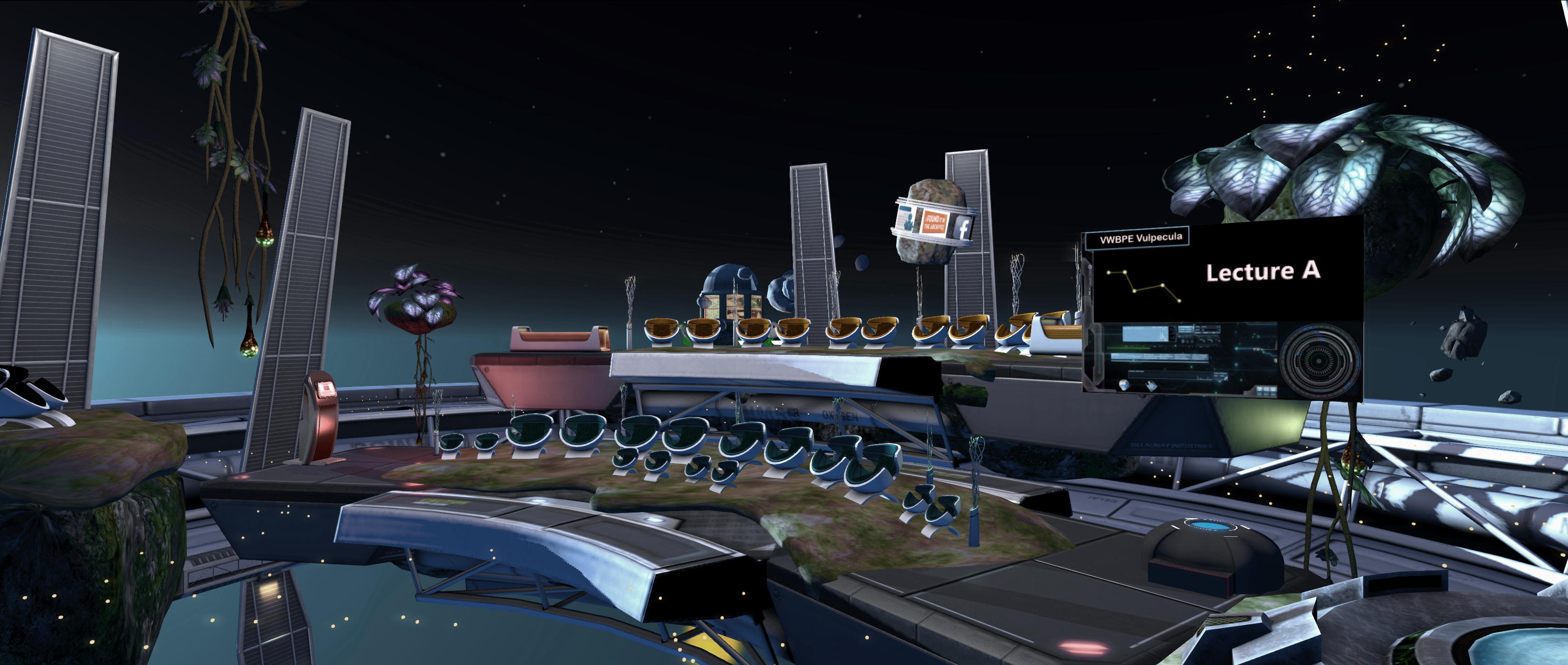
As with previous years, the 2020 VWBPE conference is a multi-region affair. However, unlike recent conferences, it offers facilities designed to match its stellar theme – the majority of which are located in the air (or rather in space) over the regions. The following is a quick run-down of some of core facilities.

  • The VWBPE Gateway: located on the ground level, the Gateway offers a main landing point for in-coming visitors, complete with a teleport HUD giver. The latter offers the easiest means of getting around the various facilities and locations, and is explained in more detail below.
  • The VWBPE Auditorium: with three access points, the auditorium is an asteroid that has a cloud of debris floating before it – just click one of the little rocks and take a seat!
  • The VWBPE Social Spaceport: the spaceport is the main entertainment centre for the conference, and offers rides and freebies and opportunities to relax.

The conference also includes lecture and workshop spaces and locations for presentations, all of which can be accessed via the teleport HUD.

The Teleport HUD

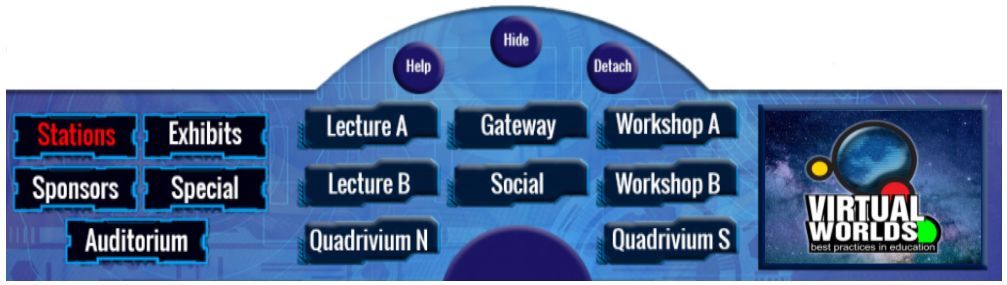
As noted above, the VWBPE teleport HUD is the best way of getting around the facilities. It can be obtained via the HUD giver at the VWBPE Gateway and is delivered to inventory in a folder. Open the fold and right-click → ADD the HUD. Note that you will need to grant teleport permissions for it to work.

The VWBPE 2020 teleport HUD

By default, the teleport HUD attaches to the bottom of the viewer window. Click the Show button to reveal / hide it. When displayed, it will show the main buttons to the left:

  • Stations: displays buttons for all of the conference facilities except the main auditorium. click one of the buttons to be teleported to the named location.
  • Exhibits: displays a directory of exhibits, each numbered, and a corresponding set of numbered buttons. Again, click a button to go to the desired exhibition.
  • Sponsors: displays a directory of sponsors, each numbered, and a corresponding set of numbered buttons. Click a numbered button to visit the listed sponsor’s exhibit.
  • Special: offers a teleport button to the VWBPE Luminaria centre.
  • Auditorium: displays three buttons corresponding to the three landing points for the VWBPE Auditorium.
VWBPE 2020: Social Spaceport

To keep up-to date with the conference, be sure to check the VWBPE website daily.

About VWBPE

VWBPE is a global grass-roots community event focusing on education in immersive virtual environments which attracts over 2,000  educational professionals from around the world each year, who participate in 150-200 online presentations including theoretical research, application of best practices, virtual world tours, hands-on workshops, discussion panels, machinima presentations, and poster exhibits.

In the context of the conference, a “virtual world” is an on-line community through which users can interact with one another and use and create ideas irrespective of time and space. As such, typical examples include Second Life, OpenSimulator, Unity, World of Warcraft, Eve Online, and so on, as well as Facebook, LinkedIn, Twitter, Pinterest or any virtual environments characterised by an open social presence and in which the direction of the platform’s evolution is manifest in the community.

Read more here.

Additional Links

Art and a fort in Second Life

Grauland, March 2020 – click any image for full size

Grauland, the Homestead region held by JimGarand, is a location that undergoes periodic redesign on the part of its owner – something that keeps it an interesting and intriguing place to visit. We dropped into the region on Friday, March 21st having heard a whisper that Jim had been working on a new design; but as he was still in the process of moving walls and buildings around (and we didn’t want to intrude – or get clobbered by a wall passing by!) we quickly skedaddled away.

However, working with some speed, Jim took the region from a collection of wall sections and three buildings plonked down seemingly randomly, to a complete new setting that – as has always been the way with the region – offers a new delight for visitors.

Grauland, March 2020

The latest design – called Grauland Castle and Art Park – again offers an interesting mix. Split into two islands with what might be a sandy-bottomed tidal channel between them, the region presents a setting dominated by a great fort-like structure on the larger of the two. This has a mixed look of both Roman and medieval influences, presenting a large walled courtyard dominated by a basilica-like building together with a pair of clearly medieval buildings.

While the buildings were empty at the time of visiting, the rest of the grounds of this fort – it strikes me more of a fort than a castle, but that’s just a personal thing – offers 3D art awaiting appreciation. It’s an eclectic and attractive mix of sculptures and modern art pieces,  the courtyard also offering an outdoor seating area and a pergola covered bird cage, also with places to sit around it.

Grauland, March 2020

The art continues beyond the main, west-side gatehouse (which I’m using as an arbitrary landing point for this article), which contains the teleport to Jim’s sky-based store. Outside of the gate are two more pieces of art, one pointing the way to Grauland’s signature motif: it’s own version of the Giant’s Causeway formed from Cube Republic’s excellent basalt columns set.

To the south, across the narrow gorge / channel and on the smaller of the two islands, sit a ruined rotunda and a copy of Stonehenge. They lie separated from one another by the islands’ scrub grass, a single track running south from the fort to connect it to them, passing by way of a small bridge to do so. The south island can also be reached from outside the fort by following its walls south, while to the east there sits a low beach, its lie again suggesting it might also be tidal in nature.

Grauland, March 2020

This is a simple, minimalist build, but one offering an interesting mix of things to see, including a fair few – the fort, the henge, the rotunda and a tombstone raised in the last century – that suggest the island is a place with great age to it. One where art sits well within its boundaries, offering a further layer of interest for the Second Life traveller.

All told, another new twist on looks for Grauland, visually engaging and as worth taking the time to explore as the previous builds.

Grauland, March 2020

SLurl Details

Second Life Skill Gaming applications re-open

via and C Linden Lab

On Tuesday, March 24th, 2020, Linden Lab announced they would be accepting a new round of applications from those interested in becoming Skill Gaming Operators and / or Skill Gaming Creators.

While gambling and games of chance that provide a Linden Dollar Token payouts are prohibited in Second Life, skill games that offer Linden Dollar Token payouts are allowed in Second Life, providing they are only available within approved Skill Gaming Regions, and both the creator of such games and the operator of any Skill Gaming region (often, but nor always, one in the same) must also be approved by Linden Lab.

Changes were made to the Second Life Gaming Policy in 2014 to reflect the provisioning of skill games in Second Life and the introduction of the Lab’s Skill Gaming regions, and from time-to-time the Lab has opened its doors to applications from those wishing to become skill game creators and / or operators (the last being at the. The last time this was done was in 2017, when applications remained open for a month.

Skill Gaming is covered by the Second Life Skill Gaming Policy, which in turn is supported by a Skill Gaming FAQ. In short, Skill Games are games which, in the Lab’s words:

1) whose outcome is determined by skill and is not contingent, in whole or in material part, upon chance; 2) requires or permits the payment of Linden Dollars to play; 3) provides a payout in Linden Dollars; and 4) is legally authorized by applicable United States and international law.

All Skill Games in Second Life must be created and / or operated by Lab approved Skill Gaming Creators (SGCs) and / or Skill Gaming Operators (SGOs), and must be located within Skill Gaming Regions. The latter must be Full regions, which cannot be located on the Mainland, and cannot be located adjacent to non-Skill Gaming Regions. They have an increased maintenance fee (tier) compared to Full regions.

Applications for those wishing to become Skill Gaming Operators and / or Skill Gaming Creators re-open on Tuesday, January 3rd, 2017

The Skill Gaming Policy sets out all requirements in full, and should be read, along with the FAQ, by anyone wishing to become a Skill Gaming Operator and / or Creator, or who wishes to access Skill Gaming regions and participate in the games on offer.

Links