The following notes were taken from the Tuesday, November 28th Simulator User Group (SUG) meeting. They form a summary of the items discussed, and is not intended to be a full transcript. A video of the meeting is embedded at the end of this summary, my thanks as always to Pantera for recording the meeting and providing it.
Apologies for the lateness of this summary, RL is not playing nice at the moment.
Meeting Overview
The Simulator User Group (also referred to by its older name of Server User Group) exists to provide an opportunity for discussion about simulator technology, bugs, and feature ideas.
They are open to anyone with a concern / interest in the above topics, and form one of a series of regular / semi-regular User Group meetings conducted by Linden Lab.
Dates and times of all current meetings can be found on the Second Life Public Calendar, and descriptions of meetings are defined on the SL wiki.
Simulator Deployments
Tuesday, November 28th: support for PBR Materials was deployed to the SLS Main channel, making it grid-wide.
Wednesday, November 29th: the “Fall Colours” maintenance update should be deployed to the BlueSteel RC. This will include llRezObjectWithParams, llIsFriend, but will not include the game controller updates.
“Fall Colours” is liable to be the last simulator update for 2023.
Viewer Updates
The glTF / PBR Materials viewer, version 7.0.1.6894459864, dated November 17th, was promoted to de facto release status on November 28th, in line with the grid-wide deployment of PBR Materials.
Other viewers in the pipe remain as:
Release channel cohorts:
Maintenance X RC, version 6855926535, issued November 21 – usability improvements.
Maintenance Y, version 6.6.17.6935642049, issued November 21 – My Outfits folder improvements; ability to remove entries from landmark history.
Puppetry project viewer, version 6.6.12.579958, May 11.
Game Controllers
The code remains under internal review at the Lab, particularly around the UI elements needed to support it in the viewer.
Runitai Linden has suggested seeing if it is possible to support a system where the scripter can specify custom input names, which show up in the UI with a select-and-toggle method of mapping game device inputs to those channels, as Leviathan Linden explained at the meeting:
Suppose you were making some custom game with very custom input names (e.g. not “Strafe” and “Jump”), like a Twerking game and you wanted “Wiggle”, “Waggle”, and “Bop” to be the names of your inputs. The scripter would be able to call something like… llGameControlMappings([“Wiggle”, GAME_CONTROL_AXIS_0, “Waggle”, GAME_CONTROL_AXIS_3, “Bop”, GAME_CONTROL_BUTTON_2]); The viewer would then get that info and be able to provide custom UI for setting those input names to the various axes or buttons on whatever device you happen to be using.
– Leviathan Linden describing a proposed custom button names for games controllers
This led to an extended discussion on game controller, mapping buttons, options and approaches.
Leviathan also noted the current version of the back-end support for games controller will be made available on a simulator channel on Aditi (the Beta grid) later in the week.
In Brief
The straw man document Rider Linden has been putting together on combat system improvements is now being circulated within the Lab for comments and feedback. Expect more probably in the new year.
The above, together with BUG-233210 “Third Person View With Mouselook Functionality”, led to a discussion on camera positions, remote vehicle control, etc., which in turn led to a broad conversation on camera placement options and camera control.
Region Crossings: no major update from Monty, who has been out of the office.
A mixed discussion on frame rates (including confusion between server-side frame rates and client FPS performance), region crossings co-habiting regions which are adjoining one another as a defined group on the same simhost server, and much else that was mostly user-side in terms of input. Please refer to the video below.
† The header images included in these summaries are not intended to represent anything discussed at the meetings; they are simply here to avoid a repeated image of a rooftop of people every week. They are taken from my list of region visits, with a link to the post for those interested.
My SL island home, as rendered on the PBR Materials viewer
Second Life is about to undergo something of a revolution in terms of the viewer’s rendering capabilities and – in the future – other capabilities as well as, after around than two year’s worth of development and testing, Linden Lab has deployed physically based rendering (PBR) into Second Life as part of an on-going project to overhaul rendering and other capabilities within the platform, with a focus on adopting as much of the Khronos® glTF™ ¹ 2.0(+) specification as can reasonably be achieved.
“PBR” and “glTF™” are terms which have referenced a lot in forum discussions, Lab Gab sessions, etc., but for many Second Life users it might not be entirely clear as to what it all means. I’ve therefore written this article to offer a layman’s overview of what is happening and what people can expect. I’ve intentionally tried to avoid making this a “one stop tour of everything PBR”, and to keep it as a relatively simple and (hopefully) informative introduction, with a resource list people can use to find out more.
The Terms
Khronos® Group¹
The Khronos® Group is a consortium of 170+ organisations focused on developing, publishing and maintaining open, royalty-free standards for a range of computing applications including 3D graphics, to enable software applications and middleware to effectively harness authoring and accelerated playback of dynamic media across a wide variety of platforms and devices. Some of these standards – such as COLLADA and OpenGL – are already used within Second Life (as the current file format for the import of mesh objects and the graphics API in the viewer respectively), and another Khronos® API – Vulkan – is also being considered as a replacement API for OpenGL in the viewer.
Find out more about the Khronos® Group via Wikipedia.
glTF™ ¹
Developed by the Khronos® Group, the graphics library Transmission Format, or glTF™ specification, is now regarded as the leading standard for sharing 3D and related assets (models, scenes, animations, etc,) authored in multiple tools across multiple platforms and devices in a optimised manner, minimising things like the processing overheads required to render those assets. It also enables content produced in accordance with it to be more easily shared across platforms and services by content creators.
To achieve this, the specification covers many aspects of 3D modelling and rendering, leveraging recognised rendering methodologies to manage the appearance of 3D models and assets, such as physically based rendering (PBR).
Find out more about the glTF™ specification via Wikipedia.
Physically Based Rendering (PBR) is a method of shading and rendering that provides a more accurate representation of how light interacts with material properties, with the aim of making both the environments and objects in a 3D environment appear more life-like in terms of the ambient lighting, haze, light diffusion, how surfaces respond and reflect the lighting within a scene – and in their general appearance.
To put this all into some form of context in how it relates to the PBR Materials project within Second Life: Linden Lab has committed to gradually transitioning Second Life so it more and more adheres to the glTF™ specification.
Note: glTF™ is a core specification. Associated with it are additional features and schema referred to as extensions. Until such extensions are formally adopted into the core glTF™ specification, they are outside the scope of consideration for adoption by Second Life.
Hang On! Second Life Already Has Materials!
A materials system was first introduced into Second Life in 2012/13 (coincidentally the time when the first implementation of PBR-like rendering was being attempted within video games). However, that system of materials handling was based on the Blinn-Phong reflection model, which has roots reaching back as far as the 1970s (Phong), although it was more directly defined to leverage OpenGL and Direct3D. The key point with Blinn-Phong is that it is based on a mix of ad-hoc assumptions and approximations of lighting and reflection, rather than anything modelled in the physical world.
As noted above, PBR is based far more on how physical world light interacts with surfaces and objects, etc., in order to provide a greater sense of depth and realism to rendered scenes. As such, PBR Materials might be said to be more integrated with the overall environment / scene, properly leveraging lighting, rather than being a capability added “on top” of the scene to provide an approximation of surface shine and reflectivity.
To help achieve this more realistic look, the Second Life PBR Materials system supports up to four texture maps: the base colour (which includes the alpha); normal map; metallic / roughness map and emissive map, each with independent scaling. Further, PBR Materials come as a bundle of textures and primitive parameters, such as face tint and specular colour which travel as a single unit and are applied all at once.
Note: I appreciate the above is a rather simple explanation, but as state at the top of this piece, I do not want this article to be overly technical. Others have already provided resources which explain the system in this regard far more capably than I ever could, so I’ll simply leave you to use the resources listed at the end of this article – such as the official PBR Materials Overview in the SL Wiki – to find out more.
Co-Existence
However, this should not be taken to mean the current materials system is now entirely obsolete and no longer useable. It remains possible to use “classic / legacy” materials (texture (diffuse), normal and specular) if required; steps have been taken to ensure that as far as possible, these will render reasonably well via the PBR shaders – but there will be some discernible differences that pop up.
How big / noticeable these differences might be is down to how the “classic / legacy” materials have /are been / being used (e.g. have they ever been exposed to local lighting with SL?). Therefore, users should anticipate objects using the older materials system potentially looking “different” when viewed on a PBR-enabled viewer, but outside of some edge-cases, not excessively so.
Bringing PBR to Second Life means updating the basic calculations of how light is represented and interacts with the world of Second Life. The goal is to integrate these changes while minimally changing how everything that presently exists in Second Life that was designed prior to the introduction of PBR. While the preservation of creative intent and the aesthetic appeal of items users have enjoyed for over two decades of Second Life is always a priority, Second Life is an ever-evolving platform, and to continue to do so, some changes are inevitable.
– PBR Materials Overview in the SL Wiki
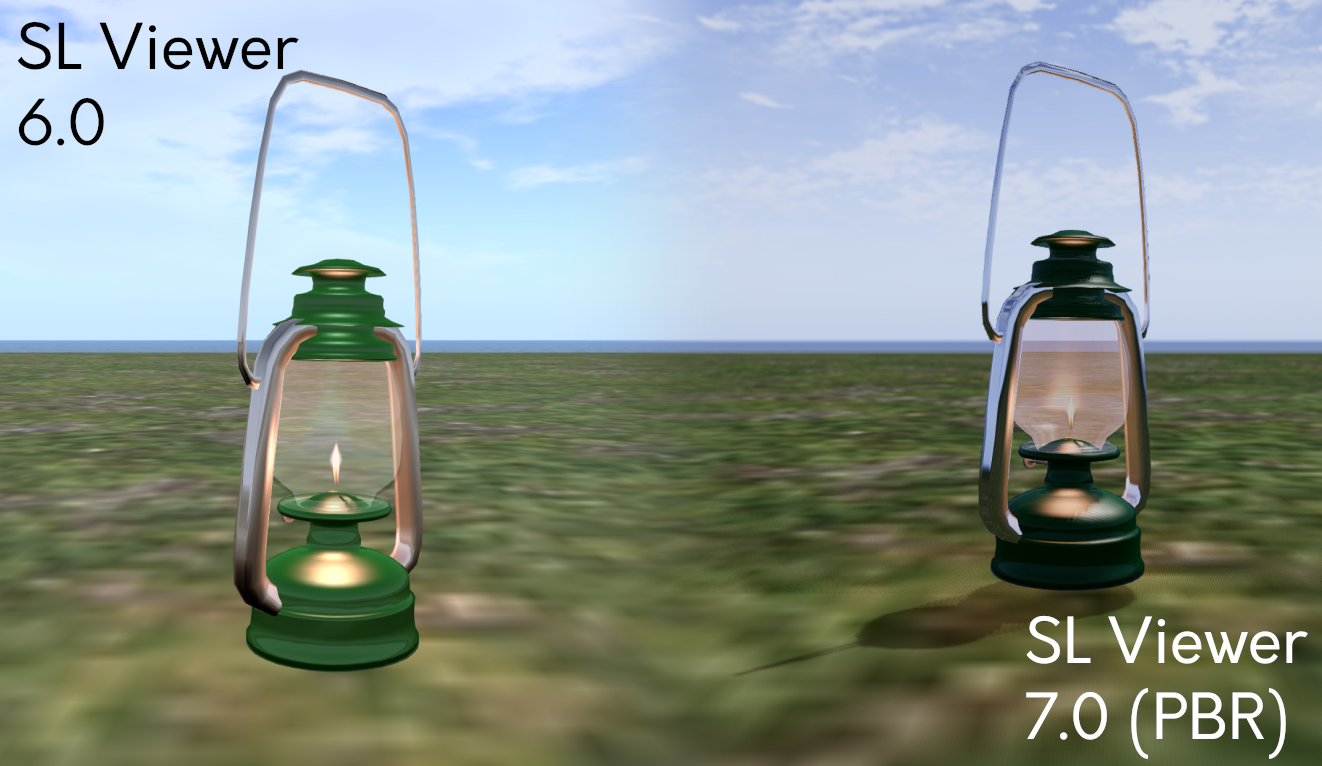
The lamp in this screenshot uses “classic / legacy” SL Materials and was created before PBR’s integration into SL. Here it demonstrates some of the visual differences to existing content. The environment used for the screenshot is the viewer’s default Midday preset (Note that the PBR viewer has a new Midday preset). Credit: Jenna Huntsman, via Linden Lab
Some of the Visible Changes Users Can Expect
Some of the updates to the Second Life Build / Edit floater to support PBR Materials
Note: PBR Materials require the use of a PBR-Materials enabled viewer. It may take time for the code to be implemented on all third-party viewers.
The introduction of PBR Materials has required a large-scale overhaul of the viewer’s rendering pipeline (and numerous back-end updates which fall outside the scope of this article). Some of the more visible changes users can expect to see include:
More realistic and immersive reflections (related: see Reflection Probes, below).
More natural ambient lighting within scenes, including a new Midday sky preset).
The use of high-dynamic range (HDR) rendering and tone-mapping, which should result in colours in Second Life generally appearing more saturated, with less detail being lost in shadows and highlights.
Updates to the viewer’s Graphics Preferences, comprising:
The removal of:
Hardware settings – Texture Memory slider, Fog distance Ratio slider and Gamma slider.
Shaders – Bump Mapping and Shiny, Local Lights, Terrain Detail slider, Avatar Cloth, Water Reflections drop-down, Atmospheric Shaders and Advanced Lighting Model.
The repositioning of:
The Sky detail slider.
The Shadows drop-down options.
Ambient Occlusion (renamed: Screen Space Ambient Occlusion).
The introduction of:
Enable / disable Screen Space Reflections.
Drop-downs to set Reflection Detail and Reflection Coverage.
Exposure slider.
Updates to the viewer’s Build Edit floater:
Ability to switch between “classic / legacy” materials (still referred to as “Textures”) and PBR Materials (referred to as “PBR Metallic Roughness”).
Options to copy attributes (colour tint, transparency, glow, materials) between editable objects / object faces.
Of the above, the removal of the Advanced Lighting Model checkbox might be viewed with alarm, given its (not always correctly) linked to viewer performance. However, given the amount of work already completed in viewer rendering performance under the Graphics Improvements project, the loss of this option and the ability to disable atmospheric shaders should have a minimal impact for most users.
That said, for those who are on particularly low-end hardware and have relied on these options to help boost the viewer’s performance on their hardware, please refer to this section of the PBR Materials documentation for guidance on adjusting settings within PBR-enabled viewers.
Capabilities for Content Creators / Modifiers
Note that this is not an exhaustive list, but a simple-to-grasp summary.
Ability to use tools with PBR workflows without sacrificing visual quality on import.
A new Build → Upload option for uploading Materials to Second Life.
Generate new Materials assets which can be sold to other users in-world / via the Marketplace and otherwise exchangeable in accordance with their defined permissions, just like any other texture in Second Life.
Drag and drop Materials asset from inventory and onto an object face.
Perform limited editing on PBR Materials (again in accordance with their specified permissions).
As I am in no way qualified as a content creator, I will leave it to Boston Blaisdale to present an introductory course on creating, uploading, applying and editing PBR Materials, courtesy of the Second Life University.
Reflection Probes
As noted in the above video, a key component within the PBR Materials capability is the idea of a new Second Life volume type called a reflection probe.
“Automatic” reflection probes are located within regions and cannot be moved or edited; they are intended to provide a “default” or “ambient” reflection solution.
Reflection probes can also be created manually, when they are intended to be used in interior spaces such as rooms, homes, etc., or where a specific style / use of reflections is required. They are used to calculate and present reflections based on proximity to them, the local lighting, etc., and will override the default (/ambient) solution (e.g. so an object will not reflect things like the sky outside of a building).
Manually-created reflection probes are defined using a new set of parameters found within the Features tab of the Build / Edit floater.
However, Reflection Probes can be resource-intensive, and so should be used sparingly and efficiently, and should not:
Be used to try to create (planar) mirrors in Second Life – there is a follow-on “Mirrors” project which will enable real-time mirrors in SL within define parameters.
Be attached to small creations such as furniture or décor – these should use the reflection prob(s) within the space in which they reside.
Be worn on an avatar or attached to a physics-enabled object (e.g. a vehicle). By design, and given that reflection probes are intended to be part of a scene, doing so will render the probe inoperative.
Known and Possible Issues
There are some issues and bugs within the PBR code, with two of the most significant perhaps being:
A “slim minority” of users with very, very large inventories and Friends lists may find some objects in a scene do not render when logging-in. Currently, the steps for correcting this are to a) re-log, and if that fails to resolve the problem, b) clear cache.
Some users on Macbooks and / or Apple Silicon systems may experience poor performance on the PBR viewer.
When seen on a non-PBR enabled viewer, objects and avatars may have a blue tinge reflecting off of them. This is a result of the viewer not having the required shaders within the rendering pipe to manage the ambient lighting.
These, and remaining bugs within the system will be dealt with in upcoming maintenance updates to the viewer. Those finding issues with PBR Materials are asked to test on the official viewer, and if necessary raise a bug report.
Looking to the Future
The release of PBR Materials is not the end of the glTF™ project, but rather the first deployment of glTF™-based capabilities. In the coming months the Lab hopes to be able to deliver:
Real-time mirrors: providing the means to have mirrors within scenes reflect their immediate surroundings.
These will leverage a “hero” reflection probe concept (512×512 resolution), with one such probe per scene being active for any given avatar, based on the avatar / camera distance from the mirror.
Work on this is already in progress, and a project viewer for the capability is expected to be available in the very near future.
PBR terrain: providing the means to apply glTF™ materials to terrain as a viewer-side effect to improve the appearance of the SL terrain.
Again, s project to deliver this work is already in progress, and a project viewer supporting the capability will hopefully be available in the near future.
Please note: this is not support for PBR terrain painting.
Materials applied to Second Life terrains. Credit: Linden Lab
glTF™ Scene Import
It is hoped that alongside of the above mirrors / terrain work, and allowing for maintenance releases to the PBR Materials deployment, work will soon commence on developing the capability for Second Life to support glTF™ mesh and scene import.
There is no time frame as to when this will be available for testing or when it might be deployed.
The first steps will likely be the development of a prototype import mechanism.
Once the prototype is available, the Lab will then likely proceed as with the PBR Materials project, invite content creators to engage in the project, provide input / feedback, and then develop the capability on an iterative cycle utilising that input / feedback.
Logos representative only and should not be seen as an endorsement / preference / recommendation
Updates from the week through to Sunday, November 26th, 2023
This summary is generally published every Monday, and is a list of SL viewer / client releases (official and TPV) made during the previous week. When reading it, please note:
It is based on my Current Viewer Releases Page, a list of all Second Life viewers and clients that are in popular use (and of which I am aware), and which are recognised as adhering to the TPV Policy. This page includes comprehensive links to download pages, blog notes, release notes, etc., as well as links to any / all reviews of specific viewers / clients made within this blog.
By its nature, this summary presented here will always be in arrears, please refer to the Current Viewer Release Page for more up-to-date information.
Note that for purposes of length, TPV test viewers, preview / beta viewers / nightly builds are generally not recorded in these summaries.
Official LL Viewers
Release viewer version 6.6.16.6566955269, formerly the Github Actions (GHA) RC viewer, version , issued October 20, promoted October 25 – No Change.
Release channel cohorts:
Maintenance X RC, version 6.6.17.6935636398, issued November 21 – usability improvements.
Maintenance Y, version 6.6.17.6935642049, issued November 21 – My Outfits folder improvements; ability to remove entries from landmark history.
Opening on Saturday, November 25th at Artsville is We Orange The World, a 16-day arts event intended to coincide with the The United Nations Women’s 16 Days of Activism Against Gender-Based Violence, and which runs from November 25th, 2023 through to December 10th inclusive.
The physical world campaign started in 1991 at the inauguration of the Women’s Global Leadership Institute, which continues to coordinate each year’s campaign. It is used as a nexus strategy by individuals and organisations around the world to call for the prevention and elimination of violence against women and girls. Initially a civil society initiative, the campaign has – since 2008 – been supported by the UNiTE campaign, which runs parallel events with the aim of ending violence against women by 2030.
We Orange The World, November 2023
Within We Orange the World, now in its third year, artists have been invited to submit 2D and / or 3D art to be displayed within the exhibition, related to the general theme of the beauty and empowerment of women around the world. Entrants were asked to keep pieces positive, uplifting and empowering rather than negative in nature, otherwise subject matter and presentation were left up to the artists.
Participating artists for 2023 include: Raven Arcana, Ceakay Ballyhoo, Bamboo Barnes, Bijoux, Abi Brewer, Carelyna, Mirabelle Biedermann, Melissandre Blade, Ilyra Chardi, Xia Chieng, Mareea Farrasco, Dido Haas, Margo Hollak, Jeanie, Jessamine2108, Lizzy, Diney Mccallen, Maghda, Marvayu, Selen Minotaur, Raisa Reimse, Rhiana Rhiano, Sina, Souza, AmandaT Tamatzui, and Dakota Wind, with Artemis Greece providing 3D sculptures.
The event includes entertainment throughout the 16 days, with the schedule at the time of writing as follows (all times SLT):
Saturday, November 25
12:00 Noon: DJ Pru
13:00: Susie Star Twilighton
14:00: Tay Tayana
Monday, December 4
14:00: Maximillion Kleene
15:00: Amberle Janniah
Monday, November 27
13:00: Wytchwhisper Sadofsky
14:00: Katia Portugal
Tuesday, December 5
13:00: Open microphone poetry with Sabre and Jolie Carter
Tuesday, November 28
13:00: Open microphone poetry with Sabre and Jolie Carter
Borkum, November 2023 – click any image for full size
It was back to Yoyo Collas’ Homestead region of Borkum for me recently, on the grounds that I dropped in early on in 2023, so hopping over once more as the year draws to a close has something of a nice balance to it. Plus, I’d been informed that the region had received a winter make-over.
Drawing its name from the Lower Saxony island which forms the largest and westernmost of the East Frisian Islands as it sits alongside the border with the Netherlands, and caught between the North Sea and the Wadden Sea, Yoyo’s Borkum has always been a place that is both photogenic and a reminder of how good it is to spend time away from the bustle of life and simply be. This remains true with this winter 2023 iteration, which incorporates a couple of little reminders from past builds to help generate a feeling of continuity through the changing seasons, whilst at the same time it presents an entirely new location to explore.
Borkum, November 2023
The first of these little reminders is the Apple Fall Old Manufactory. Still overlooking the beaches – if from a different location compared to my visit in March, it retains its feel as a place of work now converted into a place to life, with an inviting , warm interior, together with some furnishings on the deck which also serve as reminders of past builds. Behind it sits the familiar barn, this time occupied by the animals and fowl who might find the wintry weather and colder winds (the clothing pegged out on the line strung between house and barn give ample evidence that the wind is blustering its way over the landscape).
Down below the house, the broad beach is covered in snow – as is the rest of the landscape – and so hardly a place for soaking up the Sun or splashing out into the waters lapping the shore; well not if you are sane, at least. However, this hasn’t stopped the local beach chairs resolutely turning their backs on the wind and offering places for visitors to sit, the braziers burning brightly alongside each one perhaps adding their warmth to the invitation to sit for a while.
Borkum, November 2023
Inland, across a dip in the land from the converted warehouse sits another cabin, this one offering a view over the south-eastern side portion of the region, as it sits on a rocky bluff. Like the cabin to the north, it has a welcoming and cosy interior and a deck with further seating outside for those who enjoy the brisk air. However, someone has clearly gone to a lot of trouble to get it to its hilltop post, this particular cabin having once been an iron-hulled houseboat!
Off to the north-east lies another reminder of past builds, this one taking the form of a lighthouse standing on a blunt headland – although if memory serves, this one is of a different design to the one gracing the island back in March 2023. It shares the same coastal upland as the converted factory and its barn, a rocky line separating the north and east sides of the island from the beaches below as it crooks a finger southward from the lighthouse to end as a blank-face promontory overlooking a frozen inlet which is now being used for ice-skating, and where the locals have set-up little kiosks and trailers from which warming refreshments might be had.
Borkum, November 2023
Where much of the island’s interior was open was given over to rippling seas of lavender and other plants at my last visit, now they have become suitably wooded, frost-bearded firs covering the gently hills, paths and trails cutting through them as they are watched over by a tall wind turbine, its blades tuning in the wind to provide the power for the cabins and skate-side hostelries. Deer roam these woods as might the odd sledding enthusiast or two (look for the sign board!) – although some might find the presence of a trio of dire wolves among the trees a little worrying! Also foraging through the trees and the grass poking up through the snow slopes around them are white horses, their colouring a perfect camouflage in the circumstances.
Throughout all of this are boardwalks, paths and trails to roam, places to sit awaiting discovery (some with a lean towards the holiday period in their style) and a rich mixture of animals (some obviously mentioned above) and birds throughout, all of which add life and depth to the setting as well as upping the ante for photographers.
Borkum, November 2023
Finished with an ideal environment setting and subtle soundscape, winter’s Borkum in Second Life retains its status as a relaxing and photogenic location in which to spend time.
Spark Project: Olympus, September 2023 – blog post †
The following notes were taken from the Tuesday, November 21st Simulator User Group (SUG) meeting. They form a summary of the items discussed, and is not intended to be a full transcript. A video of the meeting is embedded at the end of this summary, my thanks as always to Pantera for recording the meeting and providing it.
Apologies for the lateness of this summary, RL is not playing nice at the moment.
Meeting Overview
The Simulator User Group (also referred to by its older name of Server User Group) exists to provide an opportunity for discussion about simulator technology, bugs, and feature ideas.
They are open to anyone with a concern / interest in the above topics, and form one of a series of regular / semi-regular User Group meetings conducted by Linden Lab.
Dates and times of all current meetings can be found on the Second Life Public Calendar, and descriptions of meetings are defined on the SL wiki.
Simulator Deployments
No scheduled deployments for the week, due to this being Thanksgiving week in the US, and so a No Change window is in force. Simhosts are being restarted, however.
Upcoming Simulator Deployments
The simulator support for glTF PBR Materials is expected to be deployed to the SLS Main channel on Tuesday, November 28th, making it grid-wide. Promotion of the glTF viewer is liable to occur in that week as well.
The “Fall Colours” maintenance update will likely go to RC on Wednesday, December 6th, so it can be grid-wide by Christmas. This update will not include Leviathan Linden’s work on game controller support.
The game controller work will now likely be included in the simulator update to follow “Fall Colours”, and which has been code-named “Gingerbread”. This will most likely be deployed in the first working week of January 2024, and will likely included the recent Feature Request to increase the available sensor counts (see: BUG-234648).
Viewer Updates
Four viewer updates at the start of the week:
Maintenance X RC (usability improvements), updated to version 6855926535, November 21.
Maintenance Y RC (My Outfits folder improvements; ability to remove entries from Landmark history), updated to version 6.6.17.6935642049, November 21.
Maintenance V(ersatility) RC viewer, updated to version 6.6.17.6898288582, November 20.
Other viewers in the pipe remain as:
Release viewer: Github Actions (GHA) RC viewer, version 6.6.16.6566955269, issued October 20 (with major CEF update and number version numbering) and promoted on October 25.
Release channel cohorts:
glTF / PBR Materials viewer, version 7.0.1.6894459864 November 17.
Puppetry project viewer, version 6.6.12.579958, May 11.
Game Controllers
Note the changes to code deployment changes outlined above. The work was pulled from “Fall Colours” to allow for further internal review of the code by the Lab.
Because of the need for further review, the code is not currently available on Aditi (the Beta grid). It is hoped the code will be re-deployed to some regions on Aditi in the week after US Thanksgiving.
It was noted by Signal Linden that it would be nice to have an official project viewer available when the code starts being deployed to the Main grid.
In Brief
Region Crossings:
Monty Linden is continuing to work on the updates for physical and TP region crossings, but was not available to respond to questions at this meeting.
However, it was suggested that, subject to his input, the update to the simulator code handling income teleports / regions crossings to a region might form a part of the “Gingerbread” simulator update.
A discussion on support for expanding regex support with Linkset Data keys to support case insensitive searches (see : BUG-233678) and for case insensitive regex support in general. This is being actively pondered upon within the Lab.
A further discussion on sensors and their potential uses, which also touched on the need for an “official” Area Search capability.
Please refer to the video for these, and other sundry mentions / discussions.
† The header images included in these summaries are not intended to represent anything discussed at the meetings; they are simply here to avoid a repeated image of a rooftop of people every week. They are taken from my list of region visits, with a link to the post for those interested.







 Inara Pey: Living in a Modemworld