GI Joe proves he’s a Block(sworld)head

GIjoe
G.I. Joe now in Blocksworld

It slipped out under the radar for most of us interested in such things, possibly because it occurred on the same day as the sad news came of Sir Terry Pratchett’s passing; but for those wondering how things are fairing for Blocksworld, the one remaining product in the Lab’s portfolio outside of its virtual world endeavours, the answer would appear to be, “Well enough to get an extension of LL’s relationship with Hasbro.”

On March 12th, the Lab slipped out a press release announcing that Heroes Will Be Made…with Blocks! G.I. JOE® Comes to Blocksworld®.

the release reads in part:

Through the relationship with Hasbro, six fun new G.I. JOE games will be available for all Blocksworld players. The games present an exciting new storyline in the conflict between G.I. JOE and COBRA that ends in a cliffhanger, and Blocksworld players will be challenged to create and share their own interactive endings to the narrative.

As well as the games themselves, the launch included a set of G.I. Joe building sets, available as in-app purchases, allowing players to extend the G.I. Joe related adventures by using them to create additional characters, vehicles and weaponry.

This is the third partnering between Linden Lab and game / toy maker Hasbro, with My Little Pony having been added to the Blocksworld stable in 2014 alongside of – in what must have seemed an obvious choice for the game – Transformers, coinciding with that particular franchise returning to the silver screen.  Another foray for Blocksworld into the world of films during 2014 came with the release of the  Legends of Oz sets of Dorothy’s Return (tying in with the animated feature of the same name), and Heroes of Oz.

Approaching eighteen months on the market, Blocksworld is proving to be something of a durable title in the cut-throat world of apps, where titles can rise and fall almost overnight at times. According to App Annie, it continues to enjoy relatively high rankings in countries like the USA, UK, Canada, and Japan. In the USA, it has consistently been in the top 10 in terms of revenue for “educational” games, and in the top 500 for games in general.

While “educational” might seem a tad bit odd as a category for the game to be listed under,  Michelle Vuckovich, the Director of Product for Blocksworld, points to the game’s educational value in the G.I. Joe press release. “Kids love playing and creating in Blocksworld,” she is quoted as saying. “While having fun creating anything they can imagine, they’re also learning to think like programmers, game designers, and engineers – something parents and teachers can appreciate.”

The Blocksworld Premium banner

As well as the G.I Joe release in March, Blocksworld also saw a change in January 2015, with the introduction of something which might have a familiar ring to it for SL users: Blocksworld Premium.

This appears to be an in-app (presumably purchasable) upgrade which offers those joining the opportunity to “build epic creations with infinite blocks, actions, textures, and more!”. In addition, Premium users get Standard Blocks as soon as they are released, with (dare I say it?) a “stipend” of Action Blocks added to their inventory every week.

It’s still not clear if Blocksworld will move into the world of Android devices; but it certainly seems to be quite comfortable in the iPad world, and quite likely doing very nicely for the Lab while there, as noted.

Related Links

Streaming the viewer: a Bright Canopy update

Bright CanopyNews is spreading on the efforts, spearheaded by Bill Glover, to bring a new cloud-based means of access to Second Life (and other grids).

Bright Canopy is the name of the project, and Bill was stirred into action following ruminations on this blog relating to Amazon AppStream, and more particularly as a result of Nikola Bozinovic’s invitation that people take a look Frame, the company he has established to provision Windows applications and web applications to a range of clients across the web, something I did couple of days ago when looking at one of the two options for Frame: that of a do-it-yourself option.

As mentioned in that article, while the DIY approach works, it is not ideal in some respects. Far better to have a fully managed service along the lines of SL Go available to users. As noted in my article, and in posts like Ciaran’s, linked-to above and in the SL subreddits, this is exactly what Bill is working towards.

Since word of Bright Canopy initially broke, the response has been overwhelming. So much so that the beta invitation has now been closed, as it was getting to the point where too many people were wanting to try things out. Those signing-up now will instead receive news on developments.

So, in the meantime, what has been going on? Well, in brief.

The project is on a solid footing, with a core group of beta testers; a Github environment has been set-up for issue reporting and tracking, managing code, and running the project’s internal wiki, and channels of communication established. In addition, the LL viewer has now been added to the project alongside Firestorm.

Testing has already raised a range of issues, and these are in the process of being addressed, with the Frame team are working closely with Bill to overcome some of the stickier issues around provisioning the viewer in this way.

Bright Canopy now runs both Firestorm and LL's viewer
Bright Canopy now runs both Firestorm and LL’s viewer

One such issue is getting viewer settings to persist across multiple sessions, another is upping the overall performance, and there are more. All are being looked at,  but it is going to take time to solve things, so it might be a little while longer before things can be opened-up some more and invite more people to try it.

In terms of performance, various options are being looked at, and one thing that may help is that Nikola informs me that Frame are working on a new set of native terminals covering OS X, Windows and iOS, which should be in their own beta soon.

Because there is a lot to be achieved, a work list is being drawn-up, and some key decisions for the short-term have been taken with regards to focusing efforts.

Bright Canopy now has LL's viewer enabled, and things like performance are very much being looked at (the 30 fp seen here is fairly typical of the upper end of the performance scale at present
Bright Canopy now has LL’s viewer enabled, and things like performance are very much being looked at (the 30 fps seen here is fairly typical of the upper end of the performance scale at present

This means, for example, that the current work is focused on getting a non-mobile solution working.This makes sense because the majority of people using the SL Go service did so from low specification computers rather than mobile devices, so ensuring there is a service which can fill the void for them is key.

A mobile solution also requires much more in the way of specialist work – such as providing an overlay to allow users to control things like avatar and camera movement via a touch screen (just as was the case with SL Go), and a means of interfacing with touch keyboards. While this work will be tackled, it is not on the immediate priority to get sorted. Having a service that works and provides the level of performance users will be happy with is currently key.

Also in the running is a new Bright Canopy blog, which we intend to use to help keep folks up-to-date on progress, offer screenshots of work (and maybe even a video or two), and more as time goes on. This will hopefully be up and running in the near future, and you’ll likely see me writing there 😉 .

There’s obviously a lot else to be sorted as well – including pricing. Right now, however, the effort is in exploring exactly what can be achieved and how.  However, this will hopefully give a flavour for what has been achieved in just a few days of effort. There will be more to come as more progress is made, and I’ll have a link to the Bright Canopy blog once it is up and running.

Related Links

Streaming Second Life (and other grids): Frame enters the arena

My original ruminations on Amazon AppStream have led to a couple of people giving the service a go.  Nabadon’s Izumi  has tried the service with the OnLook viewer and OS Grid, and Bill Glover has given feedback through his blog on using AppStream with Firestorm connecting to Second Life.

However, as several people have said, AppStream isn’t the only way to go – there are other options. One of these is Frame, which uses Amazon’s AWS and Microsoft’s Azure cloud services. In fact, it was Frame’s founder, Nikola Bozinovic, who suggested people look at the service as s potential means of accessing SL and similar grids via the cloud through a comment he left on this blog. He also provided a link to a demonstration he his have said up using the official viewer, together with an invitation to try it out.

Nikola Bozinovic, founder of Frame, who extended an invitation to try the service as a possible means of accessing Second Life (and other grids) from the cloud

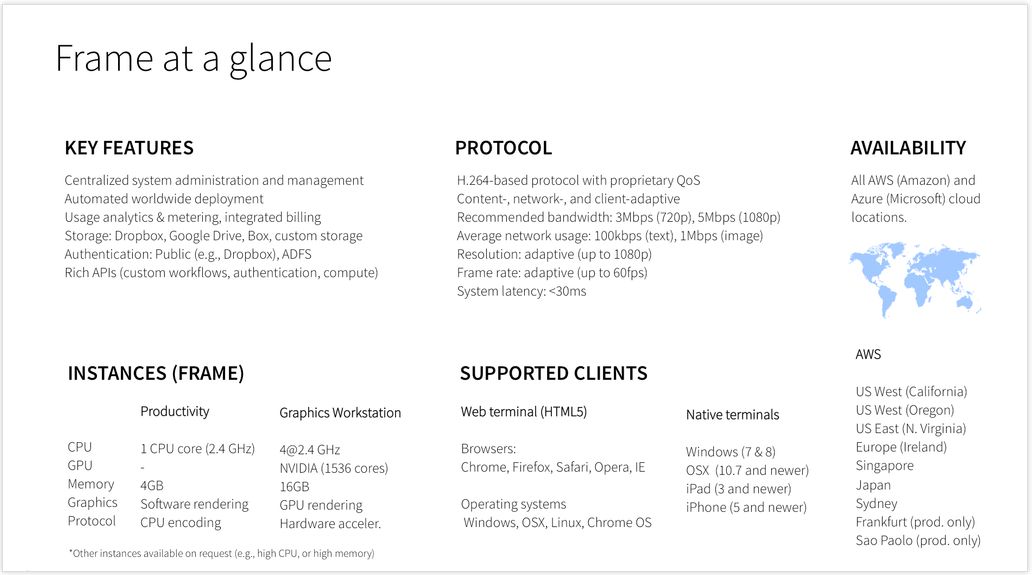
I don’t want to get blogged-down about what Frame is, but the infographic below should give the basics – suffice it to say here that it allows you to stream Windows and web apps, using a number of locations around the world, to a range of devices. It also provides a number of different use levels: Personal, Education, Business, and Platform. You can also find out more about it here.

The key point with Frame is that it potentially offers two approaches to accessing Second Life and other grids via the cloud:

  • As a do-it-yourself option, where you can sign-up for a Personal account, upload your choice of viewer and run it yourself when needed
  • As a packaged service similar to SL Go – which is how Bill Glover is approaching things through his Bright Canopy project, which has a demo up-and-running using Firestorm, and those interested can sign-up to find out about the work and try the demo version.

Nikola extended an invitation to me to try the Personal account  / “do-it-yourself” option for myself, which I was happy to do as a proof-of-concept attempt, and this article is primarily focused on doing that, and providing some short-form feedback. As Bill is working on the packaged service option, I’m not touching too much on that at this point in time.

A quick summary of the technical aspects of Frame (image courtesy of Nikola

Getting Started On your Own With Frame

Anyone wishing to try accessing Second Life through Frame can do so by requesting access to Frame Personal. An access code will be sent to you, allowing you to set-up your Frame account, and select the nearest PoP to you, and your preferred server type  (I opted for the four core system with 16Gb of memory and 20 free hours running a JavaScript client).

Once this has been done, the Launchpad is displayed. This is the normal starting point for Frame operations, and is used to manage the applications you’re running on the service (two are provided by default). This may take a short time to load the first time.

Adding a Viewer to your Frame Account

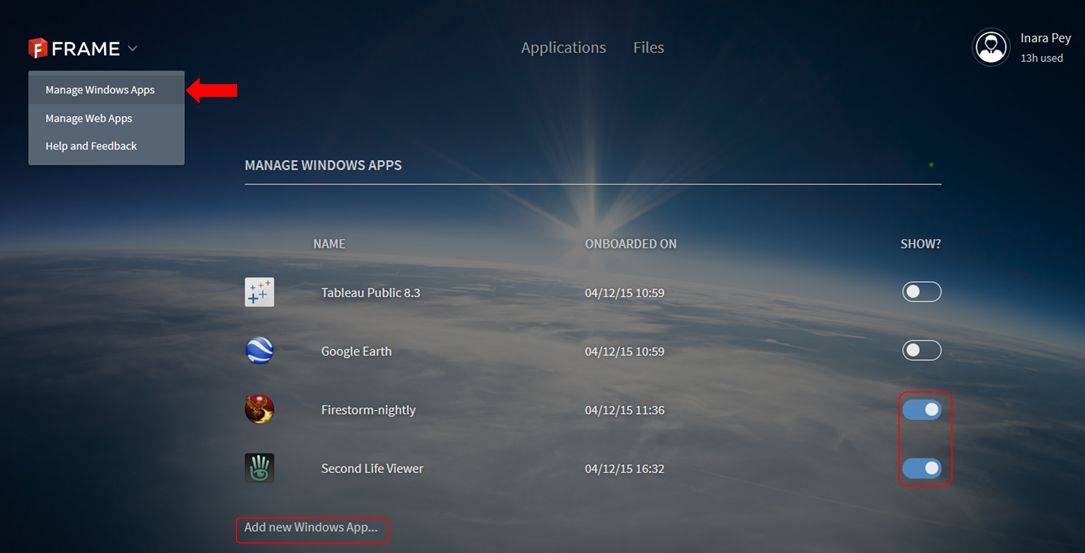
  • click on the chevron next to the Frame logo in the top left corner of the screen and select Manage Windows Apps.
  • A list of your installed applications is displayed (Tableau Public and Google Earth are provided by default).
  • Click on Add New Windows App … under the list.
  • Your virtual desktop will launch. Use the Chrome browser in the desktop to navigate to and download the Windows installer for your preferred viewer OR, if you have the EXE on your computer, use the Upload button (arrow in a circle) button in the lower right corner of the desktop screen to upload it.
Adding new applications to Frame is a matter of using the Manage Windows Apps (main menu) and the Add New Windows App function to run a virtual desktop from which you can browser for the application's installer and then download and install it. Frame will then automatically "onboard" it, and the application simply needs to be "switched on" via the toggle to the right of it
Adding new applications
  • Run the installer as if you were installing the viewer on your PC.
  • Once the viewer has installed, Frame will ask you if you wish to “on-board” it – confirm this, and accept the ToS – having read them, obviously! 😉 ).
  • When the “on-board” process has finished (it takes about 15 seconds), go to the gear icon in the lower left of your virtual desktop and DISCONNECT.This returns you to your Launchpad
  • Activate the viewer by toggling the “switch” to the right of it so it turns blue (shown above). This adds the viewer (and any other app you activate) to your Frame dashboard.
  • Click on Applications at the top of the screen to go to your dashboard. Double click the displayed viewer icon to launch the viewer.

While it may sound long-winded, the entire process of setting-up an application like this can be done in just a few minutes.

Continue reading “Streaming Second Life (and other grids): Frame enters the arena”

USMP’s 3rd Introduction to Second Life for Spanish educators

Monday, April 13th marks the commencement of the 3rd Massive Open Online Course (MOOC) designed to help Spanish-speaking educators in the use of Second Life as a starting point in their interaction with emerging and innovative environments that can be used for education.

Professor Max Ugaz, UMSP

Developed by the Universidad de San Martín de Porres (USMP), located in Santa Anita, Lima, Perú, the course was first run in April 2014, and as I reported at the time, was promoted by the Lab as a part of their re-engagement with the educational sector.

An updated version of the course, developed by the university’s Project Director or Virtual Worlds, Professor Max Ugaz, was again run in September, 2014, which also met with success.

“The purpose is to train educators, researchers, academics and interested public speaking, in creating a virtual identity, accessing and using the virtual world Second Life,” the University’s promotional material for the course states, before continuing, “This version is enriched with the latest version of our platform, which allows us to streamline the process of teaching and keeping better track of participants. ”

As with the previous iterations of the course, which is presented in Spanish, activities will extend over three weeks, with an average workload of 5 or 6 hours a week. Those completing the course will be entitled to a Digital Certificate (Certificate of Participation), awarded by the USMP.

Details on the course, together with a registration form for interested parties, are available on the course web pages, and the activities will take place at one of the USMP’s teaching areas in Second Life, commencing on Monday, April 13th, as noted.

l Proyecto en Mundos Virtuales de la Universidad de San Martín de Porres de Perú, inicia este 13 de Abril la tercera edición del curso en la modalidad MOOC (Curso Masivo Abierto En línea) titulado “Introducción a Second Life para Educadores 3da. Ed.”. El curso es gratuito y está diseñado para capacitar a educadores y público en general de habla hispana en el uso del mundo virtual Second Life, a fin de ofrecer conocimiento que permita desempeñarse en este entorno y aprovechar su potencial, especialmente en el ámbito educativo.

 Si tú o alguien que tú conoces pueden beneficiarse de un curso como éste, pueden acceder al vídeo de introducción y registrarse en la página web. Inicio: 13 de Abril.

Using Amazon AppStream to stream a viewer

Update, Saturday April 11th: Bill Glover, who has also shown a keen interest in the possibility of using Amazon AppStream, has been carrying out his own experiments with Firestorm and Second Life. He notes of his experience:

I set-up a stream with the Firestorm and was able to use it from both a Chromebook and an Android phone. It was really very responsive over a hotel wifi network, but there are many caveats.

It works, but it’s expensive and nowhere near being useful for just casually streaming SL without some custom client development and viewer integration.

You can read his initial thoughts on things over on his blog.

On Wednesday, April 8th, and following the announcement that the SL Go service is to be discontinued, I speculated on how the Lab (or indeed, someone else) might offer up an alternative to fill the void left once SL Go ceases at the end of the month.

After looking at various alternatives (including Highwind’s GDN – Highwinds being one of LL’s CDN providers), a conversation with Dennis Harper pointed me towards Amazon AppStream, and the more I read, the more it seemed to be a viable option, and hence it became the focus of my article.

As a result, Nebadon Izumi (Michael Emory Cerquoni) sat down to see just how easy (or not) to get something up and running, albeit using OS Grid and the OnLook viewer, and reported some success.

What made me think to try was your article. “You get 20 hours of free streaming per month with Basic Amazon AWS account (required to access the AppStream service), then its 83 cents per hour. I also tried this on my Android Tablet, but while the graphics were beautiful, input is a problem, and the viewer will need overlay controls like SL Go, which will require development.

– Nebadon discussing using Appstream for Second Life with me

Once he had his account created, Nebadon was able to install the viewer and use the supplied web browser to obtain and install the VS C++ 2010 re-distributable packages he needed in order to run the Singularity-based OnLook viewer, “you can go anywhere on the web and download any software you need to make your application run,” he noted to me. “Once I had these and the viewer installed, it took about 20-30 minutes for the viewer to deploy, and I got a set of instructions on how people can connect to it.” The whole process took him, he estimates, about 2 hours.

This is obviously a long way short of providing a full-blown service, and anyone wishing to use Amazon AppStream as the basis for a streaming solution for their grid who obviously have to dig a lot deep into issues of cost and pricing, payment mechanisms, potential demand, management, scaling, and so on; it also has yet to be tried with a viewer connecting to SL. Nevertheless, as a trial exercise, Nebadon’s work at least shows that the viewer can be streamed relatively easily using AppStream, and that’s a good place to start.

Could the Lab use Amazon AppStream to “replace” SL Go?

Sl Go proved itself very popular among SL users running low-end hardware
SL Go proved itself very popular among SL users running low-end hardware

On Thursday, April 2nd, it was announced that SL Go, the streaming service for accessing SL  provided by OnLive, is to shut-down on April 30th alongside OnLive’s other consumer services. The reason for this is because OnLive has sold the IP and patents associated with the services to Sony Computer Entertainment.

Since the news broke, there have been numerous calls made for Sony to maintain SL Go as a service, including  an on-line petition. However, as painful as it is, all such calls and petitions to  Sony are unlikely to succeed, as I explained in a recent blog post.

In that article, I also considered whether or not the Lab might invest time and effort in offering something that might fill the void. At the time, I thought the answer to this would most likely be “no”, as the Lab seem to have enough on its plate already with Second Life and its next generation platform.

But the more I think about it, the more I feel that the Lab should endeavour to offer some kind of “SL Go replacement”.

One potential means by which they might do so could be via Amazon AppStream.

Obviously, there are issues involved in providing such a service beyond the physical provisioning. Anything which requires some form of external hosting is going to incur costs, for example. However, the flip side to this is it’s fair to say the SL Go has demonstrated that if users believe they are getting a beneficial service, they are willing to pay for it, providing the price is not prohibitively high.

Certainly, there are a wide range of potential benefits to be had from such an endeavour, particularly if implemented through something like Amazon AppStream:

  • It offers an easily scaled means by which the Lab could provide an “SL streaming service” to users on low-end hardware and those on mobile devices – something long demanded by SL users
  • It could provide the means by which SL could be accessed through web browsers – again, a long-desired means of attracting new users to the platform who might otherwise be put off by having to download and install the viewer
  • It obviously means that those SL users on low-end systems can enjoy the full graphical richness of SL in the manner LL would like to see all users experience it
  • It could help those preferring to run older operating systems – such as Windows XP – to continue accessing SL even after they might otherwise be unable to even install the viewer
  • It might even help the Lab map and test options which might be beneficial for their nascent next generation platform.

While developing such a service might not necessarily be easy, the Lab isn’t entirely without any experience in this area. As I and many others have pointed out, in 2010 they did experimenting with streaming the viewer, using the Japanese company Gaikai (coincidentally purchased by Sony Computer Entertainment in 2012), which delivered the viewer to web browsers, as shown in the video below. If there is anything remaining of this work at the Lab, it might possible to put it to work through something like Amazon AppStream.

That said, there is a lot for the Lab to consider in attempting to fill the forthcoming void that will be left by SL Go. And while I would not be at all surprised to learn they are already doing so, they might still require some encouragement to take things beyond just considering options. Something which might encourage them, or at least demonstrate to them that there really could be a worthwhile demand for such a service, could be for users to politely speak up.

One way to do this might be to add your name to the existing petition – I would hope someone at the Lab is keeping an eye on it.

Another could well be to leave a positive and polite comment on the subject following this article, as (and all ego aside) I do know eyes at the Lab pass over this blog (just as they do many others).

There is no guarantee that Lab will move to provide some kind of “SL Go replacement”, but on the other hand, as someone once said, nothing ventured, nothing gained.