Second Life group list changes explained

A note of explanation. I first published on this update on Thursday, June 4th, PDT. However, that post was withdrawn out of respect of a request from Linden Lab that I not blog on the change at that time. Subsequent discussions with the Lab led to an agreement that I could blog in full on the matter once the change had been deployed across the grid. Hence this post.

Until now, it has been possible to open the details for any Second Life group you have joined and display all the information relating to that group, including the list of members.

However, with the new update, groups with 5,000 or more members will no longer display the list of members unless:

  • You are assigned the Owner or Officer role within the group
  • You are assigned an ability within the group which requires the members list to be displayed (e.g. you are able to assign members to assigners roles, or are able to eject / ban people from the group, etc.).

Instead, and until corresponding changes are made to the viewer, all you will see on opening the members list as a message stating “Retrieving member list (0 / XXXXX)” – where XXXXX is the total number of members in a the group, as shown in the images below.

The back-end cange currently on the server RC channels means that group member lists will not load (or may be truncated until the change is fully deployed) for those groups wil more than 5,000 members
The change to the logic on accessing group member lists for large (5,000+ members) groups means that the members list will no longer display for members of the group, unless they are assigned either the owner or officer role, or an ability that requires they can view the list.  Instead, and for the time being, the above message (illustrated using both the LL and Firestorm viewers) is displayed – click for full size

This update has been made for a number of reasons, including:

  • Where very large groups are concerned, the full list of members has rarely completely loaded into the viewer – it has only seemed that the list has loaded
  • Tests have shown that in order for very large groups (e.g. tens of thousands of members) to load can take on the order of 10 or more minutes, during which time no other activities within the viewer can be carried out
  • Opening the members group list for large groups can result in performance impacts elsewhere (notably in group chat, as we’ve seen with changes made to that service recently).

In particular, the update is related to additional changes the Lab intends to make to the viewer-side code for group management, as Oz Linden, the Lab’s Technical Director for Second Life, explains:

It turns out – and this was one of the reasons we made the change on the RC channel – because we weren’t really sure what it would affect. But it turns out there are a bunch of places in the viewer, where the viewer triggers these requests for all the members of a group where it’s not even going to use the data … So some of those requests are kind-of bogus and not helpful, and we’re going to be making a set of changes to take those out, and replace them with something more focused.

Do note, however, that this change is not in any way connected to the recent increase in the number of groups Premium members can join, and it is believe that around 600-700 groups are affected by the change.

The initial deployment of the update on the server RC channels on Wednesday, June 3rd gave rise to some concern, notably:

  • The message currently displayed by the viewer suggests that rather than the member’s list being prevented from loading, it has simply stalled or perhaps timed-out, which could result in elevated support calls
  • The change breaks a lot of ways in which a group’s members list is used – see BUG-9393
  • In particular, the change means that people unable to see the members list can no longer ascertain which owners / officers are on-line and in a position to assist with any group-related issues which might occur.

Acknowledging some of these points during the Server Beta User Group meeting on Thursday, June 4th, Oz said:

 There are some things we need to do in the viewer to make some of these changes clearer… those changes will be made as soon as we can … In the mean time, if large groups want their officers to be reachable, they may want to put something in the description to help with that.

Further to this, and in relation to making information on group owners / officer visible to all members of an affected group, and on improving the currently-displayed message in the viewer, Oz further stated during the TPV Developer meeting on Friday, June 5th:

We will find a way to make that information available in the fullness of time [owners / officers], but it probably won’t be real quick … We’re going to fix the problems, but it’s going to require building some new interfaces for things like, “show me who the officers are”.

There are certainly going to be some bug fixes for the viewer coming quite quickly, quite probably in the next maintenance viewer, not the one that will get released next week [week #24]  but the next one, that will clean-up how things look. You’ll actually get a positive indication that you can’t see this list, or whatever. But we’re still fiddling with that.

Thus, while the changes to large groups may initially seem a little confusing, they are part of a larger attempt to improve group management functions within the viewer, and the Lab does recognise that more needs to be done to make key information within groups clearer to members.

In the meantime, please remember this change only affects those groups with 5,000 or more members, and does not prevent those assigned roles / abilities that require them to be able to see the group’s member list. Groups with less than 5,000 members remain unaffected by the change, and all members will continue to be able to see the group members lists for these when viewing a group’s information.

Lab announce Premium members meet-up

The next meet-up with the Lindens will be a Premium members affair and a beach party

In the run-up to the 12 anniversary celebrations for Second Life, the Lab has announced the next meet-up between staff and users will be a special Premium membership affair, and an opportunity for those attending to grab a copy of the the 12th anniversary avatar.

The meet-up is set to be a part of various activities the Lab is planning to help celebrate SL’s 12th birthday, which will be available for all SL users, and doubtless announced through the official blog.

The blog post announcing the Premium meet-up reads in part:

Splish Splash – it’s a Tiki Beach Bash!
Premium members – this one is just for you, so be sure to save the date! We’ve lit the tiki torches and brushed up on our fruity drink-mixing skills to host a casual gathering with the added bonus of early access to our Official Second Life 12th Birthday commemorative avatar.

That’s right – come to the SL12B Premium Meetup on Thursday June 11th from 10:30 to 11:30 AM SLT, hang out with us, and be one of the first to glimpse and grab the celebratory 12th anniversary avatar. The nature of this particular avatar required us to select a remote island for our gathering as well as implement a strict quarantine on the subject, so you’re going to have to drop by our tropical jungle destination to find out what it is.

The bar is ready ...
The bar is ready …

For those unable to attend the event itself, the post also notes:

While we hope you can make it to the meetup, we understand that schedules, timezones, and such make it impossible for everyone to make every meetup. With this in mind, the avatar kiosk will be available until midnight SLT on June 12th for you to stop by and pick up your prerelease avatar. That means, even if you can’t come to the Tiki party, you can still get early access to the avatar.

Speculation is already running as to what the avatar will be, with some speculating it will be a dinosaur, given the hint of Isla Nublar about the official blog post. However, the only way to find out ahead of the rest is to attend the gathering.

So, Premium members, get your swimsuits on, make sure you all know where your towels are, and get ready to meet a few Lindens on the beach…

Lab seeks assistance with improving land bans in Second Life

secondlifeDuring the Third-Party Viewer Developer’s meeting on Friday, June 5th, Oz Linden raised the subject of making improvements to the current way in which land bans  – both region-wide and for parcels – are presented and managed within Second Life.

In doing so, he invited open-source developers to work with the Lab to help improve how the ban functionality is presented through the viewer, and how it works in general, indicating that those wishing to provide assistance would be able to work with the Lab to improve the viewer-side tools while the Lab’s developers work on the simulator end of things.

His comments came at the 17:58 minute mark of the video from the meeting, which was recorded by Chakat Northspring, and I’m providing his core comments  in audio and text below for reference.


One thing that I wanted to talk about was ban lists; and i’m referring to ban lists for land here. Right now … we certainly don’t have a good mechanism for managing the ban list. That is for looking at it and figuring out who are the least important people on it that you can get rid of to make room for more, that sort of thing.  I am putting out a general call for people to think about, and especially to contribute to implementing an improved ban list management mechanism.

Oz Linden - looking for open-source developer support for improving land ban management capabilities in Second Life
Oz Linden – looking for open-source developer support for improving land ban management capabilities in Second Life

At this point, several suggestions were put forward – such as having a note field in the list where the reason a person has been banned can be recorded, and / or adding a means by which a ban can be specified for a length of time before expiring, etc. Oz then continued:

So here’s what I’m really most interested in getting, is somebody who is interested in doing the UI and front-end work, in collaboration with us doing the back-end work for an improved ban list managed interface. So I’m putting out a call for volunteers and if you volunteer and want to put together a specific proposal,  we will evaluate whether or not we can get that much work done on the back, and how quickly, and do all that good stuff.

So that’s an opportunity to make all land owners think that you’re a wonderful person, and of course it comes with the usual inclusion in the contributor’s list and all that good stuff that goes with that.

Open-source contributors willing to assist in this work should probably, in the first instance, contact Oz through the usual channels to indicate their interest.

Viewer-Managed Marketplace update

secondlifeViewer-Managed Marketplace (VMM) is a new set of capabilities designed to enable merchants to manage the creation and management of Marketplace product listings through the viewer, bypassing the need to use the Merchant Outbox an have copies of items stored on the Marketplace inventory servers), or using Magic Boxes located in-world, as VMM fully supports the sale on No Copy objects.

As most (all?) merchants are aware, it has been undergoing beta testing since the end of 2014, initially on Aditi (the Beta grid), and more recently on the Main grid, and there have been several feedback session on the work, either directly with merchants and those involved in the beta testing, and / or through the Lab’s Third-Party Viewer Developer meetings (see my VMM updates in this blog for specifics, together with the main VMM discussion thread on the Commerce forum).

The general feedback on the beta is that it has been going very well, with reported issues being dealt with by the Lab.

Automated Migration Notes

As a part of the transition to VMM, the Lab is offering merchants an automatic migration of their existing Direct Delivery items to VMM (items in Magic Boxes must be manually migrated to VMM). It is this automatic migration process that has been undergoing the most recent and extensive testing, and details on the process are now beginning to emerge, which can be summarised as:

  • The automated migration process for all merchants will start no earlier than June 20th, 2015
  • The automated migration process is capped at a maximum of 5,000 items per merchant, and the Lab has been notifying affected merchants of this, and what actions will be taken for those with more than 5,000, namely:
    • Any unlisted items held by the merchant will be removed from the Marketplace as returned to the Merchant’s Received Items folder
    • If the above fails to reduce the item count to below 5,000, any listed items held by the Merchant which have not had a sale in the past year will be unlisted and returned to the Merchant’s Received Items folder.
  • Those merchants with more than 5,000 items on the Marketplace who do not wish to have their items pruned by the auto-migration process are being encouraged to carry out any pruning that may be required to get their numbers below 5,000 ahead of the start of the auto-migration process, or to carry out the migration of their Direct Delivery items manually and alongside any Magic Box items they may have.
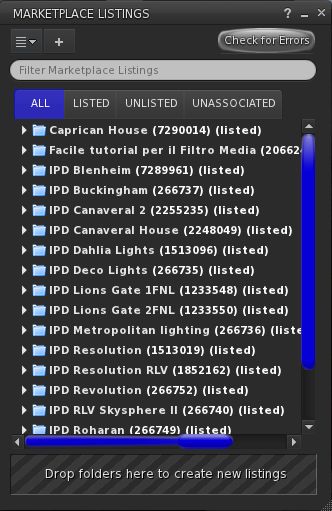
VMM includes an option to manually associate existing MP listings with VMM items in your inventory, which will help ease part of the the migration process for those concerned over automated migration paths

For those who wish to do so, manually migrating Direct Delivery items to VMM is relatively straightforward. All you need is the VMM project viewer (currently version 3.7.28.300920, although this may update shortly – see below), and you can use the Associate Listings capability within VMM to easily link items in your Marketplace Listings panel with you existing MP listings without having the re-create the latter, as shown above.

One point to note when moving DD items to VMM is that if you use multiple sub-folders within a current Direct Delivery folder, you may have to re-arrange things to avoid VMM treating the sub-folders as individual versions of the product.

Additional Notes

Some concerns have been raised over goods from merchants which are still popular in terms of sales, even though the Merchant may no longer be active in Second Life. It would seem that if these items meet the criteria for automatic migration, then they should continue to be available following the migration process. However, if they are only available via Magic Boxes and are not migrated manually (or fail to meet the automatic migration criteria), then will cease to be available as the switch-over to VMM runs its course.

The UKanDo viewer is one TPV to have already implemented the viewer side VMM updates. Out of curiosity, I used them alongside the project viewer to convert my own Marketplace items

For those who would prefer to use the viewer they are most familiar with in order to migrate their items to DD, rather than use the LL viewer, it is anticipated that the latter will undergo a further round of minor fixes, and the updates version either issued as a release candidate viewer or promoted to RC status shortly thereafter.

Once at RC status, the VMM code will legitimately be available for incorporation into TPVs as well. However, some TPVs have already adopted the code – the v3-style UKanDo viewer being one, for example.

One additional point of note here as well is that just because the viewer code may go to RC status fairly shortly, it does not mean the Lab are suddenly going to declare VMM is “live”. Lead times have been promised and adhered to throughout testing, and as noted earlier in this article, the only time scale that is confirmed for now is that the automatic migration process for all Merchants will not commence before June 20th.

While my own feedback may be of limited value, as I only have a small store and do not classify myself as a Merchant, I have used both the project viewer and UKanDo to manually migrate my items (and have removed various items out of choice, even though my store was well below the automatic migration threshold). By using the Associate Listing capability in VMM, I found the entire process to be relatively issue free – the only problems I did have were the result of silly mistakes on my part will flicking back and forth between the project viewer and UKanDo to test the functionality of the latter against the former.

Related Links

Second Life: changes to viewing group members’ lists

Due to a missed communication from the Lab, which indicated a preference on their part for this issue not to be blogged about, this post has been withdrawn, at least until such time as I can resolve matters with them.

Updated: Further to a discussion with Oz Linden on Friday, June 5th, there will be an updated report on these changes available on Tuesday, June 9th 2015.

An opportunity in Australia with a little help through Second Life

Image courtesy of Carmsie Melodie

FreeWee Ling is perhaps best known for her tireless work on behalf of the University of Western Australia (UWA), and co-organiser and curator of the UWA’s art-related projects, activities and galleries within Second Life.

At the end of 2014, she rightly gained recognition from the Australian Department of Education for this work, and was awarded an Endeavour Executive Fellowship that allowed her to travel from her home in the eastern United States to spend four months at the UWA in Perth, Australia, where she was based with the UWA’s Department of Physics.

FreeWee was encouraged to apply for an Endeavour Executive Fellowship by colleague Jayjay Zifanwe (Jay Jay Jegatheva in the physical world, Manager of the School of Physics at UWA) and her application was supported by a letter of recommendation from UWA.

Now, JayJay, FreeWee and the UWA are encouraging other Second Life residents to take the opportunity to follow in FreeWee’s footsteps, and applying for a 2016 Endeavour Executive Fellowship and, if selected by the Australian Department of Education, travel to UWA.

News of this was passed to me by Carmsie Melodie, who Tweeted me to point to a write-up on her blog. The same write-up is also available on the UWAinSL blog, where FreeWee has also written about her experience as a Fellowship awardee – so if you are interested in applying, do make sure you read FreeWee’s article.

What is the Endeavour Executive Fellowship?

The Endeavour Executive Fellowship is one of a number of Endeavour Scholarships and Fellowships offered by the Australian government to international applicants from participating countries who are considered high achievers in business, industry, education or government.

The Endeavour Executive Fellowship is a 4-month study period in Australia, focusing on learning and building skills and knowledge through a host work environment in the applicant’s field or area of expertise, rather than through formal enrolment in a study programme. It offers financial support (up to  Australian $18,500) towards professional development opportunities for the successful applicant, and an opportunity to study at UWA for four months.

Image courtesy UWA
Image courtesy UWA

Commenting on her experience in applying, FreeWee said:

The Endeavour application process was fairly easy, all done online. You need to describe what you want to do, get a couple of people to write recommendations, get certified copies of transcripts, etc. But it’s all carefully laid out in the online application. I’m happy to answer any questions you might have about it. You can’t win if you don’t enter!

Once I was notified that my application was approved, the program turned me over to a caseworker who supported me from leaving for Perth to arriving back home. My caseworker was great, always responded quickly to any concerns I had and monitored my progress throughout my stay.

To find out more, please read the Endeavour Scholarship and Fellowship lead-in from the Australian Government,  which also includes a link to the applications forms.

Should you decide to apply for the Executive Fellowship, please be sure to contact Jayjay (in-world via IM or note card or via e-mail to: jay.jay-at-uwa.edu.au) and / or FreeWee (in-world via note card) for advice and support on how the UWAinSL can assist you in your application.

Do note as well that submissions for Fellowship applications close on Tuesday 30th June, 2016.

With thanks to Carmsie Melodie for the pointer via Twitter.