Update: August 16th: Merchants have been reporting a number of reported issues with the new search tool. The Lab has set-up a forum thread for general discussions on issues and problems. If you are experiencing issues with the new MP search, please join the discussion on the forum thread.
If you are noting specific issues which appear to be bugs, the Lab requests you add details to BUG-37670.When doing so, please provide the following: Affected Field: (Demo linking, Related Items, Quick Fill, etc.); Name of Product you are editing: (What is the name of, or link to, the item listing that you are trying to add a demo or related item); Search Term: (What is the exact search term you have entered to try to locate the Demo, Related, or Quick Fill Template); and if possible, provide a screenshot showing the empty search return showing the search text and the lack of results. The exception to this is “Adult rated items that contain profanity”.
First issued as a beta test in November 2015, the updated search has been undergoing refinement and improvement (and bug fixing!) since then, hence why it has taken some time to reach a release status.
The new search mechanism is designed to address some of the shortfalls inherent in searching for listings and products on the Marketplace, which can often by a frustrating and time-consuming, as anyone who has used it will be able to attest.
To achieve this, it is said to be a complete step away from the older infrastructure supporting Marketplace search, with the new system hopefully being faster and more robust. In particular, the Lab point to it having a learning algorithm intended to improve search results over time – essentially, the more search is used, the better it performs. The new search also supports the use of boolean operators – AND, OR, NOT – so users can hopefully set-up more focused search criteria.
During testing, the Lab took feedback from merchants and users into account, using it to further refine and improve the new system. This obviously doesn’t mean it is flawless, but the hope is the overall experience will be improved, and will continue to improve over time. Should anyone encounter significant bugs or issues, they are asked to file a bug report. There is also a pinned Commerce Forum thread where general discussions might be continued.
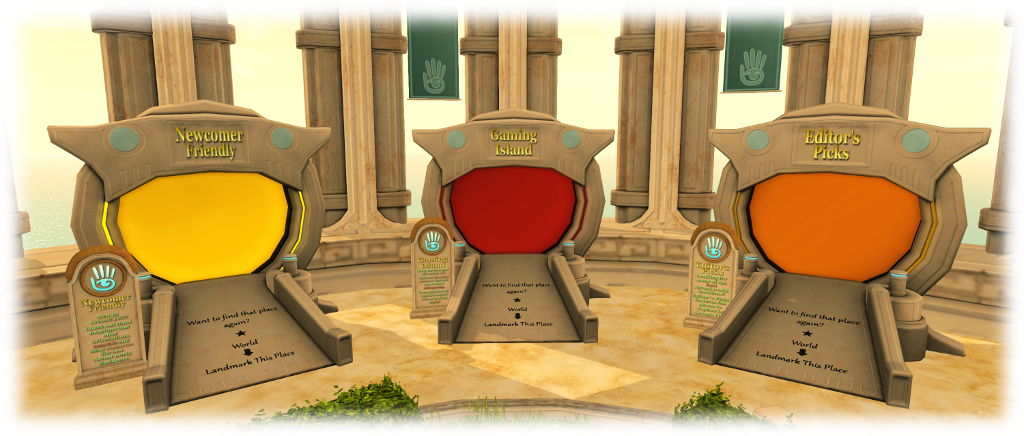
The new Gaming Islands – designed to introduce Second life users to Skill Gaming
In a blog post on August 2nd, 2016, the Lab introduced their new Gaming Islands: regions designed to help Second Life users – particularly (but not exclusively), I would assume, new users – understand Skill Games in the platform, how they can play them (and why they may not be able to play them), together with a means to find them.
I’m not sure when these regions – there appear to be two at present – opened, so whether the blog post has been timed to coincide with their launch or whether, like much that is in the blog post, they’ve been around a while but simply not promoted, is hard to tell. However, on reading about them, I jumped over to take a look – but before I get into the details, a quick bit of background.
The Social Islands provide a dedicated teleport portal to the Gaming Islands for new users; established users can reach them via the Portal Parks
Gambling laws in the USA and around the world can be complicated beasts. What some might consider to be gambling to others might be viewed a game of skill, and vice-versa. This makes determining what is and isn’t allowed and by whom a difficult practice, particularly where the Internet is concerned.
Because of all this complexity, the Lab banned gambling in Second Life, whilst allowing games of skill to remain. Then, in 2014, the Lab sought to further refine the kinds of skill games involving money and payouts which are permissible in SL through a complete overhaul of their Skill Gaming Policy, together with the introduction of new Skill Gaming regions where such games can be played.
The new Gaming Islands are designed to help SL residents understand what Skill Games are, where they can be played, the kinds of games they might encounter, how they can get to play them – and why, in some instances, they may not be allowed to access the regions where they can be played, and finally to offer a means to reach Skill Gaming regions.
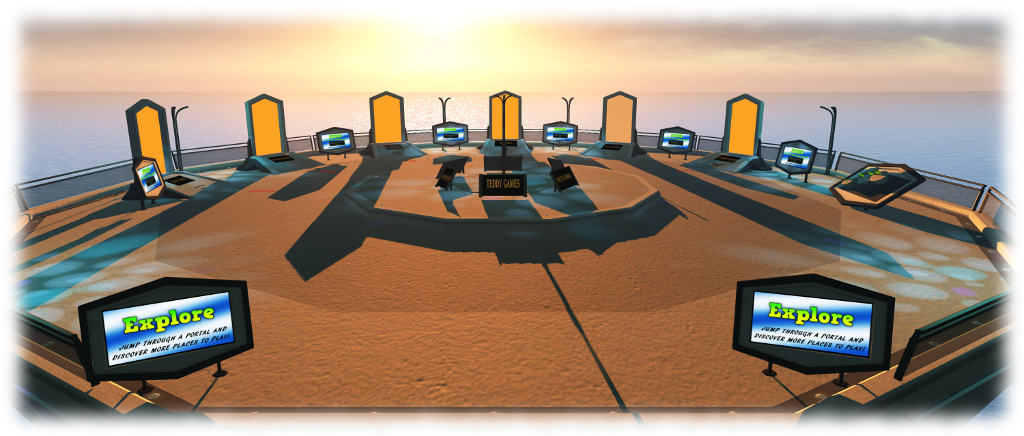
To achieve this, the new Gaming Islands are split into four areas: the arrival point, a game play area; a Learn area which explains more about Skill Games in SL and how to access Skill Gaming Regions; and an Explore area which provides direct teleport portals to Skill Gaming regions provided by various in-world Skill Gaming Operators.
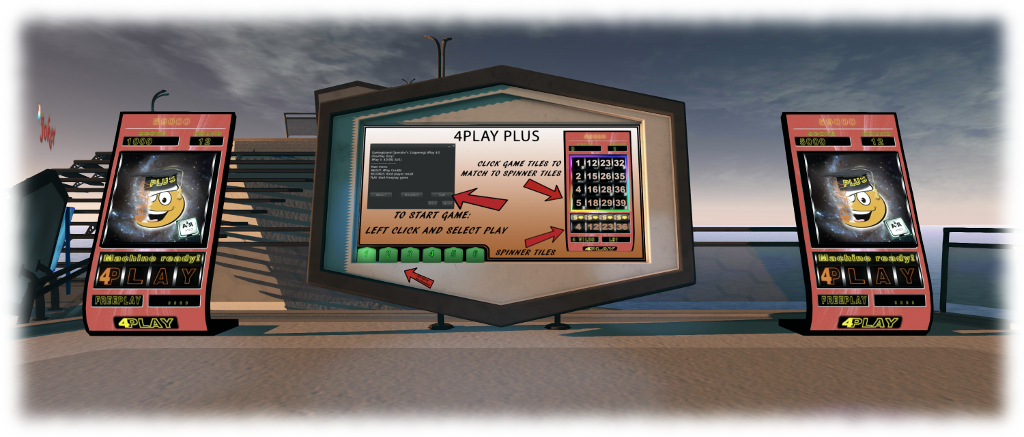
The game play area offers what appear to be “skill-based slot machine” games (yes, there are such beasts in the physical world) with L$ pay-outs – although I have to admit, even after reading the instructions, I was unable to determine where the “skill” factor came into effect over and above the “chance” element (the requirement for Skill Games in SL is that their outcome “is determined by skill and is not contingent, in whole or in material part, upon chance”).
This is not to say that I think the games are not skill-based, but simply that – as a non-gambler / player of skill games, I simply didn’t get where skill enters into them, even after reading the instruction tabs. Perhaps this might indicate more practical explanations are required, or maybe it just indicates I just don’t get Skill Games. I’m also a little mystified as to why, more than an hour after I left one of the islands, the GamingIsland Operator made a small payment to my account – but hey-ho (addendum: apparently pay-outs are made at regular periods after play).
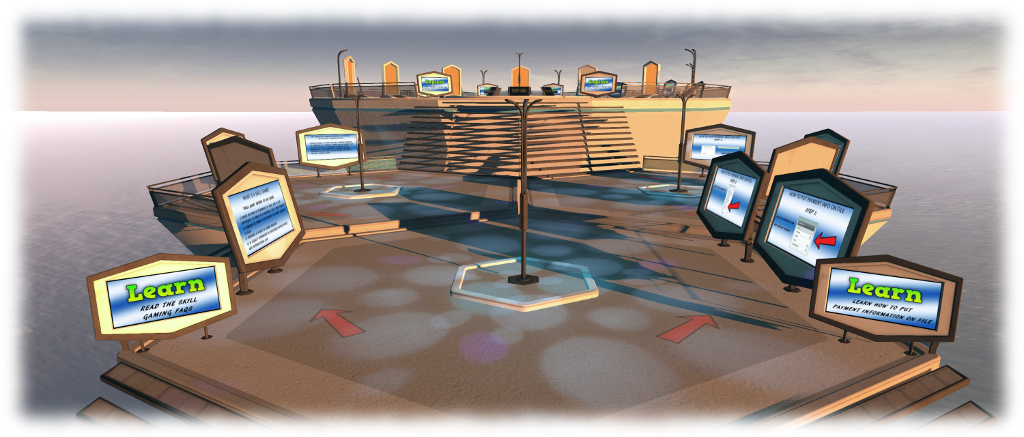
Gaming Islands: Learn area – discover more about Skill Gaming and how to access Skill Gaming regions in SL
The Learn area, designed to get people up-to-speed with Skill Gaming in SL, how they can ensure they are eligible to access Skill Gaming regions and why, even if they meet the SL criteria, they may still be unable to do so, is a little more straightforward.
To one side of the are a series of information boards designed to help people ensure they can access Skill Gaming region; on the other are explanations of what Lab’s define a Skill Game (lifted from the Second Life Skill Gaming FAQ), together with information on why, legally, some SL users may not be able to access Skill Gaming regions even if they meet the SL criteria for doing so. The split path perhaps isn’t the best approach here, given it might encourage some to simply go around one side and then up the stairs to the final section, but the use of teleport boards in the final section makes this a minor quibble.
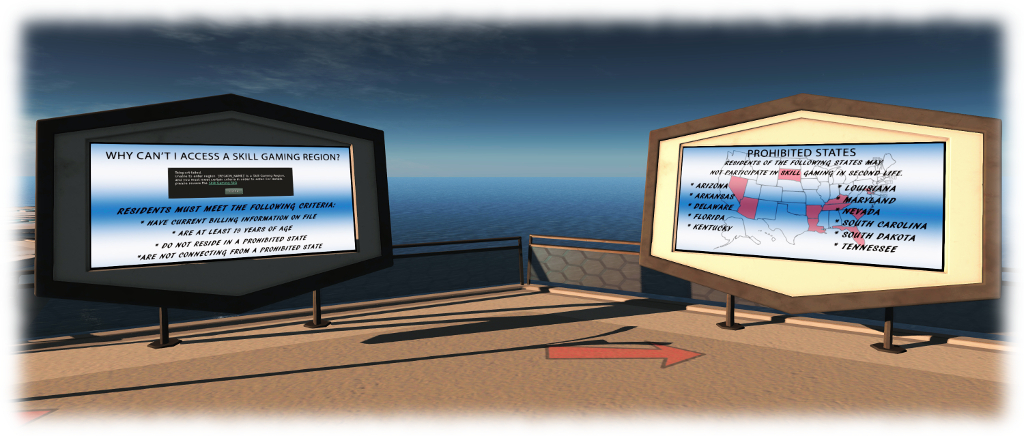
Gaming Islands: a more detailed look at a couple of the Learn area info boards, which explain what is required to enter Skill Gaming regions (step-by-step instructions to meet the requirements are provided on the other side of the area), and why, even if the SL criteria are met, some users may still not be allowed to access the regions
This final section, entitled Explore, offers teleport portal directly to a number of Skill Gaming regions provided by different Skill Gaming Operators. Should anyone find they cannot use the teleport portal, boards between the portals will teleport them to the Learn section of the island where they can double-check they meet the SL / legal (in the case of US residents) requirements for accessing Skill Gaming regions.
Gaming Islands: the Explore section with teleport portals
Skill Gaming isn’t to everyone’s interest, to be sure. However, providing information on what it is and how to find it is, I would suggest, a good idea, as is joining the dots for new users to be able to find their way to such regions, which give the opportunity to play for Linden Dollars. As it is, Skill Gaming operators pay a premium for their regions, and so providing a means by which they can obtain traffic on the same footing as other types of activity in SL is only fair.
In terms of the Gaming Islands layout, and my own problems in “getting” the games aside, the design is straightforward and does pretty much exactly what it says on the tin. Which is all one can ask, really.
On Tuesday, August 2nd, the Lab blogged about recent and forthcoming updates to Second Life. It’s a curious post, offering a potpourri of news, some of which is liable to be familiar to many, some of which might be new / surprising / interesting, even for those of us covering Second Life to the best of our abilities.
First up on the post is Project Bento – the project to greatly enhance the avatar skeleton for use with mesh bodies and bits (human and non-human). I have, and am, covering this project through my Bento updates, so please excuse me if I refer you to those reports for specifics, if you’re unfamiliar with the project and want to know more. If you’re completely new to Bento, you might want to start your reading here.
Bento is still very much a beta project – the viewer-side code has yet to make it to Release Candidate status, with the project viewer still being worked on by the Lab. However, Bento is an interesting project, not only because of what it can bring to mesh-based avatars, but also because of the way in which it has been very much a collaborative project between the Lab and content creators and animators.
Aki Shichiroji demonstrates a wearable wyvern utilising Bento bones for animation. Inset: the model under development at a Bento meeting.
The Visual Outfits Browser (VOB) is next to get a mention. Again, this has a way to go to make it into a release viewer, but was issued as a Release Candidate on August 1st (version 4.0.7.318263). Simply put, this viewer allows you to use the Appearance floater to capture / upload / select images of your outfits and save them against the outfits in a new Outfit Gallery tab within the floater.
Also getting a mention is the QuickTime for Windows replacement viewer, also known as the VLC plug-in viewer, which sees the QuickTime media plugin for the Windows viewer replaced with a plug-in based on LibVLC. At some point in the future, LibVLC will also be used to replace QuickTime in the Mac version of the official viewer. I’ve previously covered both the VOB and VLC viewers in these pages., so feel free to follow the link to read more.
The Visual Outfits Browser (VOB) viewer is another of the forthcoming updates mentioned in the official blog post, and you can read my overview of the project viewer version of VOB
Other updates which are mentioned comprise the use of Experience Keys in the new user Social Islands, which I blogged about in April; the recent TLS 1.2 update, which affects using the viewer’s built-in web browsers for web cashier interaction – see my post here on the subject; the improvements to group bans to eliminate the problem of people banned / removed from a group still being able to use an active chat session; of the ongoing work with Marketplace search, the recent core HTTP updates, viewer and server bug-fixes and the ongoing work to improve server robustness.
The new Social Islands, which I covered in April, also get a mention in the official blog post
However, the two items most likely to be of interest are the new e-mail verification (all new users must new verify their e-mail address with the Lab in order to receive updates, etc), and the new Gaming Islands.
The latter are designed to introduce users to Skill Gaming in Second Life by providing demonstration games to play, information on Skill Gaming – what it is, who can play, who cannot play and why, how to get your account set to play Skill Games – and finally, a set of portal providing access to regions providing Skill Games in SL, which will be the subject of an upcoming article.
The new Gaming Islands – designed to introduce Second life users to Skill Gaming
In July 2016, Windlight Magazine ran a hunt in aid of Feed A Smile, the a programme run by Live and Learn in Kenya (LLK) to provide nutritious warm lunches for over 400 children in Kenya every day, paid for entirely from donations to the project.
The hunt featured Prism Designs, Miss Darcy, FLOOD, Bindu Gallery, % Percent Furniture and Lighting, The Edge Gallery, CKB Gallery, Kaerri, Maven Homes, Windlight Workz, and Windlight Magazine. In organising it, Windlight Magazine pledged to match all donations made through the hunt, and to make a large donation at the end.
Enjoying the meal: 180 happy faces (via: Windlight Magazine / Feed A Smile / LLK)
On July 27th, writing on behalf of Windlight Magazine John Brianna (Johannes1977 Resident) published a blog post on the results of the effort: funds to cover 180 meals for children in the Feed A Smile programme, who enjoyed their meal on Wednesday, July 26th.
Commenting on the effort, John said:
Putting this all into perspective, this is what Second Life should be about, coming together to help others. We have seen it time and time again, with the recent Pulse fund-raisers, to the various charity organizations in Second Life (Rock Your Rack, Creations For Parkinson’s, Autism Speaks, Team Diabetes of Second Life, Homes For Our Troops), that the charitable spirit is alive and well in people.
The children themselves sent a special message of thanks to both Windlight Magazine and the residents of Second Life who supported the fund-raiser, which can be seen at the top of this piece.
Kudos to all involved!
About Feed A Smile
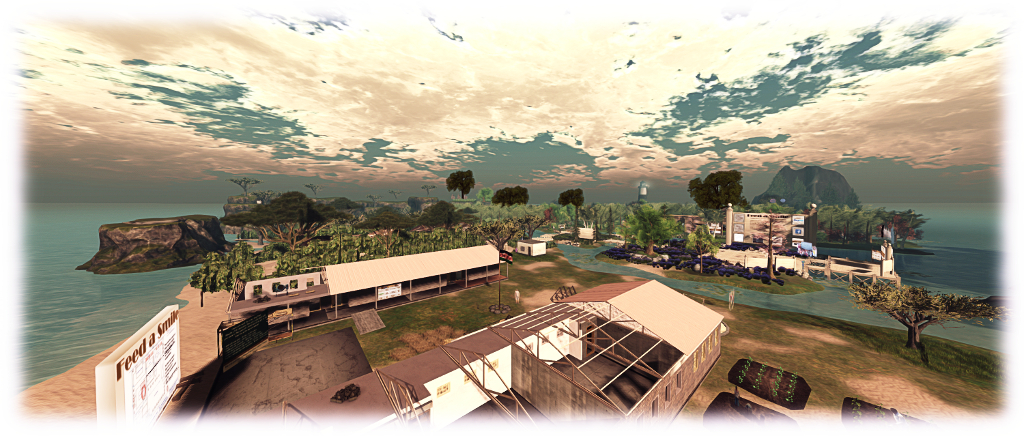
Feed A Smile is a programme run by LLK to provide nutritious warm lunches for over 400 children every day, paid for entirely from donations to the project. Over a third of the money directed at the programme comes from donations received through Feed a Smile in Second Life – and that’s a remarkable figure.
Feed A Smile in Second Life – in the foreground is a model (by RAG Randt) of the school in Nakuru, Kenya, Live and Learn Kenya (LLK) are building
The money is raised through fund raisers like this, and through live music played at the Feed A Smile Region, which stages around 5 or 6 events weekly. At these music events, musicians donate their tips, and visitors are asked to donate just L$100 ($0.30), which is enough to purchase a filling meal for a child in Kenya, a fact that within itself is also quite mind-boggling!
If you would like to offer support to Feed A Smile through fund-raising, etc., please contact Brique Topaz in-world.
Development of Oculus Rift support within the official Second life viewer has been suspended.
On July 1st, I blogged about the new Oculus Rift project viewer designed to support both the DK-2 and CV-1. The release, coming almost two years after the initial project viewer was made available, had been long anticipated among Oculus Rift HMD users in SL, and so the response was initially enthusiastic in terms of people downloading it.
Unfortunately, as I subsequently reported, thanks to feedback from TTech, Ai Austin, Rai Fargis – who raised BUG-20130 on the viewer (still open at the time of writing, although that may change) – and others, the new project viewer had more than a few issues with it, and was seen as something of a step back in terms of general usability.
Now it seems that the Lab have – for the foreseeable future, at least – decided to cut their losses in developing Second Life viewer support for Oculus Rift. Posting in the Oculus CV-1 forum thread, Oz Linden announced:
Thank you for experimenting with our Oculus Rift Project Viewer and offering your feedback. Unfortunately, the Project Viewer that we recently made available didn’t meet our standards for quality, and so we’ve now removed it from the Alternate Viewers page.
By definition, Project Viewers aren’t ready for primetime. The purpose of these experimental Viewers is to share with you the earliest possible version of what we’re working on, so that you can see what we’re up to, help discover problems, and provide feedback. In this case, though, we’re not ready for that, as those of you who tried it have seen.
We can’t say at this point when or even if we may release another Project Viewer for experimenting with the Oculus Rift in SL.
We want to prioritise our development efforts around initiatives that we know will improve the virtual world and bring more value to SL Residents, and due to some inherent limitations with SL, it may well not be possible to achieve the performance needed for a good VR experience. (In fact, this is one reason why we’re creating Project Sansar a new, separate platform optimized for VR).
We greatly appreciate the interest in trying SL with the Oculus Rift and are grateful that several of you took the time to try the Project Viewer. We regret that the quality was not up to our standards, and we will of course keep the community posted if we release a new Project Viewer for VR in the future.
Providing support for high-end HMDs within Second Life was always going to be problematic; most of the content found in-world is unoptimised (and our avatars even more so), so producing the means by which the viewer could comfortably meet the levels of performance required for such HMDs, such as a consistent frame rate of at least 75 fps (DK-2) or 90 fps (CV-1), was always going to be doubtful.
However, the Lab has remained reasonably bullish through about trying to offer an acceptable level of HMD support within Second Life – albeit it with caveats. For example, speaking at the TPV Developer meeting on Friday July 1st and just ahead of the Oculus Rift project viewer appearing, Oz said that offering HTC Vive support at some point for Second Life was something the Lab “would like to be able to do”.
So what went wrong?
Well, we don’t actually know. Interestingly, most of the issues experienced with the new project viewer weren’t performance related, but focused on general usability: as UI problems, rendering issues, image resolution problems, etc., all of which had been acceptable on the previous release of the Oculus rift project viewer. Whether these point to something being fundamentally wrong with the viewer build, or whether there have been some intrinsic changes to the Oculus SDK software (the latest version of the viewer have leapt forward significantly in SDK support when compared to the last viewer) which are not limiting options for integrating it into the viewer is hard to say.
All we do know is that from Oz’s forum comment, it would seem that fixing the problems which have been encountered would seem to be a non-trivial task – and once of potentially questionable value when compared to the possible return in terms of benefits to a broader cross-section of users other SL improvement initiatives might bring.
Does this mean the end of all attempts to provide HMD support in Second Life?
Again, that’s hard to say. In the short to medium term, I’d say most likely it does insofar as the Lab is concerned, given the general thrust of Oz’s comment. but that doesn’t mean a third-party developer might not be sufficiently motivated to at least take up the challenge and see how far they can get. Longer term, however, the door might not be so firmly closed.
HMD technology is still in its infancy. so who knows what might come down the road in a couple of years time, and how it might influence the Lab’s thinking with regards to Second Life? Time ell tell on that one.
The Second Life Oculus Rift project viewer has been updated to support the Oculus CV-1 – but not without issues
Update: July 8th: Linden Lab has suspended viewer support for the Oculus Rift. This article has been updated accordingly, notably with strikethroughs on links which are no longer valid.t.
On July 2nd, I posted about the release of the latest Oculus Rift project viewer, version 4.1.0.317313. As I’m actually Riftless, I could do little more than take a surface poke at the viewer and leave it to others to have a more detailed look – and they have done so, and found things to be less than favourable.
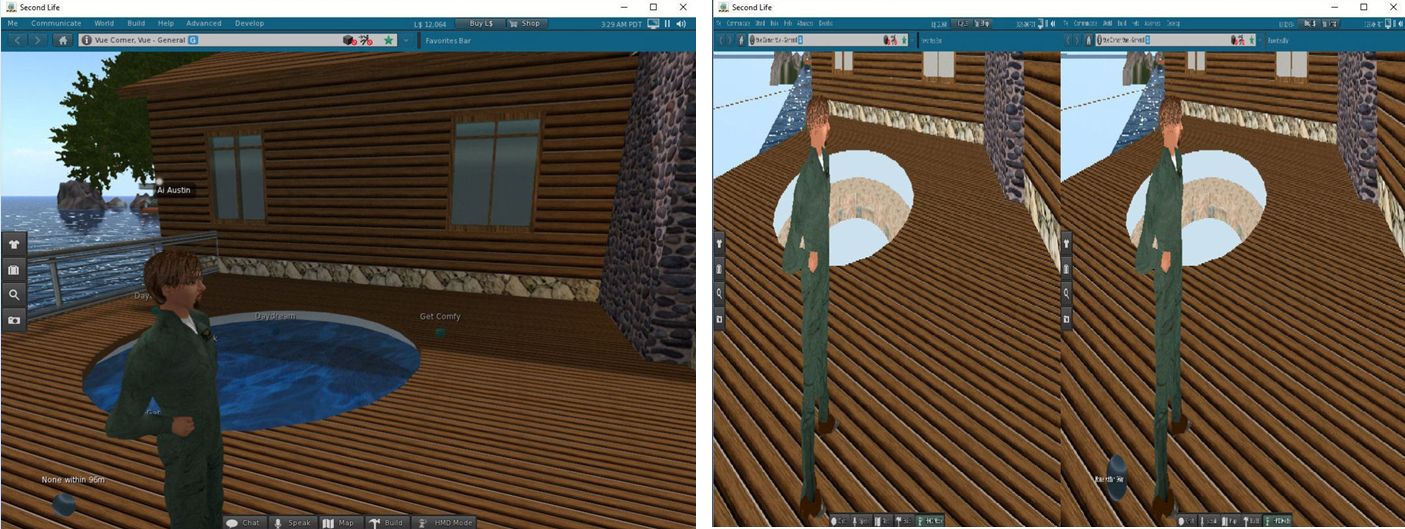
Ai Austin / Austin Tate is perhaps best placed in terms of overall feedback having gone through using an Oculus Rift HMD with the new viewer in several scenarios, all of which he has documented in his own blog, some of his initial finding having been reported in the comments following my original article. The problems he’s encountered include:
In all cases and with all graphics settings tried, the HMD view is over bright and washed out pastel in colour. He also notes the Pixel Luminance Overdrive setting, which had been present in earlier versions of the Rift project viewer is now absent
A failure to show any objects, wither in-world or attached to an avatar, with full or partial transparency when in HMD Mode (so, avatar hair, for example will not render). AI found that disabling Atmospheric Shaders in the viewer resolved this – but is not entirely a desirable solution
The image resolution in the HMD is low and jagged, and altering the viewer’s graphics settings apparently has no impact
Numerous UI-related issues in HMD mode, including: UI elements in fixed positions which cannot be changed via viewer settings; object and avatar labels and interaction icons fail to show; mouse pointer fails to display
Additional visual and display issues.
Ai Austin illustrates one of the visual issues with the new Oculus Rift projects viewer: one the left, a scene rendered in the viewer when not in HMD mode; on the right, when rendered in HMD – note the missing transparencies in thew avatar’s hair, giving the impression of hair loss and the “missing” hot tub water. Credit: Ai Austin / Austin Tate
His experience mirrors that of other Rift users, including TTech (who also commented on this blog), and a number of users who have tried this 4.1.0 release of the viewer and have commented on the Oculus Rift forum thread ( see feedback commencing with this message onwards).
Commenting on the viewer at the Simulator User Group meeting on Tuesday, July 5th, Oz Linden said:
At this point, I don’t have any real comment. It’s a Project Viewer, and one explicitly labelled Experimental at that… the point is for people to try it and let us know what they find out.
To help let the Lab know what people find out in using the viewer, I’d like to point to a bug report – BUG-20130 – raised by Rai Fargis.
While I am flattered that staff at the Lab do read this blog, if you are experimenting / trying the new Oculus Rift project viewer and experience specific issues, please add them to bug report rather than documenting them in the comments following this article (general feedback here is welcome, obviously). Doing so, and including with information on your system set-up, relevant log files, etc., guarantees your feedback is seen and recorded by the Lab, encouraging them to investigate issues.
When reporting problems, one thing to keep in mind is that this version has leapt forward several iterations in terms of the Oculus SDK; therefore comparisons with earlier versions of the viewer may not be helpful (outside of possibly pointing to removed options which proved useful in dealing with specific issues in the past). Rather, specifics of issues encountered with this version will offer a better means for the Lab to start / continue investigations.
At the moment, viewers operating in HMD mode have no means to tell the simulator they are doing so. Therefore, the Lab doesn’t have a means of accurately determining the numbers of people using Rift HMDs – and metric which could be useful in the future; as such, it is something which may change with a future update to the viewer.
With thanks to Ai Austin, TTech, Rai Fargis, and Jeanette Doobie
 Update: August 16th: Merchants have been reporting a number of reported issues with the new search tool. The Lab has set-up a forum thread for general discussions on issues and problems. If you are experiencing issues with the new MP search, please join the discussion on the forum thread.





 Inara Pey: Living in a Modemworld