The following notes were taken from the Thursday, February 22nd, 2024 Combat User Group meeting (also referred to as the Combat Committee User Group or CCUG, an abbreviation also used by the Content Creation User Group, and which I’ll not be using in these summaries to reduce the risk of confusion between the two). They form a summary of the items discussed, and are not intended to be a full transcript.
Meeting Overview
The Combat User Group exists as a forum to discuss improvements to the Linden Lab Combat System or LLCS to better support combat in Second Life.
The core idea is to provide additional events and capabilities which sit on top of LLCS to provide combat creators with better tools with which to create better combat systems for their specific scenarios.
The meetings are the result of a proposal document on improving the native damage system in SL, written by Rider Linden, and which is the focus for both the meeting and any work arising from them.
These meetings are conducted (as a rule):
By Rider Linden, with the support of Kyle Linden.
On alternating Thursdays (rotating with the Content Creation User Group) at 13:00 SLT. Meeting dates are recorded in the Second Life Public Calendar.
Initially in text, although voice might be included in the future depending on feedback from those attending.
Feedback from the previous meeting has been written-up in the form of Github / Canny items by Rider Linden. However, they are not open to public viewing, due to being part of the server repo.
However, general feedback on Combat 2.0 can be found in this Canny board. This is seen as the place to raise any issues or suggestions as we go on, as Rider can monitor it pretty.
Rider proposes setting up two combat-specific region on Aditi (the Beta grid), specifically for testing output from this work / project.
Names are TBC, but will likely be something along the lines of “Waterloo”.
These will hopefully be up and running in about a week.
In terms of initial work, Rider is looking to “knock off” the low-hanging fruit:
First will be llGetHealth.
Second will be damage transfer across regions (e.g. damage transfer is not going to 100% when you cross a region boundary).
The above will be followed by work on the on_damage() event, key to much of the rest of the work.
New documentation accompanying the events and capabilities will be posted the to LSL Wiki.
Comments and Requests
A request was made on whether combat capabilities could be made so unobtrusive, they could be “always on” unless specifically disabled through region / parcel setting.
This was seen as a non-starter on a grid-wide basis, due to the diversity of uses to which SL is put, and the need for combat to be opt-in, not opt out as a result.
In terms of Mainland, any such arrangement would be under the remit of the Product Operations group under Patch Linden.
A user proposal has also bee submitted to the Combat 2.0 section of Canny to address damage caused by physical collisions, for review.
It was suggested that there should be some permanent regions set up to demonstrate combat in SL, as these could be useful for demonstrating to new users what sort of experiences are out there, as well as showing off how the combat features can work.
An adjunct to this was a suggestion the the SL Combat Communit(y/ies) get(s) totgether and promotes activities via the Second Life Community Exhibition at the Welcome / Motown Experience gateway.
There was a general discussion about having the ability to parcel region vertically (e.g. by altitude). However, this is not a part of this project – or something the Lab has on its roadmap, as it raises a lot of complications.
More discussion on teleporting on death / respawning and allowing defined re-spawns by group or similar, along much the same lines as the previous meeting.
Rider indicated that he is not going to tie spawning (or combat capabilities) to the SL Experience system, BUT existing experience functionality can be used to extend them.
As I noted in my January 9th Simulator User Group notes, Linden Lab is in the process of moving Second Life away from using Atlassian’s Jira for bug reporting / tracking and filing feature requests, and on January 12th, this was confirmed in the first of a series of official blog posts on the transition.
The decision to move away from Jira is due to Atlassian changing their licensing model; traditionally, Linden Lab has been able to offer Jira on an unlimited basis to all SL users, leveraging the Atlassian Jira Server licence. That licence is being discontinued by Atlassian, making it fiscally impossible for Linden Lab to pay the licence fees associated with its many thousands of individual users who regularly access Jira. Therefore, a move to an alternate platform or platforms is required.
This being the case, going forward Jira will be replaced by what has been called a two-pronged approach to issue reporting and feature requests:
Github will form the new back-end for tracking and managing issues and requests (and is already being used for this purpose by LL), with all current Jira issues being migrated to it. In addition, technical users (such as TPV viewer developers, open-source contributors, etc.) who have accounts with Github, will be able to file ticket through it as well.
More generally, a new front-end feedback portal has been created for filing bug reports and feature requests by users at large.
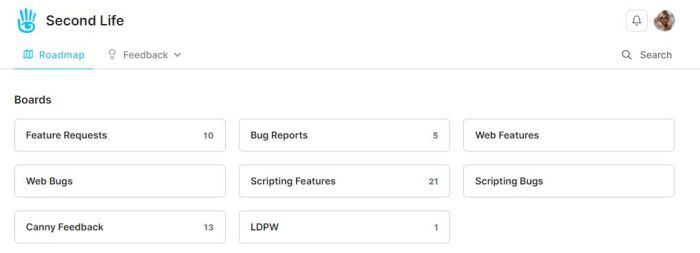
Second Life Feedback Portal – current bug report form (l) and list of current bugs with search filters (top)
The latter is powered by Canny customer feedback software and tools. It was selected for a number of reasons, as the Lab note in their official blog post, not the least of which is the fact that Canny offers integration with Github, allowing requests and issues raised within it to be imported into the Github repositories (removing the need for cloning issues as is currently the case with Jira), combined with an improved set of triage tools. Other advantages with Canny are given as:
The ability to log-into the Canny tracking system via a user’s Second Life log-in credentials (as is the case with Jira now), thus maintaining its convenience of access / use.
Simpler forms for bug reports and feature requests, which may encourage more users to file issues / ideas.
Clearer navigation for non-technical users, making finding issues, etc., easier.
The use of multiple Boards to help categorise submissions and information.
Canny boards make navigation to specific subject areas – bug reports, feature requests, et. – easier
The ability to view a roadmap of activities and priorities.
Other advantages as noted by the Lab can be found in the official blog post.
The system has been undergoing testing, which has involved selected users, and feedback on it has been provided – although not all of it is particularly favourable. Some of the issued raised (such as the lack of file format options for attachments with only jpg, png, gif and webp supported) are understandable, particularly given these are unlikely to change in the near-future (if at all); others might simply be the result of a natural reluctance to enforced change. In this respect, the Lab is at pains to note that Canny is not a one-to-one replacement for Jira, and will require changes to established behaviours; how people adapt to this in practice is only something time will demonstrate.
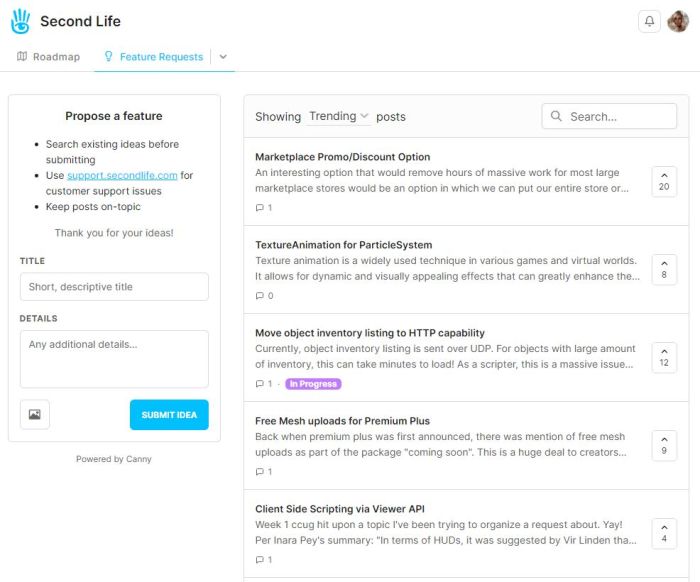
Second Life Feedback Portal – current feature request form (l) and list of open requests with search filters (top)
The switch-over to Canny / Github will now be rapid (by SL standards). The new Jira licensing is due to come into force in March 2024, and so the Lab has published the following timeframe for the transition away from it:
December 2023: generate a full archive of Jira and maintain until shutdown.
December 2023 / January 2024: migrate Jira reports to Github repositories. Soft launch of Canny and accept tickets via both Canny and Jira.
February 2024: provide information on accessing the Jira archive; shutdown Jira access and complete switch to Canny / Github.
Finally, as noted in the official blog post – these changes do not impact general Support / personal issues. These should still be reported to support.secondlife.com.
For my part, I have previously – with the Lab’s help – provided tutorials on filing both bug reports and feature requests. The not As the Canny front-end for filing either is considerably more straight-froward to use (and / or may be further enhanced based on user feedback), I will a) be disabling access to the Jira tutorials on this blog from mid-February; b) may provide a tutorial on using Canny, if this is found to be worthwhile.
SL Mobile, December 2023 – screen cap via Linden Lab
Update, December 13th: – the Lab now has an official blog post on the Alpha.
Linden Lab have announced – by way of a You Tube video (at the time of writing, I’ve not seen any official blog or forum post commentary to accompany it) – the launch of a Second Life Mobile “Private Alpha” allowing Premium Plus subscribers to sign-up for the opportunity to take the app for a test drive and provide feedback to help with development.
Narrated by – I believe – user Boston Blaisdale, the short video (just over a minute in length) introduces the features and capabilities those accepted into the alpha will be able to try. These include:
See your avatar & edit appearance / change outfits.
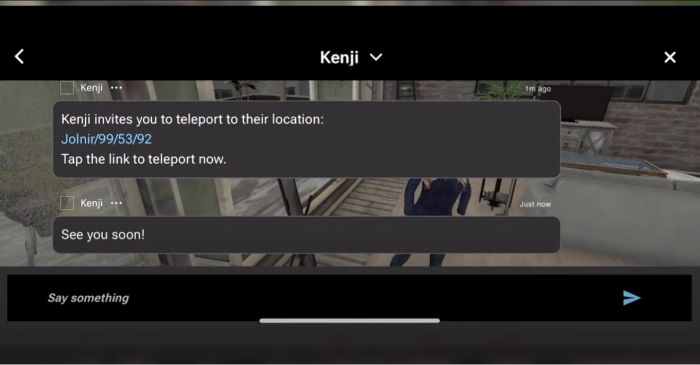
Explore the world via the Destination Guide, mobile showcase, teleport, deep links, TP offers.
Interact with the world through a limited set of movements (walk, run, fly, sit, stand) and object interactions (touch, sit) – or park your avatar and explore via flycam.
Socialise and stay connected (nearby chat, group chat, IM, group notices, find contacts, inspect profiles).
Create and log in with a new account.
The app is currently available on the following platforms:
iOS (minimum: iPhone X running iOS 16.6.1).
Android: mid-to-high-end Android device (comparable to Google Pixel 6 or higher) running Android OS 13 or higher.
Those participating on iOS will also require the TestFlight app for testing and feedback, whilst Android users will need to provide feedback through Google Play.
Premium Plus subscribers can find out more by following this Support Page link and (I believe) submitting a support ticket. There is also a link on this page to a FAQ on the Mobile app. It is not clear if this testing is subject to any form of NDA.
SL Mobile, December 2023 – screen cap via Linden Lab
Commenting on more general availability for the app, Linden Lab state:
It’s still early days for our mobile app. Our mobile team has been hard at work building a mobile-centred design and foundational features so that we can all enjoy Second Life anywhere we want. We’re ready to share what we’ve built so far with our most dedicated residents and we ask for your help as we continue to develop this project through this early Alpha stage, but we do not have a date for the next phase of testing or full release at this time.
Using Premium Plus members for initial feedback is an interesting choice. On the one hand, it would appear to greatly limit the potential resource pool of people willing to work on the app and give objective feedback; on the other it does allow Linden Lab to manage the size of the pool of likely applications at this point in time. Whilst some might feel snubbed at the restrictive nature of this initial Alpha, it is probably worthwhile noting that the SL Mobile app has already had input from users and will continue to do so; so will hopefully include more broad-based Alpha and Beta testing using an expanded pool of users in 2024, as LL continue to develop the app.
My SL island home, as rendered on the PBR Materials viewer
So it’s another year and another pair of birthdays, physical and virtual – although I admit as the time passes, I get more and more envious of my avatar’s youth; she remains eternally young, trim and fit. Me? While I admit to still being vain enough to work out and maintain something of a trim figure (home rowing machines and exercise mats are both a godsend and a means of home torture), I have to admit that each year I find the back complaining a little more, the feet and knees getting more resentful when I go for walks or spend 20 minutes on the rowing machine…
However, be that as it may, December 5th saw my avatar reach 17 years of age. I actually had to be reminded of this by Johann Neddings (who always sends rezday greetings, bless him!), as I’d totally missed the fact for myself. I guess that as with the physical world, the older you get the harder it is to mark the passing birthdays with any enthusiasm!
2023 has been an interesting year; events in the physical world have – and continue – to mean that my ability to spend time in-world has become choppy. This is somewhat reflected in the number and frequency of posts appearing in this blog decreasing through the year as I’m just not had time to even begin to keep on top of things in Second Life. Sadly, this is likely to continue through the first part of 2024, largely as a result of one set of contractors messing a project up so badly, another project had to be postponed and cannot now commence until the end of January / start of February 2024. However, on the positive side, the project to switch to solar for the bulk of the house’s electricity requirements did go ahead without fuss or bother (although very nearly derailed by the aforementioned mess-up), and in the last 2 months alone has seen a reliance on the national grid for electricity drop by some 40%.
Anyway, what time I have had in-world has largely been devoted to various personal projects and following the ongoing updates to the platform – particularly that of PBR Materials and the Lab’s work to adopt the Khronos glTF 2.0 specification. With the first phase of the PBR Materials work now live across the grid (see: A simple introduction to PBR materials, reflection probes & glTF in Second Life), I’m looking forward to getting the home island updated with reflection probes. I’m also eagerly awaiting the availability of the PBR Materials terrain work Cosmic Linden is working on, to see what that allows.
Another view of the island home, with two copies of the No Cottage Bazar used to form the “pool house” (lower left) ad “main house” (behind it, upper left) overlooking the old “castle courtyard”, the two linked via a small walled inner courtyard and be dint of swapping out windows on the upper level of the “pool house” for a door
In terms of the home island, Second Norway remains my “home” estate, but time being what it has been, I’ve not had the ability to fiddle-fart around with trying out new island designs and kitbashing houses as frequently as I’ve been known to do in the past. There are certainly a lot of house designs I’ve encountered whilst wandering SL and reporting on public regions, but even if I’d had the time to start playing with ideas, I’m not sure I would; a good deal of available effort this year has been in putting together a home design based on what remains one of my favourite models to be offered with Second Life: Marcthur Goosson’s NO Cottage Bizar, which I first obtained in January and initially kitbashed into – of all things – a home swimming pool and lounge area (see The NO Cottage Bizar in Second Life).
Since then, that build has gone through a couple of iterations, but remains very much in use, becoming the nucleus for a scratch-build home design using renovated ruins as a theme before I finally opted to simply bring two copies of the model together to form a single extended home. Although me being me does mean the layout has had a couple of updates since I originally blogged about it (notably swapping the positions of the “house” and the “swimming pool” with one another).
Under full sail
Due to the lack of time, sailing & boating – a particular pastime I enjoy in SL – has also taken a back seat in 2023, whilst flying has been almost totally absent my SL. However, I would like to again thank Spartaco Zemenis and Analyse Dean for their individual generosity in supplying me with versions of the ’86 Domino cruiser and Skûtsje Barge respectively. I’ve enjoyed taken both out on the water (even if the ’86 Domino is by far the largest vessel I’ve operated in SL!) and equally enjoyed modding them to suit my needs.
The other thing I’ve continued to enjoy / appreciate is Second Life is the art exhibitions and installations I’ve been privileged to be invited to view. I haven’t always been able to make every invite – and certainly not every exhibit or installation; but the fact that my opinion is actively sought and artists and gallery owners take the time to write to me either via the blog comments or directly after I have written a review, is both greatly appreciated and genuinely humbling. Thank you to all of you for this – it genuinely keeps me engaged in SL and wanting to see (and often learn about) more art and expressionism in SL.
And, of course, there are all the marvellous public builds across the grid I’ve been invited to visit. Again, apologies to those who have sent an invite I’ve been unable to follow-up on for one reason or another; as noted already, time has often and quite genuinely often been against me. However, the fact that folk do take the time to offer a personal invitation is deeply appreciated, and I do try to respond whenever I can by paying a visit, even if time later conspires to prevent me from offering a writing-up.
A final but by no means lesser thank you to everyone who does continue to read this blog, comment on articles and who suggest ideas for articles and / or pass on news and pointers; all of you genuinely make these pages what they are as much as I (only with fewer typos! – I’m still exceedingly lazy in checking my own pieces after a day of checking other people’s written work; my apologies again for that).
Each time my rezday rolls around, I tend to wonder about the portion of my life spent in Second Life, and whether it has been a meaningful, worthwhile effort, and whether or not I should continue to devote time to it. But the flipside to this is just where else is it possible to see such a rich and diverse gathering of creativity, companionship and artistic outreach and expression from the comfort of an armchair and in the company of your own cats (yes, both of mine will actually sit on my lap / on the desk and watch SL on the screen in fascination – and occasionally try to paw something so it will stop moving!)? As long as all of that remains available, it’s kind-of hard to imagine stopping altogether.
Besides, next year my avatar will be old enough to vote! 😀
On Monday, October 9th, Linden Lab sort-of formally launched the new Linden Homes Store for Second Life, showcasing all the Linden Home types and themes available to those users holding a qualifying subscription account (at the time of writing, Premium / Premium Plus), and which had been previously semi-previewed in a September 27th official blog post.
The new Linden Home Store is part of a project to completely overhaul what Linden Lab calls the “Land Journey” in order to provide a resource hub for all matters pertaining to land holdings in Second Life: how to lease one or more regions from Linden Lab, types of regions available, how to obtain Mainland, even how to go about locating and renting land from private estates / land providers.
The first part of this work actually launched in February 2023 in the form of the Land Portal, the core of the new hub. At that time, the Portal was little more than a “front page” showing what was to come, so rather than devote a full post to it, I covered it in one of my Web User Group meetings, as it was at one of those meetings where the launch of the portal was announced. While it does gather together information related to buying / renting land from existing sources, the Linden Homes Store is really the first major piece of meat on the bones in terms of a new suite of pages for the Portal – so what’s been done and how does it look?
The upper part of the new Linden Homes Store main page, as seen by someone in possession of a Linden Home.
General Overview
Store Home Page
In terms of looks, the first thing that hits the eye is that the store has – unsurprisingly – been produced using the new general page style and colours which have started to roll out across the Second Life web properties, as was the case with things like the Destination Guide. The Linden Home Store also borrows from DG in some elements of its look and feel, thus helping to further instil a sense of platform identity in to the pages whilst encouraging a degree of familiarity to help promote confidence of use.
But to get down to specifics. The Store’s home page offers two slightly different layouts, depending on whether a user is either logged in our out of their secondlife.com account and / or has a qualifying subscription account with a Linden Home already associated with it or not, per the images above and below.
upper part of the new Linden Homes Store main page, as seen by someone who does not have a qualifying account type / is not logged into the the Second Life web properties.
The What Next? section of pages displayed for qualifying accounts has some curiosities within it which raised my eyebrows:
The “Your home’s content pack” links to third -party purchasable add-ons for “2019+” Linden Homes. Whilst these are a handy resource, they actually have bugger all to do with the Content Packs actually supplied with the various themes – so why name the link thus? It’s unnecessarily confusing for those interested in seeing the different selections of items supplied with the various Linden Home themes.
Why on Earth utilise a video from 2010 which has nothing to say about the far more recent Linden Homes themes, which are liable to be of the most interest to recently upgraded account holders? Could not a more up-to-date video have been produced prior to the launch? If nothing else, a video that properly encompasses all of the Linden Homes products also lends itself to acting as a promotional tool aimed at anyone accessing the Store, regardless of their account type.
Why on Earth is “Choose a different home” so called? It’s a link to the SL wiki page serving to introduce and describe “2019+” Linden Homes – so why not call it “Introducing Linden Homes” or something? As it is, the title suggests that by clicking it, the user will be magically whisked to where they can swap their existing home without the need to scroll further.
A closer look at the What Next? section of the Linden homes Store, as displayed to qualifying account holders with the niggling links (your home’s contents pack, Video tutorial and Choose a different home).
Beneath the What Next? / Amenities section of the page, is the main store listing. This comprises information panels for all Linden Homes, 2019+ and 2010., with panels listing slightly different information:
2010 Linden Homes only provide a photograph of the house type, the name of its theme (e.g. “Tahoe” or “Meadowbrook”), and the parcel size.
“2019+” Linden Homes are listed by theme name (e.g. Ranch, Log House, Silt House, etc.), provide a photograph of one of the styles from the theme, number of layouts (styles) within the theme, location and parcel size.
This listing is periodically updated to reflect the current status of all Linden Homes: available themes / types are listed firt in the order Premium Plus Homes then Premium 2019+ Homes then Premium 2010 / 51w sq m parcel homes. And themes or types currently unavailable are then listed in the same order and labelled NOT AVAILABLE.
For those on non-eligible (for Linden Homes) accounts / who are not logged-in to the SL web properties, the Store will go on to display additional useful information on Linden Homes below the index list.
House Panels / Information
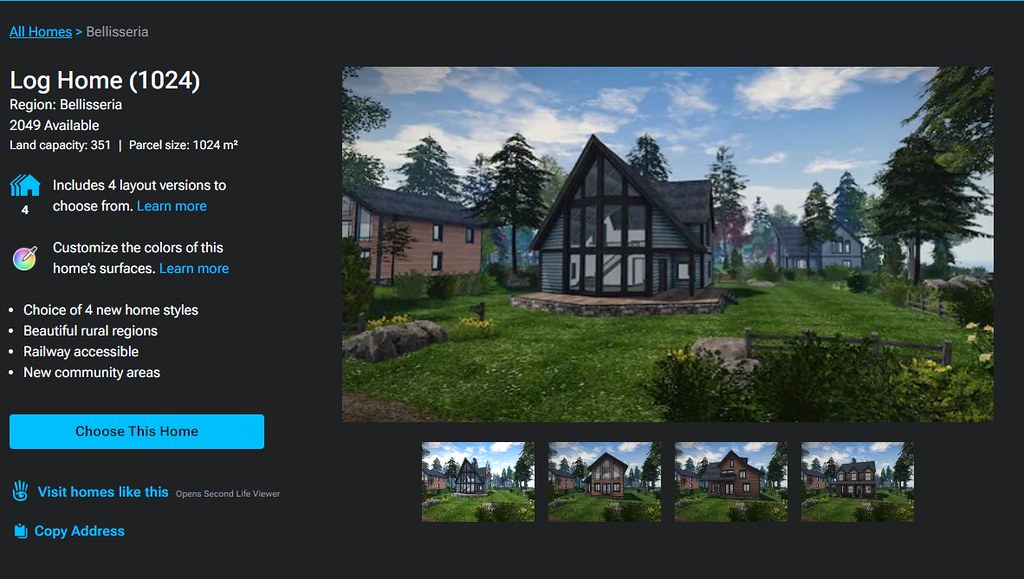
Clicking on a specific house / theme in the Store’s index list will refresh the page and display expanded information on the selected house / theme that the top, with the more recent Linden Home themes having more information available than the 2010 Homes, per the images below. The listing of homes will then continue below this expanded panel.
An information panel within the Linden Home Store for one of “2010” styles of Linden Home. Note the information on the left.
That the “2019+” homes have more information associated with them is not surprising, simply because they have more to offer. however, it did again give rise to some niggles:
The text “Includes X layout versions to choose from” (where X is a number) is followed by a link called Learn More. This gives the impression that clicking the link will display further information directly related to the theme (such as what the layouts are). Instead, it takes the user out of the Land Store and to the 2019 Linden Homes wiki page.
While this does contain some information related to the various themes, it’s hardly more informative that the information displayed within the Store and totally disrupts what has thus far been a relatively contained, seamless experience.
Given the effort put into the Store, it’s a shame time wasn’t taken towards building more detailed pages (with images) for the themes ahead of any launch.
Similarly, the text “Customise the colours of this home’s surfaces” is perhaps mis-labelled, and would be better called “About the Linden Homes Controller”, given it links to the section of the SL wiki page devoted to all of the Controller’s options, not just decorating.
An information panel within the Linden Home Store for one of “2019+” themes of Linden Home. Note the expanded information on the left, and the critquies of it noted in the above bullet points.
Some have also commented that listing the “2019+” Linden Homes within the Store in terms of their collective theme (e.g. Houseboat) rather than style (e.g. Windlass, Barnacle, Jolly Roger, etc.), and doing the reverse for the “2010” Homes, listing them by style (e.g. Aspen, Birch Cedar) rather than collective theme (e.g. Tahoe) is further confusing.
However, while I can understand thinking this way, I’d actually point out that it does in fact make sense: all “2019+” Lindon Home styles within a given are available through a rezzing system on the parcel, allowing the user to swap between them whenever they wish. However, this is not the case with the “2010” homes; regardless of the over-arching theme (Tahoe, Meadowbrook, etc.)., the only way to swap from one theme to another is to physically swap homes through the Store – ergo, listing them by style rather than trying to group them by theme does in fact make sense.
General Observations
I will confess, other than kicking the tyres of the new Linden Home Store as described above, I’ve not taken it for a drive in terms of using it to obtain a Linden Home; frankly, I’m perfectly happy with the location of my current Linden Houseboat, and I have no desire to pack-up and be randomly moved for the sake of a test. Sorry.
That said, it should be noted that whilst you can see the various types and themes of Linden Home currently available when browsing the Store, while the actual house type / theme you pick might be in-world is still down to a random selection from the available stock; you cannot puck a specific parcel in a specific region. Nor should this be expected: building a system to list all the locations of a given house type / theme when these could run into the hundreds just isn’t reasonable; thus Support ticket remains the means but which to request a specific location.
I do find several other points in the design niggling / confusing. Why, for example, are “2019+” Linden homes on 512 and 1024 sq m parcels listed as “Free with Premium Membership” when they are in fact available to both Premium and Premium Plus? Why do Basic and Plus members who might not realise have to get half-way through the Choose This Home before being told they are not eligible? Would it not be better to divert them to the account updates page on clicking the Choose button, rather than displaying angry red text when they try to Confirm Their Choice? Why wasn’t the store hooked into the Linden Homes widget in the top right of the secondlife.com dashboard for Premium / Premium Plus members from the outset (and which currently still links to the “old” Linden Homes store)?
The updates page for choosing a Linden home. It is only at this point that Basic and Plus users are informed they are ineligible for a Linden Home and need to upgrade – diverting them to the account upgrade page on chick the earlier Choose This Home button might be friendlier.
These are all small points, and to be fair, LL does have a long history of releasing not-quite-baked features and updates into the wild and then tweaking them after the fact. As such, there is the potential for all of these personal annoyances to be be address as a natural part and parcel of that work. However, the fact that there are all these little niggles and potential points of confusion does negatively impact first impressions. Which is a shame, because overall, it has to be said this new Linden Home Store is a significant and welcome improvement to to previous version.
On Tuesday, August 1st, 2023, Linden Lab officially announced the release of the first of the Senra brand of starter avatars for Second Life. The announcement came perhaps a little later than had been planned – at SL20B, Patch Linden indicated the hope was to launch them in July – and more than a year since they were initially previewed at the SL19B event in June 2022.
Of course, the release of new “starter” avatars for Second Life is nothing new; there have been several such releases over the years – some of which have been covered in these pages. However, particular excitement / interest has surrounded the Senra project, because it is the first time LL has developed a start avatar making full use of “modern” capabilities within Second Life, including the use of mesh bodies and heads, the rigging and animation capabilities presented by the extended “Bento” skeleton and capabilities such as Bakes on Mesh.
More particularly, the Senra avatars are coupled with a new approach to introducing new users to their avatars and to customising them, using a web-based process integrated into the overall New User eXperience (NUX), which commences with the sign-up process and continues through to bringing new users into Second Life via Welcome Hubs and Community Gateways.
The Senra folders in the System Library
Sadly, I’ve been unable to test this customisation process myself, so for that, I’ll have to direct you to the Second Life University video released alongside the formal announcement (and embedded at the end of this article). What I will say about it is that it is very mindful of that used with Sansar. Whether this is a result of taking lessons learned and replying them or purely coincidental, I’ve no idea; but if it is a case of the former, then I say good on LL for doing so, as the Sansar system always came across as easy-to-use.
For those who wish to try the new avatars directly, then as the official blog post notes, they can be obtained via the System Library. However, and if you have not yet done so (and while it may well be obvious to most) – do be sure to copy the folders from the Library into your inventory.
While it is possible to Add / Wear items directly from the Library, this will result in them being copied to your inventory anyway – but rather than remaining together, they’ll simply be placed in the system folder corresponding to their item type (eyes, shape, object, skin, tattoo layer…) thus scattering them throughout your inventory, rather than keeping them all nearly together.
This initial release for Senra – emphasis here because again, it is important to note that work on further avatars in the range, including anthro, are in development, as per Patch Linden’s comments at SL20B – is referenced as “Beta”; in other words, while it is officially released, feedback and lessoned learned from it will be applied to the new versions of Senra avatars as they are released.
In the meantime, this “beta” comprises two avatars: Jamie (female) and Blake (male).
In keeping with most avatar bodies and heads, they are supplied Copy / No Transfer + No Modify, and each, as supplied with this release, comprises:
A separate body and head. Both use the standard SL avatar UV Map using the universal channels and are fully BoM. Thus, they are reasonably compatible with most skin, tattoo and clothing layers.
A total of six shapes, skins (from bleached to really dark) and nail layers, eight eye colours and nine hair styles (a mix of hair objects and tattoo hairbases).
An identical range of clothing (tops, bottoms, skirts, etc.) for each avatar, sized to suit their basic shapes & with alpha layers for the fuller body forms.
Note that free additional colours of some clothing can be found at the kiosks within the SL Welcome Hubs (at the Avatar area inside the Second Life Academy).
A basic, HUD-style animation system with single-click stop / start capability.
The Blake and Jamie starter avatars
I don’t want to go overboard in discussing these avatars in detail; we’ll all form our own opinions on them over time – and there are others far better qualified to dig down into them than I. As such what I have to say here is somewhat subjective and intentionally limited.
The splitting of the avatars between head and body – given they were originally described as “all-in-one” back around the time of SL19B – is a good move. It allows those transitioning from these avatars to third-party options to split the expense (and learning curve) in doing so over an extended period (e.g. purchase a body first, get used to using it + its HUD, then later decide on a head), rather than having to do everything at once.
Whilst six shapes are provided, these actually split between three body sizes (which for ease of reference, I’ll call “thin”, “medium” and “broad”), and two facial feature shapes (again for ease of reference: “thinner” and “fuller”) to provide two broad sets of appearances: the “thinner” face with each of the three body sizes (shapes 1 through 3), and the “fuller” face with the three body sizes (shapes 4 through 6).
What a difference a skin makes. Left: Jamie with her default shape 4 and skin 4 (l) and the same shape with the skin supplied with the Monique starter avatar (r)
Some have critiqued the avatars – notably the female – for not supporting heeled shoes. While Patch has indicated this may be added as an option in the future, not doing so actually makes sense in the context of new starters: have to reference a HUD system and find the option to angle the foot for a specific hell height isn’t entirely intuitive when the aim is to keep things as simple as possible.
For me, the weakness visual part of these avatars les with the skins, which lack a degree of depth and – for Jamie at least – could have been much improved by the simple application of decent makeup in the texture, as demonstrated in the image above, which uses one of the older starter avatar skins suppled by LL (“Monique”).
Again, I can understand LL wanting to minimise items they provide so as to keep the door as open as possible for third-party content creators to join the Senra ecosystem; but surely something a little more attractive could have been provided for new users when it comes to Jamie; something which lets them feel there avatar is at least reasonably attractive when compared to others. As it is, the blandness of the Jamie skins could leave those using it like they must immediately start spend, spend, spending to “get up to par” with others – or (as bad) feel their avatar is inadequate.
Additional Senra avatar items can also be found at the SL Welcome Hubs
My other niggle is with the animation system; I cannot fathom why LL felt a need to change a term that has been in use for almost as long as SL has been around (Animation Override). True, “Animation Controller is a more accurate term, but it still runs contrary to accepted terminology and could led to some confusion for new users – which Senra is supposed to minimise. Also, could not the animations be a little smoother or more natural?
With regards to third-party creators entering the Senra eco-system, applications for the Senra SDK, intended to allow them to obtain the SDK and do so opened a little ahead of the formal release of the avatars via a forum thread announcement.
This has prompted a lot of feedback related to the design and construction of these avatars which I’m far from technically competent to comment on. However, my own rough-and-ready comparisons using the Improve Graphics Speed floater – whilst not totally ideal in making such comparisons – suggest that overall, these avatars are not that bad when compared to other systems in terms of their overall load, even if they are perhaps not the most efficiently made.
The Jamie head (top) compared with the Lelutka Simone head (bottom, minus its separate eyes and teeth). Note the comparative faces / vertices / VRAM counts which allow for a number of calculations by which to compare the two heads
The thread on the license agreement has also led to a degree of discussion on the extent of the requirement laid out in the agreement and its associated documents. I don’t want to drag this article out further by diving into things here, but I would say that some of the concerns raised (e.g. LL not allowing content for other head / body ecosystems) is born of a misunderstanding of Senra’s function (the system is for those new to SL and intended to offer a simplified road into avatar customisation – and providing multiple items for multiple bodies or heads could confuse new users), and a degree of over-wrought mistrust of LL born of a misapprehension around legal terms. However, for details, I’ll leave it you to to follow the thread and draw your own conclusions.
Conclusion
As with all avatar systems, Senra has its positives and negatives. What these are seen as will largely be a matter of personal experience and subjective analysis by most – as is the case with some of my comments here. As such, I’ll just close with a handful more of personal observations:
Are the Senra avatars an improvement on the “classic” ranges of starter avatars – absolutely.
Could the possibly be better? Well, most likely, yes. The devil is in the details, and I do feel this skimp on the most important detail – the skins.
Would I personally use one? No. But that’s because I have two bodies and four heads to play with on my main account and two heads and a body on my alt account, and they are more than enough.
Would I suggest friends still firmly glued to the the system avatar give Senra a go and see what they can make of them, mix and matching with items already in their inventory? Absolutely.







 Inara Pey: Living in a Modemworld