On Tuesday April 2nd, Linden Lab issued a blog post on pricing for private region moves on the grid (i.e. moving a region from one location to another on the grid map), and for renaming regions.
If you have a private region in Second Life, there are several special services you might occasionally need, like region moves and name changes.
The charges for these services depends on the number of private regions you have, and to make it easier for all of our customers to understand the fee structure, we now have laid it out in this chart in the Knowledge Base:
(New region fees – poor readability due to original also being of poor quality – click to enlarge)
To request one of these private region management services, please submit a case through the support portal.
The guidelines for actually moving / renaiming private regions remain unchanged.
Also unchanged is the cost of transferring a region to new ownership. This remains at $100 per region (plus VAT for Europe), which includes moving and renaming the region, transferring billing for the region and changing the estate ownership settings.
Don’t forget that Magic Box retirement commences today. As per a recent announcement from Linden Lab, from April 2nd:
Merchants will no longer be able to list unlimited-quantity items for L$10 or less using Magic Boxes.
Any active, unlimited-quantity listings for L$10 or less using Magic Boxes will be unlisted.
Therefore, if you are selling items at L$10 or less, and haven’t already migrated them to Direct Delivery – you’ll need to set aside time ASAP or risk seeing them unlisted as from April 3rd.
SL Marketplace: first phase of Magic Box comes into effect from midnight SLT on April 2nd
To assist with migration, the Lab has a Direct Delivery Migration FAQ. Also, for those who have experienced specific issues with DD in the past, the Lab has re-issued the Merchant Outbox project viewer with some fixes which should overcome any issues previously experienced.
Additionally, merchants should again note that from April 16th:
Merchants will no longer be able to list unlimited-quantity items using Magic Boxes, regardless of price.
Any remaining active, unlimited-quantity listings using Magic Boxes will be unlisted, regardless of price.
As per the original announcement:
Limited-quantity items (i.e. those to items to which the merchant does not have rights to copy – such as breedables) can continue to use Magic Boxes for the time being
There is still no confirmed date by which limited-quantity items must be migrated to Direct Delivery, and the Lab is still intending to present merchants with a 30-day lead time for migration once the date has been set.
Following my piece on the general status of Second Life, some of the comments revolved around educational discounts for regions – or rather, the ending of them in 2010. Many credit the abolishment of the discounts with the loss of hundreds (I’m not entirely convinced on the “thousands” element) of regions from the grid since that time.
It now appears that the Lab is quietly trying to reverse matters by extending a 50% discount to selected educational and non-profit organisations.
The news comes via Hamlet Au, with a natty little scoop on the offer he gained after being e-mailed on the matter. The originator of the e-mail informed Hamlet that he’d been offered a full region for $1,770 USD for a year or $3,540 USD for two years, for use by his organisation. The new prompted Hamlet to drop Peter Gray, LL’s spokesman, an e-mail on the matter. Hamlet comments:
“I’m not able to share numbers,” Gray e-mailed me, “but can confirm that we’ve extended this special offer to a targeted number of educational and non-profit institutions that have recently left Second Life.” The next question is how many institutions they’re offering this to, but there, he is mum. Furthermore, there’s no way for former sim owners of this variety to request this discount:
“There isn’t currently a way to apply for this; it’s a special offer we’re extending directly to some nonprofit and educational institutions as part of our customer win-back efforts,” as Gray puts it.
Deep Think East – one of the regions operated by the UK’s Open University, one of the educational organisations which still operates within Second Life
While not privy to the exact arrangements specified in the offer, I assume that as one or two-year discounts are specified, the caveat to it is that the discount only applies to a full up-front payment of said fees.
Like Hamlet, I’m also a little dubious that the offer will be taken-up by everyone who has departed Second Life – although it is interesting to now that LL are apparently targeting organisations which have “recently left” SL, and therefore have yet to put down roots elsewhere. As Hamlet rightly points out, a lot of people got somewhat burnt when the Lab announced they were discontinuing discounts for educational bodies and non-profits, and there has been a good degree of bad feeling since. There’s also the fact that over the past couple of years OpenSim has become a more than credible – and potentially a lower-cost – solution for educational needs.
It is probable that the move might be seen is some quarters of one of “desperation” on LL’s part in order to reverse the decline in the number of privately-held regions. However, given the limited and closed nature of the offer, such views may not be entirely valid – Second Life isn’t anywhere close to balancing on the edge of disaster just yet – although it would be interesting to know what did prompt the move.
In the meantime Hamlet has requested the any organisations or individuals who have been in receipt of the offer drop an comment onto his post on the news.
Advertising on SL has been something of a minor theme on this blog of late. Most recently, I returned to the idea of LL using machinima collaboratively with users (via a competition) to help promote Second Life to the world at large. Prior to that, and paralleling Ciaran Laval, I’ve touched on the topic of the SL websites being perhaps a means for the Lab to leverage revenue through advertising as a means of helping to offset falling tier revenue – something which the Lab actually embarked upon recently.
The move has been met with mixed feedback from users, with many objections being raised (unsurprisingly) and some mistakenly believing they were somehow “milking” their own userbase – as if the revenue generated from the ads was coming directly out of their own pockets. Some of this negative feedback may have been driven by the initial ads displayed on things like people’s dashboards to start with, although it is evident now that LL are seeking to more robustly curate the nature of the ads with show up – not always successfully, but the improvements are there to be seen.
Advertising on the SL dashboard has raised mixed responses
Some of the backlash against the new move appears to be on the grounds that advertising somehow devalues the SL brand. However, as Gywneth Llewelyn points out, the SL web properties potentially offer a rich vein of revenue flow which could significantly assist LL (with a potential beyond anything I admit to imagining).
Obviously, given my own stance on the matter, I’m supportive of the move – and have actually suggested it should be broadened to incorporate other SL web properties such as both our profile feeds (which already advertise SL in a case of “preaching to the converted”) and the Marketplace. The latter is something some have drawn the line at, alongside the use of people’s SL dashboard. Although objections to the use of former have been given with caveats, the idea of excluding either would appear to be counter-productive to the aim of helping to generate revenue for LL – simply because of the amount of traffic they generate.
Possibly in response to the wider negative reaction to the move, and in confirmation that LL very clearly see their web properties as a valuable source of revenue generation, the Lab has issued a Featured News blog post on the matter, covering both the current advertising and the moves to expand it, confirming that as of the 12th March, advertising will encompass the SL marketplace. The post reads in full:
As you may have noticed, we recently added some banner ads to SecondLife.com. Today, we’ve also added them to the Marketplace, and we’ll soon expand the program to other Second Life web properties as well. The placement of these ads is designed to be unobtrusive, as we don’t want them to interfere with your Second Life experience on the web, and we’re taking care to keep the content appropriate.
These ads are a great opportunity for advertisers to reach the large, global audience that visits the Second Life web properties every day, and we want to extend that opportunity to Second Life merchants as soon as we can. For Merchants, advertising on the Second Life web properties will be a new way to get their offerings in front of potential customers, while at the same time making the ads extremely relevant to every Second Life user who sees them.
We have some work to do before we can make the ads purchasable by Second Life business owners, and it’s too soon to say precisely when we’ll be able to, but we wanted to let you all in on this plan early on. We’ll blog again when we have more info to share, so keep an eye on this space!
Ads now on the SL Marketplace – although initial offerings suggest some refinement of the filters might be in order
That the ad spaces will be expanded to include user-run business should amount to good news, and help mitigate objections relating to ads appearing on the various SL web properties. Allowing SL businesses to use the capability (assuming they are in a position to do so) brings both added relevance to the ads and helps SL businesses promotion themselves to SL consumers across an even broader front.
Obviously, with regards to the Marketplace in particular, some careful consideration needs to be given to how advertising for SL business will sit alongside existing aspects of Marketplace promotion, such as listing enhancements. If merchants using the latter feel that the advertising option is undermining the listing enhancement options, then it is likely that there could be a wider withdrawal from the latter than has been experienced in the past when the scheme has hit problems.
Some have called for those with Premium accounts to escape the advertising. There’s actually some merit in this – other websites offer “advertising opt-outs” on payment of a fee, so given that Premium members have already paid out, then automatically opting them out from any advertising campaign of this nature is liable to go down very well (and potentially make Premium accounts a little more attractive than offering-up cars, boats, planes and other trinkets). Certainly, I wouldn’t be against seeing the ads vanish from my views of the various SL website – although I don’t actually see them as actually impinging on my SL experience as it is.
Whether such an “opt out” could actually be easily achieved, however, is perhaps a matter of debate. As we’ve seen in matters of logging-in etc., the various SL web properties are perhaps not as well-integrated as they first appear, making any attempts to “ring-fence” Premium accounts from the advertising, even were LL so minded (which I actually doubt) potentially harder than may first appear.
Given the initial reaction to the advertising move, it’ll be interesting to see what the response to the news that the programme is being expanding is liable to be.
As recently reported, Linden Lab have announced the first step in the retirement of Magic Boxes in order to encourage remaining merchants who have not done so to swap over to Direct Delivery.
At the time I posted that piece, I noted that a major stumbling block in the adoption of Direct Delivery was the fact that while it tended to work flawlessly for some (myself included), for others it has been at least as problematic as using Magic Boxes, and that Marketplace issues with DD were potentially as widespread as those for Magic Boxes.
To help overcome both reservations on the part of merchants who have not yet swapped over to Direct Delivery, and to help resolve any remaining issues with DD migration, the Lab has moved to do two things:
Launch a fresh Direct Delivery FAQ which attempts to answer some of the most common basic questions around Direct Delivery and also point towards other resources
Launch an updated Merchant Outbox project viewer. This viewer, built on 3.4.4 code, and so pre-CHUI, is designed to overcome all Merchant Outbox issues recorded in JIRA WEB-4600, and the advice for anyone still encountering migration problems is to give this viewer a run.
If you’ve been using a more recent (3.4.5 or 3.5.0 code base) LL viewer, note that you might find your toolbar buttons vanishing when you run this project viewer – it’s a known issue, and buttons can be restored from the Button Toolbar.
An updated Merchant Outbox project viewer has been issued to assist those encounter problems migrating to Direct Delivery
In addition, Dakota Linden has been responding to requests and questions regarding migration posted to the Merchant’s forum, and her responses may also be of assistance to those encountering problems.
These questions were actually the focus of some thought on my part back in 2011, when – having been prompted by a tweet from Crap Mariner, I mused on advertising SL: the machinima effect, and it seems worthwhile both revisiting those thoughts and updating them with a few further ideas and thoughts.
The video that prompted my original post on the subject may not be focused on Second Life, but it is ample proof of how machinima can be used to promote a product. What’s more it is fun.
Back in 2011, it prompted Crap to tweet: Linden Lab needs to make some ads like this for Second Life – something which caused me to reply: Or #LL should work with the machinima folk for suitable ads: say a competition; top 3 promoted on YT, SL.com, etc., which inturn prompted my original post on this idea,
Today, as Ciaran points out, and as I’ve covered for the last few years in this blog (albeit haphazardly), the University of Western Australia holds an annual MachinimUWA Challenge, which this year sees a prize pool of L$1.1 million for machinima makers submitting entries on the theme of “Reflections”.
MachinimUWA VI: showing the potential for machinima as a promotional tool
What makes MachinimUWA particularly relevant to this discussion is that not only does it showcase machinima as an art form, it actually promotes the University of Western Australia. The promotion may actually be very low-key, and a somewhat secondary consideration in terms of storytelling for those entering the competition, but it is there. This year, for example, entrants are required to film in “At least one of the 3 major spaces of Reflection at UWA … (The Reflection Pond, The Sunken Gardens, The Somerville Auditorium).” With the rules going on to note that entrants “may choose to film in any other area of the campus … or … include all 3 locations.” Thus, the UWA’s in-world facilities form the nucleus of the competition in terms of providing the backdrop for whatever stories entrants opt to tell.
 On Tuesday April 2nd, Linden Lab issued a blog post on pricing for private region moves on the grid (i.e. moving a region from one location to another on the grid map), and for renaming regions.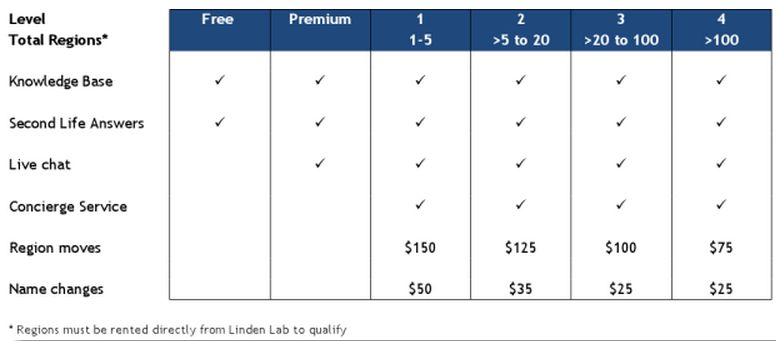


 Inara Pey: Living in a Modemworld