Update: Friday, December 5th, 2014: this Benchmark RC has now bee promoted to the the de facto release viewer.
On November 10th, the Lab promoted their benchmark viewer code to release status (viewer version 3.7.19.296094. This viewer removes the need for a manually-maintained list of GPUs (the GPU table) in order to identify the graphics system your computer is using, replacing it with a series of quick tests which are used to test the graphics system and set suitable initial defaults for the viewer (which only happens if you have no graphics settings already recorded for your viewer).
Despite extensive testing whilst a release candidate viewer, the promotion of this particular viewer to the de facto release viewer resulted in some people experiencing issues with the viewer immediately crashing on start-up due to a VFS failure – see this forum thread and BUG-7776, BUG-7783).
The problem didn’t affect everyone using the viewer, but for those who did, the usual fixes for VFS failures didn’t appear to work.
Since that time, there has been a further release viewer update – version 3.7.20.296724 (December 1st, formerly the Snowstorm contributions RC).
However, if you have resisted updating the viewer due the crash issue, or if you are still encountering the VFS crash issue, the Lab has released a new Benchmark RC viewer, version 3.7.22.297128 .
This release should address the start-up issue, and the Lab has requested anyone who may still be having problems install it, try it, and provide feedback via BUG-7783.
Marketing Second Life is something we all have an opinion about, and as such, Linden Lab has often taken a far amount of flak from users on the subject. I’m as guilty as anyone in this; in the past I’ve been particularly verbose on the subject through posts in this blog such as Business, Collaboration and Creative Growth, Tell me a story: marketing Second Life, and Advertising SL: the machinima effect (the latter of which has been somewhat overtaken by the Lab recognising the power of Draxtor Despres’ The Drax Files; World Makers series.
However, there is another potential marketing strategy the Lab is missing, something which was recently brought home by by a segment of The Drax Files Radio Hour.
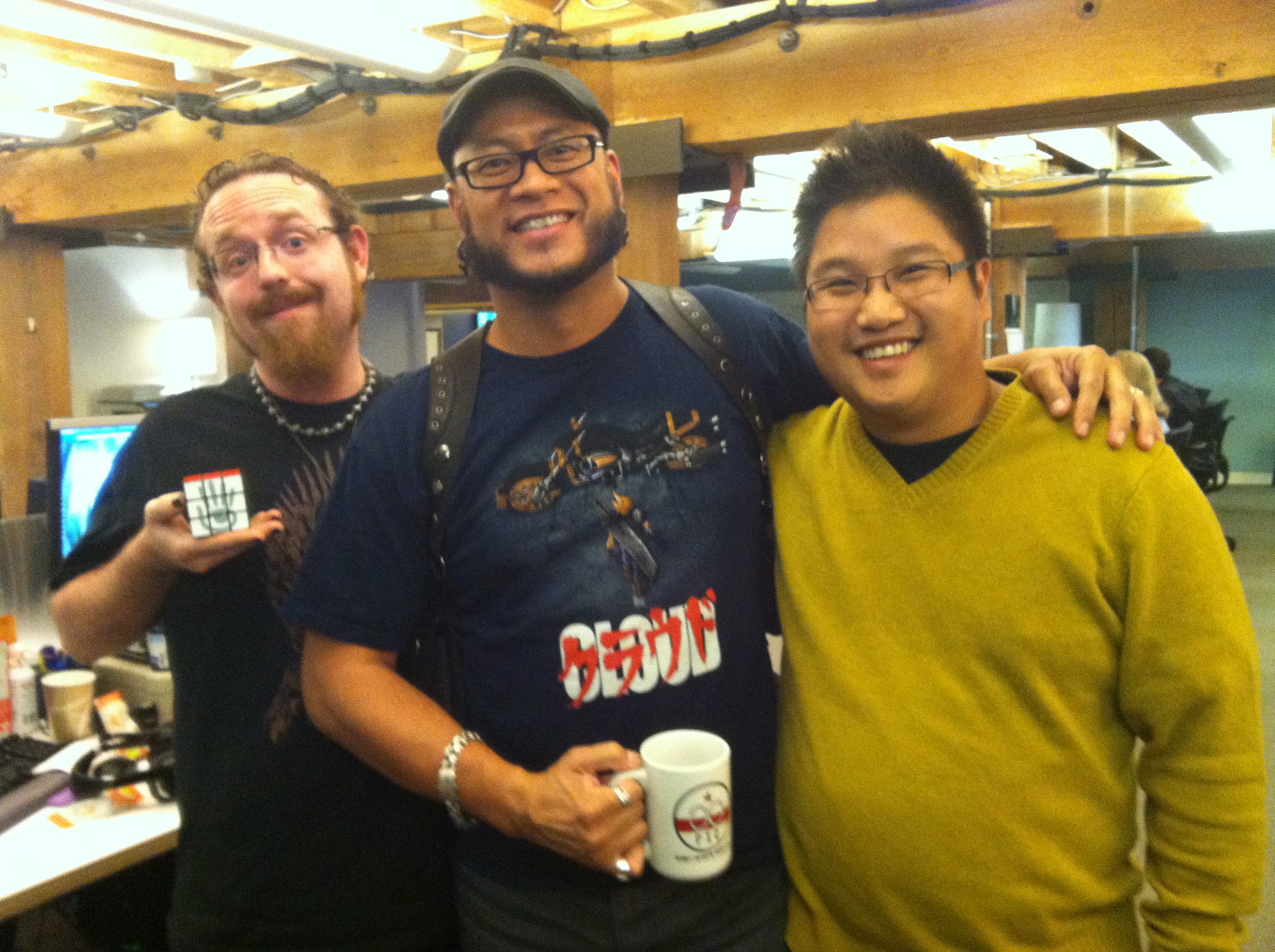
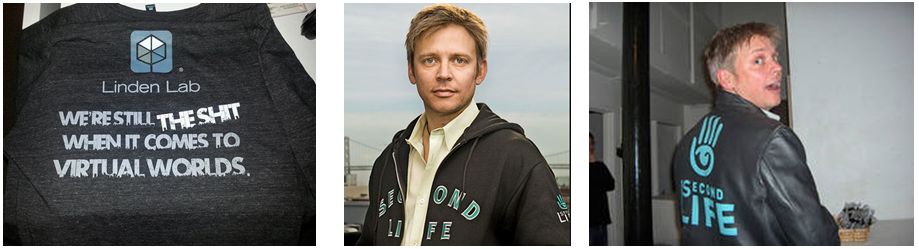
During a visit to the Lab’s HQ for the show, Drax had a chat with Shaman and Kona Linden, both of whom were holding items of merchandise available to Lab staff – a Rubik’s cube featuring the Second Life logo on one face, and a FIC (Fêted Inner Circle) mug. Lab personnel have also seen out and about wearing a certain t-shirt proclaiming their leading role in provisioning virtual worlds.
Shaman Linden holds a Rubik’s cube with the Second Life logo and Kona Linden, with an arm around Caleb Linden, holds a FIC mug (image: Draxtor Despres)
Other items were mentioned as being available, leaving Drax to wonder why the Lab doesn’t market these goods to users; and he has a point. True, there are issues of the Lab’s international user base and the cost of postage – but these are things that can be factored-in, and if the Lab doesn’t necessarily want to handle the additional weight of merchandise orders, etc., itself, there are companies who will do it for them for a small commission on sales.
Certainly, the appearance of the merchandise has sparked discussions in a number of areas since the show. Ciaran Laval, for example started a thread over on SLU (although admittedly, it got somewhat sidetracked into a discussion of the meaning behind a particular term, which eventually involved Kevin Bacon – who said the six degrees of separation was dead?); others elsewhere have expressed an interest in having at least some of the merchandise, and other items that have been seen in the past.
The Lab’s current t-shirt (l), and two styles of jacket / track suit top worn in the past by Philip Rosedale – all have been the subject of “want” attention from SL users
Take the jackets that were variously sported by former CEO (and co-founder of the Lab) Philip Rosedale; these were oft been admired and a subject of attention at the likes of the old SLCC events; so why not make them available?
And how about an updated version of the 10th anniversary varsity-style jacket the Lab made available in-world in 2013? Replace the 10th anniversary logo with the SL logo, and it might well be something users would buy if offered in the physical world. I know I wouldn’t object to having the opportunity to buy one, although admittedly, that might be something a tad too expensive to produce and sell…
If I understand things correctly, there’s even a JIRA-related t-shirt, something which would likely prove popular within the coding community;
The in-world 10th anniversary varsity-style jacket: an updated version might have potential in the physical world
Some items made available in the past, such as a pendant, and Ciaran makes mention of Jack Linden once offering those at his office hours meetings a “bag of swag” (although where this was physical world items or not is unclear to me – I didn’t attend Jack’s meetings – but Ciaran seems to lean towards this being the case). Were they to appear again, they might prove popular enough to make it worthwhile.
The advantage to the Lab in making these items available for users is not just a potential (albeit modest) revenue stream through the sale of the goods – it’s the broader reach of marketing and promotion they offer. Of course, some might thumb their nose on seeing someone else wearing a Second Life jacket, but that’s no reason not to offer them; and a FIC mug in the office is a way to start conversations (and depending on the nature of the office politics, might end up being something everyone wants, regardless of whether they are SL users or not! 🙂 ).
So how about it Ebbe? Why not give thought to making merchandise available to your users? Even if you only dip a toe or two into the water to see how things go, it might prove worth your while.
The US Army’s Military Open Simulator Enterprise Strategy (MOSES) and AvaCon have announced the first Federal Consortium of Virtual Worlds (FCVW) workshop, which will take place in a specially built virtual conference centre on Friday, March 6th and Saturday March 7th, 2015.
The workshop will be an active experience, with on-line exhibits and presentations provided in an interactive manner. Workshop participants are encouraged to engage and interact with the presenters, and the exhibits will range from cultural training material in a mock village to scientific ethical dilemmas in a city landscape.
Virtual world technology has matured significantly and rapidly over the past eight years to the point where hundreds of people are able to simultaneously participate in an on-line event. The workshop is open to military and civilian personnel, including the public. The conference will be held entirely within an Open Simulator virtual environment, and reservations will be free for attendees.
The workshop will be a multi-track event, featuring keynote speakers and break-out sessions, and the FCVW and conference organisers are inviting proposals to be a speaker, presenter, or performer in one of the following tracks:
The Alternative User Interfaces track
The Metacognition
Military Applications track
Security, Privacy and Identity track
In addition, the Knowledge Transfer track seeks public sector participants for a panel entitled Public Service Education in Virtual Worlds: Past, Present, and Future, which will discuss public service education uses for virtual world learning simulations as well as will feature panelists’ views on public service virtual world education projects from the past, present, and future. Participants in this discussion will be able to showcase relevant Open Simulator virtual world learning simulations via OAR and IAR uploads to be coordinated with the workshop organisers.
Full details on the above tracks, including information on areas of interest applicable to each of them, can be found in the workshop Call for Proposals page of the official website. Proposals must be received by the organisers by Monday, January 5th, 2015.
About the FCVW
The Federal Consortium for Virtual Worlds (FCVW) supports individuals and organisations from government (federal, state, local, and international), academia, and corporate sesectors to improve government collaboration through the use of virtual worlds, enrich collaborative online experiences, explore technologies that may enhance telework, and foster cross-agency collaboration.
About MOSES
The Military Open Simulator Enterprise Strategy (MOSES) is operated by the operated by the US Army’s Simulation & Training Technology Center (STTC), a part of the U.S. Army Research Laboratory, Human Research and Engineering Directorate. It is a coalition of military, industry, and academic partners who share a common interest in the advancement of virtual world technology for simulation based training and education. The MOSES Project seeks to address issues surrounding current game based virtual environment training systems in the two key areas of scalability and flexibility, and create a practical and deployable virtual simulation-based training system capable of providing a learner with a means to test skills in an accreditable manner. http://militarymetaverse.org/
About Avacon
AvaCon, Inc. is a 501(c)(3) non-profit organisation dedicated to promoting the growth, enhancement, and development of the metaverse, virtual worlds, augmented reality, and 3D immersive and virtual spaces. We hold conventions and meetings to promote educational and scientific inquiry into these spaces, and to support organized fan activities, including performances, lectures, art, music, machinima, and much more. Our primary goal is to connect and support the diverse communities and practitioners involved in co-creating and using virtual worlds, and to educate the public and our constituents about the emerging ecosystem of technologies broadly known as the metaverse.
The Lab has issues a reminder via the Grid Status Reports page that there will be no concierge telephone and chat support available from midnight SLT on Wednesday, November 26th through until 08:00 SLT on Friday, November 28th.
This is to allow support staff in the USA to enjoy Thanksgiving with their family and friends.
Concierge phone and chat support will be offline this coming Thursday, 27 November, so that team members can spend the Thanksgiving holiday with their friends and family. Both services will close at midnight Wednesday evening and will re-open at 8am Pacific on Friday morning.
To the support staff and all at Linden Lab, I’d like to pass on my best wishes for a happy Thanksgiving, and the same also goes out to all those I’ve come to know in SL who are celebrating Thanksgiving as well.
In show #46 of The Drax Files Radio Hour, which I’ve reviewed here, Draxtor pays a visit to the Lab’s head office in Battery Street, San Francisco. While there, he interviews a number of Linden staffers – including Monty Linden.
Monty is the man behind the Herculean efforts in expanding and improving the Lab’s use of HTTP in support of delivering SL to users, and which most recently resulted in the arrival of the HTTP Pipeline viewer (the code for which is currently being updated).
He’s also been bringing us much of the news about the content delivery network (CDN) project, through his blog posts; as such, he’s perhaps the perfect person to provide further insight into the ins and outs of the Lab’s use of both the CDN and HTTP in non-technical terms.
While most of us have a broad understanding of the CDN (which is now in use across the entire grid), Monty provides some great insights and explanations that I thought it worthwhile pulling his conversation with Drax out of the podcast and devoting a blog post on it.
Monty starts out by providing a nice, non-technical summary of the CDN (which, as I’ve previously noted, is a third–party service operated by Highwinds). In paraphrase, this is to get essential data about the content in any region as close as possible to SL users by replicating it as many different locations around the world as is possible; then by assorted network trickery, ensure that data can be delivered to users’ viewers from the location that is closest to them, rather than having to come all the way from the Lab’s servers. All of which should result in much better SL performance.
“Performance” in this case isn’t just a case of how fast data can be downloaded to the viewer when it is needed. As Monty explains, in the past, simulation data, asset management data, and a lot of other essential information ran through the simulator host servers. All of that adds up to a lot of information the simulator host had to deliver to every user connected to a region.
The CDN means that a lot of that data is now pivoted away from the simulator host, as it is now supplied by the CDN’s servers. The frees-up capacity on the simulator host for handling other tasks (an example being that of region crossings), leading to additional performance improvements across the grid.
Highwinds, a CDN provider Linden Lab initially selected for this project, has 25 data centres around the world and a dedicated network from and through which essential asset data on avatar bakes, textures and meshes (at present) can be delivered to SL users
An important point to grasp with the CDN is that it is used for what the Lab refers to as “hot” data. That is, the data required to render the world around you and other users. “Cold” data, such as the contents of your inventory, isn’t handled by the CDN. There’s no need, given it is inside your inventory and not visible to you or anyone else (although objects you rez and leave visible on your parcel or region for anyone to see will have “hot” data (e.g. texture data) associated with it, which will gradually be replicated to the CDN as people see it).
The way the system works is that when you log-in or teleport to a region, the viewer makes an initial request for information on the region from the simulator itself. This is referred to as the scene description information, which allows the viewer to know what’s in the region and start basic rendering.
This information also allows the viewer to request the actual detailed data on the textures and meshes in the region, and it is this data which is now obtained directly from the CDN. If the information isn’t already stored by the CDN server, it makes a request for the information from the Lab’s asset servers, and it becomes “hot” data stored by the CDN. Thus, what is actually stored on the CDN servers is defined entirely by users as they travel around the grid.
The CDN is used to deliver “hot” texture and mesh data – the data relating in in-world objects – to the viewer on request
The HTTP work itself is entirely separate to the CDN work (the latter was introduced by the Lab’s systems engineering group while Monty, as noted in my HTTP updates, has been working on HTTP for almost two-and-a-half years now). However, they are complimentary; the HTTP work was initially aimed at making both communications between the viewer and the simulator hosts a lot more reliable, and in trying to pivot some of the data delivery between simulator and viewer away from the more rate-limited UDP protocol.
As Monty admits in the second half of the interview, there have been some teething problems, particularly in when using the CDN alongside his own HTTP updates in the viewer. This is being worked on, and some recent updates to the viewer code have just made it into a release candidate viewer. In discussing these, Monty is confident they will yield positive benefits, noting that in tests with users in the UK,, the results were so good, “were I to take those users and put them in out data centre in Phoenix and let them plug into the rack where their simulator host was running, the number would not be better.”
So fingers crossed on this as the code sees wider use!
In terms of future improvements / updates, as Monty notes, the CDN is a major milestone, something many in the Lab have wanted to implement for a long while, so the aim for the moment is making sure that everyone is getting the fullest possible benefit from it. In the future, as Oz linden has indicated in various User Group meetings, it is likely that further asset-related data will be moved across to the CDN where it makes sense for the Lab to do this.
This is a great conversation, and if use of the CDN has been confusing you at all, I thoroughly recommend it; Monty does a superb job of explaining things in clear, non-technical terms.
In October 2014, I reported on the viewer-managed Marketplace (VMM) project, which the lab has been developing for several months.
The aim of the project is to enable merchants to manage the creation and management of Marketplace product listing through the viewer, bypassing the need to use the Merchant Outbox (and have copies of items stored on the Marketplace inventory servers) or using Magic Boxes.
VMM does this by adding a new Marketplace Listing panel to to viewer, of which more below.
On Friday, November 21st, the Lab announced that wider beta testing of VMM is now ready to start on Aditi (the Beta grid). and is inviting merchants to download a new VMM project viewer they can use to test creating and managing product listing through the viewer.
Alongside of the announcement, the Lab also made available:
A VMM FAQ which contains important additional information
A VMM JIRA project for the reporting of specific issues and problems discovered during testing
A VMM API wiki page for viewer developers (merchants do not need to worry about this!).
If you are a merchant and wish to test the VMM functionality, you’ll need to download and install the project viewer, and use one of the following three test regions on Aditi: ACME D; ACME E and ACME F. Using the viewer anywhere else can generate error messages when first logging-in (designed to indicate VMM is not available, and which will not interfere with using the viewer for other activities).
If you’ve never logged-into Aditi, please refer to the instructions on how to do so on the beta grid wiki page.
When testing VMM, remember that it is not intended to enable all Marketplace-related activities through the viewer. Rather, it is intended to allow merchants to create new Marketplace listings with inventory, associate inventory with an existing Marketplace listing, remove items from a listing and unlist goods entirely. All other Marketplace activities will still have to be carried out within the Marketplace itself.
Also note that at present there is a bug within the Aditi Marketplace that will cause purchases to fail. The Lab is working to address this, and it shouldn’t interfere with testing VMM to create and modify product listings.
The following notes are intended to get you started with the project viewer and beta testing, please refer to the Lab’s VMM FAQ for other pertinent information.
The Marketplace Listings Panel
An active Marketplace Listings panel showing the four tabs used to manage inventory
The heart of the viewer-managed Marketplace is the new new Marketplace Listing panel within the viewer. This will eventually replace the Merchant Outbox, although both are provided in the project viewer.
The Marketplace Listing panel allows a merchant to carry out a number of Marketplace tasks from within the viewer, such as: create a new product listing, modify a listing, change the items associated with a listing, etc.
It does this by enabling merchants to directly associate products in their inventory with product item listings on the Marketplace, eliminating the need to either upload copies of products to the Marketplace inventory servers via the Merchant Outbox or, in the case of limited stock items that are No Copy for the merchant, having them stored in-world in a Magic Box. When a customer purchases an item listed via VMM, it is delivered to them directly from the Lab’s asset servers.
This does mean that care must be taken when handing product items in inventory in order to avoid occidentally deleting items associated with Marketplace listings. To help with this, the folder associated with the Marketplace Listing panel remain hidden from view (as far as is possible) when working directly in the inventory .
Google Form
The first time you open the Marketplace Listing panel, it may display the following message:
This feature is currently in beta. Please add you name to this Google form if you would like to participate
If this happens, it is likely because you logged-in to a non-VMM region and then teleported to the test regions. To correct, simply log-in directly to one of the three ACME test regions (ACME D; ACME E and ACME F). The Marketplace Listing panel should open correctly; if you haven’t already created an Aditi Marketplace store, it will display a message requesting you do so, with a link to the Marketplace.