2018 Sansar Product Meetings week #41

The following notes are taken from the Sansar Product Meeting held on Thursday, October 11th. These Product Meetings are open to anyone to attend, are a mix of voice (primarily) and text chat. Dates and times are currently floating, so check the Sansar Atlas events sections each week. The meeting was hosted by Eliot, and well attended by members of the Sansar product team, with Ebbe also dropping in.

Release Process Flow: Overview

The various teams working on Sansar are developing and refining multiple features and aspects of the platform, and periodically, a feature freeze is called.

  • This occurs roughly 2-weeks from the planned deployment date for the next release.
  • At this point the decision is made on which features are developed and stable enough to include in that release, and no additional features tend to be added to the release after the feature freeze.
  • Those features assigned to the release then go through extensive testing and bug squashing.
  • The amount of bug fixing, etc, required determines whether the release ships on the target date or slips.

While dates are not set in stone, this cycle means that for the next release, R27, the feature freeze date in October 17th, 2018, and the planned release date in October 31st, 2018.

Release 26: Thumbs Up

General Points

  • New VR hand gestures: the current Vive controller will support the hand clenching gesture; however, as noted in the release notes and my R26 overview, full Vive support for all of the new hand gestures will likely come with support for the new Vive hand controllers.
  • Galen has developed two scripted elements to support the new broadcast capability:
    • The first is a simple trigger volume that can be used for things like stage settings, etc. An avatar standing in the trigger volume will have their voice automatically broadcast throughout the experience.
    • The second is a broadcast script that can be configured to work as required within a scene.
    • Linden lab will be providing simple scripts to support broadcasting as well.
  • Panel readability in VR: there have been requests that the various client panels now visible in VR (e.g. chat, settings) be given a transparent background so they don’t block the world view so much.  However, these requests are countered by those who felt that having the chat panel fairly transparent (as it was during the initial release) made reading text difficult. For their part, the Lab believe what they have with the panels may be the best solution.
  • There appears to be a bug in the scene object drop-down that can lead to something other than the desired object being selected. This has been noted by the Lab, but at the time of the meeting the status of any fix was unknown.
  • A major under-the-hood change made in R26 is to the way the camera’s focus is handled. While this is now much improved, there are edge-cases that need to be tweaked. Examples of this:
    • If an avatar’s name tag is displayed by hovering over it, and an attempt is made to right-click and drag the camera around when the mouse pointer is over the name tag, the camera may not actually move.
    • When selecting objects in the scene-object drop-down, it can be possible to point to one object, but actually select another on clicking.
    • When renaming an object, clicking the anchor the cursor in the text entry field may result in the rename dialogue vanishing.
    • As there is no mechanism to push updates to customers, items updated in this way must be re-purchased at present.
  • Chat copy / paste has been lost in both VR and Desktop mode, this should be corrected in the next release.

Permissions Licensing

  • Materials editing: the decisions to disable in-scene materials editing on purchased legacy objects and the need to make new objects full perm in order to allow in-scene materials editing have both been criticised. Both decisions may yet be subject to revision.
  • Some creators have already started re-listed their items on the store to enable the save to inventory capability introduced with R26.
    • Only re-listing is required to enable this; items do not have to be completely re-uploaded and listing.
    • The process is put the item into a scene, take in to inventory, set the permissions against it, then upload it to the store.
  • It been requested that the Lab provide a means of flagging or tagging items on the Store (and in inventory – which might be harder) to indicate they are legacy (and therefore outside of the new permissions / licensing system). For example, a tag on Store listings to say “legacy Content” or similar, and / or legacy items in inventory appearing in a different colour – e.g. red.

R27 Release (October)

Not many details as yet, as the freeze features date hasn’t been reached. However, the release will hopefully include:

  • Sprint set via settings button.
  • Custom animations upload.

Other Items

  • A point release is being worked on. This may include a fix for an issue whereby assets added to a legacy scene can inherit legacy permissions (those enforced prior to the R26 release).  This release may also include fixes related to the use of folders in scene editing and  other fixes.
  • Twitch channels: when watching a Twitch channel from within Sansar, all avatars watching the stream count as individuals on the stream count.
  • IK issues in VR: when using VR it is still possible to end up with an avatar looking like it is a professional contortionist (or trying to impersonate a pretzel). The Lab is still working on the IK system to prevent this.
  • Setting avatar height / reach arm length: a recent change was to introduce an “arm stretch” movement that is tied to the scaling of an avatar. The result is intended to have the avatar’s height, reach, arm length more close match the user’s actual height, reach and arm length.
    • This help ensures a naturally sense of proportion between user and avatar, for comfort of movement, etc.
    • It has specifically been done to allow avatar scaling in the future – so movements will continue to feel natural in whatever size of avatar is being used, and arm reach will appear correctly proportioned to body size, etc.
    • It does mean there will be a difference in perspective: when inside an experience with a small avatar, the space will appear to be much larger than when using a big avatar.
    • A side issue with this is that the stretch movement has to be performed whenever a headset is worn.The Lab is looking to improve on this, so the movement only has to be performed once, or in specific situation (e.g. when seated or standing).
  • Private messaging. Currently, to find out who is sending a private message, all private messages must be opened. This has been reported and a fix is in the works.
  • Exporting own models: currently, it is not possible to export models from Sansar. With the introduction of the licensing system with R26, it may in the future be possible for creators to export their own models they’ve uploaded to Sansar to help deal with issues of local loss of creations, etc. This currently isn’t a priority for the Lab to develop.
  • Materials editing on uploaded clothing: this has been requested so as to avoid the need to repeatedly upload an item when making adjustments to it. The request will be looked into.
  • The desktop throw animation has been tweaked, and now makes it difficult to simply drop an object after picking it up, and is proving somewhat unpopular.
  • Combining multiple objects into a single unit for resale: how this will work is still under consideration at the Lab. The idea currently being considered is to utilise a folders based approach: saving multiple items (complete with all the local transforms and scripts and associations they have) and extract that back to inventory, then offer the folder on for sale through the Store. People buying the folder would then be able to place it in their scene and see the objects exactly as they were when “packaged”.

Sansar: R26 – the thumbs-up release

The new avatar VR gesture and ability to hold objects correctly – parts of the R26 Thumbs Up release. Credit: Linden Lab

On Tuesday, October 9th, Linden Lab issues the October release for Sansar (R26). Called the thumbs-up release, it includes some significant updates and additions, not all of which I can review in-depth, simply because they are VR-oriented. However, the VR such is not perhaps the most significant element within the release – although it is impressive.

This article is designed to provide an illustrative summary of the release, but do note the lack of an VR headset and controller on my part means that any features described in detail here are looked at from the Desktop Mode.

The full release notes for R26 are available here.

Permissions / Licensing System

This is perhaps the most anticipated element within the release. With it, content creators can now set permissions against their goods, allowing them to be sold and re-sold via the Sansar Store.

Resale Price and Buyer’s Permissions

Sansar’s permissions system is built around the concept of the supply chain: creators can sell complete items “as is”, or they can create items – such as components as well as complete objects like a house or a suite of furniture, etc.,), expressly for other creators to use in their own creations which can also be sold on to consumers, with both the maker of the object and the creator of the original item receive payment.

This means, for example, a creator might make the engine and gearbox for use in cars and place them for sale / resale in the store for use in vehicle products built by others. When one of those vehicles is subsequently sold, the creator of the engine / gearbox receives a commission from the sale.  To achieve this, the permissions  / licensing system has two key elements:

  • The Resale Price: set by the original creator, it defines the price at which the item must be resold and is their commission on any re-sales of that item / any objects in which it is used. So using the car engine / gearbox example, if the resale price for these is set at S$400, then anyone building a car using them must factor this amount into their car price, as the engine / gearbox creator will receive S$400 from the sale of each car using the engine / gearbox.
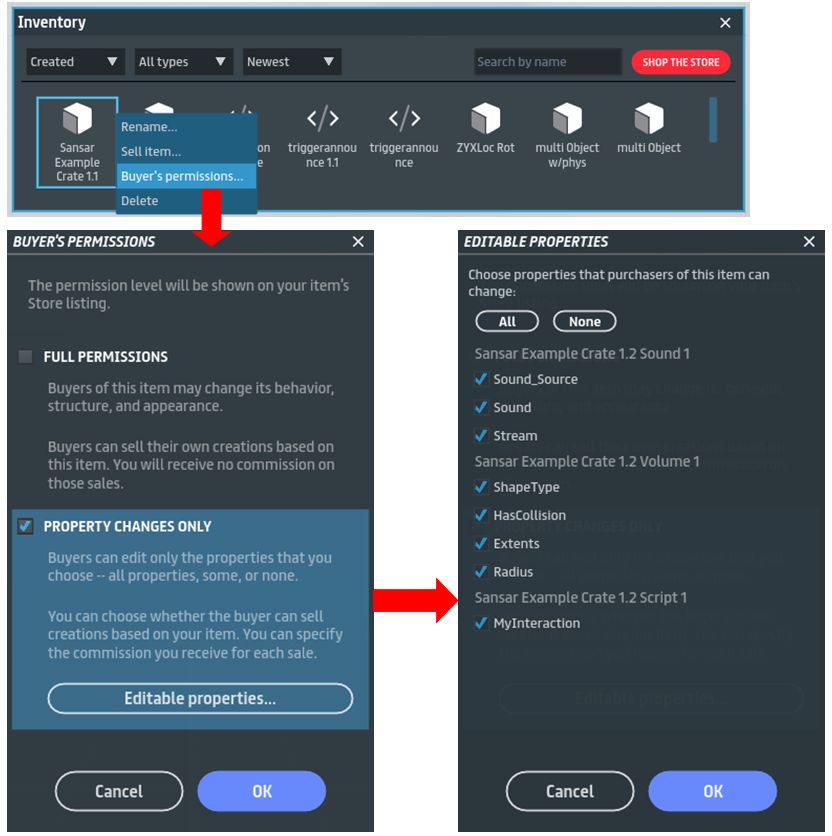
  • The Buyers Permissions: set by the creator of an object sold via the Store, these define what purchasers can change with the object when they have bought it.
Creators can now set permissions on the elements in their objects purchasers can change, or they can opt to offer then with full permissions. Credit: Linden Lab.

There are some important concepts around resale prices and buyer’s permissions, so please read the official documents linked to above – particularly the small print.

Additional Notes On Permissions

  • Save to Inventory: Objects with edited properties or with additional components can now be saved from a scene in Edit mode back to inventory.
    • With this release, it is still not possible to join two objects together.
    • Note: Legacy items created by other store sellers cannot be saved back to the inventory.
  • Licensing: Any item uploaded to Sansar or saved back to inventory will not contain a basic license with information of the avatar uploading / saving it. This is part of the mechanism to allow items to be resold and commissions paid.
  • Disable materials editing: it is no longer possible to change the materials of legacy items purchased prior to this release. For new items, materials editing can be enabled by giving full editing permissions or limit it by setting it to property changes only.

Store Integration

With the September 2018 R25 release, Linden Lab took the first step towards integrating the Sansar Store into the client. At that time, users could browse the store from within the client, but when wishing to purchase an item would be transferred to the web version of the Store in their browser to complete their purchase.

With this release, purchases can now be completed within the client.

With R26, it is possible to browse the Sansar Store within the Sansar client and complete purchases from within it as well

Continue reading “Sansar: R26 – the thumbs-up release”

Sansar: September R25 release

The new look Look Book, a small part of the Sansar September R25 release

On Monday, September 10th, Linden Lab issued Sansar release 25 (R25), entitled the Shop, Gift, & Spend Release. As the name suggests, the focus is on shopping and gifting Sansar dollars – although there is more to this release than commerce activities.

I provided an overview of some the new features on August 30th, 2018, based on information provided at a Sansar Product Meeting. This article looks at some of these features in more detail, as well as the other elements in the release. Note that as I do not own a VR headset, these reviews primarily focus on using Sansar in Desktop Mode.

The full release notes for R25 are available here.

Look Book / Avatar Updates

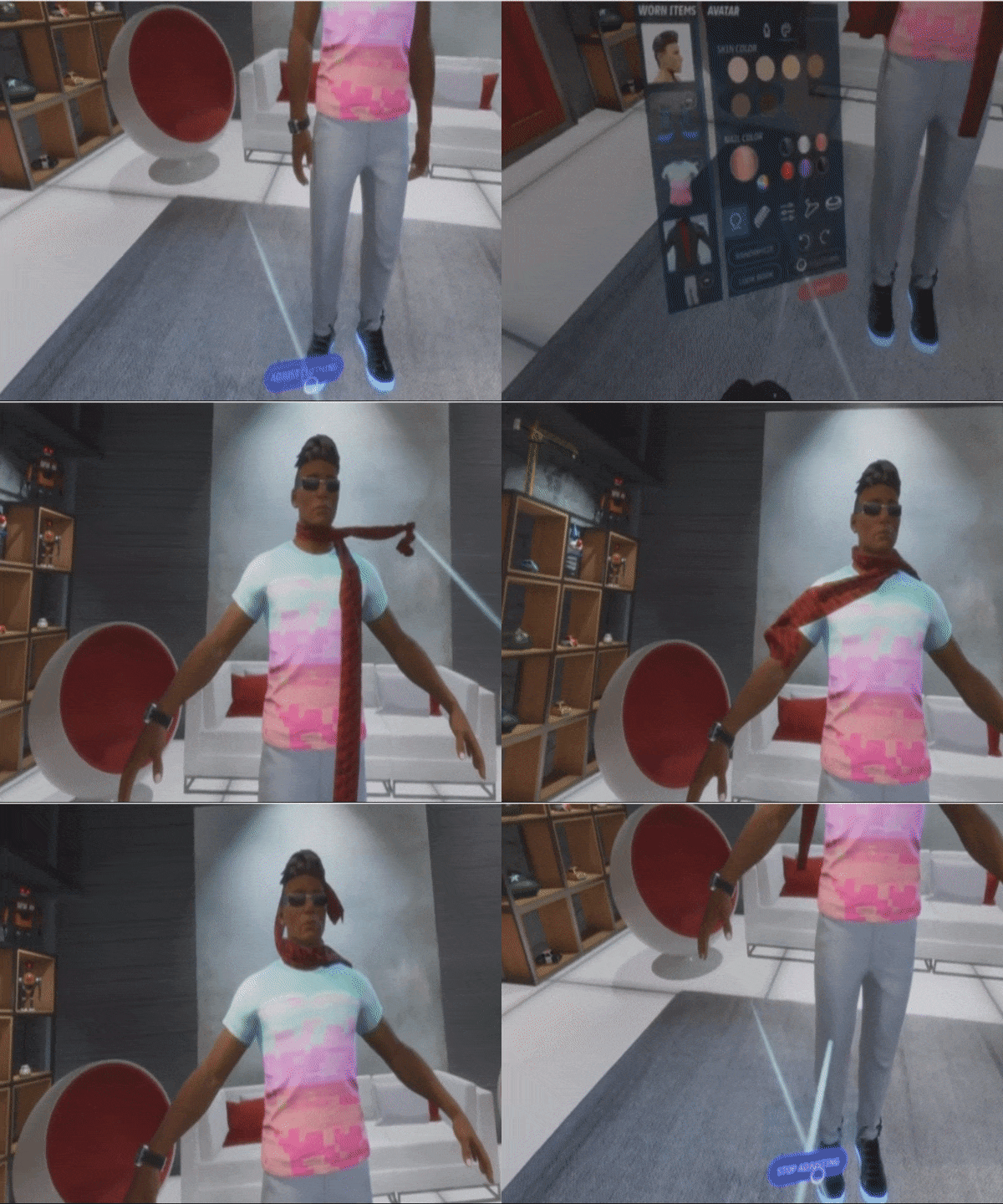
The first noticeable change with the release is with Look Book – which users will be delivered to the first time they log-in to Sansar following the update. A new background image has been added to the Look Book, replacing the blue screen (as shown in this article’s banner image). The background places your avatar into a living room style space, offering a cosier setting when adjusting your look.

In addition, VR users will no longer have to revert to Desktop mode in order to adjust their avatar in Look Book, bu can now do so whilst in VR, including making adjustments to clothing made using Marvelous Designer, as shown in the video below, courtesy of the Sansar team at Linden Lab.

Adjusting Marvelous Designer clothing in Look Book using VR. Footage courtesy of Linden Lab.

Additional Avatar Updates

  • Comfort Zone Changes:
    • The comfort zone now applies in first person desktop mode as well as to VR.
    • The Comfort Zone is now disabled by default to all incoming new users starting from this release. However, all pre-existing comfort zone settings will still persist.
    • Comfort zone options for Friends and non-Friends can be found by scrolling to the bottom of the Settings panel (More Options …  > Settings).
  • Teleport sound: A sound can be heard by everyone when someone teleports nearby.
  • New dance animations: type /dance3 or /dance4 for new dances.

Store Updates

The R25 updates sees two enhancements to the Sansar Store:

  • The ability to browse the Store from within the client.
  • A new shopping cart.

Browsing the Store in the Client

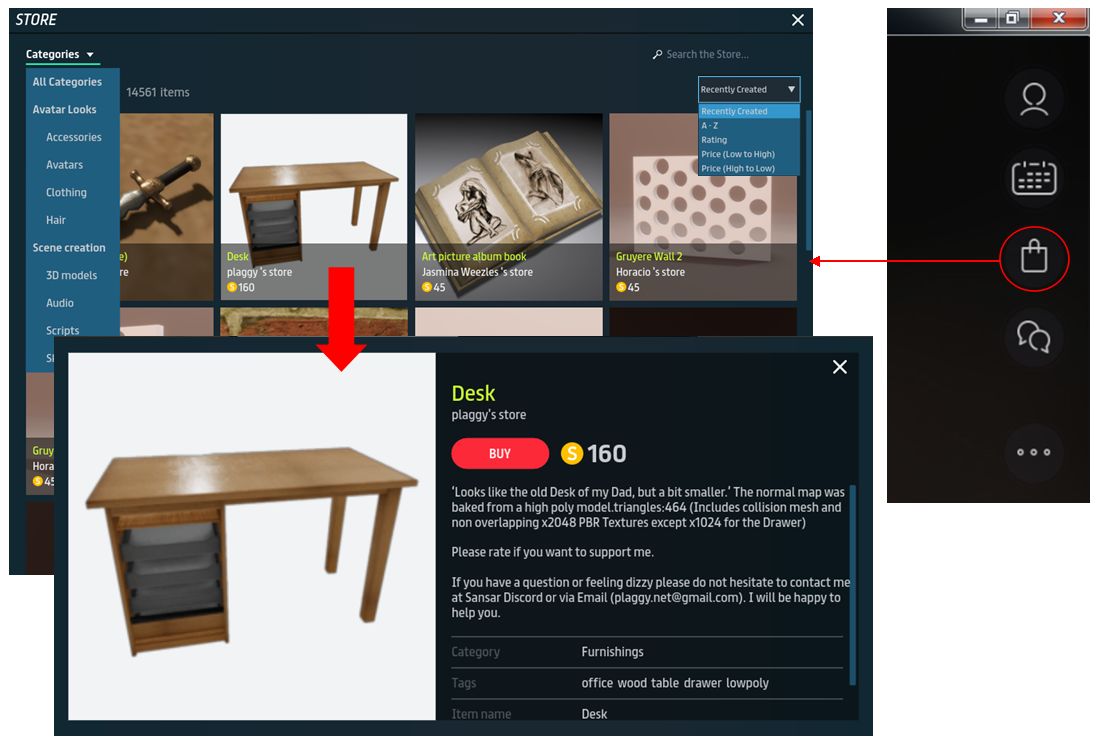
Accessed via the new shopping bag icon in the top right icon set of the client (show below, right), the store functions almost as it does within a web browser.

In desktop mode, once open, it is possible to scroll through item thumbnails, select categories via the drop-down, sort listings via drop-down (both of which are shown open in the image below), while clicking on an item will open the full listing in a pop-up panel (again shown below).

However, as it is not currently possible to make purchases via the client version of the store, clicking on the Buy button will take you to the Sansar Store web listing for the item, where a purchase can be made. The ability to make purchases through the client version of the store will hopefully be part of a future update.

Accessing the store through the client and viewing items (click on the thumbnail, as per the web version, to display a pop-up item listing). Purchases must be made through the web Store for now via an automatic transfer when clicking the Buy button

Shopping Cart

The Sansar Store shopping cart appears in the web version of the Store only at present, and is located in the top right corner of the browser tab. When empty, it is displayed as a plain white cart icon. However a small running total of items is displayed as items are added, as seen below, top right.

Items are added by viewing them and then clicking the Add To Cart button, which will change to Added To Cart when the item has been added (along with the item count icon in the shopping cart incrementing).

When items are in the cart, click it will display a drop-down list (again shown in the image below), allowing individual items to be removed or the entire cart emptied or for all items to be purchased and delivered to your inventory (assuming there are sufficient account funds on hand).

The shopping cart (icon top right). Items are added by clicking the Add to Cart button in a listing, which then changes to Added to Cart. Individual items can be removed using the X option alongside them. The Buy button will complete the purchase / delivery of all items, providing you have sufficient S$ on account

When using the shopping cart, note that at present item quantities in the cart cannot be adjusted.

Continue reading “Sansar: September R25 release”

2018 Sansar Product Meetings week #35: release R25 preview

Horizon Maze – that’s me, bottom centre, for a sense of scale – blog post

The following notes are taken from the Sansar Product Meeting held on Thursday, August 28th. These Product Meetings are open to anyone to attend, are a mix of voice (primarily) and text chat. Dates and times are currently floating, so check the Sansar Atlas events sections each week.

Attending this meeting were  Nyx, Derrick, Aleks, Torley and Ebbe. Unfortunately, I was AFK for part of the meeting, and while I was gone, my client disconnected from the meeting location, so I missed some 25 minutes of discussion.

Next Release

At the meeting, Cara confirmed that Permissions / Licensing will not be part of the next release (R25), due to some last-minute issues that need to be addressed. However, items slated to appear include (note this is a limited list, due to my being disconnected from the meeting whilst AFK):

Commerce

  • The initial release of the Sansar Store within the client.
    • The Client version of the store will allow items to be browsed. However, for purchasing, the user will be transferred from the client version of the Store to the web version in their browser.
    • The ability to purchase goods from within the client will be added in a future update.
  • A shopping cart capability in the Sansar Store on the web.
  • The gifting of Sansar Dollars to another avatar will be possible with the next release, although it is be subject to the 15% commission payment to LL – so a gift of S$100 from one avatar to another will in fact be S$115 for the avatar making the gift. The 15% commission charge serves a dual purpose:
    • It is in line with the Lab generating revenue through transactions.
    • More importantly, it prevents users avoiding paying any commission to the Lab by paying one another directly for goods and services.
    • Gifting of goods will be possible in a future release.

Events

  • The next release will allow custom images to be added to people’s events, rather than having to use the experience image.

General

  • A teleport sound will be added, allowing those within an experience to hear when someone has teleported.
  • Avatar-to-avatar collisions will be turned off. This should hopefully prevent narrow passages, doorways, etc., from being blocked by an avatar standing in / in front of a confined space.

Permissions / Licensing

Although it will not be part of the next release, Nyx provided more insight into the permissions that will be available when the system is deployed. These will comprise:

  • Permission for content to be resold, including how much money should be earned by the creator, whether the item is directly re-sold or used as a component within another creator’s item.
    • Included in this is the ability to specify what properties within an object can be further modified by a purchaser. This will allow purchasers to set properties within an object without the creator having to give up the right to earn from any re-sale of the object.
  • Full permissions on an item – essentially an open-source licence for the object and its contents to by used howsoever a buyer wishes, including claiming it as their own, so that no further income is earned by the original creator.
  • There is apparently one further permissions category to be added, and may follow the initial deployment of the permissions system when it happens. However, Nyx did not go into specifics on this.

CDN Asset Distribution

It is hoped that asset delivery for experiences will be moving to CDN (Content Delivery Network) distribution / delivery will be happening in the very near future. This means that rather than having all the data for an experience being delivered from the Amazon services, content assets could be delivered from a “local” CDN cache. It is the approach currently used for asset delivery within Second Life. It is hoped that this move will reduce the load times for those experiences that have had their assets previously cached within a “local” CDN node.

General Discussion

Store

  • There have been further requests for additional store categories (e.g. “Trees and plants”), with ideas being requested. The Lab fully intends to keep adding to the categories list as it become clear what is needed.
  • It has been requested that sub-categories are better surfaced. For example, being able to mouse over the Avatar category, and have the category list expand to show all of the avatar sub-categories, rather than have to go to the Avatar category list, then click for a drop-down of sub-categories. The Lab had been working on something similar to this, but the work was sidelined; it may be resumed.
  • Work is proceeding on making notifications visible to VR users, although this will not be in a forthcoming release.

Edit Server Issues

Some issues have arisen with the move to the Edit Server infrastructure. These include scene settings failing to persist, and scenes reporting as being saved when they have not. One issue with settings failing to persist is the sky being set to 0 – so everything is black when entering the scene in Edit mode. The way to fix this is to go to the scene settings and adjust the sky distance. The Lab has been trying to reproduce the issue with scene settings failing to persist, but so far have not been able to do so.

People having specific, repeated issues with scene settings can made a copy of the scene and contact the Lab, who will take the copy and run it on their test environment for further investigation.

In Brief

  • Support for Nvidia RTX: not currently being planned.
  • Improvements are being made to the Chat App, including quality of life improvements for viewing chat, and (hopefully) timestamps again chat items.
  • Support for custom avatar animations, including the ability to sell them, is planned for the R26 release.
  • Work is progressing on customisable controller options for VR handset – no release date as yet.
  • A virtual keyboard for VR users is also being developed, but not details on how it will work as yet.
  • Disabling capabilities in run-time: this has come up on a few occasions. There is concerns that if there is not a simple, direct way to inform users as to what is / is not permitted in an experience (e.g. having teleports allowed in one experience, but disabled in another), they could become confused when hopping between different experiences.
  • Cancelling an experience load: an option will be coming to allow users to abort loading an experience which is taking – for them – too long.
  • Consideration is being given to changing the Atlas in terms of how experiences are listed (is concurrency the best approach?). This may include providing categories under which experiences can be listed (e.e. Games, Educational, etc.), to make searching and listing experiences easier.

Sansar: August release and upcoming Edit Server

Scurry Landia

Thursday, July 16th saw the release of the Sansar Script, Snapshot and Share update. After the extensive updates in the July release, this is a more modest update, with a focus on what the Lab refers to a “quality of life” improvements – focusing on user-related capabilities, notably for creators.

This article highlights some of the more visible new features and updates with the release. As always, full details of the updates in the new release are available in the release notes.  In addition, these notes also include comments from the August 16th, 2018 Product Meeting, which preceded the release. Boden was attending the meeting, together with Aleks and Zaius. Their voices, along with that of Community Manager Eliot, can be heard in the audio extracts included below.

To jump directly to information on the upcoming Edit Server changes click here.

Events Improvements

This release follows in the footsteps of the web Events on the Sansar website, allowing you to add your events to your local Sansar calendar, which also has its own tab within the Events panel.

To make use of it:

  • Within the client, either while displaying the Atlas or within an experience, click on the Events calendar icon in the top right set of icons. This will open the Events panel (note: you can also get to the Events panel via the open Atlas and clicking Featured > View All Events).
  • The Events panel, which now comprises just two tabs: All Events and My Calendar (which replaces the My Events tab). To add an event to your Sansar calendar, click on the Add To Calendar button.
  • You Can then view all your recorded events (including those in the recent past) in the My Calendar tab. This actually lists:
    • Events you have created and are hosting, if you have created any.
    • Upcoming events you’ve added to your calendar (if any).
    • Those events you’ve recorded / attended in the past.
  • Listed upcoming / past events include a Remove From Calendar button, allowing your list to be managed.
The new option to add events to your Sansar calendar (ringed). Note that Featured events are no longer listed in a separate Events tab, but are highlighted within the main listing (arrowed). This was, IIRC, made in a prior release, but worth pointing out here in case someone missed  it

Events added to your Sansar calendar will also appear on the web version of the your calendar and vice-versa (a refresh of either will be required if both are open at the same time when adding / removing events from one or the other).

There is currently no ability to add events from the client to external calendars (Google, Apple, Outlook, Yahoo) as you can via the Sansar web site. This will hopefully be in a future update.

Snapshots to Profiles Update

It is now possible to save snapshots taken with the client to your Sansar web profile via a new button – Share. When you’ve positioned the camera and sized the capture area to your requirements, clicking the Share button will:

  • Save the image.
  • Upload it to your profile on the web.
  • Open a tab in your default web browser and display the snapshot.
With the August 2018 Sansar release, it is now possible to upload snapshots to your web profile, where they can be viewed by yourself and others

In the snapshot web page, it is possible to:

  • View all of your snapshots.
  • View all snapshots of the Experience featured in a given picture.
  • View the latest snapshots uploaded by anyone.
  • Delete the snapshot you are displaying (your own snapshots only).
  • Report a snapshot (only available when viewing snapshots uploaded by others).

The options are listed above an image when viewing them in your browser, and are arrowed in the image above. You can also obviously share the image URL if you wish.

You can view other people’s snapshots directly from their web profile. So, if you click on the name of an experience creator, or on the name of a friend in your Friends list, for example, you can view their snapshots alongside of their published experiences and current store listings (if they have any of either of the latter). Clicking on a snapshot will display it in its own page, with the options described above.

Side Notes on Snapshots to Profiles

  • Snapshots to profiles can currently only be viewed on the web, they cannot be seen when viewing profiles from within the client.
  • There is no ability to caption a snapshot with a description. This is intentional on part of the Lab, although it may be reconsidered in the future.
  • In the future, snapshots will be appended to the web pages for experiences as well, whether uploaded by the experience creator or anyone else (however, the experience creator will be able to moderate which snapshots remain displayed on their experience page.
    • This is why the ability to include descriptions in uploaded snapshots has been excluded; it is felt that there is too much risk of people leaving inappropriate descriptions with images, giving experience creators a moderation headache.
    • This option is ready to go, but will be turned on once the necessary moderation tools are in place for experience creators to manage snapshots shared to their experiences.
  • However, a future update to the capability will include the ability to tag snapshots, making them searchable.

Other snapshot items raised at the Product Meeting:

  • This update doesn’t change anything else within the snapshot app. However there have been requests put forward the Lab is considering:
    • Adding date and time to snapshots when captured.
    • Auto-generating sequential file names for snapshots taken in sequence, rather than each one having to be manually named.
    • Possible offering a broader range of saved file formats (e.g. TGA, JPG, etc).
  • One thing that is being considered is the option to take a series of snapshots and have them “held” during a session, allowing the user to then go through them and select which ones they want to actually upload to their profile and discard the rest.

Edit Mode Improvements

Scene Report Generation

It is now possible to export a .CSV breakdown (comma-separated values file that may be opened in a spreadsheet or text editor.) of every object in your scene. These reports comprise:

  • Name.
  • Size estimate for download.
  • Number of textures.
  • Number of triangles.

Reports are generated via Scene Toolbar > About This Scene > Generate Report > Set the destination location on your computer > Save.

Import Lighting from .FBX

This release allows creators to create point lighting (e.g. colour, intensity, animation) in their preferred editing tool and then import them directly into the scenes as .FBX files. Once in Sansar, the properties for these lights can still be edited  when the .FBX file is within a scene.

Additional Edit Mode Enhancements

  • Locking persistence: objects locked within a scene when editing will now remain locked between Edit mode sessions.
  • Scene objects panel enhancements: these comprise:
    • Rename a scene object’s name: the name fields for various scene objects have been removed from the properties panel, with the Rename option moved to the scene objects panel.
    • New object icons: there are new object icons attached to scene objects to help guide you in distinguishing items
  • Toggle visibility per object: it is now possible to toggle an object’s visibility in a scene.
  • Toggle selectability per object: the ability to select an object within a scene can now be disabled or enabled. This allows for easier selection of objects which may be layered behind others, etc (e.g. lighting within an object).
  • Trigger Volume filter: it is now possible to now filter by trigger volumes.

Scripting Updates

New Simple Scripts

Simple scripts were introduced in the August release with the aim of offering non-scripters the ability to achieve basic functions within their scenes (such as opening / closing doors, etc.), in an easy-to-understand and simple manner. The August release builds on this with three further simple scripts:

  • SimpleDispenser to rez objects.
    • Currently this does not include any form of parameter to allow spawned objects to decay, but does include the ability to remove the last or all spawned objects.
    • It includes the ability to cap how many items can be spawned in a given time.
    • Objects are spawned as the are imported into the script. So a dynamic object imported into the script will spawn as a dynamic object, for example.
  • SimpleMedia to change the streaming media
 – the Greenwall VR experience utilises the SimpleMedia script on their media board.
  • SimpleObjectReset to reset an object’s position.

Additionally, the SimpleCollision script has been revamped to better handle Trigger Volumes.

New Base Script Class: ObjectScript.

In anticipation of rezzable scripts (not yet enabled), this base class only has access to ScenePublic and a maximum of 10 parameters. SceneObjectScript scripts will not run on rezzed content; ObjectScript scripts can run on scene content or rezzable content.


Other Scripting Updates

  • Parameters limit for scene objects increased from 10 to 20 parameters.
  • ObjectPrivate.AddInteraction: an Interaction to an object dynamically. Used to add Interactions to rezzed objects or when it isn’t desired that the Interaction prompt be a script parameter.
  • Improved syntax for [DefaultValue] on vectors, quaternions and colours. These no longer need to be specially formatted strings, simply list 2 to 4 values: [DefaultValue(1.2, 3.4, 5.6)]
  • SimpleScript base class deprecated. Not to be confused with the new Simple Scripts. Scripts that use this base class will still compile with a warning. Support for new compiles will be disabled in a future release.

Store Categories

It is now possible to browse the Sansar Store using the two new top-level categories of Avatar Looks and Scene Creation, with the sub-categories defined accordingly.

New Edit Server

Due to appear in a point release between the August (R24) and September (R25) updates is the Edit Server release. This moves scene editing from within the Sansar Client (and local) to being server-based. It means that when editing a scene for the first time, there will be a delay in accessing Edit mode and the scene being edited as the Edit Server instance is spun-up.

The reason for this change is to pave the way for a range of new capabilities in Sansar, most notably in relation to the platform’s upcoming licensing / permissions / supply chain system.

Moving the Edit capabilities server-side allow the Lab to incorporate the ability to check the licenses associated with all of the objects within a scene and verify what can / cannot be done with them (e.g. is an object / script modifiable? Can it be incorporated into objects intended for sale? etc).

The initial benefit of this is that it will allow creators to build complex objects in a scene and then export them as a single object back to inventory (so a car is complete with its wheels, engine, seats, etc.), rather than these all being individual objects), allowing the composite object to be sold.

Additionally, this will enable the licensing / permissions / supply chain system of Sansar’s economy, so that duly licensed objects by other creators can be used within an individual’s own creations, which can then be saved to inventory and sold through the Sansar Store. The first elements of the licensing  / permissions / supply chain system is due to start deployment in upcoming releases following the switch to using the Edit Server. Beyond this, the move may in the future allow for things like creators being able to work collaboratively within the same scene.

2018 Sansar Product Meetings week #32: Edit mode

Channelling my inner Trekkie at the Roddenberry Nexusblog post

The following notes are taken from the Sansar Product Meeting held on Thursday, August 9th. These Product Meetings are open to anyone to attend, are a mix of voice (primarily) and text chat. Dates and times are currently floating, so check the Sansar Atlas events sections each week.

The primary topic of the meeting was Sansar’s Edit mode, with Regomatic, who is a part of the Edit Mode development team talking about what has recently been released for Edit Mode, future plans, and taking a Q&A.

Date of Next Release

The planned release date for the next Sansar update is Thursday, August 16th, 2018. However, it is entirely dependent upon Sansar’s schedule of public events for August – see below for more on this – which my cause the update deployment pushed back until later in the month.

Promoting Sansar

Not strictly a technical aspect of Sansar, however, the platform is spending time “on the road” and also raising its visibility among different global audiences.

  • On August 1st through 5th Sansar was at the Star Trek Las Vegas convention, where the Roddenberry Nexus was unveiled – see More Star Trek in Sansar: the Roddenberry Nexus for more.
  • On August 10th through 12th Sansar is at the Los Angeles edition of KCON, with the promise of “more exclusives” with regards to that.
  • A further e-sports “thing” is also in the offing for later in August. An earlier attempt at an e-sports link was pulled shortly after being announced. It’s not clear if this is a further attempt, or something else entirely.
  • A the same time, Sansar and Twitch are hosting “Twitch Streamer” days throughout August, with Twitch users being encouraged to drop into Sansar and explore.

Express Yourself Release Edit Mode Updates

The July Express Yourself update included a number of Edit mode updates:

  • Multiple Object Select / property application: The properties panel now works when multiple objects are selected, allowing the value of a property to be changed and applied across all selected objects.
  • Animated materials update: it is now possible to specify which textures in a material will be subject to the scrolling effect. This affects the following shaders:
    • Standard + Emissive + UV animation.
    • Standard + Alpha Mask – UV animation.
  • Standardise geometry option: by default, all objects uploaded into Sansar will go through an optimisation process that makes objects more efficient, foregoing the upload window optimisation process.
    • This can be disabled via a drop-down panel option.
    • The auto decimation will not apply to clothing or avatar attachments.
  • Object total triangle count: view the total triangle count of objects.
  • Real-time Gizmo updates: Position/rotation values update in real-time as the Gizmo is manipulated.
  • Fixes:
    • Rotation values no longer flip 180 degrees as you enter values
    • Scene settings no longer close the properties panel and vice versa; both can be displayed at the same time.

In addition to the above, the focus mode has been improved. Rather than just centring on an object when pressing F, it will now zoom the camera to the object. If two objects are selected and focus is used, the system will find a balance so that both are visible after zooming.

Upcoming Edit Mode Updates

August Update

  • Per-object settings: this should be a part of the August release, this will allow visibility to be toggled on individual objects within a specified type. So, rather than only being able to toggle visible for all audio materials, it will be possible to toggle it for an individual audio object. The state set for each object will persist between sessions. States will be indicated by “eyeball” icons.
  • Improved selectability of objects: it is currently different to select an object in Edit mode when it is “stacked” with others. The August release should improve this be adding a “selectability” icon / option. When set, it will make objects either selectable or cause them to be ignored when attempting to select others groups with them. Again, the individual states of objects will be indicated by a cursor icon, and will persist between sessions.
  • Container naming and renaming objects: the August release will include friendlier names for container, and the ability to rename anything in the scene objects list, rather than having to go through the Properties panel. Names can be up to 64 characters.
  • Analytics improvements:
    • The diagnostics ribbon in Edit mode is to be enhanced to include number of textures and the estimated download size, as well as the number of triangles.
    • There will be a new report option that will give a breakdown of all object in a scene and the amount of space they take up.
    • In addition, it has been requested that the analytics include the number of draws it takes to render an object, as high draw counts can often be a performance issue.

September Update

  • Folder support for scene objects: allowing objects to be placed together in folder, and allow entire folders to be selected and pulled into a scene, the ability to see the combined properties, etc.
    • Once scene object folders have been deployed, inventory folders will be coming as a future update.
    • Folder names will have a maximum length of 64 characters.

Still to be Prioritised for Future Release

  • Arrays for scripts: ability to use arrays rather than hard-coded parameters (e.g. an array to allow a user to pick a sound, rather than having to hard-code “sound 1”, “sound 2”, “sound 3”, etc.).
  • Locking improvements: currently, locking a container does not necessarily lock all of its children. In a future release  this will be revised such that it does.
  • Inventory folders: these are being worked on, and discussion are being had on the use of folders and the possible use of saving search categories / grouping by category to go with folders.

General Q&A

Scene / Experience Management Requests

  • Disabling capabilities in run-time: there are so types of experience that would benefit from having some run-time capabilities such as free camera movement or teleporting disabled in the Runtime mode (e.g. blocking the ability for someone to avoid traps in a game by teleporting past them, or using the free cam to cheat their way around a maze). These could be done via the scene settings, and Regomatic is going to look into it.
    • It was noted that if abilities to disable user-facing options are added to Sansar. then the ability to inform users as to what has been disabled (voice, teleport, freecamming, etc.), either before or when they enter the experience.
  • Search capabilities for scene objects: name, object type, etc. Possibly inclusion of thumbnail images of objects within the scene list to allow for visual recognition of objects, particular where multiple objects might have similar names (“Rock A”, “Rock B”, etc.).
  • Image size standardisation: currently, multiple image sizes and formats are required for items – one size saved within inventory, a different image size for the store, etc., requiring multiple image uploads. Automatic re-use of a single uploaded image would be preferable, and the Lab is looking into this.

Continue reading “2018 Sansar Product Meetings week #32: Edit mode”