Last week I reviewed the Linden Realms game – and found it oddly compulsive (up until I completed the first three quests – I understand more are to be added). Shortly thereafter came a comment from Lani Global pointing towards a game she’d developed in OSGrid which bears a strong similarity to the LR game.
As I have an OSGrid account, I decided to go over, don a suitably sci-fi-ish outfit (the game is an a sci-fi rp region) and have a look.
I did actually have trouble finding the game the first two visits – I found the crystals OK, but couldn’t find a way to interact with them or any sign of a game HUD. In fairness, the HUD was there – I just didn’t recognise it as such at the time, as it appears to be for a combat system as well. Also, hovertext pointers appear to have been added since my initial visits to help point the way to the game – or at least, I don’t remember seeing them the first times I entered the pyramid and went downstairs.
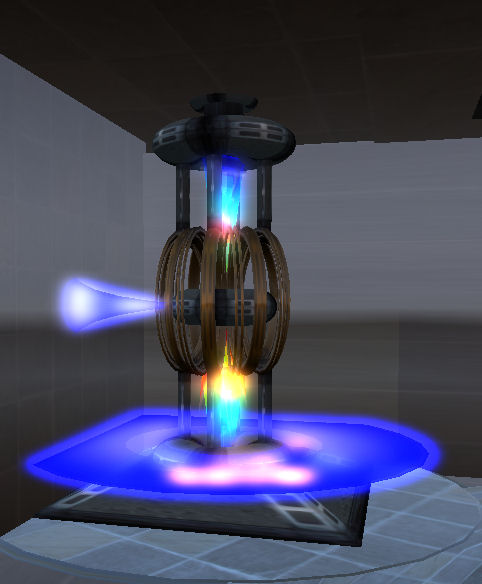
Power source: the start of the quest
Anyway, with HUD and health metre safely installed, off I went into the bowels of the pyramid to start my quest.
The first part of this is to locate the main power source. Here you are given your first task: locate a red crystal, together with a hint on where to find it.
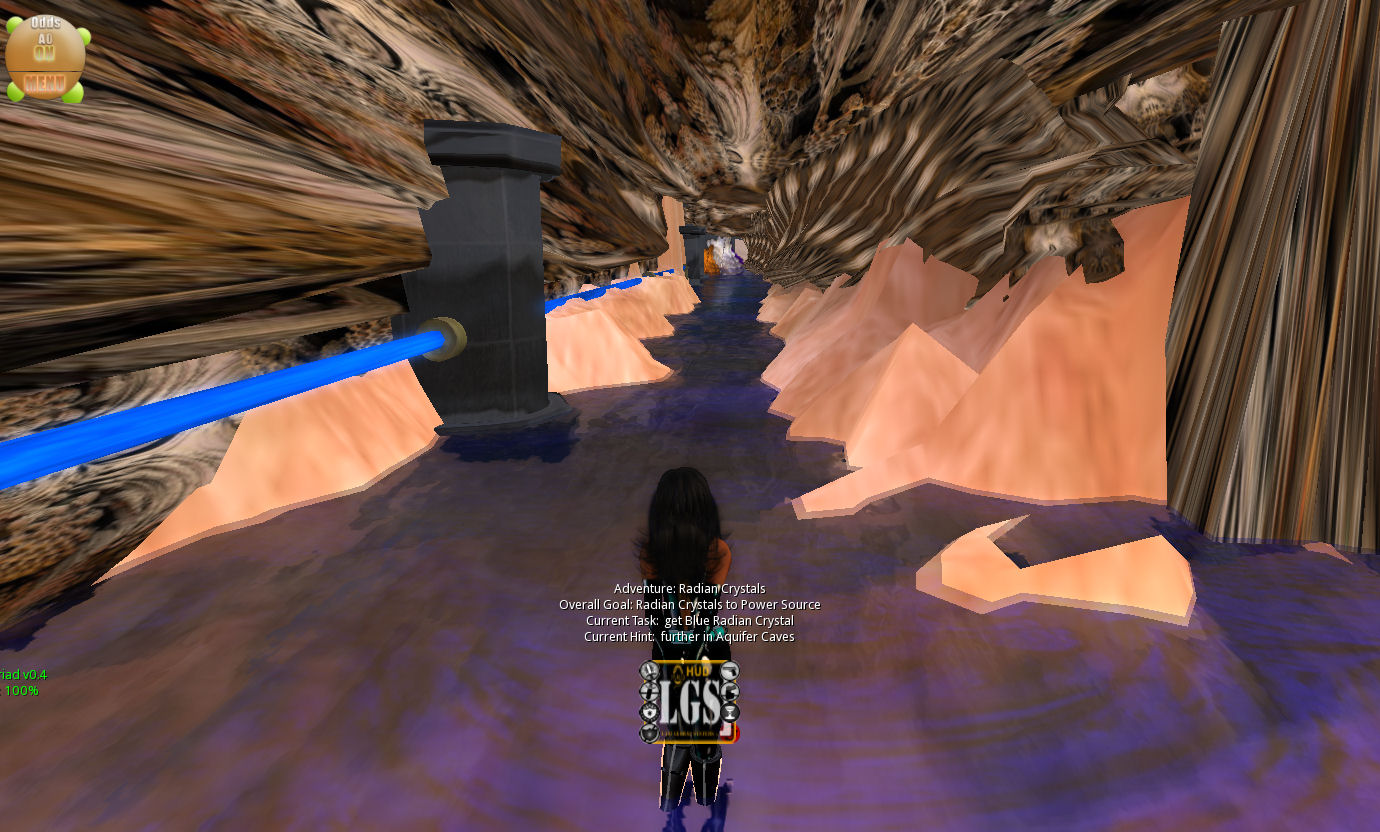
From here, you’re off into the caves and hunting crystals and trying to avoid things that can do Nasty Things to you – when you encounter one, you’ll be teleported back to the start of the game.
Once you have collected all your required crystals as instructed, then it’s back to the start to complete your quest, ready to receive a rather nice little award I was unable to rez due to the sim being a no-rez environment, but did manage to see in a couple of images elsewhere.
It all sounds very familiar, doesn’t it? Find your start point, locate crystals, avoid nasty things, forced teleports and so on. So have LL copied Lani’s idea?
I’d have to say “no”. Crystal quest games have been around in varying forms since the 1980s. The formats may change, the hazards may change; some may take place in space, others on the ground; the key however, is that it is hardly an original idea. As such, similarities are bound to emerge. What’s more, the dynamics of OSGrid and SL – their respective mechanics and capabilities – will tend to lead to a good chance of there being strong areas of commonality between any such games in both that are based on the same principles and with the same aims in mind.
Game environment
Lani herself has recognised this since first posting on my blog – she’s written a thoughtful and open post on the SLU forums on the matter of both games. Given the way the rumour mill churns across SL and the metaverse, kudos to her for doing so clearly and concisely.
Opinion on Comparing the Games
Lani’s OSGrid game functions well and offers a nice diversion although there are a couple of things I didn’t get. I’m not sure why I furnished with a sword I didn’t appear to be able to use (none of the HUD buttons appeared to do anything other than allowing me to sheath or draw it) & I found the HUD icons hard to read without resizing it – which could be a reflection of my eyesight, now another birthday has passed as much as anything else! Overll, completing the quest is far less frenetic than the LR game, although it’s clear that the option to extend it a little more is there, should Lani so wish.
If you do come to it having played the LR game, then the OSGrid game is clearly at a disadvantage in terms of expectations – and this is hardly surprising. A lot of work has gone into the LR game to make it as intuitive as possible (no need to wear the HUD, no need to physically touch the crystals (just run through them), etc. BUT this has been achieved only because LL have the luxury of being able to tweak the server-side environment to suit their needs. Lani doesn’t have the same luxury, and has to work within the confines of what is available to her; at the end of the day, there is only so much you can do with LSL scripting. As such, what has been developed is very credible and shouldn’t be judged simply through a comparison with the Linden Realms game.
All told, everything worked well for me once I started out on things, although the game didn’t take that long to play overall. This again shouldn’t be seen as a disadvantage, it simply makes the game a nice little fun diversion when visiting the region. All I would advise is that you don’t randomly click the HUD icons – if you click RESET you’ll have to start over on the game back at the power source!
If you are using OSGrid, why not try-out Lani’s game (OSurl) for yourself.
Last week saw the US Army’s MOSES virtual environment, operated by the Simulation & Training Technology Center (STTC), out of Florida, undergo a major upgrade.
During Wednesday and Thursday the 26th & 27th October, the MOSES system was offline to enable the environment to be migrated to a new server platform and network with the capability to support thousands of regions.
Prior to the upgrade, participants in MOSES were advised to create full OAR backups of their estates as an additional safeguard against mishaps in the migration process. Users were also informed that post-migration, all of their landmarks would need to be deleted and replaced, as the MOSES world centre had been relocated to allow for future hypergridding activities.
The migration also gave the STTC the opportunity to re-arrange MOSES into a series of sub-continents focused on the larger projects hosted on the system, with individual regions within the sub-continents renamed by either estate or project name. The sub-continents themselves remained connected to one another by means of water sims and open spaces, in order to continue to present MOSES as a single continuous mass of land and water.
In the lead-up to the migration, the STTC monitored two regions on the MOSES grid in an attempt to broadly determine resource use in an attempt to help determine baseline requirements within the new hardware set-up. Commenting on this monitoring, Douglas Maxwell, Science and Technology Manager for Virtual World Strategic Applications at the STTC commented:
“We have been observing 2 sims that have roughly the same amount of prims (10,000). Testing has revealed these heavier sims requires at least 50% of a processor and 1Gb of ram to support a meeting of 20 people.
“The current processors are 4-5 years old, so we will need to conduct virtual machine testing on the new cluster to determine how to allocate CPU resources. However, the memory needs should be consistent. We will be allocating a minimum of 8Gb to each virtual machine giving us a theoretical prim allocation of 40,000 prims to each sim. These calculations are very rough as they don’t take into account texture sizes and script activity.”
The older hardware appears to have been dual-core HP servers supporting approximately 120 regions running on 60 CPU cores.These older servers are still used within the new set-up, but are now restricted to providing open water and spaces connecting sub-continents. The new servers average 8-core servers with 64Gb of memory and 80 GB hard drives.
While MOSES was back online on Friday 28th October, the migration work was continuing, with the expectation it would take a few days to complete. However, as of Friday 28th, users were being invited to log back into the system to attend the weekly MOSES Office Hours and try-out the new sims as they became available.
MOSES is still accepting new accounts from suitable parties. These are obtained via the MOSES website, and are vetted by Douglas Maxwell for suitability. While priority is obviously given to military projects, proposals don’t have to be within the military arena in order to gain access to the system.
There are a number of points to consider when applying to use the environment:
MOSES is a professional environment, and everyone is expected to maintain decorum. There are no casual users
MOSES is a research and development environment, not an operations environment, and as such, subject to software and hardware upgrades that may disrupt use
Full region backups from MOSES to local hard drives is fully supported. As Douglas Maxwell puts it, “What you put on MOSES, you own free and clear.”
On Saturday 8th October, OpenSim core developer Justin Clark-Casey announced the release of OpenSimulator 0.7.2. This includes – among other things – support for mesh uploads that matches Second Life’s capability and which can be utilised using the official Second Life Viewer.
OpenSim has in fact had compatible mesh capabilities – albeit with limitations – to Second Life since the day after Linden Lab launched the SL Mesh Beta a year ago, thanks to the work of Teravus Ovares, Latif Khalifa and Intel’s John Hurliman. However, until now, the capability has been limited, but 0.7.2 makes it available as a full release – although the upload capability and the release itself are both tagged as “experimental”.
Mesh uploads on OpenSim 0.7.2 (model by Timmi Allen, SL mesh beta)
Nor is it the only new feature. Commenting on the release, Clark-Casey stated on his blog, “Despite having a minor point release number, it actually contains a very large number of features and fixes, including experimental support for the mesh upload seen in the latest Linden Lab version 3 viewers, Hypergrid support for friends, lures, landmarks and instant messages, NPC functions, prim and agent limits on regions”.
NPCs: New opportunities
The NPC functionality is also something Linden Lab are moving towards. It has actually been under development for a while within OpenSim, thanks to the intervention of UK-based Daden Limited. As Maria Korolov reported at the time in Hypergrid Business, Daden offered a small bounty to fund the capability.
Interestingly, the pay-to-develop route is something that has now come to Second Life, with Maxwell Graf’s project to have a basic parametric deformer developed for mesh clothing – although this project is going the public funding route through indegogo.com (and it should also benefit OpenSim once completed).
NPCs have a wide range of applications, from training scenarios through to providing background characters for role-play environments. Daden were particularly interested in the former, hence their willingness to sponsor the development of the capability within OpenSim.
Crista Lopez
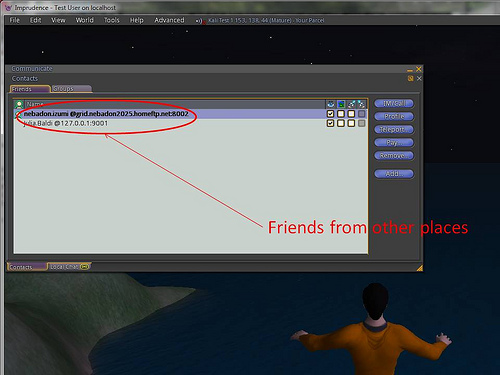
The additional Hypergrid functionality – friends, lures, landmarks and instant messages – is similarly marked as “experimental”, but adds important new functionality to the capabilities of OpenSim. These will make travelling between grids in the Hypergrid environment more personal – allowing friendships to be made, landmarks to be stored and shared, etc. People on different grids will even be able to IM one another.
This capability has been under development by Crista Lopez, who is both a Hypergrid core developer and an Associate professor of Informatics at UCI, and who first blogged about the work in May of this year.
Hypergrid instant messaging (image with thanks to Crista lopez)
The abilities to both make friends across grids – additional checks are included in the process to prevent unscrupulous spamming of offers – and to IM across grids are liable to be warmly welcomed by OpenSim / Hypergrid community around the globe.
The release also brings a range of other features, improvements and fixes to the OpenSim environment, as specified in the full release notes.
Note: the MOSS environment appears to have been discontinued.
On Friday 23rd September, Non-profit Commons (NPC) hosted a presentation by Douglas Maxwell, Science and Technology Manager for Virtual World Strategic Applications at the U.S. Army Simulation & Training Technology Centre (STTC), who was speaking at Plush Non-profit Commons in Second Life.
He was there to specifically discuss MOSES – the Military Open Simulator Enterprise Strategy – although his talk broadened to covered other aspects of the STTC’s work.
MOSES is a project aimed at evaluating the use of OpenSim as a means of providing a virtual world-based simulations and research environment available for use by relevant parties both within and without the U.S. Department of Defense. It grew directly out of the STTC’s involvement with the Second Life Enterprise product.
STTC
Currently overseen by Colonel Craig G. Langhauser, the STTC – Full name, the SFC Paul Ray Smith Simulations Training and Technology Centre, in memory of posthumous Medal of Honour recipient Sergeant First Class Paul Ray Smith, killed in 2003 during Operation Iraqi Freedom – was officially founded in 2002, with a heritage stretching back over the last two decades related to the use of simulator-based training technologies. Located in Orlando, Florida, the unit’s stated mission is to: Enhance Warfighter readiness through research and development of applied simulation technologies for learning, training, testing and mission rehearsal.
As the Science and Technology Manager at STTC, Douglas Maxwell (SL name: Maccus McCullough) is no stranger to the use of computer simulations, having started out in the mid-1990s, when he was hired by the US Navy as a civilian specialist to work in their Virtual Reality labs in Washington DC. It was there that he realised people were becoming more immersed in simulations, “It isn’t logical to duck when a virtual object is flying at you, but they did,” he explained to the audience at the presentation.
“It told me they had made the mental leap from reality into the virtual environment we created. So I started looking at gaming technologies,” he continued. “[And then] a wonderful thing happened in the late 90’s. Nvidia released the first commercially available and cost-effective PC based 3D graphics accelerators. We no longer needed a $750k SGI computer to do 3D tasks.”
This led Maxwell to write a paper how PC clusters could be used for simulation work at a much lower cost than that associated with high-end, dedicated systems, while also offering the same flexibility of use in creating and modifying scenarios. A paper which didn’t win him a popularity award, as he noted wryly to the audience, “I got some hate mail for that one!”.
Virtual Worlds and 3D Games
In 2008 Maxwell and his team started investigating virtual world environments as possible platforms for research, looking at OpenSim and Second Life. They immediately drawn to what they found in SL. “It is a computationally steerable persistent simulation,” Maxwell explained to his audience. “The capabilities in here are tremendous: in-situ scripting, terrain deformation in real-time, every object is composable, not static. We got the idea that if we could increase the fidelity of the physics in here, it could actually be very useful”.
As a result of these explorations, Maxwell engaged with Linden Lab to address issues of security and data integrity for simulations, the company steering Maxwell’s team towards the Second Life Enterprise product. Simultaneously, he established the 12-sim Naval Underwater Warfare Centre campus within Second Life itself – used more as a promotional tool than for simulation work.
Alongside of this, Maxwell and his team brought the source code rights to an entire commercial 3D gaming system which they used to develop EDGE-P – the Enhanced Dynamic Geosocial Environment Platform – an advanced virtual environment used to provide real-world operational environment training.
EDGE enables personnel from different locations to be brought together and trained in a wide range of scenarios, including homeland security and preparation for overseas posting. During his NPC presentation, Maxwell invited his audience to watch footage from an EDGE simulation held in September 2011, in which troops in one location were put through and immersive contact scenario with members of an Afghan village (represented by native language speakers located in other US Army bases). Observer / trainers were able to monitor proceedings from other centres, and provide exercise objectives and feedback for the participants.
The use of SLE covered a similar field of study, with the product being used to create aspects of the Afghanistan terrain for training and simulations study. Of particular interest to the team was a mix of the platform’s content creation capability and the ability to deform and model the terrain to suit their requirements combined with the fact that virtual worlds are entirely non-deterministic, or as Maxwell put it, “We set the goals, not the makers of the virtual world”.
When Linden Lab announced in May 2010 that they were pulling the plug on SLE, Maxwell faced a problem. Considerable time, effort and money had been put into developing a wide range of content and data using the SLE platform which he didn’t want his team to lose. As a result, he found himself once again looking at OpenSim – and receiving another surprise. “It had matured significantly since 2008. It was more stable, feature rich [and] even allowed for *gasp* backups!”
MOSES
MOSES (with thanks to Sitearm Madonna)
Thus was born MOSES – the Military Open Simulator Enterprise Strategy – with the aim of evaluating whether OpenSim could in fact meet and exceed the capabilities originally being developed within the SLE product, with the goal of providing a persistent and stable virtual world incorporating VOIP, base content, mesh, media on a prim, and monitoring tools.
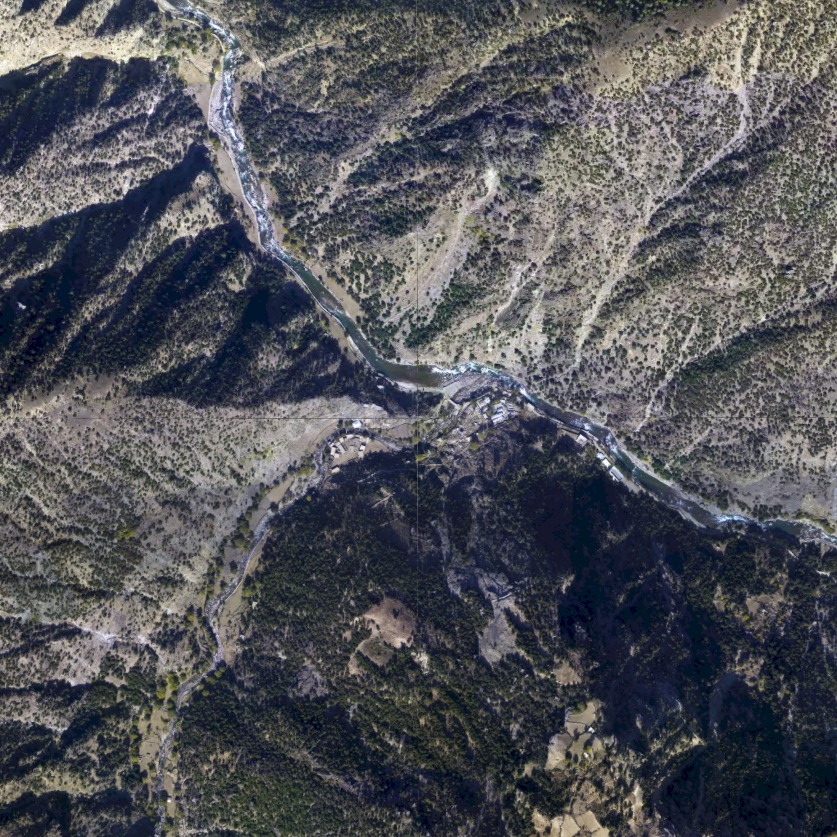
Afghanistan terrain image (w/ thanks to Sitearm Madonna)
MOSES currently comprises some 117 regions running on standard OpenSim software and HP servers. Additionally, the team brought on-line assets from The University of Central Florida’s STOKES High Performance Computing Centre, which allow them to run Intel’s Distributed Scene Graph (DSG). This in turn allows them to tun up to 1,000 avatars on super regions. The environment had its official début at the U.S. Defence GameTech Users’ Conference, held in March 2011.
MOSES initially hosted the content originally created in SLE (safely exported prior to the licences expiring), which included some 36 regions modelling terrain common to Afghanistan. However, it quickly grew far beyond that. Some 18 regions have been assigned for use by the US Air Force and at least four for use by the US Navy. Nor does it end there.
This is because MOSES isn’t restricted to purely military uses. Indeed, unlike SLE, rather than sitting behind a hyper-secure firewall, it’s sitting on the open Internet. Maxwell cites two reasons for this.
The first is purely practical for the project: “MOSES is on the public Internet … to allow us all to expand, more efficiently, best practices in using Open Simulator and 3D Web virtual environments,” he said, talking to Sitearm Madonna about the work.
Safe Haven
The second reason is a little more philanthropic: Maxwell saw a need to offer a safe haven for others in the same situation he’d found his team in with the loss of SLE.
Reproducing the terrain in SLE / MOSES (highlighted) (with thanks to Sitearm Madonna)
“I knew of many users in the military, industry and academia who were in the same dilemma as myself – how do we preserve the content?” he explained to his NPC audience. Thus, MOSES provided a way for other groups and organisations to migrate their work.
To date, over 100 non-military accounts have been established on MOSES, either as a result of migration from SLE or because of individual requests for access to the platform. Regions have been supplied to research groups, organisations, and some private companies, some of which also have Estate Manager rights to the regions they use. “The academics really like it,” Maxwell observed, “As it provides a safe environment for their students.”
Nevertheless, on the open Internet it might be, but MOSES has security measures in place that equate to around 75% of the security achieved on the SLE platform, increasing its attractiveness to those engaged in research and development. It is certainly not for the hobbyist, as Maxwell made clear. “MOSES is a professional environment, and everyone is expected to maintain decorum. There are no casual users.”
Accounts can be obtained by visiting the MOSES website and registering interest. All requests are vetted by Maxwell himself in order to discover the level of interest, type of proposed use on the grid, and so on. While priority is obviously given to military projects, proposals don’t have to be within the military arena in order to gain access to the system. “If you’re developing or evolving some cool new kind of technology, like bots, for example, that would be clearly relevant to the MOSES mission,” Maxwell informed Sitearm.
While the STTC provide a dedicated Viewer (based on Imprudence) pre-set to point directly to MOSES, any TPV can actually be used to access the system once a request for use has been approved. To help with communications and to provide updates and information, Maxwell has adopted the LL approach of holding weekly in-world Office Hours meetings. These take place every Friday at 15:00 EDT, and he encourages those using the platform to attend; “The weekly office hours are a great way to meet open simulator developers and our team. We usually have 20-ish in attendance”.
There are some key points to remember when applying for access to MOSES, as Maxwell stated to Sitearm: “What you put on MOSES, you own free and clear,” he stated unequivocably. “We have also enabled full sim backups from your MOSES regions to your own organisation’s hard drives.”
He also added, “It’s important to remember [that] MOSES is a research and development environment, not an operations environment. We will keep upgrading the platform, for example, as we learn new improvements in using OpenSim”.
Certainly, as a dedicated research environment enjoying the benefits of controlled access, MOSES offers significant attractions to those carrying out virtual world related research and study. The project itself stands, as Maxwell himself commented when talking with Sitearm Madonna, “As carrying on the tradition of military research contributing to the public good”.
Those wishing to learn more about MOSES can contact Douglas Maxwell via the MOSES website or via e-mail at: douglas.b.maxwell-at-us.army.mil.
Last month I reported on a new virtual environment being created by Wemomedia, called The Blu. The Blu presents itself as project that brings together digital media, social networking and collaborative workspaces into a global shared creative space. Neville Spitieri, co-founder of WemoMedia, the company behind The Blu, describes it thus:
“The Blu is a global mission to create the ocean on the world-wide web. It’s an interactive world where every species and habitat is a unique work of art created by digital artists and developers from all over the world.”
Which sounds very exciting, and the project certainly seems to have the support for various visual effects luminaries and digital artists. Given my fascination with ocean exploration, it was enough to pique my curiosity and get me to register for the Beta. Today I received an invitation to register The Blu and start exploring.
Registration is very straightforward, requiring the usual – name, username, e-mail, password. For the Beta at least, there is no e-mail verification process, and once you’ve completed the registration process you can log-in to the main website.
Your Home Page
The Blu home page
This is pretty straightforward, comprising your current status, access to your profile page and credit standing (you get 100 Blu Credits to start) right at the top of the page. Beneath this is a simple menu bar:
Home is your personal home page (the one you’re on)
The Blu launches the virtual world itself in a separate browser window
My Collection takes you to a page listing the various species you have collected in-world or purchased
The Store take you to the online store where you’re able to purchase species
Community take you to a list of The Blu Users – clicking on a name / icon here take you to their Home page, where you can connect with them, or become a Friend / Fan.
Beneath this is a map of the currently available “spheres” you can explore, with your home location indicated by a star. As I’m in the UK, my home sphere is Europe, landscaped as an undersea cliff environment.
The lower section of the page is split into two. Your Event Stream is on the left – what you and anyone you are connected to has been up to (fish collected / purchased, messages posted, etc.) – think Twitter page / Facebook Wall. The right side features various other elements – including the opportunity to become a Maker for The Blu. When your Home page is viewed by others, the Event Stream moves to this side of the page, and the species you have collected appear on the left side.
Entering The Blu
Clicking The Blu from the menu bar, or clicking on DIVE next to your Home page map launches a separate Viewer window and loads the Unity 3D Viewer (the first time you run The Blu, it will prompt you to download the Viewer, which installs seamlessly with your Viewer. Here is where things get interesting / confusing.
Music greets you as the Viewer completes loading and you slip gently beneath the waves to arrive at your default environment. The question then becomes, “OK, so what the bloody hell do I do now I’m here?”
The short answer is – explore!
Moving the mouse cursor around the Viewer window will allow a limited amount of camera movement – so pointing over to the left side of the window will cause the camera to pan left, etc., and there’s no need to press any key. Note that in some views, the camera will proceed on its own, and you can make only minor adjustments to your course.
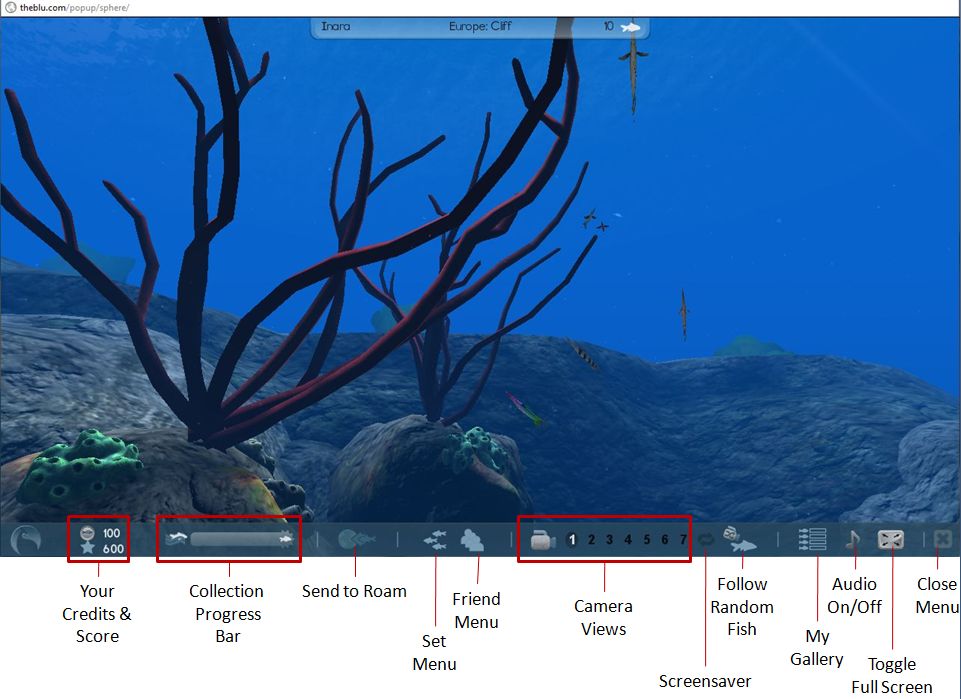
Hover the mouse at the bottom of the screen and a toolbar will fade-in (above). You can change the camera view of your location by clicking one of the 7 pre-set camera positions. In some of these you will see fish, sponges, anemone, etc. Clicking on any of the latter will display two floaters – one providing a brief description of the plant / item, the other details of the item’s creator, with a link to view their profile.
Clicking on a fish for the first time will display a floater asking you to collect the remaining fish in the “collection” to which the one you clicked belongs, and will open an additional Information Bar under the toolbar, listing the fish you need to find to collect the set. If you close this bar, the collection progress bar in the main toolbar will activate, indicating your progress in locating and clicking on fish.
Clicking on a fish you’ve already collected will bring up the two information floaters for the fish and its creator. You can view the creator’s profile in summary in the Information Bar when you click on Viewer Maker’s Profile, and you can ask to be a fan / make contact with them / view their web page.
Fishes in a set you have yet to collect generally show-up in one or other camera views, and tend to have a luminescent glow around them – an audio tone will also sound when a fish from the set you’ve yet to collect enters your sphere. Alternatively, rather than use the camera controls to hunt down fish, you can use the FOLLOW RANDOM FISH button, and see where you end up.
Collecting a set
When you have collected a full set, each fish in the set gets a cameo appearance on-screen, and you can then elect to move on to collecting your next set – or if there are no remaining sets, you can click on a fish and then use the SEND TO ROAM button to select another ocean sphere. The fish will then take you there in a manner similar to (but far smoother than) an SL teleport minus the progress bar. Once you have arrived at a new location, you can start collecting more fish – with everything you collect appearing on your Event Stream and each fish you#ve collected appearing on your My Collection webpage.
Buying Fish
Fish can also be purchased using your credits. This can be done one of three ways:
When collecting them in the Viewer – click on the shopping trolley for a fish in the set display (see image above)
By going to your My Collection webpage
By visiting The Blu’s store.
In the case of the latter two – use the links in the menu bar of your Home page to display the relevant webpage. Both will display the available fish as icons. Hovering the mouse over a fish brings up additional options (see right) including price, a purchase button and a link to the species’ web page. Alternatively, you can double-click on a fish to go directly to the species’ webpage, which also has a purchase button.
A word of warning here: if you click on the shopping trolley within the Viewer, or any purchase button in a webpage, that’s it – you’ve bought the fish. There is no confirmatory pop-up warning prior to completing a purchase. Instead, you are given the options to continue browsing or “dive in” to the Viewer window once more. The lack of any form of confirmatory pop-up is, I feel, an oversight – I was forced to buy a fish while simply checking-out what options are displayed during a purchase; people “clicking to see” may equally find this a little annoying.
Should you run out of Credits, you can purchase more via your Home page. They come in packs ranging from 20 for $3 USD through to 1700 for $100 USD. Fish themselves range in price from 20 Credits upwards; how they are priced (by the user or the vetting team and / or based on some scale related to size / complexity) is unclear.
Species’ Webpages
The species’ webpage for a fish allows you to read-up on the fish (click on the + under the fish name area on the page), and also see how many variants on the species have been created for The Blu (click on the + below Variants to expand the bar) and you can display each of the available variants by clicking on each of them in the drop-down bar.
Species information expanded in the species webpage
You can additionally mark a fish as a “favourite” and /or leave a comment about it for others to read when they visit the page.
Playlists
You can also use the fish you collect to create your own “playlists” – these appear to be screensaver-like movies that feature the fish you have collected and placed into an ocean sphere of your choice.
Playlists are created using the MY GALLERY button on the Viewer toolbar, with opens up the Playlist display.
Clicking on the NEW button in the display allows you to create and name a playlist, select the ocean sphere you wish to use, and then select the fish you wish to add to the playlist. Clicking on SAVE saves the playlist, which is then displayed in the playlist area. Double-clicking on a playlist will cause it to play in the Viewer window until the window itself is clicked, and you are returned to the “main” ocean, and can resume your search for more fish.
Creating Content
Creating content requires you re-log into the site (without signing-out first) by clicking on the BECOME A MAKER button on your Home page. This takes you back to the login screen where you use the same username / password combination to log-in to the Maker platform and get delivered to your Maker Home page.
Maker home page
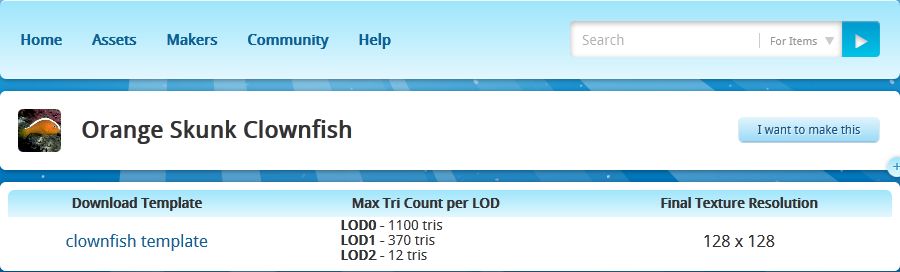
Here you can review existing assets (creations), select a species you want to create, request permission to create an entirely new species, etc. Clicking on a species brings up the template page, which allows you to download any available template you can use to create the fish in question, and provides LOD (Level of Detail) and texturing information. Templates are in Autodesk .FBX format. I’m no 3D modelling expert, so am unsure as to how well this sits with the likes of Blender and Wings3D in terms of pulling the template into the application for use, although it obviously works with high-end applications.
Template and information for creating a species / variant
.FBX is also the file format for uploading a species for review / acceptance for use in The Blu. Makers of accepted species / variants get paid each time a copy of the species is sold.
Thoughts and Feedback
Currently, The Blu is a bit of a curate’s egg – at least from a user’s perspective. When all is said and done, there is little to do but splash around various ocean scenes and collect fish – but even this is mildly addictive.Once you’ve started gathering a set of fish, there is something oddly compelling about having to get all the fish in the set – and then move on to the next set. Or maybe it’s just me developing a virtual form of OCD! Either way, it’s engaging – but I’m not entirely sure exactly how engaging, or shake the feeling that the novelty will wear off sooner rather than later.
Graphics-wise The Blu is crisp and sharp. Being made up of mesh creations, it is streets ahead of Second Life in many respects – but then, it is an entirely different environment when it comes to content creation (the environments are pre-designed and all fish and other species are vetted prior to being added to the system). It might also be a promise of what is to come, to some degree, within the likes of SL as mesh creations become more widespread.
The Viewer itself is very functionally smooth and the animations are for the most part very realistic and movement is superb. Some of the larger fish occasionally exhibit odd “folding” motions if you happen to catch them from certain camera positions, but on the whole the visual experience is quite immersive.
The Blu: a typical scene
The Viewer appears to suggest there will be more on offer as things develop – what is the purpose in having points, for example? Why have undersea “flora” clickable? Is it simply to provide information about the item and its maker, or will there be more in time? The lack of any clear information on the main website both adds to the desire to dive in and try things – but is also maddingly frustrating in some areas – the above being cases in point.
Something I have found disappointing lay in the information presented within the Viewer when clicking on a fish: generally a couple of lines (written by the maker?) which tend not to reveal that much. To get any detailed information on the species, one has to swap over to one Home page, then look the fish up via the My Collection or Store pages, call-up the species’ webpage and then expand the information drop-down. This tends to ruin any semblance of an immersive experience. While one doesn’t want the Viewer unduly cluttered-up, it would be better of the species information could be displayed when clicking on the fish itself.
It would also be nice to see more information on the various habitats and environments under the sea as well. Maybe this is on the cards for the future.
As a social medium, The Blu is currently lacking the ability to – well, socialize. There is the Event Stream, there are options to make friends / become a fan / connect (not entirely clear on what the differences are and no explanation given) – but no real means of directly interacting with other people. There is no clear way of exchanging messages openly or in private, etc. Again, there is every possibility that this is coming – but it seems odd that some greater ability to interact with others is lacking even at this stage, given The Blu’s stated goals.
You may touch a fish that “belongs” to someone else during your travels. When this happens you have the opportunity to Connect to them if you are not already friends, or you can use their fish to roam to another ocean sphere, etc.
I’m not sure how popular The Blu is going to be among the general populace. As a collaborative project, it holds possibilities for digital artists, but more needs to be done on the communications side of things to allow greater interaction between Makers. Similarly, more needs to be built into the system to sustain the interest of the “casual” user. Frankly, it is hard to see why people will want to buy the fish available. While artists may understand the appeal of supporting one another, the greater population probably isn’t – to be brutally honest – really that interested. There simply isn’t anything (at present) that compels someone to collect and then buy the fish on offer – you can’t do anything further with them once purchased, for example. This needs to be addressed in some way, I would venture to suggest, if doing so is not already on the cards.
For a Beta, an novel experiment. It’s going to be interesting to see how this develops.
Running throughout September, the Inworldz Homes and Residences exhibition covers four sims within InWorldz and provides some 42 exhibits to explore on foot or in the air. The exhibition offers InWorldz residents the chance to take a look as homes, pools, garden items and furniture from some of the grid’s top creators.
The Homes and Residences sims
The setting is somewhat rural in styling, with exhibitor plots neatly laid out in plenty of greenery, while the central area where the four sims meet incorporates a grid system of roads and foot paths.
Each exhibition plot has a large sign out front for displaying the creator’s logo / image, and which includes a giver for both the creator’s notecard and a landmark to their main store / sim.
A typical display
You can wander around the sims, or fly on your own or – in a marvellously refined option – take a hot air balloon around each of the sims, with up to three fellow passengers. The balloons can be flown, rather than running on a scripted route, with PAGE UP / DOWN controlling height, and the ARROW keys controlling direction. You can even get a glass of champers to enjoy during your flight. When you’re done, simply STAND UP and the balloon with auto-return to its start-point, leaving you free to roam on foot.
Drifting over the exhibition
There is a slight caveat to taking a balloon, however, Currently, InWorldz doesn’t support scripted objects crossing sim boundaries Twhich might or might not still apply when you visit. During my preview visit (September 1st,) the balloons were scripted to stop at sim boundaries. An explanatory notecard stated this was to do with issues with scripted objects crossing sim boundaries. As you can see from the comments at the end of this piece, this is apparently no longer the case, but the balloons within the exhibition sims had not be updated with revised scripts, etc. Hopefully, this will be corrected now it has been noted.
There are a few “special” landmarks to visit as well, including a live events stage and dance area, and the Bates Motel of Psycho fame (once a common find within Second Life many years ago, and thus something of a memory-jogger).
Sim crossing may be an issue with scripted objects, but they don’t present any problem when on foot. InWorldz has some of the smoothest sim crossings I’ve encountered, and this was certainly true wandering around the exhibition.
The exhibits themselves demonstrate a range of styles and approaches, from “traditional” house designs through to the more esoteric – tree houses, etc., – and the futuristic.
A more futuristic build
Overall the exhibition presents a good opportunity for InWorldz content creators to showcase their wares, and for residents to take a look at what is on offer and gain landmarks to stores to check-out more. The balloon rides are a pleasant experience, and there are some well thought-out plots in the sims that encourage exploration.
 Last week saw the US Army’s











 Inara Pey: Living in a Modemworld