Kitely: faster worlds, transfer stations and more

Over the course of the last month, Kitely, the on-demand virtual world service, has continued to refine their megaregion offering introduced at the start of August, improving their OpenSim performance in the process. They’ve also announced an upcoming feature called “Transfer stations”.

Traditionally, working with megaregions is limited in some ways due to the viewer code being geared towards handling regions which are 256×256 metres in size. Editing terrain textures, for example, is something which usually cannot be done when working on a megaregion. While megaregion mode can be disabled to allow work to be carried out on a per-region basis, it can also lead to problems: landmarks can stop working, in-world objects may show at the correct location, etc.

Kitely have solved this problem by introducing an Advanced Megaregion option, which works relatively seamlessly with the viewer. When a world owner / manager using a megaregion attempts to carry out an operation such as changing the terrain settings, a pop-up is displayed advising them that the operation cannot be performed with the world running in Advanced Megaregion mode. A link on the pop-up allows the world owner to switch to their browser and disable the Advanced Megaregion  option via their Manage World webpage. This then allows them to work on the world as if it were a series of individual regions. Once terrain work has finished, the Advanced Megaregion mode can be turned on once more.

The Advanced Megaregion also allows parcel media to be heard right across a megaregion (rather than being limited to the south-west corner region).

“Oren, We Need Warp Speed!”

As well as working on megaregions, Kitely has been optimising the OpenSim code running on their cloud-based servers. In the same blog post announcing the Advanced Megaregions, Oren Hurvitz, Kitely’s co-founder and VP of R&D describes the improvements thus:

We have made numerous improvements to OpenSim to make big worlds work faster on Kitely. These changes reduce OpenSim’s CPU usage up to 80%! This makes the user experience smoother and allows for the use of more complex worlds and more avatars than regular OpenSim. The following chart shows how much we reduced CPU usage compared to regular OpenSim. These tests were done on a world running in its own server, with one avatar in the world.

Kitely CPU server optimisation (courtesy Kitely)

This optimisation allows Advanced Megaregions on Kitely to run up to 5% faster than regular megaregions.

Transfer Stations

Transfer Stations are an upcoming Kitely feature. They are described as, “Miniature worlds that users wait in while their world is being loaded.” The blog post announcing them goes on:

Kitely is a cloud-based virtual world provider, so when a user tries to enter a world that is currently offline we need to start the world first. This is fairly quick, but not instantaneous. Currently users look at a progress bar on our website while the world is being started, and once the world is ready their viewer is automatically launched. Transfer Stations are going to change this: when a user tries to enter an offline world their viewer will start immediately, but they will enter a Transfer Station instead of the desired world. Once the world is ready the user will be teleported to it automatically.

The Transfer Stations will be located on dedicated worlds specifically set-up for them, and could, in the case where more than one user is logging-in to the same offline world, allow people to meet and chat while awaiting their destination to load (not that the wait should in any way be extensive!).

To encourage the development of Transfer Stations, Kitely are inviting world owners to submit themed Transfer Station designs of their own, which other world owners and managers will then be able to pick from when setting-up a Transfer Station on their world(s).

Kitely Transfer Station conceptual drawing (courtesy Kitely)

There are certain requirements which must be met for Transfer Station submissions, and these can be found in the Kitely blog post. Reviews of submissions, which will be performed by the Kitely Mentor’s Group, will commence on October 1st.

New Avatars

On September 21st, Kitely updated their default avatars with a range of seven new avatars, using modified assets based on ones provided by designer Linda Kellie. The avatars are available to new users signing-up to Kitely, and the assets are currently also available at in-world Linda Kellie malls for those who wish to use them as their base model.

Kitely’s new default avatars (image courtesy of Kitely) – click to enlarge

Related Links

Kitely goes mega

I’m a little late getting to this, as I’ve been swimming through a lot of SL-related stuff and other bits, so apologies to Oren and Ilan. 

On the 17th August, Kitely announced the addition of high performance big worlds and world pictures to their on-demand service.

Public World Page Images

Taking the second of the new additions first, Kitely users can now add an image of their world(s) to the Public Worlds listing. Previously, the Public Worlds list was just that – a text list of all worlds in Kitely available for public access. The use of images makes the list more visually appealing and gives those browsing the list a glimpse of the world prior to clicking on the image to access the region’s World Page.

Adding a Public Worlds image via the Manage World Advanced tab

Pictures can be set in one of two places – the World Page, and in the Advanced tab of the Manage World dialogue box. Submitted pictures are automatically resized to fit the available space on upload.

The Public Worlds page has been redesigned to support the new images,  with world images being displayed 12 to a page, with the world name below the image with the world owner’s name. Those worlds that have not yet had an image uploaded for the page will show the Kitely logo, and will generally be listed after all those that have an uploaded image available.

The updated Public Worlds page layout, with my own region in the list 🙂

Big Worlds

Following-on from the promise in the last update, Kitely have implemented their “big world” feature. This allows large, high-performance worlds to be created which can be up to 16 regions in size (i.e. 4 regions x 4 regions). In addition to the 16-region world, big worlds are also offered in four region (2×2) and nine region (3×3) sizes.

The free worlds offered within the Silver and Gold subscription plans can be used to create  various mixes of big worlds and standard regions, according to the user’s requirements. For example: a Silver plan might be used to create 10 individual regions, or two 2×2 big worlds and two “standard” individual regions or a 3×3 big world and single individual region, etc.

However, the size of a world can only be set when it is created, and cannot be changed afterwards. Therefore, single region worlds already created in Kitely cannot be converted to big worlds, regardless of the remaining quota of free regions in a silver or gold plan (e.g. if a user has 3 regions left in their free quota, they cannot combine them with an existing single-region world to create a 2×2 big world).

Additional worlds beyond a plan’s quota can be purchased using Kitely Credits (KC) at the rate of 10KC per region per day. So a 4-region (2×2) big world would cost 1200KC a month (4 regions x 10KC x 30 days), or as little at $4 a month when purchasing Kitely Credits at the maximum discounted rate. The costs of copying, exporting, and replacing big worlds are also dependent on the number of regions in the world. For example, copying a 4-region world will cost 40 KC (10KC per region).

Additional points of note about big worlds:

  • Big worlds have a “root region”, which is always the region in the South-west corner of the world
  • Big worlds have a “default region”, which is initially the root region (SW corner region) of the world, where incoming visitors arrive
    • This can be altered through the use of a tele hub, which can be placed in any region in the world, making it the default for incoming visitors
    • Deleting the telehub will not alter the updated default region
    • Moving the default region does not change the location of the root region
  • There is a limit of 100,000 prims for a world, regardless of the number of regions it contains.  How the total allocation is distributed among the regions within a big world is up to the world owner, but the total of 100,000 prims cannot be exceeded
  • When running in megaregion mode (see below), region crossings are completely eliminated
  • Vivox works seamlessly across all regions in a big world.

By default, Kitely’s big worlds use the OpenSim megaregion mode, wherein multiple regions have been merged into one contiguous region. This eliminates region crossings within a big world and all the dependent issues around them for building, vehicle movement, etc., and provides a much smoother overall performance.

However, Megaregions are an experimental feature so some OpenSim features don’t work properly (e.g. parcel audio only works in the root region). Kitely therefore allows big worlds to be run as either megaregions or non-megaregions; a check-box is provided in the Advanced Tab of the Manage World dialogue box to switch any inactive world (i.e. a world not currently running on a Kitely server) between the two modes.

Kitely have also added a new world template to help in the creation of big worlds. This is the Universal Campus, a 2×2 region build created by Michael Emory Cerquoni (a.k.a. Nebadon Izumi), and licensed under the Creative Commons Attribution-ShareAlike licence.

To support the safe archiving of big world builds, Kitely have extended to the OpenSim Archive (OAR) file format to support the saving of a multi-region world as a single OAR file. Currently, the file format cannot be used to export builds elsewhere, but the code has been submitted for inclusion in standard OpenSim, and once adopted by OpenSim, will allow the exchange of multi-region OAR files between Kitely and other grids (with limitations to protect 3rd party content), although pre-existing multi-region OAR files may require replacing should the file format change as a result of adoption by OpenSim.

In the meantime, Ilan Tochner, Kitely’s CEO has offered a workaround for people to import their own multi-region builds to Kitely ahead of the new file format being adopted.

Related Links

Kitely restructures subscriptions, payment options and more

July 17th. Kitely has today announced extensive pricing restructuring which has come about in part as a result of requests from users asking that they be able to spend more time in-world rather than receiving additional Kitely Credits (KCs).

New Subscription Options

Under the new subscription system, monthly KC awards are abolished and in-world times revised. This means the basic Bronze level subscription now provides 30 hours in-world per month (up from 25 under the old system of combining free minutes and awarded KCs), with the Silver plan now providing 120 hours in-world, up from the 100 hours offered under the old minutes + KCs model. With both Bronze and Silver plans, the number of supplied regions remains unchanged (two and 10 respectively).

The old Kitely subscription model (top) and the new (bottom)

The biggest changes are at the top end of the subscription model, with the Platinum plan being completely abolished and the Gold plan reduced in price from $50 a month to $35 a month. Gold does also sees a reduction in the number of offered regions (down from 30 to 20), but Gold plan users now get unlimited time in-world.

The new subscription plan comes into effect for Bronze and Silver subscribers from August 1st, 2012. Gold and Platinum subscribers have the option of continuing with their old plans if they wish, or swapping to the new system.

There is also a small change to the free plan: new users signing-up to this now receive six hours of free in-world time during the month in which they create their account. After this (i,e, at the start of the next month), their free usage reverts to 2 hours a month.

Further pricing Updates

In addition to this:

  • The costs for setting-up and/or storing additional regions (over and above the free allocation of regions within each subscription plan) has now been increased. The one-off cost of establishing an additional world increases from 1KC to 10KC, while  the cost of storing a region similarly rises from 1KC to 10KC per day
  • Users can now buy up to $500 USD of KCs at any one time (up from a maximum of  $50 USD in a single purchase), options rising in $100 USD increments from $100 onwards
  • It is now possible to pay for a subscription plan using Kitely Credits as well as PayPal at the start of each month. Three options are available:
    • Via PayPal: as per the current system
    • Via PayPal, or Kitely Credits whenever possible: providing your account has sufficient Kitely Credits, payment will be made via KCs at a rate of 300 KC per $1. Otherwise, your PayPal account will be billed
    • Using KCs only: this option is only recommended for those who purchase large amounts of Kitely Credits and / or who prefer not to use PayPal for their subscription payments. If there are insufficient KCs in an account when payment is due, the plan risks cancellation (a warning e-mail will be sent out in advance of cancellation).
Setting your preferred subscription payment option

Setting a Price for Visiting Region

Until now, users have only been able to decide whether they pay Kitely for the time others spend visiting their worlds (effectively making the region “free” for visitors), or whether they pass the charge onto visitors. In either case the rate was 1 KC per minute a visitor spent visiting a region.

These options continue unchanged, but as from July 17th, users are able to charge visitors directly for the time they spend in a region; KCs earned can then be used towards subscription plan payments, for example (subject to the notes above). Further, the new functionality allows region holders to pay others for the time they spend visiting the region.

Pricing can be defined in terms of group access and is calculated on the basis of minutes spent visiting the world.

Changing options for visitors to a region

This approach offers a tremendous flexibility of use, including:

  • The ability to charge different amounts on the basis of the group a visitor is in. For example, a RPG region could charge one rate for all members of the associated RPG group and a slightly higher rate for people visiting the region out of curiosity
  • The ability to automatically pay others for visiting your world – the blog post uses the example of paying performers for their time performing in a region
  • The ability to initially have a region set, for example, to free access ahead of an event (allowing people to come and sample it), and then turn on the additional pricing as the event is about to start; users are then presented with an pop-up dialogue asking them to confirm their willingness to pay or to be disconnected from the region if they do not
  • Payment options can be mixed within a single region, so it is possible to charge visitors for their time in the region while also paying performers.

All charges applied to a region are in addition to the basic rate of 1KC per minute. Furthermore, Kitely charge a 10% commission on all Kitely Credits that are earned using these monetization options (i.e. so if you charge 10KC per minute to visitors, you will receive 9KC; if you pay a performer 10KC a minute, they will receive 9KC). This commission  does not apply to any of the other ways users can transfer KC to one another.

Related Links

Kitely: KCs now virtual currency; web messaging added

The last few weeks have seen Kitely roll out further features to enhance their on-demand virtual world service.

Today, June 10th, the company has announced that Kitely Credits have become a full virtual currency and that web messaging is now a part of the Kitely service.

Kitely Credits as currency

You can now use your Kitely Credits (KC) in-world. This finally makes it possible to sell goods and pay for goods and services in-world. Your current KC balance is shown in your Viewer  – although note that some Viewers may show the balance as “L$” rather than “KC”. Additionally, all of your KC transactions will appear in the History tab on your Kitely account web page, and some transactions can be clicked to get more information such as the name of the item that you bought or sold.

Note that KCs cannot be purchased through the Viewer. This is because the BUY button is hard-coded for the purchase of Linden Dollars. Please continue to use the website to purchase your Kitely Credits.

This is just the first step in Kitely developing KCs, and further features will be added in the coming weeks, including the ability to earn them through charging people to access your world and the ability to pay your monthly payment plan using KCs. Anti-fraud mechanisms will also be rolled out, which will allow in-world ATMs to be created and used (although Kitely recommend ATMs are not implemented by users until the anti-fraud controls are in place).

Web Messaging

The web messaging capability enables Kitely users to contact one another through the website. Wherever a user’s name appears in the website (i.e. on the history page for a world, in the Public Worlds list, etc., you can right-click on the name to display a pop-up menu, which will contain an option to Send Message. Click on this to open a message pad.

Simply type your message into the pad and click on Send. The recipient will get your message the next time they log-in to Kitely, if they are not already logged-in. If they are logged-in at the time you send the message, they will receive it as an Instant Message in-world.

Updates to Group Policy

There have also been a few changes to the Kitely Group Policy:

  • It now costs 100 KC to create a group.
  • Users can join a maximum of 100 groups (note that some viewer may only display a maximum of 42 Groups, but the limit is 100)
  • You must add at least one other member to a group when creating it in addition to yourself. Any group with less than two members will be automatically deleted two days after creation

Note that existing groups were grandfathered in: they didn’t incur the new charge of 100 KC, and have not been deleted if they have only one member.

Finally, there have been a number of additional improvements and tweaks – including the Kitely plugin now supporting the Teapot browser.

In May, the company added the ability to intelligently replace world contents and an automatic disconnect for idle users.

Replace World

The replace world function allows the contents of an existing world to be updated with a new OAR file, retaining some of the settings associated with the world, rather than overwriting them. In particular, the world’s URL remains the same and all Facebook likes and Twitter tweets associated with it are kept. In addition:

  • All of the settings in the Manage World dialogue, e.g. the world’s description and its access controls.
  • Where possible, all parcel settings will be retained. This is handled by the OAR upload process comparing parcel names in the world with those in the OAR file; where the names are the same, the existing settings for the parcel are retained, rather than being replaced by settings in the OAR file. This affects the parcel’s flags (e.g., “No Build”), and the parcel’s permissions: which group it belongs to; which users can enter it; etc.

The Replace World feature is located in the Files tab of the Manage World dialogue (previously called Edit World – note that the Export World feature has also been moved to this tab).

Disconnect idle users

The disconnect idle users helps to ensure you do not remain unduly connected to Kitely (and using either time or Kitely Credits) when real life takes you away from your computer for extended periods and you haven’t logged out. This feature can be used to both ensure you are logged out from Kitely should this happen, and can be used to remove avatars that have been “parked” (i.e. left unattended for extended periods) on your worlds.

Idle avatars can be disconnected automatically after 30 minutes of inactivity in one of two ways:

  • To ensure your own avatar is automatically disconnected: go to your account settings page and ensure Disconnect from worlds when idle is checked (under the General section)
  • To ensure other avatars are automatically disconnected from your own worlds: go to Manage World, then click on the Access tab and make sure Disconnect idle visitors is checked

Kitely adds more features

Kitely, the on-demand grid, and effectively my second virtual world home, today adds several new features that increase the grid’s appeal and capabilities.

Profiles

Kitely now has full profile capabilities, allowing you to supply information on yourself and your interests, set picks, and so on, a-la other grid-based VWs.

Profiles now available in Kitely

Groups

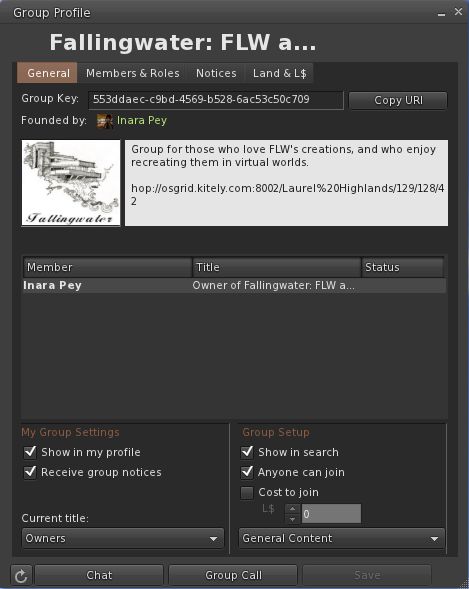
Groups are now also featured within Kitely, with all the capabilities you’d expect: Group chat / IMs, Notices, Roles, etc. Kitely follows the OpenSim standard for Groups, so I’m unclear on what the upper number of allowable Groups per avatar is (42 being the maximum number a person can join in Second Life).

Doubtless Ilan or Oren will drop by and overcome my ignorance in this :). Creating and participating in Groups follows the usual process, but if you’re new to the whole thing, the Kitely blog post provides a link to some instructions.

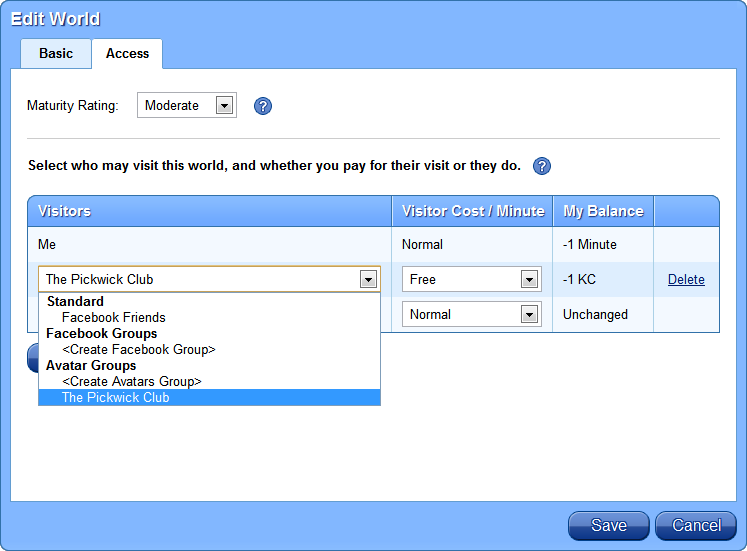
The arrival of Groups also adds further granularity to controlling who can access your world(s) in Kitely. Until now, the levels of access have been based on Facebook and / or Twitter. However, you can now additionally define access in terms of the Groups you create / join, again using the through the Settings for each of your Worlds.

Setting Avatar Group access to worlds (Credit: Kitely Ltd)

Kitely offers significant flexibility here, as you can assign access to multiple Group of which you are a member / you create, including defining how the time Group members spend in your world is paid for.

Security and Other Updates

Alongside these updates, Kitely has also:

  • Implemented off-line messaging for the receipt of IMs while not in-world
  • Updated world security settings so that only the world manager to build in them. “Pushing” is also now disabled by default. Worlds can still be opened for anyone to build, but the recommended practice is to enable build rights via a trusted Group
  • OAR export format has been updated to save a world’s telehub, if one is set.

Finally, this update also sees an optional (but recommended) update to the Kitely web browser plug-in. You’ll be prompter to update (if you haven’t done so) when you click ENTER WORLD from any World Page.

Related Links

Kitely rolls to OpenSim 0.7.3.1, offers NPCs and more

Kitely, the on-demand grid powered by the Amazon cloud continues to develop a-pace. Today, Oren Hurvitz, co-founder of Kitely has announced a significant update, which includes the roll-out of OpenSim 0.7.3.1.

As well as the OpenSim upgrade, the update includes some significant updates in functionality:

  • Mono upgraded to version 2.10.8.1
  • More OSSL functions have been enabled so that now most functions with a threat level of Low are now supported by default, while functions with a higher threat rating being available to World Managers, including osTeleportAgent (allowing “walk-through” teleports) and osKickAvatar, which have been on the request list from World Managers. The post notes that some of the more dangerous functions remain disabled for everyone
  • OSSL sun position bug fix, so that visitors to a world will now see it as the World Manager / owner intended
  • Server-side Windlight support is now enabled
  • Non-player Character (NPC) support has been enabled.
The update also includes an avatar walk fix, which will be contributed back to the OS community.

All-in-all a great update for the platform, and I’m certainly looking forward to getting the time to play with the Windlight capabilities :).

Related Links