
An inside look at Get the Freight Out in Second Life

Get the Freight Out (GTFO) is a popular in-world game among many vehicle users. HUD-based, it allows players to “haul” cargo from by land, sea or air, point-to-point across the mainland continents of Second life, and over their connected waterways and seas (e.g. Blake Sea). In doing so, players can earn in-game (and non-redeemable) “Goal dollars” – G$ and game experience points which allow them to “level up” through GTFO.

Since its launch, the game has grown to encompass, at the time of writing, over 280 different land, sea and air vehicles, and has over 300 “hubs”- the points at which players use to collect / deliver their cargoes – scattered around the Mainland continents of the grid, presenting players with multiple opportunities for collecting and delivering cargoes, with more being added all the time.

In fact, such is the popularity of the game that many vehicle creators are offering suitable vehicles with GTFO support out-of-the-box; no need to convert them for game use, all that’s needed is the game HUD. There’s even a “trial” HUD available for a refundable L$1 for those wishing to try the game; this offers all the features of the “full” HUD, but is limited in how far a player can level-up. All experience points and Goal Dollars earned while using it remain valid should the player go on to purchase the “full” game HUD (L$699).

Originally created and run by Rez Gray, the game changed hands early in 2018, when Rez and Cinn Bouchard (cinnamonmousse) reached an agreement for him to sell her GTFO, including the core assets of the system – the databases, LSL and PHP coding –  together with the in-world assets such as the game HUD, GTFO dock system, groups, etc, together with the rights to expand the game in certain directions. Since then Cinn and her in-world business partner,  Syler Avon (Jaiden Nexen), have been working with a small supportive group of people for the last several months to overhaul GTFO without changing any of the established game mechanics.

That work is about to come to fruition, and I recently had the opportunity to sit down with Cinn and Syler at the new GTFO in-world headquarters to discuss all that’s been going on since the purchase of the game, and what players and those interested in GTFO can expect to see in the very near future. However, we started the discussion on how they came to be involved in GTFO in the first place, with Cinn providing the background.

We found out about GTFO accidentally after I introduced Syler to sailing in SL. In mid-2017, we got some coastal mainland just off Blake Sea and built a house with a marina with room for all our boats, and we started noticing people arriving in the marina and then leaving, and I got a little nervous about what was going on. So Syler went to ask some of them what was going on, and they said they were loading and offloading cargo for the game, and that’s how we first heard about it.

– Cinn Bouchard on how she and Syler Avon became involved in GTFO
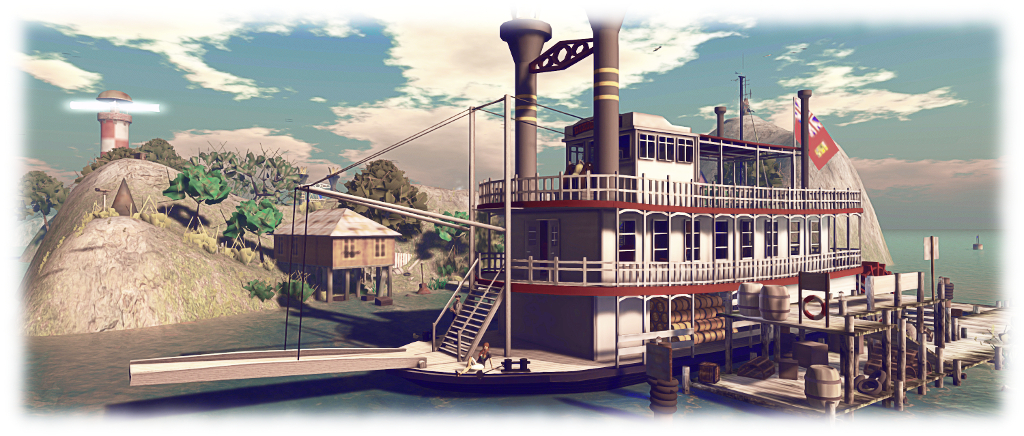
GTFO allows vehicles and vessels and aircraft of all periods and types to haul freight by land, sea and air

Curiosities piqued, Cinn and Syler sought out Rez Gray to find out more. At the time, Rez was – as Cinn put it – “up to his eyeballs” in trying to run and expand GTFO and handle other projects. As a result, they threw themselves in trying to help him with moving things forward. In particular, Cinn, using her background in programming, web design, and coding, became very heavily involved in the game’s back-end support: working on the database alongside Rez, learning how things worked, adding hub locations and vehicles to the games, etc. Syler, went out and placed dock systems, talked to new hub providers, and in group chat, finding out what people were interested in seeing with the system, and growing the sense of community among players.

Over time, Cinn and Syler built a small team of helpers, which they informally called the GTFO Ops Team, who gradually took on more of the general running of the game. A major contributor to the team was Keif Denimore, who overhauled the processes for adding new GTFO hubs and new vehicle APIs (used to identify vehicles and their freight capabilities) to the system. Eventually, with Rez keen to pursue other projects, the arrangement was reached that allowed the game to be transferred to Cinn’s ownership.

Syler and Cinn have been developing a new in-world HQ for GTFO, where people can find out more about the game, the GTFO community, obtain the game HUD, and more

Since taking the game on, the team has been focused on three areas: providing a more robust and capable back-end to the game, complete with a new website; to prepare the way for adding new in-game activities such as smuggling, and adding support for space vehicles; and to expand GTFO’s in-world presence and establish new partnerships. In addition, and as a related project, the GTFO team have been working to expand a more defined sense of community among GTFO players, and present opportunities for informal role-play alongside of the game.

One of the things we decided in taking on GTFO was to keep the game play going as it had been. We didn’t want to cause any major disruptions to people’s enjoyment, so we’ve had a slow transition over to new back-end infrastructure that will allow us to both run the game as people expect it, and expand it a lot more.

– Cinn Bouchard on some of the core decisions made in taking over GTFO

Critical to the initial transition was Ven (VenKellie), as Cinn noted. “His expertise with servers has been invaluable, and helped us move forward in ways I’d only hoped to one day achieve. We’re now developing everything on a cloud-based infrastructure, and we’ve completely overhauled the game on the back-end.” One of the major outcomes of this is a general move away from HUD-centric LSL processing, in favour of back-end processing.

Continue reading “An inside look at Get the Freight Out in Second Life”

Testing the LS33W AirFish in Second Life

Taking a prototype LS33W AirFish out for a test. Finish and colours are not representative of the production version

As is probably clear to regular readers of this blog, I’m a fan of craft built by Ape Piaggio. I played a (minor) role in the development of her Little Bee tender-style speed boat (which you can read about here), and for the last couple of weeks I’ve been acting as a test pilot / CTD (that’s “crash test dummy” for the uninitiated 🙂 ) for Ape’s newest vehicle: the still in development LS33W AirFish.

Based on the WigetWorks AF8-001, the AirFish is  a ground effect vehicle. This is a type of craft designed to attain sustained flight over a level surface (usually water) by making use of ground effect, the aerodynamic interaction between the wings and the surface over which it is travelling. another term for this type of vehicle is wing-in-ground effect (WIG), and it is the terminology generally used when referring to the AirFish and its physical world progenitor.

An overhead view of the AirFish

I confess, when Ape first told me she was developing the AirFish, I wasn’t convinced. We have high-performance boats in SL; we have aircraft; we have hovercraft; is a WIG vehicle likely to be popular? Well, on the strengths of having been testing this vehicle and seeing first hand the way Ape is both accepting feedback to tweak and improve it, and adding new features along the way – I can say it’s a heck of a lot of fun!

I’m not going to go into specifics about the AirFish here – I’ll save that for an in-depth review when it goes on sale (which might not be for a little while yet, as there is still much work to be done). What I will say is that the AirFish offers a lot to both motor boat fans and flying enthusiasts. On the water, it handles like a conventional boat and can happily motor around using its impellers. In doing so, it’s pretty manoeuvrable but not particularly fast (on-the-water speed isn’t the point). However, switch to the two rear-facing propellers (driven in the AF8-001 by a conventional V8 car engine!), and the AirFish comes into its own  – a fast, manoeuvrable craft able to pass over water and low-lying, relatively flat terrain at speed and with ease.

Airborne over water…

Once of the nice touches Ape has added – based on my own feedback, if I might toot my own horn a little – is a configurable set of flight controls. These allow pilots / driver to either use a standard “boat” layout to keyboard controls with the arrow keys / WASD for left/right and throttle up/down and vehicle pitch set via the PAGE keys. Or, for those used to flight controls, the arrow keys can be used for left / right and pitch up / down, with the PAGE keys used for adjusting the throttle.

Nor is the AirFish restricted to the water – a retractable undercarriage can be deployed to allow it climb up (and down) seaplane ramps, although it is not designed for trying to get airborne from a runway, and the AirFish is intentionally configured to prevent this: lowering the undercarriage locks it into its “taxi” mode.

I’ll have much more to say about the AirFish when it is officially released. In the meantime, those wishing to try a demonstration version can do so at the FoilBourne headquarters in-world, and as a further teaser, I’ll leave you with a short video of some of my trial runs testing the craft. Note that the vehicle finish and colours in both the images here and in the video are not representative of the production version’s finish or colours.

Note: this blog post and film produced and published with Ape’s approval.

Adding a little vehicle space with a rezzing system

Having room to moor / park all your boats and planes at home can be a problem (if you have room at all!) – so why not use a rezzing system?

Being into planes and boats in SL can be a little taxing. Not just on the purse / wallet, but also in where to park things. Even if, like us, you have a place near water where you can moor your boats and seaplanes, providing space for all of them can be a little hard – every LI given over to vehicles, moorings and so on, is one less for the house, furnishings and garden. Sure, you can always putt things out of your inventory when you want them – but where’s the fun in that? Having at least something out on your docks or slipway is part of the pleasure in owning vehicles.

In our case, we have numerous vehicles, some of which get considerable use – notably our two DSA G58 Barons and M33 Debonair, plus the Little Bee and FoilStream by Ape Piaggio, and the Bandit 210. Having all of these rezzed at any one time along with our Loonetta 31, which tends to be permanently rezzed, gobbles up 263 LI – and quite a lot of space. Add to that some of the vehicles have multiple finishes to them (different registrations or colour schemes), and of which we might want to use at any given time, even more LI can get eaten in trying to have all of them out at once.

Of course, hauling some of them of inventory when needed is always an option, it’s still a little boring and negates the idea of having “home space” for vehicles. So is there a compromise that allows for a quick swapping between vehicles while allowing some to be parked / moored and ready to go? If your vehicles have both copy and modify permissions, there is: a simple scene rezzing system.

A system like the RF Device / Multi-Scene Rezzer lets you quickly choose which (and how many) of your copy / modify vehicles you have rezzed and parked at home, and lets you swap between different types – note how I can swap between the two different ‘planes occupying the same mooring. Thus, you don’t have to keep everything rezzed at the same time, saving LI, and you don’t have to bother with manually hauling things out of inventory when you want to use them.

This is pretty much what we’ve had at Isla Pey for a good while – and note I am not talking any kind of temp rezzer here; they are a blight that should really be avoided. There are several scene rezzing systems available that fit the bill for vehicle rezzing, and I’ve been using a couple for the last few years. However, my unit of choice at the moment is the RF Device / Multi-Scene Rezzer.

Priced at just L$250, this is a low-cost, very easy-to-use system, comprising a “control panel” object and a single script. Simply rez the “control panel” object, rez and position your copy / modify vehicle(s) where you want it / them to be parked / moored when rezzed, drop the script inside the contents, then take the vehicle(s) and drop it / them into the contents of the “control panel”, and you’re done. Touching the “control panel” then displays a list of objects within it, with a corresponding set of buttons used for rezzing the vehicle(s) of your choice. You can even move the control panel around within your parcel / region and the vehicles will still rez correctly in their original places.

We have various vehicles stored in the rezzer (shown on the left with a custom finish) – including different variants of the same vehicle (indicated by the small arrows on the menu), any of which can be rezzed at the click of a button whenever it is required. Those rezzed can then remain parked / moored until needed or replaced by an alternative

Thus, using this system, we have direct access to a fair number of my boats and planes (some of which are copies with different registrations / paint finishes) which we can swap between quickly and easily, and without messing around with inventory and positioning things manually (particularly handy if you can’t use RTLP on your parcel).

The RF system, like many others, includes an “auto clear” function. So, if you only have space to rez one vehicle at a time, this will remove any currently rezzed vehicle before rezzing the next. But if, like us, you have room to have several (but not all) of your vehicles out at one time, the “auto clear” can be disabled, and you can manually delete any individual vehicle before  using the rezzing system to display another that might occupy the same spot when rezzed.

Easily use a single mooring / parking space to swap between vehicles or between different versions of a vehicle with different finishes (as seen above, where I’m swapping between two versions of my Little Bee), all without any tedious mucking about with inventory. 

Obviously, using rezzing systems like this isn’t a new idea – it’s actually as old as the hills in some respects. But, if you haven’t considered it before, and do have limited space for your vehicles and would like a more convenient way of displaying them / swapping between them in-world than having to refer back to your inventory – trying out something like the RF Device / Multi-Scene rezzer might be worth considering.

A pause for a personal ad: landscaping and design

Our home: Isla Pey – click any circle to view image / enter slide show

One of the things I’ve always enjoyed doing in Second Life is landscaping. I’ve done so on both a parcel basis with the properties I’ve had and still have in Second Life and with for parcels held by friends. I’ve also designed assorted regions – most notably, Holly Kai Park, which is still open to public visits.

As a result of this, I’ve built up a good library of landscaping sets from various designers, and gained a good familiarity with designers work as well – so I’m pretty well placed to provide advice on what to buy, what to mix’n’match (so you have full control of the finished design).

Holly Kai Park – click any circle to view image / enter slide show

So, this being the case, I’ve decided to test the waters and offer my abilities to those who would like to have the regions or – most particularly, their home parcels – landscaped.

I don’t intend to make this a full-time thing, and may not be able to fulfil all requests, however, if you are interested, feel free to contact me in-world via note card (please, no requests via the comments section!) and we can discuss ideas and terms.

In the meantime, the embedded slide shows will, I hope, demonstrate some of my work. Simply click on any of the images in the circles to see a full version, and scroll through each set.

“Impression”, LEA 6, 2016 – click any circle to view image / enter slide show

And as the saying goes, “we now return you to our regular broadcasts” – or in this case, articles 🙂 .

A no-nonsense hovercraft in Second Life

The Foilborne MW47L HoneyBadger

Ape Piaggio is a keen builder of assorted vehicles in Second Life – and I admit to being rather partial to several of them (see my pieces on the FoilStream, Little Bee and Orion). Her latest, which she asked me to test prior to its release on May 26th, 2018, combines the fun of several of her earlier designs with the utilitarian nature of a number of others.

The MW47L “HoneyBadger” (named for the ferocious Mellivora capensis, or ratel,  made famous in a 2011 viral YouTube video) is a cargo carrying hovercraft that incorporates Get The Freight Out! capabilities, can carry up to six avatars and – despite its workman-like looks – can offer a lot of fun.

Marketed under Ape’s Foilborne Industries brand, the MW47L is delivered in Ape’s familiar “toy box” approach: a neatly boxed miniature of the vehicle, visible through a clear plastic screen in the box. It also has an unusual approach to unpacking. On rezzing the box, you’ll be greeted with a number of local chat comments, one of which will ask you to wait for the “Ready” notice. When this is displayed in chat, touch the box to display a menu with the options to PLAY or UNPACK. If you’re only interested in getting to the hovercraft, click UNPACK; however, if you want to have a little fun, click PLAY and then try the follow-up menu.

The Foilborne MW47L HoneyBadger

When unpacked, the box delivers the hovercraft itself, an instruction manual, driver’s HUD, a customer paint applier,  and an “extras” box (of which more anon). Note that if you unpack the box by the usual means, you’ll also end up with an animation and three scripts in the hovercraft’s folder. These can all be safely deleted.

On rezzing, the MW47L is quite a sizeable vehicle – not surprising, given it is intended to carry cargo. However, it can be manually resized (with a couple of caveats: the refuelling animation is best disabled after resizing; resetting the scripts will result in the vehicle reverting to its default size) for those who might wish to do so.

The controls are simple enough, with chat commands and a vehicle menu for additional / alternate options. To get started, right-click and sit on the MW47L, this will position you in the driving “seat”. Type “s” or “start” to start the diesel motor (“s” or “stop” will stop the engine). This drives both the big vertical fan that propels the hovercraft and the two horizontal fans that draw air down into the vehicle’s skirt to form the pocket of air on which it rides. As the fans spin-up, the skirt will inflate. You can then use the UP / DOWN keys to advance / retard the throttle and the LEFT / RIGHT keys to operate the two rudders aft of the vertical fan to turn left or right.

The Foilborne MW47L HoneyBadger at rest

Note that once in motion, the MW47L becomes more responsive with speed. As such, it can be a little sluggish in turning at low speeds – but at higher rates of knots, it can be quite entertaining, offering lots of opportunities for turning, slewing, and generally having fun. It’s also compatible with the Foilborne wakeboard Ape also sells and with tube rides, if you fancy having fun towing friends around. Hovertext displayed over the rear fan will keep you appraised of your throttle setting, speed, skirt inflation and remaining fuel.

A point of note here is that the HoneyBadger can be operated with or without the additional HUD or in Mouselook mode. In the latter regard, I’d suggest driving with the HUD first – the switches re not clearly labelled on the dashboard, so using the HUD will help familiarise you with the dashboard buttons (although note the HUD has an additional button for displaying the menu).

The forward ramp can be lowered / raised using the chat command “ramp”  or using the lower / extreme right button on the HUD / dashboard. Note you can pause the ramp at any time by typing “ramp” again or clicking the button. This allows it to be correctly angled when taking freight aboard from a pier or other raised surface, for example.

The Foilborne MW47L HoneyBadger – fully GTFO! compatible

Which brings me to Get The Freight Out! (GTFO) and freight carriage. The HoneyBadger is fully GTFO! compatible, and a menu option will allow you to display a “pre-loaded” cargo crate. You can also carry other GTFO! cargo with the hovercraft as well.  Nor is that all. The “extras” box supplied with the HoneyBadger includes the MW47L HoneyBadger Payload Plugin script and a configuration note card.

The script and the note card can be used with modifiable goods / vehicles you might wish to transport using the hovercraft. Full instructions are provided in the HoneyBadger’s manual, and I strongly advise that you follow the recommendation that when carrying goods in this way, you hold the hovercraft’s speed down. It might also be worth having someone (an Alt account?) sit on the object to further help it maintain its position relative to the hovercraft. Both the script and the note card or transferable, and so can be given to friends for you to transport their goods.

The Foilborne MW47L HoneyBadger – you can carry your own suitably prepared cargo and goods

Handling on land is very similar to on water, although rough terrain can be a little awkward, and getting up some banks from water to land can require additional power (some might equally be too steep / high to climb). Other options include the custom paint capability (PSD, etc., files are available via a download link in the instruction manual), the aforementioned options for towing wakeboarders, etc., and a wide range of additional settings options (including a parkcam for mooring and a race mode).

At L$800 (at the time of writing), With the ability to let others drive it, the MW47L HoneyBadger offers a rich mix of opportunities for vehicle enthusiasts – and this review barely scratches the surface. So, if you are looking for a vehicle this is that little bit different and which has GTFO! capabilities, the MW47L might be just the ticket. Like its namesake, it’s a no-nonsense vehicle, pretty much up for anything.

Now, if I can only get Ape to finish her long-awaited take on the Icon A5 …

Additional Links

Personal data and Modemworld.me – update

The European Union’s General Data Protection Regulation (GDPR) came into force on Friday, May 25th, 2018.

In April, and in preparation for this, I updated this blog with  and page explaining how it is hosted by Automattic Inc., the creators of WordPress, and what data was liable to be collected when visiting this site, and who held it. The page was a temporary place holder pending Automattic Inc releasing their own statement on privacy and data management.

On May 25th, 2018, Automattic issued a Privacy Notice for Visitors to Our Users’ Sites, outlining the information they collect when visiting sites such as Modemworld.me, hosted on their servers. I have now updated my Privacy Statement page to reflect the availability of this document.

Note, as well, that the Automattic document should be displayed when completing the contact form on this site. However, if it is not, a link to it is included below the form itself.