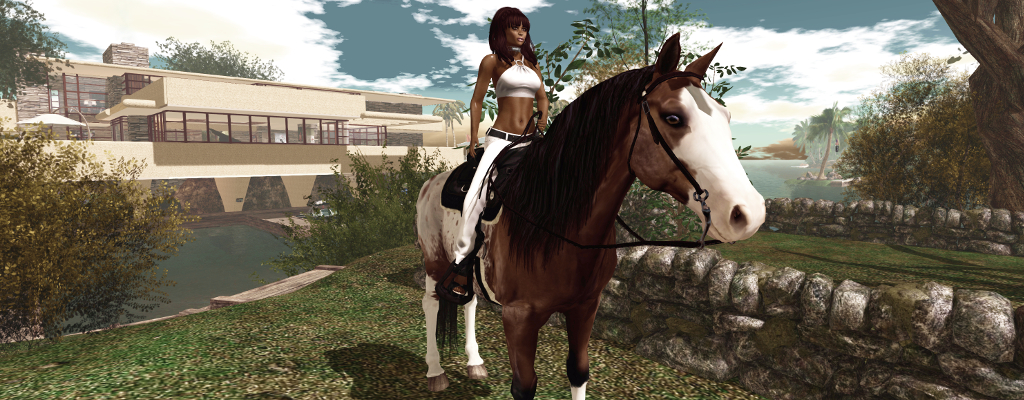
The Animesh Water Horse in Second Life

~* Water Horse*~ Animesh horse

On Friday, April 5th, the ~*Water Horse*~ team released their new Animesh rideable horse – something many in their group, myself included, had been eagerly awaiting.

Those who follow my Content Creation User Group updates will know that Animesh allows the avatar skeleton to be applied to any suitable rigged mesh object, allowing the object to be animated. This opens up a whole range of opportunities for content creators and animators to provide things like independently moveable pets / creatures, and animated scenery features.

Comparison between ~*WH*~ Bento and Animesh horses

For the ~*WH*~ Animesh horse, it means the ~*WH*~ team have been able to produce a horse that:

  • Can be ridden by attaching it to an avatar directly from inventory, akin to the manner of a Bento attachment. However, as it uses its own skeleton, it will not clash with any other Bento attachments the avatar might be wearing.
  • Can be rezzed in-world, where it has a range of capabilities (subject to certain land constraints), including the ability for it to be mounted and ridden.

These points make the ~*WH*~ Animesh horse a very flexible new product; one that will continue to be offered alongside the ~*WH*~ Bento horses, but with notable differences, as indicated by the graphic on the right, provided by Tyrian Slade, the ~*WH*~ brand owner.

At the launch, two breeds of the new horse were made available:

  • A warmblood with English riding tack and a 38 Land Impact when rezzed in-world
  • A quarter horse with American riding tack and a land impact of 37.

Given that all Animesh creations have a basic LI of 15, both of these horses are really impressive in their relatively low LI. As a worn attachment they also have a reasonable complexity value, adding roughly 12,000 ARC to an avatar in the case of the quarter horse. Both also have extreme compact script memory usage (231 KB).

The horses are also supplied at two price points:

  • L$4,499 for the “personal version”, which can only be ridden (controlled) by the purchaser (~*WH*~ group members can purchase this for L$4,050).
  • L$12,999 for a “public / friends” version, that can be ridden (controlled) by anyone when it is rezzed in-world.

In both variants, the overall features are the same (so both variants can carry “passengers” for example), and all of the horses are supplied Copy / Modify. This latter point means that you can have multiple horses on your land for use as décor, if required, and you can add accessories (increasing their LI) or remove items (the riding tack can be removed, for example, if a horse is rezzed purely as décor), and they can be re-textured.

The package for each comprises: four versions of the horse itself (with stirrups, without stirrups, jousting version, version for large avatars); separate wearable stirrups; a riding HUD; a texturing HUD; a visual guide to the HUD buttons; a texture creator kit and some (minimal) documentation (detailed documentation is available on the web).

The Riding HUD

The HUD is a core part of the system, comprising two sets of buttons:

  • A set of gesture buttons for animating the horse when riding. Note that the button to lead the horse via its halter only applies if the horse is directly worn from inventory.
  • A set of buttons accessed via the gear button, combining a number of options for making adjustments to the rider, and for setting different capabilities for the horse when it is rezzed in-world (see below).
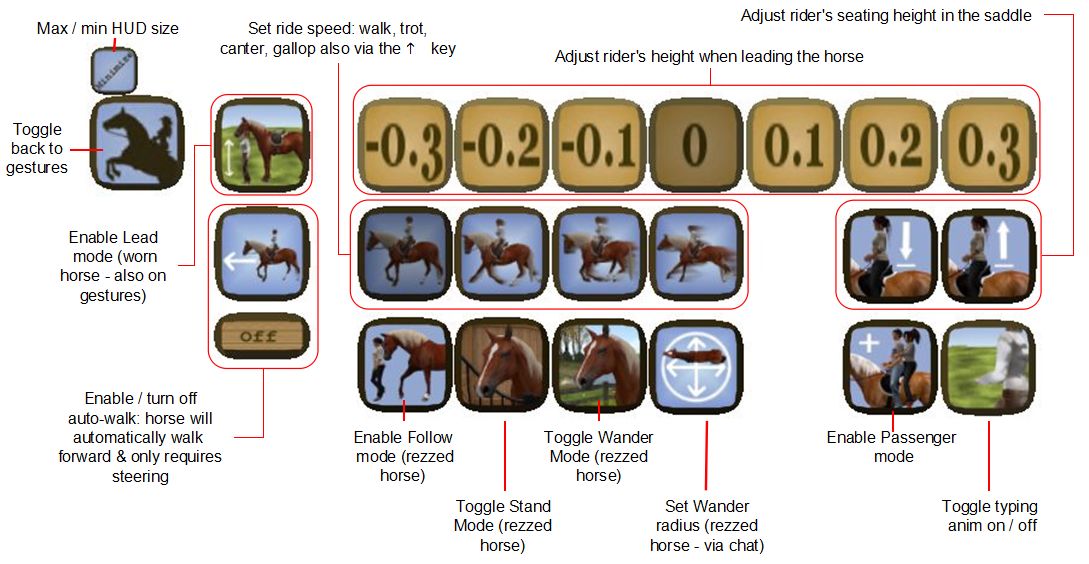
~*Water Horse*~ HUD options

Riding the Horse

Before riding the horse, make sure any AO you have (scripted or client) is turned off to avoid any conflicts. Then either:

  • Add it to your avatar from inventory as a worn attachment.
  • Mouseover the horse in-world, and left-click.

Both options will play an animation as your avatar mounts the horse. If the horse has previously been rezzed and set to wandering, the riding tack will render on it prior to the mounting animation being played. In both cases (worn or rezzed) there will be a brief pause as the riding animations are loaded.

Mounting and riding the Animesh horse (when worn or rezzed)

Movement is via the usual WASD / Arrow keys, with W / Up for forward motion. Speed can be increased from walk through trot and canter to gallop with further taps on W / Up; releasing the key will bring the horse to a halt. Tapping S or Down will slow the horse or cause it to walk backwards. Your vertical position in the  saddle can be adjusted via the HUD or via Hover Height. To dismount a worn horse, right-click on it and select Detach. To dismount a rezzed horse, click on the viewer Stand button.

Passenger Riding

Passenger riding only works with the horse rezzed in-world.

  • Mount the horse as rider and open the HUD to the second set of options.
  • Click the Passenger mode button (shown right).
  • Select who you wish to have ride with you via the displayed dialogue box.
  • The nominated person can then mouseover the horse and left-click sit.
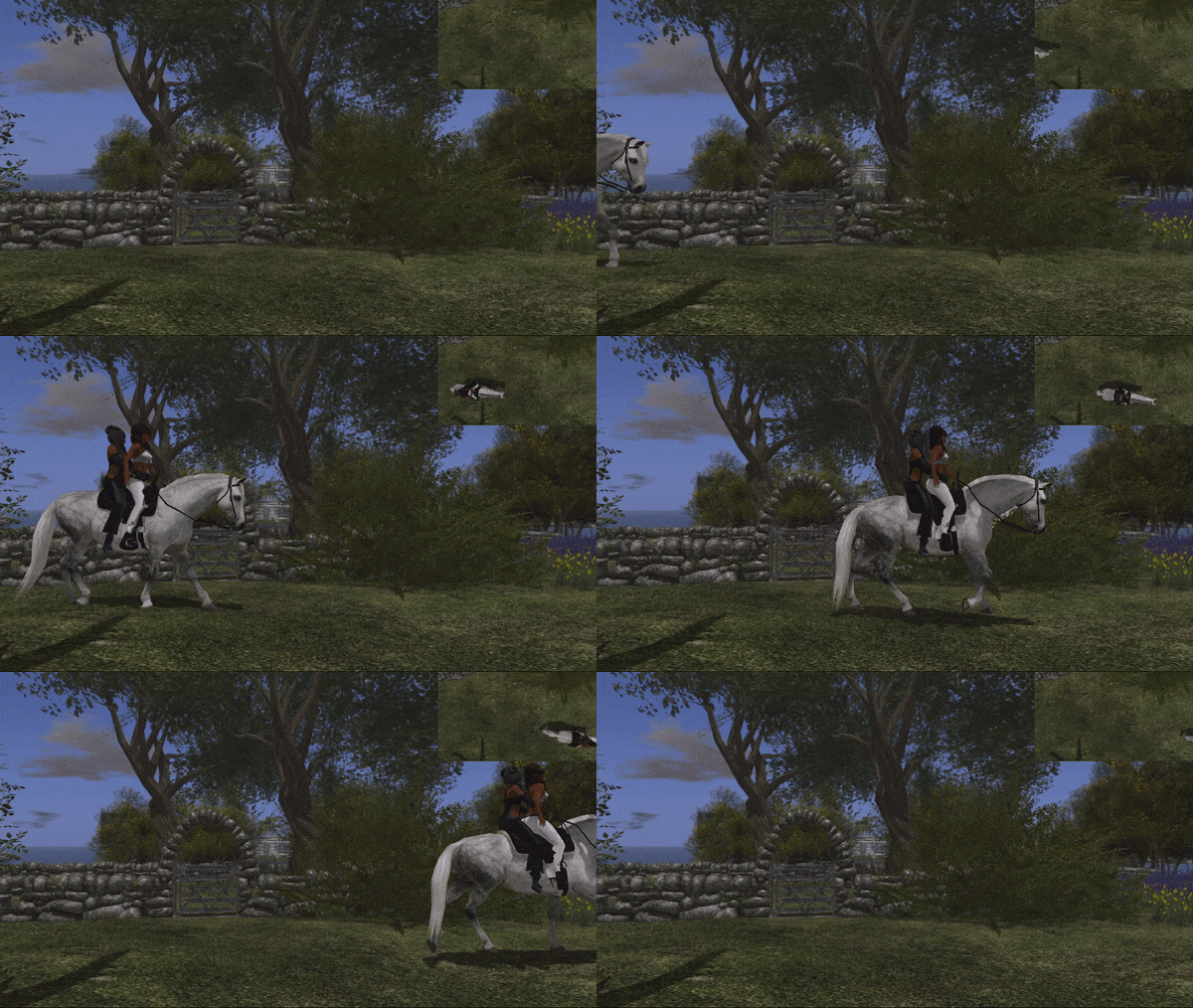
Passenger riding with the ~*WH*~ Animesh horse

Camera Position

Many SL users now set their own camera presets (see: SL Camera Offsets in this blog). Due to the way camera control has been implemented in the horses, this can result on some odd camera positions for the rider (which attaching the horse) or for a passenger. Should this happen, try positioning your camera behind you and, once mounted / seated, use CTRL-mouse wheel / the mousewheel to set your camera to a comfortable position above and behind the horse for viewing.

Continue reading “The Animesh Water Horse in Second Life”

Celebrating SL Women 2019

Celebrating SL Women 2019

In 2018, as a means of celebrating International Women’s Day, Kyoko (Samara Barzane) and Brooke Brandenburg of the Confederation of Democratic Simulators (CDS), established a means of honouring women in SL who have contributed to “making SL a better place through their contributions.”

We wanted to do something a bit more than just a celebration so we came up with the idea of honouring ten Second Life women. And that’s what we are doing. Last year was a roaring success. So here we are again!

– Kyoko describing the Celebrating SL Women event

Nominations for come from a mix of names submitted by the event organisers and their assistants, CDS residents and – for this year, suggestions from the 2018 awardees. Names are then filtered down on the basis of some basic criteria, including the fact that the final list must comprise women who are still active in Second Life, until 10 honourees were agreed upon.

For 2018, those honoured were Treacle Darlandes, Sudane Erato, Rosie Gray, Kikuyu Kikutsuru, Nuala Marcus, Marianne McCann, Caryl Meredith, Bryn Oh, Strawberry Singh and Robin Sojourner Wood.

2019 Honourees

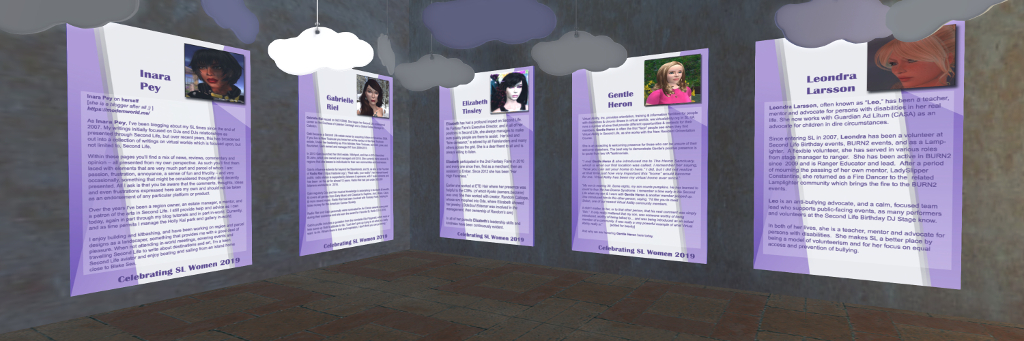
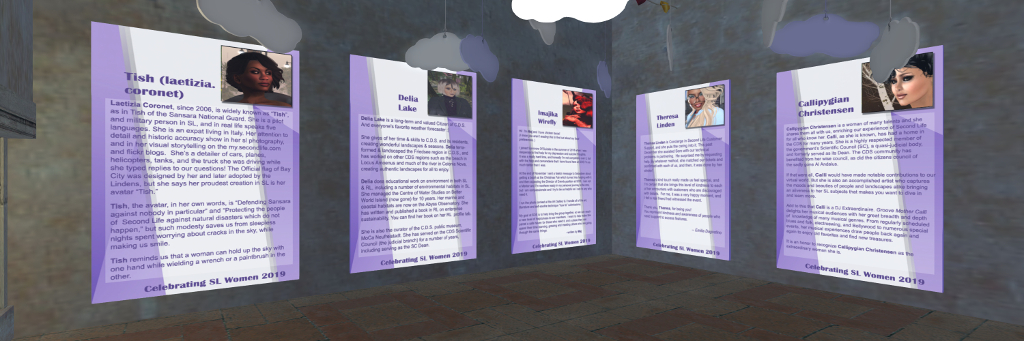
On Saturday, March 23rd, between 12:00 noon and 14:00 SLT, a special event will be held at the Gallery Barzane recognising this years honourees. they are:

  • Callipygian Christensen, an active member of the CDS community, an artist and DJ.
  • Laetizia Coronet: historian, aviator, photographer, modeller, and storyteller through her Flickr pages and her SL profile.
  • Gentle Heron, a founder and volunteer of the Virtual Ability community in Second Life, and mentor to users with disabilities.
  • Delia Lake, CDS resident, landscaper, educator and published author.
  • Leondra Larsson, teacher, mentor, and advocate for people with disabilities, work now works with Guardian At Litum as an advocate for children in dire circumstances.
  • Theresa Linden, Concierge in Second Life Customer Support.
  • Gabrielle Riel, community builder and founder of Radio Riel.
  • Elizabeth Tinsley, executive director of Fantasy Faire.
  • Imajika Wirefly, Director of Events for Survivors of Suicide.

It is my sincere privilege to say that the tenth person selected to be honoured in 2019 is myself.

2019 Honourees

I’m honoured to be included among such a diverse and richly talented group, and would like to pass on my genuine thanks to the  residents of CDS, and to this year’s organisers, Kyoko and Emilia Avindar for considering and selecting me.

I look forward to seeing and meeting my fellow honourees at the reception on March 23rd, between 12:00 noon and 14:00 SLT, and I hope those of you who can will join us at Gallery Barzane.

About the Confederation of Democratic Simulators (CDS)

Currently comprising six regions, the Confederation of Democratic Simulators (CDS) is the oldest, continuously-running democratic estate in Second Life.Loose themed on Germanic, Alpine, Tuscan, or Mediterranean styles, the regions present an all-encompassing government based on citizen participation, with elections to the Representative Assembly held each six months, and the work of the Representative Assembly supported in its work by a Scientific Council.  This governing structure is not role play, as might appear to be the case: it is more a residents co-op, not unlike the way apartment buildings are managed in real life, where every landowner is a “citizen” and is granted the right to vote and be elected to manage the overall space.

Among the goals for this project are: to enable ownership of high-quality public, private, and open-space land; create a themed yet expressive community of public and private builds; and implement novel democratic forms of self-government within Second Life.

Two Bandits at sea in Second Life

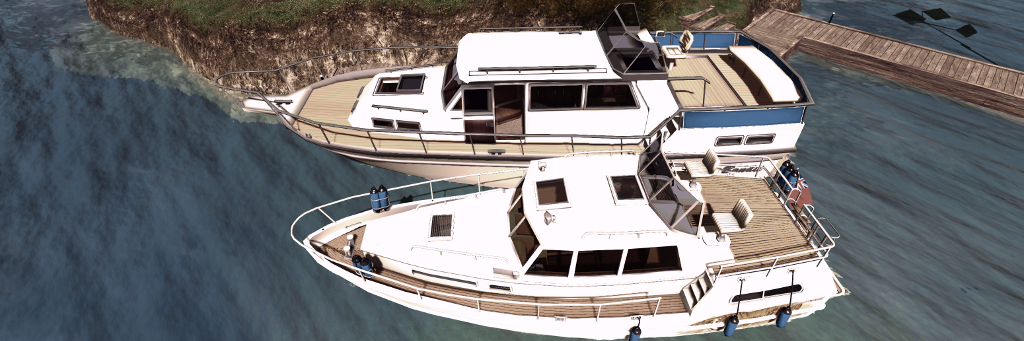
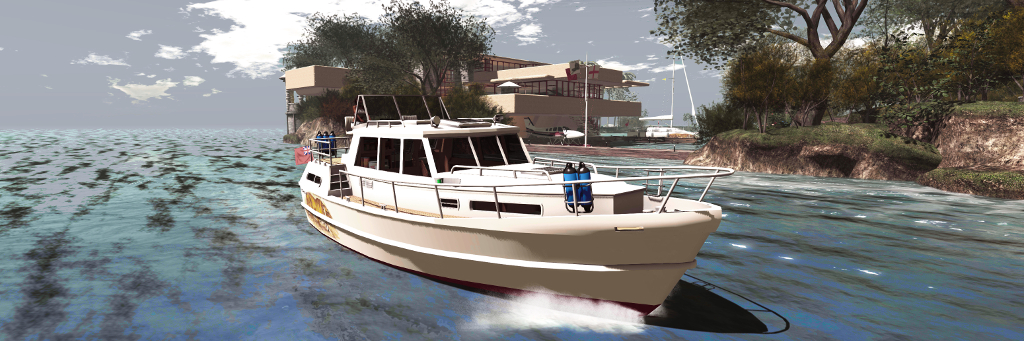
The Bandit 460 (foreground) and 580

Over the last several years I’ve collected numerous boats in Second Life, but one thing that has been missing from collection is a cabin cruiser. After looking around, and given budget is a little limited at the moment, I decided to pick up a Bandit 580.

Now, to be sure, this is not the most recent design in the Bandit range by Analyse Dean, but there was something about the lines I liked, together with its rich range of animations. It also, given the budget limit noted above, fitted my purse rather nicely, given I wasn’t entirely sure how often it would be used. However, I was in for a very pleasant surprise; unbeknownst to me, Analyse had noted the purchase, and no sooner had I arrived home and started unpacking the 580, she tapped me on the (IM) shoulder and dropped the more recent Bandit 460AK (the AK a reference to the included streaming radio) into my lap. So now I have not one, but two cabin cruisers to play with – thank you, Analyse!

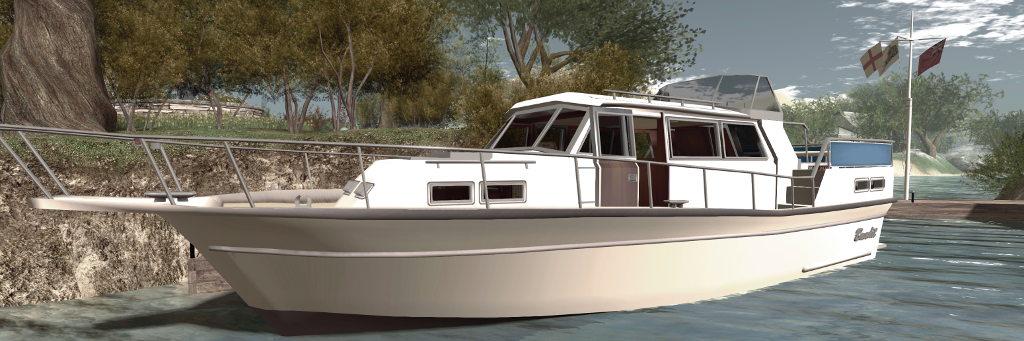
The Bandit 580

As noted, the 580 is the older model, roughly 16 metres in length and about 5.8 metres across the beam. It has a large central cabin with a double berth forward, and dining cabin to the stern, which raises the helm station and stern deck. A second helm position can be found in the main cabin and both this and the stern helm station have working gauges and are suitable for Mouselook piloting. Two versions are supplied, the 580GT noting it has a built-in GridTalkie grid-wide marine 2-way radio system.

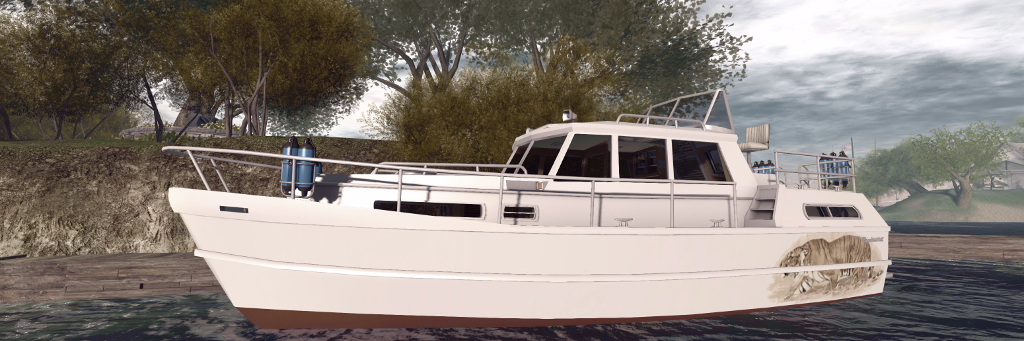
At roughly 12.1 metres in length and 4.6 metres at the beam, the Bandit 460AK is noticeably smaller than the 580, but it packs in a lot more. As with the 580, it has a primary midships cabin, with a stern sleeping area and forward dining area / sleeping cabin with a “functioning” toilet / shower cubicle. Piloting the boat can be performed from both inside the main cabin (standing position) plus a seated stern helm area with co-pilots seat alongside, separated by the single hatch to access the cabin.

The Bandit 460 with my own custom hull finish

A visual comparison between the two quickly reveals the improvements Analyse has made to her modelling; the steering wheels on the 580 are noticeably more “clunky” looking than those on the 460AK, for example, while the control switches on the latter all work via touch, as do the cabin light switches, hatches and a number of windows – the instruction manual highlights all touchables. Overall, the detailing on the 460AK is a step above the 580, but there are also similarities between the two. Many of the animations found in the 580 are also present in the 460AK: both share the same, or have similar, swimming, dancing, and deck working animations, for example (although overall, the 460AK has more animations). Local chat commands are similar for the two as well, although again, the 460AK’s are more extensive.

But when it comes to handling, these are very different boats. A twin-screwed vessel (the engines can be accessed via floor panels in the main cabin), the 580 has a higher top speed than the 460AK, and includes a racing mode. Trim can be automatically set via the engine script, or manually adjusted (Page Up and Page Down keys).  The engine sounds are suitably diesel-like for a vessel of this size, and while turning feels very flat, overall handling and manoeuvring is acceptable.

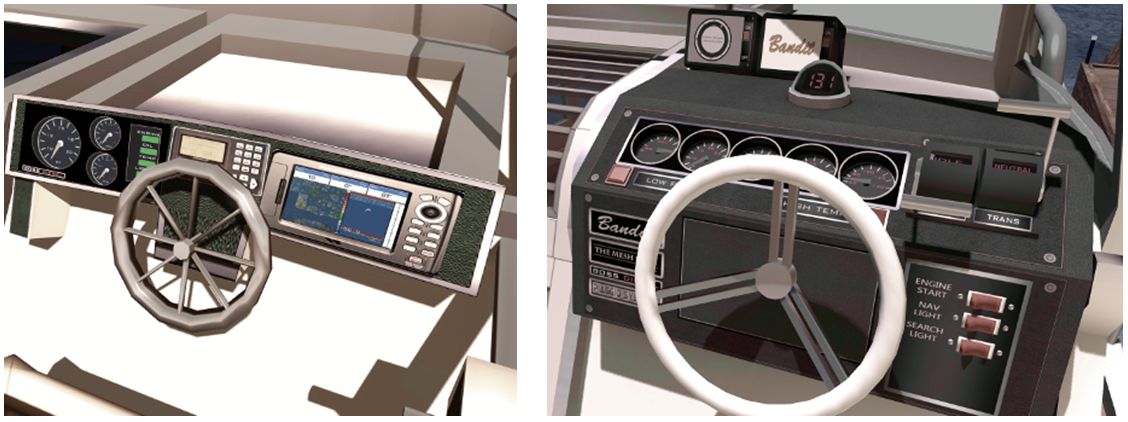
The Bandit 580 (l) dashboard features working gauges, but is showing its age a little – note the steering wheel. The 460 dashboard (r) offers more refined working gauges and steering wheel, together with a working compass and master switches for Mouselook driving

By contrast, the 460AK has more realistic handling, the boat naturally rolling outwards as it turns, and the helm being affected by inertia when travelling a speed (the faster you’re going to more pressure is required on the left or right cursor keys to maintain the turn). Like the 580, it is well suited to Mouselook piloting, and the superior helm controls make this a joy. My one small disappointment is the engine noise itself, which is  – to my ears – is a little underwhelming.

Another difference between the two boats is in their LI and physics costs. The 580 weighs-in at 32 LI and a physics cost of 24.2. The 460AK, however is a heavy 55 LI and 40.5 physics. Both of these tend to make themselves felt at region crossings, making the 460AK something of a handful, although like the 580 it recovers well enough.

Taking the Bandit 460AK around Isla Pey

The additional LI / physics costs with the 460AK is a result of the range of options included: deck furniture for the rear deck – chairs, table, drinks-; forward deck loungers that sit over the main cabin, radio (working) forward cabin switchable bed / table, cushions and curtains for the cabins and a stern deck railing canvas. The upper deck also has a 3-option Bimini (at least the top canvas needs to be deployed to see the in-world text HUD displayed over the boat), and the rear cabin has a built-in television.

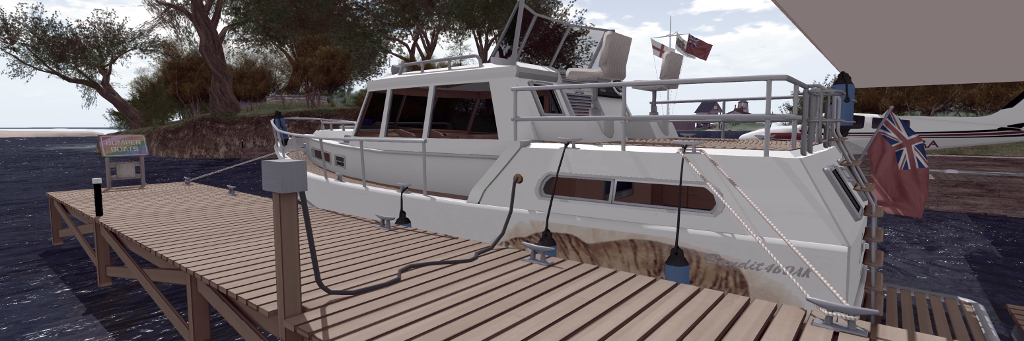
Further accessories are supplied in a separate box, the smartest of which is the 460AK wooden dock. Place this out in a suitable position and bring the 460AK in close with engine running, preferably with the fantail at the stern facing towards the small extension side from the  dock, and then type “moor” in local chat. The 460AK will slide neat into to place, fenders deployed, before mooring lines appear, together with a shoreline power connector, before the boat’s engine shuts down.

The 460AK alongside with mooring and power lines deployed

When leaving the dock, starting the engine will automatically hide the mooring lines – then just click the fenders to return them to their stowage bins on the boats’ railings, and you’re ready to advance the throttle and ease away from the dock. The dock itself is provided in handed versions – but the second is unscripted. Other accessories include a fishing rod, dock poles, a second radio for the boat and a lounge chair.

Custom painting of either boat is possible, with texture PNG files supplied. These are adequate for the task, with each boat having at least one additional hull finish. For those not up to painting, there are also several paint schemes from various merchants to be found on the Marketplace – just search Bandit 580 or Bandit 460. I opted to use one of the supplied Bandit 580 pre-sets, as it has a nice musical theme, but took work I’d previously produced for my Loonetta 31 and applied it to the 460AK to offer something of a matching theme.

Both the Bandit 580 (l) and the Bandit 460 (r) are set-up to be rezzed from our vehicle rezzer, although the 460AK tends to remain rezzed by default.

As noted, both boats have optional in-world hover text information displays, while the 580 also includes two screen HUDs, one for the skipper and one for crew. The former provides options to start the boat, activate the lights and sound the horn. It also includes a CTRL button, which takes control of the driving the boat back from any crew member currently driving it. Crew can drive the boat if the skipper (owner) expressly allows it, and use the crew HUD Control button to take command.

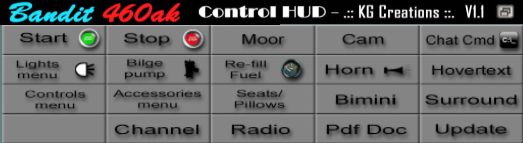
The 460AK doesn’t have a screen HUD of its own, relying on chat commands – which can get a little tedious (e.g. typing “bimini” multiple times to step through the Bimini options and remove it). However, .:: KG Creations ::. have produced a L$170 460AK Control HUD, that reproduces the majority of the boat’s commands either directly (button click) or via button-click and displayed menu. By default, when attached to your screen, this will appear at the top of the viewer window (and can be repositioned, obviously), making switching from the HUD to a displayed menu dialogue straightforward.

The third-party Bandit 460AK Control HUD by .:: KG Creations ::.

Analyse is justifiably proud of the Bandit 460AK, and while it takes a little getting used to handling-wise, it’s a feature-packed vessel that justifies the L$3,000 price tag. While older in build quality and lacking all the options found in the 460AK, the Bandit 580 offers a good cruising experience at a modest L$1,250.

But before buying either, I do recommend seeing them in-world at the Bandit / Mesh Shop store at Dutch Harbor, where demo versions are available to take out and get a feel for their respective handling – note that the demos are limited to 10 minutes rez time, but that should be more than adequate. In addition, the 460AK can be obtained via the Bandit Marketplace store.

Related Links

The Culprit Sonata Baby Grand piano in Second Life

The Culprit Sonata Baby Grand in two of its finishes

In September 2018, I wrote about the Culprit Sonata Bento Piano created by Eku Zhong and Yure4u Sosa (see The Culprit Sonata Bento piano in Second Life). At that time, I noted that Eko and Yure4u were working on a baby grand edition, and on March 13th, 2019 they graciously sent me a copy.

As I noted in that piece, as a pianist, I have a leaning towards the grand (concert or baby), as I appreciate the more rounded richness of its note. As having one in the physical world is impractical (although I do have a Yamaha N1), I enjoy having them in-world, and have been looking forward to the opportunity to try this particular baby grand and seeing how the Bento animations work with such an instrument.

The Culprit Sonata Baby Grand

Unlike the upright variant, the Culprit Baby Grand is supplied in one size, and follows the accepted shape of a grand, with a sweeping case built around a horizontal plate and pin block / action. In this, the Culprit Baby Ground might appear little different to other grand pianos in SL. However, it is fair to say that it is the play mechanism in this piano that is one of the aspects that sets it apart from others, even without the Bento play capability.

Where others might in part reproduce the mechanism – some strings,  the plate and sound board – or offer a texture of a grand’s “innards”, the Culprit Baby Grand goes much further. A peek under the raised lid reveals the cast iron plate with soundboard below – and a beautiful pin block and hammer set, with strings neatly positioned, presenting one of the best facsimiles of a grand I’ve yet witnessed.

Play-wise the Culprit Baby Grand is similar in nature to the Sonata upright: sit at the piano and you’ll be placed in an “idle” pose – and moving your arms as if conducting – or perhaps warming-up in readiness to play. While mentioning this pose, note that as playing the piano can result in your avatar’s eyes rolling up into the head and flicking back to this option – available from the Muted option (see below) before standing will avoid this. Sitting will also display the piano’s menu, which has the following options:

  • Texture: allows the piano body and the stool’s cushion to be textured to suit your preferences.
  • Muted: presents a total of 12 different playing styles without any associated music – so you can set a style in keeping with the music you’re listening to out world, or on your parcel stream.
  • Songs: offers 54 solo pieces to play, all public domain, representing a good cross-reference of music.
  • Duets: offers 11 duet pieces of public domain music to be enjoyed with a friend of partner playing with you.
The Culprit Sonata Baby Grand – mechanism detail

The menu also includes options to adjust the seated position on the stool, and to swap positions when playing duets, all of which makes for a pretty comprehensive set-up.

Selecting a piece of music from the Songs or Duets menus will display sheet music on the piano and move your avatar into a matching playing animation. It is here where the Bento element comes in. If you have Bento hands and watch yourself play (note that non-Bento users can still play the piano, it will just be minus the finger movements). The animations appear to be those used in the Culprit Sonata Upright, so just like that piano, they are fluid and natural, if with a slightly dramatic flair in a couple of styles  – although even the fact this is a grand, they are perhaps more in keeping with playing classical pieces than might be the case with the upright version.

Bento hand movements  are available in the three playing options built-in to the Culprit Sonata Baby Grand. Note the thumb-led glissando (filmed on the Sonata)

For those who like their in-world pianos to autoplay without being physically seated at it, the Culprit Baby Grand is perhaps not an ideal choice, simply because it does require and avatar to be seated (you can set rights to control who can). But then, this is a piano that is all about the Bento playing actions. On a personal note, I found the Culprit Baby Grand a little larger than I was expecting; the width of the piano means the reaching the extremes of the keyboard is a stretch for an avatar proportioned close to a physical world build, like mine. However, this is a minor point when compared to the “interior” modelling of the piano, its music selection and playing animations mean, all of which make it an ideal addition to any home – and it is now the preferred piano at Isla Pey, replacing the slightly smaller Lisp Persimmon grand.

With a total LI of 11, the Culprit Baby Grand will début at the Boardwalk shopping event from March 15th, 2019, at a price of L$995. It will be generally available, including via the Culprit store, from April 15th.

Driving the Beverley 812 and Carra “911” in Second life

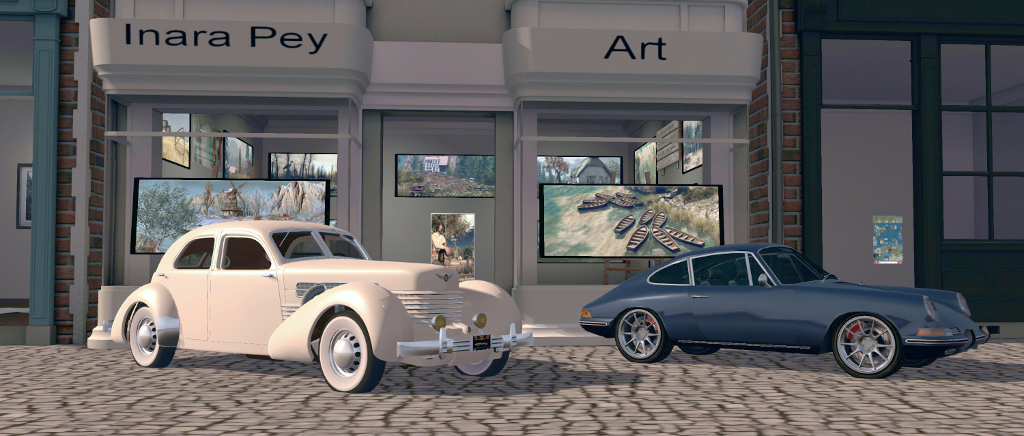
The CHC Beverly 812 (l) and [SURPLUS MOTORS] Carra outside my gallery at the GTFO World HQ, ready for their road tests
For a while now, and as part of my continuing explorations of the grid, I’ve had it in mind to run an occasional series on the highways and byways of the mainland. However, doing so requires having a suitable vehicle.

Back in 2015, I purchased the CHC Beverley 812, largely as a photographic prop, but which could also offer a ride while exploring the mainland. However, I also wanted a second car for a bit of variety – but not being much of an SL road driver, I wanted something of a modest price, given it would largely remain “garaged” in my inventory. Fortunately, the Marketplace furnished me with just such a vehicle: the fully featured [SURPLUS MOTORS] Carra, offered for just L$10 as a former group gift.

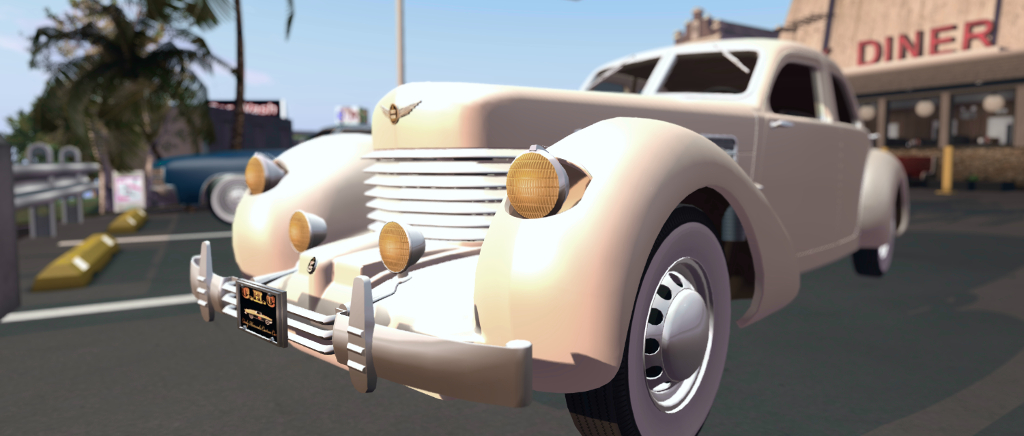
The CHC Beverley 812 with headlights flipped up

Now I confess to knowing absolutely nothing about the relative merits of different makes of cars in SL, so I’m approaching this from a novice standpoint, but I thought it might be worthwhile looking at the two cars as products before starting on any mainland journeys.

Both are very different in looks and finish – but under the hood (so to speak), both are surprisingly similar. The Beverley 812 (L$1,199) is based on the 1930s luxury salon car, the Cord 812. With stylish, Art Deco lines that still draw the eye today, the Cord was innovative for its time, and its looks are perfectly captured in the CHC model, which is 100% mesh. The Carra is modelled after an early model of the Porsche 911.

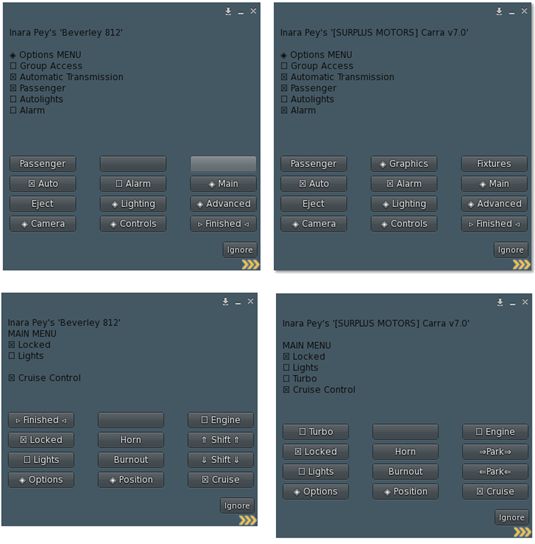
In terms of controls, both vehicles are driven by scripted menu systems which, if not from the same source, are remarkably similar in layout and options, as shown below. This is actually extremely comprehensive on both cars, and includes multiple options to adjust things like acceleration, braking, steering, skidding, etc., responsiveness, together with enabling automatic headlights / tail lights, etc.

Comparison of menus between the CHC Beverly 812 and [SURPLUS MOTORS] Carra
The basic drive controls are the usual: Arrow Left / Right and  / or A / D for steering; Up Arrow / W for the accelerator; Down Arrow / S for brakes, and the Page keys to step up / down through the manual gears. In addition, the menus for both can be used for gear shifts, and both have options for an automatic transmission and cruise control.

On the road, and with either one or two aboard, both handle in a similar manner; I found both needed a similar level of adjustment to the steering responsiveness (down to around 0.80-1.00) to ensure a more realistic road handling for road driving, and both tended to pull to the right when on “straight” sections of road. Other than this, both were easy to drive, and they handled multiple region crossings (we took Route 8 from the GTFO HQ at Bruissac all the way to the end of the line at Bagheera and back), in much the same way – again, I assume because the use the same scripting. In short, while there were the inevitable attempts to take to the air, burrow into the ground to go a-slewing off across the countryside on reaching a crossing, providing either car wasn’t going at a silly speed, both recovered very close to the point of crossing to allow driving to resume.

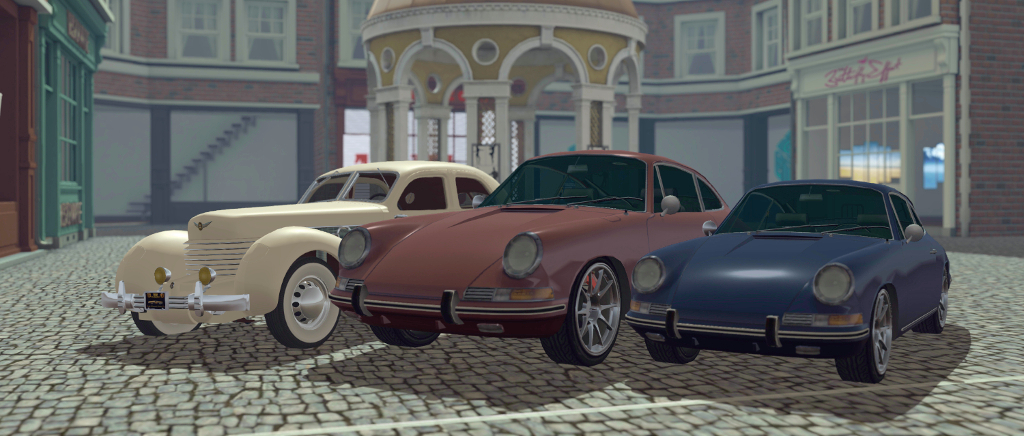
Comparison in size: the Beverley 812, the default Carra, and one resized to scale with the Beverley / my avatar

Turning to the individual models, the Beverley is supplied Modify, and individual mesh faces on the bodywork and interior can, to a degree, be selected for tinting. Sadly, no templates or maps are supplied, so detailing can be hit-and-miss. The build quality is very good, with few visual blemishes in the mesh, and the texturing is very much the superior, particular on the car’s interior.

The Carra is No Modify, but is supplied with additional script options to overcome some of the limitations this presents. These include a painting system with 6 colour presets and the option to provide your own tint using SL vectors. There’s also a scripted resizer – which is vital if you’re like Caitlyn and I, and have a reasonably “real” avatar height and body dimensions, as the car feels HUGE in its default size (see the above image).  In terms of finish the mesh perhaps isn’t as polished as the Beverley’s, and texturing on the interior and body trim is noticeably poor.

[SURPLUS MOTORS] Carra
Both cars have opening doors, bonnets and boots. The latter respectively reveal the engines, with the Beverley very much the superior. They both have customisable license plates (scripted again for the Carra). Both also have a tendency to float when being driven, and this can be far more noticeable with the Carra when resized smaller.

However, when taken as a whole, there really is little to chose between the two – and by extension, either brand, assuming the same script system is used across all their vehicle. For the keen SL motorist, the Beverly 812 is probably the more attractive of the two; it is a stylish model that completely captures the heart of the original, and has some nice touches and an overall better finish. However, for those looking to try driving in SL with a capable vehicle that will allow them to graduate to other models / makes, the Carra is undoubtedly a bargain – and would remain so at twenty times the L$10 paid, and issues with mesh blemishes and textures doesn’t negate this.

The CHC Beverly 812

Related Links

Happy New Year 2019


Wishing you all the best for 2019 in whatever you do, and once again, thank you for all your support and encouragement through 2018.