Calas Galadhon Shadowfell – click any image for full size
Every year, Tymus Tenk, Truck Meredith and the Calas team bring us worlds of wonder to explore in the form of their Halloween and Christmas wonderland builds as an adjunct to Calas Galadahon Park, and each year we are gifted with regions of mystical / seasonal delight. Mixing an atmospheric setting rich in places to explore, scenes to uncover, rides to enjoy and events to attend, all knitted together by the weave of environment settings, soundscape and supporting music, these builds are always and genuinely a highlight of Second Life.
For October / Halloween 2024, the Calas team once again present Shadowfell, a three region journey journey through a realm which although probably not modelled specifically after any element of Tolkien’s mythology, carries with it something of a sense of Middle Earth during the Second and Third Ages, mixed with hints of other franchises to offer an engaging potpourri of elements deserving of careful exploration. First presented in 2022 as The Gardens of Shadowfell, the setting was updated and expanded in 2023 (see: A journey through Shadowfell in Second Life), and it is this iteration – with some little tweaks and updates (including the use of PBR materials) – which opened at the start of October 2024 for people to enjoy.
The Shadowfell Pavilion schedule of entertainment for October 2024
As with all of the Calas themed builds, this is one in which it is very important visitors note at least some of the guidelines regarding a visit, all of which can be found at the landing point – with the most important perhaps being:
Make sure you Used Shared Environment (via World → Environment).
If you are not a PBR viewer, make sure Advanced Lighting Model is active via Preferences → Graphics).
Enable local sounds.
Make sure you have particles visible.
It also is suggested that those who can, should also enable Shadows via Preferences → Graphics. This is worthwhile if you can – and with the roll-out of the performance improvements within the viewer, this should be easier than it might have once been for a fair number of Second Life users – and I’d at least recommend it for photography.
This year, rather than blathering on and talking the four legs off a donkey describing the setting, I thought I’d offer a video instead – hope you enjoy it (best viewed in You Tube!)!
Vulcan Centaur rises from Cape Canaveral Space Force Station, Florida, October 4th, 2024 during Certification Flight 2. Story below. Credit: John Kraus, via X, and captured at 5,000ft in a Cessna light aircraft
Update: October 6th: Two hours after this article was published, NASA announced launch operations for the Europa Clipper mission are standing down, and the launch postponed due to Hurricane Milton. A new target launch data will be announced once the hurricane has cleared the Florida Space Coast and any damage to facilities at Cape Canaveral Space Force Station’s SLC-41 launch pad assessed.
If all goes according to plan, October 10th should see the launch of the second of NASA’s Large Strategic Science Missions of the 21st century (formerly called Flagship missions, and the first having been the James Webb Space Telescope): Europa Clipper.
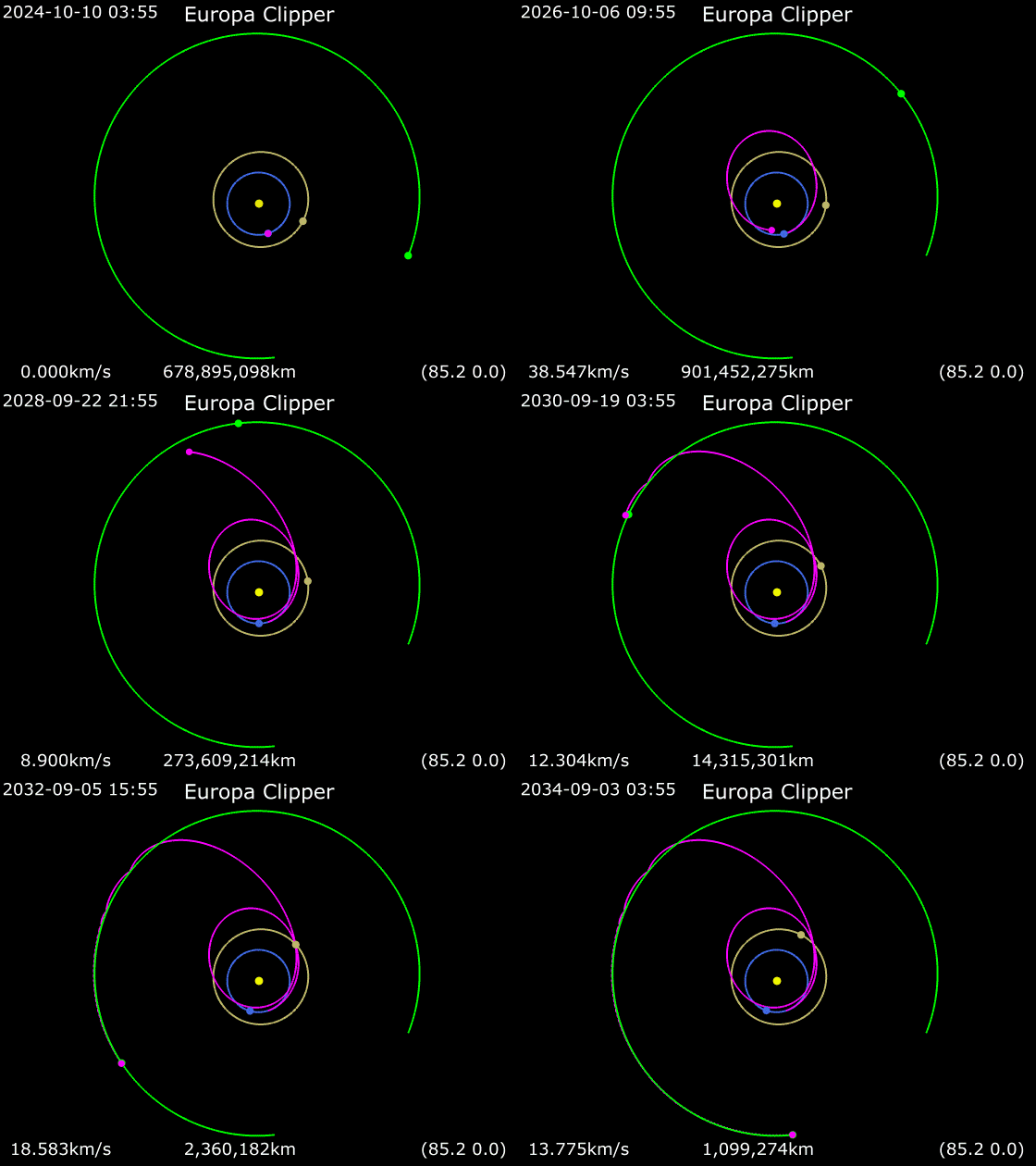
The launch will see a SpaceX Falcon Heavy carry a NASA space probe bearing the same name as the mission on the first leg of a 5.5 year journey to Jupiter to study the Galilean moon of Europa. In order to achieve this goal, the spacecraft will be directed towards Mars, which it will reach in February 2025. Using the Martian gravity as a brake, the spacecraft will fall back toward the Sun and encounter Earth again in December 2026, using our planet’s gravity to fling it out on a trajectory to reach Jupiter in April 2030.
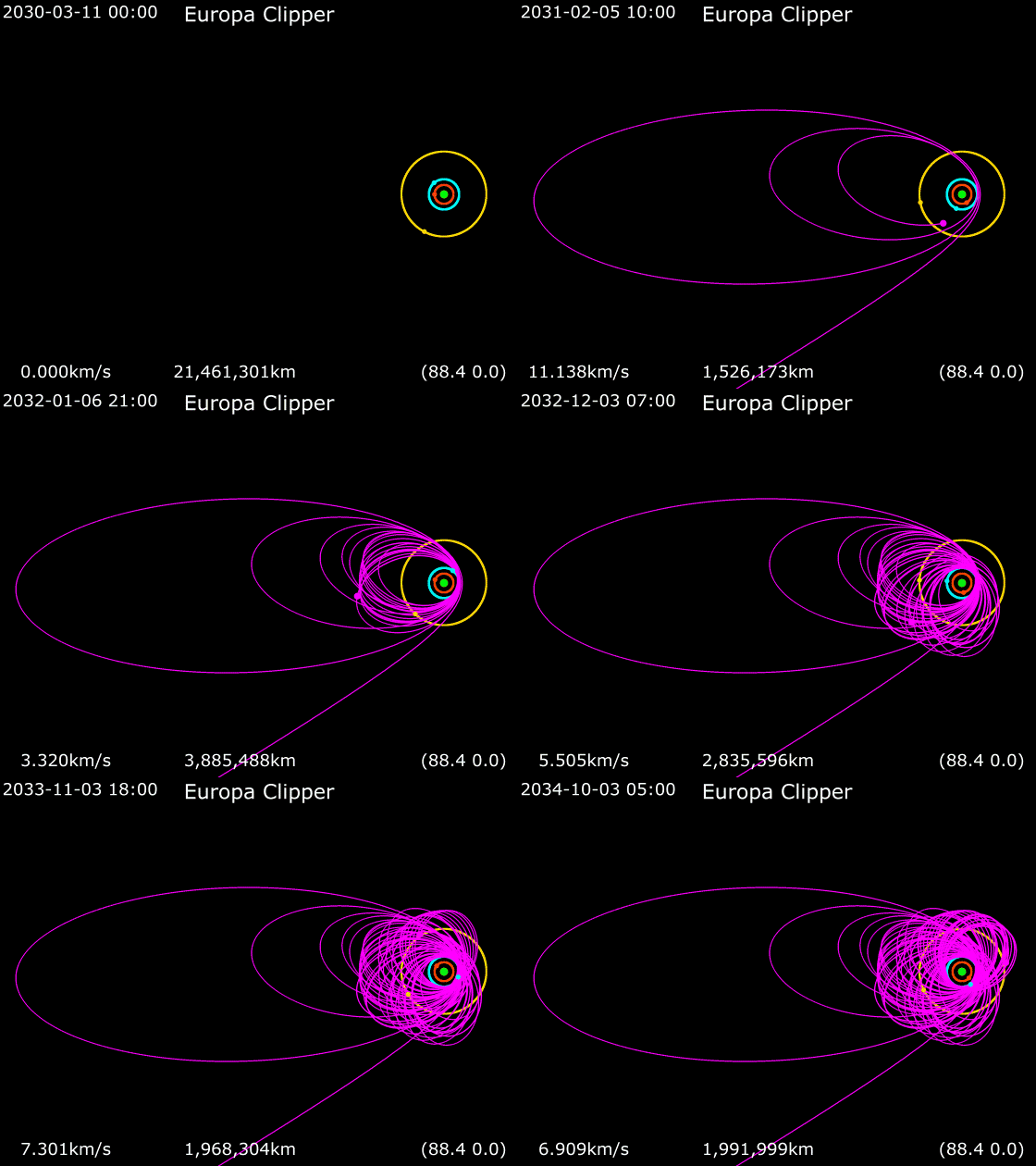
On arrival at Jupiter, the vehicle will enter an initial orbit that will then be refined, allowing it to make some 44 fly-bys of Europa varying between just 25 km above the surface and 2,700 km. The reason fly-bys will be made rather than the craft entering orbit around Europa directly is large due to radiation. Europa lies well within Jupiter’s extreme and intense radiation belts, an environment so harsh that it would fry the spacecraft’s electronics and electrical component – notably the huge solar arrays which generate its power – in just a few months after its arrival.
An artist’s rendering of the Europa Mission Spacecraft. With the deployed solar arrays measuring 22 metres in total span, the 6-tonne probe is the largest robotic interplanetary mission NASA will have flown to date. Credit: NASA/JPL
In addition, the spacecraft is carrying a significant science payload which can gather data much faster than the communications system can transmit it to Earth; were it to be placed in orbit around Europa, the opportunities to transmit the data its has would be subject to a a range of limitations (such a when Jupiter is between the probe and Earth), risking data loss due to existing data being overwritten before it could be transmitted.
By taking up an orbit around Jupiter and simply swinging by Europa, the space craft may lose opportunities for gathering data, but it increases the time available for the successful transmission of the data it does collect safely. Rather than having mere minutes or hours in which to send information, the probe will have between 7 and 10 days at a time. Further, by orbiting Jupiter rather than Europa, the spacecraft “dips” in and out of the harshest radiation, rather than being subjected to it all the time, thus preserving its electronics for much longer, and allowing it a primary science mission of an initial 3.5 years.
Generating model of Europa Clipper’s transit from launch to Jupiter. Credit: Phoenix777, via Wikipedia
To assist it whilst orbiting Jupiter, Europa Clipper will use 24 thrusters connected to a hypergolic propulsion system with 2.7 tonnes of propellants. Up to 60% of this mass will be used during the initial orbital insertion phase around Jupiter in April 2030, with the rest used in stabilising the spacecraft and orienting it during Europa fly-bys and communication periods with Earth to maximise data gathering and transmission.
The suite of nine instruments on the vehicle will be used to study Europa’s interior and ocean, geology, chemistry, and habitability. The science payload accounts for some 82 kg of the vehicle’s mass and includes a pair of imaging cameras operating in visible light wavelengths, and both a thermal imaging system and a near-infrared imaging system which will search for the likes of dynamic activity on the icy-covered surface of Europa (e.g. vents venting water and sub-surface material into space) and the distribution of organic material across the moon’s surface.
The vehicle also carries an instrument called REASON – the Radar for Europa Assessment and Sounding: Ocean to Near-surface (NASA still reign supreme in the acronym stakes!) – an ice-penetrating radar designed to characterise the 10-30 km (estimated) thick ice crust of the moon, seeking information on its composition and any indications of water pockets within it, any exosphere existing just above it as a result of venting, and – hopefully – reveal something of the nature of the upper limits of the liquid water ocean sitting under the lowest extent of the ice, between it and Europa’s rocky mantle.
Artist’s impression of Europa’s interior. The REASON instrument on NASA’s Europa Clipper will attempt to characterise the moon’s icy crust, including any water pockets in it, down to a depth of some 30km, possibly reaching the upper reaches of any liquid water ocean which might exist under the ice. Credit: Kelvinsong, via Wikipedia
Whilst it has launched some 18 months after ESA’s JuICE (Jupiter Icy Moons Explorer – see: Space Sunday: a bit of JUICE, a flight test & celebrating 50) mission, Europa Clipper will arrive in Jupiter orbit more than a year ahead of it by virtue of being launched atop a more powerful launch vehicle. In doing so, it will take over from the Juno mission as NASA’s lone research spacecraft orbiting Jupiter (the Juno mission is expected to come to an end in September 2025, the vehicle having exhausted the vast majority of its propellants, leaving only sufficient for it to make a controlled entry into Jupiter’s upper atmosphere and burn-up).
During its fly-bys of Jupiter, the Juno spacecraft has also been able to study the Galilean moons as well, and while the mission’s overall science goals have been very different to those of the Europa Clipper and JuICE missions, they are nevertheless somewhat foundational, helping both NASA and ESA better understand the environment in preparation for JuICE and Europa Clipper. Once both craft are in orbit around Jupiter, the respective science teams will work closely together, JuICE being tasked with studying Europa as well as the other two potentially water-bearing moons of Jupiter, Ganymede and Callisto.
Animation showing Europa Clipper’s arrival at Jupiter and subsequent orbits of the planet in order to fly-by Europa (coloured blue; with Callisto, the outermost of the Galilean moon in yellow, Io, the innermost in red and Jupiter in green). Credit: Phoenix777, via Wikipedia
In all, should the October 10th launch opportunity be missed (e.g. due to weather), the Europa Clipper launch window will remain open for a further 20 days.
Vulcan Triumphs despite SRB Anomaly
United Launch Alliance (ULA) completed the second launch of its new Vulcan Centaur rocket on Friday, October 4th, and despite a significant issue with one of its Northrop Grumman GEM-63XL solid rocket boosters (SRBs), the vehicle went on to ace the flight.
Vulcan Centaur is a ULA’s replacement for both the veritable Atlas and Delta families of launchers, and like them it is currently fully expendable. I covered its successful maiden flight for the vehicle, sending the ill-fated private lunar lander Peregrine One by in January 2024 (see: Space Sunday: lunar losses and delays; strings and rings). Following that flight, ULA had hoped to launch Vulcan again in April 2024, carrying aloft Tenacity the first of the Dream Chaser cargo space planes being developed by Sierra Space; however, delays with Tenacity’s final preparations now means this launch has been pushed back until at least March 2025. Instead, ULA decided to go ahead with flight designed to certify it for DoD launches, using a payload mass simulator in place of an actual payload.
Launch came at 11:25 UTC on October 4th, the vehicle lifting-off from Launch Complex 41 (SLC-41) at Cape Canaveral Space Force Station in after around a 30-minute delay. After clearing the tower, it became obvious that the right-side GEM-63XL booster was suffering an anomaly: the exhaust plume was broader than it should have been and it appeared that ignited propellants might have been escaping the SRB just above the engine bell. Then, roughly 37 seconds into the launch as the vehicle was about to commence its roll programme to pitch itself out over the Atlantic, and just before passing through clouds, the base of the right-side SRB disintegrated.
21 seconds from the pad, and the off-nominal burn of the right-side GEM-63XL SRB (indicated by large red arrow) can be seen in the form of an exhaust plume angling away from the lower side of the SRB (thin red arrow), opposed to the booster’s desired direction of thrust (short black arrow). Credit: I. Pey, using screen capture from ULA launch livestream. October 4th, 2024
On emerging from the cloud, cameras revealed the damaged SRB now had a very “off-nominal” exhaust plume, with pieces falling away as the launch vehicle continued its ascent. And here is where the overall robustness of the GEM-63XL came into play and the superb flight avionics and capabilities of the Vulcan Centaur were demonstrated. Rather than simply unzipping and exploding, taking out the entire rocket, as might reasonably be expected with the rocket was entering and passing through “max Q”, the period when it faces the maximum dynamic stresses imposed on its structure during ascent, the GEM-63XL held together and continued to provide at least some semblance of thrust all the way up to the engine cut-off point.
Meanwhile, the Vulcan Centaur sense the asymmetric thrust pushing it off of its flight trajectory and commenced compensating for it by gimballing the two Blue Origin BE-4 engines of the first stage and adjusting their thrust. At the same time, the vehicle started looking downrange and recalculating flight parameters in order to achieve a successful orbital insertion for its upper stage and payload. This entirely automated response also included calculating the likely drop-zone for the two SRBs following separation as a result of the off-nominal performance of the right side SRB.
Launch plus 44 seconds, the extreme exhaust plume from the right-side SRB now clearly visible, some 5 seconds after the base of the SRB apparently disintegrated. Credit: screen capture via ULA launch livestream, October 4th, 2024
This actually resulted in the rocket “holding on” to the two SRBs for 20 seconds beyond their expected release time. In doing so, this pretty much ensured both SRBs had sufficient upward momentum to complete their ballistic trajectory and then fall back to the Atlantic Ocean without exceeding any downrange parameters. Similarly, the rocket performed a recalculation of the required burn time on its main engines, and for the same reason.
Thus, the two BE-2 motors ran for an additional 6-7 seconds beyond their designated cut-off time. This was enough to ensure the Centaur upper stage received the kick it needed and the first stage to also remain within the parameters of its specified descent trajectory into its targeted (and shipping-free) splashdown area. Once separated, the Centaur stage was able to light its motor and go on to deliver its mass simulator almost exactly in the centre of the “bull’s-eye” of its intended orbital track.
A graphic released by Tony Bruno, ULA CEO following the launch of Vulcan Centaur on its second certification flight, showing that despite the issues with the GEM-63XL SRB, the rocket was able to successfully deliver its simulated payload mass onto its track for a heliocentric orbit pretty much perfectly. Credit: Tony Bruno, via X.com
And that is a remarkable success, all things considered. Sadly it did not stop some SpaceX cultists proclaiming FAA “bias” against SpaceX because a) Vulcan has not been “grounded” following the “failure” and b) the FAA signalled no requirement for a Mishap investigation on the grounds that, despite the SRB issue, the vehicle performed precisely as called for within its flight plan, and at no time exceeded the limits of it launch license.
Obviously, the GM-63XL failure needs to be thoroughly investigated by Northrop Grumman (potentially with FAA oversight) and the causes understood together with any significant issues – if found – rectified. However, this in itself require a “grounding” of Vulcan Centaur nor does it illustrate any kind of “bias” towards SpaceX on the part of the FAA. Why? Firstly, because the conflict between SpaceX and the FAA relate pretty much to the later exceeding the limitations imposed in the launch licenses issued to it by the latter. That’s not the case with the Vulcan Centaur flight.
More to the point, Vulcan Centaur’s launch cadence is fairly relaxed; the next launch will not occur until mid-November, for example. Ergo, there is more than enough time for the SRB issue to be investigated and a decision taken as to whether there is any kind of fault endemic to the GEM-63XL which precludes further Vulcan Centaur launches until such time as the problem has been rectified, and without the need for the FAA weigh-in on the matter pre-emptively.
Voyager 2 Loses Further Science Instrument
The two Voyager mission spacecraft have been hurling themselves away from Earth since their launches in 1977. In doing so, they are the first human-made craft to reach interstellar space, and are truly voyaging into the unknown. But even though both are powered by three radioisotope thermoelectric generators (RTGs) – essentially “nuclear batteries” generating electricity through the decay of plutonium 238 – their ability to produce the electricity they need to operate is constantly declining.
At launch the three RTGs on each of the Voyager vehicles generated some 470 watts of electrical power on a continuous basis. However, by 2011, that had been reduced to just 268 watts per vehicle. To combat the loss of electricity production NASA has, since 1998, been gradually turning off systems and instruments that are no longer essential to either vehicle’s mission.
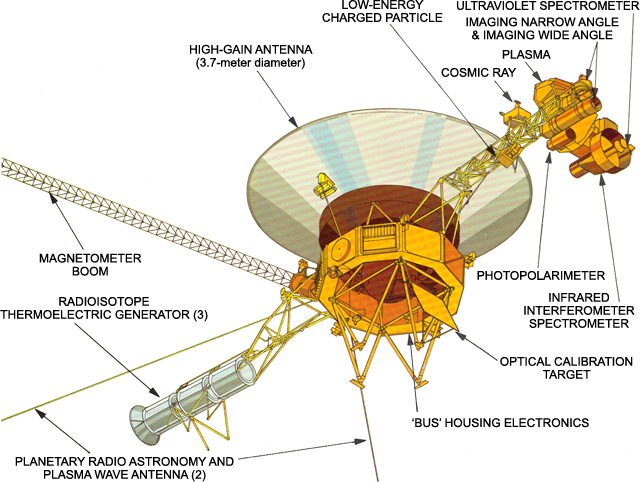
Diagram showing a Voyager spacecraft and its major elements, including the RTG boom and, opposite it so the bulk of the spacecraft bus helps shield it, the main scientific instrument arm. Credit: NASA/JPL
For example, in 1998, NASA turned off the imaging system on the two spacecraft because the amount of light reaching them was insufficient for them to be able to produce meaningful images. Over time, this policy has continued to the point were, at the start of October 2024, of the 11 instruments aboard each of the vehicles, Voyager 1 had just four operating and Voyager 2 had just five, all dedicated to examining the interstellar space through which both vehicles are travelling.
However, on October 2nd, 2024, NASA announced that a further instrument on Voyager 2, the Plasma Spectrometer, has now been turned off, again to meet the dwindling amount of energy the RTGs are producing. This means that both craft are now operating the same four instruments each, allowing for solid comparative science to be carried out as they continue to move out into interstellar space. These instrument comprise a magnetometer gathering data on the interplanetary magnetic field; a low energy charged particle instrument for measuring the distributions of ions and electrons in the interstellar medium; a cosmic ray system that determines the origin of interstellar cosmic rays; and a plasma wave detector.
Unfortunately, overall power issues mean that the rate at which instruments must be turned off is likely to accelerate over the next few years, and that by 2030 it is likely the last science instrument on both Voyagers will be turned off, although there may be sufficient power for the communications systems to continue to transmit system reports beyond that, if NASA opt to allow them. But even if this is the case, by 2036, the signals from the two spacecraft will be so weak, they will not be heard by facilities on Earth.
A 2013 diagram showing Voyager 2’s relative position as it entered interstellar space. In another 300 years, it should reach the Oort cloud, crossing in in roughly 30,000 years. Providing it suffers no mishap or deviation in its trajectory, it should pass within 1.7 light-years of Ross 248 some 40,000 years from now. The numbers along the line refer to astronomical units (AU); 1 AU being the average distance between the Earth and the Sun. Credit: NASA/JPL
But the loss of communications, when it eventually comes, will not be the end of the voyage for either of the spacecraft: in 300 years they should reach the “inner edge” of the theorised Oort cloud. It will take each of them some 30,000 years to cross it and arrive at the cosmographic boundary of the solar system. Ten thousand years after that, Voyager 2 will pass “just” 1.7 light-years away from the first star relatively close to its trajectory since departing the Sun: Ross 248. At roughly the same time, Voyager 1 will pass within 1.6 light-years of the star Gliese 445.
If you want to keep abreast of the Voyager mission status then check the official “where are they now” page for the mission.
Cherishville, October 2024 – click any image for full size
Lam Erin’s Cherishville is a place that changes with the seasons, sometimes shifting location in the process; it’s also a place I do attempt to visit annually in order to catch one of its annual looks. The last time I did so was in winter (see Cherishville’s winter 2023 in Second Life) and I had intended to drop in during the summer during 2024; sadly, that didn’t happen for assorted reasons, so once again it is autumn that brought me back to the setting, and probably not too far ahead of winter once more taking over.
While the setting has at times dipped a toe into more tropical settings, for most of the iterations I’ve covered in these pages it has presented a look and feel of a location somewhere within the North American continent, and the same is true with this iteration. This is not to say they each look in any way similar as the seasons pass; each setting very much has its own unique look and feel. Rather, the general design and flora used within each of Cherishville’s iterations offers as a sense of loose theme for the settings presented, as if they are different locations along a journey.
Cherishville, October 2024
For Autumn 2024, there is also a further dimension to this idea of journeying: that of travelling through time. With a couple of exceptions, the road vehicles occupying the setting suggest the 1930s and 1940s (and even the exceptions suggest a not-too-distant leap from there to the 1950s). While there is nothing implicit to suggest the setting is intended to be from those decades – the buildings sandwiched between the north-side main road and the railway track paralleling it could be from almost any period of the last century and a half (or more) -, the vehicles help to offer a sense of period to the setting.
But that said, there are anomalies to this feeling: the traffic lights serving the pedestrian crossings along the road seem to come from much later that the 1940s; whilst in terms of location, there are touches here and there that are perhaps more European in nature, such as a British telephone box and French-style advertising kiosk. Whilst these might be slightly anachronistic given the North American vibe noted above, they nevertheless work and remind us that SL can be anywhere we chose it to be.
Cherishville, October 2024
It is on the north side of the setting mentioned above that the designated (but unenforced) Landing Point has been set. It sits at the western extent of the road, which points towards the steeple of the local church sitting at its far end. A bridge with the promise of a botanic garden on its other side forms the local ending to the road, but the sign’s promise is false: across its pan is just a small spit of land. Street lamps along the road huddle under the boughs of tree from which the wind is pulling brown and gold leaves whilst the rain covers the cobble road’s surface in a patina of ripple-spreading splashes.
Set back from the road and behind the protection of a wrought iron fence, the miscellaneous houses and cottages seem to offer various retreats from the tumbling rain, both indoors and under the false shelter of a pergola, although it is perhaps the bakery-café alongside the railway platform which offers the warmest and cosiest welcome. Trains and tracks tend to be another motif in Lam’s build, and the presence of the track as it sits over the large, flagstone-paved expanse behind the houses gives the setting a further link to past iterations of Cherishville.
Cherishville, October 2024
The train rail are further paralleled by a broad body of water entering the setting from its eastern end, where it passes under a low-slung bridge to flow through the landscape before making a right turn through boulders and shallows, making a turn to the north. Here it slips under the railway bridge and that of the one promising a walk through the botanic park, and from there exiting the region once.
South of the water and road bridge, the countryside of the setting becomes more rural and perhaps a little more mysterious. An old armchair sits out on the road just beyond the bridge, potentially hampering traffic whilst also maybe directing attention to the roofed cart with its lights and hay bails as possibly offering a slightly drier place for people to sit. Tall ranks of corn on the cob plants stand on parade to one side of the road here, apparently called to order by the slightly spooky scarecrow standing in their midst, his arms perches for local ravens.
Cherishville, October 2024
The local road sign here is not encouraging, offering directions to the likes of the Bates Motel, Amityville, Elm St., and Sleepy Hollow amongst other destinations; however it is in keeping with the time of year, so might have been raised by some local wag as a Halloween joke, particularly given the nature of the little barn sitting at the end of the track the road sign guards.
Another barn stands atop a low hill on the southern extent of the land, but this one appears to be far more for the purposes of farming. Certainly, the guard duty here has been taken over by rows of innocently-faced sunflowers, leaving the grasping fingers of the corn behind. The sunflowers are also marshalled by far less creepy scarecrow as the road loops past to make its way back to where it is crossed by the railway line, the bridge of which offering a way back to town.
Cherishville, October 2024
Caught under a leaden sky heavy with cloud and in keeping with the downpour, Cherishville offers numerous places to sit and – as one would expect – multiple opportunities for photography. I wasn’t too convinced by the little ball of a full Moon lurking at tree-top height and looking as if it might be looking for a place to land between the region’s eastern side and the outlying region surround – but a quick click with object derender meant it was no longer a distraction. Outside of this, meandering and camming through Cherishville came with its usual pleasure, and it was interesting to see someone else putting what appears to be Alex Bader’s PBR terrain materials to good use (as I’ve done on my home island).
The following notes were taken from my audio recording and chat log transcript of the Content Creation User Group (CCUG) meeting held on Thursday, September 5th, 2024.
Tis meeting was also livesteamed on You Tube by the Lab. The video is embedded at the end of this summary, my thanks to the Lab for providing it.
The CCUG meeting is for discussion of work related to content creation in Second Life, including current and upcoming LL projects, and encompasses requests or comments from the community, together with related viewer development work. This meeting is held on alternate Thursdays at Hippotropolis.
Meeting dates and times are recorded in the SL Public Calendar, and they re conducted in a mix of Voice and text chat.
The notes herein are a summary of topics discussed and are not intended to be a full transcript of the meeting.
Aesthetics improvements: new Antialiasing setting – SMAA; Contrast Adaptive Sharpening; Khronos Neutral Tone Mapping (can be changed to ACES via the RenderTonemapType Debug setting).
Near-Term Viewer Release Roadmap
ExtraFPS work is focuses on bug fixes with the aim to get it promoted to default viewer status ASAP.
The first maintenance RC to follow ExtraFPS will be the Maint B viewer, which will include updates put on hold during the focus on performance issues plus additional updates, some of which may be further “post-PBR” performance / aesthetic improvements.
A new project intended to move Second Life away from reliance on the Vivox voice service and plug-in, and to using the WebRTC communications protocol (RTC=”real-time communication”). Roxie Linden is leading this work.
Key benefits:
WebRTC supports a wide range of real-time communications tools in common use (e.g. Google Meet), supporting audio, video and data communications, and is thus something of a “standard” approach.
Offers a good range of features: automatic echo cancellation, better noise cancellation and automatic gain control, much improved audio sampling rates for improved audio quality.
Opens the door to features and capabilities to voice services which could not be implemented whilst using Vivox.
Status
Still awaiting wider simulator RC deployment. Per recent SUG / TPVD meetings, this now looks set to commence on October 16th, although the date may still change.
LL is already looking ahead to further work with WebRTC once it has been deployed, in terms of “Voice and media”. More to follow on this in the future.
Again, as per the previous CCUG meeting, in order for PBR lighting to render anywhere close to correctly, alpha blending had to be switched from SRGB to linear colour space. This can cause some older content using Blinn-Phong, to look either more opaque or more transparent than in did pre-PBR.
For those with access to the Content Creation Discord channel, this work is now available in a pre-release viewer there.
Note: due to a request from Derrick Linden, I am unable to post information on how to access the Content Creation Discord channel. Requests to do so should be made to Vir or Derrick Linden.
This work is supported on (the Beta grid) – again, refer to the Discord channel for details on this.
Those using the Discord build are asked to provide feedback (with screen shots as appropriate).
Originally slated as being a part of the viewer to follow ExtraFPS, the Khronos Neutral tone mapper (another code contribution by Rye Cogtail), which should improve overall ambient lighting in SL, making things somewhat brighter and more vibrant.
Options for this are available within the ExtraFPS viewer as debug settings:
RenderToneMapType – set the desired tone mapper (either Khronos Neutral (new default) or ACES .
RenderToneMapMix – mix between linear and tone-mapped colours.
If this approach is continued, these options will likely become UI elements within the Sky settings, allowing the desired Tone Mapper / mixing be set at parcel level for the viewer, together with Advanced Graphics options for determining which should be the general default.
Results to these have thus far been mixed, so more feedback is being sought – which is felt to be better (ACES or Khronos Neutral (or even something else, etc).
Some concerns have been voiced by creators over the idea that tone mapping can be user-configurable (“how can I make sure the tone mapping on my item is correct, if the user can change tone mapping in their viewer?”).
Allowing tone-mapping offers the ability for people to view Second Life as they prefer / set their regions / parcels to be viewer under specific lighting conditions; ergo offering tone mapping options via the EEP Sky settings as has been suggested above was seen by most at the meeting as a good thing.
Some questioned how consistency of appearance can be maintained (per the question above) if they cannot be certain on the adjustments users make to their viewers.
One suggestion was for LL to designate one as the default that creators should be testing and creating against, and if the parcel is different, then it is up to the parcel owner to deal with.
Overall, keeping with Khronos / glTF would be preferred,
Further help in setting the brightest / contrast for for scenes can also be offered through exposure control and the colour gradient, with Geenz working on these as well.
The above grew into an extended technical discussion through to the end of the meeting, please refer to the video.
In Brief (Q&A)
[Video: 12:23-13:30] A brief discussion on glTF punctual lights (coming with glTF scene import), which might also offer the opportunity to offer more lights on alpha (rather than just the 6 closest, as it currently the case).
[Video: 15:00-16:50] more Bakes on Mesh channels (e.g. individual left / right eye channels to allow for individual eye colours er eye:
Nothing currently planned beyond the existing Aux channels.
LL has had internal discussions on a “simplified editor for decorating houses, etc.”, and feedback has been requested as to what kind when / if the concept of layer channels is re-visited, it might be from the perspective of replacing them with something more accessible – but this is not something currently being investigated.
In terms of channels for individual eye colours (or similar), a feature request was requested.
† The header images included in these summaries are not intended to represent anything discussed at the meetings; they are simply here to avoid a repeated image of a gathering of people every week. They are taken from my list of region visits, with a link to the post for those interested.
Kondor Art Club, October 2024: Nils Urqhart – Autumn LightsCurrently open through October at the Kondor Art Club is a new exhibition of photography by Nils Urqhart entitled Autumn Lights.
For those not familiar with his work, Nils is a professional photographer-artist hailing from France in the physical world, whose work is focused on landscapes, particularly those found within France’s numerous (and quite breath-taking) mountain ranges. In this, he covers everything from the magnificent and dramatic heights of the French Alps to the much lower (in terms to summit height, but no less impressive in scope and landscape) Jura and Vosges, the latter with their distinctive ballon summits, and Bugey.
Kondor Art Club, October 2024: Nils Urqhart – Autumn Lights
Since 2007, Nils has brought many of these landscapes and scenes into Second Life, offering nigh-on 180 (at the time of writing!) exhibitions which serve as travelogues of his walks and hikes through the mountains and countryside of France. Within Autumn Lights, he presents a fall walk through the Vosges and (primarily, I think) the French Alps, capturing the golden richness of the foliage, the majesty of the snow-capped peaks beyond and the rugged beauty of the land and the homes people create within the valleys and among the hills.
These are images that bring home the full depth of Nils’ compositional skill. Within them we find greens, golds, browns and yellows set against skies so blue they stray towards cobalt and touched here and there with ribbons of cloud; or the yellow tides of trees flowing up the slopes of stonewashed hill to meet their zenith, the rocky slopes rolling back to where their rounded tops are backed by snowbound peaks at even greater heights; or the checkerboard of small fields sets within the golden march of firs, their boundaries marked by embankments and dry stone, the grass within them pale and sunwashed…
Kondor Art Club, October 2024: Nils Urqhart – Autumn Lights
Each image offered through Autumn Lights has a story to tell; a story of the stately grace of these mountains, the formation of which started 300 million years ago and sharing something of an ancestry with the Himalayas, together (on a smaller scale) the people who populate them, which itself reminds us that humans inhabited these region as far back as the palaeolithic period.
But more than this, these images tell the story of a man in love with the country and landscapes in which he lives and travels; they form – as I’ve noted- a travelogue of his times within these mountains and their foothills, walking, hiking, exploring. As such they can be appreciated for the beauty they convey quite naturally and fully, whilst also inviting us into Nils’ life and allowing us to witness them through his eyes and thus share in his love for the places he records on camera.
Kondor Art Club, October 2024: Nils Urqhart – Autumn Lights
On September 27th and 29th, Kokua updated their viewer with the release of version 7.1.10.
As is common with Kokua, the viewer is provided in three variants utilising the same code:
No RLV, version 7.1.10.56206
RLV and “Full time” RLV, version 7.1.10.59780.
The key aspects of this release are parity with Linden Lab’s DeltaFPS viewer code base, and changes made to the Linux system requirements. The following is an overview of some of the key changes between this release and the previous Kokua 7.1.8 release.
Also note that Kokua did not provide a release to match the Lab’s 7.1.9 Altasaurus viewer. However, updates from that viewer are a part of DeltaFPS; as such, the release notes for the Altasaurus viewer are referenced below for those interested.
Installation
Only download Kokua via the Kokua website. Do not utilise and other third-party site purporting to offer the Kokua viewer.
There is no need to perform a clean install with this release if you do not wish to.
Do, however, make sure you back-up all your settings safely so you can restore them after installing 7.1.10.
Linden Lab Updates
DeltaFPS
Viewer version number 7.1.10.10800445603, dated September 17th – release notes in full.
Core updates: performance improvements, building on the improvements in viewer 7.1.9; viewer-side WebRTC support.
Date of promotion to release status: 26th August, 2024.
The release notes for both of the above should be referred to for complete information on updates and resolved issues, only some of which are summarised below.
WebRTC
WebRTC communications protocol (RTC=”real-time communication”) is the new Voice communications protocol for Second Life, replacing Vivox Voice.
Why Make The Change?
Voice in Second Life has been supplied through an arrangement with Vivox. This has required Linden Lab to utilise a viewer plug-in tool – SLvoice.exe – to manage voice services within the viewer., which in turn has made LL both reliant on Vivox for bug fixes for the plug-in, and subject to changes in support for operating systems imposed by Vivox such as the latter ending native support for Linux some years ago).
WebRTC by contrast is the predominant telephony protocol used by web-based applications, such as Google Meet, and is integrated into most common browsers. It has almost all the features common to Vivox in supplying a voice service – spatial in-world voice; peer-to-peer sessions; Group voice (including moderation) and multi-user Voice conferencing – although the are some limitations (see below).
Benefits and Improvements
WebRTC Offers a range of benefits over Vivox, including, but not limited to:
48khz audio bandwidth providing cleaner sound.
User control over:
Audio noise reduction – high reduction for noisy environments, no reduction for clean audio sources (performers, etc.)
Automatic gain control – less need to individually tune other user’s audio levels.
Audio/video device selection.
Improved: spatialization, audio echo cancellation and audio sampling rates for improved audio quality.
The WebRTC options added to Kokua’s Voice preferences
Most significantly, WebRTC removes all reliance on a third-party plug-in for the viewer. Instead, it is supplied as a library and wrapper within the viewer. This means:
Linden Lab has greater ability to address Voice related issues directly, without having to await fixes from a supplier.
WebRTC potentially opens the door to adding features and capabilities to SL Voice in the future, including some which have been long-requested.
Limitations
WebRTC does not support the existing Voice Morphing capability in Second Life.
This is because voice morphs are tied to the Vivox service, and cannot be utilised with WebRTC.
Those who do use the current Voice Morphing capability are directed to this SL Wiki article on Voice Morphing, which provides a list of solutions which can be used with WebRTC.
Note that the Voice Morphing options remain available in Kokua 7.1.10 because at the time of release, Vivox Vorph Morphing remains available on Vivox-enabled regions.
Conferences and group voice calls are limited to 50 participants.
Security
The Second Life implementation of WebRTC addresses security issues such as potential eavesdropping, exposing users’ IP addresses, etc., by routing communication through proxy servers managed directly by LL .
Deployment Notes
At the time of writing, simulator support for WebRTC is limited; deployment is due to become more widespread from October 16th, 2024, and hopefully be grid-wide by the end of October 2024. During this transitional period, peer-to-peer, conference calls and group chat sessions might be subject to various disruptions (e.g. they will not work between those on simulators running Vivox and simulators running WebRTC).
Usability Updates
Object Take
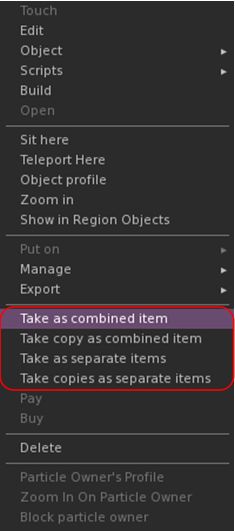
The update multi-object take options
Kokua 7.1.10 includes the Lab’s updates to picking-up objects in-world using the right-click context menu:
When selecting an individual item, the right-click context menu will display the expected Take and Take Copy options.
When selecting multiple items, the right-click context menu will display the following new options:
Take As Combined Item: return all the selected objects to inventory as a single, coalesced object.
Take Copy As Combined Item: return copies all the selected objects to inventory as a single, coalesced object, leaving the originals in-world as individual objects.
Take As Separate Items: return all the selected objects to inventory, but list them as individual items, not as coalesced.
Take Copies As Separate Items: return copies all the selected objects to inventory, but list them as individual items, not as coalesced, leaving the originals in-world.
Note that all of the above Take options will be available in accordance the SL’s permissions system (as with Take / Take Copy).
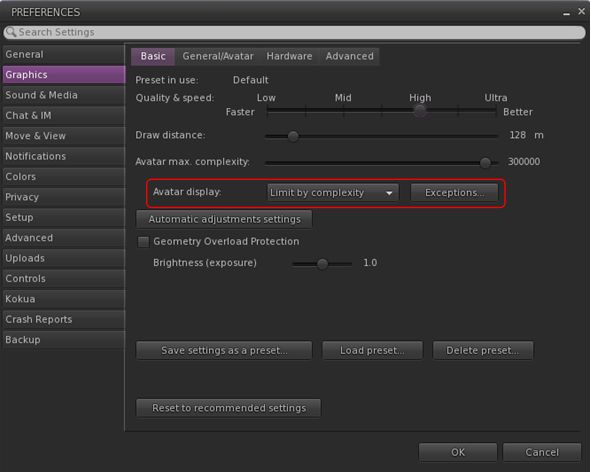
Avatar Rendering Updates
Linden Lab added new options to enable the prioritisation of rendering avatars using the following criteria:
Limit by complexity – any avatar with a complexity greater then your Avatar Maximum Complexity” setting will be rendered as a Jellydoll.
Always show friends – your friends will never be rendered as Jellydolls, no matter what their complexity
Only show friends – all avatars except your friends will be rendered as Jellydolls.
Within Kokua, this options are found under Preferences → Graphics, with the Exceptions drop-down also repositioned in the panel.
New Complexity options from LL within Kokua’s Preferences → Graphics → Basic, including a move of the Exceptions drop-down (also see below)
General Updates / Improvements
Add Images to Inventory Items in Bulk: select up to 50 inventory items → Right click selection → Image.
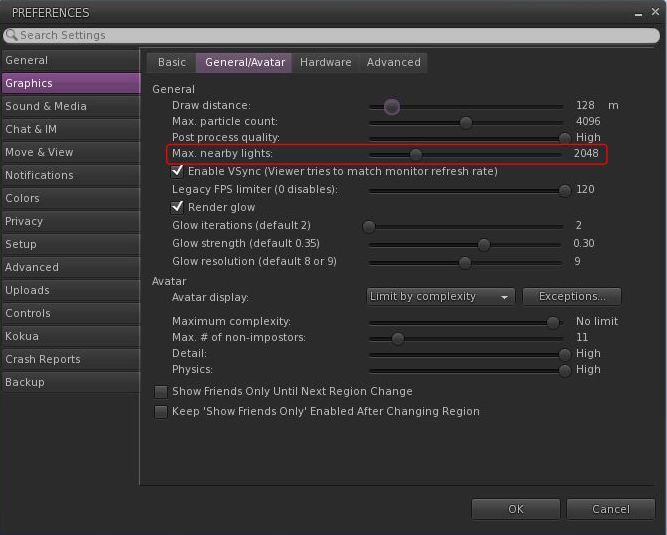
Option to control the amount of lights: Preferences → Graphics → General/Avatar → Max Nearby Lights slider.
Control nearby lighting through the nearby lighting slider
glTF model preview: use a prim to preview the appearance of a glTF scene / model:
Edit the prim. then Top menu bar → Develop → GLTF → Open.
To enable the Develop menu, either go to Advanced → Show Develop Menu or press Ctrl-Alt-Q or go to Preferences → Advanced → check Show Developer Menu
Note that this feature is still in the early stages of development and that glTF models will only appear locally in your own viewer, they will not be rendered for others to see in their viewers.
Better MOAP URL handling in order for users to not only be able to CTRL-C or Cmd-C copy but also to see decoded URL payloads for easy inspection. In the nearby media list, you can also right click a media/data link and Copy URL/Copy Data.
Mirrors disabled by default for all graphics quality levels to improve performance.
You can choose to enable mirrors manually in Preferences → Graphics → Advanced→ Mirrors.
Selected Kokua Updates
Preferences
With the introduction of the new avatar complexity settings by the Lab:
Kokua’s options Show Friend Only Until Region Change and Keep ‘Show Friend Only Enabled Avatar Changing Region have been relocated:
From: Preferences → Graphics → Basic
To: Preferences → Graphics → General/Avatar.
Kokua’s Always Render Friends checkbox is removed from Preferences → Graphics → Basic.
Improve Graphics Speed
The Improve Graphics Speed → Auto-Adjust Settings panel is now correctly sized to fit the displayed information (no overflow).
The Enable VSync options have been inverted so the explanation and note are at the top (Improve Graphics Speed → Auto-Adjust Settings → Enable VSync.
Linux Updates
Kokua 7.1.10 requires a newer Linux system than previous releases; GLIBC 2.35 is required, meaning Ubuntu 22 or better and Debian 12 or better.
This version of Kokua may run on older Linux variants (e.g. Ubuntu 20), however CEF will not run, so web pages within the viewer will not be available.
There are some known bugs in the Linux version which we considered minor enough to proceed with the release.
360 snapshot doesn’t work
Need wine installed for Vivox voice
GLIBC 2.30 systems could still run the viewer, but with a broken internal browser.
This Linux version of Kokua runs much more smoothly due to LL fixing a number of the causes of frame stall which were most noticeable on Linux.
Kokua Team Request
Kokua is provided through time and efforts of a two-person project team. Understandably, the majority of work two people can perform on the viewer is largely focused on tracking and integrating with official viewer releases from Linden Lab. This means that there is limited time for bug fixing and for implementing additional features and requests. The team also has a limited capacity for maintaining the Linux flavour of the viewer.
Because of this, the Kokua team is seeking additional help. In particular they would like to hear from:
People interested in working on bug fixes and enhancements for Kokua, thus reducing the said backlog.
A Linux specialist to help with maintaining the Linux version of Kokua.
Those interested in volunteering their time should drop an e-mail to chorazinallen AT gmail.com. When doing so, please note that:
Experience with C++ is essential.
Familiarity with working with the viewer is a bonus.









 Inara Pey: Living in a Modemworld