Scare Me Silly 2023, in support of the American Diabetes Association (ADA), opened its doors on Friday, October 13th, 2023 for its 8th season in Second Life, and will remain open through until October 31st. As with previous years, the event is organised by Team Diabetes of Second Life, with Scare Me Silly featuring live performances, parties, a hunt and an art show and – of course – shopping!
All participating merchants this year can be found comprise: Adore Amore, @AdReNaLiZeD@, Angel Fae Boutique, Art & Fashion, Be Bold, Closer to the Heart Creations, Cosmos Boutique, Country Crafter, Couture Chapeau, Creepy Midget Designs, Darymple Designs, DINKIEWEAR, Dreadfully Dark, DUST, Fae Fantasy Creations, Fashiowl Poses, Fire Within, FIRELIGHT, Grumble, HJM Designs, House of papillon, IKR, Kittycat’s Creations, LC Fashion, Le Moon, Llama Inc./Little Llama, Manikin, MG Designs, Nocturne Skies, PAJAMARAMA, PEEPS Dinkies, Pendragon Designs, Pixel Box, Pixelancer, POTOMAC, QUE RICO, Redangel Clothing Co, Shy’s Creations, Starlight Apparel, Techicolor dolls, Telsiope’s Couture, TRS Designs, & The Undiscovered Jewel. In addition, items listed in the Scare Me Silly Shopping Guide.
The artists participating in the art event are: Hadiya Draper, Jamee Sandalwood, HarlowJamison Resident, Llola Lane, maggiemagenta, aquarius27, Eucalyptus Carroll, Jessamine2108 Resident and SNOW KELLEY.
For details of the entertainment and activities going on throughout Scare Me Silly, please see the entertainment schedule.
This year the Evil Pumpkin Hunt offers a number of exclusive prizes available from several of this year’s merchants. The prizes cost L$10, with 100% of proceeds going to Team Diabetes.
In addition to Scare Me Silly, and events organised directly by Team Diabetes of Second Life, individuals, businesses and organisations are encouraged to hold fundraising events in support of Team Diabetes of Second Life. The official fundraising season toolkit is available at Team Diabetes’ offices within the Nonprofit Commons region in Second Life.
About the American Diabetes Association
Established in 1940, the American Diabetes Association is working to both prevent and cure diabetes in all it forms, and to help improve the lives of all those affected by diabetes. It does this by providing objective and credible information and resources about diabetes to communities, and funding research into ways and means of both managing and curing the illness. In addition, the Association gives voice to those denied their rights as a consequence of being affected by diabetes.
About Team Diabetes of Second life
Team Diabetes of Second Life is an official and authorised fund-raiser for the American Diabetes Association in Second Life. Established with the aim of raising funds in support of diabetes treatment and to raise awareness of the disease in SL, Team Diabetes of Second Life was founded by Jessi2009 Warrhol and John Brianna (Johannes1977 Resident), who serve on the Advisory Board along with Eleseren Brianna, Veruca Tammas, Rob Fenwitch, and Dawnbeam Dreamscape.
Th No Cottage Bizar combined: foreground: the version used to create the house; Centre Background: the version containing the swimming pool / home gym
Back in January 2023, I wibbled on about the NO Cottage Bizar by Marcthur Goosson (see: The NO Cottage Bizarin Second Life). Despite its unusual name, this is a sublime mesh model of a ruin dating back to medieval times and which has seen more recent attempts to revitalise it through the construction of newer brick walls and installation of modern windows, frames and doors.
As I noted in my previous article, the model is particularly well suited to kitbashing and / or modding, something which back in January saw me convert it into a pool house with hot tub and (after that article was written) a personal exercise space, and which has remained a part of the home island since then. However, having recently got my periodic itch to change things up, home-wise, I started wondering how it might be turned into a comfortable home and perhaps combined with the existing pool house. The answer turned out to be a combination of “surprisingly easily” – further demonstrating the potential for this building design.
The original build – it is delivered as a complete 99 LI build, without a rezzing box, and the Copy-Mod version includes a set of shadow maps to help with the production of custom textures. There is also a full permissions version.
To give a recap on the basic model, it comes in 2 versions, both at 99 LI. One is supplied at Copy / Mod / No Transfer and priced at L$1,499; the second is supplied Full permission, at a price of L$11,500. Both include shademaps, and the Full permissions version includes all diffuse, normal and specular maps. I opted for the Copy / Mod version, but have recently come to rue not getting the Full permission version. The building is supplied boxes but without a rezzer; after unpacking it’s just a case of pulling it from inventory, placing it and you are good to go.
By default, the building has 5 rooms, three on the ground floor, with one extending out to one side so its roof forms a terrace / broad balcony, and two on the upper. There’s also a small courtyard formed by the addition of brick walls at some point in its recent history, seen on the left of the image below. The textures and material maps used give a good degree of depth to the build, with enough variation in style to give the impression of a building extend over time using different stonework.
The rooms themselves are of mixed size, with two on the ground floor linked by an impressive stone arch into which modern doors have been set, guarded by heavy wooden doors on one side. The two upstairs rooms can be accessed separately, one by a pair of wrought iron stairs leading up from the innermost of the ground floor rooms, and the other via original stone stairs within the building’s single tower (which also provides access to the rooftop terrace / balcony mentioned above).
Four of the rooms of the No Cottage (out of the box”: two on the lower floor, linked by the large arch and two sets of doors and the paired stairways to the upper level (top), and the two upper floor rooms (bottom).
Now admittedly, the default interior texture do give the building a drab, dank look – entirely intentionally and no critique of Marcthur as they fit the broad theme of the building “as is”; however, for a comfortable sense of home, some of them probably need brightening up. Fortunately, Marcthur has considered this and provided sufficient mesh elements / mesh faces in the build to make this relatively easy for the most part. Thus, with some suitable wall, ceiling and floor textures it is very easy to brighten the place up, whilst leaving the original stone untouched as a contrast.
For my part, I opted to use the room off to one side of the build as a new kitchen, retexturing the wall in a mix of “wallpaper” and (for their exteriors) stucco. Running the full width of the No Cottage, the room is ideal for this kind of use. Meanwhile, the rooms linked by the archway became, respective, the dining area (complete with sofa for enjoying pre- and after dinner drinks!) (also replacing the cement on the outer wall with a white stucco to enhance the look), whilst the first of the rooms linked by the archway and double doors became an ideal dining area with an additional sofa for enjoying pre- and after inner drinks and the living room.
Another view of the two copies of the No Bizar combined. Left and lower, the version forming the house; right and elevated, the version with the pool and home gym, the brick-fronted courtyard of which (centre) forms the link between the two.
In its default form, with huge fireplace, double wrought iron stairways and heavy concrete pillars supporting one side of the arch, this latter room can at first seem too cramped to become a comfortable living space. However, it is very easy to open it out – such as by the removal of one of the stairways and replacement of the huge fireplace (I used the LISP Mid-Century fireplace by Pandora Popstar), and perhaps the removal of the concrete columns supporting the archway in the room (I also disguised the archway’s broken stonework with an arch of my own).
Removing one of the wrought iron stairways also allows the floor above to be remodelled to give more space, which I opted to use to fell the room become a comfortable bedroom, retaining the door connecting it with the other upper floor room, which became the bathroom (as well as serving a second purpose, of which more anon).
The four rooms after modding, in the same order an shown earlier. Top: the top lower floor rooms, now forming the dining area and lounge. Note the absence of a stairway and the revised arch in the lounge top help open it out. Top: the bedroom, making use of the added floorspace provided by the removal of a stairway, and the bathroom with access at the far end to reach the pool, etc.
If you want even more space, the walled courtyard can be easily converted into a room: just add ceiling/roof, floor and glazing (with the removal of the wrought iron element from the original). How the new room is then used is a matter of personal choice; I opted to install a new “front door” and make it an entrance-come-music room, increasing the sense of space in it by removing the doors separating it from the rest of the house.
One of the things I decided I wanted to achieve early-on in converting a copy of the No Cottage into a house was to combine it with the pool house version I’d created in a manner which suggests they are a single structure. Given the No Cottage essentially has a single mesh forming most of its shell, this might sound a hard-to-achieve goal; but with a little imagination it needn’t be.
Looking down on the “new” room formed out of the original courtyard (shown in the inset image, lower right), complete with glazed windows and a new “front door”.
Cutting a long story short, I managed it through the simple expedient of turning the house through 90º to the existing pool house and then placing it on a lower elevation. This allowed me to align the lower level of the pool house – notably its courtyard with is two stone arches – with the the house version. By aligning ne of the arches from the pool house courtyard with an upper floor window of the house, which could then become a connecting door linking the two (via the bathroom). By removing the wrought iron from the wall of the courtyard, I was also able to provide a second means of access the pool house from the garden (working alongside the double doors off to one side of the building.
To help blend this arrangement with the rest of the land, and to add to the sense this was once a very large structure, I availed myself of the various sets of ruined walls Marcthur also offers, and which are themselves based on elements of the No Cottage build. These were used to construct a ruined gatehouse and tower a short distance from the house, together with the remnants of a curtain wall and a wall to help with the split in elevation between the two versions of the No Cottage.
Looking across the pool house courtyard to where the two versions of the No Cottage have been aligned to give the impression they are a single building. Note the new door within the left-hand archway providing access to the house. The opening in the brick wall behind the sculpture provides access to the pool house from the garden.
As these kits are textured in a manner to suggest they have been ravaged by fire, to don’t entirely blend with the lighter stonework of the No Cottage (hence leaving me rueing the fact I didn’t but the Full permissions version!), but the gap between them and the house hopefully gives the impression the latter avoided the fire experienced by the former.
For those looking for the opportunity to obtain a building design offering some good potential for modding and which can fulfil a variety of roles from house to club venue or bar to deserted ruin – or even to house a swimming pool! – then it is really hard to fault the No Cottage Bizar, as I hope this piece again shows.
The long room to the right of the No Cottage is ideal for conversion for a number of uses. I opted to make a a rather spacious kitchen (partially visible).
The following notes were taken from the Tuesday, October 10th Simulator User Group (SUG) meeting. They form a summary of the items discussed, and is not intended to be a full transcript. A video of the entire meeting is embedded at the end of the article for those wishing to review the meeting in full – my thanks to Pantera for recording it.
Meeting Overview
The Simulator User Group (also referred to by its older name of Server User Group) exists to provide an opportunity for discussion about simulator technology, bugs, and feature ideas.
They are open to anyone with a concern / interest in the above topics, and form one of a series of regular / semi-regular User Group meetings conducted by Linden Lab.
Dates and times of all current meetings can be found on the Second Life Public Calendar, and descriptions of meetings are defined on the SL wiki.
Server Deployments
No deployments for the week. However, all simhosts (SLS Main and RC) will be restarted.
Upcoming Deployments
The initial work on updates to the SL damage system – specifically making damage a property of the object (e.g. a bullet), rather than being a script property (see the previous SUG meeting notes and this forum thread discussion) will now hopefully be available for testing on Aditi in week #42 and are being lined-up with the upcoming “Fall Colours” simulator update.
The rez_object_fail update planned for the upcoming “Fall Colours” simulator update is likely to slip back to a later simulator release.
The ability to turn an avatar invisible when they are sitting is being targeted for a simulator release following “Fall Colours”. This will help address issues such as allowing avatars to sit on small vehicles without them having to be deformed and folded up inside them to fit. This may additionally encompass the likes of feature requests BUG-232678 and/or BUG-233175.
Viewer Updates
No updates to viewers for the start of the week, leaving the official viewer pipelines as:
Release viewer, version 6.6.15.581961, promoted October 2 (formerly the Inventory Extensions Viewer).
Release channel cohorts:
Maintenance V(ersatility) RC viewer, version 6.6.16.582093, October 6.
Maintenance W RC viewer, version 6.6.16.582075, October 5.
glTF / PBR Materials viewer, version 7.0.0.581684, September 8.
Puppetry project viewer, version 6.6.12.579958, May 11.
Potential for Games Controller Use
No major update, Leviathan is trapped in a loop of bug-hunting whilst trying to set-up a test region on Aditi with the necessary LSL support for controllers.
Region Crossing Code Tests
Monty Linden provided an initial breakdown on the recent region crossing code tests (see the two previous SUG meeting summaries). The summary being:
While chaotic and the resultant data not entirely reliable in all cases, it was sufficient to demonstrate the code tested can offer noticeable improvements to teleport and physical region crossings.
The tests specifically demonstrated that the impact of “bad” (script-heavy) attachments can be significantly reduced with the new code (up to around 5-6 faster in the very worst cases). That presumably relates to vehicle-related crossings more than anything, but hopefully Monty will clarify this once he gets to a stage of confidence in the data to perhaps provide a forum post).
Monty also commented that “bad” avatars (again for some undefined measure of “bad”) faired somewhat better during region crossings than he had anticipated.
More formalised testing method for crossings is being developed within the Lab, but Monty expects that the revised code thus far tested is likely to find its way into simulator releases in the future.
In Brief
Following the region crossing discussion, several people participating in the last pile-on test reported issues of attachments failing to re-load correctly following a teleport, and having to be manually re-attached. However, the same issue was also noted as occurring for some prior to the test, and also by some who didn’t attend the test, suggesting it may be an uptick in a pre-existing bug.
Rider Linden indicated he is considering implementing a fix to correct the following scenario:
An agent can select a physical object that they do not own and have no rights to edit and stop it in place. It is useful to be able to select the object, but causing it to stop interferes with events like racing. Somebody in the stands can grab the leader’s vehicle and hold it there.
This sparked a debate on the issue having been fixed with the implementation of llSetStatus(STATUS_BLOCK_GRAB_OBJECT) having already achieve this, together with suggestion to revise it (if it requires implementation) to exclude land owners, so they might continue to stop and move unwanted physical objects rezzed on their land by others. This discussion took-up most of the latter half of the meeting.
The end of the meeting includes a short discussion on revamping the Linden trees which focus on ideas and requests more than actual work being planned.
† The header images included in these summaries are not intended to represent anything discussed at the meetings; they are simply here to avoid a repeated image of a rooftop of people every week. They are taken from my list of region visits, with a link to the post for those interested.
On Monday, October 9th, Linden Lab sort-of formally launched the new Linden Homes Store for Second Life, showcasing all the Linden Home types and themes available to those users holding a qualifying subscription account (at the time of writing, Premium / Premium Plus), and which had been previously semi-previewed in a September 27th official blog post.
The new Linden Home Store is part of a project to completely overhaul what Linden Lab calls the “Land Journey” in order to provide a resource hub for all matters pertaining to land holdings in Second Life: how to lease one or more regions from Linden Lab, types of regions available, how to obtain Mainland, even how to go about locating and renting land from private estates / land providers.
The first part of this work actually launched in February 2023 in the form of the Land Portal, the core of the new hub. At that time, the Portal was little more than a “front page” showing what was to come, so rather than devote a full post to it, I covered it in one of my Web User Group meetings, as it was at one of those meetings where the launch of the portal was announced. While it does gather together information related to buying / renting land from existing sources, the Linden Homes Store is really the first major piece of meat on the bones in terms of a new suite of pages for the Portal – so what’s been done and how does it look?
The upper part of the new Linden Homes Store main page, as seen by someone in possession of a Linden Home.
General Overview
Store Home Page
In terms of looks, the first thing that hits the eye is that the store has – unsurprisingly – been produced using the new general page style and colours which have started to roll out across the Second Life web properties, as was the case with things like the Destination Guide. The Linden Home Store also borrows from DG in some elements of its look and feel, thus helping to further instil a sense of platform identity in to the pages whilst encouraging a degree of familiarity to help promote confidence of use.
But to get down to specifics. The Store’s home page offers two slightly different layouts, depending on whether a user is either logged in our out of their secondlife.com account and / or has a qualifying subscription account with a Linden Home already associated with it or not, per the images above and below.
upper part of the new Linden Homes Store main page, as seen by someone who does not have a qualifying account type / is not logged into the the Second Life web properties.
The What Next? section of pages displayed for qualifying accounts has some curiosities within it which raised my eyebrows:
The “Your home’s content pack” links to third -party purchasable add-ons for “2019+” Linden Homes. Whilst these are a handy resource, they actually have bugger all to do with the Content Packs actually supplied with the various themes – so why name the link thus? It’s unnecessarily confusing for those interested in seeing the different selections of items supplied with the various Linden Home themes.
Why on Earth utilise a video from 2010 which has nothing to say about the far more recent Linden Homes themes, which are liable to be of the most interest to recently upgraded account holders? Could not a more up-to-date video have been produced prior to the launch? If nothing else, a video that properly encompasses all of the Linden Homes products also lends itself to acting as a promotional tool aimed at anyone accessing the Store, regardless of their account type.
Why on Earth is “Choose a different home” so called? It’s a link to the SL wiki page serving to introduce and describe “2019+” Linden Homes – so why not call it “Introducing Linden Homes” or something? As it is, the title suggests that by clicking it, the user will be magically whisked to where they can swap their existing home without the need to scroll further.
A closer look at the What Next? section of the Linden homes Store, as displayed to qualifying account holders with the niggling links (your home’s contents pack, Video tutorial and Choose a different home).
Beneath the What Next? / Amenities section of the page, is the main store listing. This comprises information panels for all Linden Homes, 2019+ and 2010., with panels listing slightly different information:
2010 Linden Homes only provide a photograph of the house type, the name of its theme (e.g. “Tahoe” or “Meadowbrook”), and the parcel size.
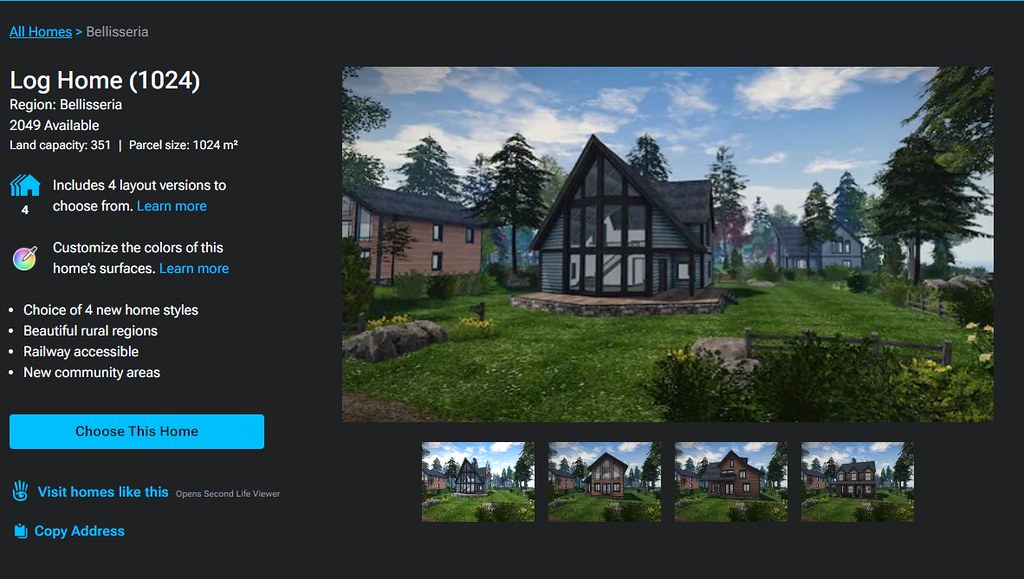
“2019+” Linden Homes are listed by theme name (e.g. Ranch, Log House, Silt House, etc.), provide a photograph of one of the styles from the theme, number of layouts (styles) within the theme, location and parcel size.
This listing is periodically updated to reflect the current status of all Linden Homes: available themes / types are listed firt in the order Premium Plus Homes then Premium 2019+ Homes then Premium 2010 / 51w sq m parcel homes. And themes or types currently unavailable are then listed in the same order and labelled NOT AVAILABLE.
For those on non-eligible (for Linden Homes) accounts / who are not logged-in to the SL web properties, the Store will go on to display additional useful information on Linden Homes below the index list.
House Panels / Information
Clicking on a specific house / theme in the Store’s index list will refresh the page and display expanded information on the selected house / theme that the top, with the more recent Linden Home themes having more information available than the 2010 Homes, per the images below. The listing of homes will then continue below this expanded panel.
An information panel within the Linden Home Store for one of “2010” styles of Linden Home. Note the information on the left.
That the “2019+” homes have more information associated with them is not surprising, simply because they have more to offer. however, it did again give rise to some niggles:
The text “Includes X layout versions to choose from” (where X is a number) is followed by a link called Learn More. This gives the impression that clicking the link will display further information directly related to the theme (such as what the layouts are). Instead, it takes the user out of the Land Store and to the 2019 Linden Homes wiki page.
While this does contain some information related to the various themes, it’s hardly more informative that the information displayed within the Store and totally disrupts what has thus far been a relatively contained, seamless experience.
Given the effort put into the Store, it’s a shame time wasn’t taken towards building more detailed pages (with images) for the themes ahead of any launch.
Similarly, the text “Customise the colours of this home’s surfaces” is perhaps mis-labelled, and would be better called “About the Linden Homes Controller”, given it links to the section of the SL wiki page devoted to all of the Controller’s options, not just decorating.
An information panel within the Linden Home Store for one of “2019+” themes of Linden Home. Note the expanded information on the left, and the critquies of it noted in the above bullet points.
Some have also commented that listing the “2019+” Linden Homes within the Store in terms of their collective theme (e.g. Houseboat) rather than style (e.g. Windlass, Barnacle, Jolly Roger, etc.), and doing the reverse for the “2010” Homes, listing them by style (e.g. Aspen, Birch Cedar) rather than collective theme (e.g. Tahoe) is further confusing.
However, while I can understand thinking this way, I’d actually point out that it does in fact make sense: all “2019+” Lindon Home styles within a given are available through a rezzing system on the parcel, allowing the user to swap between them whenever they wish. However, this is not the case with the “2010” homes; regardless of the over-arching theme (Tahoe, Meadowbrook, etc.)., the only way to swap from one theme to another is to physically swap homes through the Store – ergo, listing them by style rather than trying to group them by theme does in fact make sense.
General Observations
I will confess, other than kicking the tyres of the new Linden Home Store as described above, I’ve not taken it for a drive in terms of using it to obtain a Linden Home; frankly, I’m perfectly happy with the location of my current Linden Houseboat, and I have no desire to pack-up and be randomly moved for the sake of a test. Sorry.
That said, it should be noted that whilst you can see the various types and themes of Linden Home currently available when browsing the Store, while the actual house type / theme you pick might be in-world is still down to a random selection from the available stock; you cannot puck a specific parcel in a specific region. Nor should this be expected: building a system to list all the locations of a given house type / theme when these could run into the hundreds just isn’t reasonable; thus Support ticket remains the means but which to request a specific location.
I do find several other points in the design niggling / confusing. Why, for example, are “2019+” Linden homes on 512 and 1024 sq m parcels listed as “Free with Premium Membership” when they are in fact available to both Premium and Premium Plus? Why do Basic and Plus members who might not realise have to get half-way through the Choose This Home before being told they are not eligible? Would it not be better to divert them to the account updates page on clicking the Choose button, rather than displaying angry red text when they try to Confirm Their Choice? Why wasn’t the store hooked into the Linden Homes widget in the top right of the secondlife.com dashboard for Premium / Premium Plus members from the outset (and which currently still links to the “old” Linden Homes store)?
The updates page for choosing a Linden home. It is only at this point that Basic and Plus users are informed they are ineligible for a Linden Home and need to upgrade – diverting them to the account upgrade page on chick the earlier Choose This Home button might be friendlier.
These are all small points, and to be fair, LL does have a long history of releasing not-quite-baked features and updates into the wild and then tweaking them after the fact. As such, there is the potential for all of these personal annoyances to be be address as a natural part and parcel of that work. However, the fact that there are all these little niggles and potential points of confusion does negatively impact first impressions. Which is a shame, because overall, it has to be said this new Linden Home Store is a significant and welcome improvement to to previous version.
Logos representative only and should not be seen as an endorsement / preference / recommendation
Updates from the week through to Sunday, October 8th, 2023
This summary is generally published every Monday, and is a list of SL viewer / client releases (official and TPV) made during the previous week. When reading it, please note:
It is based on my Current Viewer Releases Page, a list of all Second Life viewers and clients that are in popular use (and of which I am aware), and which are recognised as adhering to the TPV Policy. This page includes comprehensive links to download pages, blog notes, release notes, etc., as well as links to any / all reviews of specific viewers / clients made within this blog.
By its nature, this summary presented here will always be in arrears, please refer to the Current Viewer Release Page for more up-to-date information.
Note that for purposes of length, TPV test viewers, preview / beta viewers / nightly builds are generally not recorded in these summaries.
Official LL Viewers
Release viewer, version 6.6.15.581961 (formerly the Inventory Extensions Viewer), promoted October 2 – NEW.
Release channel cohorts:
Maintenance V(ersatility) RC viewer, version 6.6.16.582093, October 6.
Maintenance W RC viewer, version 6.6.16.582075, October 5.
Calas Galadhon Shadowfell II, October 2023 – click any image for full size
Every year, Tymus Tenk, Truck Meredith and the Calas team bring us worlds of wonder to explore in the form of their Halloween and Christmas wonderland builds as an adjunct to Calas Galadahon Park, and each year we are gifted with regions of mystical / seasonal delight. Mixing an atmospheric setting rich in places to explore, scenes to uncover, rides to enjoy and events to attend, all knitted together by the weave of environment settings, soundscape and supporting music, these builds are always and genuinely a highlight of Second Life.
For October / Halloween 2023, the Calas team once again present Shadowfell II, a journey to a realms which although probably not modelled specifically after any element of Tolkien’s mythology, carries with it something of a sense of Middle Earth during the Second and Third Ages, mixed with hints of other franchises to offer an engaging potpourri of elements deserving of careful exploration. First presented in 2022 as The Gardens of Shadowfell, things have this year been expanded into a third region for visitors explore.
Calas Galadhon Shadowfell II, October 2023
As with all of the Calas themed builds, this is one in which it is very important visitors note at least some of the guidelines regarding a visit, all of which can be found at the landing point – with the most important perhaps being:
Make sure you Used Shared Environment (via World → Environment).
Make sure Advanced Lighting Model is active via Preferences → Graphics).
Enable local sounds.
Make sure you have particles visible.
Calas Galadhon Shadowfell II, October 2023
It also is suggested that those who can, should also enable Shadows via Preferences → Graphics. This is worthwhile if you can – and with the roll-out of the performance improvements within the viewer, this should be easier than it might have once been for a fair number of Second Life users – and I’d at least recommend it for photography.
Those familiar with the Calas Halloween builds will know that there are two primary means of exploration – on foot, following the paths winding through the regions; and via tour boat (available a short walk from the landing point). I strongly recommend you take the time to use both; the paths and trails offer the most comprehensive way through Shadowfell – including to the teleport portals which are a vital part of the complete experience, but which are beyond the reach of the boats (for obvious reasons); just be sure to allow around 50 minutes for the boat ride.
Calas Galadhon Shadowfell II, October 2023
I would also suggest, perhaps, that when exploring on foot, the accompanying music track is turned off during a first visit so that the ambient sounds can be fully appreciated. Instead, turn the music on for the boat tour (and for subsequent visits). Finally, and as per the guidelines at the landing point, keep an eye out for the eye-in-hand tapestries along the routes – they offer teleport opportunities to additional sit points and locations that you might otherwise miss.
Shadowfell really isn’t so much a single place, but more a realm of multiples environments, all interlinked by the paths and trails as they wend their way through it. There is the forest, with its twists of Tolkien’s Mirkwood, and the caverns dark and old (and on the ground and in the air); places where spiders wait to trap the unwary and even more unearthly creatures have come to call “home” (and where I again found myself wishing that music streams could be defined by altitude as Jerry Goldsmith’s theme for a 1979 Ridley Scott film remains highly suitable for the caverns in the sky!
Calas Galadhon Shadowfell II, October 2023
Then there are the ruins where the cold eyes of battle-ready orcs keep watch, or which mark the place where a kingdom of men (or elves) has fallen. There’s also the caves cut by the aeons-long passages of water, lit by the glimmerings of crystals and otherworldly plants as the water leads inexorably to swamps as beautiful as they are mysterious.
Throughout it all creatures of many places and world watch or roam. Some are clearly hostile; others perhaps content more with the watching. Some might even look friendly and welcoming (although with one, I’m always reminded of a comment by the legendary Robin Williams: “Mickey Mouse to a three-year-old is a six foot RAT!” – so perhaps some of the funnier-looking characters here aren’t as innocent as they might appear!).
Calas Galadhon Shadowfell II, October 2023
Given this is an expansion of 2022’s Shadowfell, there is much which is likely to look and feel too familiar to those who visited in 202. However, looks really can be deceptive, and there are many new and subtle touches which bring a fresh sense of discovery and exploration. This is obviously very much true of the additional region, a place which extends the swamplands into something darker and more chilling and in which ruins mindful of both adventures in the depths of the forests of the Far East and also of places like Moria, hewn from living rock and long deserted by those who created it.
Here fires burn from high stone ledges, perhaps awaiting visitors such as yourself – or perhaps indicating those who lit them heard your approach and even now lie in wait should you stray from the path. Then there are the statues and figures: a hint of Sauron (or perhaps the Witch-King of Angmar) here, a hint of Herne the Hunter there; whilst all across the regions are hints of and suggestions of all walks of fantasy and horror.
The Shadowfell II calendar of events
As always with Shadowfell and Calas special events, entertainment is also provided throughout the time the realm is available to visit; check out the schedule below for dates and times of performances at The Pavilion. But above all else – do visit and enjoy; Calas events like this are not to be missed.

 Established in 1940, the American Diabetes Association is working to both prevent and cure diabetes in all it forms, and to help improve the lives of all those affected by diabetes. It does this by providing objective and credible information and resources about diabetes to communities, and funding research into ways and means of both managing and curing the illness. In addition, the Association gives voice to those denied their rights as a consequence of being affected by diabetes.






 Inara Pey: Living in a Modemworld