 On Tuesday, November 11th 2025 (SLT), Firestorm released version 7.2.2.79439 of their viewer. On Tuesday, November 11th 2025 (SLT), Firestorm released version 7.2.2.79439 of their viewer.
The primary aim of this release is to achieve parity with the Lab’s most recent releases and to add further updates to features added to the June 2025 Firestorm 7.1.13 release. Note that the following is not a complete review of the 7.2.2 release and all the changes made therein; it focuses on the more visible and user-facing updates. Those requiring a list of all changes and updates, including all bug fixes, etc, should refer to the Firestorm 7.2.2 release changelog, which also provides all proper credits for the work. |
Table of Contents |
General Notes
Installation
- Only download Firestorm from the Firestorm website. Do not utilise and other third-party site purporting to offer the Firestorm viewer, and remember Firestorm will never ask for log-in credentials in order to download a release version of their viewer.
- There is no need to perform a clean install with this release if you do not wish to.
- Do, however, make sure you back-up all your settings safely so you can restore them after installing 7.1.11.
Linden Lab Updates
This release brings Firestorm to full parity with the following recent official viewer releases from Linden Lab:
Viewer 2025.04 – Chat Mentions
Version and release notes: 2025.04 – 7.1.14.15192634334 – May 2025.
- Chat Mentions: support for chat mentions allowing for better communication and awareness in local chat.
- Type @ in any chat then pick a name from those listed, add your message and Say. Your text chat will be preceded by the selected avatar’s name displayed as a clickable link visible to everyone in local chat range, and which will open that person’s Profile.
- Firestorm options:
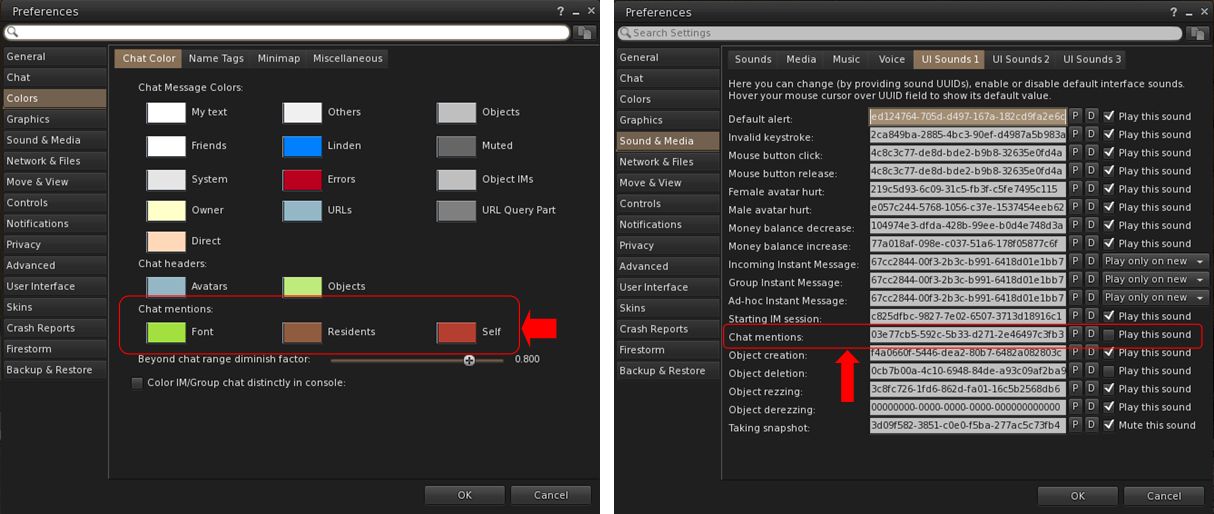
- Set chat mention colours for Font, Residents and Self: Preferences → Colors → Chat Color → Chat Mentions.
- Set audible tone for chat mentions using your name: Preferences → Sound & Media → UI Sounds 1 → Chat Mentions.
-
Outfit Subfolders: the Outfit system folder now officially supports the use of subfolders.
- Hover Height now supports new +/- 3 metre minimum/maximum values.
- Build improvements:
-
Texture scale boundaries have been increased to match Firestorm Viewer – Canny Bug, GitHub Issue.
-
Physics Material Type now updates when selecting linked objects – Canny Bug, GitHub Issue.
-
Resolved texture “repeats per meter” value being incorrect for non-uniform sized objects – GitHub Issue.
-
- Refer to the official release notes for all major updates and fixes.
Viewer 2025.04.01 – Avatar Welcome Pack
Version and release notes: 2025.04.01 – 7.1.15.15596336374 – June 2025.
- Replacement of the old Avatar Chooser with the Avatar Welcome Pack, accessed via Menu Bar → Avatar → Avatar Welcome Pack.
Viewer 2025.05 – glTF Mesh Imports (.gltf and .glb)
Version and release notes: 2025.05 – 7.2.0.16729091892 – August 2025.
- Support for glTF mesh imports, together with enhanced frame time metrics.
- Allows content creators to import models in .gltf and .glb formats in a process to COLLADA uploads, with a few key differences.
- A unified material upload for the .glb format is not yet supported (due in a future viewer update). To upload .glb models containing material, upload the model without any textures, then upload the materials separately via Upload Build → Upload → Material and then rez the model in-world and apply the materials.
- Refer to the official release notes for all major updates and fixes .
Viewer 2025.06 – Inventory Favourites
Version and release notes: 2025.06 -7.2.1.17108480561 – August 2025.
- Adds the Favourites tab to the Inventory floater.
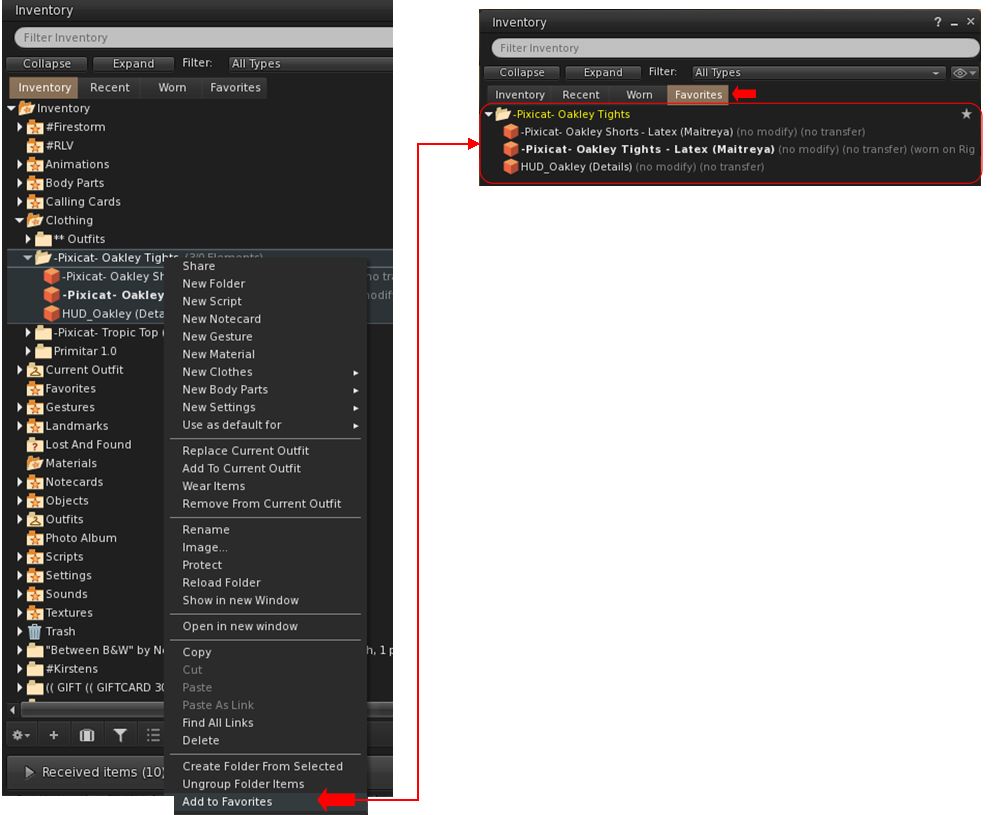
- Supports the addition of individual items or folders in Inventory to the Favourites tab in the floater.
- To add an item / folder to the Favourites tab:
- Right click on the item or folder.
- Select Add to Favourites in the context / Pie menu.
-
- To remove an item / folder from the Favourites tab:
- Locate the item / folder in Favourites or the original in the main Inventory tab.
- Right-click on it and select Remove From Favourites in the context / Pie menu.
- Note, this functionality is entirely separate to Firestorm’s Favourite Wearables feature, which remains in place in Firestorm, complete with its own toolbar button option.
- To remove an item / folder from the Favourites tab:
- Additional updates and improvements:
Cherry-Picked Upstream Fixes from the Official Viewer
- The Voice and WebRTC Reliability changes included in the official 2025,07 – 7.2.2.18475198968 viewer release have been added to Firestorm 7.2.2 at the request of Linden lab.
- These changes comprise:
-
Improved device detection and recovery when unplugging/replugging microphones.
-
Fixes for several rare WebRTC crash scenarios, together with improved Voice clean-up and logging.
-
In world Voice indicator now properly reappears after tuning.
-
Fixed voice clean-up and device update crash on reinitialization.
-
- All remaining updates and changes found within the 2025.07 official viewer release will be included in the next Firestorm release.
Firestorm Updates
New Features for 7.2.2
Disable Connecting to Neighbouring Regions (Navigation and Teleporting)
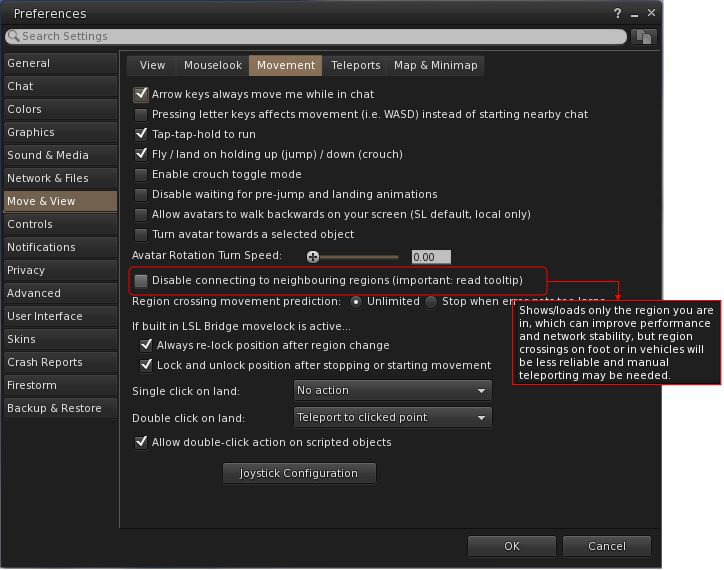
- Preferences → Move & View → Movement → Disable connecting to neighbouring regions.
- Request: FIRE-2325.
- When enabled:
- Prevents the viewer from connecting to neighbouring regions (which are ignored by the viewer), and only the current region (login/teleport destination) is connected, effectively isolating it.
- This may improve performance for users with weaker computers or slower connections, assist multi-region event setups by lowering client overhead and reduce unintended neighbour interactions.
- Limitations:
New Imposter / Avatar Imposter Exclusions (Inventory / Avatar Appearance)
- Preferences → Graphics → Rendering → Exclude Animesh Impostor Avatar.
- Request: FIRE-35735.
- When selected, allows a user to keep using the imposter system, but protect Animesh avatars from not animating or from having rendering issues (e.g. missing attachments).
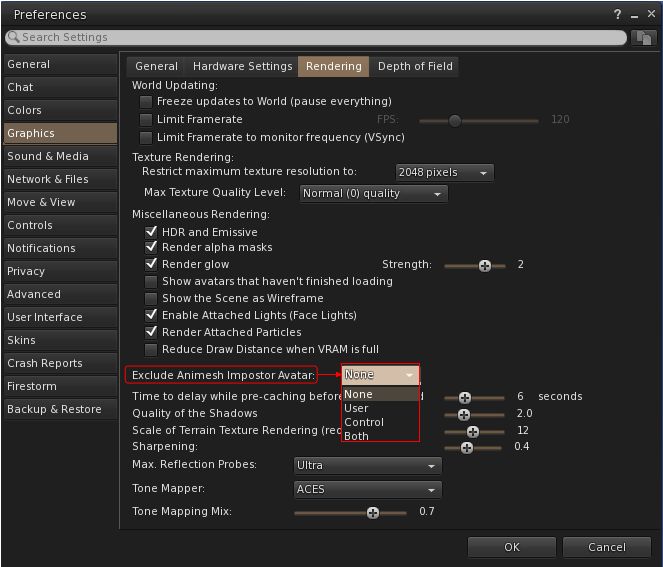
- Comprises four options:
New Snapshot Framing Guides and Settings (Photography / Snapshot Floater)
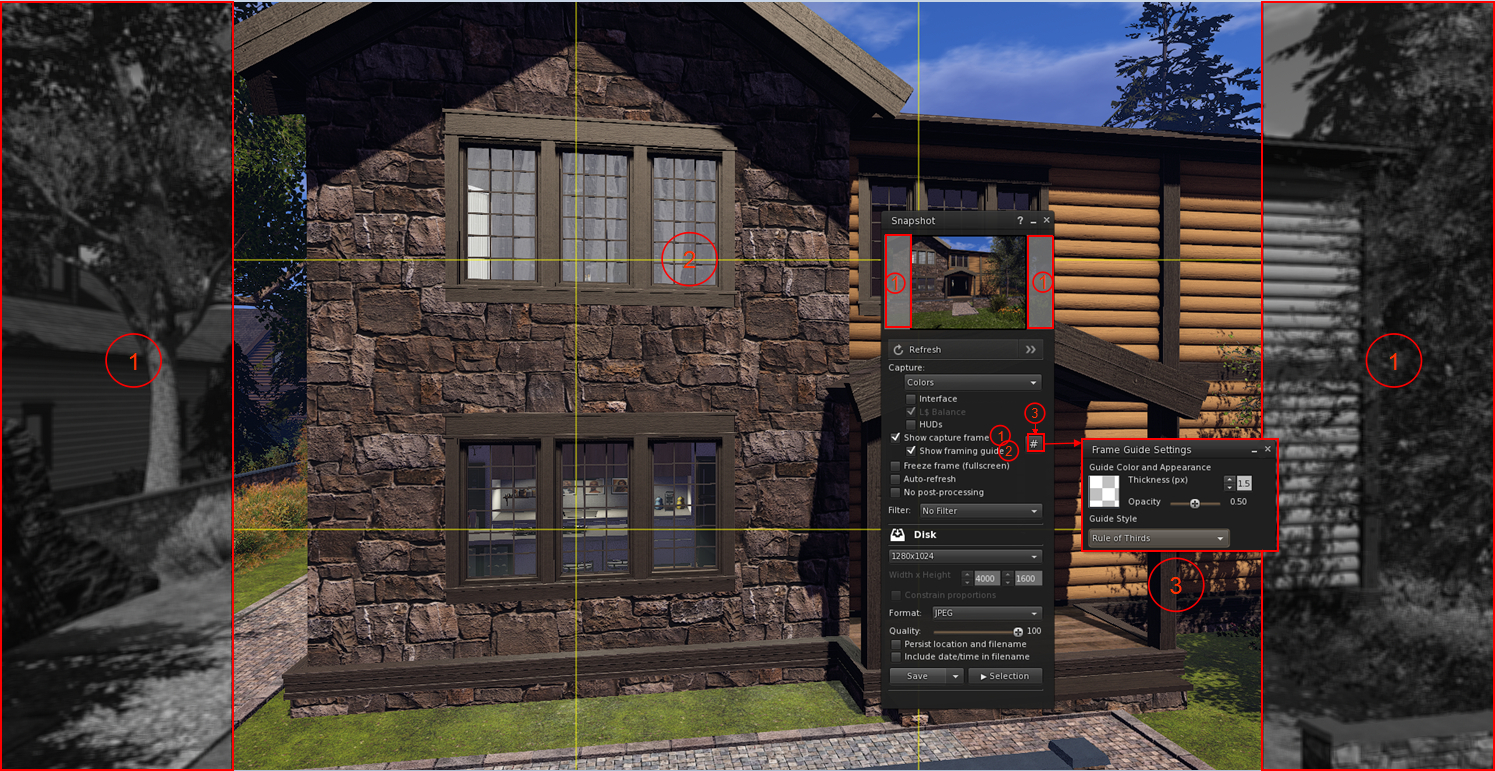
- The snapshot frame overlay and composition guides were added to the Snapshot floater with Firestorm 7.1.13.
- They allow the user to:
- Overlay their in-world view with a frame mirroring the selected image size selected from the relevant image size drop-down, with the parts of the in-world view outside of the image capture size rendering in monochrome (Show Capture Frame)
- Optionally display a composition guide overlay as a set of yellow lines within the image frame on their world-view.
- Use a series of Debug settings to customise the snapshot frame.
- Firestorm 7.2.2 enhances these frame overlays and guides with additional options, access via a new # button.
- When clicked, this button allows the user to:
- Adjust the thickness and opacity of the frame guides displayed in-world by the viewer without having to use the Debug Settings.
- Select from an expanded down-down of guide styles:
- Rule of Thirds.
- Golden Ratio: – one of Top Left, Top Right, Bottom Left or Bottom Right .
Firestorm Avatar and Animesh Poser
The Firestorm avatar and Animesh poser system was introduced with the release of Firestorm 7.1.13 as a re-write of the Avatar poser system developed by NiranV Dean (and found on the Black Dragon viewer). For assorted reasons, that release of Firestorm did not have any associated overview in this blog, therefore for detailed information on it, please refer to the following links:
- The Firestorm Avatar and Animesh Poser documentation.
- The Firestorm 7.1.13 release changelog.
- New features coming soon (Part 1) on the Firestorm blog.
Firestorm 7.2.2 introduces a large number of improvements and updates to the Avatar and Animesh Poser, all of which are summarised in the viewer changelog, to which those interested are referred to for details.
Other Notable Improvements / Updates
Note: for bug fixes, etc., please refer to the viewer changelog
Inventory, Appearance & Avatar
-
New option to automatically reset skeleton upon standing up, which is also automatically broadcast to surrounding avatars as well: Preferences → Firestorm → Extras → Reset avatar skeleton after standing up.
- New Stop button on the link replacement floater (Right click inventory item → Replace Links (FIRE-29394).
- ‘Delete from outfit’ context menu entry when right clicking on an item in an outfit, in the Appearance window, Outfits tab.
- This is useful for when you mistakenly added some HUD or anything else you didn’t want in your outfit, and is simpler than going inside the inventory and deleting the links from the outfit folder.
- Note that only links are deleted, not actual inventory items.
- Accessed via: Appearance → Outfits tab → Right click item → Delete from outfit.
- Visual warning about too many saved outfits:
- If a user has a large number of saved outfits, this can cause the viewer to freeze for a short time when opening the Appearance panel or when searching for saved outfits on slower hardware.
- Therefore, when the user has over 200 saved outfits, they will now see this warning notification:
A large number of outfits were detected: [AMOUNT]. This may cause viewer hangs or disconnects. Consider reducing the number of outfits for better performance
Radar, Navigation and Teleporting
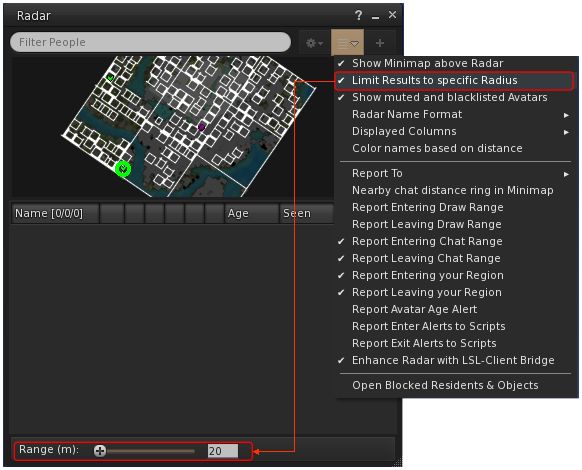
- New Radar option to set the maximum range for results to be obtained (FIRE-35815):
- World Menu → Radar (or Radar Toolbar button)→ Radar Options drop-down → Limit Results to specific Radius → open range panel at the foot of the floater.
- Use the slider to set the desired radius, or manually enter the radius.
- An option to View Chat Transcripts’ added to the Nearby People and Radar right-click context menu.
-
Option to show yellow beacons at region corners to help avoid region boundary disconnects, especially when driving or flying: Top menu → World → Show More → Beacons → Show → Region Corners (FIRE-33085).
-
The maximum zoom on the World Map has been increased to match the official viewer (FIRE-35934).
Communication + Sound and Media
-
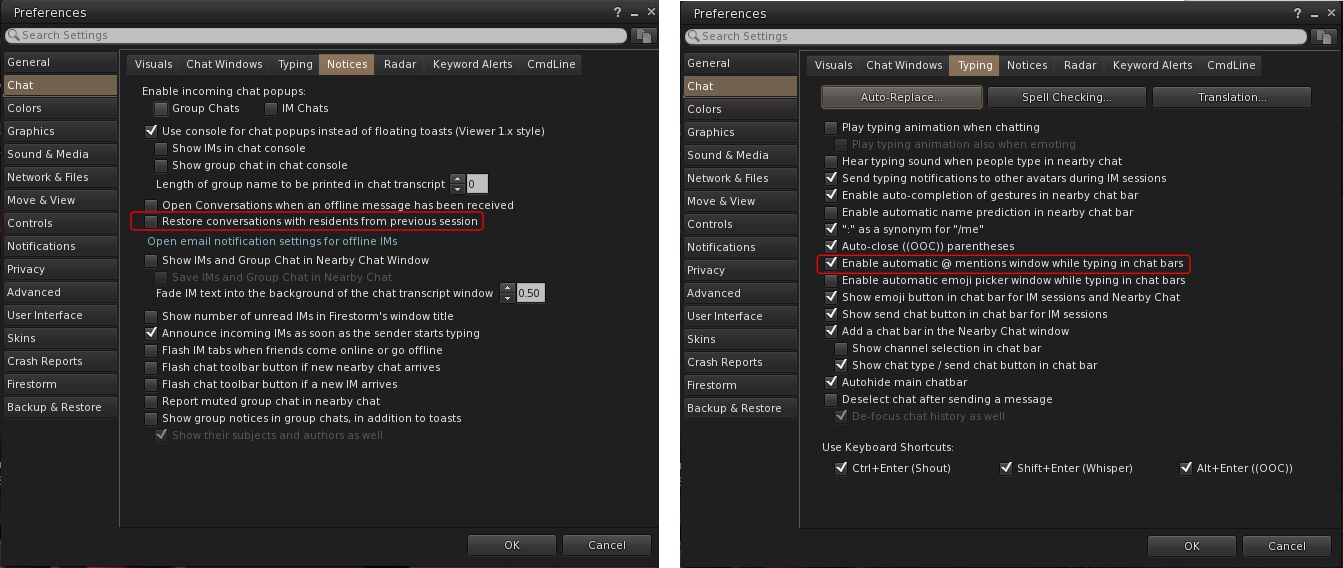
Functionality to save and restore open resident-to-resident IMs from the previous session (Group chat sessions are not always ready in time during start-up, making their restoration unreliable): Preferences → Chat → Notices → Restore conversations with residents from previous session.
-
Option to enable / disable auto-completion when typing @ mentions in chat: Preferences → Chat → Typing → Enable automatic @ mentions window while typing in chat bars.
- Separate conversations opacity options, together with new checkbox to allow the conversation floater to abide by the active opacity when it is focused, so that way it can have its own inactive transparency separate to everything else – FIRE-35804.
- Preferences → Colours → Miscellaneous → Floating Window Opacity → Conversations.
- Preferences → Colours → Miscellaneous → Floating Window Opacity → Use Active Opacity value when the conversations window is focused.
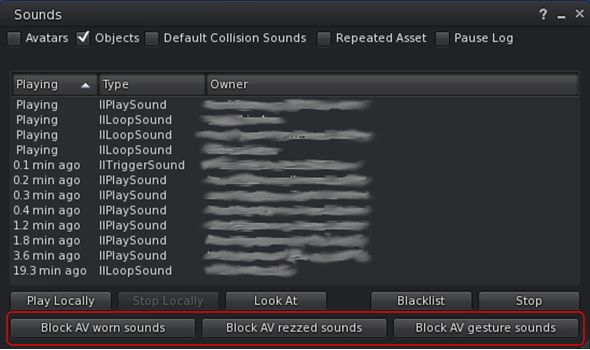
- Sound Explorer: new buttons in Sound Explorer to mute all attached, rezzed or gesture sounds for a specific avatar
- Muted sounds are re-enabled via the Asset Blacklist.
- Asset Blacklist: new Flags column to the Asset Blacklist to denote if the muted sound is one of Avatar Worn Object Sounds, Avatar Rezzed Objects Sounds or Avatar Gesture Sounds.
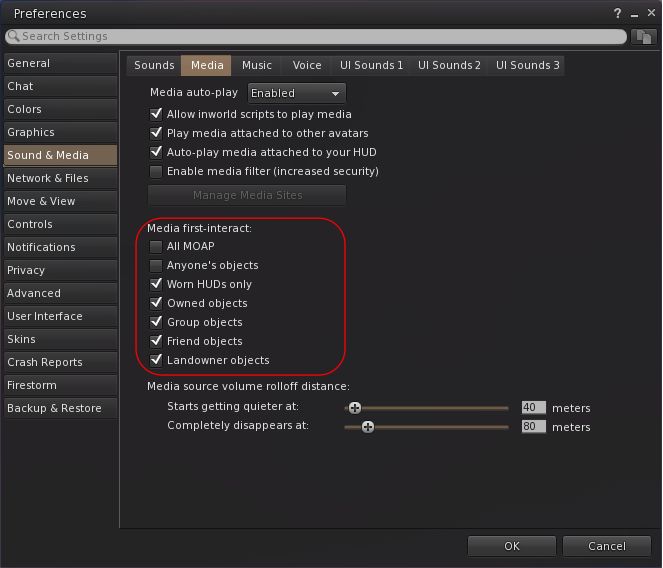
- Media on a prim (MOAP) interaction option can now be set individually (when set, does not require a first click to focus before interaction can begin): Preferences → Sound & Media → Media → Media first-interact.
Miscellaneous Updates
-
Show On-Screen Console shortcut revised to ALT+SHIFT+`.
- Area Search improvements:
- Added functionality to save Area Search flags and options as defaults when the floater is opened:
Top Menu → World → Area Search → Filter Tab → Save as Default. - Improvements to more reliably send all objects and not just objects in front of the camera.
- Added functionality to save Area Search flags and options as defaults when the floater is opened:
- Camera:
- Added an option to disable the reset buttons in the camera floaters (prevents the centre bullseye of the orbit and move camera controls from resetting the camera): Preferences → User Interface → Interface Windows → Disable camera controls reset buttons
- Added a TPP preset button to the added to the right of the front, side & rear buttons on both the small and regular camera floaters – FIRE-32595.
- Added Default buttons for Preference → Move & View → View sliders for ease of resetting to default values – FIRE-32710.
- Height of Preferences floater increased for improved readability.
- Graphics: Draw Distance VRAM Optimization changed to be optional:
- Preferences → Graphics → Rendering → Reduce Draw Distance when VRAM is full or
- Top Menu → Developer → Rendering → Reduce Draw Distance when VRAM is full.
Feedback
Sorry, no real feedback from me on 7.2.2, my personal situation has been such that I only managed to try the 79438 beta and the 78439 release less then 24 hours before the release of 79439.

 Inara Pey: Living in a Modemworld