Chaos and Calm in Second Life – Part 2: a rich Calm

Chaos and Calm – Calm, March 2025 – click any image for full size

In the first part of this series, I wrote about the return of Chaos Theory, the setting designed by Megan Prumier  which originally sat in the sky above The Butterfly Effect by Vally Lavender. In particular I noted the setting now has a new home, courtesy of Izzy Moondust (iggymurphy), who specifically went out and obtained a Full region just so Chaos Theory and its  residents could once again enjoy it (see: Chaos and Calm in Second Life – Part 1: Chaos Theory).

In that article I noted that as well as presenting Chaos Theory as a public space once more, the ground level of the region it sits within was also being developed by Megan on Izzy’s behalf as a rural space for people to explore and enjoy, and that I’d be covering it closer to completion time. Well, Megan has been working her socks off – and the region’s ground level is now all but done, so here’s the promised piece!

Chaos and Calm – Calm, March 2025

Called Calm, the ground level of the region is a marvellous, largely public setting (Izzy does have her home in the north-west corner of the region, screen away from the rest by trees and sitting on its own hill so please respect her privacy) featuring a lot to see and appreciate throughout. And I do mean a lot; such is Megan’s skill, this is a place that genuinely feels a lot, lot larger than the region in which it sits.

I’m honestly not sure whether words are adequate when it comes to Calm; the setting is so richly informed from its coastal edges to it high cliffs. The Landing Point sits close to the western side of the region,  tucked under the roof of a gazebo sitting between the region two outflowing streams.

Chaos and Calm – Calm, March 2025

These streams flow to the coast from a large lake below the region’s eastern uplands with their high cliffs,  and leave the ground on which the Landing Point sits as a tongue of land lapping at the lake at its bulbous inland end. This headland is split by two small brooks as they depart the lake, forming a Y as they meet to form the southern most of the two streams.

This headland offers an ideal vantage point from which to appreciate the horseshoe of waterfalls tumbling down the cliffs, a path running due east from the Landing Point running almost to the little bridge spanning one of the brooks to reach the headland.

Chaos and Calm – Calm, March 2025

The falls carry the name Snoqualmie Falls, and so appear to honour one of Washington state’s most popular natural attractions. As scenic as they are within Calm, the cliffs from which the water tumbles hide a number of points of interest and secrets which might be easily  be missed by the unwary visitor.

Close by the Landing Point gazebo and on its north side, a wooden bridge spans one of the two streams to lead to a stone-paved footpath. Running eastward towards the falls, this path quickly reaches fields of grass and flowers on the edge of the lake, arched boxwood hedges marking where it continues onward to where it starts winding up through the cliffs, passing by a warehouse converted into a (publicly-accessible) house, complete with a most unique (and historic!) garden ornament located on a flat-topped shoulder of rock.

Chaos and Calm – Calm, March 2025

Beyond the warehouse, the path continues to meander between high bluffs of rock, helping to give the region that sense of being a lot bigger than 256×256 sq metres, prior to reaching a high meadow cut through by some of the water from the upper level of waterfalls. Beyond a bridge spanning this stream, the path plunges into a long, natural tunnel as it passes under the highest waterfalls, offering its own unique beauty prior to emerging on the southern uplands, where a rough trail offers a route back down to the lowlands once more.

However, before being two quick to pass through the cave north-to-south, make sure you look around the field leading into its northern end, as you might find a lookout point of interest. further, mid-way through the tunnel you might noticed a – curtained, shall we say – exit leading to another retreat sitting between the step-like waterfalls to provide a magnificent view out of the region and its many points of interest.

Chaos and Calm – Calm, March 2025

As you descend from the upland along the southern trail and you’ll pass back through some of these further points of interest, including the arboretum, Buckskin peak camp store (which I take to be reference to Mount Buckskin in the Rocky Mountains), outdoor camp sites, what looks to be an art gallery in waiting, a farm shop bakery, places to fish, an old boathouse complete with a dice game sitting neatly on the water, a meadow for horse grazing, a neatly hidden events stage – the Steampunk Corner – and more.

Another event space is to be found on the lake itself. It takes the form of a solidly-built warehouse sitting atop a broad deck extending out over the lake’s shallow northern waters. Called simply Club Calm, it offers bars to either end (one topped by the DJ booth, the mostly open floor in the middle available for dancing.

Chaos and Calm – Calm, March 2025

And all of this still only scratches at the surface of a setting that lives up to is name in every way, and which is rounded-out by a mix of animal / wildlife, a perfect ambient soundscape and plenty of places to sit and pass the time.  Teleport boards are available to help with getting around (and with getting up to Chaos Theory and back!) – but really, Calm should be experienced carefully and on foot – it is a genuine joy to explore.

Do be sure to visit!

Chaos and Calm – Calm, March 2025

SLurl Details

Jhaeros is rated Moderate

Second Life Discord Server open to all & how to join

via Linden Lab

Following the announcement made during the March community Round Table (summarised here with video), the official Second Life Discord server has now been opened up to access by any Second Life users wishing to join it.

Whilst also being YACTF (yet another channel to follow) which comes on top of the blogs, forums, social media feeds etc., that Linden Lab tends to variously (and at times inconsistently) use for communications, the Discord server also presents broader means for SL users to connect with one another, share information, and keep abreast with events and activities (official or otherwise) within Second Life / at Linden Lab.

In particular, the Lab’s official blog post on the opening up of the server gives the following reasons for participating on it:

  • Stay Updated: get the latest news, updates, and announcements directly from Linden Lab.
  • Community Interaction: join discussions, participate in events, and meet other residents from around the virtual world.
  • Exclusive Channels: access dedicated channels for various interests including channels for creators, bloggers, newcomers, and more!
  • Community Support: seek assistance and advice from other Second Life users.

To gain complete access to the server you will need to:

  • Have a Discord account – you can set this up when accessing the Second Life server if you do not already have one.
  • Join the Second Life server.
  • (Optionally) link the Server with your Second Life account for access to all the available channels on the server.

Accessing the Second Life Discord Server

  1. Follow the https://discord.gg/secondlifeofficial link.
  2. If you do have a Discord account, skip to Step 3. Otherwise, follow the steps to create one:
    • Provide a Display Name at the pop-up (user name) and accept the Discord Terms of Service / Privacy Policy (follow the links to read both!).
    • Verify you are not a robot.
    • Provide a birthday.
    • Enter a valid e-mail address and create a password for your account.
    • Respond to the verification e-mail to confirm your e-mail address.
    • If required, get and install the Discord Desktop app (or just access Discord through your browser).
  3. You will be invited to join the Second Life Discord Server.
Accept the invite to join the Second Life Discord Server
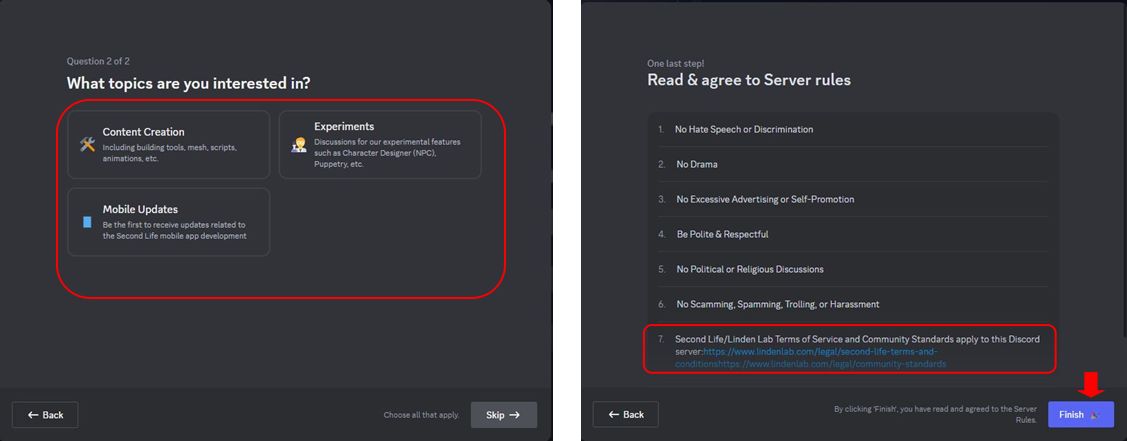
  1. Specify (or skip for now):
    • Your preferred language.
    • Your Second Life interests (you can select some / all of the available options).
Joining the Second Life Discord Server: interest options selection and rules and requirements pop-up
  1. Access the server on clicking Finish.
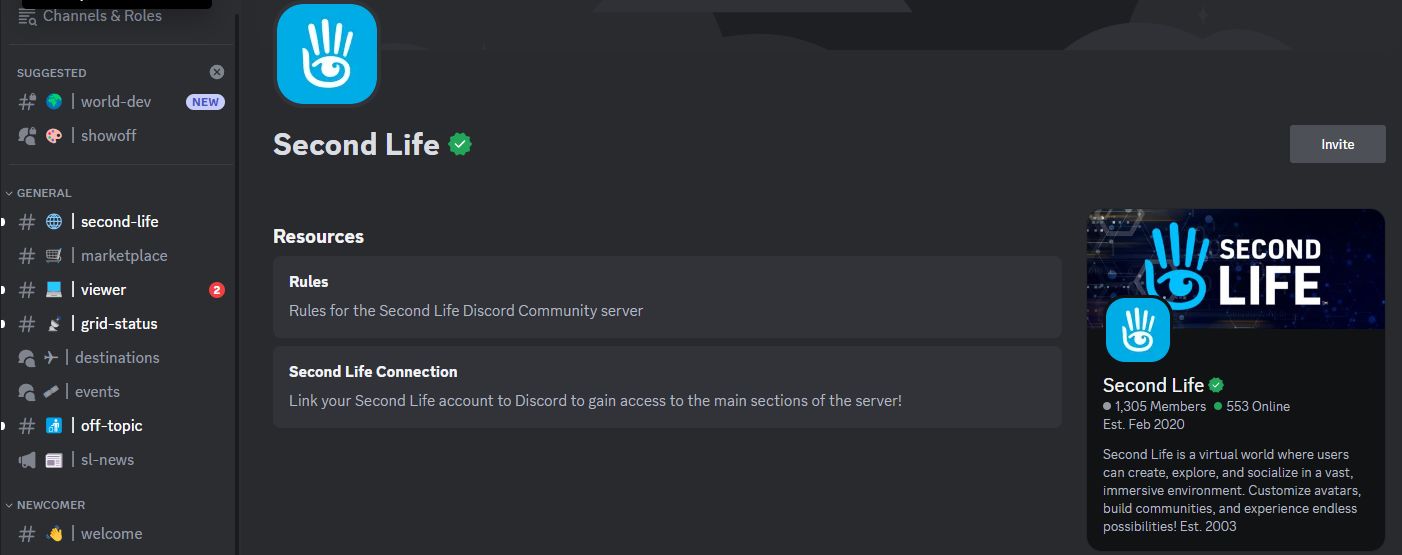
The Second Life Discord Server

Linking Your Second Life Account with Discord

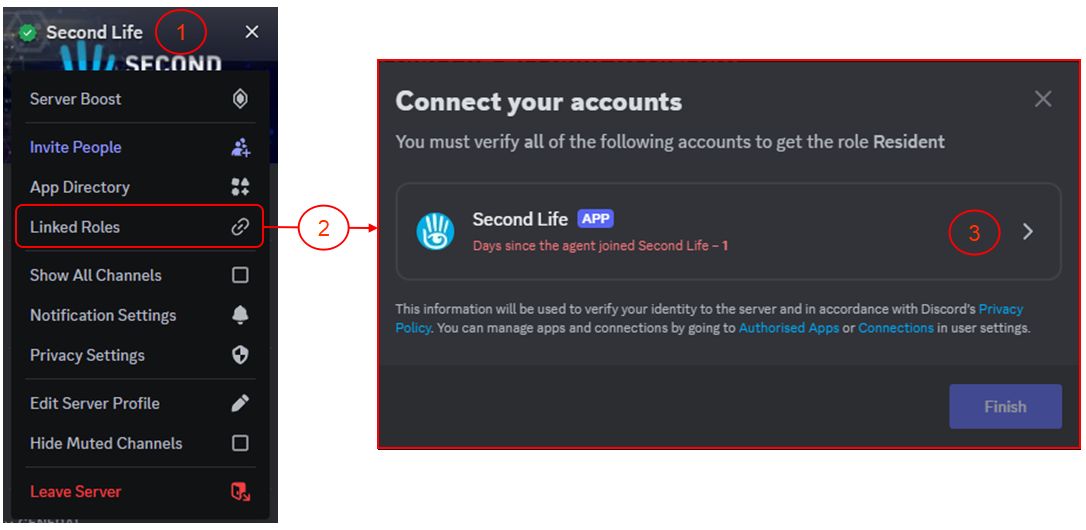
  1. Click on the Second Life Server name in the top left corner of the Discord window to open a drop-down menu.
  2. Click on Linked Roles in the menu to open the Connect Your Accounts pop-up.
Linking your Second Life account to your Discord account (1)
  1. Click on the Second Life APP link.
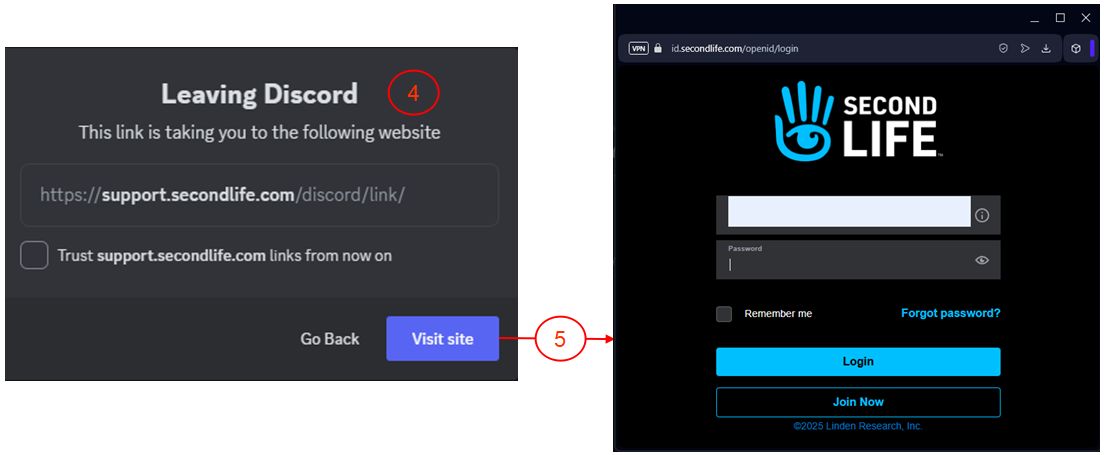
  2. A pop-up will be displayed indicating you are leaving the Second Life Discord Server using the link support-dot-secondlife-dot-com with the option to trust the link which you can optionally check.
  3. Click on Visit Site to open a pop-up with the Second Life web log-in (and note the URL at the top of the pop-up to ensure it is genuine).
Linking your Second Life account to your Discord account (2)
  1. Enter your Second Life log-in credentials (note: if you use MFA, you might be asked to provide an authenticator  Token).
  2. You will be asked to authorize linking your Discord account with your Second Life account – note you must scroll down the request in order for the Authorise button to activate.
  3. A message is displayed, indicating the link has been successful, and you can close the pop-up.
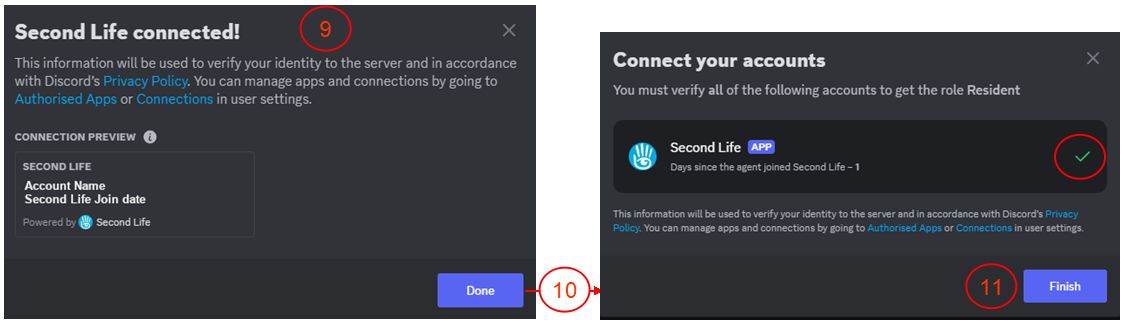
  4. A further pop-up will be displayed, confirming the connection is successful, as well as containing additional useful links.
  5. When you have finished with this pop-up, click Done to be taken back to the Connect Your Accounts pop-up, which has been updated with a tick to indicate the connection.
  6. Click Finish to close the connection.
Linking your Second Life account to your Discord account (3)

Unlinking your Accounts

To Unlink your accounts:

  • Make sure Show All Channels is checked in the Server drop-down menu.
  • Click on sl-connection under the Resources heading in the left side channel list.
  • Scroll to the bottom of the page and the section How to Disconnect Your Second Life Account from Discord.
  • Click on the specified URL to unlink your accounts.
  • The accounts will be unlinked and a message displayed (in a new browser tab if accessing Discord via your browser) indicating your Discord and Second Life accounts have been unlinked.

2025 week #12: SL SUG meeting: Grid SSL Certificate Renewal

l’Oree des lumieres, January 2025 – blog post

The following notes were taken from the Tuesday, March 18th, 2025 Simulator User Group (SUG) meeting. They form a summary of the items discussed, and are not intended to be a full transcript, and were taken from Pantera’s video of the meeting, which is embedded at the end – my thanks to her for providing it.

Meeting Overview

  • The Simulator User Group (also referred to by its older name of Server User Group) exists to provide an opportunity for discussion about simulator technology, bugs, and feature ideas.
  • These meetings are conducted (as a rule):
  • Meetings are open to anyone with a concern / interest in the above topics, and form one of a series of regular / semi-regular User Group meetings conducted by Linden Lab.
  • Dates and times of all current meetings can be found on the Second Life Public Calendar, and descriptions of meetings are defined on the SL wiki.

Simulator Deployments

  • On Tuesday March 18th, the SLS Man Channel was updated with any deployment.
  • One Wednesday March 19th:
    • Durian Scones should be deployed to the BlueSteel RC – this update incudes the SSL certificate renewal – see below for more.
    • The rest of the RC channels should be restarted without update.

Production Grid SSL Certificate Renewal

  • The SSL certificate for the Second Life Production Grid is set to expire on April 16th, 2025 02:40 GMT.
  • A new certificate anchored by DigiCert in being deployed, starting with the BlueSteel RC on Wednesday, March 19th.
  • Testing of this certificate – particularly with accessing the grid from older viewer versions is recommended.
  • In addition, the certificate can be tested on Aditi (the beta grid), on the following regions:
    • Bonifacio.
    • Blake Sea (Very nearly the entire set of regions).
    • Cloud Sandbox 1 through 4.
  •  For full details on the re-certification, please read Monty Linden’s forum post and thread, or the Lab’s official summary blog post.
  • The plan is to complete deployment of the new certificate ahead of the old certificate expiring.

SL Viewer Updates

  • Default viewer: 7.1.12.13550888671, formerly the ForeverFPS, dated March 1, 2025, promoted March 5th – No change.
    • Numerous crash and performance fixes.
    • Water exclusion surfaces.
    • Water improvements.
  • Second Life Project Lua Editor Alpha, version 7.1.12.13858460198, March 14th, 2025 – NEW.

In Brief

Please refer to the the video for details on the following.

  • A discussion on encrypting local chat  – or at least moving it from UDP to HTTP2. No so much due to chat passing through the Lab’s servers, but due to concerns about external agents eavesdropping.
  • A general discussion on SLua and updates, and on issues and requests.

† The header images included in these summaries are not intended to represent anything discussed at the meetings; they are simply here to avoid a repeated image of a rooftop of people every week. They are taken from my list of region visits, with a link to the post for those interested.