Meeting Purpose
- The Mobile User Group provides a platform to share insights on recent mobile updates and upcoming features, and to receive feedback directly from users.
- These meetings are conducted (as a rule):
- The last Thursday of every month at 12:00 noon SLT.
- In Voice and text.
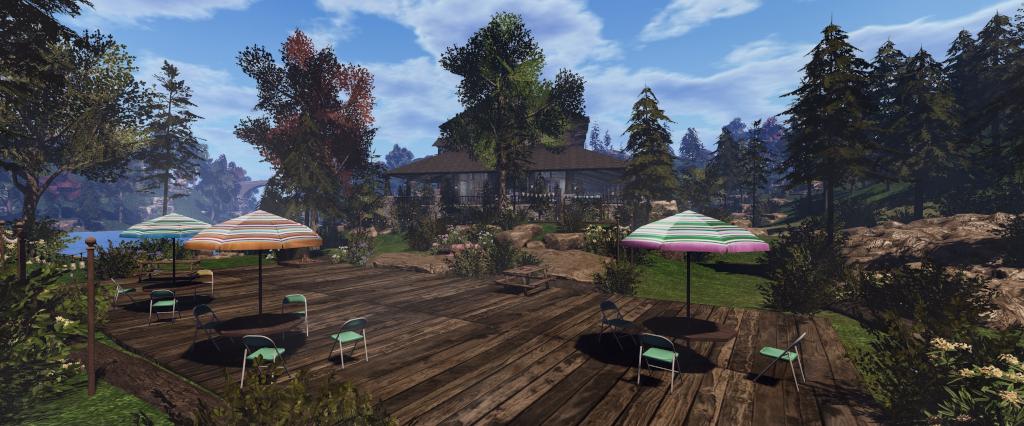
- At Campwich Forest.
- Meetings are open to anyone with a concern / interest in the above topics, and form one of a series of regular / semi-regular User Group meetings conducted by Linden Lab.
- Dates and times of all current meetings can be found on the Second Life Public Calendar, and descriptions of meetings are defined on the SL wiki.
Resources
- Second Life Mobile Beta website.
- Second Life Mobile on the Feedback Portal:
Re-Cap on Recent Releases
- Version: 2025.1.542 (Android) / 0.5.533 (iOS).
- Create / Delete accounts – see: SL Mobile gains account creation workflow (and more).
- Improvements to the format of Group notifications.
- Streaks rewards (see here for more) broader release among subscription accounts.
- [Video: 8:59-9:25] There is no guarantee as to how long the Rewards scheme will run. However, it will not end at the start of March, and there is potential for “new cool things happening with log-ins in March”.
Bone Attachment Point Handling

- A new Developer Tool option (Menu → Settings → Developer Tools).
- This is off by default – so no behaviour change from previous versions of the app.
- When enabled and SL mobile is restarted, it can improve avatar mesh appearance handling.
- However, it might also cause cause new problems!
- More debug information relating to rigged meshes is sent for developers to use.
- A request was made for users to enable the option an provide feedback either through the app (Help → Feedback) or via the Feedback Portal.
Campwich Forest Cloning
- In line with the account creation capability mentioned above, Campwich Forest in Bellisseria is currently the initial Landing Point for users signing-up to Second Life via SL Mobile.
- As this has seen a lot of traffic with new users within the Linden homes around the Campwich location, the decisions has been taken to clone Campwich Forest and use that as the Landing Point.
- The clone will be located separately from Bellisseria.
Roadmap Updates
Still in progress:
- Addition of an Address Bar to the app, making it possible to:
- Search landmarks /create landmarks.
- Share SLurls with people on other apps (Discord, Reddit, WhatsApp, etc.) via the native share cards found in Android and iOS.
- Allow maps.secondlife.com work on the Mobile App.
- Providing quicker access to chat when using the app – e.g. a button on the in-world view to go directly to Chat, rather than having to go via the menu.
- Improving in-world interactions within the app – making it easier to identify objects with which an avatar can interact, and know that something is happening when long-pressing an interactive object.
- [Video: 14:17-15:51] Pluto Linden indicated:
Lobby Alpha Testing
- Lobby is a new feature, intended to enable communications, allow users to see who is on-line and provide general information whilst the app continues to load things like the 3D world view in the background.

- Announced in December 2024, Lobby was made available to users on the SL Mobile Alpha testing programme on Thursday, February 27th, 2025.
- This is an initial release, and will be iterated upon and improved, potentially with more information being provided.
- Note that currently, when using the Lobby, scene loading will continue in the background, and you will arrive in-world at the last location at which you were previously present, be it when using the viewer or SL Mobile; you are not held in a separate environment.
- However: the plan is for Lobby to be accessible to users without any in-world loading taking place, thus making SL Mobile even more of a “lightweight client” for those on lower / mid-tier mobile devices to use it as a communications tool.
- As I am not a part of the Alpha Testing, I will have an article on Lobby as it is made more generally available.
Texture Loading
- Texture resolution, as currently handled, is not very well optimised in terms of resolution.
- In short, two channels are used for loading textures, one for in-world objects and one for avatars. however, as neither are currently optimising, they can load larger objects requiring higher resolution textures using the same resolution as small objects that can get away with lower resolution textures.
- One of the reasons for this has been trying to get everything rendering under the memory constraints imposed by mobile devices (e.g. 500-800Mb), with the intent of then going back and adjusting things for better rendering / performance.
- An outcome of this is particularly noticeable on avatar rendering (see also the discussion from the January meeting), is where avatars may not load, or only load as far as a transparent outline.
- Adam Sinewave is currently working to optimised texture resolution when loading, and this is now at a point where it allows avatars to be automatically refreshed on loading, which should help make the problems of avatar load failures / transparency be greatly reduced / go away.
- This work will also help towards the proper prioritisation / re-prioritisation of texture loading within Mobile, making more efficient use of memory.
- The plan here is that as memory use is improved, then it will be possible to start looking towards PBR materials support within Mobile (PBR requiring 2x or 4x the memory compared to textures).
- Adam also noted that there have been a “couple of tweaks to the defaults” on texture handling, but these have yet to surface in any version of SL Mobile.
Beanie Linden’s Tips’n’Tricks
- View account / L$ balance: Menu → tap the down arrow alongside account name to open the Account draw. Can be used to verify payments made via SL Mobile have gone through.
- Reporting a bug: Menu → Help → Feedback. Can also be used to give general feedback / suggestions.
- If you encounter issues while logging-in via Mobile, tap the gear icon at the top right of the screen, and this will open the Feedback form.
- Abuse Reports: can be accessed several ways:
- Log-press on the avatar responsible for the abuse display the context menu → Report Abuse.
- In Chat (nearby / IM) locate the three dots alongside the avatar’s name to access the context menu
- → Report Abuse.
- People list: tap on the avatar name to open Profile → tap the … More option → Report Abuse.
- Togging audio stream on/ off: tap the menu → tap the location displayed at the foot of the screen to open the Location Tray → tap the audio icon to toggle audio stream. Use the volume slider to increase / reduce audio stream volume.
In Brief
Please refer to the video for details on the following.
- [Video: 23:23-24:20] Culling distances: currently the app has a set of “fairly pessimistic” set of default culling distances.
- This will be changing in future updates to respond according to hardware (e.g. those with new mobile devices with better capabilities / more memory will show more content before culling commences; with culling on devices with lower specifications also better optimised for memory use).
- These changes will also allow for the loading / unloading of avatars as they move out of / into range.
- [Video 34:45-49:48] A run through of some of the top bugs / features, including:
- HUDS:
- HUDs are difficult to render in a meaningful way because of the form factor involved with size of the screen on mobile devices, coupled with the fact that HUDs can function in multiple ways(expanding / collapsing, paging etc), all of which requires careful consideration in order to be implemented/
- As such, the work is liable to b split, with an initial focus on addressing HUDs, etc. that call for llDialog menus / responses, as these seem to be the easier option to implement, and then build towards more complex HUD support over time.
- Inventory:
- Regarded as a very large project that needs to be broken down into areas of functionality that can be implemented and built upon.
- Current thinking is to enable the ability to buy items from the Marketplace and receive them in inventory using SL Mobile, and then interact with them.
- This would require an initial view of inventory and a number of functions to allow the required interactions with items visible in that view (e.g. potentially the ability to add / remove items to / from your avatar; view sub-folders, etc.).
- Use this as a bassline to build-out inventory functionality.
- HUDS:
- A further note, following from those at the January meeting, that work is continuing to improve avatar rendering and to try to chase down those issues where avatars do not render correctly.
Date of Next Meeting
- 12:00 SLT, Thursday, March 27th, 2025, at Campwich Forest.




 Inara Pey: Living in a Modemworld