2024 week #43: SL TPVD meeting summary

Grauland / Primary Colors, September 2024 – blog post

The following notes were taken from my audio recording + the video recording by Pantera (embedded at the end of this summary) of the Third-Party Developer meeting (TPVD) held on Friday, October 25th, 2024. My thanks to Pantera as always for providing it.

Meeting Purpose

  • The TPV Developer meeting provides an opportunity for discussion about the development of, and features for, the Second Life viewer, and for Linden Lab viewer developers and third-party viewer (TPV) / open-source code contributors to discuss general viewer development. This meeting is held once a month on a Friday, at 13:00 SLT at the Hippotropolis Theatre.
  • Dates and times are recorded in the SL Public Calendar, and they re conducted in a mix of Voice and text chat.
  • The notes herein are a summary of topics discussed and are not intended to be a full transcript of the meeting.

Official Viewers Status

[Video: 0:00-2:30]

  • Release viewer: version 7.1.10.10800445603, formerly the DeltaFPS RC (multiple performance fixes, etc), dated September 11, promoted September 17 – No change.
  • Release Candidate: ExtraFPS RC, version 7.1.11.11296522354, October 18.
    • Performance improvements: enhanced texture memory tracking, broader hardware compatibility and higher FPS gain;  additional code to improve texture streaming on rigged attachments (e.g. if an earring is made with 2K textures, the viewer will correctly calculate the required resolution for the textures and download them, rather than downloading the full 2K textures), etc.
    • Aesthetics improvements: new Antialiasing setting – SMAA; Contrast Adaptive Sharpening; Khronos Neutral Tone Mapping (can be changed to ACES via the RenderTonemapType Debug setting).
    • UI Optimisations: lessening the impact of UI rendering on frame rates / performance (discussed more fully at 16:52-18:04].

Upcoming Viewers

  • ExtraFPS is described as having some “high priority” bug which require fixing before it progresses to release status.
  • The next RC viewer to follow ExtraFPS is likely to be the Maintenance B build, which includes work put on hold while the focus was on PBR and non-PBR related performance fixes.
  • Performance improvement will continue to be part of the on-going work with the viewer, but once ExtraFPS is promoted to release status, it is unlikely that the Lab will produce viewers dedicated only to performance fixed for a while.
  • From the comments made, it appears as if LL are going to try to pull work from what had been the Maintenance C RC viewer (also put on hold whilst the performance work was going on) into the next viewer build as well.
    • It was acknowledged that this approach may need toa delay in getting the updated Maint B viewer out and to release status, but it is hoped that in the long run, it will mean a faster release cycle with the viewer builds which eventually follow behind Maint B.
  • [Video 21:09-22:27] Vir reiterates that as the Maint B(/C) viewer appears, it should mark the return  of Linux to the list of official viewer builds.
    • However, the Linux flavour will be based on code contributions rather than dedicated support from with in the Lab.
    • If things break with it, the Lab will attempt to fix them, but will not hold back viewer releases as a result of Linux-specific breakages / bugs.

WebRTC

[Video 2:31-4:20]

Summary

  • The replacement of the Vivox Voice service and plug-in, with the WebRTC communications protocol (RTC=”real-time communication”). Roxie Linden is leading this work.
  • Key benefits:
    • WebRTC supports a wide range of real-time communications tools in common use (e.g. Google Meet), supporting audio, video and data communications, and is thus something of a “standard” approach.
    • Offers a good range of features: automatic echo cancellation, better noise cancellation and automatic gain control, much improved audio sampling rates for improved audio quality.
    • Opens the door to features and capabilities to voice services which could not be implemented whilst using Vivox.

Status

  • There is now a “pretty significant fraction” of users still using a non-WebRTC capable viewer.
  • LL would like this number to be further reduced before they completely pull the back-end support for Vivox. As such, the exact time frame on when the switch might be thrown is still TBA.
  • [Via chat throughout the 10-25 min point in the meeting, and with some Voice from approx 18 mins] It was noted that Voice roll-off under WebRTC should work the same as for Vivox, BUT the range at which is rolls-off completely is greater (60m).
    • Some have reported that this does not appear to be the case, with roll-off potentially not working at all (also reported at the last TPVD meeting).
    • LL to investigate further.

Graphics Work

[Video: 5:28-end]

  • The first part of this update referenced rigged attachment texture streaming as noted in the ExtraFPS summary, above.
  • Also as noted above, the work on improving performance has reached a point of diminishing returns for dedicated viewer updates, so future performance improvements will be folded in ither other viewer updates making it to the Develop branch.
  • The above noted, LL is still digging into specific hardware types where the viewer does not perform well (e.g. some AMD graphics chips) in order to determine what might be done to improve things.
    • If people running a viewer with the DeltaFPS code included are still fining they have very poor performance (e.g. single-digit FPS; an already low FPS cut in half, etc.), they are asked to file a Canny report and included information on their hardware (e.g. copy-paste their hardware information as displayed in Help → About, in the viewer).
  • [Video: 7:57-9:07] A change was introduced with the Delta FPS code such that if the viewer is running in the background on a system for more than 10 seconds, it will down-rez textures to prevent over-use of VRAM when it is not the application in focus.
    • This has received completely mixed feedback: some feel 10 seconds is too long a period to wait; others feel it is too short; those running multi-screen systems with SL on one monitor dislike the fact that when they focus away from SL to work on their other screen, SL “goes blurry”, etc.
    • As a result, LL is considering making this a switchable option, so users can decide whether they want to utilise it or not.
  • [Video 9:20-11:13] A discussion on using Vsync in the viewer vs. limiting frame rates (e.g. through the viewer or via something like the Nvidia control panel).
  • [Video 27:29-33:33] A discussion on brightness and  gamma / PBR vs non-PBR / use of HDR rendering + tone mapping.
    • In terms of tone mapping, the decision is to move back o ACES as the default in light of feedback, but people will remain able to select Khronos Neutral or ACES through Preferences.
    • The long-term plan is to have tone mapping and colour correction per sky setting, allowing region holders / designs to choose which ones they want.
    • As such, content creators are reminded no to bake tone mapping in their base colour / diffuse map but let the viewer’s post-processing handle the tone mapping.
  • [Video: 33:25-38:33] Alpha / gamma work:
    • As per previous meetings: in order for PBR lighting to render anywhere close to correctly, alpha blending had to be switched from SRGB to linear colour space. This can cause some older content using Blinn-Phong, to look either more opaque or more transparent than in did pre-PBR.
    • The fix for this giving people the ability to adjust the alpha/gamma on per texture entry for the object (including no mod items)
    • A link was provided to an installer for a viewer with the code at the meeting, but this later generated a 404 error.

In Brief

  • The latter part of the meeting included a discussion on documentation + communication (e.g. communicating more fully the reasoning behind PBR – the move towards better and more consistent content using glTF).

Next Meeting

† The header images included in these summaries are not intended to represent anything discussed at the meetings; they are simply here to avoid a repeated image of a gathering of people every week. They are taken from my list of region visits, with a link to the post for those interested.

Six for a third at the Kondor Art Museum in Second Life

Kondor Art Museum, October 2024: Thus Yootz

The third exhibition at the Kondor Art Museum, a part of Hermes Kondor’s Kondor Art Centre, features a total of six artists exhibiting theough the gallery’s halls. They comprise: Mareea Farrasco, Sina Souza, Ilyra Chardin, Zia Branner and Thus Yootz, with Hermes himself rounding out the six. Some of these artists art among my personal favourites for their depth of expression and presentation, so this has been an exhibition I’ve been wanting to drop into since it opened on October 17th, 2024.

As with the first exhibition at the the Museum in April 2024, Ilyra Chandin’s 3D pieces occupying the foyer of the gallery building, as well as at the entrance and on the roof.

Kondor Art Museum, October 2024: Zia Branner

To the left of the entrance, the first hall in the museum houses a selection of pieces by Thus Yootz, someone who is, in my opinion, one of the most expressive and at times artistically experimental artists in Second Life. Here she presents 10 pieces that very much demonstrate these facts, with landscape pieces in monochrome and colour mixing with gorgeous and expressive line and wireframe styles.

Following Thus, and occupying the rear hall of the museum’s lower level, together with the hall to which it leads, is a two-stage exhibition by Sina Souza, another highly expressive artist I admire. The first part of this selection is a series focused on the colour red, some of which carry something of a social commentary. Beyond this is the right-side hall, containing seven colour / monochrome pieces, all equally evocative.

Kondor Art Museum, October 2024: Mareea Farrasco

Upstairs, the two halls feature a selection of Mareea Farrasco’s always-engaging Second Life landscapes and avatar studies, and across the landing, Zia Branner’s abstract paintings. Again, both of these artists have a unique approach to their work, and I never fail to be drawn into their images and art.

Rounding-out the exhibition, again in the front hall to the right of the entrance, is more of Hermes’ own quite superb photography from the physically world as he takes us on a further visit to Lisbon’s Reservatorio da Patriarcal, also known as the Water Museum. Captured in a black and white, these are quite studding photos in terms of their focus, angle and contrasts of shadow and light which bring the walls and walkways of the museum to life in an almost tactile way; one can literally sense the smooth hardness of the metal railings and steps and the soft roughness of the stone.

Kondor Art Museum, October 2024: Sina Souza

In all, an engaging series of art displays from six equally engaging artists

SLurl Details

The dark beauty of a Lady’s Temple in Second Life

Dominae Templum Doloris, October 2024 – click any image for full size

Beneath a star-swirled sky from which an eye of infinity stares down, stands a temple on a floating island; a place of magic, mystery, sadness and beauty. Removed from time, this is a realm where the occult is practiced and researched and arcane and perhaps terrible secrets await discovery.

Born of the imagination of Autumn Moonwraith (AutumnsWraith),  Dominae Templum Doloris sits above the southwestern extent of Heterocera at a point where, at ground level, a graveyard might be founds set back from the road and separated from it by high rocks and gated wall. Here, both beside the steps leading to the gates of the cemetery (elsewhere and within its walls) passing visitors might find a book of Magic, a touch upon which (and acceptance of an Experience) will carry them to the Temple itself (there’s also a teleport board on the other side of the steps leading up to the graveyard, and this provides direct access to the places mentioned in this article).

Dominae Templum Doloris, October 2024

However, before being tempted by said book(s), those coming the cemetery first may well want to spend a little time exploring it first, as there is much to be found within its darkened walls, including possible references to Goddess for whom the Temple was established, together with the bloody and mystical Club Midian – but I’ll leave it to you to discover these.

A crumbling domain in the endless void Explore the fallen temple of a long dead Goddess and the ancient occult library at the veil between life and death.

– Dominae Templum Doloris About Land description

Dominae Templum Doloris, October 2024

For those teleporting to it from the ground or directly (from, say this article or the Destination Guide), Dominae Templum Doloris – perhaps most easily expressed as Temple of the Lady of Pain – lies separated from its main Landing Point by a chasm of sky crossed by the single broad span of a bridge. The Landing Point sits within the ruins of of a chapel perhaps younger that the temple, but which have not weathered the passing of time nearly so well. Make what you will of the altar and strange throne within these ruins – but do take note of the floating prize box close to where the bridge reaches outwards from the ruins; within it you will find a clue that my well help you in your explorations and in unlocking some of the mysteries of this setting. I’ll say no more of this here, but let you seek out more should you visit.

Find me, rooted near our lady’s sorrowed heart and the tears that help the lost souls to depart. Another clue is yours if you search the round; they say, behind words true knowledge may yet be found.

– Dominae Templum Doloris first hint

Dominae Templum Doloris, October 2024

As you cross the bridge, you might witness a smaller rock circling the chapel’s ruins, the shape of the bent tree on its back as it circles perhaps mindful of a shark silently circling its potential prey. But while that tree is no monster, signs that strange and terrible creatures once occupied this realm can be found on the far side of the bridge, in the form of a giant dragon-like beast’s skull and bones. Just be careful where you step should you examine them, and you might find beasties still await the chance to scare.

Stone steps climb from here to the temple’s imposing bulk, their passage upwards guarded by tall carved pillars topped by mystical cold blue flames, together with more bent and twisted tress looking like fossilised serpents forgotten by time. Sitting under the high domed roof open at its centre to the stars above, the temple is a vast rotunda of magic and mystery. It is a place mixing learning with practice; where spells and incantations might be sought and cast, or knowledge of dark and light and life and death might be studied. It is also, strangely, a place in which to relax, and even to play a parlour game or two, as well as in which to study.

Dominae Templum Doloris, October 2024

The attention to detail within the temple is – in a word – exquisite. So much so that I again do not want to spoil your explorations; just do take time to pan and cam carefully, high and low, or you might miss something – be it an image on the walls or an object on a desk or shelf. Those wishing to try their hands at levitating might want to touch the floor within the ring of candles, whilst those who came directly to the Temple might try the book of spells and runes to one side of the the circle to travel down to the cemetery mentioned above – or elsewhere!

If walking is your forte, exiting the temple and turning to the right will lead you to another set of stairs climbing to a further garden; a place where more surprises might await – particularly for those with active RLV/a; so be careful where you click!

Dominae Templum Doloris, October 2024

There is one other place within the setting awaiting exploration (although, depending on your luck, you may find the teleport board already mentioned offers the easiest means of access). It sits even higher overhead, where the swirl of a yellow galaxy spins as a golden iris around the darkness of its heart to form that eye of infinity staring down over the temple. But again – I will leave you to discover this location for yourselves.

Dominae Templum Doloris is a fascinating visit – yes, it might seem appropriate to the season, but it in fact exists well outside of Halloween or anything else of that nature; it is a fully-formed place of mystery and the mystical which can be enjoyed regardless of the season or time. When visiting do be sure to have local sounds enabled and to either be running a PBR viewer or if on a non-PBR viewer, to have Advanced Lighting Model (ALM – Preferences → Graphics check the box; Shadows need not be enabled as well if your system struggles with them) – and enjoy!

Dominae Templum Doloris, October 2024

SLurl Details

2024 SL SUG meetings week #43 summary

Loch Dhoire an Chláir, September 2024 – blog post

The following notes were taken from the Tuesday, October 22nd, 2024 Simulator User Group (SUG) meeting. They form a summary of the items discussed, and are not intended to be a full transcript, and were taken from my chat log and Pantera’s video of the meeting, which is embedded at the end – my thanks to her for providing it.

Meeting Overview

  • The Simulator User Group (also referred to by its older name of Server User Group) exists to provide an opportunity for discussion about simulator technology, bugs, and feature ideas.
  • These meetings are conducted (as a rule):
  • Meetings are open to anyone with a concern / interest in the above topics, and form one of a series of regular / semi-regular User Group meetings conducted by Linden Lab.
  • Dates and times of all current meetings can be found on the Second Life Public Calendar, and descriptions of meetings are defined on the SL wiki.

Simulator Deployments

  • On Tuesday, October 22nd, the Main SLS channel received an updated version of the simulator Doubtfire release, which incorporates a fix for the attachment issues that people have been seeing, together with a fix for the last of the problems for things like region traffic.
  • On Wednesday, October 23rd, this version of Doubtfire should be deployed to all RC channels.

Simulator Deployment Plans

  • The next simulator maintenance update will be Barbecue, which should include:
    • Support for “alpha-gamma” which will allow an object owner to adjust some of the PBR alpha values that were impacting legacy things like hair.
    • llSetAgentRot.
    • A new warning on receiving direct IMs from Scripted Agents (“registered” bots): if a Scripted Agent “right clicks” you and sends you a message, it will trigger a warning about sharing personal information with bots within the chat window.
  • Following Barbecue will be Apple Cobbler, which should include:
    • llTransferOwnership which enables a prim give itself to a new user (subject to owner permissions already set).
    • An extended llGiveInventory to allow for a destination folder (spystem folers + RLV/a) to be specified as well (+ the use of a parameter list, so further options can be added in the future).

SL Viewer Updates

No changes at the start of the week:

  • Release viewer: version 7.1.10.10800445603, formerly the DeltaFPS RC (multiple performance fixes, etc), dated September 11, promoted September 17 – No change.
  • Release Candidate: ExtraFPS RC, version 7.1.11.11296522354, October 18.
    • Performance improvements: enhanced texture memory tracking, broader hardware compatibility and higher FPS gain.
    • Aesthetics improvements: new Antialiasing setting – SMAA; Contrast Adaptive Sharpening; Khronos Neutral Tone Mapping (can be changed to ACES via the RenderTonemapType Debug setting).

In Brief

Please refer to the video below for the following:

  • llTransferOwnership: concerns were raised over ensuring proper safeguards to ensure the function cannot be abused. For example:
    • If person A has edit rights to person B’s objects, and one of those objects has something like a money() event (or similar), and A drops a llTransferOwnership into the object, so it is automatically transferred, potentially exposing the recipient to an unexpected outcome (such as L$ transfer).
    • Safeguards against these potentials is to be investigated before making the function available.
  • The proposed new message for Scripted Agents raised a discussion on bots which have not been explicitly “registered” as a bot at creation still presenting a range of issues: spamming people, gaming the system, etc, and how better to manage them.
    • One suggestion is provided via this Canny report. The discussion covered other options / ideas.
  • The idea of llGiveInventory being able to target folders resulted in discussions of how far this should go, with strong opposition to the idea of the option allowing it to establish multiple sub-folders in a tree, or placing items in a system folder with out requesting permission first; and suggestions that maybe the extension should offer a means for the recipient to browse their folder tree and determine where the object’s contents should go (if at all possible).
  • Both of the above conversations became intertwined throughout most of the rest of the meeting.
  • Some have reported issues with Voice chat working on the official DeltaFPS viewer, even when Enable Voice Chat is checked. It’s not clear if this is an issue within the viewer or not. If the problem occurs, the suggestion is to toggle Enable Voice Chat off/on. If the problem persists – file a report.
  • Assorted end-of-meeting discussions on Lua (no actual news on status to give) and on issued such as scripted functions for easy PBR alpha switching – which unfortunately weren’t addressed due to the continuing discussions on the likes of llGiveInventory, and so missed.

† The header images included in these summaries are not intended to represent anything discussed at the meetings; they are simply here to avoid a repeated image of a rooftop of people every week. They are taken from my list of region visits, with a link to the post for those interested.

Firestorm 7.1.11: DeltaFPS: performance updates and tweaks

On Tuesday, October 22nd (SLT), Firestorm released version 7.1.11.76496 of their viewer. The primary aim of this release is to achieve parity with the Lab’s DeltaFPS viewer release, and bring the performance enhancements and fixes from that viewer to Firestorm.
Note that the following is not a complete review of the 7.1.11 release and all the changes made therein; it focuses on the more visible and user-facing updates.

Those requiring a list of all changes and updates to Firestorm 7.1.11, including all bug fixes and changes since the last release, should refer to the Firestorm 7.1.11 release changelog, which also provides all proper credits for the work.

Table of Contents


General Notes

Installation

  • Only download Firestorm from the Firestorm website. Do not utilise and other third-party site purporting to offer the Firestorm viewer, and remember Firestorm will never ask for log-in credentials in order to download a release version of their viewer.
  • There is no need to perform a clean install with this release if you do not wish to.
  • Do, however, make sure you back-up all your settings safely so you can restore them after installing 7.1.11.

On Version Blocking

The Firestorm Team provide the following on viewer blocking and updating:

  • As per the 7.1.10 release documentation, Firestorm 6.6.17 will not be blocked, but will remain available for those who need it. However, it will not be maintained in terms of updates and bug fixes.
  • Firestorm 6.6.14 will also remain unblocked for the time being. However users running version 6.6.14 are strongly advised to update to version 6.6.17 on the ground of greater stability.
  • Users on the initial Firestorm PBR release, 7.1.9, are strongly encouraged to update to this release – 7.1.11 -in order to benefit from both greater stability and improved performance. Version 7.1.9 may well be blocked in the future, due to the high number of crash reports.

Linden Lab Updates: DeltaFPS

  • Viewer version number 7.1.10.10800445603 (release notes).
  • Date of promotion to release status: 17th September, 2024.

This is the first of two viewer releases from the Lab specifically targeting performance improvements (both PBR and non-PBR related), and which offers some additional quality of life improvements for users and a range of bug fixes. The following is a summary of some of the more notable updates within the DeltaFPS release:

Schedule Region Restarts

  • Region holders / Estate Managers with access to to the Region /Estate floater can now schedule their region restarts to run at a given time.
  • Top menu → World → Region Details → Region → Manage Restart Schedule button.

Disable 2K Textures for Bulk Uploads

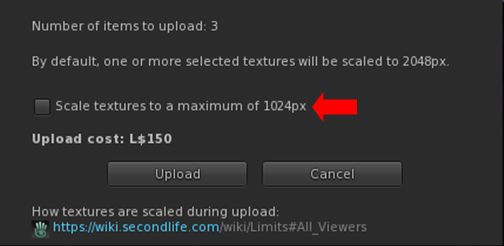
  • Even with the pop-up warning when including 2K textures during a Bulk texture upload, some people are still getting caught out. To further help prevent this, it is now possible to limit all Bulk textures to a maximum of 1024×1024 (thus limiting costs to L$10 per texture uploaded).
  • Top menu → Build → Upload → Bulk  → check Scale Textures to a Maximum of 1024px in the upload floater.
The option to limit the image size in Bulk texture uploads (and reduce costs to a level L$10 per texture)

Disable LookAt Animations

  • Tired of your avatar constantly tracking you mouse pointer movement, and looking like an idiot, constantly look up and down? You can move disable the animation.
  • Top menu → Developer → >Avatar → Character → Tests Disable Look At Animation.
  • Note this does not disable LookAt data being broadcast by the viewer (the cross-hairs / name tag), it only disables any avatar body / head movements associated with LookAt.

Notable Bug Fixes

    • Issue 1870: Improved performance on lower-end systems: lower-specification systems should see improved viewer performance; particularly those with the following:
      • Intel HD 4000, 4400, & Iris Xe video cards.
      • Nvidia GT 1030.
      • Laptops with an AMD video card.
      • Macs with the M1, M2, or M3 Silicon SoC chips.
    • Issue 2225: Fixed opening the Joystick Configuration floater causing a hug FPS drop.
    • PBR-related fixes:
      • Issue 853: Fixed – PBR Material resets to legacy material after teleport
      • Issue 1299: Fixed – PBR texture stretches when “stretch textures” is unchecked.
      • Issue 1847: Fixed – Negative UV scale causes wrong lighting on PBR materials.
      • Issue 1922: Fixed – Make PBR scale and offset crosshair work the same as Texture crosshair.
      • Issue 1857: Fixed – Reset texture transforms for a terrain PBR material when the material is applied.
      • Issue 2027: Fixed – Being unable to apply PBR materials on larger linksets.

General Quality of Life Improvements:

  • Issue 1209: Fixed – Newly-created sculpted prims not rendering until relog.
  • Issue 1253: Fixed – Viewer tries to detach attachments in inventory on shutdown.
  • Issue 1500: New – Better out of disk space handling: The viewer should no longer crash when disk space is low; instead the user will receive the warning: The system is out of disk space. You will need to free up some space on your computer or clear the cache.
  • Issue 1965: Fixed – Selection beam swirls swirl forever when the user interface is hidden
  • Issue: 1905: Fixed – The “Share” and “Pay” buttons are active when selecting multiple avatars in Nearby tab.
  • Issue 1988: Fixed – The ‘Set Empty’ option (Preferences → Controls does not remove previously applied keys for all control modes with the ‘Apply to all’ checkbox.
  • Issue 2144: New – Added tooltip to the region Object Return button to clarify who “someone else” means.
    • Top menu → World → Region Details → Debug → Object Return → Options → On someone else’s land.
    • Tooltip has been changed from “Return only objects which are on land belonging to someone else” to “Return only objects which are on land that isn’t owned by selected user”.
  • Issue: 2395: Fixed – Favourite and Featured locations sending user to (0,0).
  • Issue 2467: Fixed – Sim surrounds do not fully load.
  • Issue 2482: Fixed – Second Life reports incorrect amount of available video memory on some discrete GPUs on Windows.

Notable Viewer Build Updates

  • Updated llphysicsextensions to version 1.0.66e6919
  • Updated Tracy profiler to version 0.10
  • Updated Meshoptimizer package to version 0.21
  • Updated llca to version 202407221423.0
  • Updated Boost to version 1.85
  • Updated Ogg Vorbis to version 1.3.5-1.3.7
  • Updated VLC to version 3.0.21
  • Updated libhunspell to version 1.7.2-r1
  • Updated from jpeglib to libjpeg-turbo 3.0.3

WebRTC – Reminder

Note: as WebRTC is (subject to last-minute stoppers) now due to be deployed across the gird in the very near future, the following is repeated from my 7.1.10 release overview, for the benefit of those who use Voice and who may not have upgraded to Firestorm 7.1.10 / read that overview.

WebRTC communications protocol (RTC=”real-time communication”) is the new Voice communications protocol for Second Life, replacing Vivox Voice.

Why Make The Change?

Voice in Second Life has been supplied through an arrangement with Vivox. This has required Linden Lab to utilise a viewer plug-in tool – SLvoice.exe – to manage voice services within the viewer., which in turn has made LL both reliant on Vivox for bug fixes for the plug-in, and subject to changes in support for operating systems imposed by Vivox such as the latter ending native support for Linux some years ago).

WebRTC by contrast is the predominant telephony protocol used by web-based applications, such as Google Meet, and is integrated into most common browsers. It has almost all the features common to Vivox in supplying a voice service – spatial in-world voice; peer-to-peer sessions; Group voice (including moderation) and multi-user Voice conferencing – although the are some limitations (see below).

Benefits and Improvements

WebRTC Offers a range of benefits over Vivox, including, but not limited to:

  • 48khz audio bandwidth providing cleaner sound.
  • User control over:
    • Audio noise reduction – high reduction for noisy environments, no reduction for clean audio sources (performers, etc.)
    • Automatic gain control – less need to individually tune other user’s audio levels.
  • Audio/video device selection.
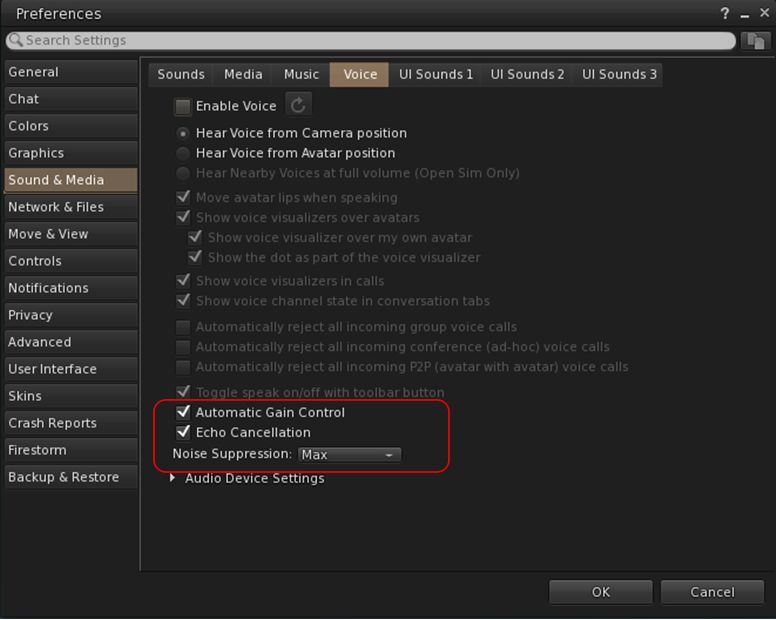
  • Improved: spatialization,  audio echo cancellation and audio sampling rates for improved audio quality.
Options for managing WebRTC Voice quality can be found under Preferences → Sound & Media → Voice

Most significantly, WebRTC removes all reliance on a third-party plug-in for the viewer. Instead, it is supplied as a  a library and wrapper within the viewer. This means:

  • Linden Lab has greater ability to address Voice related issues directly, without having to await fixes from a supplier.
  •  Potentially opening the door to adding features and capabilities to SL Voice in the future, including some which have been long-requested.

Limitations

  • WebRTC does not support the existing Voice Morphing capability in Second Life.
    • This is because voice morphs are tied to the Vivox service, and cannot be utilised with WebRTC.
    • Those who do use the current Voice Morphing capability are directed to this SL Wiki article on Voice Morphing, which provides a list of solutions which can be used with WebRTC.
  • Conferences and group voice calls are limited to 50 participants.

Security

The Second Life implementation of WebRTC addresses security issues such as potential eavesdropping, exposing users’ IP addresses, etc., by routing communication through proxy servers managed directly by LL .

Additional Information

Firestorm Updates

Performance: AVX2 Update

AVX2 (also known as Haswell New Instructions) is the more recent of the Advanced Vector Extensions for  Intel and AMD, which should offer improved performance for more modern systems. To quote the official blog post on the AVX2 work:

Installer choices – supporting modern CPUs (AVX2): One of our aims is to help those on lower-end machines, and one change that our early-access users have loved has been enabling a feature of modern computer (called AVX2) which can unleash extra performance even on smaller machines. It works on CPUs built in the last decade, but don’t worry if you are not sure, the Firestorm installer will warn you if your computer is too old for this, and will redirect you to a more traditional version (Linux user can check here).  Some have found it makes a massive difference.

Pie Menu: Object Take Options

  • Linden Lab recently added further options for picking-up multiple objects collectively selected in-world and returning them to inventory as one of the following:
    • Take As Combined Item: return all the selected objects to inventory as a single, coalesced object (old behaviour).
    • Take Copy As Combined Item: return copies all the selected objects to inventory as a single, coalesced object, leaving the originals in-world as individual objects (old behaviour).
    • Take As Separate Items: return all the selected objects to inventory, but list them as individual items, not as coalesced (new behaviour).
    • Take Copies As Separate Items: return copies all the selected objects to inventory, but list them as individual items, not as coalesced, leaving the originals in-world (new behaviour.
  • These options were added to the right-click Context menu in Firestorm 7.1.10 (see: Object Take from my Firestorm 7.1.10 overview).
  • Firestorm 7.1.11 now extends this options into the pie menu as well – not that they will only be displayed within the pie menu when selecting multiple objects to return to Inventory at the same time.

Camera Roll and Key Bindings

Camera Roll Added to the Phototools Camera Floater
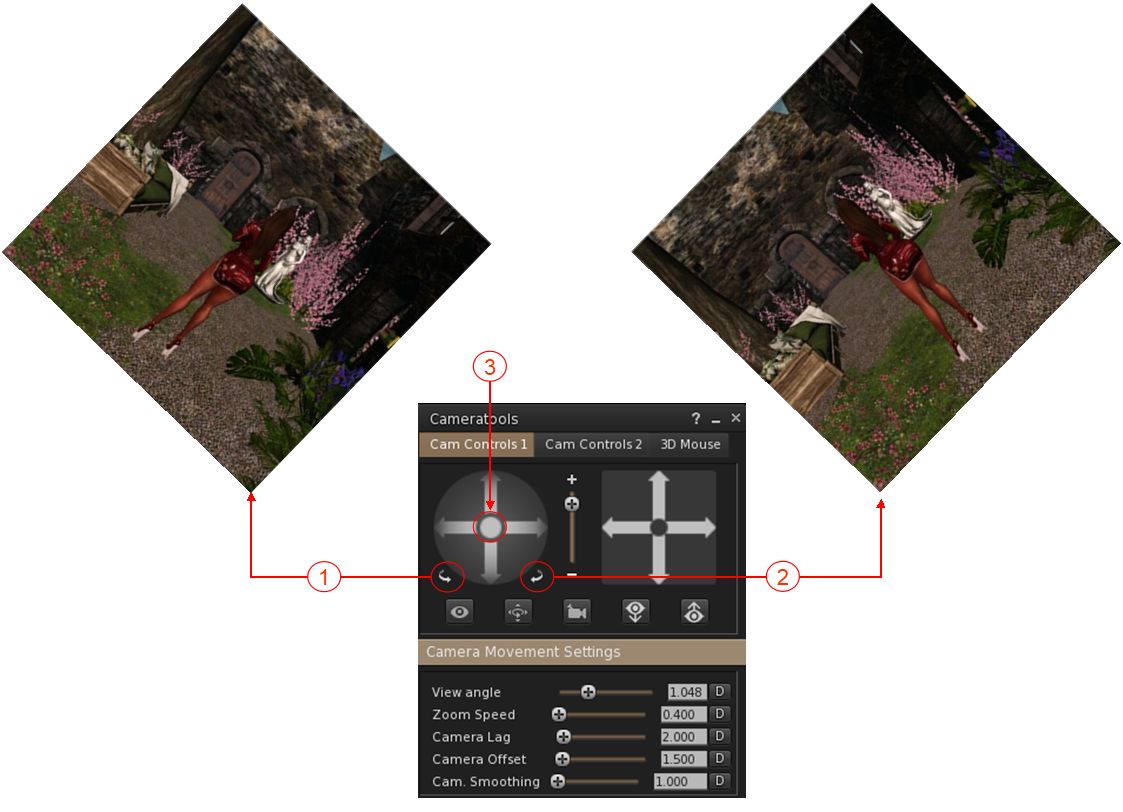
  • Camera Roll was added to Firestorm 7.1.0, in the form of two buttons on the Camera floater which allow the camera to be rolled clockwise or counter-clockwise for more dramatic photos see here for more).
  • These buttons have now been added to the Phototools Camera Floater.
The Camera Roll buttons have now been added to the Phototools Camera floater: 1. The left button will roll the camera view clockwise on your screen through up to 360º; 2. The right button will roll the camera view counter-clockwise on your screen through up to 360º; 3. Clicking the button at the centre of the rotation controls will reset the view to “normal”.
Camera Roll Key Bindings
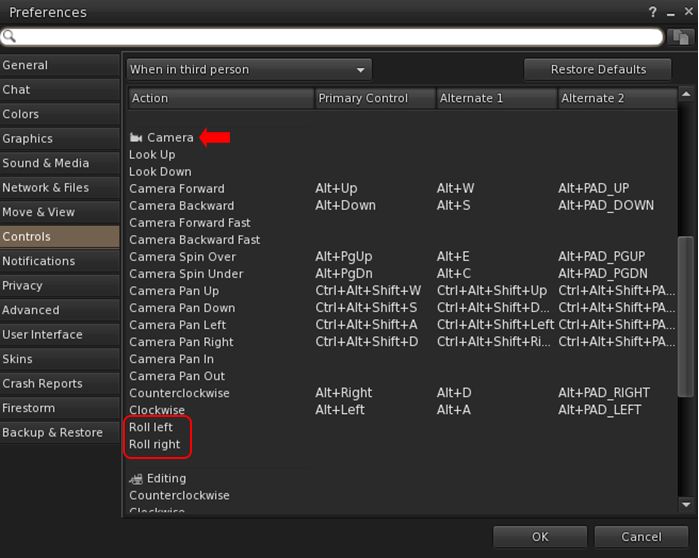
  • In addition, Firestorm 7.1.11 adds the ability to create key bindings for the camera roll buttons: Preferences → Controls → When in third person or when sitting → Camera section → Roll left / Roll right.
The new Camera Roll Key bindings options allow you to assign key combinations to enable the camera roll capabilities (left / right)

Assorted Quality of Life Updates

  • Addition of a “eye” button on the login splash screens.
    • When clicked, will display the alphanumeric values for a password as it is typed in, rather than black dots.
    • If the password has previously been saved (and so entered automatically on account name selection), clicking the button will display a placeholder, not the password.
    • See: FIRE-34629.
  • Pie menu autohide function has been extended to also work with sub menus and not only slices.
  • Whitelist adviser text corrected, as per FIRE-34524.
  • Snapshot floater updated so that the Current Window option no longer gives any pixel sizing (“512×512”), to reflect the fact that images up to 2K can be captured using this option, potentially incurring additional costs. See FIRE-34562.
  • Preferences → Graphics: in order to reduce potential confusion, the setting GPU Dedicated VRAM (GB): (Preferences → Graphics → Hardware Settings) has been renamed to Override GPU Dedicated VRAM (GB):.

OpenSim Updates

  • Removed the hardcoded classified fee for OpenSim (see FIRE-34618).
  • Fix for a crash when querying glTF materials (see FIRE-34589).
  • Fix for an OpenSim crash in surface patch gen Tangents for empty patch (see FIRE-34672).
  • General fix for OpenSim viewer build.

Feedback

In the limited time I’ve had to use 7.1.11.76496, I’ve found that it (and earlier versions of the Beta release) provide a decent improvement in performances and better stability. I did find with both 7.1.10 and earlier 7.1.11 Beta versions I experienced multiple crashes during / when attempting teleports. This has not been the case with 7.1.11.76496, although I have been running it less than 24 hours at this point. As with the PBR release, I have no feedback to offer with this release, as I’ve not had time time to bounce around with it to any great degree.

Talia’s Susurrous in Second Life

Susurrous, October 2024 – click any image for full size

Note: As of at least December 2024, Susurrous has been switched to Group Only access and the Group is closed to enrolment.

It’s been a while since I’ve visited a region design by Talia (Natalia Corvale), a designer with – as I’ve noted before – an eye for creating region designs that are wonderfully attractive, rich in natural detail, and evocative of places that one might find tucked away whilst on global travels. In fact the last time I covered one of her designs was in 2021; so I was delighted to be able to drop into her most recent design, Susurrous and spend some time exploring.

Occupying a Full region, the setting is both Talia’s home in Second Life and a public space offered for people to explore, take photographs and simply relax within, with Talia requesting visitors respect it as both public and her home.

Susurrous, October 2024

Bounded on all four sides by wooded hills of a region surround, the setting is separated from them by water, framing it as a broad, semi-rugged island with  an autumnal feel which links it neatly to the more distant hills despite the waters sitting between the two. This is a place utilising mesh landscape elements and changes in elevation which enhance its look and feel as a location deep withing a rugged countryside, such as found on the north American continent.

The Landing Point is tucked into north-west corner of the region where the land is at its lowest. It sits on a deck close to where the land makes a final short rocky drop into the waters below. An arrival sweeper gently encourages those new arrived to move along the deck toward the steps down to ground level. From this little headland, a sea of yellowing grass rolls inland, interspersed with trees, a little stream bubbling its way from the southern uplands as it  sloshes its way down over little steps of rock towards open waters.

Susurrous, October 2024

Across the stream, and reached via a couple of bridges spanning it, is a cosy cabin with a barn and small greenhouse relatively close by, giving the impression this is all a homestead farm. It’s not clear what the produce from it might be, but some of could be connected with the sale of alpaca fleece, while another seasonal product appears to be pumpkins, making it the kind of place Linus Van Pelt might appreciate spending time within at the end of October 😀 .

The homestead has a nice sense of being lived-in, from the interior furnishings through the clothes drying on the lines outside, to little details such as a shirt draped over the handle of an axe with its blade embedded in a tree stump, as if whoever had been welding it worked up a sweat and then and stripped to the waist before wandering off to get a drink.

Susurrous, October 2024

The southern border of this little farm lies along the bank of another stream as it cuts a gully to reach the west side of the region, spanned by a bridge reaching out from the farm to connect to the grassland on the other side. A little group of buildings from a short arc on the far side of the gasses from the stream, and sit is if someone once tried to establish a little huddle of businesses here. Whether the attempt succeeded or not is a matter of conjecture; for now the majority lie deserted; now this came to be is a story for your imagination to create when visiting – perhaps whilst sitting in the little bar which has managed to survive in the shell of the old oyster shop.

Much of the southern and eastern sides of the region are elevated, starting with a high plateau along the southern edge of the setting. This runs from the eastern cliffs almost all the way to the grassland on which the would-be hamlet sits. A grassy incline and rocky wall link the two, the incline offering a way up the former from the latter. Climbing half way to the top, the incline ends alongside a pool of water fed from the rocks above, and which in turn feeds the two streams below. From here, a broad shoulder to grass leads the way to where stone steps take over, curving their way up grass and rock to pass a terrace. Just beyond this, the steps are in turn replaced by a wooden stairway as it climbs to a treehouse cunning disguised as a cabin sitting atop a wooden platform extending out from the plateau’s edge.

Susurrous, October 2024

The top of the plateau offers a broad expanse of grass  dotted with trees, two of which support the two halves of a tree house (in the literal sense of a house built in the boughs of a tree 🙂 ), and another carries a large platform with seating surrounding its trunk and suspended from the boughs above it. It is on this plateau I found a couple of rideable horse from Water Horse – although given they are rideable, and so might get moved around by those using them, you might come across them elsewhere in the region. As one was available, I mounted it and headed east and then along a trail running along the top of a flat-topped ridge pointing north.

Susurrous, October 2024

I’ll admit the trail was a little unfriendly to horseback riding in a couple of places, but with the little trial and error, I found myself making my way past more locations to sit (one being a cabin down on another shoulder of the plateau, and best reached from the western end of the uplands, after crossing the stream there to the trail rising to run along it). Towards the northern end of the ridge, the path dropped down a steep slope and into the north-east corner of the setting.

This forms a roughly square expanse of grass and shrubs, overlooking water on three sides: the waters to the east and north, and the mouth of an inlet cutting into the land from these northern waters. Tucked into one corner of this flat table of rock and grass sat a large open-air deck with seating and a fireplace for warmth, and sitting semi-secluded behind shrubs and bushes.  Facing it from across the grass and sitting about the inlet mouth sat a large café offering further respite for weary travellers.

Rather than visit the deck or the café  – which offers both indoor and outdoor seating, I instead switch-backed my way down grassy inclines the the banks of the inlet, and made for the covered bridge spanning it.

A shack at the head of the inlet displays a sign offering boat rentals and the sail of fishing bait, but given the bridge sits so low over the water, fishing is probably the better option of the two to pick. For my part, I crossed the bridge and then cantered up the slope to where the meadow flowed back towards the landing point and the stream forming one boundary to the farm. I headed for one of the bridges to the latter, finally leaving my good-natured horse at the barn there.

Nor does this complete a look at the region: as noted earlier, there are multiple places to sit and pass the time, some of which are easy to stop, others more cleverly tucked away and need to be sought out. Throughout the entre region the landscaping is exceptionally well done and the opportunities for photography manyfold, with the local animals (domesticated and wild)  offers a further sense of life throughout.

My one minor niggle with Susurrous lies in the fact that scripts are disabled. While the choice of capabilities available to people entering a region is entirely the choice of the region holder, and there are a couple of horses (that I saw) in the region which can be ridden, it would nevertheless be nice if those who have them to be able to add their own horse to their avatar and enjoy a canter / walk around the setting.

However, the above does not in any way spoil the fact that Susurrous is a beautiful setting, the landscaping very well put together to present an entirely natural and eye-catching environment at it slopes down from the the southern and eastern uplands to the north-western coastline before the land makes its final rocky drop into the surrounding waters. The accompanying soundscape is subtle and helps to further immerse visitors, whilst the multiple places to sit offer plenty of opportunities for relaxing and taking photographs.

Susurrous, October 2024

SLurl Details

  • Susurrous (Blue Water Cove, rated Moderate)