Logos representative only and should not be seen as an endorsement / preference / recommendation
Updates from the week through to Sunday, November 5th, 2023
This summary is generally published every Monday, and is a list of SL viewer / client releases (official and TPV) made during the previous week. When reading it, please note:
It is based on my Current Viewer Releases Page, a list of all Second Life viewers and clients that are in popular use (and of which I am aware), and which are recognised as adhering to the TPV Policy. This page includes comprehensive links to download pages, blog notes, release notes, etc., as well as links to any / all reviews of specific viewers / clients made within this blog.
By its nature, this summary presented here will always be in arrears, please refer to the Current Viewer Release Page for more up-to-date information.
Note that for purposes of length, TPV test viewers, preview / beta viewers / nightly builds are generally not recorded in these summaries.
Official LL Viewers
Release viewer version 6.6.16.6566955269, formerly the Github Actions (GHA) RC viewer, version , issued October 20, promoted October 25 – No Change.
Release channel cohorts:
glTF / PBR Materials viewer updated to version 7.0.1.6658224456, November 2.
Cool VL viewer updated to version 1.30.2.35 (Stable) and version 1.31.0.13 (Experimental) on November 6 (hotfixes for the Nov 4th releases) – release notes.
The last several days have seen the circulation of news regarding what is patiently a scam viewer. The item in question is being “promoted” by means of an IM circulating to users promising all sorts of goodies and advantages: free Linden Dollars! Freedom to build where you please! And so on.
Most established users are a little too wily to fall for such promises – and the IM has apparently given rise to a number of Abuse Reports being filed, with additional warnings going out via social media. However, those not so familiar with such schemes might be tempted by promises of free L$ and so on, and others might be tempted to “just give it a quick try” to “see what it is all about” – neither of which would be especially wise, as the “viewer” in question does far more than might initially be suspected.
To discover the threats posed by the “viewer” in question, programmer and Firestorm Bug Hunter (and also animator and modeller) Chaser Zaks risked taking a look under the covers of the code that is supplied, and published his findings on Github Gists. So as to (hopefully) help spread the word more generally, I asked Chaser if I could repro his notes here, to which he agreed.
In his document, Chaser neatly encompasses the high-level claims of the “viewer” before dismantling them, before going on to describe the threats posed by installing it. For ease of reference, I’ll summarise the realities behind the claims made by the “viewer” in my own words in the table below, and then turn to Chaser’s notes directly on the threats posed by the “viewer”, if installed on a computer.
Claim
Reality
Unlock unlimited Linden Dollars (L$)
This isn’t possible. Linden Dollars are created and controlled by Linden Lab through the LindeX mechanism, which is not a part of the viewer. Therefore, any claim of being able to access / generate unlimited Linden Dollars outside of this mechanism constitutes the crime of fraud and is a violation of both the Terms of Service and (among others) US federal law. Further:
Linden Lab has the capability to immediately identify and track fraudulent transactions – and to take action (up to and including) banning accounts engaging in such transactions, as well as reporting such activities to the relevant authorities.
The Lab can also identify and block malicious viewers (and similarly take action against accounts using such viewers).
Fly to Unlimited heights
This is already possible; Linden Lab removed the limit on flying to any altitude a fair while ago, and most third-party viewers allow users to fly as high as they like (Building, however does remain constrained to below 4096 metres – but’s that’s a different matter).
Build on any land
Not possible; land permissions are checked by the simulator, not the viewer, the the permissions set by a land holder as to what can / cannot be done on their land cannot be overridden.
For the rest, I’ll refer directly to Chaser’s notes.
So What Does It Actually Do?
A lot of stuff you don’t want happening. I’ll break it down into steps:
You are instructed to download viewer.exe, upon execution it will pretend to install a viewer so that it looks legitimate.
Upon running the newly installed program, it will run builddata.bat.
This script elevates the permission to administrator permissions on your computer! This is incredibly dangerous as it allows whatever is running to do what it wants. In specific, this script will download and execute the files called “V1”, “Q”, and “A”.
“V1”, will install files “1” and “2”.
“1” is Trojan.CobaltStrike, which is a penetration testing toolkit which cybercriminals often abuse in order to do remote administrative access.
“2” will install Trojan.Molotov/Reflo. While I am not 100% sure about what it does, it is very likely another remote administration toolkit.
“Q” will install Quasar, which is also a remote administration toolkit.
“A” will install AsyncRAT which is also a remote administrative toolkit.
Some of these toolkits will automatically install additional stuff not included in the script, such as a crypto-miner.
The script will execute start.vbs – which shows a fake dialogue saying that there was an error.
Why So Many Remote Administrative Toolkits?
Attackers will intentionally install as many backdoors as possible so that it becomes increasingly difficult to remove to the point where you should probably just wipe your hard drive and re-install your operating system.
What Does a Remote Administrative Toolkit Do?
A remote administrative toolkit(also known as a RAT), is basically like giving someone physical access to your computer. They can, but are not limited to, do the following:
Steal your username / passwords.
Steal your browser cookies.
Steal your files.
Steal your banking information.
Steal your L$.
Steal your REAL WORLD money (through credit / banking / wire fraud).
View your webcam and take pictures/videos.
View your desktop.
Install additional software.
Encrypt your files.
Delete your files.
What Does a Crypto-miner Do?
A crypto-miner abuses your GPU to mine cryptocurrency such as bitcoin. This wastes electricity, computing power, and also degrades your graphics card. And you do not see a dime of what they make. It’s basically turning your computer into a mining slave.
Does it Install Anything Else?
Yes and no:
No: The script it’s self doesn’t install anything else
Yes: However, when each of the remote administrative toolkits are installed, it pings as server, which that server can tell the toolkit to install even more stuff.
While I could do further investigation, it involves going further than I feel reasonably safe doing so.
Help! I installed it! What do I do?
Turn the computer that you installed it on OFF immediately! If the computer is off, they can’t access it. Make sure you do not put it in a “sleep” state where the CPU is still operating in a lower power mode, make sure it is OFF off!
Take your device to a computer technician who is specialised in removing viruses and malware. Be prepared to have to have your files backed up and system re-installed.
Do not be tempted to use it until it is cleaned! Malware can spread over internal networks, and every moment it is on is a chance that the hacker will be able to steal any or more data from you!
Closing Notes (from Inara)
“Viewers” like this are not a new phenomenon, although not all of them are as blatantly suspicious in terms of up-front claims as this particular example. Some are extremely subtle, seeking to trick users into downloading them (such as by spoofing the genuine download address in a manner which makes it look like you’re going to the official website when you are not). To this end, when it comes to installing viewers:
While the latter are self-certified and not validated directly by the Lab, the fact that they have registered for inclusion on the Directory generally means they are regularly updated, ensuring stability, security, and compatibility with the platform.
Only download such viewers directly from their “official” websites. Do not use links supplied via random IMs or notecards, and carefully check the links provided by other website and blogs (even this blog!) to ensure they are pointing to a valid download page for a viewer.
If you are on X (or as most of us – and quite frequently, the platform itself – still prefer, “Twitter”), then follow Soft Linden for news and information on dealing with malware in general.
Keep an eye on the Second Life forums for warnings about bad faith viewers, etc. These may be posted in the General forum or within the Technology forum.
My thanks to Chaser Zaks for allowing me to reproduce his work here and for his work in investigating the “viewer” in question; also thanks to Soft Linden for pointing me towards Chaser’s Github document. Do be sure to read the latter as well, as it also includes code snippets for those with a more technical interest.
As it might have been: a NASA portrait of the original Apollo 13 crew with Ken Mattingly flanked by Jim Lovell, the mission commander (l) and Fred Haise, the Lunar Module pilot (r). Mattingly was later dropped from the mission ahead of launch due to fears of illness. Credit: NASA
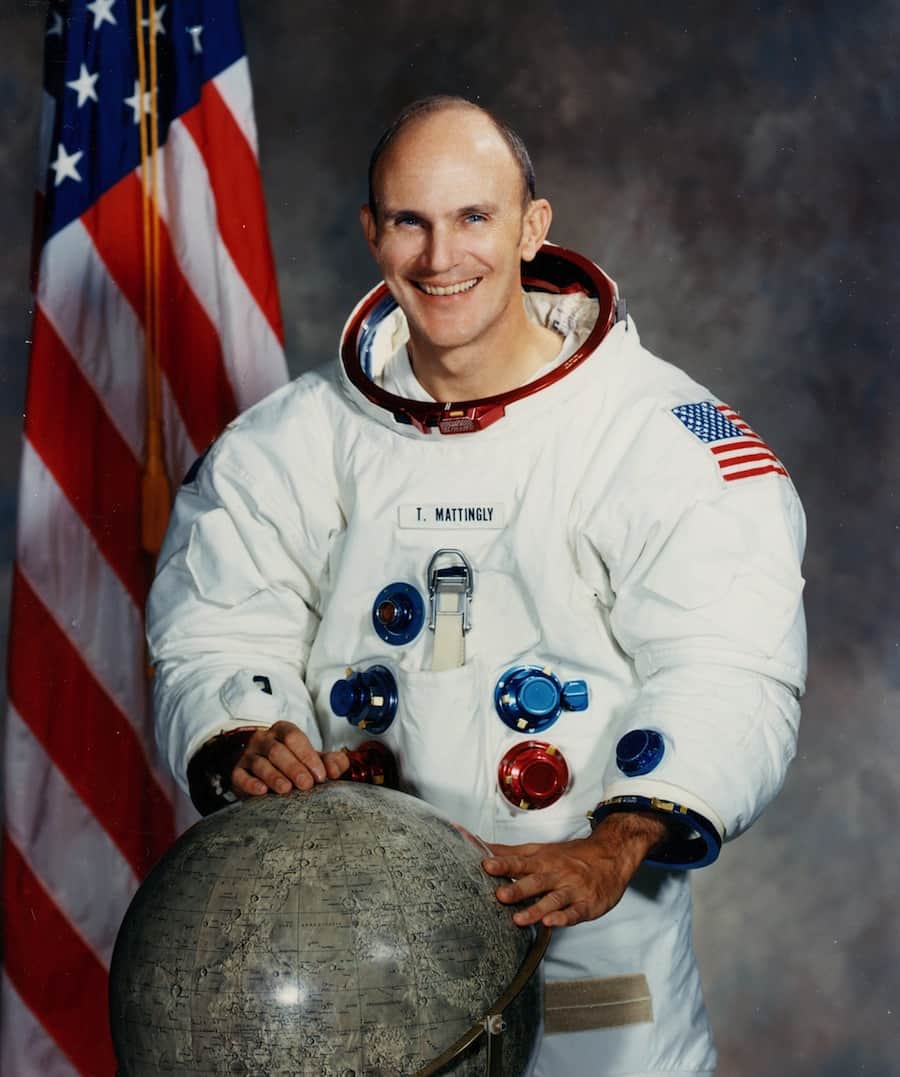
On November 3rd 2023, NASA announced that Apollo and shuttle era astronaut Thomas Kenneth “Ken” Mattingly II, had passed away on October 31st, 2023 at the age of 87.
Perhaps best known, courtesy of Ron Howard’s film and his portrayal by Gary Sinise, for the mission he never actually flew, that of Apollo 13, Mattingly did participate in the penultimate Apollo mission to the Moon – Apollo 16 – and also flew two space shuttle missions in the 1980s.
Born on March 17, 1936, in Chicago, Illinois, Mattingly grew up with aviation in his blood, his father being employed by Eastern Airlines, and came to see it as a natural choice of career, opting to study for and achieve a BSc in aeronautical engineering prior to joining the US Navy in 1958 and applying for flight school.
Graduating as an attack aircraft pilot in 1960, Mattingly served first in VA-35 based out of Virginia, with an at-sea rotation aboard the USS Saratoga. Following this he was assigned to the heavy attack / reconnaissance squadron VAH-11 with his rotations split between the USS Franklin D. Roosevelt and Naval Air Station Sanford, Florida. It was whilst at the latter that Mattingly accepted an invitation to share a flight an a fellow aviator in his squadron had been ordered to take in order to gather aerial photographs of the launch of Gemini 3 out of Cape Canaveral in March 1965.
Shortly after this, and having being refused admission into the Navy’s Test Pilot School due to his assignment at VAH-11 finishing after the class of ’65 had commenced, he accepted a slot with the US Air Force Aerospace Research Pilot School. While primarily a USAF school, this also took on pilots from both the Navy and the civilian sector for courses, and in joining, Mattingly found himself training alongside future astronauts “Ed” Mitchell and Karol Bobko whilst receiving instruction under future astronauts Charles Duke and Henry W. “Hank” Hartsfield Jr.
Ken Mattingly posing for an official Apollo 16 photo. Credit: NASA
All of this had an impact on Mattingly, who applied for and was accepted into the NASA Group 5 astronaut intake of 1966. Coincidentally, his final selection interview was chaired by John W. “Jim” Young – one of the crew of the Gemini 3 mission he had watched launch whilst riding the photographic mission – and Michael Collins. It was an event he didn’t feel he’d fared well at, thinking he annoyed Collins and felt “perplexed” by Young’s attitude.
Following initial training, Mattingly was selected as part of the back-up crew for Apollo 8 and served as CapCom (capsule communicator – the individual charged with communicating directly with a crew in space) for that mission. He then worked with Michael Collins during the training cycle for Apollo 11, having being assigned as Collins’ “second” back-up after Bill Anders. As there was a risk that the mission could slip from July 1969 and into August – and Anders would be leaving NASA during that month – Mattingly was put on the back-up roster and training in case the mission did slip beyond Anders’ departure and Collins was unable to fly for some reason.
That he was assigned the joint back-up position on Apollo 11 also meant Mattingly took over Anders’ spot as Command Module pilot for Apollo 13, continuing the loose partnership started with Jim Lovell (Apollo 13 commander) and Fred Haise (Lunar Module pilot). They formed a particularly good team together, but plans had to change three days ahead of the launch after Mattingly revealed he’s be exposed to someone with rubella. Standard policy called for his back-up for the mission (John “Jack” Swigert) to replace him to avoid any complications caused should he fall ill during the mission.
As a result of this, Mattingly was on the ground following the explosion which crippled Apollo 13’s Service Module. He immediately joined the teams ordered to recover the mission, using his knowledge of various simulations to suggest who could be called upon to provide specific expertise – such as cobbling together an air circulation system between command module and lunar lander.
After the command module had to be completely powered-down in the hope of conserving the battery power it would need in order to successfully re-enter the atmosphere and deploy its parachutes, Mattingly was assigned to the team charged with working out exactly how to re-start the command module’s electrical and guidance systems, given this was part of their design parameters – and to do so with a very limited power budget.
In the film Apollo 13 this saw Mattingly – as played by Gary Sinise largely leading the way in this work and bouncing in and out of the simulator. However, as the real Mattingly was quick to point out after seeing the film, reality was a lot less dramatic, comprising working through reams of documentation and data on the Command Module with a team led by Flight Controller John Aaron, and using the information to slowly and methodically write-up a clear set of procedures to bring the Command Module back to life. Only after this was all done was there any simulator hopping
We said, “Let’s get somebody cold to go run the procedures.” So I think it was [Thomas P.] Stafford, [Joe H.] Engle — I don’t know who was the third person, might have been [Stuart A.] Roosa. But anyhow, they went to the simulator there at JSC and we handed them these big written procedures and said, “Here. We’re going to call these out to you, and we want you to go through, just like Jack will. We’ll read it up to you. See if there are nomenclatures that we have made confusing or whatever. Just wring it out. See if there’s anything in the process that doesn’t work
– Ken Mattingly on developing the restart procedures for the Apollo 13 Command Module
Mattingly, at the CapCom desk in the Apollo Mission Operations Control Room, watches the screens after the successful splashdown and recovery of the Apollo 13 crew, April 17th, 1970. Credit: NASA via Getty Images
That the vetting of the procedures went smoothly and afterwards, Fred Haise on Apollo 13 was able to receive them over the radio and follow them without major hiccup is testament to the speed and care with which Mattingly, Aaron and their team were able to work, bringing together the final vital part of the puzzle together in order to bring the crew home.Mattingly finally got to orbit the Moon in April 1972 as the Command Module pilot for Apollo 16. By another of the quirks of fate which seemed to mark his entire career, his commander for that mission was Jim Young and the Lunar module Pilot was fellow Aerospace Research Pilot School instructor Charles Duke. While the latter went down to the surface of the Moon, Mattingly remained in orbit, performing a battery of experiments – some of which required he complete a EVA during the return leg to Earth in order to collect film and data packages from equipment in the science bay of the Service Module.
Mattingly (l) with Mission Commander Jim Young (c) and Charles Duke (r), in training for Apollo 16. Credit: NASA via Getty Images
Opting to remain with NASA as Apollo’s lunar missions were rapidly wound-down (causing a number of his colleagues to depart the agency to go back to their military careers or the private sector), Mattingly rotated through a number of key positions in managing the development of the space shuttle. This led to his first shuttle mission assignment as commander of STS-4 in 1982.
This was a week-long mission – the final in a series of four so-called “test flights” – timed to end on Independence Day 1982, with the landing at Edwards Air Force Base, California serving as the backdrop for then President Ronald Regan to announce the Space Transportation System was to henceforth be regarded as “operational”. In another twist of fate the man selected to fly with Mattingly as the vehicle’s pilot, was none other the Hank Hartsfield, Mattingly’s other instructor from the Aerospace Research Pilot School and who was now subservient to Mattingly’s overall command (confusingly, and in difference to aviation, the pilot on most NASA missions is not the commander for the mission but rather the “co-pilot”).
Mattingly (second from left after Hartsfield) chats with former US President Ronald Regan on July 4th, 1982 following the fourth – and last – test flight for the shuttle programme, whilst former First Lady Nancy Regan admires the imposing bulk of the shuttle Columbia. Credit: NASA
Mattingly’s last flight to orbit came in January 1985, when he commanded the shuttle Discovery on mission, STS-51-C. This flight is chiefly remembered for two reasons: it was the first shuttle flight to be classified by the US Department of Defense, and it is the shortest shuttle mission on record – just 3 days. However, it also has two haunting links with the loss of the shuttle Challenger on mission STS-51-L just a year later. The first being that 51-C was the first (and tragically last) on-orbit mission for Ellison S. Onizuka, one of those killed during 51-L.
The second was that 51-C revealed the dangers inherent in launching a shuttle during extremely cold weather – if people had been willing to see the signs for what they were. At the time of its launch, Discovery lifted-off in the coldest temperatures recorded for a shuttle flight up to that time: just 12 ºC. Following the recovery of the mission’s solid rocket boosters, it was found that all of the o-rings on both boosters showed signed of charring as a result of exposure to flame – with one of the primary rings entirely burnt through and its secondary badly burnt.
Tests subsequently showed that in low temperatures, this rings – designed to seal the joints between the major segments of the solid rocket boosters – both lose their ability to flex in response to dynamic pressures exerted both from within the boosters as they burn their propellants and from the surround air through which the shuttle system is trying to punch its way, and they become brittle and subject to burn-through. Despite these findings, Challenger was allowed to launch on mission 51-L after it had been exposed to temperatures fifteen degrees lower than those experienced at the launch of STS-51-C – and tragedy followed.
The crew of STS-51-C. Back row (l to right) Gary E. Payton, payload specialist; and mission specialists James F. Buchli, and Ellison L. Onizuka. Kneeling: mission pilot Loren J. Schriver, pilot; and Thomas K. Mattingly, II, commander. Credit: NASA





 Inara Pey: Living in a Modemworld