Share what Second Life means to you in a 12th anniversary project

To mark Second Life’s 12th anniversary, Linden Lab has launched a rather unusual video share project, asking residents to reveal some of what Second Life means to them.

The official blog post from Xiola which launches the project reads in part:

Second Life has been going strong for a dozen wonderful years and there’s a ton of things happening to celebrate. You’ll see more to come here in the Featured News Blog – but we wanted to stop and ask – “What is the meaning of Second Life?” To you – that is! This question may sound daunting – but the truth is, tapping into what makes “SL” so special to us as individuals and communities is a really amazing exercise in retrospection and self-discovery. This is your world – so what does it mean to you?

Whether you just got started, have been onboard for the full dozen years, or fall somewhere in between – we’d love to see a glimpse of your story in the “What Second Life Means to Me” video project. You don’t have to be a master of machinima to participate…

From a few seconds to a few minutes – just kick it off with this – “In Second Life, my name is …” and share your story from there! Once you have something set – share it! Upload it to YouTube and embed it on this forum thread. Together, we’ll watch the thread for new stories over the coming weeks – it should be awesome. If you prefer to express yourself in writing – share what Second Life means to you with a reply to the thread.

To get things started, and to springboard people’s inspiration, the Lab has included a number of videos from well-known names in Second Life, including Xiola and Torley from the Lab.

Each video is roughly a minute and a half long. Those they already provide a unique mix of stories and provides very personal points of view of Second Life, ranging from Torley’s extrovert and enthusiastic approach (which again reveals just why he is such a marvellous ambassador for the platform and the Lab), through to more introspective pieces, such as Xiola’s piece or Kaya Angel’s examination of creativity in Second life, and the richness it has brought to him in terms of his own creations and the people he has met.

This is a unique project everyone can share in – remember, videos are not required: you can write your own story  in a forum post if you prefer (and, I would guess, include your own pictures). Nor do you have to be a great machinima maker, or necessarily film in-world scenes.

It’ll be interesting to see who else opts to celebrate SL’s 12th birthday in this way, and reveals what Second Life means to them!

A sail boat in a bag offers fun in Second Life

The Shield 1.2 by Burt Artis in my custom red / white finish, and named "Imladris"
The Shields 1.2 by Burt Artis in my custom red / white finish, and named “Imladris”

For those starting-out with sailing – which I enjoy simply for the pleasure, rather than for racing or anything – there are numerous little freebie boats available to help, of which the veritable little Nemo, which can be found in rezzers all over the waterfront in Second Life, is perhaps the most famous.

However, my attention was recently drawn to a relative newcomer to the freebie sailing market by a comment left by ZZ Pearl Bottom concerning the work of Burt Artis. My interest grew following a visit to the Three Pines Sailing School and Resource Centre, where I found a vendor for the boat, and decided to grab a copy and have a look.  And even to my untutored sailor’s eye, the boat is a heck of a lot of fun, and great introduction to sailing in SL.

My Shields boat by Burt Artis in default colours & me sitting in the default boarding pose

The boat in question is a Shields sloop-rigged keeled racing boat, and is offered in a size pretty close to the physical world boat on which it is based (that has an overall length of 9.19 metres, and Burt’s is 11.29 metres). It’s a mesh build, with a land impact of 27 and is quite packed with features – including two versions of the boat itself: the original 1.0a and the more recent 1.2, which is the one I took out on the water.

For those with an technical inclination, I’m reliably informed via Maiti Yenni that the the sailing engine is based on the original Tako scripts that Kanker Greenacre published, with the WWCmod from Mothgirl. The wind system used by the boat is Zephi Boat Weather, developed by Burt and JoyofRLC Acker. Also included with the package are a set of texture and UV maps (the boat is mod when rezzed, allowing you to customise it). The whole thing is delivered in a neat little sailor’s knapsack when purchased.

Getting underway
Getting under way

On the water, the boat looks good – although barefoot sailing (or in a pair of wellingtons / galoshes!) is recommended, as the floor of the boat can get a little wet 🙂 ). The skipper should board first via the usual right-click and sit, which will place you sitting on the boat with legs dangling over the side, and displays the initial set-up menu, with instructions in the board’s note card manual.

From here, everything is more-or-less operated by keyboard and chat commands. To start sailing, simply type “raise” – this both hoists the sails and rotates you into a position inboard the boat and handling the tiller. If you’re sailing with friend, you my need to issue the “crews” or “crewp” command to get them seated correctly.

Handling-wise, the LEFT / RIGHT keys turn the boat, and the UP / DOWN keys let the sails out or take them in. Colour codes help to understand the sail settings: green – good; cyan is tight and blue is much too tight (so let the sails out); yellow is loose and red much too loose (so bring the sails in). You can also go “in irons” (steering into a headwind), indicated by the wind colour turning orange, which can happen rather quickly, killing your momentum and requiring some careful manoeuvring.

Under full sail
Under full sail

Crew and helm positions can be altered in chat to suit the sail position, using the “hp” (helm port) and “hs” (helm starboard) commands and “crewp” and “crews” (crew can move themselves using the LEFT / RIGHT arrow keys). There are also keyboard commands for setting the angle of the sails, etc., and to “wing” the jib in place of a spinnaker when downwind.

If all this sounds complicated, it’s not – a little practice gets you sailing along nicely and the commands give a good feel for sailing more complicated boats.

Texturing-wise, the maps that are provided are basic, but sufficient to nicely customise the boat for personal tastes. It took me less than 10 minutes to have my Shields 1.2 repainted and named.

My familiar red / white colour scheme applied to the shield 1.2

Sailing on my own, I found the Shields 1.2 to be a delight: smooth and easy on region crossings and fast enough when “in the green” without being stupid fast and feeling like it has a secret V8 powering it. The wind system keeps you very honest, and encourages more thought on sail management than simple “raise and go” and manually changing the wind to suit needs. Region crossing with crew did result in us ending up in some odd seating positions, but these were easily corrected via chat / with the arrow keys, and didn’t interrupt sailing.

All told, this is a great boat – one couldn’t ask for more from a freebie; so if you’ve been looking for something to try that offers a little leg room and gives a good feel for SL sailing, why not give the Shields a go? Vendors are available around SL, including at the Three Pines Sailing School – just follow the link towards the top of this article, and wander down to the quayside.

Second Life L$ Authorised Reseller programme to close

On Monday, June 15th, Linden Lab announced the forthcoming closure of the Linden Dollar (L$) Authorised Reseller programme, which has been in operation for just over two years.

The programme was originally introduced in May 2013, after Linden Lab had, earlier that month, made changes to their Terms of Service (ToS) which meant that only the official LindeX was the only place where trading in Linden dollars would be allowed.

At the time of the change, the Lab stated their reason for the change was to better protect users from the risk of fraud. However, there was considerable speculation on whether the move was linked to a set of interpretive guidelines (PDF) issued by the US Department of the Treasury’s Financial Crimes Enforcement network (FinCEN). As I reported at the time the guidelines were issued, the suggestion was that insofar as the federal government was concerned, the Linden Dollar could be regarded as a virtual currency  a virtual currency (the Lab had “downgraded” it to a game token in 2010 within their ToS), and therefore potentially subject for more rigorous controls to prevent issues of fraud and money laundering.

However, whether or not FinCen’s guidelines were a trigger point for the Lab’s changes to the Terms of Service in 2013, the changes themselves did cause assorted problems for may users outside of the United States who wished to but L$, but who could not, again for assorted reasons, easily use the LindeX.

The Linden Dollar Authorised Reseller logo, introduced with the programme in 2013

The Linden Dollar Authorised Reseller programme was a direct response to the problems users affected by the ToS changes were encountering. It allowed approved bodies to buy Linden dollars through the LindeX and then resell those L$ to users in a variety of international currencies and via numerous payment methods. However, in keeping with the May 2013 ToS changes, these Authorised Resellers were not allowed to buy back L$ from users or cash users out – such transactions would still have to go via the LindeX.

When it was introduced, the Authorised Reseller programme was supported by a wiki page, and was regarded by the Lab as a pilot programme – and its status as such has never changed over the last two years. Nevertheless, it proved to be popular; by early June 2013, just three weeks after it had been launched, some 29 resellers had been approved by the Lab as a part of the programme.

In announcing the closure of the programme, which will take place on August 1st, 2015, the Lab states:

Since then [the introduction of the programme in 2013], we have expanded the payment options for Second Life users, and today, you can easily purchase L$ in more countries than ever before, using a credit card, PayPal, or Skrill, which supports a wide range of payment methods. We’ve found that these options support the vast majority of Second Life users, and we have therefore made the business decision to close the Authorized Linden Dollar Reseller pilot program.

We are contacting program participants directly to detail the next steps for them, and they will have approximately six weeks to sell off their L$ inventory.

As of August 1, 2015, the Authorized L$ Reseller pilot program will be closed, and the LindeX will be the only authorized place to purchase L$.

While the announcement will probably lead to speculation and theories as to why the Lab is taking this step, the stated reason actually seems to be fair enough: when the changes were made to the Terms of Service in 2013, the loss of third-party exchanges for L$ purchases did impact users – but the Lab has, over the last two years, genuinely sought to offer more options by which users can make L$ purchases, all of which enjoy widespread use among Second Life users.

For full details on the closure and on how to buy L$ beyond August 1st, 2015 if you have relied upon a third-party authorised Reseller, please refer to the official blog post.

2015 viewer release summaries: week 24

Updates for the week ending: Sunday, June 14th, 2015

This summary is published every Monday, and is a list of SL viewer / client releases (official and TPV) made during the previous week. When reading it, please note:

  • It is based on my Current Viewer Releases Page, a list of all Second Life viewers and clients that are in popular use (and of which I am aware), and which are recognised as adhering to the TPV Policy. This page includes comprehensive links to download pages, blog notes, release notes, etc., as well as links to any / all reviews of specific viewers / clients made within this blog
  • By its nature, this summary presented here will always be in arrears, please refer to the Current Viewer Release Page for more up-to-date information.

Official LL Viewers

  • Current Release version: 3.7.30.302599, June 12 – hotfix update with MSVCP100.DLL and MSVCR100.DLL files missing form recent Windows releases of the viewer (download page, release notes)
  • Release channel cohorts (See my notes on manually installing RC viewer versions if you wish to install any release candidate(s) yourself):
    • Obsolete platform viewer version 3.7.28.300847 dated May 8 – provided for users on Windows XP and OS X versions below 10.7. This viewer will remain available for as long as reasonable, but will not be updated with new features or bug fixes and will not be promoted to release status (download and release notes)
  • Project viewers:
    • No updates.

LL Viewer Resources

Third-party Viewers

V3-style

  • Black Dragon updated to version 2.4.3.1 on June 14th – core updates: bug fixes for microphone issue and potential crash on start issue (release notes)
  • UKanDo updated to 3.7.29.34273 Beta on June 10th – core updates: latest changes to VMM (release notes)

V1-style

  • Cool VL Viewer Stable branch updated to version 1.26.12.46, and the Experimental branch to version 1.26.13.15, both on June 13th (release notes).

Mobile / Other Clients

  • No updates.

Additional TPV Resources

Related Links

Finding fool’s gold in Second Life

Alpha.Tribe
Alpha.Tribe

Artist and avatar creator Alpha Auer has re-opened her region, Alpha.Tribe, after a period of redesign. “This new build revolves around the theme of ‘fool’s gold’,” she says of the new design, which extends on, under and over the region.  In respect of this, the majority of the builds and objects in the region have been given a black and gold finish, with even the sandy seabed carrying the motif, graduated as it is into alternating lines of light and shadow.

The result is an environment which brings together a rich mix of influences and structures which, although very disparate in design and form, are nevertheless unified through the contrasting richness of the gold and ebony of the region’s look.

Alpha.Tribe
Alpha.Tribe

“I have tried to build a sim that is conceptually a bit like my old sim Syncretia,” Alpha continues. “a continuous ecology that tells a story of sorts, rather than a place in which discrete things are presented independently of one another, which is what I had tried to do with the previous build.”

Among the things on offer for explorers to discover lie an oriental pavilion offering an exotic environment in which to relax, or visit a shipyard where a golden ship is under construction. Elsewhere there are gardens, ruins, and high tech designs. Meanwhile, seahorses in rich black and gold, escort Nemo’s Nautilus under water and overhead a huge and ornate airship rises slowly into the sky.

Alpha.Tribe
Alpha.Tribe

Not all of the region is new; the Blueprint City and Pastoral sphere have been preserved, Alpha informs visitors. Careful exploration is encouraged on foot and / or by flying, and there are things to see within the builds as well as around them, and to help visitors reach key points, a teleport system has been provided. Do make sure you use the region windlight settings when visiting; they add considerable depth to the various locales.

Alpha also notes that the region pays homage to creator Arcadia Asylum, also known as Aley. “Many of the prims that you will see on the sim are Aley’s creations which I have modified, and re-textured,” alpha says. “Aley’s ingenuity as a builder has allowed me to create a sim that (although it is only a homestead with limited prims) will hopefully appear as densely built as a full sim and hopefully tell a secret tale that needs lots of prim-detail in order to be properly heard.”

Alpha.Tribe
Alpha.Tribe

To mark the reopening and redesign, Alpha has released two new avatar designs which are in keeping with the theme of “fool’s gold”. These together with the rest of her designs can be found in the region’s gift store, which can be reached via the teleport system.

Alpha.Tribe is well worth a visit, offering a unique and very intriguing environment and design. Recommended.

SLurl Details

Space Sunday extra: Philae, the little lander that could, wakes up!

Rosetta (r),Philae and, behind them, comet 67P/Churyumov–Gerasimenko seen in an artist’s impression of the mission

On Wednesday, November 12th, after 10 years in space, travelling aboard its parent vehicle, Rosetta, the lander Philae touched down on the surface of comet 67P/Churyumov–Gerasimenko (67P/C-G). It was the climax of an amazing space mission spanning two decades – and yet was to be just the beginning. Packed with instruments, it was hoped that Philae would immediately commence around 60 hours of intense scientific investigation, prior to its batteries discharging, causing it to switch to a solar-powered battery system.

Unfortunately, things didn’t quite work out that way. As I’ve previously reported, the is very little in the way of gravity on the comet, so in order for Philae to avoid bouncing off of it when landing, several things had to happen the moment it touched the comet’s surface. As it turned out, two of these things didn’t happen, with the result that the lander did bounce – twice.

Philae shortly after departing Rosetta, with the landing legs deployed, the solar panel
Philae shortly after departing Rosetta, on Wednesday November 12th, 2014 with the landing legs deployed, the solar panel “walls” on the sides of the lander clearly visible.

The first time it rose to around 1 kilometre above the comet before descending once more in a bounce lasting and hour and fifty minutes, the second time it bounced for just seven minutes. Even so, both of these bounces meant the lander eventually came to rest about a kilometre away from its intended landing zone. What’s worse, rather than touching down in an area where it would received around 6-7 hours of sunlight a “day” as the comet tumbles through space, it arrived in an area where it was only receiving around 80-90 minutes of sunlight – meaning that it would be almost impossible to charge the solar-powered battery system.

Even so, the lander commenced science operations as planned, and despite having only limited power within its batteries, and insufficient means to fully recharge them, Philae returned almost all of its anticipated science data. However, in the morning of Saturday, November 15th (UK / European time), being unable to charge its solar batteries, the lander “safed” itself and entered a state of hibernation, leaving scientists hoping that as the comet continues towards the Sun, sufficient sunlight would fall across the lander in order for it to successfully recharge its batteries.

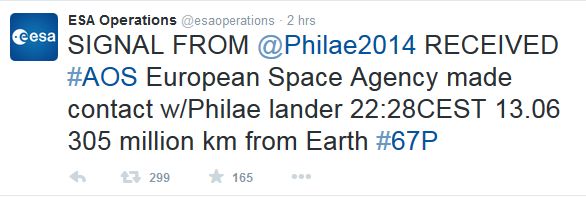
It happened. On Sunday, June 14th, ESA operations announced that communications with Philae had been re-established.

ESA Operations announced contact re-established with the comet-landing Philae

So far, some 300 packets of data have been returned to Earth via Philae’s parent craft, Rosetta, as it orbits the comet since communications were re-established at 23:28 GMT on Saturday, June 13th. This data revealed that Philae appears to have been awake for a while, the comet’s “fall” towards the Sun having done the trick, but the Sunday, June 14th contact marked the first time Philae had managed to reach Rosetta.

The initial 85-second communication is still being analysed, but has indicated there are around 8,000 additional packets of data to be returned by the lander, the initial information being largely concerned with information on Philae’s overall condition.

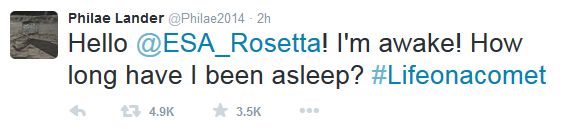
As well as tweeting directly on the resumption of contact, ESA also issued a Tweet “from” Philae announcing the news.

Philae's
Philae’s “Tweet” on the resumption of contact

That there is still some 8,000 packets of data still within Philae’s memory, which is likely to be science data the lander has gathered over the last few days as it has come out of its seven month hibernation. As the comet becomes more active as it continues inward towards the sun-ward, Philae is in a prime position to discover more about these remnants of the earliest history of the solar system.

During its initial 60 hours of operations prior to going into hibernation, The lander discovered organic molecules on the comet, results of which were sent back from Philae’s Cosac instrument (one of the ten science instruments on the lander), thus fulfilling one of its primary mission objectives.

While Philae may have been in hibernation for the last seven months, its parent vehicle, which bears the same name as the mission, has not and has continued to orbit the comet and gather data as the comet gradually sweeps through the solar system towards the sun – it is currently some 205 million kilometres (127 million miles) distant, and will reach its nearest point in August before heading back in to the far reaches of the solar system.

The first image from the surface of a comet, returned to Earth by the Rosetta lander Philae, November 13th, 2014. image: ESA/Rosetta/Philae/CIVA
The first image from the surface of a comet, returned to Earth by Philae, November 13th, 2014. image: ESA/Rosetta/Philae/CIVA

Continue reading “Space Sunday extra: Philae, the little lander that could, wakes up!”