A further look at the Experience Tools viewer in Second Life

secondlifeUpdated, July 2nd: A series of questions were asked at the Simulator User Group meeting following the release of the Experiences Tools viewer. A summary of those asked and which I’ve seen asked elsewhere has been added to the end of this article for reference.

On Tuesday, June 30th, the long-awaited Experience Tools viewer was promoted as the de facto release viewer by Linden Lab.

An official blog post announced the move, indicating that while experiences created using the new capability will be open to all, the ability to create new experiences using the tools is available to Premium members only, who have the opportunity to create one Experience by default.

For those not previously aware of Experience Keys, I’ll simply quote from the blog post issued by the Lab back when Experience Keys reached release candidate viewer status:

Experience Keys are a powerful feature that allows creators to build more seamless and immersive experiences in Second Life. Without this feature, you need to grant individual permissions to every single scripted object included in an in-world experience, and that can mean a lot of dialogue boxes interrupting the fun! Experience Keys make it possible for creators to build experiences that ask your permission just once. In other words, you can opt-in to the entire experience, rather than having to grant individual permissions to every single scripted object included in it.

A number of Experiences are already available across the grid for people to use. The Lab’s Cornfield shooter game available through the Portal Parks, for example, utilises Experience Keys, as does Loki Eliot’s outstanding Childhood Dreams, available at SL12B through until Saturday, July 4th, 2015. There’s also a growing section of the Destination Guide devoted to Experiences.

You don’t actually have to use the Experience Tools viewer to visit and participate in any Experience. However, the viewer does provide a lot of additional information to users than viewers without the code, and is essential for those who wish to build Experiences – so expect TPVs to be updating with the code as soon as they can.

An Experience dialogue box. On the left, as it appears in an Experience Keys enabled viewer, with options to display the Experience Profile (by clicking the Experience name link) and to accept / refuse the Experience and to block the Experience (so you'll never see a prompts anywhere for it again) or to block just the current inviter. On the right, how the same dialogue appears in a viewer that is non Experience Keys enabled - you can only opt to accpt or refuse the invitation
An Experience dialogue box. On the left, as it appears in an Experience Keys enabled viewer, and on the right, in a “non-Experience Tools” viewer. Both will allow users to join  / refuse experiences, and indicate the levels of permissions the Experience is requesting, but the Experiences Tools viewer provides additional options

As explained in the Lab’s video, once you have accepted an invitation to join an Experience, you never need to do so again; the fact that you have accepted it and the permissions you have awarded it in respect of your avatar are remembered – so each time you re-visit, you’re not hampered by having to accept. If there are HUDs and other attachments applicable to the Experience, these are automatically applied to you on your return; if there are scores or points associated with the Experience, these are also recorded and restored on your next visit. When you leave, HUDs and other attachments belonging to the Experience are removed and any permissions you’ve granted are revoked.

If you spend time in a place that has an Experience you’d rather not join, and don’t want to be bothered by invitations to do so each time you visit that place, you can opt to block the Experience (or specific objects offering invitations to the Experience). This will prevent further invitations being sent.
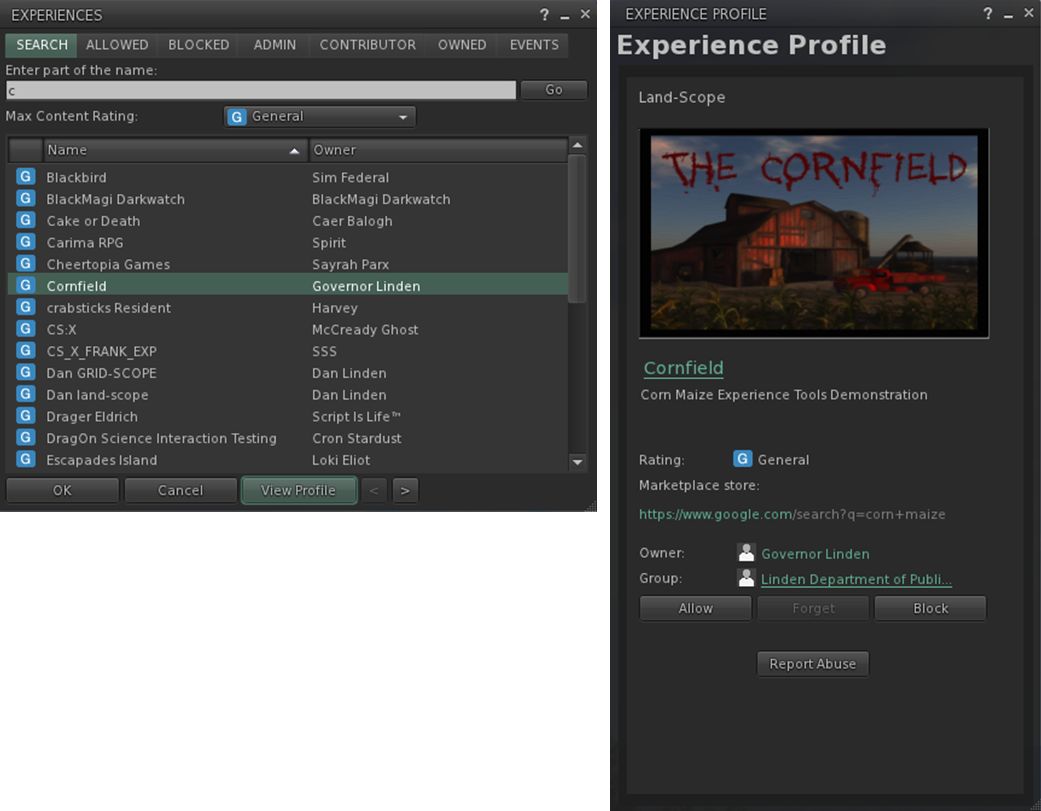
The Experience floater (left) can be used to managed the Experiences you've joined, blocked, own, etc., and allows you to see what events have acted on your avatar and to search for Experiences.
The Experience floater (left) can be used to manage your Experiences and to display more information about them through the Experience Profile (right) – click for full size

For Experience users and creators, the viewer introduces two new floaters – the Experience panel and the Experience Profile, both shown above.

The Experiences floater (Me > Experiences) helps you keep track of the Experiences you join or block, or which you are involved in as an owner or collaborator. It also allows you to search for Experiences in SL, and tracks the actions taken on your avatar by the Experiences you’ve allowed.

The Experience Profile provides additional information on a specific Experience, and can be displayed a number of ways. You can, for example, highlight an Experience in the Search tab of the Experience floater and then click the View Profile button. You can also click the Experience’s link in the Allowed / Blocked / etc., tabs to display its Profile.

The Profile allows you to Allow or Block an Experience, make an Abuse Report if it is doing something intentionally abusive (such as repeatedly orbiting you). If you wish to leave an Experience, you can use the Forget button. Note that the next time you visit, it will treat you as a new joiner. If an Experience Profile includes a SLurl, clicking on it will open the Places floater, allowing you to teleport to the Experience.
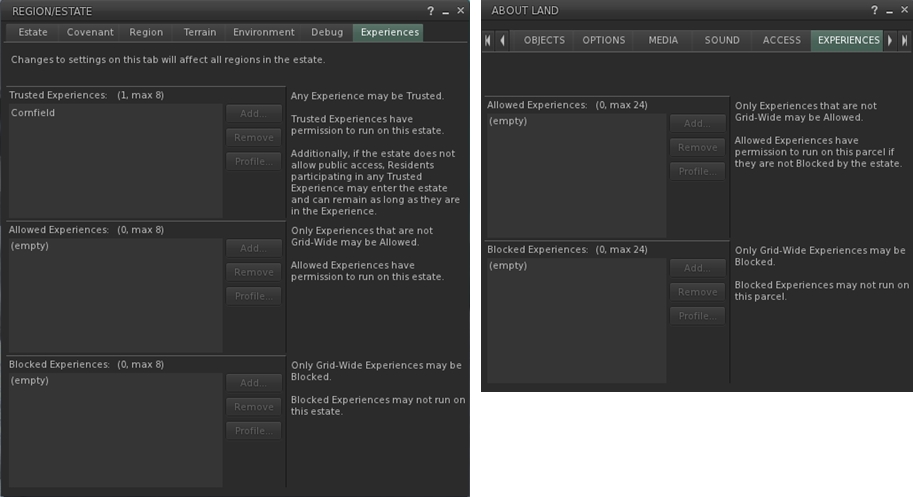
The Experience Keys viewer introduces additional Estate and Land tabs to allow management of the Experiences enabled at estate / region and parcel level.

Experience Keys – which allow Experiences to run – are currently restricted to the region / parcel level. There are currently no keys which automatically allow an Experience to run across the entire grid, although this may change in the future. To help land owners to decide which, if any, Experiences they wish to have running on their land, the Experience Keys viewer also introduces two new tabs to the Region / Estate floater and the About Land floater (shown above).

Adding an Experience to your Land should only be done if you’re actually an active collaborator / participant in providing the Experience to others, or have created it yourself. Do note as well, that a hierarchy that exists between regions and parcels; if an Experience is blocked at Estate level, it cannot be run within a parcel on that estate.
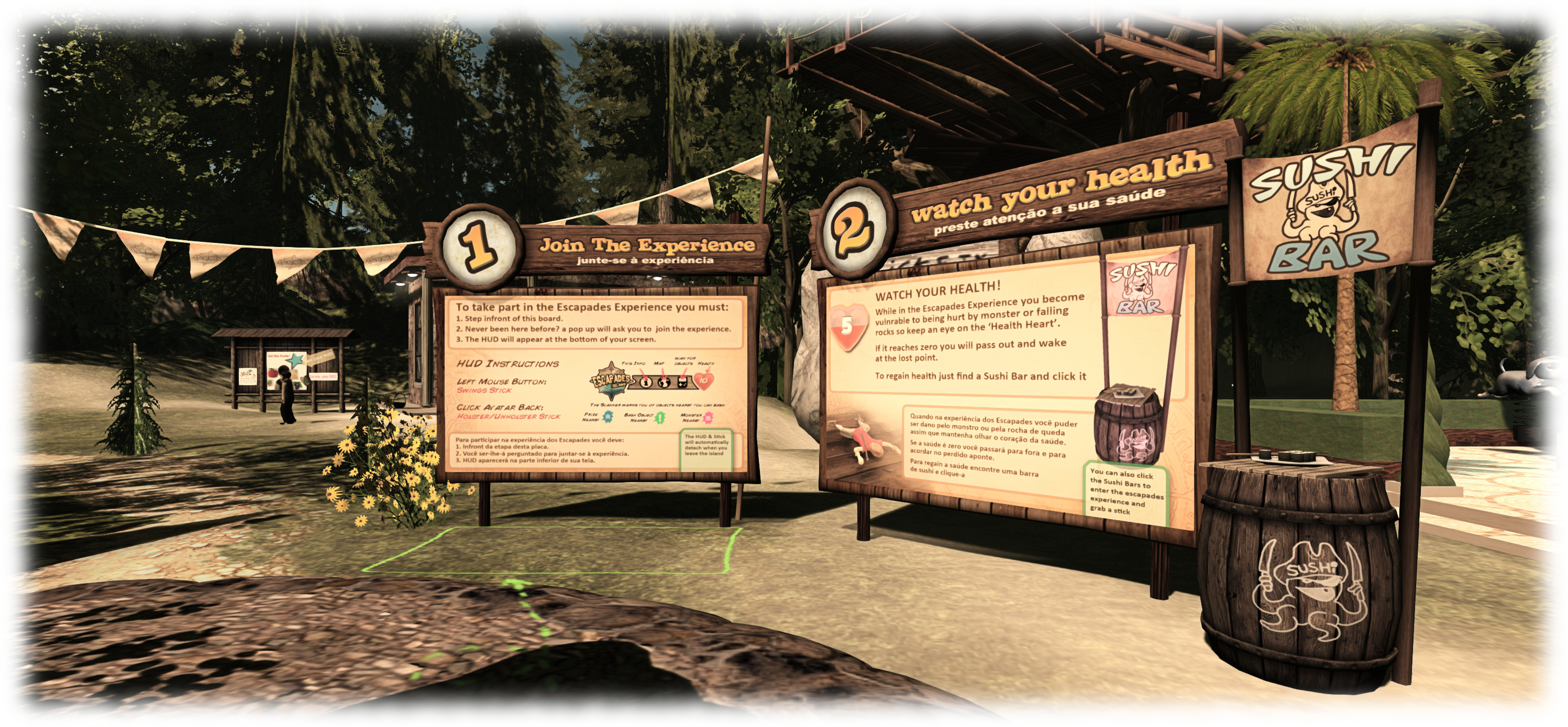
Loki eliot also has an Experience based game available at Escapades Island
Loki Eliot also has an Experience based game available at Escapades Island

In terms of creating Experiences, and as noted above, this is limited to Premium member. There is a lot of power involved in the capabilities, and so maintaining some degree of accountability with those using them is vital; so limiting the creative element to Premium members is a good way of ensuring that accountability (providing accountability is also why there are options to report abusive Experiences in both the Experiences floater and individual Experience Profiles).

Continue reading “A further look at the Experience Tools viewer in Second Life”

Strawberry’s Ask Me Anything challenge

Berry has been at it again, offering up a Monday Meme challenge 🙂 . This one is based around her creating an Ask.fm account, on which she invited people, via her blog and her social media accounts, to ask her questions. She was challenged to share some of the results on her blog, and the result is her latest (as of the end of June) challenge.

It’s another of Berry’s challenges that tweaked my curiosity, so I decided to give it a go  – in part, at least. I’m not intending to create an Ask.fm account at this point in time – not out of any fear of the questions I get, but because my time is such that the account would likely end-up languishing as I fiddle with other things. So, I’ll content myself with addressing her questions.

L'Arc-en-Ciel, WinterFall; Inara Pey, July 2014, on Flickr
Standing at the bows of Exotix 2, my Loonetta 31 sailing cruiser, moored alongside my island home

If Linden Lab shut the door on Second Life, what do you think you might do to replace it, or the time you spend on it. Gaming, school, work, reading, other virtual world, etc? I was writing on-line prior to my involvement in SL, and have recently been engaged to write on subjects related to technology(!) and other things elsewhere, so I’d likely focus far more on that, and switch back to broader writing under my given name. I’d also probably get a lot more reading done!

What would you consider your mission statement for your blog? Well, first and foremost to educate myself. I’ve said elsewhere that I’m generally not a technologist, nor was I particularly au fait with Second Life when I first started blogging (not that this ever stopped me from being critical or sounding off!). So this blog (under the Modemworld title, at least) has been very much about my desire to learn more about the platform, the Lab, to understand how things actually hang together (rather than just relying upon my own assumptions and misconceptions), and to try to be objective in my critiques and opinions, as and when given; when it comes to news articles I try to steer clear of subjective editorising.

On a broader scale, I hope people enjoy what they find here, and that my travelogue pieces and arts reviews offer sufficient interest to encourage folk who might otherwise not travel to places far and wide, or who have thought much about art in SL to go and take a peek. I also hope the personal notes I slip into the blog help people understand me a little better.

What would you change about your Second Life right now if you could just press a magic button and have it automatically happen? Have circumstances change such that I’d never allowed a couple of friendships from a good few years ago slip away prematurely. The people concerned subsequently ceased being active in SL. While I don’t presume that my friendship would have prevented them vanishing, I do wish I’d taken better care of things so we might have enjoyed more times together in conversation and bouncing around places before they opted to take flight. 

What topic would you like to see explored in a non fashion blog post? Anything you are curious about and want someone else to do all the research? Umm… honestly don’t know. I actually like researching and delving into things myself (one of the reasons some of my own posts take time to appear – I easily go off at tangents when researching, as I love discovering things & information!).

Ichi-go Ichi-E, Fantasy Faire 2015 Inara Pey, April 2015, on Flickr Ichi-go Ichi-E from Fantasy Faire 2015 (Flickr) – Fantasy Faire is always one of my favourite annual SL events (see below)

Do you have a point of contact in SL? Someone that a person from your RL knows to contact in case something happens to you or you are unable to get online for an extended period of time? No. But now you’re raised the question, and for those I’m am close to, it’s something I should consider.

What provides you the most inspiration and motivation to keep learning and growing? What keeps you from being held back by the common negativity in Second Life and elsewhere? Negativity doesn’t really annoy me per se, it’s a fact of life. Misconceptions and  / or misrepresentations of issues and matters do tend to irritate, however. Inspirationally speaking, I am constantly inspired by people’s creativity, in SL and elsewhere. Our capacity for learning, for self-expression, to explore, learn and understand – all of these inspire me, be it through activities, things like space programmes, the art of others or the words they have written or spoken or sung.

How do you deal with other bloggers (who don’t know you personally) that are spiteful towards you? I can think of no better reply than Berry’s: “I ignore them and pretend they don’t exist because I have better things to do with my time then worry about what some random person on the internet thinks of me.”

What is your advice to those that admire you and what you do, hoping to be able to do some of the same things with as much confidence as you often seem to have? Don’t try to emulate me. I’m as flawed as the next person. Set aside time to listen to your own voice; look to the things that you like / enjoy / find important to yourself. And don’t take any externalising of confidence as a sign of anything from anyone; we’re all human, and masks are easy to hold up to the world and are not always as revelatory as we so often quote Oscar Wilde as being the case.

Name 5 favourite events in Second Life

Name three of your favourite blogs

(OK, I admit that’s more than three for SL, etc. But do you know how hard limiting it to three is?!)

Thanks, Berry! Looking forward to seeing what else you think up through the summer! 🙂

Restrained Love 2.9.12: rendering rigged mesh and shadows

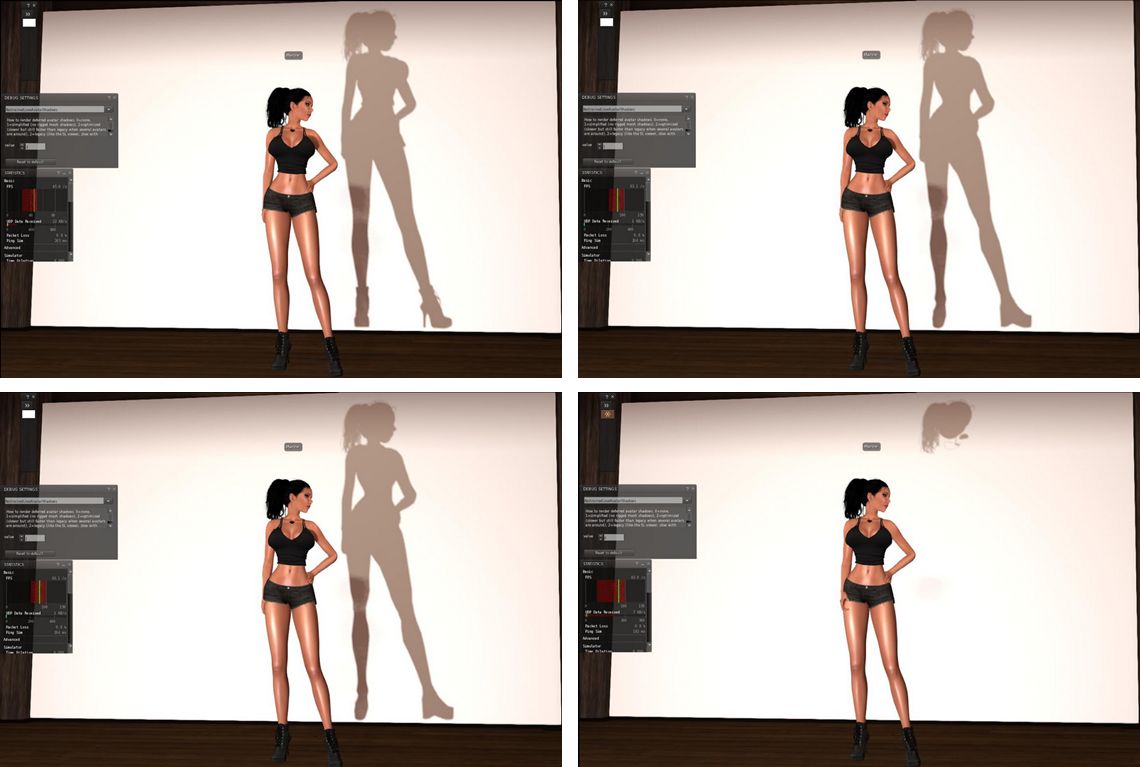
Avatar shadows as see using the debug, top left; rigged mesh avatar body seen in default avatar shadow rendering (debug setting 3); Top right: as seen with the debug set to 2 (Chalice Yao's adjustments; bottom left: as seen with the debug set to 1, showing the system avatar shadow, rather than the rigged mesh body shadow; bottom right: the setting reduced to 0, only unrigged attachment shadows are rendered (images via Marine Kelley)
Avatar shadows as see using the debug, top left; rigged mesh avatar body seen in default avatar shadow rendering (debug setting 3); Top right: as seen with the debug set to 2 (Chalice Yao’s adjustments; bottom left: as seen with the debug set to 1, showing the system avatar shadow, rather than the rigged mesh body shadow; bottom right: the setting reduced to 0, only unrigged attachment shadows are rendered – see below for details (images via Marine Kelley)

The latest version of RLV appeared on Friday, June 26th. Version 2.9.12 brings with it an attempt by Marine Kelley to lighten the load placed on your GPU when rendering complex rigged meshes (such as avatar bodies) when running with shadows enabled in the viewer.

In her notes accompanying the release, Marine states:

I have become a mesh body user not long ago, and like every mesh body user, I quickly found out that having dynamic shadows activated while wearing a complex mesh body (Maitreya which is my choice, but also Eve, Belleza, Slink, Abar, TMP…) totally kills the FPS (Frames Per Second, the measure of rendering speed). Like, it divides them by half. It was so bad that I had to turn the shadows off, and I’m sure I’m not the only one.

I knew it was due to the avatar shadows, simply by looking at the Fast Timers in-world (press Ctrl-Shift-9 to show them). A little digging in it and you see “Avatar Shadows” in plain letters as the FPS hog. In fact, this was due specifically to complex rigged mesh rendering, the FPS slowdown wasn’t due to unrigged attachments or anything like that. And since mesh bodies are among the most complex rigged mesh around, they kind of made that issue more obvious. And over time, more and more people switch to mesh bodies, so something had to be done.

Regular readers here know that something is being done at the Lab’s end of things, with the forthcoming introduction of Avatar Complexity. This has the advantage that it takes into account other elements within avatars that can push up rendering complexity and thus reduce performance, such as over-use of very high resolution textures, etc. This disadvantage is that people will have to get used to having Jelly Baby avatars around themselves, which may not be to everyone’s liking.

As noted, Marine’s aim is to allow those people who have previously been able to run the viewer with shadows enabled, but who are finding it impossible to do so when in locations with a number of complex avatars present due to the performance hit they’re taking, to be able to do so again by reducing the hit taken by their system.

As she acknowledges in her release notes, the original idea actually came from Chalice Yao, who has been poking at things with her NaCl viewer. With RLV 2.9.12, Marine adds what she believes to be further refinements to Chalice’s work, which in turn may feed back in to NaCl.

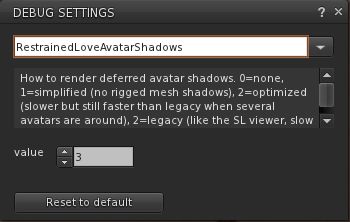
The RestrainedLoveAvatarShadows debug setting in RLV 2.9.12

Essentially, Marine has added a debug setting to RLV, RestrainedLoveAvatarShadows, accessed via the Debug settings floater (under the Advanced menu).

The debug offers four settings (3 down to 0) which offer different levels of rendering avatar shadows, thus:

  • 3- the default (what Marine calls “legacy”) rendering of avatar shadows commonly seen in viewers: an exact rendering of avatar shadows with rigged and unrigged attachments, and which recognises alpha masks
  • 2- Chalice Yao’s initial adjustments to avatar shadow rendering. Said to simplify the shadow rendering to offer noticeable performance improvements when running in locations with a number of complex avatars
  • 1 – render simplified avatar shadows. The first of Marine’s additions to Chalice’s code, this ignores any alpha masking of the system avatar shape, causing its shadow to be rendered, along with the shadows of unrigged attachments. All shadows associated with rigged attachments (e.g. mesh bodies, etc.), are ignored
  • 0 – don’t render avatar shadows. This will leave avatars with no shadow at all, with the exception of unrigged attachments, therefore offering the biggest potential boost in performance.

Marine offers a series of images demonstrating the resultant shadows, as shown at the top of this article, together with the FPS boosts she sees. The latter may be too small to read in the image collection produced here, so I recommend reading Marine’s blog post for full details.

As I don’t have anything other than a demo fitted mesh avatar body, and also have a fairly high-spec system which includes a GTx 970 with 4GB of memory which handles most situations pretty well, I’ve not been able to practically test how all of this plays out.

However, given this solution is aimed at reducing performance hits when shadows are enabled in the viewer, it’s perhaps not going to suit everyone. If your system already struggles with handling shadow rendering regardless of the complexity of any avatars around you, for example, you may not gain much from using the debug settings. But if you are an TLV user who finds Marine’s situation as quoted towards the top of this article to be familiar, this update a go could well help you. Either way, the one way to find out is to download RLV 2.9.12 and give it a go.

Additional Links

The HuMaNoiD side of Second Life

HuMaNoiD - LEA 6
HuMaNoiD – LEA 6

Making a welcome return to Second Life – for a limited period of time, at least – is Wendy Xeno’s HuMaNoiD, which can now be seen at LEA 6, having last been available on the grid a little over a year ago.

I first encountered HuMaNoiD far back in 2012, on the recommendation of Chestnut Rau. At the time, it was a fascinating, contemplative visit, and throughout several return visits over the years, I continued to find it an evocative place; I’m pleased to say this it still is.

HuMaNoiD - LEA 6
HuMaNoiD – LEA 6

For those who have visited HuMaNoiD in the past, all of the familiar elements are there: the ground level watery landscape, the cello awaiting a player as J.S. Bach’s Unaccompanied Cello Suite No. 1: Prelude can be heard. Around this stand five doorways inviting visitors to open each in turn and step through, and explore the realms in the sky on the other side of each one.

Beyond these, water breaks the landscape into a series of vignettes the visitor is invited to explore. Again, for those who have been to HuMaNoiD in the past, there will be a pleasant feeling of familiarity and comfort to most of them, although one or two nuanced changes have been made from the original, the result of working within the dome needed to give the installation a feeling of an infinite open space;. However, it’s fair to say the changes enhance the region’s aesthetic; I particularly like the bridge suspended beneath balloons (seen at the top of this piece).

HuMaNoiD - LEA 6
HuMaNoiD – LEA 6

The sky spaces are in places similarly reworked, but all present environments rich in context and colour, and once again offer places of contemplation and introspection.  With the sky a little darker than previously, but the elements of poetry still to be found and read, a visit to HuMaNoiD offers much to all, whether you recall the original or make this opportunity a first visit.

One definitely not to be missed, I understand HuMaNoiD will remain at LEA 6 until the end of July.

HuMaNoiD - LEA 6
HuMaNoiD – LEA 6

SLurl Details

2015 viewer release summaries: week 26

Updates for the week ending: Sunday, June 28th, 2015

This summary is published every Monday, and is a list of SL viewer / client releases (official and TPV) made during the previous week. When reading it, please note:

  • It is based on my Current Viewer Releases Page, a list of all Second Life viewers and clients that are in popular use (and of which I am aware), and which are recognised as adhering to the TPV Policy. This page includes comprehensive links to download pages, blog notes, release notes, etc., as well as links to any / all reviews of specific viewers / clients made within this blog
  • By its nature, this summary presented here will always be in arrears, please refer to the Current Viewer Release Page for more up-to-date information.

Official LL Viewers

LL Viewer Resources

Third-party Viewers

V3-style

  • Restrained Love Viewer updated to version 2.9.12 on June 26th – core updates: shadow rendering options for fitted mesh bodies (release notes)

V1-style

  • Cool VL Viewer Stable branch updated to version 1.26.12.48, and the Experimental branch to version 1.26.13.17, both on June 27th (release notes).

Mobile / Other Clients

  • No updates.

Additional TPV Resources

Related Links


Remembering Roche

Roche; Inara Pey, June 2015, on FlickrRoche, June 2015

I caught word from Ziki Questi that a timeless favourite would be vanishing from Second Life.

Few who travel this digital world can fail to have visited the island of Roche at least once in their travels. I first visited in 2012, and while I’ve never written in-depth about it since, I’ve been back many, many times over the intervening years.

Roche; Inara Pey, June 2015, on FlickrRoche, June 2015

The creation of ddsm2 Mathy, with the assistance of friends, the region has remained largely unchanged since my original visit three years ago – a fact that has always added to its charm; in a place where so much can change so rapidly, Roche has always stood as a constant in a fluid world; a place where once can go and instantly feel at home, be it wandering the paths, climbing the hills or sitting in one of the wooden cafés.

I hopped over to the region on Sunday, June 28th and a final opportunity to see Roche (as I write this, the build has now gone, although the region remains for the present) with the intent to grab a last few photos and also record some film footage (I’m still kicking myself around the office for not getting Goatswood recorded prior to its closure).

Roche; Inara Pey, June 2015, on FlickrRoche, June 2015

While there I bumped into Ziki, who was still grabbing snaps herself whilst there with Kinn. Also on hand was Kara Trapdoor and a number of other bloggers – all keen to capture final memories.  The presence of all of these people, together with everyone else visiting the region as I was filming and who have visited since the news broke that Roche will be closing, stands witness to how much it will be missed.

Thank you, ddsm2 Mathy, for your creative vision with Roche, and allowing us to share in it for so long.