Of lions and aliens among us; of merfolk and celtic romance

It’s time to kick-off another week of fabulous story-telling in Voice, brought to Second Life and Kitely by the staff and volunteers at the Seanchai Library.

As always, all times SLT / PDT, and unless otherwise stated, events will be held on the Seanchai Library’s home on Imagination Island.

Sunday September 7th

13:30: Tea-time at Baker Street: The Casebook of Sherlock Holmes

Caledonia Skytower, Corwyn Allen and Kayden Oconnell once again open the pages of The Casebook of Sherlock Holmes, the final set of twelve Sherlock Holmes short stories first published in the Strand Magazine between October 1921 and April 1927.

This week: The Adventure of the Veiled Lodger

“You will understand, Mrs. Merrilow, that if I come to Mrs. Ronder I should prefer to have a witness. You will make her understand that before we arrive.”

“Lord bless you, Mr. Holmes,” said our visitor, “she is that anxious to see you that you might bring the whole parish at your heels!”

“Then we shall come early in the afternoon. Let us see that we have our facts correct before we start. If we go over them it will help Dr. Watson to understand the situation. You say that Mrs. Ronder has been your lodger for seven years and that you have only once seen her face.”

“And I wish to God I had not!” said Mrs. Merrilow.

With these words, John Watson once again finds himself plunged into a new mystery at the side of his long-time friend, Sherlock Holmes. The year is 1896, and Holmes has asked Watson to attend 221B Baker Street to listen to the story Mrs. Merrilow has to tell of her lodger, Mrs. Ronder. Horribly disfigured, Mrs. Rounder is the surviving victim of a terrible accident after a circus lion somehow got loose and savaged her and her husband – killing him.

While the case had piqued Holmes’ curiosity on account of a number of inconsistencies, he had not been called upon to investigate matters. Now, every night, Mrs. Ronder is beside herself with fear, shouting and screaming of murder and beasts. Her health has also deteriorated, and she has refused all assistance, asking only that her landlady, Mrs. Merrilow, seek out Holmes and ask for his aid – and to repeat two works to him: Abbas Parva …

To find out more, be sure to turn up on time for a spot of afternoon tea at Baker Street!

13:30: Magicland Storytime

Join Caledonia Skytower for some more Summer Magic at the Golden Horshoe at Magicland Park.

Monday September 8th, 19:00: Far From Home: The People Deluge

the peopleZenna Chlarson Henderson was one of the first female science-fiction authors, having started reading publications such as astounding Stories from the age of 12, and becoming a popular author in the 1950s and 1960s.

She is perhaps best known for her The People stories, which focus of a race of human-like aliens forced to flee their homeworld due to a natural disaster, and some of whom arrive in the American southwest shortly before the start of the 20th century.

The People have the very best of human qualities: love, gentleness, spirituality; and also special powers of healing, levitation, telekinesis and more, who wish only to preserve their home culture and beliefs amidst a world which, despite their human appearance, does not understand them.

Henderson’s tales about The People ran to some 17 stories which examined the lives of The People, their past on their homeworld, their attempts to live quietly on Earth, their interactions with their human neighbours, all told in a beautiful, moving style. Why not join Gyro Muggins to learn more as he resumes their story through the pages of The People Deluge?

Tuesday September 8th, The Sea Fairies

Lyman Frank Baum is best known for his Wizard of Oz novels. However, over the course of his life he wrote some 59 novels (including four “lost” novels), 83 short stories and over 200 poems.

sea-fairiesThe Sea Fairies, first published in 1911, was intended to be the first volume in a new series of stories after Baum had “finished” the Oz series with the Emerald City of Oz. It tells the tale of young Mayre Griffiths, known to all as Trot, who lives on the coast of Southern California, where her father is the captain of a sailing schooner. Trot’s home life is shared with Cap’n Bill, her father’s former skipper, who has lived with the family since an accident cost him a leg.

Cap’n Bill is a devoted guardian to little Trot, and spends his days walking the beaches with her, or rowing her along the coast, regaling her with tales. But when the subject of mermaids comes up, Trot’s wish to see one is granted, and both she and Cap’n Bill fix themselves transformed into merfolk – who are sea fairies – and taken to the undersea realm of Queen Aquarine and King Anko, where they witness many things and are forced to come up against the wicked Zog the Magician …

Join Faerie Maven-Pralou as she takes to the seas once more and continues this lasting tale.

Wednesday September 9th, 19:00: A trio of Travelling Tales

With Caledonia Skytower.

Thursday September 10th, 19:00: Hero Tales from American History

With Shandon Loring

Saturday  September 12th, 09:00: Beyond the Veil – Tales of Irish Romance – Seanchai Kitely

Join Shandon Loring at Inis-Arcain, Seanchai Library’s  Celtic themed world in Kitely.

—–

Please check with the Seanchai Library SL’s blog for updates and for additions or changes to the week’s schedule. The featured charity for September-October is Reading is Fundamental: seeking motivate young children to read by working with them, their parents, and community members to make reading a fun and beneficial part of everyday life.

Related Links

Transcending Borders: Cherry, Kicca and Nino

Further art entires have been received in the UWA’s Transcending Borders combined Art and Machinima Challenge, on which I’m privileged to sit as a member of the judging panel. The challenge is open to entries through until midnight, SLT on October 31st, 2014, and offers a combined prize pool of some L$1,030,000 for entrants, plus L$240,000 in audience participation prizes.

Entrants are invited to interpret the challenge theme, Transcending Borders, in any way they please. It might refer to transcending borders between space and time, or the past and present or the present and future, the divisions between dimensions, the borders separating nations or cultures or languages, or any one of the many borders we encounter as we navigate our physical and virtual lives.

Cherry Manga: Imagination Transcends Borders
Cherry Manga: Imagination Transcends Borders – click any image for full size

Submissions may be either a piece of art (one item per entrant) or a short film preferably no longer than 4 minutes and 30 seconds (as many films as entrants wish to submit, as long as they have been filmed specifically for the challenge). All submissions should allow casual viewers to interpret how the theme is represented, or provide a means by which the piece can be understood in the context of the challenge theme.

Cherry Manga, Kicca Igaly and Nino Vichon are the latest entrants to the challenge, and they each off three unique 3D art pieces.

Cherry’s piece Imagination Transcends Borders is an evocative and powerful piece speaking to the transformative power of the imagination when we allow it flight, and how it in turn can feed back to, and affect us.

Kicca Igaly: Transcending Borders

Kicca’s piece is similarly evocative, edged with a touch of the surreal. It presents an office environment where a laptop is being used to create a prim figure. Through the window one can see the cartoon world in which the office is located. Beyond that lies SL itself, where sits the partially complete prim figure. Through these three environments – the physical office, the cartoon world and the digital domain, Kicca raises the question, is there really any boundary between real space and virtual space?

In Bob and the Box, Nino explores the relationship between language and humour – both spoken and visual, though a series of plays of the word “box” as seen in through various depictions of the innocent Bob and his slightly sarcastic companion, the Box. The images are grouped by various common themes, and serve to illustrate how humour can transcend the barriers of language and culture.

Nino Vichon: Bob and the Box

Art entries for the challenge are on display in the Transcending Borders gallery area above the UWA’s home regions. Machinima entires will be listed on the SLArtist website as they are received.

Full details on the challenge, including all rules and details on how to submit entries can be found on the UWA blog.

Related Links

Singularity 1.8.6: customise your toolbar and more

singularityThe Singularity team released version 1.8.6.6156 of their v1-style viewer on Thursday September 4th. The new release brings a hots of updates from the Singularity team, the official viewer and various TPV developers.

As well as implementing  range of new features within the viewer, the release includes various updates to the UI – Preferences panel changes, floater panel updates, etc., and offers Singularity users the option to customise the buttons the viewer displays at the foot of the window.

The following notes highlight some of the key changes to the viewer. As always, for a full list of updates and changes, and for full details on all accreditation for such changes and updates, please refer to the Singularity 1.8.6 release notes.

Customise Your Toolbar Buttons

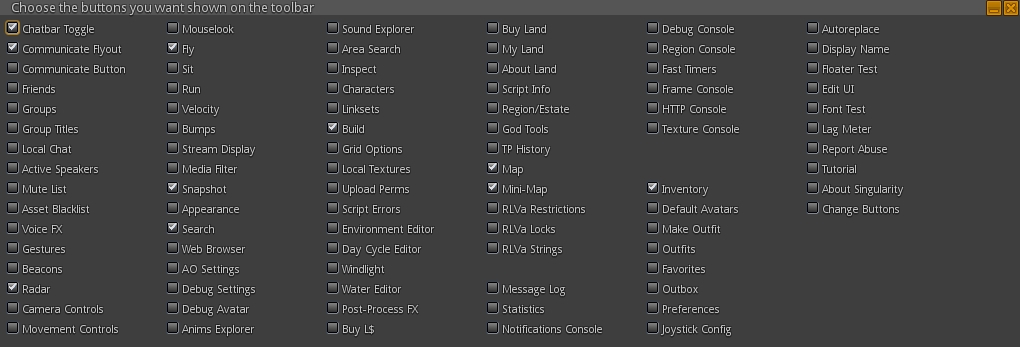
This release of Singularity brings with it the ability to add / remove buttons from the viewer’s toolbar, a-la 3.x viewers. Obviously, buttons are restricted to the bottom of the viewer, but this is liable to be of interest to users as it allows some degree of customisation in the UI. 80+ button options are offered, providing a comprehensive range of options and possible button combinations to suit your needs.

Singularity's impressive range of toolbar buttons
Singularity’s impressive range of toolbar buttons

Adding / removing buttons is a simple matter of opening the button chooser (View > Change Toolbar Buttons) and then checking those buttons to be displayed and unchecked those which are not wanted. The range of available buttons is impressive, and includes just about everything you’d ever likely want to see as a button. However, given the nature of the toolbar area itself, things can get a little crowded if you go nuts opening a tonne of buttons!

Preferences Updates

There have been a number of Preferences panel and tabs updates with this release, including:

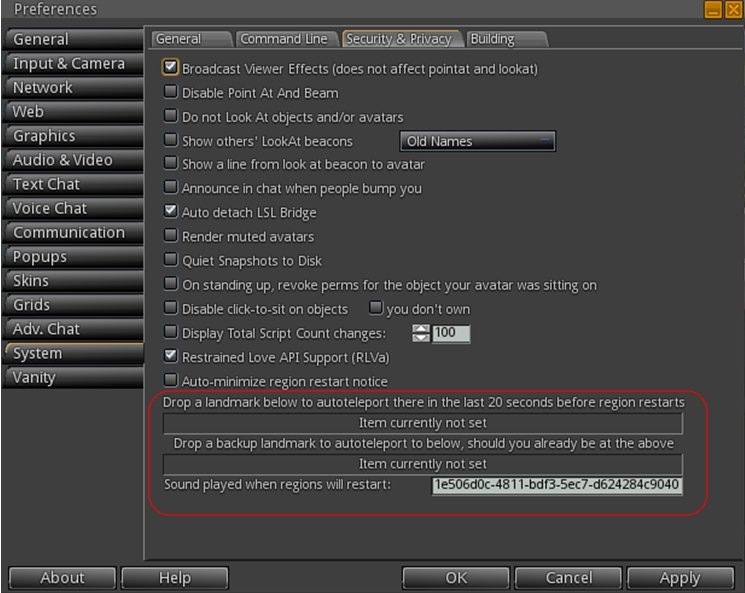
  • System > Security is now System > Security & Privacy, and includes the additional options:
    • Emergency Teleport (see below
    • An option to Render Muted Avatars
    • Announce in chat when people bump you
    • Lines from avatar to their Look At beacons
    • Customizable name display for Look At beacons
  • Input & Camera
    • Azerty keyboard support
    • Realistic Mouselook
  • Adv. Chat -> Chat UI
    • Format for names in lists
    • Autoscroll for automatic scroll to the bottom of chat when it gains focus
  • Graphics:
    • Hardware tab > VSync – adaptive option (providing your driver supports it)
    • Depth of Field tab added
  • Vanity->Main, Connect to neighboring regions: Save bandwidth & CPU usage by not connecting to neighbouring regions.

Floater Panel Updates

The following are either new, or changed floater panels with Singularity 1.8.6:

  • Destination Guide (World >Destinations): for OpenSim,  allow the destination guide to change when Hypergrid jumping
  • Default Avatar Picker Floater (World >Default Avatars)
  • New media filter implementation
  • Detailed Land Impact display
  • The default permissions floater has been overhauled, it now matches the one found in the official viewer, with permissions for each individual type of item are offered

Emergency Teleport

Even been logged-out of SL during a rolling restart due to being AFK, or been caught by a restart when you’ve missed the warnings? Well, neither need ever be a bother to you again with Singularity.

Version 1.8.6 see the arrival of the Emergency Teleport feature. Preferences > System > Security and Privacy includes two slots into which landmarks can be dropped. Should you be caught AFK during a region restart, Singularity will attempt to auto-teleport you to the first landmark in the final 20 seconds before the restart occurs. If that destination is unavailable, the second LM will be used in a further attempt to teleport you.

The Emergency Teleport LM slots

In addition, Singularity also includes the STORM-1980 screen shake and restart warnings, and there is an option to automatically minimise the latter in Preferences > System > Security and Privacy, which can be found directly above the Emergency Teleport LM slots.

Mini-Map Enhancements

Singularity 1.8.6 offers a range of mini-map enhancements, including:

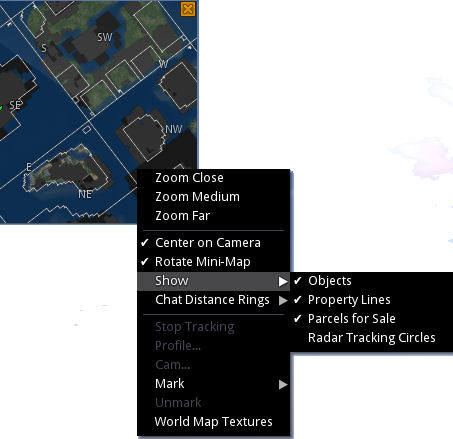
  • Show parcel boundaries and parcels for sale:  mini-map menu: > Show > Property Lines /  & Mini-map menu: > Show > Property Lines
The Mini-map parcel options and other menu options
  • Option to use world map textures: Mini-map menu > World Map Textures
  • Scroll zoom is now based on where your mouse is, if centering on camera is off
  • Option to show tracking circles around people selected on the radar while the radar is visible: Mini-map menu: Show > Radar Tracking Circles
  • Marking on the mini-map changes custom colouring of avatar tags (on a per session basis)
  • Implementation of the Exodus multiple selection tool:
    • On mouse-over, a circle is shown beneath your cursor, this is the effective range of right clicking to mark
    • Change the range by holding Shift while scrolling
    • Other menu functions invoked on right-click still only work on the closest dot to your mouse
  • Prim torture limits are now standardised in line with other viewers.

 Build Updates

Version 1.8.6 brings with it a number of building updates, including:

  • Avoid problems when meshes with invalid joint names are encountered
  • Prim Alignment Tool updated
  • Object Import/Export enhancements, including improvements from Cool VL Viewer – support for Materials (specular and normal maps), Object Physics and Light Image.

Continue reading “Singularity 1.8.6: customise your toolbar and more”

SL project updates week 36/2: server releases, CDN news, projectors and materials

Kats, Love Kates; Inara Pey, February 2014, on FlickrKats, Love Kats (Flickr / Blog post)

Note that the majority of information in this article was gathered at the Server Beta User Group meeting on Thursday September 4th, the transcript for which is available here.

Server Deployments, Week 36 – Recap

On Wednesday September 3rd, the Main channel received the server maintenance project previously deployed to the three RC channels. This comprises crash mode fixes and fixes for the following:

  • SVC-2262 – “Incorrect height value in postcard which sent from above 256m” (a postcard being a snapshot sent to e-mail)
  • BUG-6466 – “Numbers expressed in scientific notation and include a plus sign in the exponent are not parsed as JSON numbers by LSL”, which was thought to have been fixed a while ago, but which in fact resulted in BUG-6657 – “Valid JSON numbers like 0e0 no longer valid after 14.06.26.291532″, prompting the original fix to be rolled back.

There were no planned deployments to the RC channels for week 36.

Week 37 Releases

There will be a Release Candidate channels deployment in week 37 (week commencing Monday September 8th), which will comprise crash fixes and bug fixes. Interestingly, one of the fixes will be to prevent Linden personnel from getting stuck in the new Skill Gaming regions – which Maestro jokingly describes as, “once that fix is out, I’ll no longer have an excuse to play cards all day 🙂 .”

CDN Work

Map Tiles

April Linden has been doing further refinements to the use of the CDN environment for map texture fetching on Aditi (see my notes from week 35). This work is liable to be moving to a main grid RC in the near future, and is being viewed as a “good dry run  for using the CDN for texture and mesh fetching in the future”, according to Maestro.

Viewer Mesh Request Throttling

“During mesh fetch testing with the CDN, we realized that we were throttled by a viewer’s internal throttle,” Maestro said of the ongoing texture and mesh CDN testing currently underway on Aditi (again, please refer to my week 35 and  week 33 reports). He went on:

The viewer ‘only’ requests 100 meshes/second because the simulator has a similar throttle for answering those requests, but with the CDN, the simulator’s throttle is irrelevant. Monty did a special build of his viewer (I’m not sure if the change was permanent) which removed the throttle, and I benchmarked an average of ~365 meshes/second on the CDN region with it. Which, in my mind, is approaching “fast enough” 🙂 .

This probably means that when the CDN work is completed (which will include viewer-side changes at some point), the viewer’s throttle will likely remain, but will be set higher and perhaps with a debug setting. “Because,” as Maestro said, “if mesh loading got way too fast, eventually you might have viewer performance issues from the insane download speed.”

Yuzuru Jewell (of Kane projects fame), has been carrying out tests from Japan, which saw his mesh load speed double via the CDN when using an unmodified viewer.

 Other Items

HUD Detaching / Reattaching Following Teleport

This was first commented on in my week 32 meeting update, and referred to again in week 33 (both alongside BUG-6908). Commenting on the state-of-play with investigations into the issue, Maestro indicated that there is some thinking that it may have the same cause as BUG-7131 (Unexpected behaviour of on_rez event and llDetachFromAvatar() ), which is being looked into, although there is no news on a fix as yet.

Materials Rendering via Basic Shaders and Improving Projectors

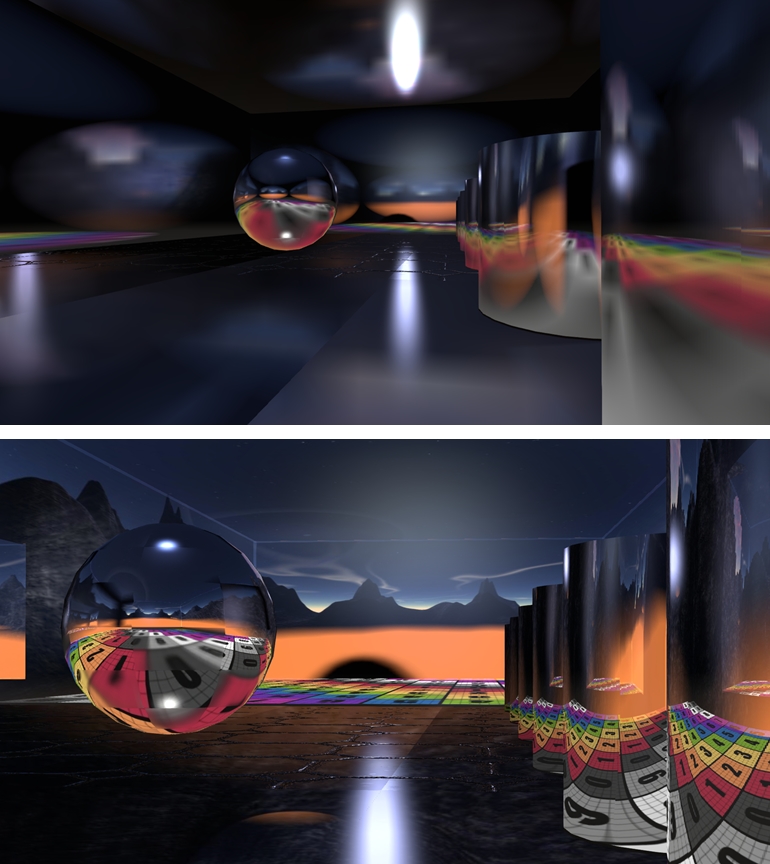
In week 34, I carried news about Geenz Spad’s proposal for introducing materials rendering into basic shaders (i.e. so users would not necessarily need to have Advanced Lighting Model enabled in order to see materials), and to improve the functionality of projectors in Second Life.

The JIRA submitted for this work were respectively:

  • STORM-2077 – Add support for materials in basic shaders
  • STORM-2056 – Projector reflections do not respect the environment intensity parameter
  • STORM-2067 – Glossy Projectors

The news on adding materials to basic shaders isn’t currently encouraging. The most recent comment from Marissa Linden (August 20th) states, “Moved to STORM. However our internal engineers do not believe that this can safely be implemented.”

Gennz's work on projectors an glossiness: top: as test items currently appear in Firestorm. Bottom: as they appear in the test viewer
Geenz’s work on projectors an glossiness: top: as test items currently appear in Firestorm. Bottom: as they appear in the test viewer

News is a little more positive with the projector work, with a test viewer having been built, offering those who are interested with an opportunity to play with the updated projector capabilities. There is also a test area on Hippo Hollow.

UWA announces Freedom Project books available

The Freedom Project FINAL 26 Aug, 2013

Launched on Sunday September 1st, 2013, the Freedom Project was a joint undertaking by the University of Western Australia,  Virtual Ability Inc., and the Centre for ME/CFS and Other Invisible Illnesses.

A 2D and 3D art and film event, the project extended an open invitation to artists suffering from a disability or chronic illness, or associated with those suffering from either, to demonstrate how virtual life has enabled them to engage in activities and interact with others in ways which may not be possible in the real world.

I covered the launch of the project at the time, and subsequently reported on the opening of the Freedom Project art exhibition in the UWA’s gallery spaces in March of 2014 (the exhibition is still open for viewing at the time of writing for those who would like to visit, although the exhibition will be taken down in the next two or three weeks to provide the UWA’s Transcending Borders project additional display space.

At the time the challenge was announced, it was indicated that art pieces submitted to the Freedom Project would feature in a commemorative book – both digital and orinted – in the hope that both the book and the exhibited pieces and films will inspire others, and will demonstrate how virtual worlds can be used to help some people who may have had difficulties finding other means of expression to believe in themselves more, or to connect with others.

The Freddom Project book is now available in in or electronically as a part of the UWA's Studies in Virtual Arts (SiVA) series of e-journals
The Freedom Project book is now available in print or electronically as a part of the UWA’s Studies in Virtual Arts (SiVA) series of e-journals

On Friday September 5th, FreeWee Ling, curator of the UWA’s gallery spaces and co-ordinator of the UWA’s virtual world art projects, announced that the Freedom Project book is now available.

Lavishly produced and illustrated, the book tells of the origins of the project and provides an overview of the global nature of the project and the events which took place within Second Life where it was represented; information on the project’s partner and sponsor organisations is also provided.

Central to the book is the art itself and the artists. The illustrations throughout are beautiful, with many of the pieces being given wonderful two-page spreads. The artists’ stories, told in their own words, are equally as moving, making this a powerful piece of reading.

The Freedom Project book is lavishly compiled and presents both the artists and their work beautifully

The electronic version is available on-line as a part of the UWA Studies in Virtual Arts e-journals series. The printed version can be obtained for L$5000 (around $20.00 US), shipped anywhere in the world. Those wishing to purchase a copy should contact JayJay Zifanwee of the UWA for ordering information.

Artists and groups who participated in the challenge can also claim a free copy of the printed book – again, please contact JayJay Zifanwee for ordering details.

Related Links

CtrlAltStudio adds basic UI elements for the DK2

CAS-logoStrachan Ofarrel, known in the physical world as Dave Rowe, continues to enhance the alpha version of his CtrlAltStudio viewer for the Oculus Rift DK2 headset and windows.

Dave has been working steadily on adding DK2 capabilities to CtrlAltStudio for a while now, and this marks the third update to the DK2 Alpha version – officially called 1.2.2.41206 Alpha 3.

The Alpha 1 release, made on August 19th, added preliminary support for the DK2, then Alpha 2, released on August 25th, added positional head tracking. The Alpha 3 release adds initial viewer UI support, as Dave explains in his blog post announcing the release:

This alpha release of the CtrlAltStudio Viewer adds basic UI to the Rift DK2 display. This includes dialogs, avatar toasts, and floating text (i.e., the same UI as displayed with the DK1 in the 1.2.1 Release).

Other changes this release:

  • Added fade-to-black around the barrel distorted image edges.
  • Stopped showing the health & safety warning the second and subsequent times into Riftlook view.
  • Fixed barrel distorted images being displayed lower on the screen than they should be.
  • Fixed “landing” in the air when flying in Riftlook with an Xbox 360 Controller.

The blog post also contains a reminder that the Alpha version(s) is / are still preliminary, with Dave noting, “it does not work with direct mode and Advanced Lighting Model needs to be turned on. It is built using the 0.4.1 Rift SDK and should work OK with the 0.4.2 Rift SDK.”

Usage is the same as the previous alpha releases. With the DK2 configured in extended mode: use the Windows key + RIGHT CURSOR to move your viewer window onto the Rift’s display, then CTRL+ALT+3 to make the window full screen and switch into Rift view.

As with the previous ALpha releases with DK2 support, this version will install into its own directory, allowing it to be used alongside the release version (although it will obviously over-write Alpha 1 or ALpha 2, if installed).

Further information on the release can be found in the release notes.

Related Links