Of beasts, beauty and stockbroking

Once again, the Seanchai Library will be presenting a round of stories and readings in Voice this coming week, with the continuation of a number of stories and also delving into the origins of the fairy tale. Forget the Brothers Grimm – discover the world of the French salon!

As always, all times SLT, and unless otherwise stated, events will be held on the Seanchai Library’s home on Imagination Island.

Sunday 3rd February

13:30 – Tea-time at Baker Street

Hall Pycroft, recently made redundant from a stock broking firm, consults Holmes and Watson over worries about his work situation. Not that he is particularly worried about being out-of-work – he isn’t. Quite the reverse in fact; he’s troubled because he seems to have had perhaps one too many offers of employment.

Having departed his former employers, Pycroft managed to secure a position with the prestigious stockbrokers of Mason and Williams, based in Lombard Street in the City of London. So far, so good.

However, he was also approached, entirely out of the blue, by one Arthur Pinner, who, with his brother, Harry, has apparently established a new hardware distribution business. The oddly-similar Pinners, the one in London, the other in Birmingham, persuade Pycroft to accept the mangership of the new business  – complete with a £100 advance  – but oddly, asked not the resign his former position at Mason and Williams on account of a bet relating to him. As he settles-in to his new position, Pycroft starts noticing other aspects of the business which convince him that all is not well, and to seek the assistance of the famous Great Detective.

Join Corwyn Allen as the journey through The Memoirs of Sherlock Holmes continues!

Monday 4th February, 19:00 – Notwithstanding: Stories from an English Village

notwithstandingFamous for his more exotic locations and stories such as Captain Corelli’s Mandolin and Red Dog, Louis de Bernieres used England for the setting for a series of short stories written early in his career.

Located in and around the fictional village of Notwithstanding, which is somewhat based on the village of Worley in Surry, where he grew up, the stories were various published in newspapers, etc., prior to being brought together into this single volume in 2009. Semi-autobiographical in places, the stories are rich in English rural detail and contain references to many real-world locations in Surrey, and allow de Bernieres to ruminate on a part of English life he believes to now be vanishing.

Join Caledonia Skytower as she dips further into de Bernieres’ England.

Tuesday 5th February, 19:00: Inkspell

Faerie Maven-Pralou continues Cornelia Funke’s young adult which forms the second part of her Inkworld trilogy. The books chronicle the adventures of teenager Meggie Folchart whose life changes dramatically when she realizes that she and her father, a bookbinder named Mo, have the unusual ability to bring characters from books into the real world when reading aloud. Mostly set in Northern Italy and the parallel world of the fictional Inkheart book, the central story arc concerns the magic of books, their characters and creatures, and the art of reading.

In Inkspell, a year has passed since the events related in Inkheart, the first book in the series. Not a day goes by without Meggie thinking of Inkheart, a book that has characters that come to life. Resa is back. The fire-eater, Dustfinger, wants to go back to his wife daughters-who are in the story. When he finds a crazy, self-absorbed psycho storyteller, Orpheus, who can read him back into the book, he goes into the pages. Soon Farid convinces Meggie to read him into the book so he can warn Dustfinger of Basta. But Meggie has figured out how to read herself and Farid into the book Inkheart.

Wednesday 6th February, 19:00: Quite a Year for Plums

plumsAnyone who has read the best-selling Mama Makes Up Her Mind or listened to Bailey White’s commentaries on NPR knows that she is a storyteller of inimitable wit and charm. Now, in her stunningly accomplished first novel, she introduces us to the peculiar yet lovable people who inhabit a small town in south Georgia.

Meet serious, studious Roger, the peanut pathologist and unlikely love object of half the town’s women. Meet Roger’s ex-mother-in-law, Louise, who teams up with an ardent typographer in an attempt to attract outer-space invaders with specific combinations of letters and numbers. And meet Della, the bird artist who captivates Roger with the sensible but enigmatic notes she leaves on things she throws away at the Dumpster.

Kayden Oconnell is joined by Caledonia Skytower as they continue to read from the novel.

Thursday 7th February, 19:00: Beauties, Beasts and Enchantments

beautybeastRegarded as the best way to access an English translation of Madame de Villeneuve’s original and entire story of Beauty and the Beast, itself a novella-length story in which the beast is actually precisely that – a beast, Jack Zipes’ gathering-together of fairy tales from the French Salon era is regarded by many as perhaps the definitive English language volume on the subject.

Within its covers, the book has 36 tales, readers can also find the works of Charles Perrault, original author of works such as Le Petit Chaperon rouge (Little Red Riding Hood), Cendrillon (Cinderella), Le Chat Botté (Puss in Boots) and La Barbe bleue (Bluebeard). Madame Le Prince de Beaumont’s derivative version of Beauty and the Beast, the version with which most modern audiences are more familiar, can also be found here.

The book is complete with a fascinating introduction by Zipes which examines the French salons and their role in the development of the genre of the fairy tale, and also looks at some of the women who dominated both the salons and the growth of the genre itself. As such, it is a marvellous door through which to explore the topic.

Join Shandon Loring as he delves into the world of tales fantastical, both fair and dark, both familiar and perhaps new. 

Please check with the Seanchai Library SL’s blog for updates and additions to the week’s schedule.

Note that throughout January and February, all donations to Seanchai Library SL will go to the real-world charity, Doctors Without Borders! Have questions? IM or notecard Caledonia Skytower.
Related Links

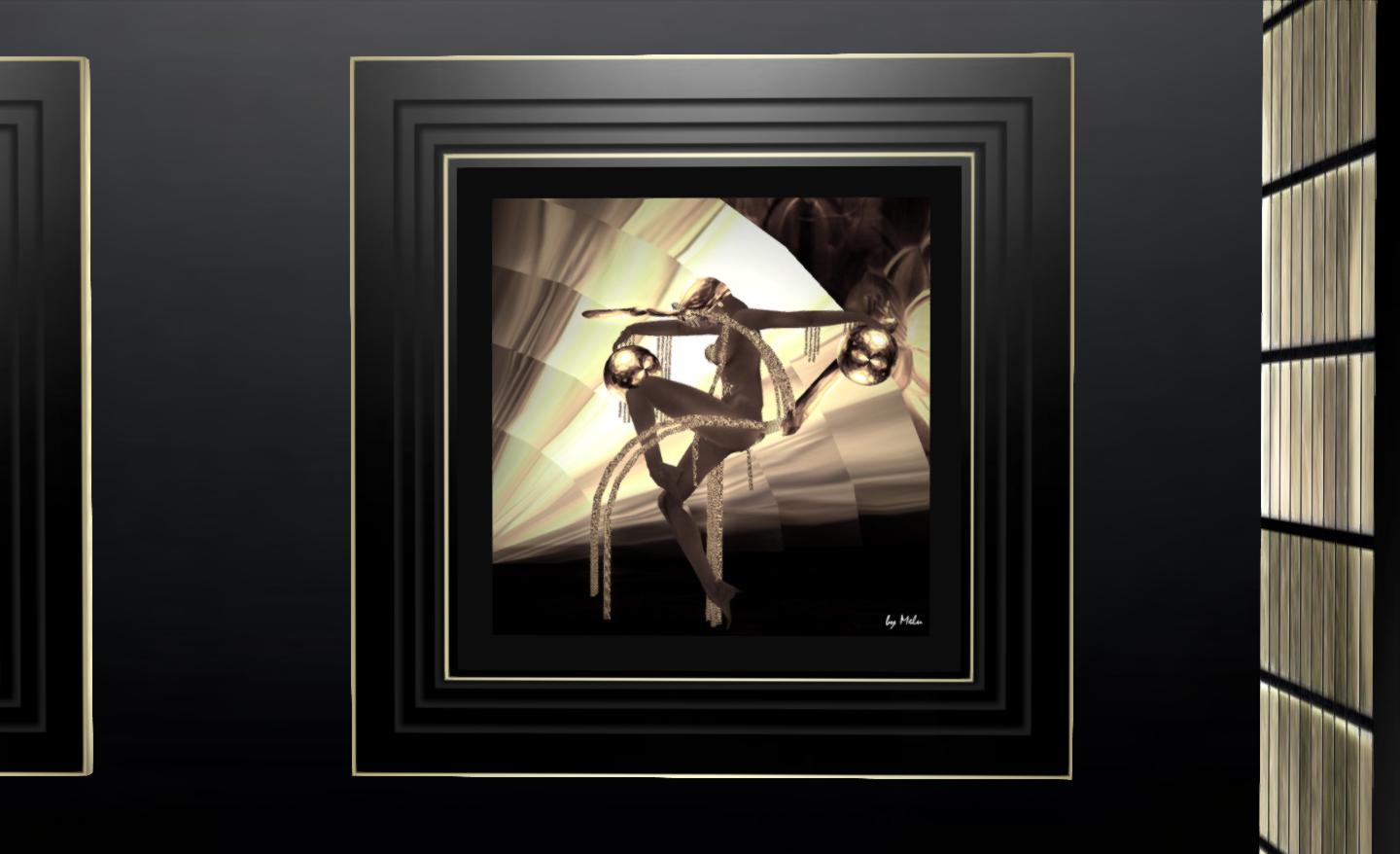
Art Deco, SL style

ART DECO Exhibition
Art Deco

Melusina Parkin has a passion for Art Deco. Since entering Second Life in late 2008, she has kept herself extremely busy, becoming CEO of MEB Fashion at the start of 2009, and also launching Melu Decos supplying Art Deco furnishings to SL users, with stores featured in many historical and retro regions such as 1920 Berlin, Seraph City, Paris 1900, Roaring 20 Chicago, and so on.

ART DECO PosterShe is also a talented photographer and has had exhibitions at Galerie des Machines (Paris 1900), Schloss Museum (1920 Berlin), Café des Artistes (Paris 1900), R&D Diotima Gallery, Musee de la Duché de Coeur (Languedo Coeur), among others.

Opening at 14:00 SLT on Saturday 2nd February, Melusina now brings her passion for Art Deco design and art and her talents as an SL designer and an artist together in an elegant exhibition which will run through until (approximately) the end of March 2013.

Located at the Art India Gallery on Shekhawati, the exhibition is being kindly hosted by Veekay Navarathna and curated by Quan Lavender.

Quan graciously offered me the chance to preview the exhibit prior to the formal opening, which will be marked by a 20’s style Flapper Party, with invitations to all – and if you can attend appropriately costumed (while not required), so much the better!

Art Deco
Art Deco

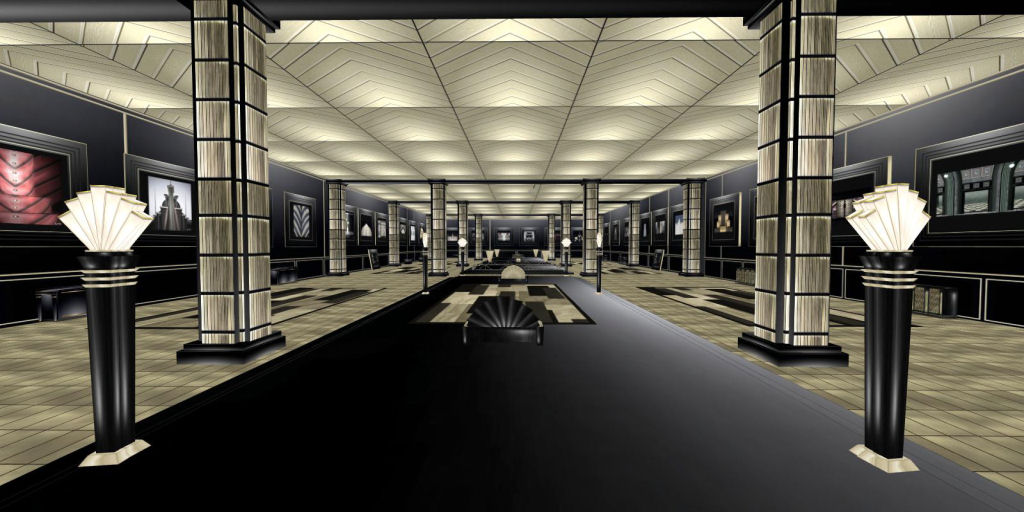
The exhibition is located in a purpose-built space Melusina has designed herself and which forms an integral part of the show, incorporating a clearly Deco style which appears at first sight simple, but which is in fact exceptionally elegant and beautifully balanced.

AD-14Both the art and the furnishings and accessories are offered for sale, providing a unique combination of art exhibit and a demonstration of Melusina’s well-crafted, low-impact mesh designs for furnishings and lighting accessories which stunningly reproduce the Art Deco style in-world. I particularly liked the 1-prim, free-standing fan-lights which, for some reason, cast me back into the world of ITV’s Poirot, leaving me half expecting the (suitably padded and brilliant) David Suchet to waddle up…

The pictures themselves are typical of the Art Deco era both in style and presentation, and there are a couple which certainly caught my eye. The furnishings included in the exhibit are also typical of the era and demonstrate clean, strong lines which perfectly complement both the paintings and the design of the gallery itself. All of the items are mesh and had a land impact of 1 each, making them a cost-effective means of decorating a house in-world.

For anyone interested in Art Deco art, design and architecture, this is a must-see exhibition.

Art Deco opens at 14:00 SLT on February 2nd, 2013 and will run for approximately 2 months.

Art Deco
Art Deco

More About Melusina Parkin

As an art object creator, Melusina Parkin has been the best voted in the Virtual Museum of Architecture (VMA) Contest of Art Deco Clocks. She has presented two talks at the VMA; the first, in December 2010 was on Art Deco, and was reprinted in the SL Retropolitan Magazine. The second talk, in March 2012, was on the subject of London’s famous Battersea Power Station.

As a builder, Melusina has been responsible for a number of notable builds in SL, including the MEB main store at Klio, the Look Elite Model agency lobby and academy, and the Cotton Club set for the Look Elite agency graduation show of 2012. As a writer, she covers cinema, fashion and SL destinations and collaborates on a number of in-world publications. She speaks English, Spanish and Italian (her native language), understands French, a little bit of German and Portuguese. Her passion for Art Deco in SL is reflected in her Flickr photostream, where she has over 500 images of in-world places and buildings.

Art Deco
Art Deco

Related Links

With thanks to Quan Lavender.

SL project news week 5 (2): servers, issues, viewer, SSB, deformer

Server Deployments week 5

On Tuesday 29th January, the Main channel received the threaded region crossing code previously deployed to BlueSteel and LeTigre in week 4release notes.

On Wednesday 29th January, the following updates were deployed to the Release Candidate channels:

  • BlueSteel received the server-side materials processing code – release notes
  • LeTigre received the maint-server project originally deployed to Magnum in week 3. This deployment includes the bug fix for the places / search indexing issue which occurred following the original deployment of the code to Magnum – release notes
  • Magnum received a further update to the interest list code deployed in week 4, with fixes intended to deal with issues of high packet lossrelease notes.

Reported Issues

Main Channel

A number of initial problems were reported  in the forum discussion thread, Several of which  appeared to be related to initial region caching / capabilities problems which lead to some strange initial experiences for users, ranging from teleport failures / potential viewer crashes on region crossings (physical or teleport) and  out-of-range controlled flight (i.e. avatars could continue to fly under full control when apparently at coordinates well outside the region (e.g. 320, 128, 75). These issues seem to cease once regions were correctly caching following a (protracted) restart period.

There were also some reports in the forum discussion thread that use of the estate tools to eject / teleport home / ban an avatar can lead to a region cross. However, as the reports appear to be the same / similar to previously filed SEC JIRA (SEC-1215 and SEC-1204, neither of which are open to public viewing), and may be an isolated series of incidents (others are not reporting the same problems, so they have not been repro’d outside of the affected region), there is a reluctance within LL to attribute them directly to the region crossing code.

Magnum RC (Interest List Code)

The Interest List Code problem relates to the use of bots. Originally, it had been hoped that one of the fixes deployed this week would correct the issue; however this has not entirely been the case.

Following further investigation by Latif Khalifa and Andrew Linden, an explanation of the problem is provided in the deployment forum thread. The issue has its routes in the fact that the Second Life UDP protocol requires an acknowledgement (or “ACK”) for all messages sent to the viewer. However, rather than sending a distinct “message received” back to the server for each packet received, certain types of bot append the acknowledgement to other outgoing messages. A bug in the interest list code means these appended ACKs aren’t read. This results in original data been regarded as a packet loss, so it is repeatedly re-sent to the viewer controlling the bot, leading to the huge increases of bandwidth which have been witnessed. Andrew is currently working on a fix for this issue.

Deployments for Week 6

There is currently no clear news on deployment plans for the week commencing Monday 4th February. Currently, it appears that the main-server release re-deployed to LeTigre will most likely be promoted to the Main channel.

SL Viewer Updates

Issues relating to the beta viewer 3.4.5 code have been resolved, and an updated beta viewer (3.4.5.269698), was released on Thursday January 31st – see the release notes for updates. Also released on the 31st was a new version of the CHUI development viewer, 2.4.6.269797. The SL development viewer rolled to 3.4.6.703 on Wednesday January 30th.

An interesting issue has been noted recently by those using multiple versions of the SL viewer. When swapping between more recent versions of the SL development viewer and older versions of the code base, toolbar buttons can vanish from the viewer’s UI. The exact cause is unclear, and the problem appears intermittent (I’ve personally only encountered it once jumping between project and release versions of the viewer).

Mesh Deformer Project Viewer

Sovereign Engineer assisted with code merges for the parametric deformer project viewer with the result that the code is now merged-up to the 3.4.4 codebase with the latest release of the mesh project viewer (3.4.4.269558) on January 29th. There are apparently no functional changes to the deformer itself.

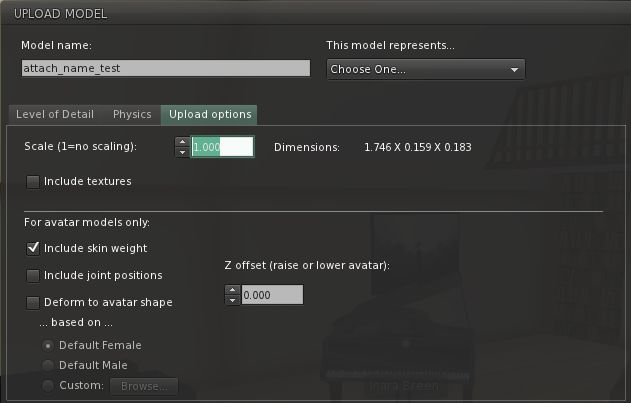
The updated shape selection options for mesh clothing and human shapes in the mesh upload floater
The mesh deformer project viewer has now been merged-up to the 3.4.4 viewer codebase. There are apparently no updates to the deformer itself with this release

This removes one of the three bottlenecks to the project as noted in the first part of this week’s reports. However, the issue of internal resources at the Lab remains a problem, although Oz Linden is attempting to address this and there may be further news in week 6.

Continue reading “SL project news week 5 (2): servers, issues, viewer, SSB, deformer”

Taking a Leap (Motion) into Second Life

While I’ve been buried in dio, working on an interactive guide to … something … Linden Lab slipped out another little surprise this week via the blog.

Reaching Out into Second Life looks at the use of Leap Motion for interacting with SL. The work is being carried out by Simon Linden, and is clearly tagged as experimental, but it shows the potential of Second Life as a platform for exploring gesture-based interactions with controllers like Leap Motion.

Nor are the Lab keeping matters to themselves. The blog post states:

If you have a Leap Motion controller and would like to experiment with the Second Life Viewer, you can find the source code for these experiments at http://bitbucket.org/simon_linden/viewer-rabbit. The indra/newview/llleapmotioncontroller.cpp file contains most new functionality. The Viewer is built to work in several different modes. These modes can be used to control the avatar while flying, send data into Second Life for scripts to intercept, detect hand motions that trigger avatar gestures, or control the camera and avatar movement. To switch between these modes use the “LeapMotionTestMode” value in the Debug Settings, accessible from the Advanced menu.

Commenting on his work, Simon Linden re-emphasised the experimental nature of the work and it’s possibilities, “It’s nowhere near a real feature. But it’s certainly fun to make things happen waving your hand around … I think we’ll see some very interesting stuff in the future.” He went on, “I think there’s potential there, along with touch screens, but it’s going to take a lot of work and experiments to see what really is good or not.”

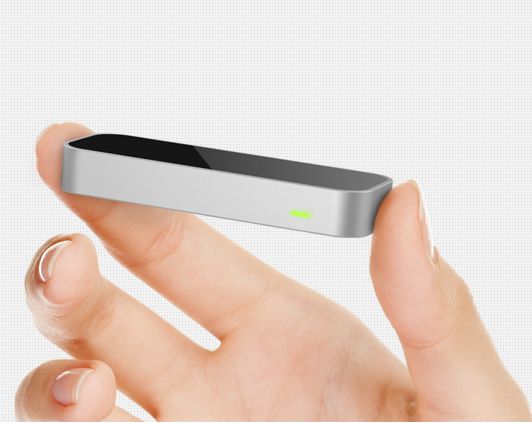
The Leap Motion device (image courtesy of leapmotion.com)
The Leap Motion device for Windows / Mac (image courtesy of leapmotion.com)

If you’re wondering why Simon has his hand cocked sideways when firing the pop-gun in the video, he’s not trying to emulate any cool Hollywood or gangster-style of shooting, the Leap Motion device sensors demonstrated a blind spot when he was testing the unit, and would not register his thumb motion if he had his thumb pointing upwards.

For those wishing to try things out for themselves, Leap Motion can be ordered from the Leap Motion website, with prices starting from $69.99 + shipping (for the USA), which does not make it prohibitively expensive. It’s also capable of being put to a wide variety of uses as Leap Motion’s own promo video demonstrates.

Related Links

Materials processing – more sneak peeks

The server-side materials code reached the main grid in week 5, with a deployment to the BlueSteel Release Candidate channel. As stated in my project report marking the deployment, the code will not be usable until there are suitable viewers on the grid which can utilise it, and they have yet to be released.

As it stands, viewer-side work is progressing, and it is likely that a project viewer will be made available in the near future, although time frames are still a little hard to determine. Commenting on possible viewer availability on Wednesday January 30th, Geenz Spad, lead developer for the viewer, stated, “At this point, it’s hard to say; the majority of the rendering bits are finished at this point. The UI’s there, but needs a bit of polish; so all in all I’d say a public testing version should be out really soon.”

During the conversation, Geenz provided further preview pictures to those in attendance, some of which are reproduced here.

Materials in action: a prim with a texture (diffuse map) and normal map applied (courtesy of Geenz Spad) - click to enlarge and see in detail
Materials in action: a prim with a texture (diffuse map) and normal map applied (courtesy of Geenz Spad)

Viewer UI

In week 4 I was able to provide a quick look at the changes to the Build floater’s Texture tab which are directly relevant to materials processing. Since then, the developer leading this work, Tonya Souther, has progressed the tab to a point where it is close to finished. In particular, pickers have been added to the normal and specular map options, and the diffuse (texture) option now has a drop-down for the alpha mode selection, also as discussed in a previous project report.

Materils Build floater Texture tab revisions (31-01-13): The diffuse (texture) option, showing the Alpha mode drop-down options (l); the normal map options, with map picker and default texture list drop-down (c); the specular map options, in which the Use texture drop-down displays the familiar low, medium & high shiny options (r)
Materials Build floater Texture tab revisions (31-01-13): The diffuse (texture) option, showing the Alpha mode drop-down options (l); the normal map options, with map picker and default texture list drop-down (c); the specular map options, in which the Use texture drop-down displays the familiar low, medium & high shiny options (r). Materials can be applied per face of an object, with scale, rotation, etc., applied across all maps on a face / object – click to enlarge

Viewing Materials: How Things Will Look

Materials processing will require viewers to be running in deferred mode (i.e. with lighting and shadows enabled, although not necessary with shadows activated – see my notes here). While it is not possible for materials to be implemented in such a way that it can run in a non-deferred mode, materials should not have any major negative impact on how second life looks to those who are unable to run their viewer in deferred mode. In fact, SL should continue to look to them much as it does today, hopefully as show in the image below.

With and without: how materials will look when running a viewer in differed mode (top) and in non-deiffered mode (bottom). The differences are clear, but the in-world experience in non-differred mode is not in any way "broken"
With and without: how materials will look when running a viewer in differed mode (top) and in non-deferred mode (bottom). The differences are clear, but the in-world experience in non-deferred mode is not in any way “broken”

In the meantime, Linden Lab are continuing to try to gather data on the number of users running their viewers in differed mode and – perhaps equally as important – the number of users who could be running with deferred active (again, if not with shadows active), particularly given the continuing improvements being made to the rendering system.

So materials processing is progressing and drawing close to an initial release. There is a lot going on within Second Life as a whole at the moment in terms of projects coming into the viewer, with both avatar baking/server-side baking (SSB) and the Communications Hub User Interface (CHUI) also on the horizon as well. As such, the Lab still need to establish priorities on the various projects and plan releases accordingly. Similarly, TPV’s need to consider the impact of these various projects on their work and determine their own priorities for integrating the projects into their viewers. Given the complexity some will face in implementing CHUI, it would appear likely that the materials capabilities might reach some TPVs ahead of that work, even if CHUI and materials are released in relatively close order.

As always, updates will be provided as news emerges.

Another preview of a  normal map and a  diffuse map (texture) in action (courtesy of Geenz Spad)  - click to enlarge
Another preview of a normal map and a diffuse map (texture) in action (courtesy of Geenz Spad) – click to enlarge

Related Links

Inside dio

dio-logoUpdate, February 19th, 2014: dio was discontinued by Linden Lab on February 19th, 2014. Links to the dio website, etc., have therefore been removed from this article.

On Tuesday 29th January, Linden Lab launched dio, the latest in their suite of new products. The Lab describes dio as a browser-based space in which:

You create places by adding text, photos, videos, and interactive objects into interconnected ‘rooms’ that give spatial context to the content you share. You can keep your places private, share them with friends and family, or allow everyone to explore and enjoy them. Live and persistent chat allows you to socialize with other users as you discover and explore dio places together and see what those who came before you had to say. In the future, dio users will be able to monetize the dio places they create, enabling them to profit from their own creativity.

Here’s a look inside dio written after spending a few hours paddling around and setting things up, tearing them down and generally poking around.

Signing-up

dio is currently free to join, and users have a choice of doing so using either a Facebook account or e-mail address. As I avoid Facebook in much the same way as a cat avoids the Atlantic Ocean, I used the e-mail option, giving my name, e-mail and a password. Seconds later an e-mail arrived from the dio website asking me to confirm my details with a click. I did – and there I was, sitting on the log-in page, my credentials filled-out and a single remaining click needed to see me into the site. Simples!

Browsing

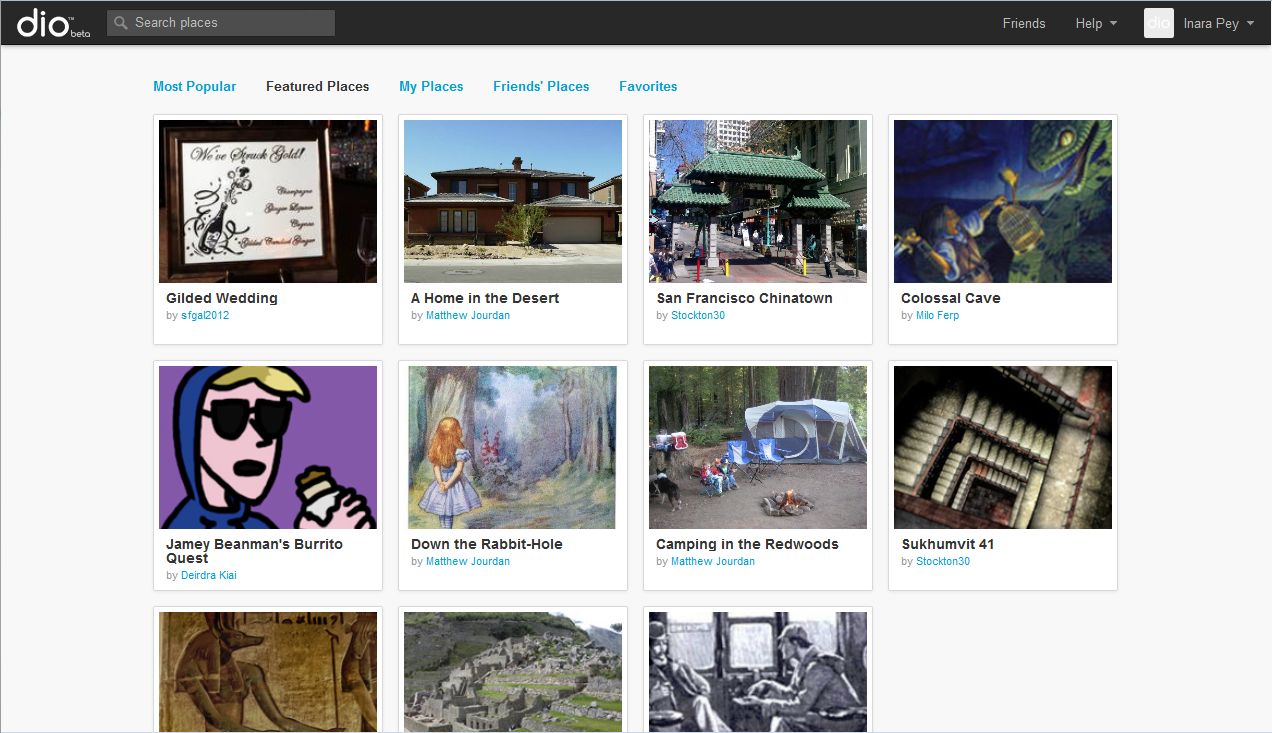
dio places
dio places

The homepage – or Community page, as LL call it – presents you with places people have already created. Some of these have obviously been created by closed beta testers, but there are already a number of places which appear to have been created by those who, like me, have just signed-up and are playing with things.

Places are listed in terms of Most Popular (most frequently visited) and Featured (criteria unclear). Additionally, users can create “albums” of their favourite places or those belonging to their friends, while also having an “album” of their places.

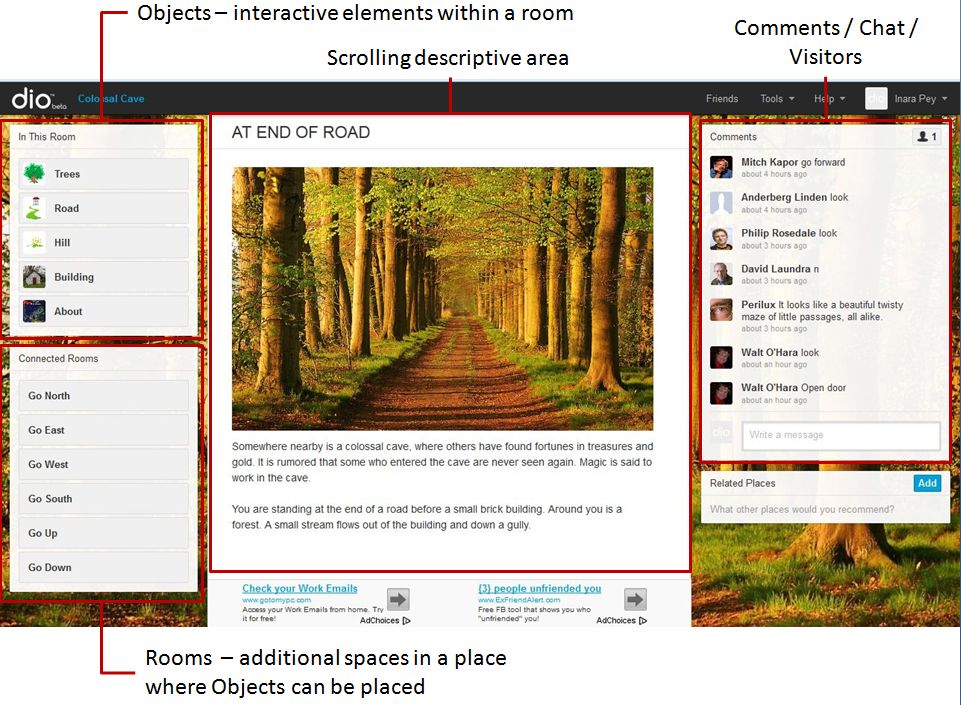
A place is accessed by clicking on it. If you’re logged-in to dio, a summary page for the place is displayed. If you’re not already logged-in, you’ll be prompted to do so or to create an account (if you are completely new to the site). Clicking ENTER from the summary page will take you into the place itself. This is effectively a web page comprising a number of elements.

A dio place screen elements
A dio place page elements
  • Objects (In This Room): this is a list of interactive objects contained in a room. Objects can currently be any combination of:
    • Photographs with descriptive text
    • Videos with descriptive text
    • Custom objects which can be coupled with a set of pre-defined actions to present a further element of interaction for visitors to a room. Custom objects can be examined, taken to inventory, drunk, eaten, used, locked, unlocked, opened, used to trigger other actions, and so on
  • Connected Rooms: a list of additional spaces within the current place visitors can move between, each containing objects of its own and/or leading to other rooms. As with objects, custom actions can also be defined for rooms (for example, a room can be “locked” and require a key object taken from another room in order to unlock it and enter)
  • Descriptive area: the main display area wherein images, videos and the results of a visitor’s interactions with objects in the room are displayed / reported here
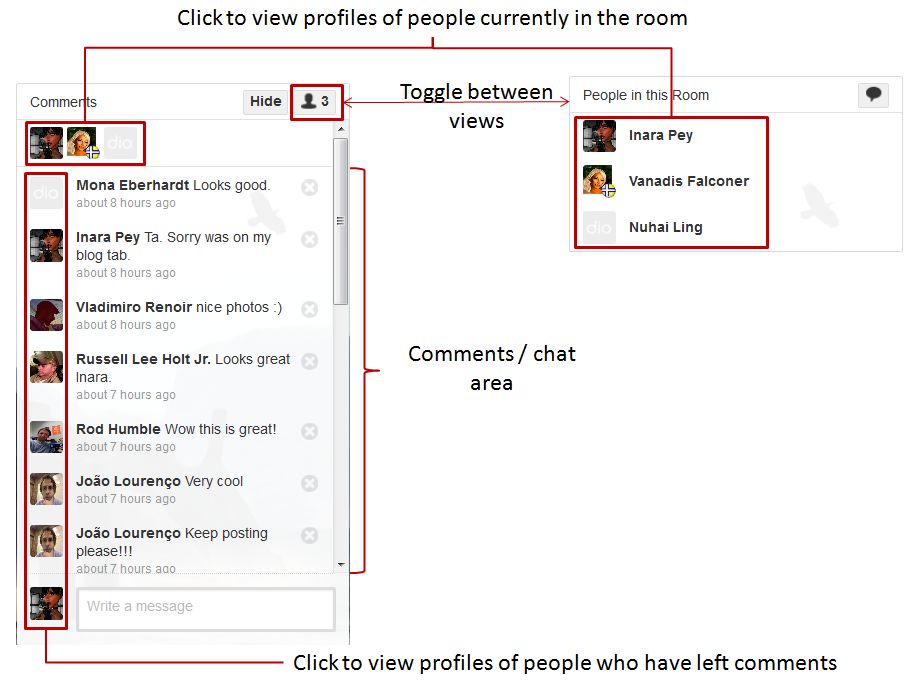
  • Comments / Chat / People: this is where the “persistent and live chat” sits – although currently it is more of a Twitter / Plurk-like comments stream than a means for engaging in conversation, and there is no instant / direct messaging capability. It also displays the people currently in the room at the, moment and can be used to access their profiles. When not required, the panel can be collapsed (HIDE). The image below provides further information on this panel.
The comments  / people panel
The comments / people panel

There are three further areas to a place page:

  • The Related Places panel, wherein links to similar Dio places can be added by anyone (although the creator of the place can remove links which are seen as inappropriate)
  • The Google Adservice area, which is discussed later in this piece
  • The inventory panel (which is not shown in images here). This is displayed beneath the Connected Rooms panel, but only if / when you have collected inventory items, which are themselves interactive objects found within a room.

Continue reading “Inside dio”