Isle of Myrth is the home of The Noble Storybook, an homage to the tales of Beatrix Potter and the work of members of the Noble Family group in Second Life.
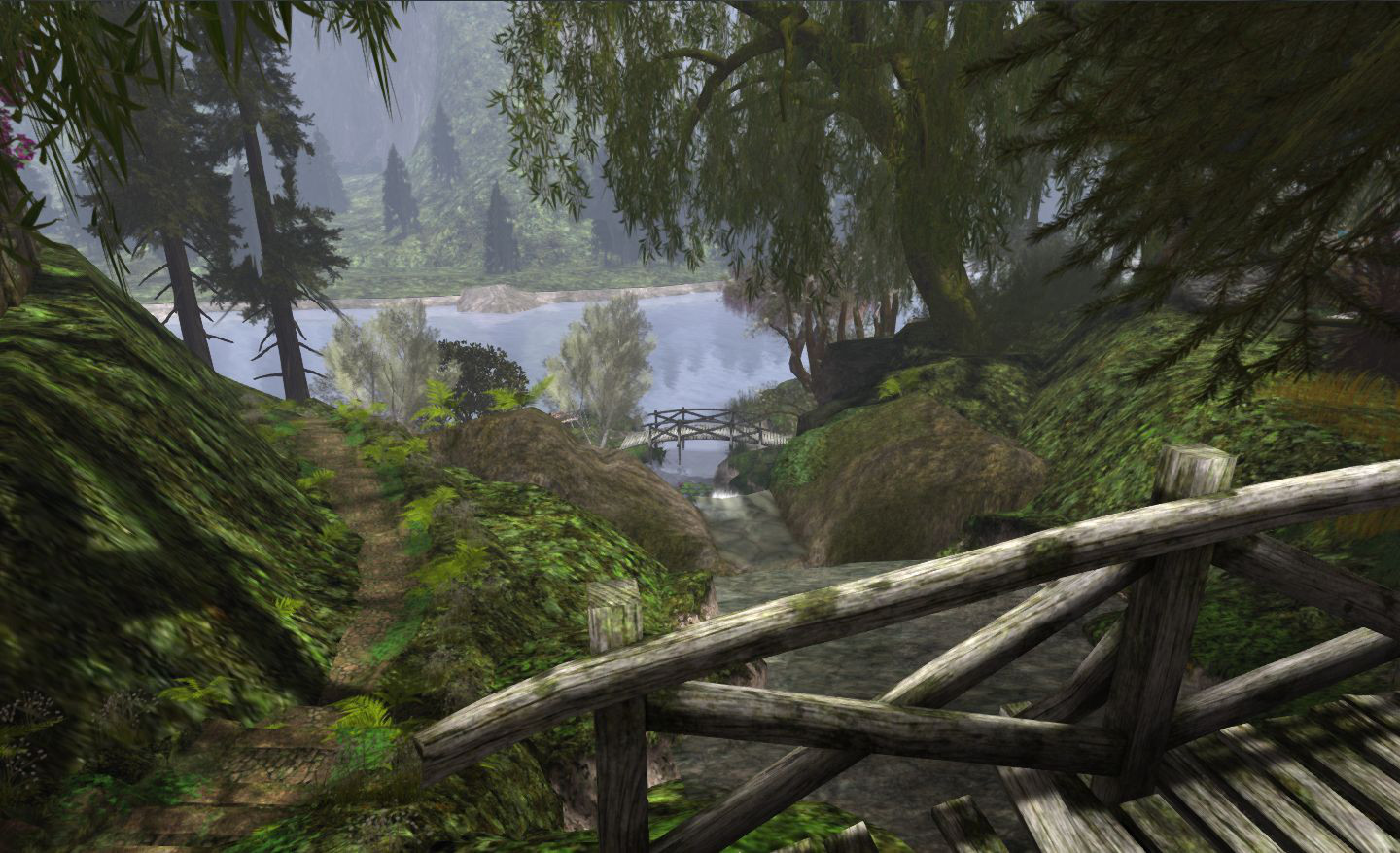
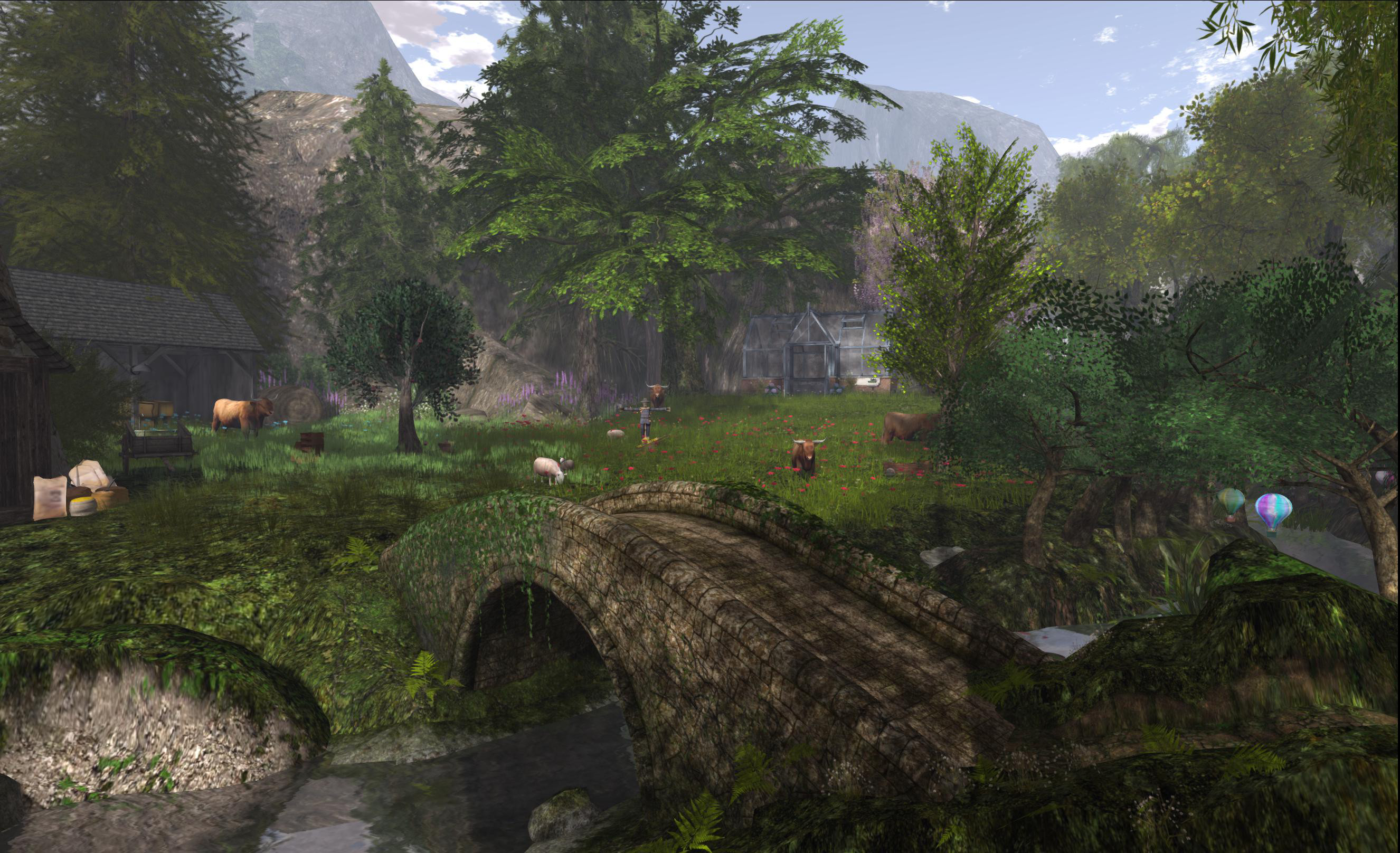
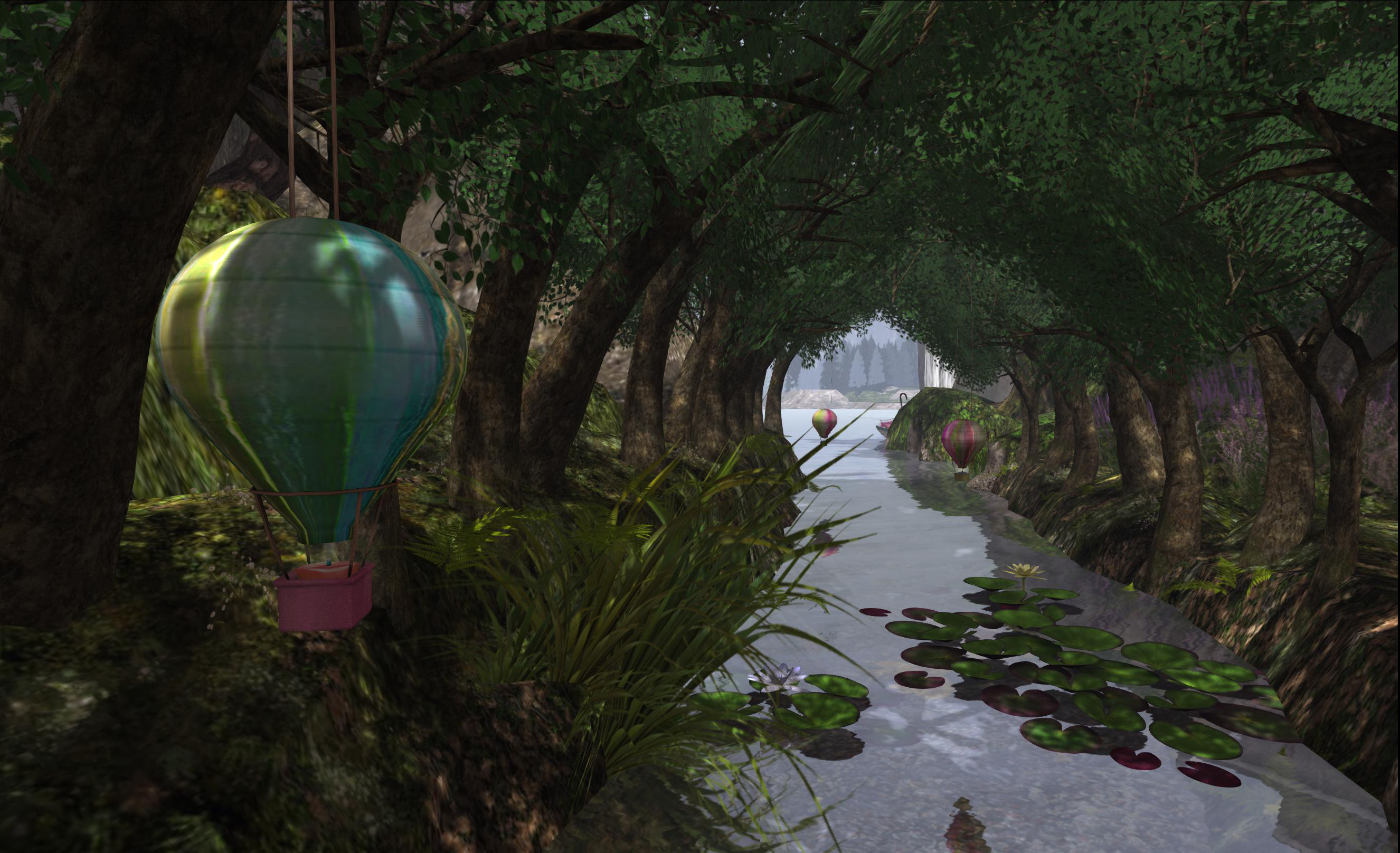
Now, while it may draw its share of hisses and boos my way, I have to confess that the tales of Beatrix Potter are not – and never were – a favourite read; either as a child or in reading bedtime stories to my godchildren. However, when it comes to The Noble Storybook, such a lack doesn’t really matter; this is quite simply a stunning and beautiful build from which nothing is lost if you’re unfamiliar with Peter Rabbit et al, and which richly rewards the Second Life explorer.
Superlatives tend to get used a lot when it comes to SL builds – but this really is one which is deserving of them; everything has been put together with an eye for detail and placement, making the entire region a delight to explore and photograph. Just be aware that the house atop the hill is a private residence and home to the Noble Family – so please respect their privacy.
The rest of the region, however, is open to meandering explorers and camera-happy snappers, and there is more than enough here to keep the most addicted snapper clicking away contentedly for hours.
The initial arrival point for visitors is some way up in the air. Here you get a hint of the region’s theme before teleporting down to the ground itself. There are no greeters passing out notecards, so it’s best to read the description in the Destination Guide if you want to get a feel for the place – not that it really takes much; as I’ve said, this is a beautiful sim which will enchant right from the time you pop-up outside the lighthouse above the beach.
Wooden steps lead down from the cozy lighthouse to the bach and the more “public” areas of the region – the Noble Cafe, a little quay and boat, shops and deck chairs. Footpaths and wooden bridges also lead around, over and along the hillside, offering shaded walks under trees and across open fields.
As you wander, you may well come across characters and creations from Potter’s books; you’ll also come across some stunning scenery. I’m not always a fan of sim surrounds – or at least my GPU isn’t; a combination of sim surround and active shadows tends to send it into paroxysms of flashing and stern NOT RESPONDING messages. However, I have to say that the surrounds used here are used to great effect and add enormous ambience to the region.
The real problem with a region of this kind is that words aren’t enough. There is only one way to really appreciate it – and that’s to go visit it for yourself.
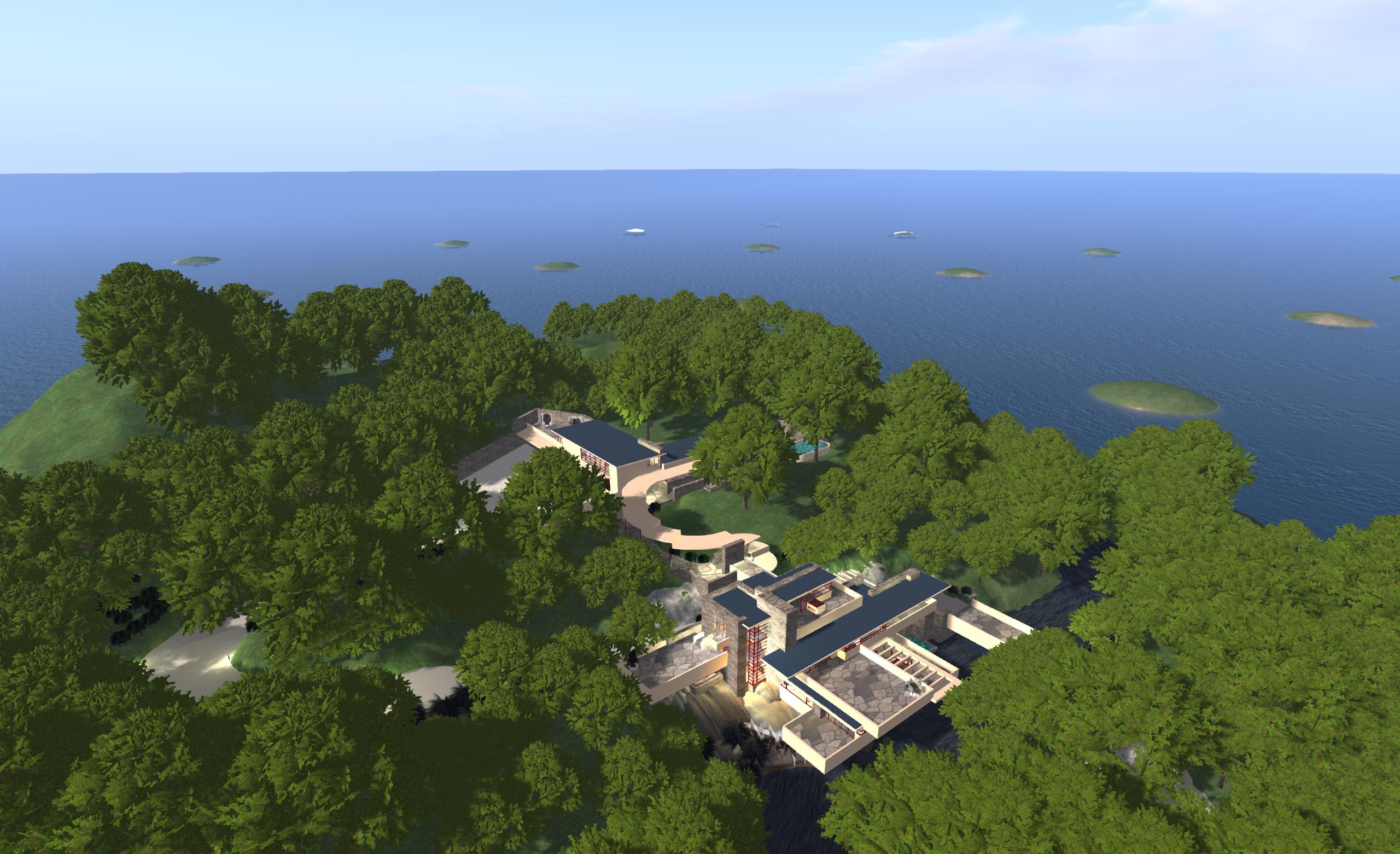
Host you own region / megaregion at home using NWS: my own initial set-up featuring 16 regions and using an OAR of my Fallingwater build
I recently reviewed the free version of Olivier Battini’s New World Studio, which allows anyone to to run their own single or multiple-region OpenSim environment on their own computer at home.
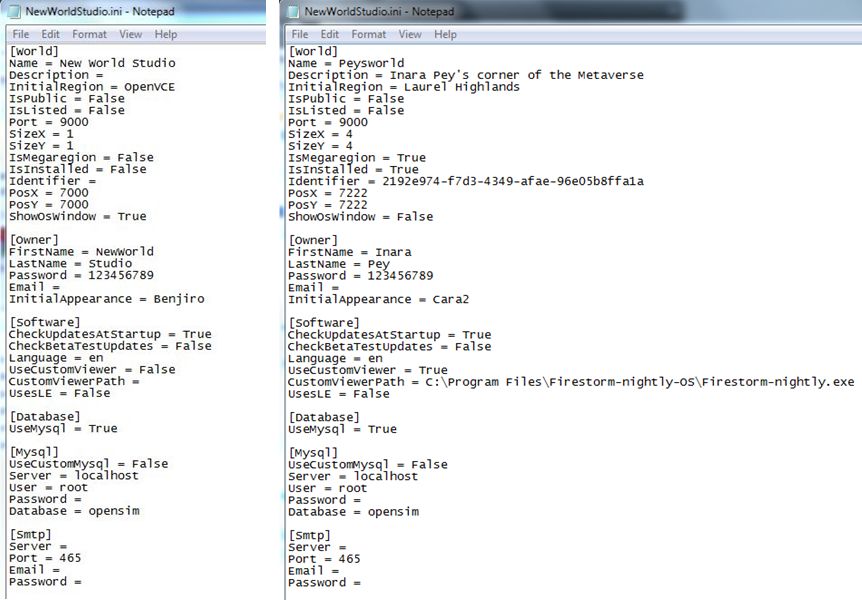
Currently, the free – or Community – version is very much as standalone version, although Olivier has indicated that connectivity will be possible in the future as a part of the manual configuration capability. This capability, which requires the editing of an .INI file, already allows users to define the number of regions their NWS installation supports, whether or not these are to be treated as a megaregion, the default starting OAR file (and avatar IAR file, if applicable), specify a preferred viewer rather than the default Imprudence viewr, and so on.
The Community edition of NWS is fully configurable – but requires editing an INI file (original shown left, and my own updated version, right)
Due to be released later this week, the licensed version of NWS (currently starting at a 50% off 15 Euros / $20 for a home licence) does, among other things, take away the need to edit the INI file by allowing access to simple selection panel which can be accessed via the Access Advanced Features button on the NWS Launcher.
This panel allows users to configure NWS quickly and easily through a series of option fields and drop-downs. Using it, you can set your avatar name and default look, define the number of regions you wish to run (1, 4, 9, or 16), the default region name and whether or not the regions are to be treated as a megaregion, and set the default OAR file.
The licensed version of NWS includes a configuration panel for easy-of-set-up (image courtesy of Olivier Battini by way of Hypergrid Business)
Currently, the control panel doesn’t include an option to select your own preferred viewer. However, this is coming with future updates, together with a number of other options, such as automatically network and firewall configuration for public access, public 3D worlds searches, and so on, as defined on the NWS Features page for the website. In terms of functionality and features, these will take time to develop, which is why licensed versions are being discounted and there is an active Early Adopter Programme, as Olivier explained when we discussed NWS recently.
“People must know and should understand that all will not be functional right now. This project requires a huge amount of work, especially as it’s multi-platform (Win, Mac, Linux),” he said, emphasising the effort involved in putting it all together before highlighting the benefits, “People can experience how easy to use NWS is, and they may not realize the cost of simplicity. This is why there’s an Early Adopter Programme that will allow people to, not only get lower prices, but also be able to vote for the features they want to see implemented first.”
In preparation for the wider availability of NWS options, Olivier has also been working on documentation and tutorials, the latter starting with an introductory video to NWS 2.1 Community Edition.
Again, if you’re looking for a “home studio” OpenSim capability for design / building work, whether your products are for use on OpenSim or Second Life, New World Studio – with a few caveats in the case of use with SL – might be just what you’re looking for as a fast, clean, easy-to-install option.
Magnificat – The Relay Royales kindly invite you to their summer palace and gardens for a week of diversions, plays, games and leisure to celebrate life and magnify our souls.
Alia Baroque’s magnificent build will open along with the rest of Fantasy Faire 2013, all in aid of Relay for Life, on April 20th. More details to follow soon!
Second Life Server (Main) Channel Week 16 Deployment
On Tuesday April 16th, the SLS Main channel received Monty Linden’s HTTP updates, which were deployed to BlueSteel and LeTigre in week 15, after having previously been on Magnum for testing. These updates can be briefly summarised as:
More complete and more correct headers on texture and mesh fetches – these should ensure the viewer is better able to handle objects as they are downloaded to it
Keepalive connections for some HTTP-based services
On Wednesday 17th April, all three RC channels should receive the same update package. This comprises the server-side LSL Animiation Override capabilities, this time complete with a fix for BUG 2164, wherein the new capabilities could conflict with built-in animation poses in chairs, etc., as discussed in my week 15 updates. This deployment additionally includes the slight region performance improvement when there are no pathfinding characters present. Release notes are available
Originally, a separate package had been in preparation for deployment to BlueSteel / LeTigre, but this has had to be postponed due to “last minute scheduling issues”, according to Simon Linden when speaking at the Simulator User Group meeting on Tuesday April 16th. While attempts were apparently being made to get an alternative project into RC, it was “down to the wire to complete testing” at the time of the Simulator UG meeting, and an announcement confirming BlueSteel and LeTigre would receive the same package as Magnum was posted to the deployment thread not long after the meeting finished.
Object Return from Region Edge
A further update which should reach all three RC channels on Wednesday April 17th is the fix for https://jira.secondlife.com/browse/BUG-313 (estate tools do not return objects between 255 and 256m ) / https://jira.secondlife.com/browse/BUG-2021 (Auto-return not affecting objects at 256m), which see objects right on the region edge sometimes slipping into a “limbo” which prevented them from being returned either under Auto-return or when using estate tools.
There is some concern that the fix, once deployed, may not correct all issues. However, until it is deployed, there’s no actual way of knowing – so further updates may well be following.
Region Crossings
Since the deployment of the fix for BUG-1814 making region crossings in vehicles has been seen as noticeably better by many people. However, some have noted problems which appeared to be linked to crossings between regions running on different simulator versions, and this was discussed at length at a recent Simulator User Group meeting.
Kitto Flora suggested the problem was not so much with different simulator versions, but due to network traffic, commenting, “It’s directly related to your Net traffic rate when you cross. If its 500k – fail maybe 20% of time … If its 50k it rarely fails.”
While I have been flying extensively over the past week, particularly over Blake Sea and the south-lying regions and over parts of Nautilus, I’ve not been monitoring net traffic during my flights – although I do reduce Draw Distance when flying and tend to shunt graphics quality down to medium-low – so cannot comment on Kitto’s observations. I can however state that when I did encounter problems beyond the expected temporary loss-of-control / rubber-banding – such as my camera skewing off to once side of my aircraft as shown below – it always coincided with a move between one simulator version and another, and never between regions on the same simulator version. So I guess more test and observations are due on my part after this week’s deployments!
Flight testing region crossings: when moving between regions running on different simulator versions, I invariably encountered greater issues (such as the camera being shunt, as shown above) than when crossing between regions on the same simulator (note the chat console reports, lower left and notifications. top right).
The discussion on region crossings raised additional questions. One of these was whether or not the speed one crosses between regions made any difference. Simon Linden replied:
Your speed in-world shouldn’t have any effect on actually making it or not, but faster crossings will show the errors in predicting where objects will be more. Such as the rubber band effect when crossing … your viewer sees you going a certain speed, and keeps moving you that way, while you hit the crossing, get some lag as the data is transferred to the new region, and you’re stuck into the world, then sling-shot back to the new position.
Questions / comments were also raised around the subject of region crossings and idle regions: specifically whether crossing into an idle region was subject to additional delay as the region “woke up” and that some have experienced issues with regions which are apparently idling being unresponsive to new child avies, and people “bounce” off the border prior to being able to cross. Responding to both the question and the comments, Simon said:
You actually shouldn’t ever be able to do that. It won’t be idling if you can see into it … Also, remember idle regions are not dead, they [are] just are running at a slower frame rate, just like loaded down regions do.
Missing Prims
There are currently no updates on the “missing prims” situation which has been previously reported in this blog, and which has grown markedly more apparent since the last set of interest list updates.
Andrew Linden was not at the Simulator User Group meeting on Tuesday April 16th to discuss either, but is almost certain to be asked at the Beta Server meeting on Thursday 18th April, if he attends.
Update, August 4th: This region appears to be under new ownership, and Happiness is Liberty no longer exists.
The Photogenic Spots section of the Destination guide recently received a boost with 6 new entries into the category. It’s one I keep an eye on, so seeing it rise from 21 to 27 of late has caused an eyebrow to perk up at what might be waiting.
The first entry at the moment is Happiness is Liberty, a build occupying the Homestead region of Our Souls and which has an interesting description:
Where the problems are forgot and the relax begins, enjoy the view of a cold beach, or drink a cup of coffee while you see airplanes take off and land, get lost in a majestic forest or just lay in the vast green landscape …
Teleporting brings you to a coastal scene on a foggy morning. A carousel turns on the boardwalk (or in this case, perhaps broadwalk might be more appropriate!), waves wash the beach and a lighthouse stands sentinel over the bay. It’s a place that has clearly gone through something of a rebuild since the promotional picture for the Destination Guide was taken, and it appears that the shops atop the hill are perhaps designed for renting-out.
Designed by Senna (ndyv), Happiness is Liberty is an interesting mixture of themes – the holiday-like beachfront, complete with pier and boardwalk, carousel and Ferris wheel, he open fields and vistas of hills-across-the-water and the deep woodland setting – all of which blend together and offer something to everyone who enjoys exploring Second Life. The sky may be overcast, the morning foggy – but the wonders of windlight mean it doesn’t take much to tweak things if you want to get a more summer-like feel to your snaps.
This is the kind of region I tend to like – there’s both a good amount to see and the opportunity to wander freely and see what ideas and tales might take shape when framing photos. I’m not entirely convinced as to the style of the shops (which tend to dominate the view from some angles in a most unflattering way), but the rest of the region offers a lot with which I can indulge myself.
“Indulge” because over the last several months – if not over the course of the last year – I’ve become somewhat more insular in my SL life. I’m not entirely sure why this is – and I certainly don’t want to upset friends and acquaintances – but the fact is, I tend to enjoy Second Life and find myself relaxing within it a lot more when I’m simply on my own.
It’s not that I feel antisocial or anything like that; I suppose it’s a case that just like real life, there are times in SL when it is good to be alone with one’s thoughts; to get away from things and feel you have the freedom to simply ignore the chiclets (or the flashing Chat button in the case of CHUI), and just lose yourself in the digital moments.
Which is not to say that happiness is Liberty must be enjoyed alone – the carousel, the cafe and the woodland walks offer more than enough for couples and groups to enjoy if they so wish.
For the photographer, the region has a lot to offer both in the diversity of the landscape and in the fact that is does lend itself to a wide range of windlight options. There are a couple of nips and tucks required in places – the back of the aforementioned shops, for example plus the woodland hillocks which are floating slightly above ground level – possibly because of whatever recent re-working which might have taken place; but these are minor quibbles in the scheme of things and the hillocks can be easily taken care of (and actually are only noticeable from certain angles).
If you’re looking for a new place to explore or simply somewhere to wander and spend a little “me” time, the a trip over to Our Souls might be just the ticket. As someone (I’m sure) once said: happiness can be liberating.
There’s no movement on the release viewer, and likely won’t be until Server-side Baking moves to it, having finally arrived in the Beta viewer on April 12th (see below). The Development viewer was also updated on April 12th, with the release of version 3.5.2.273873, which includes both SSB and CHUI updates.
Materials Project
An update to the materials processing project viewer was released on Friday April 12th – 3.5.1.273855 – with a series of bug fixes included in it. There are further updates on the way, with the next release due around the middle of week 16, which will have further bug fixes and, hopefully, some Alpha mode updates as well. Commenting on the latter at the Content Creation User Group on Monday April 15th, Geenz Spad said, “Actually just got normal maps working on alpha blended objects, and trying to get everything else working on them as well.”
One fix currently pending is that for MATBUG-16, Changing one material, or setting causes another material texture to be lost. This is an issue which can happen as a result of several factors. For example, setting a normal or specular map for one face of an object can result in maps already applied to other faces of an object either being removed or replaced with the most recently added map. The same issue can occur when applying a setting such as glossiness to one face of an object using materials.
MATBUG-16 demonstrated using 2 diffuse maps and their associated normal maps. A prim previously set with a stone diffuse map and associated normal map has a green diffuse map applied to one face – the normal map is unaffected (l). However, when the normal map is updated, it changes for the entire prim (r)
This problem doesn’t happen every time mixed materials elements are used on object faces, but can occur when adding multiple materials elements to an object in quick succession. “There are a couple of problems there,” Oz Linden said while discussing the problem at the Open-source Dev meeting on Monday, April 15th. “The updates to the server are happening faster than it will allow, which is one problem. The other is that the updates are not applied locally as smoothly as they should be.”
Tonya Souther, who re-worked the Build floater for materials processing added, “Yeah, that bug has been driving me batty ever since I first did the UI. And I think that’s due to the design of the system…the UI has to ask the server for the material separately, and apply the values retrieved from it to the UI components when they arrive. That ‘s the only way that the UI won’t get out of sync with the actual values stored on the server … I just need to find a way to make the delay not apparent to the user and handle changes that come along in that period.”
For now, the answer seems to be that if you experience any issues with normal / specular maps vanishing or being replaced when using multiple maps / effects across different faces of an object, then allow a short pause between adding the various maps / effects so the viewer and server can keep pace with your work.
Elsewhere, Geenz Spad, one of the architects of the materials processing system, has started a new blog series on materials, Second Life Materials: A Content Creator’s Guide. In the first part of the series, he answers the question, What’s a material? In the next installment, he promises to take a look at some of the tools which can be used to create normal maps.
Server-side Baking
The viewer Server-side Baking /Appearance code reached the Beta viewer in week 15 with the release of 3.5.1.273869 on April 12th. The initial stats apparently show it is doing well, crash-wise, but the status of incoming bugs is currently unclear. However, it still looks as if the code is currently on course for around a two-week stint in the beta viewer prior to moving to the release viewer channel.
A key bug fix for the system has been SUN-57, which now allows multiple layer of clothing to be worn / swapped on regions which are not running the SSB server-side code (on Aditi), which removes a potential road block from server-side code deployment (remembering that for a time during the server-side deployment, updated viewers must support both the old and new avatar baking services).
The SUN-57 issue, as defined by Whirly Fizzle, which saw issues occurring in avatar baking using a viewer supporting the upcoming “new” SSB/A service and changing outfits on a region only supporting the current avatar baking process, which saw outfits and skins failing to update correctly following changes. Reportedly now fixed
There are still no definitive timescales for any Agni deployment for SSB/A. As previously reported in this blog, it is still unlikely that any major deployment operations will commence prior to the SSB cove reaching the release viewer.
Other Items
I recently blogged about Oculus Rift and speculation as to whether it would see use in Second Life. On April 7th, Jon Brouchoud blogged on why SL would be a “killer app” for the headset – an article which has seen widespread reprinting / referral in SL / Opensim related blogs. While I have no particular opinion either way as to Oculus Rift / Second life (although how it will work with the SL UI does intrigue me), I have to admit the following video demonstrating Oculus Rift had me smiling from ear-to-ear. It’s not really related to Second Life, but it is well-worth watching.





 Inara Pey: Living in a Modemworld