
As shown by Facebook’s actions this week in deleting accounts linked to Second Life avatar names, social media sites and Second Life can make uneasy bed fellows. For a time, it looked like Linden Lab themselves were prepared to bridge the gap when they purchased Avatars United. Sadly, that particular deal went nowhere at an initial flurry of activity, as Avatars United was left dangling for some 12 months prior to Linden Lab pulling the plug on it.
However, during the same time, a social media website designed specifically for Second Life users has been quietly flying under the radar, gathering a solid membership and providing the kind of facilities that Second Life users are liable to use and appreciate.
That site is called 2ndHub, and it is actually pretty cool. Highlights of the site include:
- Simple sign-up process integrated with your Second Life account(s)
- Multiple profile types for individuals, SL businesses, groups, etc., with comprehensive linking
- Twitter-like micro-blogging
- Easy trending to help you stay in touch with others and share
- Unlimited update groups that can be linked to personal or business profiles, with in-world notices & attachments, complete with their own pages for posts and comments
- Flickr integration, with your most recent Flickr uploads showing as small images in your profile, with links to your Flickr page
- Searchable directories for people, businesses and groups
- A range of web-enabled tools including SL update groups, subscribers, delivery servers, an in-world HUD
Sign-up
Signing-up to 2ndHub is straightforward, requiring you to provide your Avatar’s name, a user name, password and e-mail address. The latter is required as a part of the verification process; for those concerned about data privacy, the site includes a fairly comprehensive privacy policy which covers how the information provided will be used, and other information relating to privacy and security.
Once you’ve submitted the sign-up form, you will need to complete a 2-step verification process. The first part of this requires you to respond to an e-mail sent to the given address used in the sign-up process; the second requires you visit the in-world 2ndHub location and verify your Avatar via one of the in-world terminals.
As the sign-up process is linked to a specific avatar, you can set-up individual accounts for as many avatars as you may have or wish to include on the site.
My Hub

MY HUB is effectively your 2ndHub home page. From her you can access your message options, view your dashboard (both also available from your Profile), and which features live “feeds” on forthcoming events, new users signing-up to 2ndHub, the most recent messages published to the Public Feed, and a very useful rotating selection of business profiles created on 2ndLife – click on any of the featured businesses to go to the page for the business and find out more information, or hover over the + sign for an insert with expanded information.

Navigating from here is relatively straightforward – simply use the tabs below the site banner, together with any sub-tabs they display to help you look around.

The best way of understanding what the major tabs do, is to have a look at the Quick Tour pages. These can be accessed in one of two ways: either by clicking on the ABOUT tab, and then the TOUR 2ND HUB tab, or by clicking on the VIEW OUR SITE TOUR link, located in the 2nd Hub Tour pane, around half-way down the right side of My Hub.
It’s not an entirely comprehensive tour, only providing a static display of each of the major pages – Profiles, My Hub home page, etc., but it should help get you familiar with things enough to find your way around and get started on doing stuff.
Dashboard

The dashboard provides you with a quick reference as to what is going around you – if you have received any personal messages, any alerts (such as requests for friendship) and so on.
From here you can also log out of 2ndhub, edit your profile, and access your account details (both of which can also be reached via the site tabs). You can also jump straight to your completed profile page by clicking on your avatar’s name.
Additionally, the dashboard also provides access to the Live Chat, which provides a form of instant messaging direct to any friends you’ve connected to in 2ndhub, and provides shortcuts to your business profiles, Groups and the list of Groups you have joined.
Profiles
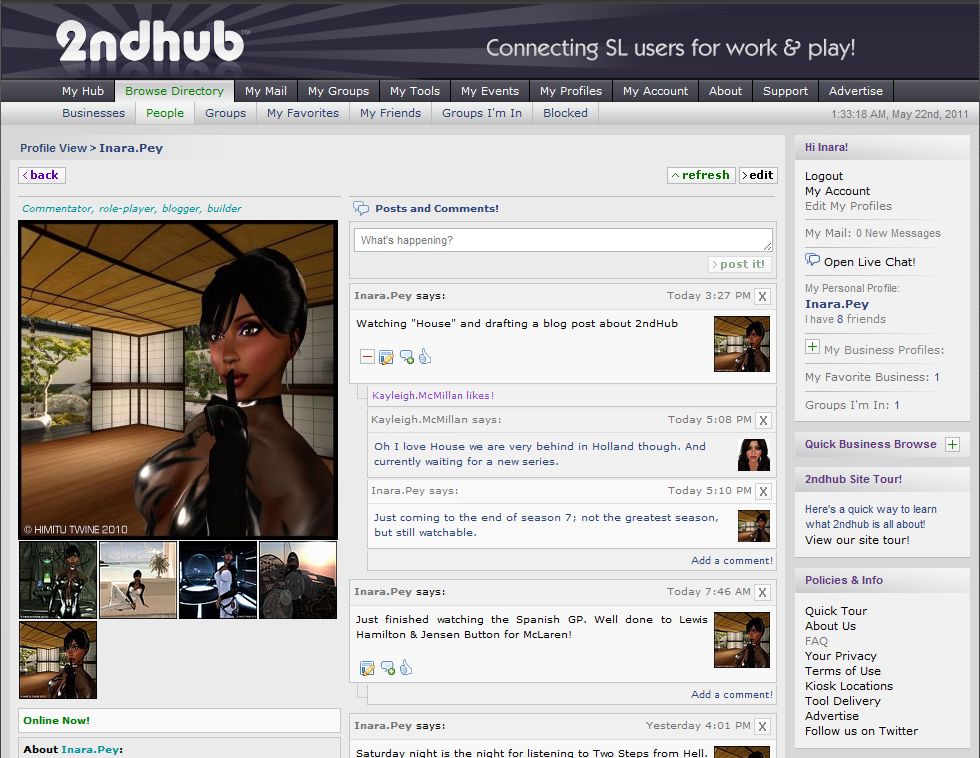
To get noticed, you should set-up a profile for your Avatar (and any business you wish to promote via 2ndHub); like Second Life, people rarely respond well to a blank profile. Setting-up your profile is a very straightforward task: click on the MY PROFILES tab and complete the displayed form – making sure any required information is given. As long as you keep obscenities out of any descriptive text, it’s really down to you as to what your write.
You can include a link to any website (such as a blog), and came also upload as many images as you like (in batches of four), one of which you can select as the default image that will appear as your main profile image. When you’re ready, you can preview your profile prior to publishing it.
Business profiles (if you have a business) follow the same principle, and can be automatically linked to your Avatar profiles(s).
Making Friends
Connecting with people is relatively easy, once you’ve worked out the initial step of finding people, as there is no obvious search option; instead there is a tab called Browse Directory, which enables you to browse through profiles (personal and business), Groups, Groups you’re a member of, review those you’ve blocked, and set up a list of personal favourite businesses.
A series of input fields allow any directory searches to be more focused; you can for example search by country, SL user name (in the case of avatar profiles) and / or keywords.
Displaying a specific personal profile will take you to the individual’s profile page, where you can, among other things, send a friendship request. It is here that 2ndHub can flex its muscles: friendship requests are sent to your 2ndHub Dashboard and if you are on-line, will pop-up as an alert for you in Chat. Additionally, a copy of the request will go to your e-mail, complete with a link-back to accept / refuse the request. Accepting an offer will see the requestor’s default Profile picture pop-up in you’re my Friends window on your MY HUB Home tab, and added to the list of Friends in the My Friends sub tab of MY HUB.
Groups
2ndhub supports Groups in much the same way as Second Life. You can create your own Groups, invite people to join them, send out notices (with attachments), and so on. A major feature with 2ndhub Groups is that you can invite anyone to join, whether or not they have a 2ndHub account, using a variety of options (see Tools, in part 2 of this article), and joining a 2ndHub Group doesn’t take up a Second Life Group slot (which perhaps isn’t as vital since in-world Groups were increased to 42).
Joining a Group is a similar process to adding a friend, although all Groups appear to be open (although the creator can limit them to be available only to friends), so joining any Group is automatic on clicking the JOIN button. Groups you are in are listed under the Groups I’m In sub-tab of MY HUB, while you can also opt to leave a Group.

 Inara Pey: Living in a Modemworld
One thought on “A 2nd Hub – Part 1”
Comments are closed.