Thought I’d drop a quick note in case anyone is having problems vis-a-vis search and the adult content changes, or in accessing adult-flagged sims.
The new Adult controls are contained within the Second Life Viewer version 1.23.4, which is currently optional. Earlier versions of the viewer, and viewers based on earlier versions are not affected by the changes and can continue to be used “as normal” until such time as Linden Lab force all users to update to 1.23.4 (or later).
Note that to be fully “Adult enabled” with 1.23.4 (or later), you need to complete both sets of actions below and ensure you are either Account Verified or Age Verified.
Set Your Content Rating
In 1.23.4 (and later) versions of the SL Viewer, log-in to Second Life and:
- Select EDIT from the menu bar at the top of the screen and then click on PREFERENCES to open the Preferences window.
- Click on GENERAL at the top of the tab list, the GENERAL tab will open on the right of the Preferences window.
- In the GENERAL tab, locate the RATING option. This has a drop-down menu next to the words “I want to access content rated:”
- From the drop-down make ure you select “PG, MATURE AND ADULT”
- Click on APPLY at the bottom of the Preferences window, followed by OK to close the window.
Set Search Preferences
- Click on the SEARCH button at the bottom of your screen to open the SEARCH window.
- Click on the ALL tab to select the All search window.
- Make sure the Adult Content checkbox is ticked.
- Repeat step (3) for all the search tabs that have a Adult Content option (e.g. Classified, Events, Lands Sales, etc.).
Account / Age Verification
To access Adult rated locations (private sims or Zindra), you must be either Account or Age verified (possibly both, depending on the land settings).
Account verification means you have either payment information recorded against your SL account OR you have deposited US dollars into an XStreetSL account in your avatar’s name.
Age Verification requires you use the Aristole Integrity age verification process. Log-on to the SecondLife website and select MY ACCOUNT from the top right of the page. When your Account Summary has loaded, click on the AGE VERIFICATION option on the blue menu to the left of the page. You may wish to read some notes on age verification before doing so.
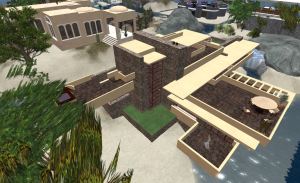 As you can see from the picture, the tropical environment is a little odd for the house, but with a few small tweaks to the place, we’ve found that it actually fits in quite nicely – certain, it blends-in well with the other builds on the sim, such as the tropical-styled house behind our parcel.


 Inara Pey: Living in a Modemworld