Thursday December 12th saw the Kokua team release version 3.6.12.30743 of the viewer. This appears to be a fairly contained update, focused on updating the viewer with the recent SL viewer 3.6.11 GPU Table updates and the 3.6.12 NameUpdater changes. Neither of these involved functional changes to the viewer from LL’s side, but do bring Kokua to parity with the current SL 3.6.12 code base.
UK-english dictionary added to the spelling checker
Removal of packaged PCRE libraries from Linux 64-bit builds as they caused web kit to fail to load on newer Debian based distributions.
The release notes also point out that when the viewer is started for the first time following installation, there will be a notice and link to check graphics drive availability. The Kokua team urge caution if the option is taken to update drivers, as system breakages have resulted in the past. They also point out that the notice is a recommendation to check for updated drivers, not a requirement to update.
The CtrlAltStudio and UKanDo TPVs have both undergone self-certification and have been added to the Third-party Viewer Directory (TPVD).
The associated wiki page for CtrlAltStudio describes the viewer as :
The CtrlAltStudio Viewer has been set up in order to try out and share a number of ideas, the first being stereoscopic 3D display and some initial Oculus Rift support . It is based on the Firestorm Viewer which it tracks closely while adding particular features.
The associated wiki page for UKanDo describes the viewer as:
UKanDo gives a whole new perspective in Second life by using a camera placement adopted by the vast majority of third person video games.
Also includes RLV along with plenty of other useful tools. It won’t have all the gadgets/gizmos a lot of the bigger viewers have, the aim is to keep it as lite as possible with only the fixes, gadgets and gizmos we need to keep the Viewer stable and up-to-date! The Avatar happy! And to aid with building!
(Please note that descriptions are supplied by the viewer developers, not Linden Lab.)
Congratulations to both viewers, both of which I’ve been following in these pages. You can catch-up with them as follows:
As a part of the holiday period, and as mentioned in various SL projects reports of min over the last few weeks, Linden Lab operate a code freeze / no change window in which no major updates to either the viewer or the simulator code are made, other than those required to fix significant issues impacting Second Life. This code freeze, which this year comes into effect on Monday December 16th and extends through until the start of 2014, encompasses all thing server, and the SL viewer release channel (the release viewers and RCs). The aim is to give LL’s support personnel and contractors a chance to enjoy the holiday period as well.
However, as well as encompassing the server and LL’s viewer, the Lab also request that TPVs refrain from making major releases during the same period, again to help lessen the load on LL’s viewer support team, who take a lot of TPV-related calls when users encounter problems.
This means that the window for TPVs to get significant updates out is closing fast, and both Black Dragon and UKanDo have both had what is likely to be their last updates this side of the new year (although in Black Dragon’s case, it appears the reason is because Niran is having fun relaxing with a new computer game!). Both updates are small, tidy packages, and as such, both are overviewed here.
Black Dragon 2.3.9.2
Released on Wednesday, December 4th, hard on the heels of version 2.3.9 and 2.3.9.1, both of which appeared on December 3rd, Black Dragon 2.3.9.2 is described as “Maintenance #4”, and is the latest in a line of maintenance releases of the viewer which build on existing functionality and UI changes, rather than adding anything significantly new to the viewer.
That said, version 2.3.9.2 does offer what is something of a new feature: “realistic Mouselook”. Traditionally, when in Mouselook, the camera is positioned / locked towards the centre of the avatar frame (around chest level). With this release, Niran has moved the camera position so it is effectively in the avatar’s head.
This may sound a trivial, but it does make something of a difference when operating in Mouselook, as movement in Mosuelook as a lot more responsive to avatar animations. While it is somewhat dependent upon the animations you are using, it can mean, for example, that when running, your mouselook view with “bounce” in time with your avatar’s running strides.
To help demonstrate the difference, Niran has produced a video showing what happens when in Mouselook with Black Dragon 2.3.9.2; you might want to compare it to your own experience using Mouselook in a viewer without the updates.
The option can be toggled off / on via Preferences > Camera > Mouselook Options. Additionally, Niran recommends that when using it, Mouselook Smoothing (same section of Preferences) is enabled.
A further Mouselook fix with Black Dragon 2.3.9.2 comes by way of Adeon Writer, which corrects the issue of hand attachments (weapons, etc., behaving oddly and appearing to move away from the avatar when entering Mouselook or when crouching in Mouselook.
The remaining updates for the release as recorded in the release notes comprise:
Addition of all windlight presets found in other versions of Niran’s viewer (other than his own “realistic” settings)
Updates to a number of floaters, include People, which has been a little reduced in size and the addition of the Send button to the Notices floater
Updates to the loading screens and a fix to the version history link on the log-in screen.
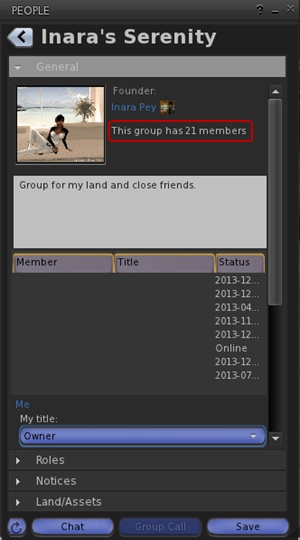
Total number of users in a group displayed for those groups you have joined (see below left)
This release offers another small package of tidy changes, several again gathered from other TPV offerings, and it’s good to see that credits for imported features are starting to appear in the release notes as well. The latter list the updates within the release as comprising:
Merged:
Updates from RLV
Tweaks:
Addition of Penny Patton’s windlight settings
Re-write/clean-up of the Status Bar code
Possible speed improvements
UKD_Logo icon updates.
Fixes:
Black background in the address bar combo list’s scroll bar fixed
An old bad merge for the avatar context menu in chat which didn’t show at the time
Net Stats graph now shows correct Kb and wdiget now clickable
Features Added:
Show the total member count on the Group panel’s General tab if you’re a member of that group
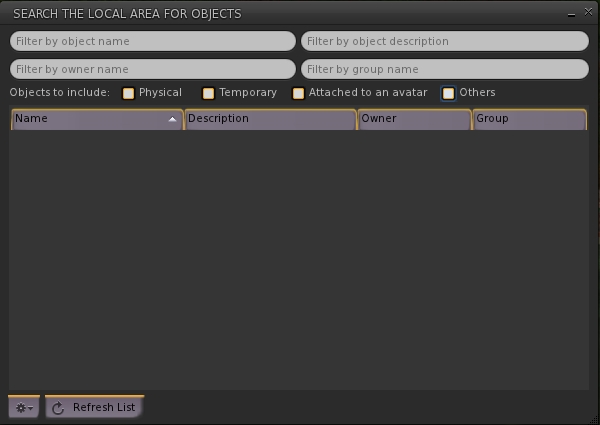
Edit option added to the Area Search floater’s context menu
Username login drop-down combo box for multiple accounts
Frames-Per-Second displayed on StatusBar (from NiranV Dean). Modified and clickable (Hidden by default)
Additional Status Bar show / hide options for FPS, Net Stats, Avatar Offset Slider and Draw Distance Slider.
Additional show / hide options for elements in the status bar (sliders, buttons, info displays)
Feedback
Both of these releases offer neat packages of updates to their respective viewers, both of which continue to be developed and enhanced in small, relevant steps and which also keep track with most of the recent code base updates from Linden Lab.
Performance-wise, both viewer showed more-or-less consistent performance levels on my primary PC as shown with earlier releases, and I had no difficulty in running both viewers with the major graphics bells and whistles enabled (ALM on, Ambient Occlusion Enabled, shadows set to Sun/Moon + Projectors, etc.), at home and in wandering.
UKanDo, the v3-based viewer from Connor Monaron updated to a new release on Wednesday November 13th. Version 3.6.10.27888 sees the viewer return to parity with the Lab’s release code base and gain the most recent improvements from the Lab including the Facebook SLShare capability.
This is more of a progressive update on capabilities already in the viewer rather than a major update with lots of new features and shinies, which is entirely in keeping with Connor’s stated intent to produce a viewer which is reasonably close to LL’s own, but which incorporates some of the more popular TPV functions and abilities.
In my last look at UKanDo, I reported on the arrival of the QuickTools floater, a variation of the popular Quick Preferences options found in a number of TPVs, which offers rapid access to a number of the viewer’s capabilities. At the time, I pointed out that the icon for the toolbar button for the panel could perhaps do with a re-think, given it was the same as the icon for the viewer Preferences panel, so there was a risk of the two buttons being confused when set to Icon Only display mode. With this release, the QuickTools button icon has been revised so that it is now a film reel / pie menu, making the button quite distinct from the Preferences button when both are used in a toolbar.
As well as the QuickTools button, the Area Search button and the Build button also get new icons.
Area Search Udpate
Area Search also sees the addition of further search criteria in the form of check boxes which allow the user to define the kind of objects which are to be located: physical, temporary, attachments, or others. These can be checked individually or in combination, and provide an additional level of granularity to object searches.
Area Search: updates with new checkboxes for more granular searches and a new option button (bottom left)
A new gear button has also been added to the floater, which can be used to access additional configuration options. Currently this only comprises Auto-Track Selections (displays beacon for an item selected from the list) and Stop Tracking (removes beacon). However, as this is reported as “part 1” of an overhaul of Area Search, more options may be forthcoming in the future.
Advanced Build Options
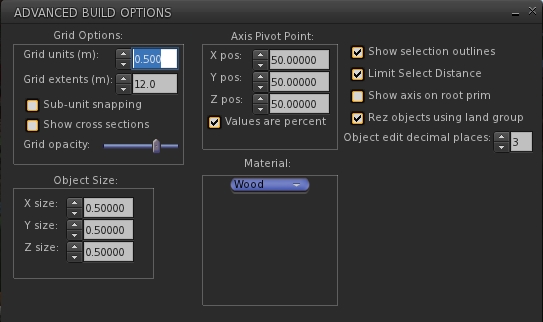
Version 3.6.10.27888 of UKanDo see the introduction of an Advanced Build Options floater, which contains some of the options also found in Preferences > UKanDo > Building, as well as some options not present in that tab.
The Advanced Build Options floater, offering additional default / options for builders, some of which can also be found in Preferences > UKanDo > Build
The new floater is accessed by editing / creating an object and selecting Build > Options > Advanced Build Options from the menu bar or pressing CTRL-ALT-B.
Geometry Overload Protection
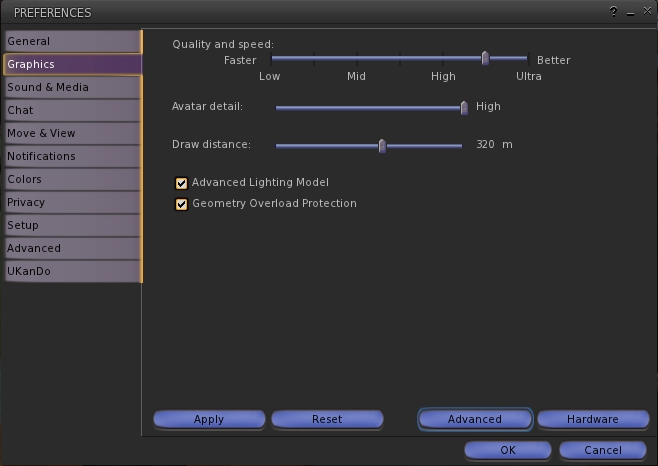
A new addition to the Graphics tab of Preferences with release 3.6.10.27888 is the Geometry Overload Protection. Enabled by default, this is designed to stop the viewer crashing due to someone using objects with excessive geometry (a common form of viewer attack in some regions). This addition brings a slight change in layout to the default display of the Graphics tab, which includes the option to enable the Advanced Lighting Model without having to access the Advanced options.
Preferences > Graphics gets revised to include the Geometry Overload Protection option and an option to enable / disable ALM without having to access the Advanced options
Other Updates
This release also includes:
Further adjustments to the viewer UI, with the buttons looking even more V1-style
Favourites Bar Landmark text now white for easier reading
Select only copyable objects Added to the Build -> Options menu
Show each avatar’s age in their name tag unless they are older than the number of days specified in Preferences > UKanDo > Avatar
Show LookAt / PointAt- includes names on crosshairs option Preferences > Privacy
Status Bar Hide/Show options for the:
Marketplace button
Buy Currency button
NetStats Bar Graph
Option to displayed log-in names as well as Display Names in the People floater tabs (click the options button and check View Login Name)
Feedback
A small, tidy update to the viewer which again draws upon some popular TPV features without risking the viewer becoming top-heavy.
Still no media filter at this point in time, which I’d personally like to see (and would like to see in the official viewer for that matter). Having it available discourages a complete disabling of media and allows one to more easily enjoy music when travelling around without necessarily being over-exposed to more nefarious goings-on. Another thing I’d like to see is the proper release note attributions for those elements incorporated from other TPVs.
That the Advanced Build Options floater and the options in Preferences > UKanDo > Building have an odd level of functional cross-over which might cause some confusion at times. Given both the degree of overlap between them and the degree of individual options found in one but not the other, it might be an idea to make them consistent in terms of the options offered by both, but this is a minor quibble.
Performance-wise, the viewer operates pretty much as anticipated, and I didn’t notice any particular drop-off in frame rates when using CHUI in expanded mode, so I assume this issue has been fixed in the last rebuild of the 3.6.10 viewer, and that UKanDo has the fix. However, this is only my experience, so don’t quote me on that if you find you are still having that particular problem either with the latest release of UKanDo or the official viewer!
In the meantime, I’ll keep following UKanDo as it develops.
Connor Monaron released an updated UKanDo viewer on Saturday October 20th. Version 3.6.8.27869 brings the viewer up-to-date with the latest viewer release code from the Lab, including the “hot fix” to prevent crashes for those using the latest AMD Catalyst drivers (13.9, 13.10, and 13.11), and adds a lot of useful nips, tucks, tweaks and additions.
Download and Installation
The Windows installer remains unchanged at 28.7 MB in size, and installation was, as with the first version of the viewer I reviewed, smooth and without incident. I ran a completely clean install out of curiosity, and the viewer again installed without a hitch, and AVG Pro didn’t hiccup over things like the voice plugin, etc.
Improved UI
One of the things I found a little hard with UKanDo last time around was the UI colours. The white-text-on-blue-buttons was not always easy to read (for me, at least on my 1440×900 monitor). I’ve no idea if the issue was widespread, or if Connor felt the same, but 3.6.8.27869 sees buttons with black text / icons by default (text turns white when the button is active), which I do find easier on the eyes.
Buttons and Placement
Version 3.6.8 brings with it a couple of new buttons – Quick Tools and Area Search (both of which are looked-at below), and sees UKanDo gain improved toolbar button alignment. As with some other TPVs buttons on the bottom bar can now be ranged to the left or right, and buttons to the left or right of the screen can now be ranged to the top or bottom – kudos, Connor!
Quick Tools
UKanDo Quick Tools
This release brings with it a Quick Tools floater (and associated toolbar button), which is similar to the “Quick Prefs” floaters found in other TPVs, providing rapid access to things like Draw Distance, Bandwidth, Max Avatars, Particle Count, the Windlight presets and so on. The list of options isn’t as extensive as some TPVs provide, but what is here is more than enough to allow users to make rapid-fire adjustments to core settings when necessary – such as when operating in a crowded environment.
Also with this release, and found in the Quick Tools, as well as in Preferences > UKanDo > Miscellaneous, is the ability to set Windlight cross-fading when moving between different Windlight environments / changing Windlight settings.
Area Search
Another popular TPV capability is that of area search: being able to locate a specific object within a region using a range of criteria – object name, creator name, etc. This makes its debut in UKanDo version 3.6.8.27869, and is likely to be a welcome addition among users. It can be accessed either via a dedicated menu button or via the UKanDo menu or by pressing ALT-A.
Area Search comes to UKanDo
Context Menu Updates
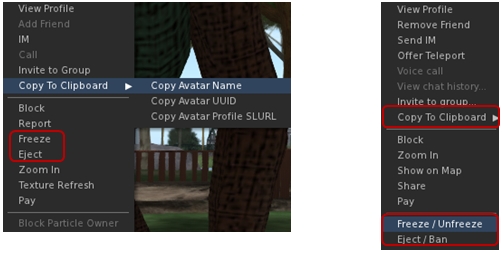
A couple of the context menus in UKanDo get updates as well. The right-click avatar context menu sees options added to copy an avatar’s name, UUID or Profile SLurl to the clipboard. Additionally, and in the case of estate owners / managers / parcel owners, the avatar context menu includes options to Freeze / Unfreeze and Eject / Ban where appropriate.
Options to copy an avatar’s name, UUID or profile SLurl can now be found of the right-click avatar context menu (l) and context menu in the Nearby tab of the people floater (r). In addition, both menus can offer estate owners / managers / parcel owners options to freeze / eject avatars
These options are also available in the right-click context menu within the Nearby tab of the People floater (with the freeze / ban options only appearing for estate owners / managers / parcel owners).
Other Additions, Tweaks and Touches
RLV is updated to 2.8.5.8
Toolbar Buttons floater New “Close” button
World Map New “Clear Selection” button
Help->UKanDo Support Group menu option will either open the group profile or, if you are a member of the group, start group chat
Allow Media to Auto-play is defaulted to off
Play Sounds from Gestures is defaulted to off
Option to allow Chiclet bar and/or Notifications to be placed top or bottom right
Viewer gives audible warning when trying to shift-drag while in edit linked parts/select face mode & object remains locked in place
Version 3.6.8.27869 represents a tidy set of updates and tweaks to UKanDo. The addition of Area Search is liable to be popular, as is the arrival of a Quick Tools floater. I personally like the additional button ranging options (I like my toolbar buttons over to the right of the screen and out-of-the way), and the ban / eject additions to context menus may well prove useful to some!
Performance-wise, this version of UKanDo is right up there with the last, and faces-off very well compared to the SL release viewer upon which it is based. In my PC, with ALM enables, ambient occlusion and shadows (Sun/Moon + projectors) enabled, and a couple of others on my home region, I was again hitting an average FPS of around 68-70.
I did find one or two things at odds in my version compared to the release notes (RenderVolumeLODFactor is reported as defaulted to 4.00, but in my clean install, I found it set to 1.25), but these were very minor issues and easily fixed. One thing I would recommend, however is that the icon for the Quick Tools button is revised. It is currently the same as the icon used on the Preferences button, and when operating with the buttons in Icon Only mode, it could lead to confusion.
I’d still like to see the media filter added to UKanDo, just for the added comfort when wanting to fiddle with media on other land; having something like Will Weaver’s Phototools appear in UKanDo would also be a blast – but these are purely personal preferences. As it is, UKanDo is a perfectly useable viewer, and for those looking for something sitting between the SL viewer and TPVs with all the bells and whistles, it’s worth taking a look at.
UKanDo (pronounced “You Can Do”, and a play on the fact that the developer hails from the UK), started as a personal project for Connor Monaron and friends for use in OS Grid. However, it has grown over time (and use) to become a fully fledged viewer project, and one of the latest to go through self-certification and appear on the Third Party Viewer Directory for Second Life.
The viewer is based on the Linden Lab codebase, rather than being a fork from another TPV, and which sees a number of additional features added to it. Connor’s aim in producing the viewer is to have something which is relatively close to the Linden viewer – which as he states, is fast and usable which having additional functions and features he and his friends find useful.
The list of current additional features is already of reasonable length, and includes some popular additions from other TPV viewers and elsewhere, including:
Marine Kelley’s RLV (disabled by default) and her v3 implementation of the updated “z-offset” capability and menu bar slider
Enhanced build options from other TPVs / developers (high precision within the position, size and rotation fields of the Build floater’s Object tab; prim alignment tool; option to sync values between diffuse, specular and normal maps; expand / collapse Build floater; reset / delete scripts from within the Build floater’s Content tab, etc.)
Katharine Berry’s Flickr upload capability
Right-click to open contents on a worn attachment
Turn avatar when walking backwards on by default
Draw distance slider in the menu bar
and more
I’ve actually been keeping an eye on UKanDo since early August, and thought it was high time I offered something of an overview of it using the current release, 3.6.7.27838.
Download and Installation
The Windows installer is 28.7 MB in size – approximately that of the official LL viewer installer, and runs pretty much as expected, installing the viewer smoothly and I experienced no pesky anti-virus warnings on starting-up SL voice (on AVG Pro), which have crept back into the last couple of viewer installs I’ve run since the last AVG update.
Starting the viewer launches the default LL splash / log-in screen, with buttons in an interesting blue colour.
Camera
For those used to the LL camera default, logging-in will reveal the first noticeable difference: the default camera placement is a lot different.
Camera placement: the default for the SL viewer (l) and the default for UKanDo (r)
Of course, this is somewhat subjective, as we likely all have different views on what constitutes a “good” camera placement; so whether one likes this or not is going to be subjective. I’ve been a supporter of Penny’s alternative camera positioning for a long while now – she allowed me to include in my blog’s tutorial section and I use a variation on one of her other settings -, so while the default used in UKanDo is slightly different to my own, I nevertheless found it refreshing not to have to fart around with camera debugs for once, but simply get on with using the viewer.
Buttons, Preferences and Menus
UKcanDo follows the LL viewer default button display and placement, and the toolbar floater reveals no additional buttons. Similarly, the Preferences floater offers-up more-or-less the same as the LL viewer, although there are some noteworthy additions / tweaks to defaults:
Move and View > Single Click on Land is disabled (rather than set to Move to Clicked Point) and Double Click on Land is set to Teleport to Clicked Point (rather than None)
Colors includes the ability to set name tag text colours
Privacy includes options to Look At / Point AT to private
Set-up includes:
A warning about setting bandwidth no higher than 1500 kbps
An option to always rez objects under the land group, if possible
An option to enable RLV functionality
Set-up also excludes the LL automatic viewer update options
An additional tab – UKanDo offers additional options for the camera, mini-map and avatar (under the Miscellaneous sub-tab) and additional building defaults (under the Build sub-tab, shown below).
UKanDo includes an additional Preference tab – UKanDo – which provides additional build options as well as additional options for the camera, mini-map and avatar (Miscellaneous sub-tab)
The viewer includes an additional menu option – again called UKanDo – which includes options to stop all animations, teleport to ground and show the time (top right of the viewer) in your local time, rather than SLT. The “Me” menu is also renamed “Avatar”, and other menu updates include:
Build > Scripts includes option to delete all scripts in an object
Build > Options includes options to set the build grid mode (world, local, reference)
Help includes options to view the UKanDo viewer support and forum web pages and removes the LL bug reporting option
Advanced includes:
Sub-menu of UKanDo menu options (see above)
Sub-menu for hover tip options
Additional Shortcut sub-menu for build tool selection options
Develop > Avatar includes options to set privacy on Look At and Point At.
Other Points of Note
Given the viewer is based on recent code from LL, it also has the expected support for SSA (which it has had from July 2013), CHUI and materials processing. The viewer also has pathfinding support, including navmesh, which means it is now limited to use with Second Life, as reflected by the Grid Option drop-down on the splash / log-in screen only lists the two SL grids: Agni and Aditi. the SLShare / Facebook options are not in the current UKanDo release, which is hardly surprising given SLShare appeared after the UKanDo 3.6.7 release.
Feedback
UKanDo does exactly what it says on the tin. It is a viewer based on the LL 3.6.7 code base and offers a filtered set of additional options which should actually appeal to a broad cross-section of users.
Performance-wise, the viewer was just shaded by the LL viewer in terms of frame rates in my subjective back-to-back testing on the same region with the same field of view / scene rendered with my usual defaults. The LL viewer managed a consistent 65-70 fps with ALM on, Shadow options enabled and ambient occlusion enabled, with UKanDo hovering around the 58-62 fps, which isn’t a big enough difference to be noticed. Switching off ambient occlusion and setting Shadows to none but leaving ALM active took frame rates over the 100 mark.
Overall I found UKanDo an interesting addition to the TPV stable; as noted at the top of this article, it does exactly what it says on the tin, and does it well. My only slight reservation with it – which is entirely personal – is that I found the combination of blue and white on things like buttons and tabs, etc., a little hard on the eyes after a while. As I generally have the toolbar buttons set to icons only, this wasn’t a major issue with them, but I did actually find myself either leaning forward or squinting at times to read tab labels – which surprised me. Perhaps I am getting old, after all …
The viewer doesn’t include the media filter, so if you are concerned about streams and nitwits, you’ll want to make sure you pop into Preferences > Sound and Media and disable the appropriate options (Allow Media to Autoplay, Play Media Attached to Other Avatars).
If you’re looking for a V3 viewer which is a step closer to the LL default, but which offers a reasonable set of additional functions and options, you might want to take a look at UKanDo and see what you think of it yourself.






 Inara Pey: Living in a Modemworld