
SL project updates 33/1: server, viewer, Experiences

Eclectica; Inara Pey, August 2015, on FlickrEclectica August 2015 (Flickr) – blog post

Server Deployments

There was no deployment to the Main (SLS) channel on Tuesday, August 11th, following the lack of an RC deployment in week #32.

The three RC channels *should* get a new server maintenance package on Wednesday, August 12th. Details were still TBD at the time of writing, however, it is thought to be a series of updates aimed at reducing the rick of No Copy inventory item losses due to race conditions occurring between the viewer and server.

SL Viewer

There is not expected to be any viewer promotion this week given the Viewer-Managed Marketplace viewer was promoted in week #32, and both of the active RC viewers were updated to match its code base.
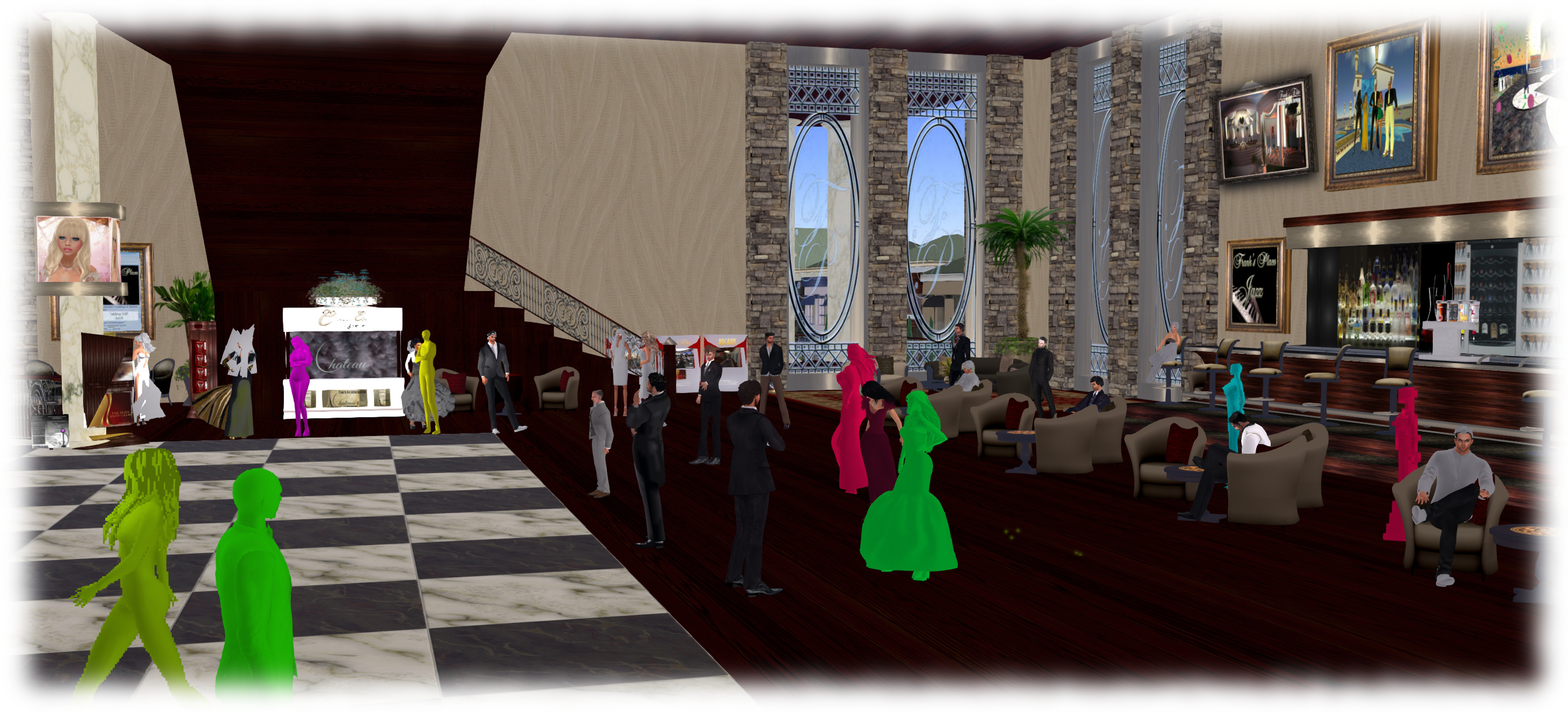
Avatar Complexity (aka Jelly Babies) will hopefully appear in week #33 as a project viewer, as per the Lab's timetable for the project
Avatar Complexity (aka Jelly Babies) will hopefully appear in week #33 as a project viewer, as per the Lab’s timetable for the project

However, it is anticipated that the Avatar Complexity / graphics preset viewer will appear in project viewer during week #33.

This is the viewer which enabled yo to set a rendering cost above which other avatars and their attachments will be rendered at a solid colour (aka “Jelly Babes”) in order to reduce the load on your GPU. It also provide a means by which users can save and restore different sets of graphics settings within the viewer. The idea being that users can then switch between different presets according to circumstance to help with viewer performance.

I provided a high-level overview of this viewer in June 2015, and I’ll be taking a closer look at it once the project viewer is available for people to download and try.  Currently, the main thing apparently preventing the viewer reaching a project release status is that the Lab is making some final adjustments to get the frequency of the Avatar Complexity notifications it sends to users. the viewer is designed to inform those who have avatars with a high rendering cost how many people around them are rendering them as a Jelly Baby, for example, and the balance of these messages need to be reasonable.
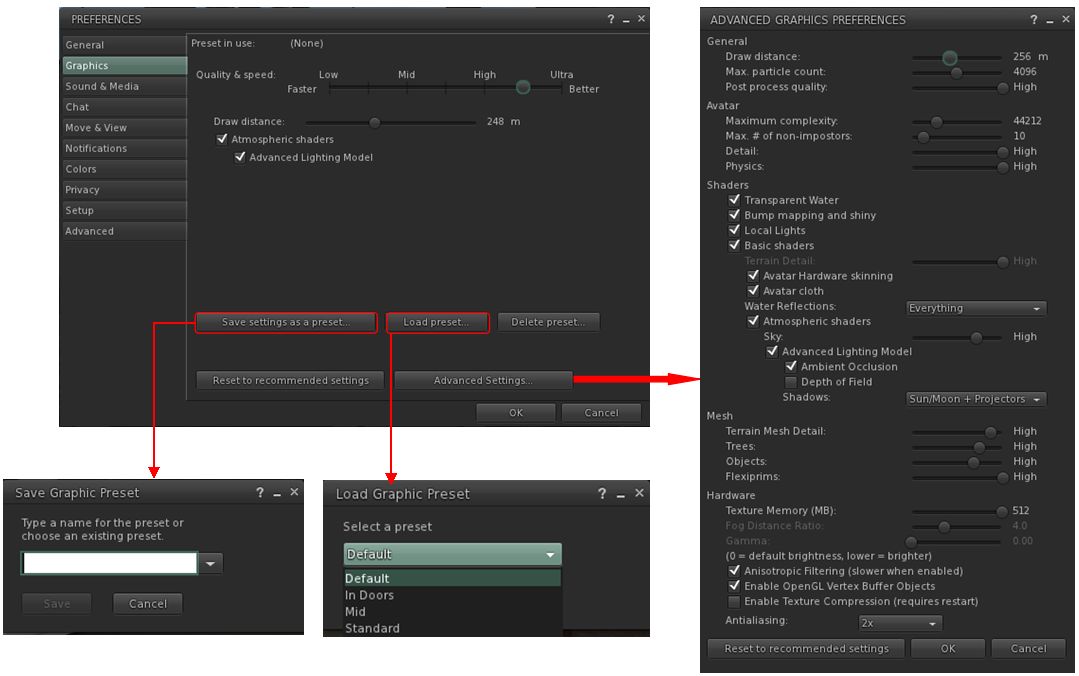
The viewer includes the means to create and save sets of graphics presets which can be quickly loaded according to need / circumstance to help maintain a viewer's performance
The viewer includes the means to create and save sets of graphics presets which can be quickly loaded according to need / circumstance to help maintain a viewer’s performance

Experience Keys / Tools

An issue with Experiences is that access to the KVP data store (used to store data and values for an Experience) is currently handled on the same thread in the region and object rezzing. This means that reading / writing from / to the KVP store can be impacted when a region is busy with people rezzing items, etc. Requests have been put to the Lab to move the KVP access to a separate thread, and now he has completely a number of other tasks, Simon Linden is hoping to look into this and get things separated.

In addition, the Lab is mulling options for further Experience Keys / Tools enhancements. Nothing specific has been decided, and the emphasis is that any changes made will be small, rather than anything “massive”. Without the Lab committing itself to any of them, some of the following were suggested for consideration during the Simulator user group meeting on Tuesday, August 11th:

  • Limiting draw distance within an Experience
  • Providing a means to force sit avatars on items, when required
  • Providing a means to force a user into Mouselook at certain points in an Experience and then back out of Mouselook
  • Providing a means to control set the windlight environment and prevent viewer-side overrides.

A problem with ideas like these is that the options are controlled by the viewer, and could theoretically be over-written by the user unless an RLV-like capability was implemented to prevent cheating by a user simply overriding a setting. However, the Lab are poking at ideas, and we might see further updates of some sort appearing in the future to further enhance Experiences.
Second Life project updates 32: Server, viewer, misc

PaleoQuest; Inara Pey, July 2015, on FlickrPaleoQuest, July 2015 (Flickr) – blog post

Server Deployments Week 32 – Summary

On Tuesday, August 4th, the Main (SLS) channel received the server maintenance package delivered to the RC channels in week #31. The focus of this release with to fix a number of Group management bugs:

  • BUG-9725 – Activating a group fails on first selection on Second Life Server 15.07.09.303393 & RC
  • BUG-9735 – Unable to Edit Group Parameters after being made OWNER of newly created group
  • BUG-9695 – [Project Notice] First attempt at joining a group fails (also happens with current release viewer)

Following the deployment of the update to both the RCs last week and the Main channel this week, indications are this these bugs have been fixed.

There were no deployments to the RC channels.

Viewer Updates

Monday, August 3rd saw the Viewer-Managed Marketplace RC viewer, version 3.8.2.303891, promoted to the de facto release viewer.

As a result of this, the two remaining active RC viewers were also updated to parity with the release viewer, with the Mesh Importer viewer updating to version 3.8.3.304090 on Thursday, August 6th, and the Maintenance RC updating to version 3.8.3.304115, also on August 6th.

Other Items

Rezzing Objects On Top of Mesh

There have, over the past few months, been increasing reports of issues in attempting to rez objects on top of mesh objects (landscaping element, mesh floors, etc). These take the form of trying to rez an object from inventory, only to get one of two error messages:

  • “Failed to place object at specified location. Please try again” or
  • Can’t rez object at  [coordinates] because the owner of this land does not allow it. Use the land tool to see land ownership”

In addition, rezzed objects can appear to “vanish” when rezzing on some mesh surfaces because they have actually rezzed under the surface in question, etc.

The problem appears related to a combination of viewer raycasting issues and uploaded mesh objects having incomplete physics hull as a result of a fault in the mesh uploading process. As ChinRey observes, The latter issue has been known for some time, and experienced mesh designers work around it. However, it is possible that newer content creators unwittingly get caught by the problem or that there are older mesh items still in circulation that can cause problems (also see Whirly Fizzle’s observations on BUG-2019).

There are some workaround to the problem, which has been accepted by the Lab. They are not ideal or always workable:

  • Try pointing your camera angle straight down at 90 degrees to the mesh surface or move your camera view further away from the mesh (Whirly Fizzle)
  • If the surface is used frequently for rezzing, try placing a full transparent bank prim over it and then rez on that (Innula Zenovka)
  • If you can, try editing the item in linked mode and check the physic model for the specific surface on which you are trying to rez upon.  If it is prim, try converting it – and just it – to convex hull.  Be aware this could alter the LI for the object; if you get any unexpected consequences, convert it back once more.

As an example, I used the latter for the Trompe Loeil Rustic Pavilion at my home, which was constantly giving me problems. The floor section was set to prim, and converting it to convex hull removed the issue entirely with no side effects for me. YMMV.

Slow-down in News from the Lab

There has been a slow down in activity and news from the Lab. In some quarters, this has been aligned with the idea that there is “not much going on” with Second Life and theat focus has perhaps further shifted to Sansar. In fact, work is progressing with Second Life; however, this is the summer period, when vacations are in progress, and we have recently come out of a period where the Lab has been very focused on specific work – such as ensuring the scalability of Experiences, working on simulator stability and internal fixes, which has come at the expense of “new shiny”, and thus giving the impression “not much” is going on.

This week saw the Second Life development team (and, I assume other directly involved in Second Life) get together in Boston for their regular meeting to discuss the plans for the immediate future. A consequence of this in particular is that there were no meetings on Monday (open-source developers) or Tuesday (simulator user group).

There should have been a TPVD meeting on Friday, but confused communications meant that Grumpity, Oz and I spent the time on our own alternately plotting world domination – if anyone known of any really good mesh Super Villian Sekrit Volcano Lairs, we’d like to know (joking) – and the fact that my hair is enough for me to be Jelly Babied in Grumpity’s viewer.  Guess it’s time to go find some really good, low-complexity mesh hair…

VMM: RC viewer updated, Magic Box / XStreet shut down dates

secondlifeUpdate: The Lab has confirmed automated migration of all Direct Delivery items has now been completed, and the current plan is for the new RC viewer mentioned in this article to be promoted to the de-facto release viewer in week #32 (week commencing Monday, August 3rd).

The auto-migration of Direct Delivery items to VMM has been proceeding for a week, and mostly seems to be going smoothly.

However, the VMM code for the viewer has yet to reach a release status, primarily due to the VMM viewer release candidate having suffered from an elevated crash rate when compared to the current release viewer.

As a result, on July 29th, the Lab to issued a new version of the release candidate, version 3.8.2.303891. This does not contain any changes to VMM functionality, but is intended to reduce the RC viewer’s crash rate. Assuming it achieves the aim, it should mean the VMM viewer is once again back in the running for promotion to release status alongside the other RC viewers currently in the release channel.

End of Magic Box Support

Also on July 29th, the Lab issued a blog post announcing the ending of Marketplace support for Magic Boxes and the final shut down of XStreet.

In the blog post, Merchants using Magic Boxes for item deliveries are advised that they have until Monday, August 17th, 2015 to manually migrate those items to use the viewer-Managed Marketplace. After that date, Magic Boxes will no longer be listed on the Marketplace.

Essentially, manual migration involves moving the item into the Marketplace Listing panel, where the required folder hierarchy will be created, and then associating that item with an existing listing on the Marketplace. This is done by copying / pasting the listing reference number (that’s the number at the end of the item’s URL displayed in a browser’s address bar) from the Marketplace and pasting it into the Associate Listing option of the Marketplace Listing panel.

VMM includes an option to manually associate existing MP listings with VMM items in your inventory, which will help ease part of the the migration process for those concerned over automated migration paths
Manual migration in VMM involves moving the item into the Marketplace Listing panel, where the required folder hierarchy will be created, and then associating that item with an existing listing on the Marketplace, by copying / pasting the listing reference number using the Associate Listing option in the Marketplace Listing panel.

Once items in the Marketplace Listing folder have been associated in this way, and a check for errors run, in-world Magic Boxes can be deleted (just make sure everything you want to manually migrate has in fact had its listing associated with a  VMM item first!).

You can also learn about manual migration in the fourth part of the Lab’s VMM video tutorial series, which I’ve also embedded at the end of this article.

XStreet Shut Down

Following the cessation of Magic Box support on the Marketplace, XStreet, (which I think may still be in part used with Magic Boxes), will remain available through until Thursday, August 27th, after which it will finally be shut down. Presumably, this is to give any merchants who missed the August 17th deadline time to complete any remaining manual migration of Magic Box items & re-list them on the Marketplace.

Summary and Migration Video

So, once again the dates:

  • Magic Boxes will stop working on August 17, 2015, and will no longer appear on the Marketplace
  • Xstreet will be finally shut down on August 27, 2015.

And the Lab’s tutorial video on manual migration of listings to VMM:

Lab VMM Resources

Reminder: Second Life VMM migration set to commence

secondlifeUpdate, July 30th: The lab has issued a new version of the VMM viewer, and the links to the download in this article have been updated accordingly.

A reminder that as recently announced by Linden Lab (and as I reported here), automated migration of Direct Delivery items on the Marketplace to the Viewer- Managed Marketplace capability commences on Thursday, July 23rd, 2015.

All Marketplace merchants will receive an e-mail at the start of the migration process, and another when it has completed. In addition, those with 5,000+ listings will receive an e-mail related to the scheduling of their store migration.

Operations will run from 21:00 SLT through to 09:00 SLT on weekdays, starting on Thursday July 23rd, and will continue in this manner until all stores on the Marketplace have been migrated. Merchants will not be able to modify their stores while their items are being migrated, but sales of items that are not in the process of being migrated will continue.

Note that Magic Box items will not be migrated during this process; they will require a manual migration, and no date has yet been given as to when support for Magic Boxes will discontinue.

The Viewer-Managed Marketplace ideally requires a viewer updated to support VMM in order to make managing items easier. At the time of writing, viewers supporting VMM are:

Non-VMM viewers will display VMM items in a Merchant Listings folder - do not delete this folder or its contents! folder
Non-VMM viewers will display VMM items in a Merchant Listings folder – do not delete this folder or its contents! (Shown in Singularity.)

Note that if you are a Merchant using a viewer that does not have VMM support, once your store has been migrated, you will have an additional folder in your inventory display called Marketplace Listings.

This is the controlling folder for VMM, and should not be deleted, or have contents deleted or moved (it will be hidden in the majority of viewer with VMM support).

While it is possible to use this folder to continue to add new VMM items to your Marketplace store (providing you create the required folder structure, etc.), as Whirly Fizzle notes on the VMM migration forum thread, this is not a recommended approach given that it might lead to mistakes or confusion.

It had been indicated that VMM migration would not commence until after the viewer code had been promoted to release status. As such, the sudden announcement of the start of migration ahead of such a promotion has caused understandable consternation with TPV developers and merchants, prompting the Commerce Team to comment:

As many of you noticed, we did shorten the time line to get Merchants migrated to VMM. This is due primarily to the need to get Merchants off of Xstreet, as it was down for a weekend in early July, forcing us to accelerate our dates.

Those who are concerned about the migration process should refer to the migration forum thread, linked-to above. I also have a high-level overview of VMM (written when the project viewer first appeared), including a look at manual migration.

The Lab’s own resources on VMM can be found here:

Second Life project updates 29/2: miscellaneous news

Matoluta Sanctuary, Sartre; Inara Pey, March 2015, on Flickr Matoluta Sanctuary (Flickr), March 2015 – blog post

Server Deployments Week #29 – Recap

As always, please refer to the server deployment thread for the latest updates / news.

  • There was no Main (SLS) channel deployment on Tuesday, July 14th.
  • On Wednesday, July 15th all three RC channels received the same server maintenance package, comprising internal simulator fixes.

SL Viewer

Following the promotion of the attachment fixes viewer to release status, all three remain active release candidate viewer in the release channel were updated as follows:

  • The Viewer-Managed Marketplace RC viewer updated to version 3.8.2.303583 on Thursday, July 16th
  • The Maintenance RC viewer updated to version 3.8.2.303563 on Friday, July 17th
  • The Mesh importer RC viewer updates to version 3.8.2.303565, also on Friday, July 17th.

Viewer-Managed Marketplace

On Thursday, July 16th, the Lab announced that VMM is now “released” (even through the viewer is currently still at RC status), and that automated migration of those Marketplace stores which have not already converted to VMM will commence at 21:00 SLT on Thursday, July 23rd, and will continue at the same time on weekdays for a 12-hour period (21:00 – 09:00) until complete.

That the announcement has been made prior to the viewer being promoted, and that it was made apparently without any notification to TPVs (who had been trying to work closely with the Lab in getting people ready for VMM) has caused no small amount of upset on the Commerce forum thread opened when the announcement was made, some of which is understandable, particularly given the way TPVs have tried to work with the Lab in support of VMM, and this announcement have left those still in the process of trying integrate the code into their viewers with little time to actually do so and support their users with a VMM-enabled version of their viewer.

Experience Tools

In my week #28 report, I referred to a comment made by Simon Linden relating to Experience Keys / Tools concerning some work he’s been carrying out on the KVP database:

I’ve been working on updating the KVP code that runs on our server and had the most frustrating time integrating the newest version into our code … The code we have is dated and we should have better performance and stability with their latest.

The use of “their” and “our” code led to some questions at the meeting (unanswered at the time) as to what it might indicate. During the Server Beta User Group (SBUG) meeting on Thursday, July 16th, some clarification was given.

The “their” referred to by Simon is MongoDB, which is the database being used to manage the KVP store and key value pairs. The version the Lab had been / is using can only apparently search around 1,000 values per minute. The new version that Simon has been working on should apparently improve on this, hence his reference to performance and stability improvements (not to mention scalability).

Viewer-Managed Marketplace migration commences July 23rd

secondlifeUpdate, July 30th: The lab has issued a new version of the VMM viewer, and the links to the download in this article have been updated accordingly.

Update, July 20th: Linden Lab have given the following explanation for the acceleration with VMM migration: “As many of you noticed, we did shorten the time line to get Merchants migrated to VMM. This is due primarily to the need to get Merchants off of Xstreet, as it was down for a weekend in early July, forcing us to accelerate our dates.” (With thanks to Whirly Fizzle for the pointer to the comment.)

Coming by way of the Commerce blog, Linden Lab has announced that the Viewer-Managed Marketplace (VMM) capabilities are now released, and that automated migrations of SL Marketplace items is to commence on Thursday, July 23rd.

Migration will commence at 21:00 on July 23rd, and each weekday thereafter until all all stores on the Marketplace have been migrated.

The blog post lays out the core aspects of the migration process, which I’ve summarised below – but do still please read the official post:

  • All merchants will receive e-mail at the beginning of the migration process, and another once it has completed
  • Merchants with around 5K or more of listings will have their migration scheduled, and will receive an additional e-mail for the Lab providing them with advanced notice – see additional notes below
  • Migration will occur weekdays between 21:00 SLT in the evening and 09:00 SLT the following morning
  • A Merchant will not be able to modify their store while items are being migrated, but sales of items that are not in the process of being migrated will continue
  • Merchants who have had their stores migrated to VMM  should use the  Second Life VMM Viewer (or a TPV which offers VMM support) in order to manage their Marketplace inventory.
If you have the viewer configured to use its internal browser (the SL viewer allows you it set it for *just* links to SL websites), you can
Viewer-Managed Marketplace allows items sold through the Marketplace to be managed directly from the Merchant’s viewer using the Marketplace Listings panel – there is no need to upload items to the Marketplace servers. Listings can then be created and amended from within the viewer using the built-in browser or, if preferred, can still be edited directly from a Merchant’s Marketplace pages via a web browser

It’s also worth pointing out that the automatic migration process will not run against Magic Box items; these must be manually migrated, and no date has yet been given as to when support for Magic Boxes will discontinue. However, this notice from the Lab should perhaps be taken by those who do still have items in Magic Boxes as indicative that they should start planning to migrate them to VMM.

Both the automated and manual migration process have been undergoing beta testing for some time now, and most reports on both have been positive.

VMM has been moving in this direction for that last couple of months. However, it had been thought that actual migration wouldn’t commence until after the VMM viewer code had been promoted to the release viewer. Given that the Lab tends to prefer promoted a viewer every other week, and this week (week #29) has already seen the attachment fixes viewer to release status, it would appear that migration might be starting prior to the VMM viewer being similarly promoted.

To help people get to grips with the Viewer-Managed Marketplace, the Lab have produced a number of resources, and those unfamiliar with VMM are referred to them for further information.