The King and I

DSA Beechcraft King Air C90 GTX

No, this isn’t a homage to Yul Brynner, although as the song goes, Second Life could well be a show with everything, even without him… The “King” I’m referring to is the DSA King Air C90 GTX, which has – after some considerable deliberation and bouncing around – become the latest aircraft I’ve added to my collection.

To be honest, it wasn’t actually the ‘plane I started out to get; I actually wanted something a fair bit smaller, given I already have the PBY 6A Catalina, and initially started looking at single-engined ‘planes. But for various reasons, I found myself drifting away from that choice and heading back into twin-engined territory, initially looking at Erick Gregan’s Cessna 421 (which came highly recommended, and looks to be a most excellent aeroplane).

DSA Beechcraft King Air C90 GTX
DSA Beechcraft King Air C90 GTX: the factory default finish, with my customised version beyond

However, as I live “on the water”, so to speak, I was drawn to DSA’s Beechcraft C90 GTX and Baron G58, as both of these are “combo” aircraft: you can switch between standard undercarriage or floats with a single command. In the end, and again on recommendation, I opted for the C90, although I suspect I’d have been happy with the G58.

The C90 is actually a big aeroplane; particularly when up on its floats – the picture of me doing a naughty and sitting on the wing probably gives you an idea of the size, if you’ve never seen this ‘plane before. 100% mesh, it weights-in at 96 LI, which is quite hefty – but it is packing a lot – and a physics weight of 11.7, which is slightly less than that of my MD-900, and almost one-third that of my Kv23H. It is supplied copy / mod, and is suitable for repainting, if desired (and a range of optional paint kits are available in-world from Josh Noonan – and I can personally attest to the quality of his work.

DSA Beechcraft King Air C90 GTX - a closer look at my paint scheme
DSA Beechcraft King Air C90 GTX – a closer look at my paint scheme

Indeed, the very first thing I did on getting mine, other than going for a short familiarisation flight, is repaint it. As I liked elements of the default colour scheme, I decided to stick with this as a base, and then work-in my traditional red and white. The model supports the use of local textures, which means you can play to your heart’s content creating and trying colours, and a full set of textures in JPG, PaintShop Pro and Photoshop formats can be downloaded from the DSA website.

To apply textures when working on things, simply blank a copy of the ‘plane then select the required face, then select and apply the texture from you heard drive via the viewer’s Local Texture option in the texture option of the Build floater. Note that The fuselage and the wing textures are used several times, and you’ll have to make sure they are applied to all the faces using them. For example, the fuselage texture needs to be applied to the fuselage (best to select the face by clicking on the tail), the rudder, and the nose wheel doors. When you’re happy, upload your textures to inventory & apply, or use the painting note card in the ‘plane.

DSA Beechcraft King Air C90 GTX - this is a big turboprop
DSA Beechcraft King Air C90 GTX – this is a big turboprop

I went for a very personalised look, as the photos here show, complete with my usual G-NARA registration and a bit of ego-pandering with a stylised “I” on the tail and on the winglets. I also added a touch of shine to the fuselage and wing textures, to give them more of a polished finish.

Flying-wise, this is a ‘plane aimed towards the more “realistic” end of the market (my one disappointment with the Catalina is that the flight system is rudimentary). DSA aircraft aren’t perhaps as advanced in this area as some other makes, but they are still pretty comprehensive. A detailed HUD is supplied, and commands can be given in chat as well.  One thing that is missing for those who enjoy procedure, is a need to carry-out pre-start checks (battery, magnetos, etc.); “lstart” and “rstart” will kick the respective engines into life once seated in the pilot’s seat, although the Engines button on the HUD will run through a more complete (and automated) pre-start check and engine start-up. This will also enable navigation, strobe and beacon lights for you, as well as close the boarding door.

... with a comfortable interior
… with a comfortable interior

The C90 handles really well in the air, and can be shared between pilot and co-pilot (the HUD is copy / transfer, so you can share it with friends) – make sure you both activate the co-pilot option on the HUD. Range is limited by fuel, and the plane comes equipped with a full fulling station (43 prims, which I presume works with any DSA ‘plane), or a convenient jerry can should you need to set down somewhere to refuel. Another nice touch is the inclusion of an instrument landing system (ILS), although I confess I’ve yet to actually try this, and documentation is supplied on the DSA website, rather than with the aircraft.

A slight irritant I have found is that this plane doesn’t handle water ramps at all well; with the wheels for the undercarriage deployed, it seems to require a decent run-up to a ramp at full throttle. Even then, getting ashore is far from guaranteed, and should you do so, there is the inevitable desperate throttling back before you go careering too far across an apron. Ironically, the C90 cannot make the relatively shallow ramp I have at home at all.

Also, the HUD also seems sensitive to region crossings; In the 4.5 hours I’ve been flying the plane, I’ve had buttons vanish from the HUD when clicked just after a region crossing, only to reappear on their own a short while later or at the next crossing. This is a niggle, but not a major problem.

DSA Beechcraft King Air C90 GTX - guess where? ;-)
DSA Beechcraft King Air C90 GTX – guess where? 😉

At L$5500 (at the time of writing), this isn’t a cheap light plane to have – but you do get the floats / wheel combo, and the mod options are all good, paint-wise. Overall, I’ve found the C90 more than pleasing to fly – the ramp issue following water lands notwithstanding; and particularly like the fact you can swap between floats and “standard” undercarriage mid-flight. OK, so not terribly real, but adds a certain flexibility when flying :). While this may not be the ‘plane I set out to get, I certainly have no regrets over buying it, and I’ll likely be swapping back and forth between the C90 and my Catalina quite regularly.
Related Links

Of impulse purchases and power boats

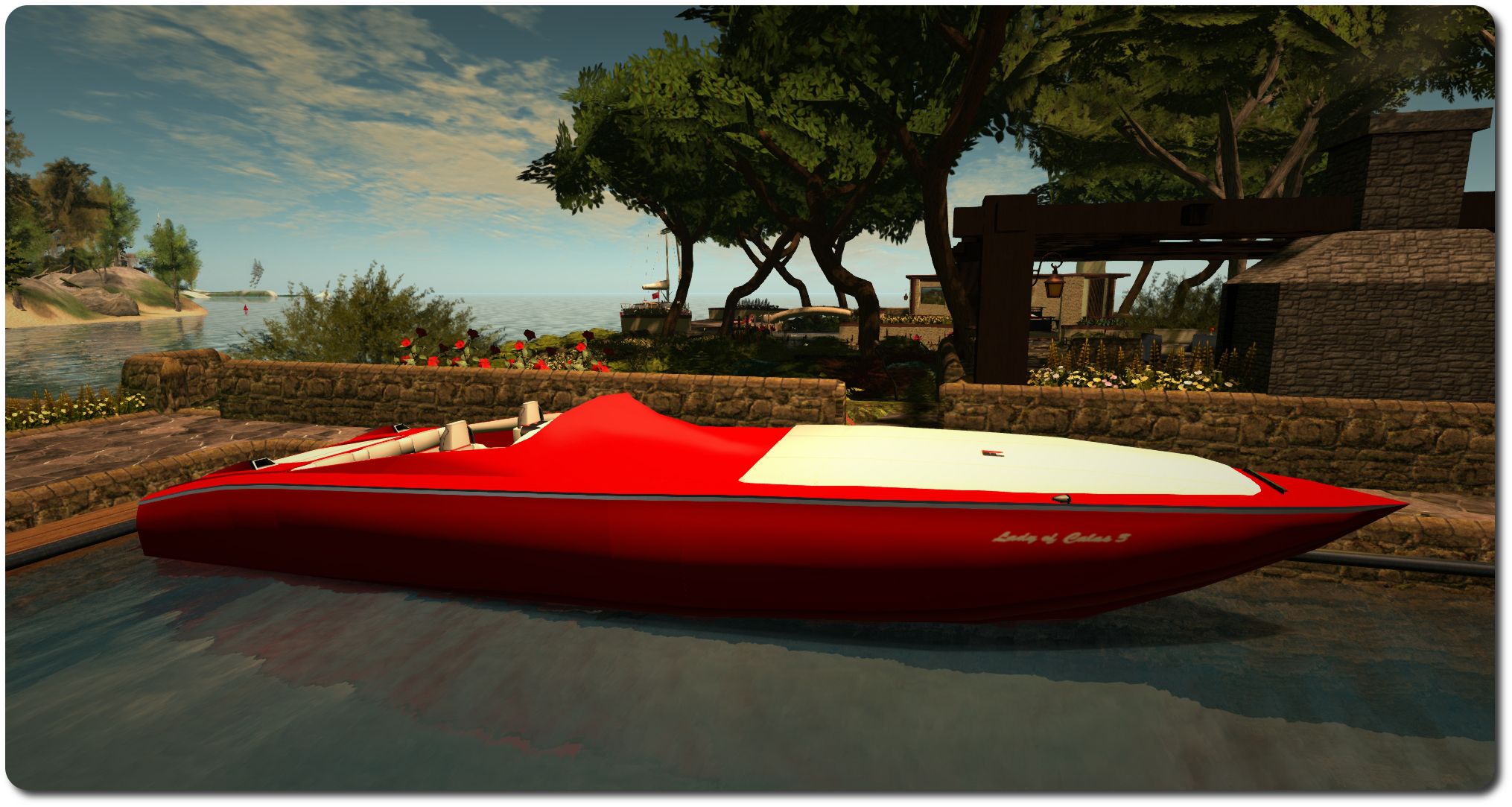
The Kv23H FoilStream at home
The Kv23H FoilStream at home. The white canvas is covering the bow seating area

As regular readers know, I’m pretty into sailing and cruising in SL. However, while I have a couple of very nice E-Tech boats, they are somewhat big and tend towards the primmy. So I’ve recently been spending time hopping around SL and trawling the Marketplace for something smaller, lighter and mesh built I could buy.

This actually proved harder than I’d imagined. Not because there is a shortage of smallish cruisers and nice little tenders to be had; quite the reverse. There are some lovely boats to be found; I just have this obsession with a red & white colour scheme, and those I saw either didn’t quite fit, or required DIY retexturing well beyond my comfort level. So I ended up making an impulse purchase simply because the colours were close enough: Kv23H FoilStream by Ape Piaggio.

The Kv23H showing the forward seating area uncovered

Not, I hasten to add, that this should be taken to mean this is a “bad” build; far from it. Ape has worked hard to produce a superb racing boat / cruiser, capable of carrying up to five people, and sought out plenty of assistance in bringing it together – such as from Analyse Dean of Bandit fame. The result is a craft that is 31 LI, 100% mesh, packed with features, and – when needs be – bloody fast.

Seating areas can be found in the cockpit, and forward in the bow area, with a small cabin area in between. The pose system allows movement between the various areas (including the sunbathing pad over the working engine cover), without the need to stand, and is available to driver and passengers. Driving-wise, the UP / DOWN keys operate the throttle in 10% increments, LEFT / RIGHT allow you to steer. If you want some really high-speed boating, PAGE DOWN will deploy the boat’s cunningly-hidden hydrofoils (you must be at 30% throttle or lower for them to deploy). Once deployed, running the throttles up to anything over 70% will lift the boat up onto the foils and you’ll literally fly across regions; this is one bloody fast boat. So much so that after lifting, I’d strongly recommend dropping the throttle down to 50% for a smoother ride.

Up on the foils at 60% throttle

When you drop back to 30% or below, the boat will settle back into the water, and PAGE UP stows the foils once more. Handling-wise, the boat is really responsive at speed, but can be a handful at 10%-20% throttle. To assist with this, Ape has added a “parkmode” option in the menu, click it and keep your speed to 30% throttle or less and it smooths-out handling. There’s also a race mode, accessed through the menu, which makes the boat compatible with popular race systems and which enables damage, while the ACSS system really does help the driver with region crossings.

Two really handy capabilities with this boat are the “park camera” and the auto-mooring function. The former places the camera above the boat, looking down on it and – with practice – allows for a lot of close-in manoeuvring both forwards and backwards. Set the boat’s home mooring position, and the latter will automatically park the boat on your return, once you’re within 10 metres of the mooring point.

Roaming Second Norway

To list all the features would turn this article into a litany, so suffice it to say that you also additional options that can be deployed, a pose system for moving about the boat without standing up, a working engine cover, two working media systems – there’s even two painting systems (texture maps supplied), one of which you can use to produce your own commercial paint kits for the boat.

There are, to be fair, some niggles, none of which are serious, but do cause grumbles. Mouselook driving requires seat adjustment, for example, so you can actually see where you’re going. However, adjustments can’t be saved, so have to be made again after standing.  I found the camera to be oddly sensitive when carrying passengers at low speeds in regions with surrounding objects, being prone to slewing into the engine compartment even when crossing parcel boundaries (i.e. moving away from my home mooring). Conversely, travelling at speed on open water with passengers across multiple region boundaries has yet to give me any problems at all. A final very small issue is with the boat’s hull texture map: the left side hull texture and the transom texture are such that if you wish to add a name to them, you’ll have to reverse it to read from right to left; if you don’t the name will be backwards when the textures are applied to the hull.

The dashboard contains working dials and a nice map function that will mark your position within a region (the yellow square) - providing you're not zipping along at an insane speed!
The dashboard contains working dials and a nice map function that will mark your position within a region (the yellow square) – providing you’re not zipping along at an insane speed! However, you’ll likely have to raise the driver’s seated position if you want to ML drive, or sit and then adopt a standing pose via the menu

But, these are minor grumbles in the scheme of things. Overall, there is no mistaking the fact this boat is well made, comes very well equipped and represents excellent value for money. Any hesitation you might sense in this article is simply because this kind of muscle boat isn’t really “me”, so I’m having a hard time persuading myself I’ll actually use it, and may yet end up resuming my hunt for something more “my” style. Either that, or I’ll await Ape’s next project, her AD25H “Little Bee” speedboat, which is looking rather good!

However, if you want to see if the Kv23H is your kind of boat, you can take a demo version out for a spin from Ape’s test location in-world and can purchase it there or from the Marketplace.

Battling balloons: Loki’s digital mastery at work

Take to the air with Loki Eliot's new Balloon Battles
Take to the air with Loki Eliot’s new Battle Balloons

As I wrote back in July 2013, Loki Eliot is many things. Games developer, content creator, blog / philosopher to name but three, and his Escapades Island in Second Life is legendary.

At the time I made those comments, I was writing about his free, Star Trek inspired starship battle game that allowed players to face off against one another flying either a Federation Starship or a Klingon Bird of Prey.

Since then, Loki has been refining things, generating a wholly original game, Battle Balloons, in the process. He’s just announced the launch of the game on SL Marketplace, and it again demonstrates that while SL may not be a game, it is possible to develop some fun game-focused experiences which can be shared among friends.

Commenting on the launch of the game, Loki says:

I think for a lot of people the experience that is Second Life revolves around visiting places, looking at pretty objects and chatting to people. There are the odd rides, combat systems and role playing groups but its always a bit rare to find simple instantly fun epic gaming experience.

And he’s right. What’s more, Battle Balloons fills the void perfectly. The essence of the game is to fly an armed, powered balloon and try to shoot down those flown by your opponents. Each balloon has a crew of two, a pilot and a gunner, who much work together, as Loki explains:

It is the pilot’s job to keep the airship in the sky, avoiding other cannon fire while collecting repair crates. It is the Gunners job to shoot down the other teams battling for air supremacy. Gunners must be careful not to shoot repair crates, unless of course you are trying to prevent the other teams from getting them … The game, while a shooting game, is also one of corroboration. While the Gunner is on the offensive, the pilot is on the defensive and success often relies on a balance between the two as you compete against others.

Fly through the repair crates to recover from damage your balloon has sustained

Battle Balloons comes complete with a balloon rezzing platform  and vendor, a spectator platform, and hovering repair crate dispensers (shown in the image above), all supplied Copy, No Mod / Transfer.  Loki tells me he is considering releasing a standalone balloon with texture kit, for those people who want to run team-based competitions.

While not specifically designed for the Oculus Rift, Loki notes the game works “pretty well” with the headset – and his request that the Lab include a means of firing guns while wearing an Oculus came directly from the development of Balloon Battles.

The game, seen in show #20 of The Drax Files: World Makers, can be purchased via the SL Marketplace, and for those wanting to try it out for themselves and get a feel for it, a version is available to play above Escapades Island.

So, if you’re looking for a new attraction for your region, or you simply like the idea of a little lighter-than-air combat with friends, when not take a look at Battle Balloons?

Images and video courtesy of Loki Eliot.

Whirlybirding and painting things

A familiar fly-past: taking the MD-900 around the Fastnet Rock lighthouse

Back at the start of the year, I wrote about my experiences in getting hold of an EC-135 Eurocopter from  Spijkers & Wingtips. As noted in that article, it’s a great little helicopter – easy to fly, plenty of space in the cabin, and nicely customisable. It’s been on my helipad ever since.

Well, at least until this weekend, when it found itself returned to inventory after one last (for the time being) flight. Not because I’ve given up on flying – oh no! Rather, as the images in this piece show, I’ve swapped to a new aircraft.

Gracing my helipad at home now is the Spijkers & Wingtips MD-900 Explorer. Superficially like the EC-series of helos in terms of exterior cabin looks, this is a 7-seater helicopter that is 100% mesh, the design by Sylvira (sylviramaus). And I have to say, it is beautiful, with a wealth of detail to enjoy.

The MD-900 in its default (supplied) finish

The first thing that is immediately noticeable about the MD-900 is that it doesn’t have a tail rotor. Instead it uses a NOTAR system, employing a fan system together with a thruster mechanism at the end of the tail to both counter torque from the rotors and provide vectored thrust when turning, etc. With the S&W MD-900 the system is reproduced such that in-flight manoeuvring of the helicopter will see the directed thrust mechanism at the end of the tail moving in response to control commands, together with the twin rudders.

The helicopter comes as a comprehensive package: there is the MD-900 itself, Copy / Mod and with an LI of 54; a static display model, six customisable texture packs, optional combat script and cargo payload scripts. The default colour scheme for the helicopter is striking, and possibly the best of the supplied packs, and a further air ambulance option can be obtained from Sylvira.

The interior detailing is incredible; from the seat harness elements through to the individual buttons and dials on the controls and flight panel. Even the ducts air circulation system in the cabin is reproduced in detail, together with work front, passenger and rear cargo doors
The interior detailing is incredible; from the seat harness elements through to the individual buttons and dials on the controls and flight panel. Even the ducted air circulation system in the cabin is reproduced in detail, together with working front, passenger and rear cargo doors

Using the texture packs is a matter of unpacking the desired finish, then editing the helicopter via Edit Links Parts to drag and drop the various texture elements onto their requisite sections of the helicopter. For those who want something more personal, the textures can be saved as TGA or PNG files and amended locally & then re-uploaded at the usual L$10 a shot.

As most know, I have a penchant for red and white in my boats and planes, so one of the first things I did was grab one of the texture packs (“white with red stripe”) and download the various elements to produce a colour scheme more in keeping with my preferred style. When I did this with the EC-135, it literally took me 3 minutes to get something I was happy with  – although admittedly, I didn’t really try anything clever in editing the textures.

The MD-900 is one of the supplied texture finishes, and the default colour scheme to the rear

The MD-900 did take a lot longer. The was mostly down to my decision to go for a design which required some careful detailing around hinges and things. However, it also has to be said that, outside of the default paint scheme, the finishes on some of the packs are a trifle rough – in my case I found that white parts would have an odd splash of red where they shouldn’t (and vice versa, or that edging between the colours be a tad rough when looked at closely (and I do mean closely – the packs past muster reasonably when to the casual eye). Unfortunately, for me, once seen closely means such things are forever nagging; so I spent a good few hours doing some general clean-up, because I’m obsessive that way.

Handling-wise, the MD-900 is fabulous. I’m not sure how much updating Tig has done with her helicopter scripts, but the MD-900 really is a delight to fly. It’s very responsive, can move at a fair lick if required, and offers the usual 3rd person or Mouselook flight options (the latter feeling far more responsive that the EC-135). A HUD is provided for flying, although not essential (all commands can be entered via chat), and this reveals some of the extras – such as the searchlight (which can also be turned on / off via the chat command “sl”), the winch options for lifting cargo aloft – read the instructions carefully, and take note that cargo can behave oddly if particularly complex. There’s even a police / rescue siren!

A particularly nice touch with the more recent helicopters in in S&W range is the inclusion of auto-deploying pontoon floats. Simply drop down over Linden water in a low hover, and the floats will deploy for a water landing. They can also be manually deployed / stored when in flight via the HUD or a chat command.

My MD-900 at home
My MD-900 at home

All told, the MD-900 is a great aircraft, and niggles over the texture packs aside (they don’t in any way spoil the aircraft), it will make a great addition to any SL aviation enthusiast’s collection.

Related Links

Loonetta: small, but beautifully formed

The Loonetta 31
The Loonetta 31

I entered the world of casual SL sailing via the Premium Gift sailboat. I know, I know, there are better offerings around! Well, those of you who have been nudging me to “upgrade” to something more will likely be likely be pleased to read that I have 🙂 .

September saw me hopping around looking at various boats and options, as I wasn’t sure what I wanted. I did know I didn’t want a racing yacht or racing sail boat; not that I have anything against racing, I just wanted something that offered comfort and a degree of style to sailing around SL. Two boats went fairly immediately to the top of my list, the MLCC Oceanic, and the MLCC Loonetta 31, both of which are created by Motor Loon, who has a well-deserved good reputation for his custom bikes and other vehicles (he’s also a regular at SL User Group meetings, which are where I first met him).

The Oceanic is the older of the two designs, and is a sleek sailing cruiser, a little over 25 metres in length which features a very comfortable& furnished cabin – seriously, you have to see the boat for yourself to appreciate the level of detail. The Loonetta 31 is the more recent of the two builds and 100% mesh. Around 9.5 metres in length, it might be thought of as the Oceanic’s chubby little sister.

Both come packed with features and capabilities, making them each very excellent value – I’m not going to spill the beans on everything included, as part of the pleasure with these boats is in the discovery. Suffice it to say check hatches and steps carefully 🙂 . Initially, I was swayed towards getting the Oceanic, but in the end opted for the Loonetta 31. This was for two reasons; firstly, Motor’s excellent video tutorial on customising it via a very smart scripted system and set of texture maps convinced me this would be something even I could manage, and secondly – and more directly – the Oceanic is a tad on the long side when manoeuvring alongside at the jetty in front of my house, and is too long to fit the dock alongside the house whereas the Loonetta 31 sits easily alongside either one.

Loonetta 31: closer look
Loonetta 31: closer look at the default finish

Which is not to say I’ve taken second best – far from it; the Loonetta 31 is an incredible little vessel, featuring a fully fitted cabin, like the Oceanic, and  has plenty of room for friends to enjoy a trip out with you. As I siad, the customising system is quite awesome, and it is packed with some really nice touches.

The boat is delivered unboxed and ready to go – simply move the folder from your Received Items to your inventory, then drag the boat into the water. The default colour is a white finish, but there are six more pre-set finishes you can pick from simply by clicking on the boat (not the wheel or the seats – you’ll end-up sitting! Top of the cabin is the best) then selecting SETUP from the displayed menu, and using the DESIGN + and DESIGN - buttons to page through the different finishes, which will render on the boat as they are selected.

The Loonetta's Cabin
The Loonetta’s Cabin – where you can use the radio to listen to an SL Coastguard weather report for Blake Sea

However, that’s not the end of the customisation options – you can select just about any part of the boat and change its colour / hue using the RGB buttons, you can change the degree of shine applied to various parts of the boat, both via the COLOR/SHINE button, and by following Motor’s very excellent video linked-to above, you can learn how to download the texture maps for the boat and use them to create your own texture finishes – which is pretty much what I did.

The menu is also used to control other options as well – lower / raise the anchor or sails, set the spinnaker, adjust the camera position, deploy / hide the fenders for docking, sound the bell or horn, set the boat to a moored status, adjust each of the 40 poses individually, and more. For those who prefer, text commands can also be used with the boat.

My customised Loonetta 31, "Exotix 2"
My customised Loonetta 31, “Exotix 2”

Customising the Loonetta 31 took me a couple of hours – a fair part of which was me trying to do a half-decent job with a graphics programme; I’m pretty sure that anyone with any reasonable graphics abilities could have done the same as I’ve achieved in half the time or less. Essentially, I used the hull map to create a red hull with a white stripe set on it, did the same with the stern plate, and re-coloured the cabin roof in a matching white. I also added a couple of graphics to the main sail and spinnaker, and created a custom name. I have to say I’m quite pleased with the results.

A point to make here is that the Loonetta 31 and Oceanic are both No Modify, so if you’re going to be engaging in some extensive customisation and are concerned about upload costs, you might want to re-sync your Aditi beta grid inventory with a password change, wait 24 hours, and then work on your boat there; once you’re satisfied with the results, you can then upload your modified textures to the main grid and apply them to the boat.

Sailing-wise, these boats are a real treat; Motor has spent a lot of time optimising them for sailing and region crossings. While it is still early days for me, a trip around the United Sailing Sims presented no problems with multiple region crossings under sail or motor. A nice touch is the smoothness of motion when turning; the boat turns gently and easily in a continuous motion, rather than the more step-by-step turns some vehicles exhibit (love the animation uses when turning the boat as well!). And if you don’t wish to leave the boat moored, you can pull out a stand from its contents and rest it safely on land.

Under sail
My customised Loonetta 31, “Exotix 2”, under sail

To say I’m pleased with the Loonetta 31 would be an understatement. It may not be the sleekest boat available (I can’t help but call it chubby!) nor the fastest, but it has won my affections. Motor has done a magnificent job with it, and despite my clunky flapping around with GIMP, I really enjoyed putting together a personalised look for it, one which keeps to my preferences for red-and-white :).

For anyone interested in seriously trying-out sailing in SL, I have no hesitation in recommending the Loonetta 31 or its big sister.

Related Links

Catching a Cat – but not by its tail!

The Shana Carpool PBY6A: graceful and fun
The Shana Carpool PBY-6A: graceful and fun

As regular readers here will know, I’ve been bitten by the SL flying bug. It’s not something I do all the time, but it is something I enjoy; so much so that I’ve gained a (very) modest collection of aircraft over the past couple of years, of which I tend to use my EC-135 helicopter, Spitfire and Terra Stingray the most.

However, these three now have a competitor for my time and attention: a Consolidated PBY Catalina, which is affectionately referred to as the “Cat” by aviation enthusiasts. It’s one of those aircraft I fell in love with while going around airshows; being a flying boat, there is something very graceful about its lines that not even the frog-like “blister” canopies on the sides or the gawky, sticky-outy main wheels (on the amphibious version) can spoil.

Starting-up the engines at Second Norway airport, ready for an early morning flight home

So when I was out investigating air racing locations in SL (of which, more anon) and I came across Shana Carpool’s PBY-6A (the “A” being for “amphibious”), I got completely sidetracked (sorry Terag!), and couldn’t help but click the button labelled “PAY”. And I’m glad I did; this aircraft is simply beautiful.

This is actually a new addition to the Shana’s impressive range of aeroplanes, and two variants are provided in the package: the flyable version, which weighs-in at a LI of 49 and a physics weight of around 9; and a static “display” model, which has a LI of 38 and roughly the same physics weight. The scaling of the aircraft is idea for SL flying, and the dual controls make it fun to fly with a friend.

One of the great things about flying in SL is the chance to discover things - such as these glorious paddle steamers!
One of the great things about flying in SL is the chance to discover things – such as these glorious paddle steamers!

Being the amphibious version, the PBY-6A rezzes with wheels down, ready for a land-based take off. However, simply sit it in Linden water, get in, and with two quick commands you can lower the wing-tip floats raise the wheels, and be ready to take off from the sea. The controls are pretty typical, the usual WASD or arrow keys for up/down and left/right and PAGE UP and PAGE DOWN for the throttle. Other commands are single-letter commands – “g” for raising / lowering the wheels, “v” for lowering / raising the wing-tip floats, etc. In addition to this, the side “blister” canopies can be opened / closed at a click, as can the rear gangway.

Starting the Cat causes the two engines to turn over in sequence; the big radials giving a puff of smoke as they cough into life. Both on land and water, the plane is very responsive to control movements, with ailerons, flaps and rudder responding nicely in response to input.

Passing a favourite landmark: the Fastnet Rock lighthouse on Blake Sea

With land based take-offs, the plane pretty much takes care of itself; simply get up to airspeed and it’ll lift itself off of the runway very smoothly, so with just a touch on the controls, you’re climbing out nicely, ready to bring the wheels up. On water it is slightly different – as it should be. Take-off requires a good head of speed and a firm (not too heavy!) pulling back on the yoke in order to get the water to agree to let you go.

Landings are slightly harder. I’m not a qualified pilot in the physical world, nor am I an expert in dynamics; but I assume that huge overhead wing is responsible; once in the air, it doesn’t want to come back down to Earth, and I found myself drifting quite a distance down the runway before actually getting the wheels on the ground during my initial attempts. Whether the real Catalina is like this, I’ve no idea; but it felt very real, and certainly adds to the experience of flying the plane.

This wasn't planned; but while over Blake Sea I happened across this vintage aircraft carrier
This wasn’t planned; but while over Blake Sea I happened across this vintage aircraft carrier, and a quick snap was too good to pass up

As well as the exterior detail, the PBY6A has a nicely detailed cockpit, complete with the distinctive overhead throttles. The aircraft also comes with a painting kit, with three supplied finishes: white, dirty white and US Navy. UV maps and instructions are supplied for those wishing to create their own livery for the Cat, although I’m hoping we might see an extension pack (as my graphics design skills are non-existent!). I’d happily buy a pack offering RAF Coastal Command colours :). Given you can also deploy a “rescue boat” to help those in distress in the water, perhaps some form of coastguard colours in a pack wouldn’t go amiss (although I assume the boat is for combat pilots who have crashed into the sea).

Region crossings with the PBY6A were no different from when flying my Spitfire or EC-135; the expected “”rubber banding” and / or barrel rolling as a result of the hand-off between regions was the same, and the occasional skewing of the camera to one side of the aircraft was encountered. Neither a fault of the design, just a fact of life with SL region crossings.  However, given it can carry up to nine (2 crew + 7 passengers) I do wonder how things will fair on multiple region crossings under a full load.

The camera slewing issue, when it occurs has led me to start flying more in Mouselook; it’s either that or edited the ‘plane mid-flight and quickly standing/sitting again to reset. I have to say that for some reason, I found doing so a lot more fun in the Catalina than in the Spitfire or EC-135. Perhaps this is simply because flying the Cat is new to me; but I certainly enjoyed myself attempting landings in ML a lot more!

There are some lovely touches to this aeroplane; just witness the way the main wheels tuck themselves up into the fuselage recesses on being raised; similarly the lowering and raising of the wingtip floats is somehow poised and graceful. All told a fabulous aircraft, and one which really is a must for any SL aviation fan, and which also now has me thinking maybe I should be moving to somewhere larger, where I can park it on display :).

Shana Carpool PBY6A Catalina price at the time of writing: L$2,100. Available from Shana Carpool headquarters and vendors across SL.