New “informal” content creation group established

Partially as a result of there being something of a gap in the existing Content Creation User Group for the discussions on improving the state of content creation in SL, and as a result of RedPoly’s suggestions for improving the way in which mesh clothing fits, a new “informal” Content Creation User Group has been formed.

The organisers for the new group are Geenz Spad, Siddean Munro, Ellie Spot and Oz Linden. Geenz will be the chair for meetings, and Oz will act as the liaison with Linden Lab. It is intended for developers and content creators alike, with the aim of providing a collaborative atmosphere which will allow members to discuss features, workflows, and modifications with the aim of enhancing content creation for everyone on SL. As such, the focus of the new group will be:

  • To provide a forum in which content creators can voice their ideas and / or concerns about the overall state of content creation in SL
  • Encourage the spread of knowledge about content creation methodologies and tools
  • Suggest / discuss new ways to facilitate content creation in SL (including the use of new tools or possible improvements to the viewer)
  • To provide a focal-point where content creators can have questions answered and issues highlighted that might otherwise go unanswered in other user groups.

It is hoped that eventually, this new forum will be the means by which proposals for new functionality that will be beneficial to the community can be proposed and developed. This would in turn lead to prototypes being developed, with Linden Lab’s approval of said functionality, that will enable the potential enhancements to SL’s content creation capabilities to be demonstrated.

In chatting with me about the new group, Geenz had this to say, “As it stands, the Mesh Import User Group is for just that: mesh import; it’s not intended for discussing how we can make content creation better. The Open Development is for discussing things already in the open source programme’s development pipeline, so that’s not really the place to discuss this sort of thing either.

Geenz Spad, who will chair the new group’s meetings, standing of the stage where the meetings will be held

“Then of course you have the Scripting, Sim, and other groups, [and] discussing how we can improve content creation in general just doesn’t fit anywhere; it’s almost as if it’s in limbo. This is intended to fill that gap, while at the same time staying clear of the existing user groups in its purpose.”

A wiki page has been established for the group, and will contain meeting agendas, etc., and which also summarises the group’s function. The group itself will meet between 15:00-16:00 SLT on Tuesdays at the Hippotropolis Auditorium in SL, commencing on Tuesday 3rd July.

CCIUG articles in this blog

Mesh clothing deformation: alternative approach suggested

Updated June 26th 16:30 BST:  The discussion on this alternative continues on the SLU Forum thread (recommended reading for anyone interested, as a lot is explained succinctly and clearly). Darien Caldwell has summarised the technical aspects of both solutions (and in not having a deformation capability) in terms of who is the greatest impacted – consumers, creators and / or coders.  Similarly, in answering a question posed by Innula Zenovka on the relative advantages / disadvantages to the two ideas (RedPoly’s and the deformer), Adeon Writer commented

“This trick was created to address major problems with clothing, but it is a patch. And you can see the areas where it’s not patched: this only makes mesh follow a few more sliders, while the rest (especially the face) do nothing.

“Qarl makes mesh work with ALL sliders, even future ones that don’t exist yet. It is the correct solution to the problem, this is a quick workaround.

“Qarl gives the ability to make entire new human meshes fully removed from the system shape that still work with all sliders and avatar physics,

“That is not possible with this.”

This would seem to be a clear-cut differentiator that would suggest that if matters come down to a choice of one approach or the other, continuing with the deformer may well be the preferred course of action. Obviously, nothing further has been said on the matter by LL, but further updates will be posted as they become available.

Nalates Urriah brings news of a potential alternative to the mesh parametric deformer that has been under development by Qarl Fizz, and which has been reported upon extensively by Nalates, myself and others.

I’ll leave the in-depth technical explanation and quotes to Nalates – she broke the story, after all. However, to try to summarise:

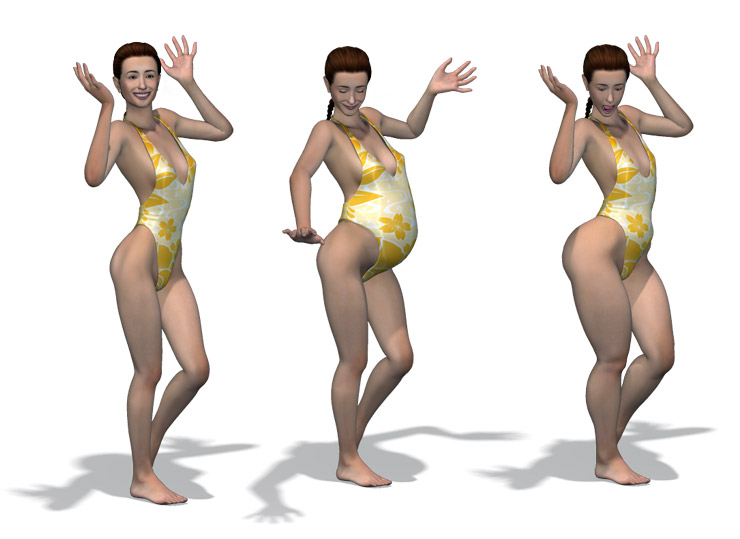
  • The idea is the rather than weighting mesh clothes against the avatar “skeletal frame”, the clothes are weighted against the “collision volumes” – these are (I gather) used to detect when your avatar collides with a physical object in-world, and thus are designed to morph when you adjust your avatar’s shape
  • The approach isn’t perfect and has a number of limitations (female clothing won’t stretch with breast size changes, for example); extreme sizes cause issues (as they do with the deformer); weight painting during the construction of mesh clothing can be somewhat more problematical
  • Alpha masks will still be required in certain situations (but then, alphas were never going away anyway).

The developer of the approach, RedPoly Inventor has released a demo version of the approach using a dress, which can obtained from his store. There is also a demo video on YouTube:

RedPoly is the first to admit the approach is not perfect, but has also proposed an additional idea of developing a further set of avatar “bones”, which he calls “cbones” that would allow this approach to work a lot better. According to Nalates’ report on the mesh meeting where this all came out, RedPoly believes the development of such a new system would be relatively simple.

Interestingly, according to AshaSekayi Ra, commenting in an SLU Forum discussion on this development, the idea of using the collision volumes  was first raised in the mesh beta last year and that Prep Linden requested samples of clothes rigged to the avatar’s collision volumes, but it is unclear what happened with any tests LL may have carried out.

Right now, this doesn’t mean the end of the deformer, nor does it mean all mesh clothing issues are solved. It does, however, open-up new avenues of exploration and certainly new topics for discussion on the matter.

Reading Nalates’ report, it would appear that the idea has taken LL themselves a little by surprise, despite the fact it may well have been previously discussed, and their reaction is potentially best described as cautious.

As it stands, mesh designers such as AshaSekayi Ra and Ellie Spot will doubtless be looking at the idea, as will those with expertise in the avatar design, as well (one would hope) LL themselves. As Nalates states, there will be further news emerging on this as tests are conducted and feedback given.

Related Links

With thanks to Nalates Urriah.

Advanced user experience tools griefing update

Oskar Linden has provided an update / post-mortem on the recent bout of griefing that took place across the grid as a result of person or persons unknown abusing the advanced user experience code that was released onto the Magnum Release Channel two weeks ago.

The problem hit on Monday 4th June when the advanced teleport functions released to Magnum were used to teleport individuals or groups around the grid, with some people reporting they were teleported to the likes of The Cornfield, while others found themselves unexpectedly picked up and dropped into stores or meetings.

Linden Lab reacted rapidly to the issue, determining a fix for the exploit on the afternoon of the 4th (SLT) and deployed across the entire grid in a rolling restart that affected the main channel and all release channels.

The key points relating to the issue remain:

  • The exploit came about due to a permissions restriction within the advanced tools not working as anticipated
  • To prevent further misuse of the code, the advanced tools were also removed from the Magnum RC channel
  • Both the code and the associated test plans have been revised and are being run through LL’s QA process to better ensure the situation of the 4th June is unlikely to be repeated when the code is rolled-out once more
  • Coyot Linden estimates that the advanced experience tools project has been delayed by around 2-3 weeks as a result of these events
  • LL are at this point in time unclear as to when the tools are likely to be rolled back out onto a Release Channel; the slot assigned to the tools on the Magnum RC has now been taken by other security issues in preparation for their roll-out to the grid.

One immediate outcome of the griefing situation is that the teleport capability has been revised so that when someone is teleported, the function will tell them the name of the owner of the object that teleported them (thus allowing any potential abuser of the system to be reported to LL via an Abuse Report).

With thanks to Nalates Urriah.

Genie out of the bottle: advanced tools capability used for griefing

Update 11th June: Oskar Linden has provided further feedback on this situation. 

Update June 6th: Oskar Linden has confirmed that the Advanced Creation Tools capabilities that were rolled-out to the Magnum RC channel will remain disabled until at least next week, although no firm decision has been on re-enabling them.

Update June 5th 11:30 UTC: The rolling restarts completed at 03:39 UTC. At present, no further updates have been given on the forum post relating to the restarts, but this may change later during the course of today. Oskar Linden has reiterated that due to this rolling restart, there will be no main channel deploy today and that details on Wednesday’s RC deploys are still TBA. My apologies for late timing of this update; a small matter of real life prevented me putting my nose in front of the keyboard any sooner!

Last week saw elements of the new Second Life Advanced Creator Tools rolled-out to the Magnum channel. As I reported at the time, the tools were issued without the new permissions system, but with safeguards that (it was hoped) would prevent misuse.

Today, however, a party or parties unknown started to use teleport functions of the new tools outside of the Magnum Release Channel as a means of griefing. People first became aware of the issue as individuals and groups started finding themselves randomly teleported around the grid, which sparked speculation on Twitter. Later, messages started circulating in-world among groups, outlining issues, such as this one, sent out to the NCI Citizens Helper Group (with thanks to Raylene Gothly)

Ok to everyone, there is something seems grid wide, we do not know if its a bad code in certain sims or if someone has found a way to teleport grief. But its happening all over, so I’m not sure. however I’d like to let everyone know we are aware of this. Suddenly you are just teleported away, best to log off and relog to get out of it, as it seems to continue to teleport you, I was teleported 3 times when I relogged… Dont be frightened it just seems to be a mess up.

The only regions unaffected by the griefing tool appear to have been those on the Magnum RC (where the new teleport functionality has safeguards) and those sims that had script capabilities disabled. Messages were thus circulated to land holders to disable scripting in their regions to avoid the issue, at least until Linden Lab responded to the situation.

Linden Lab themselves commenced efforts to stop the problem with emergency rolling restarts across the grid, announced via a Grid status update and a forum post:

To solve a security issue with the Experience Tools that were deployed to Magnum last week we are doing an emergency simulator rolling restart deploy. This has already begun.

Regions on the following channels will be restarted with the fixed code:

Main Channel
BlueSteel
LeTigre

Magnum will not be restarted because the issue is not possible in Magnum regions. We will have no rolling restart Tuesday morning. The Wednesday morning RC channels will roll at the usual time.

We apologize for any inconvenience and appreciate your understanding.

I’ll update here when further information is available.

Log-in splash images updated, WhatIs re-vamped and a call to video makers

As the new month arrives, Linden Lab appears to be kicking-off a number of outward initiatives.

Splash Screen Images Updated

First comes the latest set of secondlife.com splash screen images, which match the current masquerade banner theme on the SL Marketplace. This time there are three images in the set, which have been supplied by Strawberry Singh and Winter Jefferson, Whimsy Winx, and Sissy Scarborough and Mel Vanbeek respectively.

New secondlife.com splash screen image

Remember that in order to see the new images, you’ll need to log out of secondlife.com.

WhatIs Page Re-vamped

In keeping with the use of user-generated content, the What Is Second Life webpage has been given a revamp. For those unfamiliar with the WhatIs page, it has been the page that tries to explain Second Life (no easy task in and of itself), and is accessible from the link on the secondlife.com splash screen, or at http://secondlife.com/whatis/.

Previously, this page played host to the Linden Lab created video promoting Second Life:

In the new layout, WhatIs replaces the LL video with a selection of user-created videos intended to help showcase Second Life to the novice / potential user, complete with an additional JOIN NOW button that takes people to the sign-up page.

Also included is the What’s Hot section of the Destination Guide, while in the What Is section, there is a link that displays the most recent posts to the my.sl social feed (or if you are an existing user and already logged-in to secondlife.com, to your own my.sl feed page).

Part of the new WhatIs page

E-mail Campaign

LL look to be trying to improve their outward communications, with the launch of an e-mail campaign designed to encourage people to follow the Second.Life account on my.secondlife.com (my.sl for short). This account promises to be a provider of up-to-the minute news, etc., with the strapline: Be the first to know. Breaking SL News and More. Get the latest community updates, beta invites and more, without leaving Second Life!

This is interesting as it more-or-less amounts to the first “official” statement from Linden Lab on the subject of how to keep abreast of news from the company since Amanda Linden infamously announced the launch of the Lithium “Community Communications Platform” (which runs the current blogs and forums) – and then told users that to keep up with LL’s news on SL, they should go visit Facebook…

E-mail announcement

Continue reading “Log-in splash images updated, WhatIs re-vamped and a call to video makers”

Local Textures now part of the SL Viewer

Version 3.3.2.258114 of the official SL Viewer, released on May 29th, sees Local Textures officially reach the mainstream official Viewer. Previously, the option has only been available in Beta and Development releases of the Viewer.

Contributed by Vaalith Jinn, and an extension of his popular Bitmap Browser found in many  TPVs, Local Textures allows users to temporarily apply textures from their computer’s hard drive to their in-world objects, including the ability to apply skin and clothing textures to avatars. Such textures are not physically uploaded to the SL servers, but are accessed locally; as such, they only remain “active” for your current SL session, after which they must again be selected once more. In this, they are functionally similar to the Temporary Textures capabilities found in TPVs – but with some important differences.

I’ve covered Local Textures in detail already, and refer you to that post for an in-depth look at using the capability when building. However, it’s worth highlighting the key points here for reference:

  • Local Textures works both with applying textures to prims and to applying skins and clothes to avatars – so clothing / skin designers can test their work using the official Viewer in the same way as they can using Temporary Textures on popular TPVs
  • If you use a local graphics editor to make changes to a texture that has been applied within SL using Local Textures, any changes you save in the editor will be immediately applied to the texture in-world
  • Local Textures does not physically upload anything to the SL servers – this means that the results of anything you apply can only be seen in your own world view; anyone else will see an untextured surface in their Viewer; thus the option cannot be used to test textures in collaborative build projects
  • Local Textures does not “break” Temporary Textures in TPVs, and TPVs currently are not prevented from offering the Temporary Texture upload capability; as such, both options may be offered by TPVs (as is currently the case with the Dolphin Viewer
  • As noted in my previous article on Local Textures (linked to above), enhancements to SL may eventually break Temporary Textures at some point in the future, but this is currently far from clear.

Local Textures and Skins / Clothing

As I didn’t cover using Local Textures with clothing and skins in the previous article, here’s a brief summary:

  • Select Edit Appearance by right-clicking on your avatar or going to ME -> APPEARANCE.
  • Click on the cog button at the bottom of the floater.
    • For skin tests, select NEW BODY PART -> NEW SHAPE
    • For clothes, select NEW CLOTHES-> the require clothing item / layer
  • The desired editor will open.
  • Click on the texture box (for skins, click on the required body textures selection box).
  • The Texture Picker is displayed – click on the Local  radio button, and use ADD to local, select, apply the texture.
Selecting test skins using Local Textures

Again, the ability to make changes on-the-fly to applied textures and seeing the results immediately in-world, offers a powerful and unique capability to Local Textures that should assist creators and builders.

Related Links