AMD Catalyst™ drivers: additional Windows workaround

Update, March 21st: AMD have release a new set of Catalyst™ drivers, version 15.3 beta, which include a potential fix for the rigged mesh issues, negating the need for this workaround – see my notes here.

Update, Sunday, December 14th: user DMC Jurassic reports that the process outlined below can also be used with the OpenGL .DLL files from the AMD Catalyst 14.4 drivers. However, no ZIP file of the extracted DLLs are currently available, so Yoho’s notes at the end of the article will need to be followed to obtain them.

Also note that Singularity have issued a supplemental update to address mesh rendering issues.

On Tuesday, December 9th, I blogged about the continuing issues impacting  those with AMD GPUs using the latest Catalyst and Omega drivers.

Yoho Waco offers an AMD Catalyst driver workaround for Windows users

Second Life resident, and contributor to this blog, Yoho Waco offered a workaround to the problem for Windows users who would prefer to use the latest Catalyst drivers, rather than rolling back to an earlier version.

The workaround should fix the mesh rendering issue, and while Yoho uses Windows 7 64-bit, the basic approach should work with all flavours of support windows, 64-bit and 32-bit.

I can’t actually test it myself, as I use Nvidia, but feedback indicates it works well, and so with Yoho’s permission, I’m reprinting his instructions here so that it might get broader visibility.

As many have pointed out, the issue lies in the fact that the more recent Catalyst drivers use a late version of OpenGL that is supported by SL. This being the case, Yoho provides instruction on using an earlier version of OpenGL with the more recent drivers:

It seems that the problem is in the OpenGL version has the new driver 14.12.

AMD- Catalyst-1

I tried a small solution is to take the DLL’s from version 14.9 and place them inside the folder .\SecondLifeViewer

Above left: the .DLL files from Yoho's dropbox copied into the SL viewer's installation folder;  and above right, how they are reported by the viewer
Above left: the .DLL files from Yoho’s dropbox copied into the SL viewer’s installation folder; and above right, how they are reported by the viewer

It works perfectly, no problems or fall FPS.

Yoho provides the required files in a  ZIP file users can download – just copy them to your viewer’s installation folder, as he notes above.

Note that if you’re using a viewer other than the official SL viewer, you’ll need to drop the files into the relevant installation folder, rather than .\SecondLifeViewer (e.g. in the case of Windows 64-bit, instead of dropping the files into C:\Program Files\SecondLifeViewer, you would  place them in C:\Program Files\[name of your viewer]).

Commenting to me about the fix, Yoho said:

I had to install version 14.9 on my computer and search for the files inside C:\Windows\System & C:\Windows\System32. Once copied, I completely uninstalled the version of the Catalyst 14.9 drivers and reinstalled the new version 14.12 Omega drivers. I used and application called DDU, as  it is best to fully uninstall a driver to avoid conflicts. However, this is all very complicated, so I published my DLLs [in the dropbox link above] so users can access them and copy them to their viewer.

Do note that this workaround won’t solve the shadows issues which occur with the Catalyst 14.9.x drivers (see BUG-7947 and BUG-7627), however, Yoho informs me that when he has the time, he may try to see if he can use the OpenGL DLLs from the 14.4 drivers to see if they can be used in this approach to resolve issues, both with mesh rendering and with shadows.

In the meantime, those who would prefer to use the latest drivers and have tried this approach state it works, but as always, your mileage may vary, and the workaround is offered without liability or responsibility on either Yoho’s or my part.

My thanks to Yoho for his work in this and notifying me.
SL Project news week 50/2: viewer updates, no change window, misc news

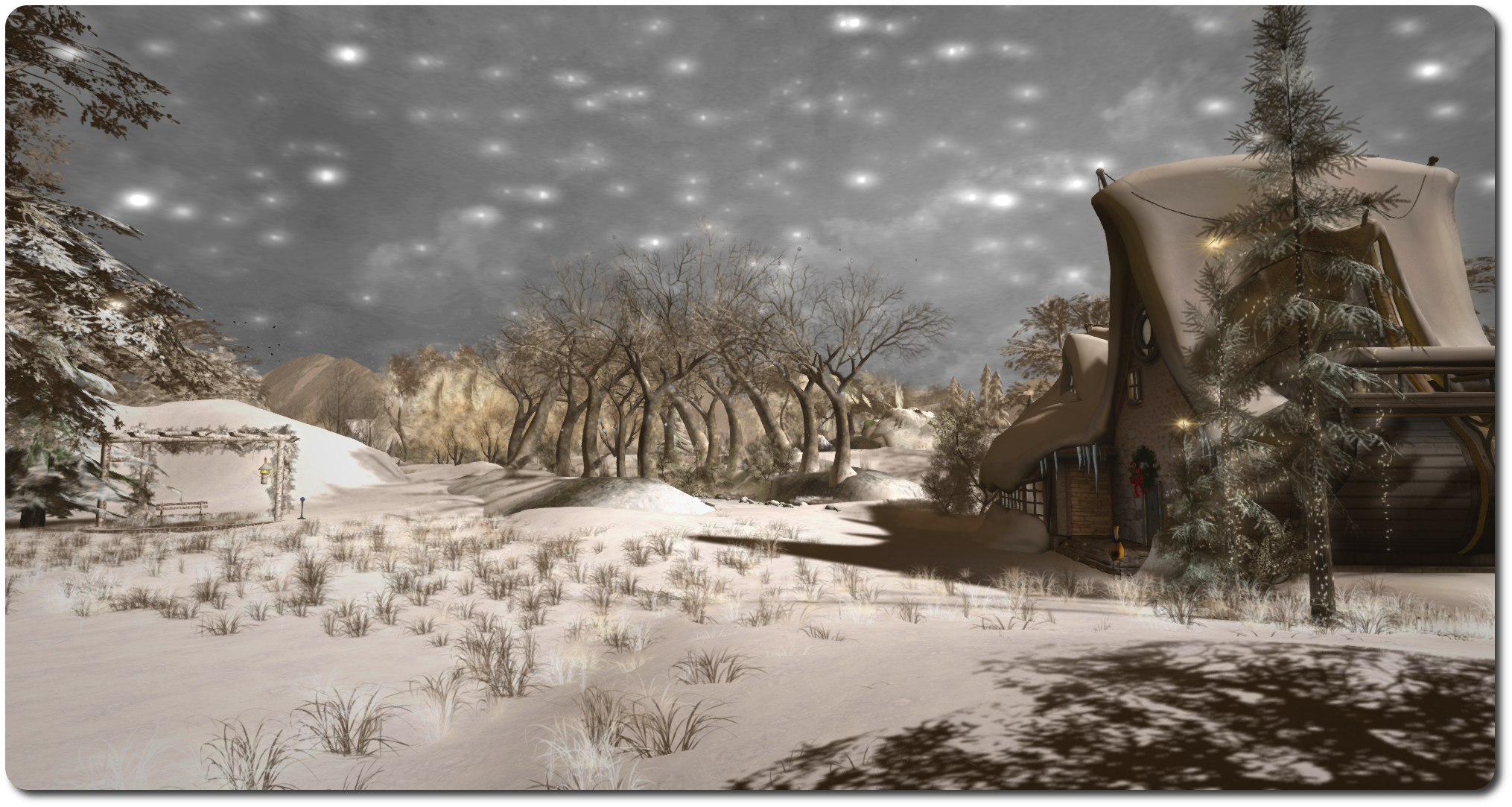
Let it snow! Isles of Lyonesse; Inara Pey, December 2014, on FlickrLet it Snow! Isles of Lyonesse (Flickr) – blog post

Server Deployments – Week 50 Recap

As always, please refer to the server deployment thread in the forums for the most recent news and updates.

On Tuesday, December 9th, the Main (SLS) channel was updated with the server maintenance package deployed to the three RC channels in week #49.

On Wednesday, December 10th, all three RC channels received a new server maintenance package primarily comprising fixes for Experience Keys / Tools issues.

Server Deployments and the no Change Window

Week #51 (commencing Monday, December 15th) marks the run-up to the Christmas / New Year holiday break.

While it is still subject to official confirmation, it looks likely that the server maintenance update deployed to the RC channels will be promoted to the Main (SLS) channel on Tuesday, December 16th. However, due to the no change (code freeze) window coming into effect for the holiday period, there is likely to be no updates made to the RC channels until normal operations are resumed in week #2 of January 2015.

SL Viewer

Wednesday, December 10th saw the to remaining release candidate viewers updated to match the most recent release viewer:

  • The Maintenance viewer RC updated to version 3.7.23.297296. This includes a broad range of fixes for for voice, rendering, avatar distortion, inventory, sounds, the viewer UI, and more, plus a series of fixes for avatar attachments
  • The HTTP Pipelining RC viewer updated to version 3.7.23.297272. This reduces pipelined texture and mesh fetching time-outs so that stalled connections fail quickly allowing earlier retry. The time-out value is changed from 150 seconds to 60 seconds.

It is likely that one of these two viewers will be promoted to the de facto release viewer in week #51, prior to the no change window coming into force for the holiday period.

All other official SL viewer versions remain as per my Current Viewer Releases page.

Other News

Map Tile Issues

Some people may have noticed that World Map tiles reverted to some very slow loading behaviour recently (after being shifted to the CDN for a faster delivery of tile textures to the viewer back when use of the CDN was first being rolled-out). The lag in tile rendering should now be fixed.

Group notices from Group “(none)”

There has been an intermittent and recurring problem with group notices being received with a group of “(none)” assigned to them. This has been ongoing for a while, and those affected by it can detect no discernible patten in how it occurs; just that once or twice a week, rather than a notice carrying the group name as a URI, it is received with “(none)” as a clickable (and unresolvable) link. Some reports suggest that people will receive perhaps two or three such notices in a row before they again start receiving notices with the proper group name.

The problem doesn’t appear to be endemic to any specific viewer, and can occur randomly with notices from any group. Due to its intermittent and random behaviour, it is hard to pin down a specific cause  – such as the viewer failing to resolve the associated group name. However, should you encounter the problem, please consider checking your viewer logs for any messages which appear to be associated with the problem, and raising a JIRA on the matter, appending said log entries.

Continue reading “SL Project news week 50/2: viewer updates, no change window, misc news”

Latest AMD Catalyst™14.12 drivers continue SL rigged mesh woes

Firestorm users: don’t miss my review of the 4.6.9 release.

Update, March 21st: AMD have release a new set of Catalyst™ drivers, version 15.3 beta, which include a potential fix for the rigged mesh issues – see my notes here.

Update, February 28th: Singularity have issued a supplemental update to address mesh rendering issues.

Update, December 13th: Yoho Waco offers a work-around for this problem – see his comment following his article. As an Nvidia user, I cannot test the workaround myself, but feedback indicates it works. I’ve also added Yoho’s workaround with additional information as an article in its own right.

Update: I have been informed (see the comment following this piece from JC de Bes, that this issue also extends to the most recent  Omega drivers release.

Whirly Fizzle dropped me a line concerning the latest AMD Catalyst™ drivers update, 14.12, which is apparently being pushed out by AMD via automatic update.

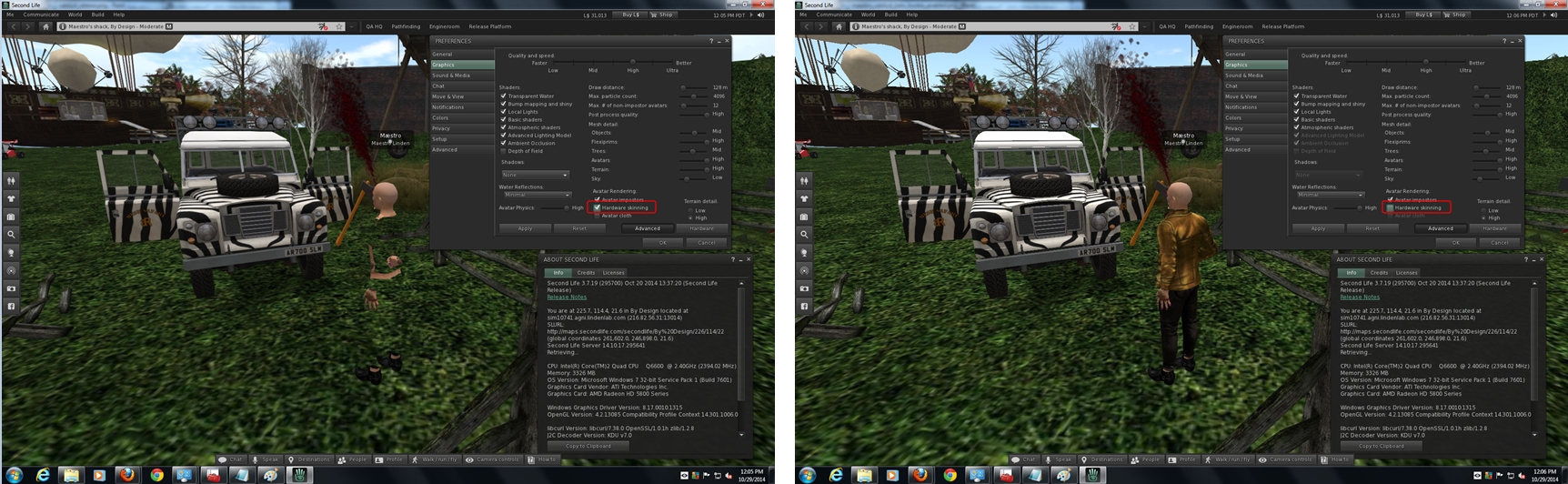
As those on systems using AMD graphics cards are likely to be aware, there have been ongoing issues with the Catalyst drivers which have impacted Second Life, notably with regards to rigged meshes which, since the deployment of the 14.9.2 drivers by AMD, cause rigged mesh to be invisible unless hardware skinning is disabled (see BUG-7653).

The 14.12 Catalyst™ drivers currently being deployed by AMD do not address this issue; worse, as it is being pushed via automatic update from AMD, it may see an increase in issues being experienced for anyone using an AMD GPU, regardless of the viewer they are using, and even if they have recently rolled back to an earlier version of the driver.

The latest AMD Catalyst™ 14.12 drivers currently being deployed via automatic update continue the issue of driver issue: with Hardware skinning enabled, rigged messhes will not render (l); disable it, and they'll render OK (r) - click for full size; image courtesy of Maestro Linden
The latest AMD Catalyst™ 14.12 drivers currently being deployed via automatic update continue the issue of rigged meshes being invisible with Hardware skinning enabled (l), but visible with it is disabled. Image courtesy of Maestro Linden

The two ways of dealing with the problem / avoiding it, are to:

  • Either turn off hardware skinning off in the viewer (Preferences > Graphics > uncheck Hardware skinning), which is hardly ideal, or
  • Roll back to pre-14.9.2 Catalyst drivers via the AMD download site. Those affected should consider using (at the latest in terms of release numbers) version 14.9.1 – but be aware this driver has issues of its own (see BUG-7947 and BUG-7627). Therefore, the 14.4 drivers might be a better option.

Uninstalling  the current AMD video drivers may be warranted prior to installing older drivers, and there is a request within the JIRA report linked-to above that those affected by the issue also raise a bug report directly with AMD to help bring this matter more to their attention.

SL project updates week 44/2: server, viewer, issues

Darkwood, for a Calas Galadhon Halloween
Darkwood, for a Calas Galadhon Halloween! (Blog post)

Server Deployments Week 44 – Recap

As always, please refer to the server deployment thread for the latest information and updates.

  • On Tuesday, October 28th, CDN support was deployed across the Main channel, meaning that the entire grid now utilises the Highwinds CDN for texture and mesh fetching. As the 130 regions deployed to the Snack channel were all originally from the Main channel, they have been reabsorbed into that channel, and Snack has once again be dissolved
  • On Wednesday, October 29th, all three RC channels received the same server maintenance project. which includes some minor improvements, which were described by Maestro Linden at the Server Beta meeting on Thursday, October 30th, as, “just some code cleanup and some extra optional debug logging.”

SL Viewer

On Wednesday, October 29th, the Lab promoted the HTTP Pipelining RC viewer (version 3.7.19.295700) to the de facto release viewer. As I’ve noted in previous blog posts, this viewer:

  • Can issue multiple asset fetches on a connection without waiting for responses to earlier requests. This reduces the impact of a user’s physical location on scene loading and generally improves the experience for everyone
  • Includes significant improvements to inventory folder and item fetches, which can markedly decrease the time taken for inventory to load.

All other SL viewer remain as per my Current Viewer Releases page.

Issues and Problems

Mesh Loading Issues

There have been mixed reports of mesh loading issues, which may or may be linked to some long-standing issues with mesh attachments. During the Server Beta meeting on Thursday, October 30th, the issues of mesh items which should be cached by the viewer being slow to load, don’t show up at all or show up with a low LOD, requiring a relog. Interestingly, the meshes can appear correctly when using one account, but not with another, either though both accounts are drawing from the same viewer cache.

Whirly Fizzle noted that there is a potential (and equally weird) fix for odd mesh loading issues, commenting:

There’s a weird mesh loading issue (not new) that’s “fixed” by deleting a certain per account file. I don’t even know why it should even work but it does. Sometimes a certain mesh gets stuck and will not render for a certain account. Relog doesn’t fix it & neither does a cache clear. You have to delete texture_list_last.xml in the per account settings files.

Texture Load Issues

There have been a couple of reports of texture loading issues which are still under investigation.

In the first, there have been  some reports that textures are getting stuck when “half loaded”, so that they remain blurred or may fail to render. It’s not clear how widespread this issue is, or whether it might be related to BUG-6382, although this is also unclear.

In the second, one content creator has reported customers are suddenly having issues with a HUD-based system for changing the colour of their shoes. When used, the textures rez very slowly, or the shoes get stuck as grey for up to 5 minutes at a time, or get stuck at a 1st level load until the wearer teleports or relogs. This is apparently a completely new behaviour with the shoes in question, and it appears to be exacerbated when using the HTTP viewer.

AMD Catalyst™ 14.9.2 Beta Woes

The latest AMD Catalyst™ 14.9.2 Beta drivers will not render rigged mesh unless hardware skinning is disabled. The current workaround is to either disable hardware skinning (which is not ideal when it comes to rendering mesh in general, and ALM features like materials will not render) or to remain on / roll-back to the 14.9.1 beta drivers if the problem is encountered. See BUG-7653. As was mentioned in the Server Beta UG meeting, this could be particularly confusing to new users running AMD GPUs and who are using the Lab’s default mesh avatars.

The latest AMD Catalyst™ 14.9.2 Beta driver issue: with Hardware skinning enabled, rigged messhes will not render (l); disable it, and they'll render OK (r) - click for full size; image courtesy of Maestro Linden
The latest AMD Catalyst™ 14.9.2 Beta driver issue: with Hardware skinning enabled, rigged meshes will not render (l); disable it, and they’ll render OK (r) – click for full size; image courtesy of Maestro Linden

E-mail Communications Issues for In-world Objects

A further JIRA has been filed in respect of e-mail communications with in-world objects hanging for no readily apparent reason (see: BUG-7554). similar issues have been reported in the past (although this one has a publicly viewable report), and Caleb Linden is currently poking at things.

Continue reading “SL project updates week 44/2: server, viewer, issues”

Poodle vulnerability: Lab issue RC viewer with browser fix

On Wednesday October 15th I blogged about the Lab having issued a Grid Status update warning, those who use the viewer’s built-in browser may not be able to access certain websites. The notice was issued by the Lab as a result of the Padding Oracle On Downgraded Legacy Encryption (Poodle) vulnerability reported by Google.

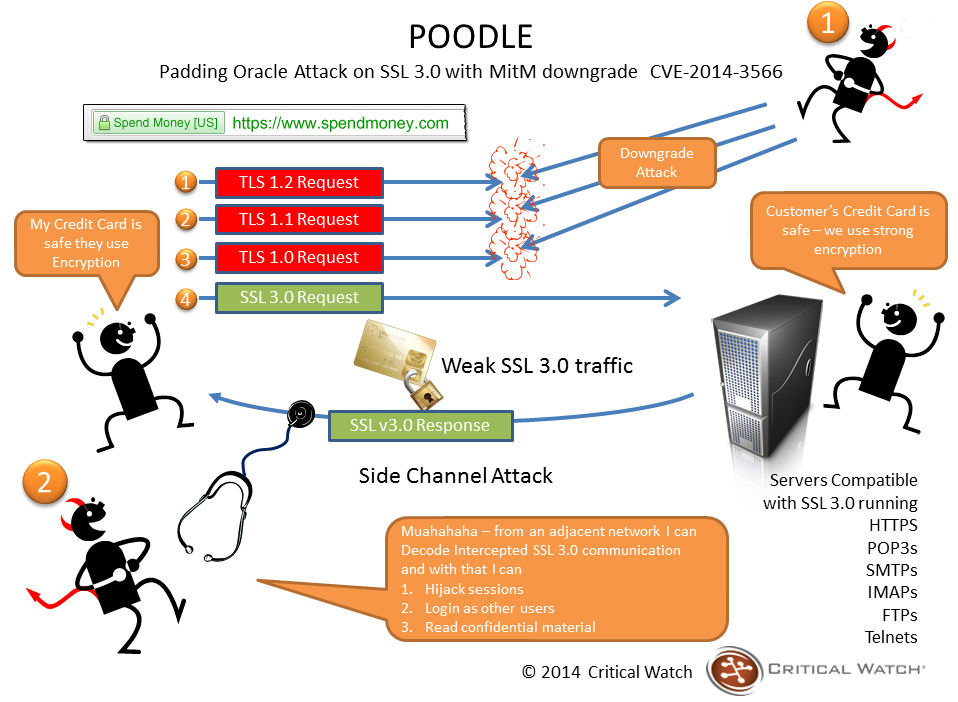
As noted in my original article, the Poodle vulnerability exploits a flaw in the design of the SSL 3.0 protocol, which despite being 18 years old, is used as a fallback security protocol within most browsers. By using a series of connection failures between a browser and website, an attacker can trigger what is called a “downgrade dance” where the browser eventually falls back to using the SSL 3.0 protocol to maintain communications. When this happens, the attacker can use the exploit within SSL 3.0 to grab sensitive data.

How a Poodle attack works (image courtesy of Critical Watch)

There are a couple of caveats to the vulnerability; for the attack to work, the attacker must be on the same wireless network as you or in the path of your communications (as shown above), and your client must be running JavaScript. However, it caused Google to issue an advisory that SSL 3.0 support is disabled or that tools that support TLS_FALLBACK_SCSV (Transport Layer Security Signalling Cipher Suite Value) are used be websites, which prevent the “downgrade dance” attacks. This prompted some websites to remove / disable SSL 3.0 support, which in turn resulted in some websites becoming inaccessible when using the viewer’s internal browser or browser-related services.

At the time the Grid Status update was issued, the Lab indicated they are working to fix the problem within the viewer’s browser capability. This has now been done, and release candidate version 3.7.18.295539 of the viewer, referred to as the “Browser Fix” viewer, removes SSL 3.0 usage from the viewer’s internal browser, allowing it to connect to sites which have disabled SSL 3.0 support.

If you do use the official viewer and prefer accessing websites using the internal browser, you may want to download this RC. For those not using the official viewer and who have experienced issues accessing websites through the viewer’s internal web browser, try switching to using an external browser to open web links (set via Preferences), as per the advice on the original Grid Status update from the Lab.

Related Links

Poodle vulnerability: Lab issue viewer browser notice

On Wednesday October 15th, and as a result of the Padding Oracle On Downgraded Legacy Encryption (Poodle) vulnerability reported by Google, the Lab issued a Grid Status update, warning those who use the viewer’s built-in browser may not be able to access certain websites.

The update from the Lab reads in part:

[Posted 12:15 PM PDT, 15 October 2014] Residents may be unable to open certain websites using the viewers internal browser. This is due to a security related change made by many web sites in response to a vulnerability announced today by Google.  This issue will affect Media-on-a-Prim for those sites, and will block initial setup of some SLShare accounts.

You may be able to access those sites by setting your viewer to use an external browser: go to Me/Preferences/Setup and check “Use my browser (Chrome, Firefox, IE) for all links.

We are aware of the issue and working on a fix.

Unlike recent security vulnerabilities, like Heartbleed, Poodle targets the client-end of things. It does this by exploiting a flaw in the design of SSL 3.0 protocol, which despite being 18 years old, is used as a fallback security protocol within most browsers, including Chrome, Firefox and Internet Explorer. However, there are a couple of caveats to its effectiveness: for the attack to work, the attacker must be on the same wireless network as you (or in the path of your communications), and your client must be running JavaScript.

Essentially what happens is that the attacker initiates a series of connection failures between the browser and website, which in turn trigger what is called a “downgrade dance” where the browser eventually falls back to using the SSL 3.0 protocol to maintain communications. The attacker then uses the vulnerability within SSL 3.0 to grab sensitive data.

Because of its nature, and the fact that certain requirements must be met (as noted above) in order for it to work, Poodle is regarded as less far-reaching than something like Heartbleed. However, it has prompted Google to issue an advisory that websites disable SSL 3.0 support or that tools that support TLS_FALLBACK_SCSV (Transport Layer Security Signalling Cipher Suite Value) are used which prevent the “downgrade dance” attacks on services that can trigger the vulnerability. Google have also stated they plan to scrub SSL 3.0 support from its Chrome browser, and Mozilla are going to do the same with Firefox.

Related Links