SL Go: OnLive announce teleport issue fixed for users of SLV

SL go logoImportant note: The SL Go service is to be shut down on April 30th, 2015. For more information, please read this report.

OnLive, the company providing the SL Go service, announced on Tuesday, February 3rd, that they had implemented a fix for the issue that prevented users of their SLV version of the viewer (the version based on the Lab’s code) teleporting anywhere when using SL Go.

As I reported on January 30th, because of the frustration the problem was causing, OnLive extended a free month’s use of the SL Go service for all users with an active subscription.

The news the the fix had been made broke on the SL Go support group when Dennis Harper, OnLive’s SL Go Product Manager announced, “I’d like to announce:  THE SLV TELEPORT ISSUE IS FIXED AND LIVE ON  PRODUCTION!”

The problem initially started around week 3, with a handful of users initially reporting problems in teleporting, but only when using SLV  – the version of Firestorm running on SL Go was unaffected. However, this gradually spread until anyone using SLV could not teleport.

By Friday, January 30th, the Lab had traced the issue down to something going wrong within the handshaking between the two simulators involved in a teleport attempt, although at that stage, what was initially triggering the problem had yet to be determined.

Further investigation revealed that a recent server-side update involving a cleaning-up of the code related to how avatars are handled during region crossings (see my week 3/1 SL project update) has triggered the issue. Essentially, the update removed the ability to have a single quote (“‘”) in the viewer’s channel name. Unfortunately, the channel used with SLV had been called “‘Onlive”, and the presence of the quote lead to teleports failing.

Once the problem had been identified, OnLive were able to make a small change to the SLV viewer via a command line change, and after some extended testing, were able to deploy that change to the production SL Go service.

As a result, any users employing the SLV viewer on SL Go (whether via computer, iPad or Android tablet)  should find teleports are once again working as soon as the log-in to the service; there is no requirement to re-download the SL Go client or anything.

I’ll have more news from OnLive ans SL Go coming later in the week.

OnLive offers SL Go users with an active subscription a free month

SL go logoImportant note: The SL Go service is to be shut down on April 30th, 2015. For more information, please read this report.

If you’re an SL Go user, you’ve probably already seen the e-mail, but just in case you haven’t…

The company has been writing to all SL Go users to let them know that an issue in the SL Go Second Life Viewer (SLV) currently prevents teleporting (although the problem doesn’t affect the Firestorm viewer on SL Go). “SLV had been running fine for months,” SL Go Product Manager Dennis Harper informed me. “Then all of a sudden… people can’t TP!”

Why this should have happened is unclear. Nothing has been changed at OnLive’s end to cause the problem, and while the Lab has also been involved in investigations, no reason or solution has yet been determined.

As a result, OnLive pro-actively sought to contact all users with an active subscription and offer them a free month’s subscription to the service, as noted in the official e-mail, which reads in part:

We understand your frustration and apologize for the inconvenience. We will give all SL Go subscribers a free month of SL Go to make up for time lost. The next time your subscription renews, you will not be charged.
Our goal is to continuously improve the SL Go experience. We are committed to our community in Second Life and hope that you will continue to enjoy the benefits of SL Go.

Note that the offer applies to all SL Go users with an active subscription at the time the e-mail was sent, regardless of whether you prefer to use the SL Viewer or Firestorm with the service – so while the teleport issue may be a nuisance, there is something of a silver lining to the problem, thanks to OnLive’s commitment to their users.

There’s also further good news on the horizon. Not only are OnLive working as hard as possible with the Lab to fix the issue, they’re also in the process of preparing to update the SL Viewer to the most recent viewer code released by the Lab. No date is yet available for when the update will occur (as OnLive understandably want to get the current problem fixed first), but Dennis assures me they’re keen to see it deployed – I’ll hopefully have more on this in the near future.

About SL Go

SL Go is a streaming service provided to Second life users by OnLive. A subscription-based service providing the means to access Second Life from a low-end PC or Mac computer,  or via and Android tablet or an iPad with the full graphical riches of a Second life viewer running on a high-end computer. In addition, Firestorm for SL Go (currently only available for PCs and Macs) allows the same degree of rich graphics access to OpenSim grids.

If you have a need to access Second Life while away from your main computer, or if you have a low-end system on which you might like to run Second Life with all of its graphical richness, SL Go might well be worth a look. To find out more, and take a free 7-day trial with the service, follow this link.

If you already have an SL Go account, don’t forget use can also get information through the in-world SL Go support group (profile link) in Second Life.

Addendum on the Issue: At the TPV Developer meeting on Friday, January 30th, Oz Linden confirmed that as a part of on-going investigations, the Lab’s QA team have turned up the logging and have been testing the service themselves in order to generate stats on the failures.

They believe they have found the point where things go “really wrong”, which lies within the handshaking between the two simulators involved in the teleport attempt. However, what remains unknown is precisely what is going wrong between the SL Go SLV, and the simulators in order for the simulator / simulator messaging to go so wrong. OnLive’s engineers are also trying to isolate any possible cause for the issue (which does not affect users running Firestorm on SL Go) as well.  

OnLive launch in-world support group for SL Go

SL go logoImportant note: The SL Go service is to be shut down on April 30th, 2015. For more information, please read this report.

OnLive, the providers of the Second Life streaming service, SL Go, which allows users to run Second Life from a low-end PC or Mac or and Android tablet or iPad (using a TPV based on the official SL viewer) or on a low-end PC or Mac using a version of the Firestorm Viewer, have launched an in-world support group for their users.

The idea for such a group was first discussed at the special Firestorm Q&A meeting held in December 2014 following the release of  Firestorm on SL Go (see my review of Firestorm on SL Go here). At the time, Dennis Harper, OnLive’s Product Manager for SL Go. indicated the idea was a good one, which he would follow-up back at the office.

On Friday, January 16th, Dennis contacted me in-world during the Third-Party Developer Meeting to let me know the group is now up and running, and open to anyone to join.

The SL Go Support Group is intended to provide in-world support for users of the service

If you are an SL Go user, and which to join the group, you will find it listed as SL Go by OnLive using the viewer’s search, or you can view the web profile for the group. A number of Firestorm support staff are helping with providing cover within the group, so enquiries on either the SL Go SL Viewer (SLV) and Firestorm for SL Go viewers can be asked through it.

In passing the details to me, Dennis said, “It’s been quite a ride for us since the Firestorm release, and we’re very pleased to be able to offer in-world support to our users as a part of our growing commitment to Second Life.”

SL Go: Drax says, “go places!”

Important note: The SL Go service is to be shut down on April 30th, 2015. For more information, please read this report.

Draxtor has been working on a promo video for SL Go on the iPad. It’s a fun piece.


OnLive issue SL Go iPad rotation fix

SL go logoImportant note: The SL Go service is to be shut down on April 30th, 2015. For more information, please read this report.

As I (among others) reported on Tuesday, October 14th, OnLive released a version of their SL Go service for the iPad.

At the time of the release, there was an unexpected rotation issue which meant that the screen orientation was locked in one horizontal orientation – if you flipped the iPad around, the screen would appear upside down, although the input areas might actually flip with the screen but still be displayed as if they were upside down.

This was a particular nuisance for people using a bluetooth keyboard or docking station with their iPad, as it meant the viewer would be displayed upside down when docked with either.

On Friday, October 24th, Dennis Harper from OnLive dropped me a note to inform me that this rotation issue has now been corrected, The app should update for those who already have it, and the fix is now a part of all downloads obtained via the Apple iTunes store.

SL Go on the iPad: rotation bug now fixed

OnLive Brings Second Life to the iPad with SL Go for iOS

SL go logoImportant note: The SL Go service is to be shut down on April 30th, 2015. For more information, please read this report.

On Tuesday, October 14th, 2014 OnLive, the company behind the revolutionary SL Go service which streams the SL viewer and  SL content directly to the user’s computer or hand-held device, announced the product is now available for iOS on the iPad.

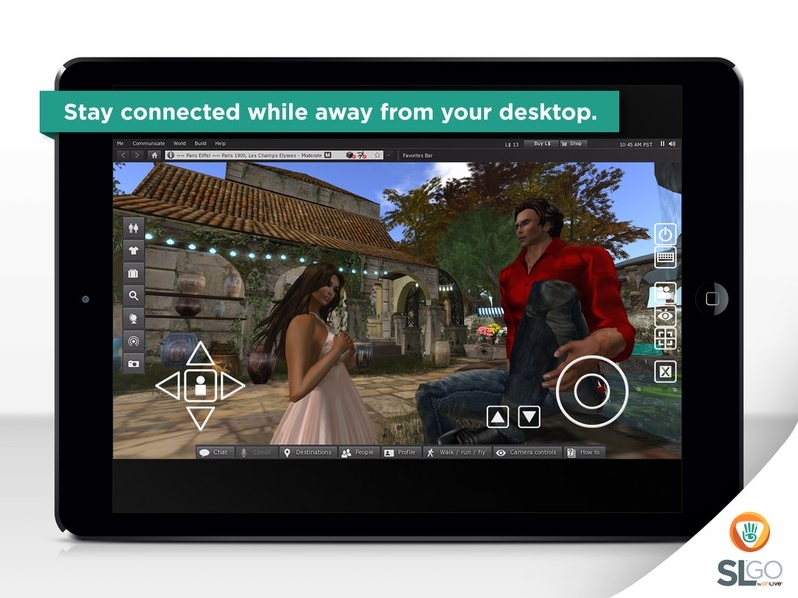
Until now, the application has only been available for the Android mobile device platform, although OnLive have been working towards a release for iOS for some time. Now, the application’s arrival for the iPad brings with it the ability for iPad users to access Second Life with the full graphical richness of the SL viewer when on the move.

OnLive bring SL Go to the iPad (image courtesy of OnLive)

The press release announcing the launch reads in part:

OnLive, the leader in cloud gaming, today announced the release of SL® Go for iOS, a mobile viewer for Linden Lab’s Second Life® virtual world that extends the player’s Second Life experience to iPad® tablets for the first time. The touch-enabled app builds on SL® Go for Android™, which launched in spring of this year.

 SL Go empowers Second Life residents to experience Second Life in full 3D and in real-time on any iPad running iOS 7 or greater, without the need for an expensive desktop computer. New and existing users can simply sign in over Wi-Fi or 4G LTE to enjoy a high-fidelity Second Life experience with amazing graphics quality, full shaders, shadows and full motion capability. Streamed from OnLive’s powerful cloud-based servers, which have been clocked at speeds as high as 200 FPS set to Ultra with Maximum Render Distance, each secure Second Life session enables users to rez quickly into their favorite sims to connect with in-world friends,participate in events, engage in combat games, and enjoy immersion in Second Life at a level never before possible on iPad tablets.

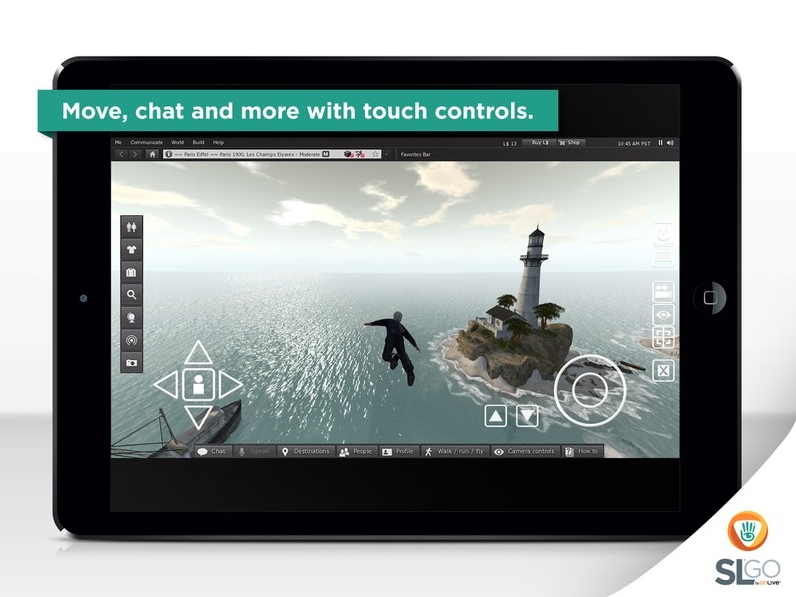
 SL Go offers access to the full Second Life Viewer interface, including edit menus, inventory, preference settings and chat management, adding intuitive touch controls. All user customizations are saved from session to session, even if played on a completely different device or platform.Design a beautiful scene using SL Go on your Mac or PC, and then show it off to friends on iPad. Your world transfers seamlessly, making it mind-blowingly easy to stay connected with in-world events.

“Ever since we launched SL Go for Android™, the Second Life community has been clamoring for iOS compatibility,” said Rick Sanchez, VP of Product and Marketing at OnLive. “Now, residents can keep Second Life at their fingertips whether they’re at work, home, out with friends or traveling for the holidays. And with the iPad’s stunning Retina display, the Second Life world is beautifully rendered with breathtaking 3D graphics.”

SL Go on the iPad (image courtesy of OnLive)

Drax has produced a video to mark the iPad launch as well.

About OnLive

OnLive is the originator of fast-twitch cloud gaming, innovating the delivery of real-time interactive experiences over any network. With ground-breaking video compression technology, OnLive instantly delivers full-featured, media-rich applications anytime and anywhere, across a range of devices. The OnLive Game Service gives gamers the freedom to play their games on PCs, Macs, tablets, and HDTVs. OnLive Go brings the benefits of cloud gaming to MMOs, virtual worlds and other graphics-rich interactive applications. Having pioneered powerful cloud solutions for the most technologically challenging segment, fast-twitch AAA games, OnLive has hundreds of patents that cover its innovations. The company is headquartered in Mountain View, California. More information is available at www.onlive.com and www.onlive.co.uk.