Web Profiles: Major updates ahead

I actually started writing this post back last week, but abandoned it for lack of in-depth information as to whether we were seeing something new or something abandoned that had accidentally resurfaced. However, after attending today’s mysecondlife.com User Group meeting, I’m now more confident in going to press – even if the news is now rather old!

Essentially, in the next few weeks our web profiles will be turning a lot more “social” in their look, feel and capabilities. With the “new” Profiles, people will be able to:

  • Link more closely to any other social networking identities they may have & which they wish to connect to their SL identity (e.g. Twitter, Plurk, Facebook, etc.)
  • Allow people to comment on their own and other profiles (subject to permissions being set) in a Twitter-like manner
  • Manage their Friends and Group lists through the web profile as well as in-world
  • Upload snapshots directly to their web profile.

Some of these changes can already be seen on my-demo.secondlife.com, although the more recent code updates appear to be only available if you actually physically log-in to the Beta grid and use the new profiles through the in-viewer browser.

Several of the new features look to be well-considered and have been much-requested: the ability to manage Friends lists for example. Others are likely to prove more questionable among the masses – and indeed are already generating concerns.

Feed option
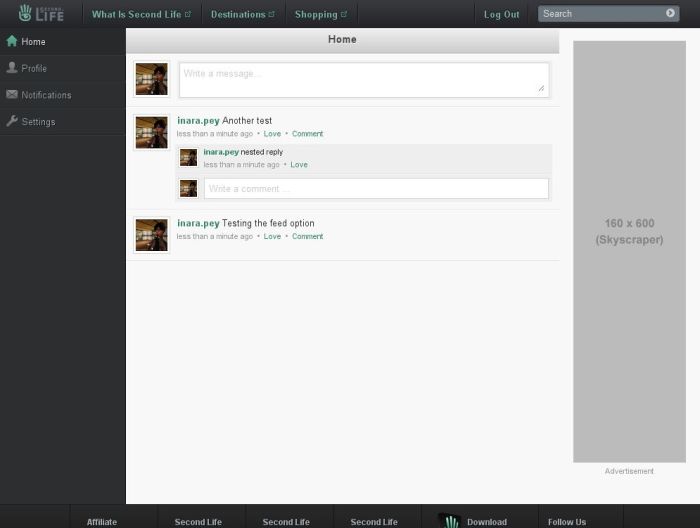
The Feed Option

The Feed option is most analogous to Twitter in many respects. Essentially it allows those to whom you give permission (defined as a Friends only, or anyone in SL or anyone coming across your profile while browsing the web) to leave a comment on your profile. Replies to comments can also be made – as shown in the example above.

This has already given rise to concerns about spammers abusing the system and people finding their feeds filled up with ads for tat, tosh and trinkets. However, this can be mitigated against by adjusting the privacy settings for the Feed option (setting it to just “Friends” – which really, it should be by default).

Another concern with the Feed is that if it is used via the in-viewer browser and Viewer 2 / a V2 TPV, your in-world location is automatically appended to the message you send out. This is something that did not prove to be popular among those attending the my.secondlife.com user group meeting today, doubly so when it became apparent that the option to transmit your location is opt-out, rather than opt-in, and that there is currently no blanket opt-out option: you must do so message by message. However, Fredrik and Teddy Linden, attending the meeting on LL’s behalf, appeared to take concerns about the opt-out rather than opt-in situation on-board, with Fredrik commenting:

[11:41] Frederico (fredrik.linden): again, we want to help people socialize and stay up to date with what’s happening in Second Life. Location does that, and we want to push it. we’ll be sure to tweak the opt in/out before we go live to agni

Given that people will be able to comment on your profile, the new system includes options to notify you when someone does so – you can elect to be notified in-world and/or via e-mail and these options can also be set should someone comment after you or comments on a message you leave on another person’s profile.

Faster, smaller, neater
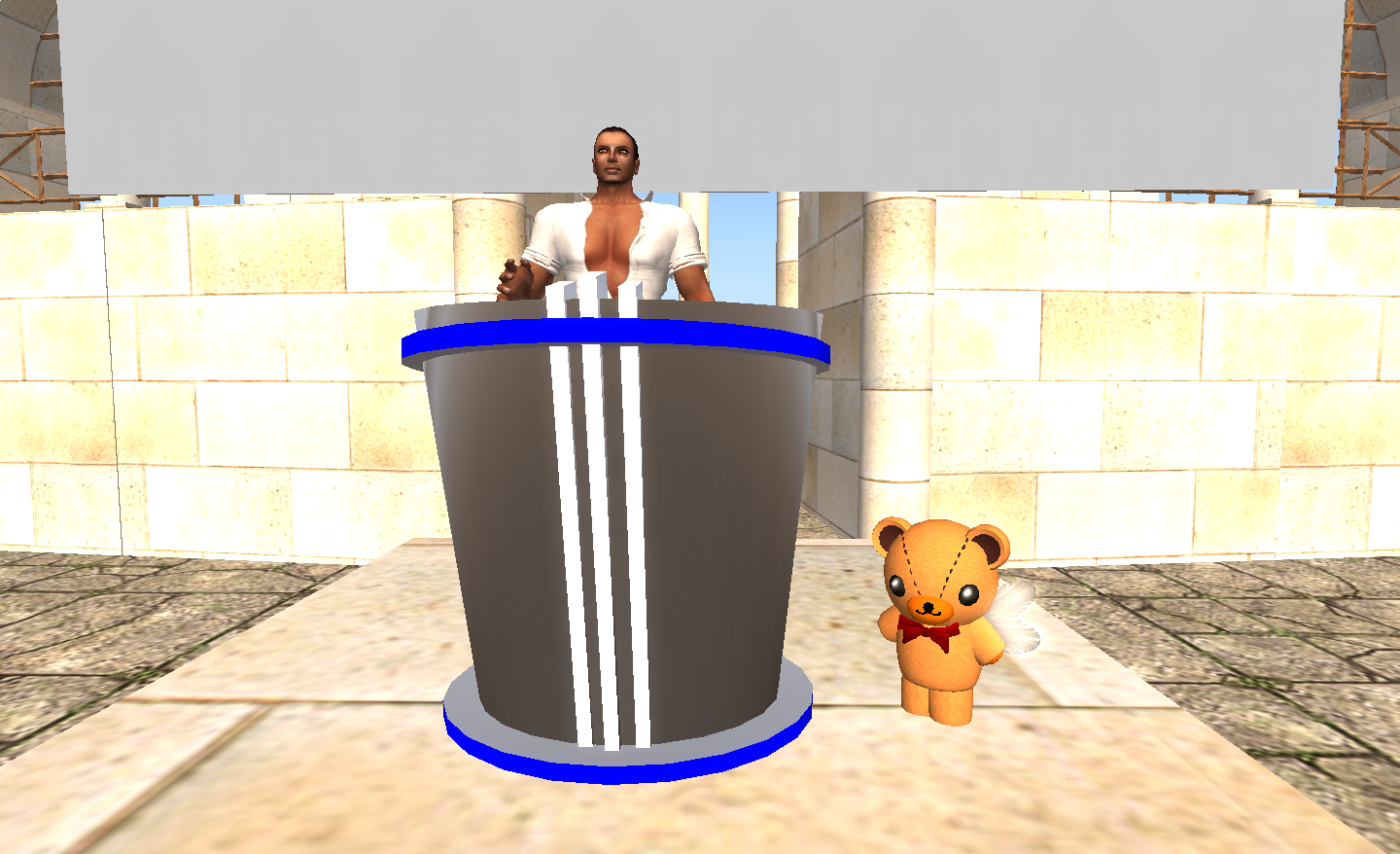
Fredrik (left) and Teddy Linden at the my.secondlife.com User Group meeting

A repeated complaint about the web profiles, and I’m as responsible as anyone here, is that they a) take far too much time to load when using the in-world browser (4 seconds on average for me – others have reported up to 10 seconds on busy regions) and b) they take up far too much screen real estate. Again, LL appear to be listening to these concerns, with both Teddy and Fredrik giving assurances that the “new” profiles will be faster on loading and “more integrated” into the Viewer.

The new profiles are not ready for prime-time as yet: the data used at my-demo.secondlife.com is from the Beta grid, and thus is very stale for many users (other than those who routinely spend a good deal of time logged-in to it). More work is required on various aspects of the new look – and both Fredrik and Teddy seemed keen to take on board as much feedback from the UG meeting as they could – presumably so that it could be fed-in to the development process in the lead-up to the release some time in the next few weeks.

Right now it is unclear (at least to me) as to which page / tab will be the item others see when looking at your profile; “Home” would appear to be the obvious choice, but given this is essentially a blank page with a feed box in it, it would appear somewhat redundant. The ABOUT tab appears more informative – and it is actually hard to understand why this isn’t, by default, the “home” page for a profile.
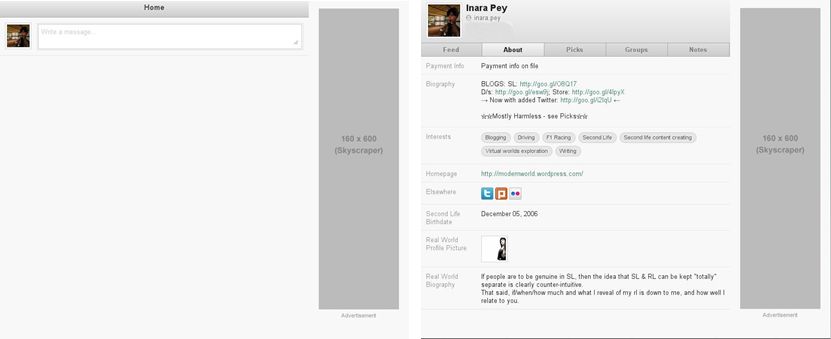
Home page (l) and About tab

Overall, the new-look profiles offer much of promise and provide a set of potentially useful social networking options. A part of me wonders as to how effectively they will be used, however – those that want to extend some of their SL contacts and activities into the “pure” social networking space are probably already at home with the likes of Plurk and Twitter, and may not be overly attracted to the new profiles unless deeper integration with their preferred communications medium are available, or all their existing contacts can be persuaded to swap over or get involved. For many SL users however, there is a risk that these additional bits and pieces will be at best ignored, as they don’t have any place in their in-world lives, or at worst seen as a complete distraction.

For my part, I do find it hard to believe that things like the Feed will do much to pull me away from Twitter (and to a lesser extent, as I don’t use it so much, Plurk) – it simply isn’t as convenient a tool to use. However, I do like other aspects of the new profiles; overall the new tabbed approach is a lot cleaner and easier to grasp. I also look forward to seeing just how LL tweak the profiles for “better integration” with the Viewer as a whole.

I’m also curious as to how the Firestorm team will respond to these changes – if at all. Currently, Firestorm takes profile information and displays it in a Viewer 1-style window within the browser. This actually works a lot better than the in-browser approach – but will it be able to display all the new widgets and options, or will Jessica and the team opt to leave that to using web profiles through the in-viewer browser.
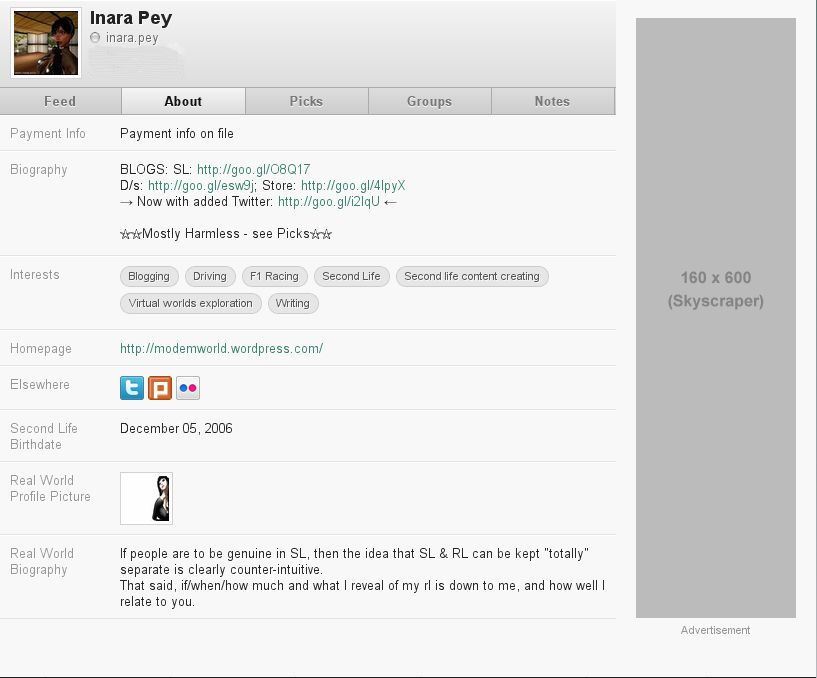
My Profile in my-demo.secondlife.com

Web Profiles – privacy leak?

Tateru Nino posts on a privacy issues surrounding SL web Profiles – or more particularly, the “old” profile API utilised by 1.x Viewers and the likes of Firestorm.

Although there is an issue here, I’m not entirely with her on her take on the situation, or in the options she provides as potential solutions.

Essentially, the problem lies in the fact that people seem to be under the impression that setting the privacy options on a web Profile via my.secondlife.com will “hide” the selected parts of the Profile from being viewed in-world. For example: if Groups to be viewed by Friends in my.secondlife.com, people take it to mean only Friends can view the Groups information when viewing the Profile in-world.

While this is the case for those people using the official Viewer 2, it is not true for anyone using 1.x-based Viewers or some TPVs based on Viewer 2. For these people, your entire Profile remains fully visible, regardless of the Privacy settings active on mt.secondlife.com.

This is because 1.x-based Viewers (and Viewers such as Firestorm) use the “old” 1.x Profile API, which has no privacy settings associated with it, and it simply doesn’t care what has been set via my.secondlife.com.

As such, and while acknowledging the situation, I’m hard-pressed to call it a “privacy” issue in its truest sense; the behaviour exhibited by the API is exactly what it has always been – no more, no less. In that regard, it’s certainly incorrect to describe the resultant situation as a bug with the 1.x Profile API.

Rather than being a matter of “privacy” with regards what is viewable on Profiles in-world, I’d actually suggest that this problem is actually an unfortunate outcome of another poorly worded communique from Linden Lab coupled with taking the “easiest” route to providing a solution.

Let’s put matters in perspective. The privacy settings on my.secondlife.com came about not to limit the viewability of Profiles in-world, but rather to address users’ concerns that my.secondlife.com initially made it far too easy for non-SL users casually browsing the web to see people’s avatar Profiles. Unfortunately, when LL moved to fix the matter (and very clumsily so, in the first pass), Q Linden issued a blog post that unintentionally linked the web aspects of privacy with the in-world viewing of Profiles; something that was possibly exacerbated by the clumsy manner in which “privacy” was first invoked.   As a result, some people have become confused.

Unless LL unequivocally state it is their intention to enable the blocking of certain parts of a person’s Profile from in-world viewing (and there are actually valid arguments for this), then I’d dispute Tateru’s view on how to resolve this matter.

Far from there only being two options open to LL (backport the privacy controls to the 1.x API or to shut down that API entirely), there is actually a third. It’s this: add the necessary clarification to the privacy settings page on my.secondlife.com. It’s around 10-15 minutes work at most. The wording itself is pretty simple:

“Please note: These privacy settings apply to how your profile is seen at my.secondlife.com or by residents using the official Viewer 2. Residents using older Viewers and third-party Viewers may be able to see your full profile in-world, regardless of the settings made here. Please ensure you only supply information you wish to be made “public” within Second Life, and ensure your profile remains within our Community Standards guidelines.”

Going social: increasing the relevancy of web Profiles?

According to Frederick Linden, we’re about to see a series of “cool social tools” and a web Profile tools released over summer (and possibly beyond) that will enhance “social networking” capabilities within Second Life.

Precisely what is coming down the line is unclear – Frederick was somewhat vague in the meeting where these tools were mentioned. However it would appear that we can expect:

  • The ability to manage Friends lists directly from web profiles (found at my.secondlife.com/first.last)
  • An ability to issue in-world, location-based status updates” from Second Life to your web profile
  • The development of a “Profile API” that will enable the functionality of web Profiles to be more easily extended in the future
  • Other undefined “cool tools”.

The first three items are particularly intriguing, and may potentially add a lot of benefits to using web-based profiles. The “location-based status updates” is somewhat eye-catching, as it comes close to describing a Twitter-like feed capability from in-world to people’s Profile pages – assuming I’m understanding Frederick’s broad hints correctly. Given that many of the SL-to-Twitter HUDs that are available have been broken as a result of changes to the server-side of Twitter, the provision of such an update capability might be seen by LL as a means of providing a reasonable alternative – although most people who use Twitter (like me) will probably want a more direct means of updating followers and friends as to what they are doing in-world.

The ability to manage Friends could be seen a boon as well – while it is nice to see your friends listed on your Dashboard, the fact that there is next to nothing you can do with the information (other than see where those who allow you Map might be in-world) tends to negate any real value in having the list visible.

However, given there is already an Action button on web Profiles, were the new API and Friends management tools to allow you to say, pay a Friend directly from your web Profile or IM them, then the value of web Profiles dramatically increases and would help them overshadow the static list presented in the Dashboard.

In fact, looking at the rough outline supplied by Frederick, one cannot help but wonder if we might not be seeing the first steps towards doing away with the Dashboard completely (which has become increasingly irrelevant since the launch of the Lithium-based Community Platform) and replacing it with our web Profile pages. Providing feeds to things like the Grid Status pages and to Events can be supplied the web Profiles, then the Dashboard becomes somewhat redundant.

Certainly, we’ve recently seen LL move positively to address privacy concerns surrounding web Profiles, actions which have clearly been intended to allay fears and increase the popularity of web Profiles. As such, making them more central to our SL lives would seem to be a direction LL would wish to move, and this would further marginalise the value of the Dashboard.

It’s going to be interesting to see what precisely emerges from Frederick’s broad hints in the coming months – and just how far things go in the other direction (an API can, after all, open up web Profiles for others to use…and possibly mine…). As such, this could well be the topic to watch between now and the end of the year.

Web Profiles – a further look

Over the last couple of months the layout of web Profile pages has undergone a series of progressive enhancements. As it has been a while since I’d last looked at web Profiles, I thought a little update was in order, particularly given the most recent change to Privacy Settings, which has come out entirely unannounced by LL.

The first noticeable revision is the provision of a new drop-down list of options that can be accessed by clicking on the down-pointing chevron next to your name at the top right of the Profile page.

Clicking on this displays a drop-down list of options, namely: EDIT PROFILE, PRIVACY SETTINGS and LOG OUT. Clicking on either of the first two options will automatically open your Profile / settings for update, regardless of whose Profile you are actually viewing.

Defining your reach

An issue with earlier iterations of the Web Profiles was that they carried all information about your avatar out into the web. This generated a lot of criticism from users, some of which was valid. While options were later added to limit how far real world and other information in a Profile could be broadcast, it was impossible to disable or stop the About Me section of a web Profile being visible from across the web without it vanishing from Viewer 2’s in-world search, effectively making you a non-person, Profiles-wise.

This has now been rectified. A new option has been added to the Privacy Settings, which defines who can see the About Me section of your Profile page.

As with earlier iterations of the web Profiles, the options for defining how widely the various sections of your Profile can be seen are:

  • Everyone: the information is available to the whole Internet and can be picked up by search engines
  • Second Life: the information is available to all Second Life residents who are logged in to the website or in-world
  • Friends: only your Second Life friends can see the information.

Setting all of the Privacy options to Second Life / Friends means that anyone casually browsing the web (via search or whatever) who comes by your Profile will only see the top section of your Profile page – name, rezdate, etc., together with a button to join Second Life. This should be ample to allay the worries people had about having their Profile information broadcast across the web, and it means that even if access is restricted to Second Life or Friends, a profile won’t completely vanish from Viewer 2.

Social media connections

A further nice addition to web Profiles that I’ve not looked at previously is the ability to connect SL Profiles to other social media accounts (FaceBook, Twitter, LinkedIn, Flickr and YouTube) should someone wish to do so. A drop-down list of available options is located towards the bottom of the Profile page when in Edit mode, under the title Social Identities.

To use it, click on the arrow and display a drop-down list of networks and click on the the one to which you wish to connect and follow any on-screen prompts or requests. Repeat for any other accounts to which you wish to links – and don’t forget to click SAVE when you have finished.

Each social media network added to your profile will be displayed in the edit screen directly below the drop-down list, together with an option to remove it later, should you wish.

Once saved, your various social media connections will be shown in the middle column of your Profile’s Second Life tab, in a field entitled Elsewhere. This will be directly under your Picks and / or Group listings, assuming these are visible to people perusing your Profile.

Worthwhile enhancements

These updates are likely to prove popular among users, providing as they do greater control and flexibility over how the web Profiles can be used.

While there are still issues with the web system that need to be examined and resolved – including load times and the loss of data entered into Profiles – which tend to impact the effectiveness of web Profiles, these new changes demonstrate that LL are listening and making changes in response to user requests, as well as providing greater choice as to what can be done with web Profiles. Both of these points are to their credit.

If there is anything upsetting about these new enhancements, it is in the fact that once again, LL have made no announcements concerning them; I only found out about the Privacy Setting changes from Ann OToole. Given the amount of concern previously expressed by users on this particular issue, this has to rate as another mark-down in LL’s ability to communicate, and shows (again) the Lab has a lot of ground to make up where keeping its user base informed is concerned.

Improvements to Web Profiles

Q Linden has posted about Viewer 2.5 going live, and in particular brings up the subject of web-based Profiles.

The introduction of web profiles has caused a lot of consternation, not least because of the inclusion of Facebook and Twitter buttons. For myself, I actually rather like the approach in general: being able to edit my Profile from the web, rather than having to log-into SL is a useful feature. The moving Profiles to this format reduces asset server loads is also no bad thing (assuming it does).

However, privacy has been a thorny issue for some – and not just because of the aforementioned buttons. Many kicked back against the idea that their Profile, far from being nice and secluded inside Second Life, would now be viewable by anyone on the Web. Protests were written  – Linden Lab read them and listened.

Firstly, they made the Facebook and Twitter buttons optional – but only if you opt not to have your Profile searchable in-world. Not an ideal start, it seemed at the time, but a start.

Now, with Viewer 2.5, Linden Lab have extended the degree of privacy you have with regards to your Web Profile. You can now:

  • Opt not to have your Profile displayed on the web at all
  • Select whether your Groups and Picks are viewable by “everyone” – the entire Internet and by search engines, or visible only to Second Life Users logged into SL / using the SL website, or only visible to your friends
  • Select whether any Classifieds yo may have are searchable / viewable on the web as a whole, or only by Second Life residents.

These are welcome changes, and even the defaults for Groups, Picks and Classifieds are sensible (they are set to Second Life). I’d personally prefer to see the option to have your Profile displayed on the web given precisely the same level of granularity as Groups and Picks, rather than it simply being an “on” or “off” affair – but perhaps that will come in time.

To see your profile and set your defaults, type:

https://my.secondlife.com/First.Last

into the address bar of your browser (where First.Last are your SL first name and last name). Press RETURN and your Profile page will be displayed.

You may have to log-in to the page using the link at the top right, which will take you to the log-in screen. Once you’ve logged in (SL username and password), you’ll be returned to your Profile page, which will now be editable and have a Privacy Settings link in the top right corner (see below).

Click on this link to open the Privacy option page, which is quite straightforward in its use.

Also, if you leave your Profile as viewable on the web, and are concerned about personal information, you can use the EDIT button from your profile page to re-word  / remove references to your real life – all such edits will be reflected back in your in-world Profile as well.

These moves are not perfect, but they are stepping in the right direction, and Linden Lab deserve the credit for adding this functionality to Viewer 2.5.

ADDENDUM – Feb 14th

There are times when one should look before one leaps. I’ve just had time to fiddle with Viewer 2.5, and I have to say two things:

  • Profile loading is abhorrent. I’m running a quad-core system with a newly-upgraded graphics card exceeding the recommended specification for SL, with bandwidth wide  open for SL – and the average time for a Profile to be grabbed and loaded is around 5 seconds. Hideous.
  • It appears the option to “Hide your profile” from the web means that no-one in-world can view your Profile either. This makes the ability to “hide” your profile about as useful as a chocolate shovel is for moving hot coals.

Far from deserving credit, as I originally stated, someone at LL needs a swift kick up the arse. Not everyone wants their profiles blasted across the interwebs; yet to maintain visibility in-world, that’s precisely what people have to do with Viewer 2.5, and frankly, that’s pathetic.

I sincerely hope there will be a way to correct this idiocy and give people a genuine choice.

And, having updated this post, I’m off to nibble on crow pie…

Storm, meet teacup …?

People are getting a little bent out of shape around the idea of being “outed” on Facebook as a result of the “new” web-based Profiles.

Now, I’ll say up-front that I don’t like Facebook. I don’t like Zuckerberg’s attitude that amounts to people wanting a degree of privacy around their private lives are somehow “less trustworthy” than those who put the entire mundanity of their lives online (or more pointedly, on Facebook).

BUT.. that said, this whole thing is coming over as something of a storm in a teacup in many respects. The issue in question is that an SL user who has a Facebook account went to his SL web profile and clicked the Facebook LIKE button and – quelle surprise – it linked his SL web Profile to his Facebook account. Ummm… well, what else did he expect?

Whether or not he was signed-in to Facebook at the time is irrelevant – and it is certainly not a reason to go screaming about the “wrongness” of the Profiles. Let’s face it – these buttons crop up everywhere; they are there for Facebook users to record things and places they like. Cookies are used so that information can be collected, recorded and displayed without the need for people to constantly log in and out of Facebook in order to do so.

As such, the user got precisely what he indicated he wanted: his SL Profile linked to his Facebook account and RL identity. No one outed him but himself. As Darren Caldwell points out in the thread:

This is because You clicked “like” on your own Profile. 

Only You can link your SL profile to your FB profile.  Other people clicking “Like” on your profile will not link the two.

And even then – he really didn’t “out” himself at all.

All he actually did was create a link between his avatar’s Profile and his real life identity on Facebook. Unless both contain information that specifically links one to the other, anyone else looking at his Facebook page will simply see that he happens to “Like” someone called “Perrie Juran” who is a Second Life user.

To claim that LL, in including these buttons, are putting people’s privacy and anonymity at risk smacks a little of histrionics. Certainly, it’s not a reason for people to decry the new Profile system.

That said, I would have preferred it if the Facebook and Twitter buttons were something that we could opt-in to and display on our Profiles, rather than being presented as a fait accompli. This latter point is apparently now being addressed according to comment from Fredrik Linden in a comment on JIRA WEB3494 – although I have yet to see any sign of an ability to remove the two buttons in question on my Profile. In the same JIRA, Yoz Linden has indicated the 1st Life tab is not longer displayed on the web Profiles – which is a good move – and hinted that it may not be back out of respect for people’s privacy.

A lot of finger-pointing is going on here, but at the end of the day, this is something of a two-way street. While Linden Lab may be acting somewhat precipitously in providing these buttons, equally those opting to use, say both SL and Facebook – as with the user generating the above thread – really should take responsibility for their own actions, both in using the tools and, frankly, in what they put in their Profile.