On Tuesday, September, 1st, the Main (SLS) channel received the server maintenance package deployed to all three RC channels in week #35, comprising:
A fix for BUG-9504 “Clicking on any object that affects the navmesh while in Mouselook dirties the navmesh”
Internal simulator fixes
On Wednesday, September 3rd, the BlueSteel RC received an updated version of the server maintenance package first deployed (and subsequently rolled back) in week #34, which comprises internal fixes aimed at improving inventory performance.
Due to the issues experienced when this latter package was deployed to all three RC channels (such as the “zombie eyes” situation), the package is only being deployed to the one RC; Magnum and LeTigre will remain unchanged from week #34, keeping them on the same release as the Main channel.
SL Viewer
On Tuesday, September 1st, the Mesh Importer RC viewer updated to version 3.8.4.304605, making its promotion to the de facto release viewer in week #36 unlikely, but not impossible.
Region Restarts and Caps Failures
A problem often encountered following region restarts is that some regions come back with a caps failure (so a lot of things that should work, don’t). While less frequent an occurrence than has previously been the case, the problem does still occur. The problem is thought to be at the server level, as regions hitting the problem tend to all be located on the same server.
Commenting on the matter at the simulator User Group meeting on Tuesday, September 1st, Simon Linden said:
I have a good theory about caps failure on the rolls but the last time I tried to fix it, the update went badly and we rolled back :). My theory is good, the side effect was bad. When we restart regions, we do them all at once. My fix was to pace that slightly, and not overwhelm the caps system. However, the delays confused the system starting the grid, and it started the same regions multiple times, which didn’t go well. And of course it didn’t do that on the beta grid.
Since his initial attempt at correcting things, Simon has been engaged on other work (such as getting group chat fixed), but he is hoping to get back to working on this problem at some point in the future.
There was no main channel roll on Tuesday, August 18th. The LeTigre and Magnum release candidate channel will also remain as they are for week #34.
The BlueSteel release channel received a new server maintenance package on Wednesday, August 19th, which includes internal improvements for inventory performance.
Commenting on the changes rolling to BlueSteel, at the simulator User Group meeting on Tuesday, August 18th, Simon Linden said:
If you notice anything on the Bluesteel RC channel after the roll, please file a jira on it with all the info you can about time and place and what happened … these changes aren’t about per[mission]s, I believe, but items and folders getting mixed up … Someone dug deep into the inventory system and identified some problems and tried to fix them.
The mention of permissions in his description of the update was the result of a question on whether the update would correct “perms bypassing”, which he addressed directly:
I know there’s been some talk about permission issues but from what we can tell, there are no _new_ permission problems. The best advice I can give is that you have to be extra careful about changing permissions in inventory (or in an object inventory) and then transferring it before it gets rezzed. And what I mean by “be extra careful” is, “don’t do that.”
There is a possible conflict if you change permissions while in inventory, and then pass it (without rezzing) to someone else. In that case, the “next owner” permissions can conflict with what you tried to set, so the result may not be what you expect. That’s been around forever and is often the reason people end up making copyable objects that they want “no-copy”.
SL Viewer Updates
On Tuesday, August 18th, the Lab promoted the summer Maintenance RC viewer, version 3.8.3.304115 as the de facto release viewer. This viewer includes over 50 maintenance fixes and update – please refer to the release notes for details.
The anticipated arrival of the Avatar Complexity / Graphics Presets project viewer in week #33 failed to occur, so perhaps it will arrive later in week #34.
There was no deployment to the Main (SLS) channel on Tuesday, August 11th, following the lack of an RC deployment in week #32.
The three RC channels *should* get a new server maintenance package on Wednesday, August 12th. Details were still TBD at the time of writing, however, it is thought to be a series of updates aimed at reducing the rick of No Copy inventory item losses due to race conditions occurring between the viewer and server.
SL Viewer
There is not expected to be any viewer promotion this week given the Viewer-Managed Marketplace viewer was promoted in week #32, and both of the active RC viewers were updated to match its code base.
Avatar Complexity (aka Jelly Babies) will hopefully appear in week #33 as a project viewer, as per the Lab’s timetable for the project
However, it is anticipated that the Avatar Complexity / graphics preset viewer will appear in project viewer during week #33.
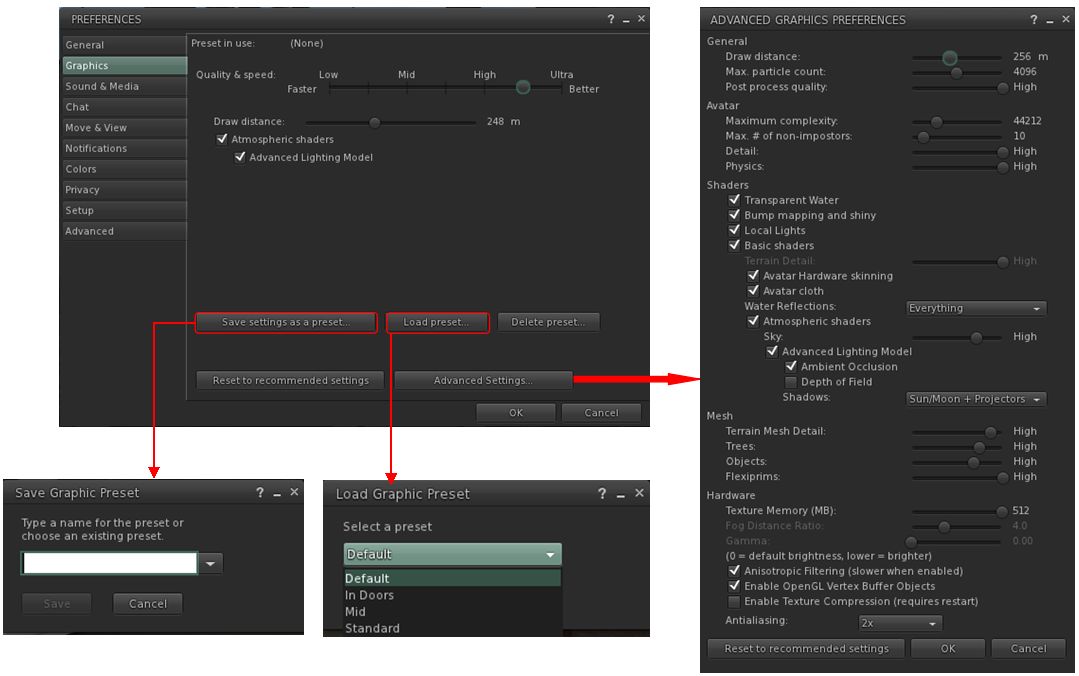
This is the viewer which enabled yo to set a rendering cost above which other avatars and their attachments will be rendered at a solid colour (aka “Jelly Babes”) in order to reduce the load on your GPU. It also provide a means by which users can save and restore different sets of graphics settings within the viewer. The idea being that users can then switch between different presets according to circumstance to help with viewer performance.
I provided a high-level overview of this viewer in June 2015, and I’ll be taking a closer look at it once the project viewer is available for people to download and try. Currently, the main thing apparently preventing the viewer reaching a project release status is that the Lab is making some final adjustments to get the frequency of the Avatar Complexity notifications it sends to users. the viewer is designed to inform those who have avatars with a high rendering cost how many people around them are rendering them as a Jelly Baby, for example, and the balance of these messages need to be reasonable.
The viewer includes the means to create and save sets of graphics presets which can be quickly loaded according to need / circumstance to help maintain a viewer’s performance
Experience Keys / Tools
An issue with Experiences is that access to the KVP data store (used to store data and values for an Experience) is currently handled on the same thread in the region and object rezzing. This means that reading / writing from / to the KVP store can be impacted when a region is busy with people rezzing items, etc. Requests have been put to the Lab to move the KVP access to a separate thread, and now he has completely a number of other tasks, Simon Linden is hoping to look into this and get things separated.
In addition, the Lab is mulling options for further Experience Keys / Tools enhancements. Nothing specific has been decided, and the emphasis is that any changes made will be small, rather than anything “massive”. Without the Lab committing itself to any of them, some of the following were suggested for consideration during the Simulator user group meeting on Tuesday, August 11th:
Limiting draw distance within an Experience
Providing a means to force sit avatars on items, when required
Providing a means to force a user into Mouselook at certain points in an Experience and then back out of Mouselook
Providing a means to control set the windlight environment and prevent viewer-side overrides.
A problem with ideas like these is that the options are controlled by the viewer, and could theoretically be over-written by the user unless an RLV-like capability was implemented to prevent cheating by a user simply overriding a setting. However, the Lab are poking at ideas, and we might see further updates of some sort appearing in the future to further enhance Experiences.
On Tuesday, August 4th, the Main (SLS) channel received the server maintenance package delivered to the RC channels in week #31. The focus of this release with to fix a number of Group management bugs:
BUG-9725 – Activating a group fails on first selection on Second Life Server 15.07.09.303393 & RC
BUG-9735 – Unable to Edit Group Parameters after being made OWNER of newly created group
BUG-9695 – [Project Notice] First attempt at joining a group fails (also happens with current release viewer)
Following the deployment of the update to both the RCs last week and the Main channel this week, indications are this these bugs have been fixed.
There were no deployments to the RC channels.
Viewer Updates
Monday, August 3rd saw the Viewer-Managed Marketplace RC viewer, version 3.8.2.303891, promoted to the de factorelease viewer.
As a result of this, the two remaining active RC viewers were also updated to parity with the release viewer, with the Mesh Importer viewer updating to version 3.8.3.304090 on Thursday, August 6th, and the Maintenance RC updating to version 3.8.3.304115, also on August 6th.
Other Items
Rezzing Objects On Top of Mesh
There have, over the past few months, been increasing reports of issues in attempting to rez objects on top of mesh objects (landscaping element, mesh floors, etc). These take the form of trying to rez an object from inventory, only to get one of two error messages:
“Failed to place object at specified location. Please try again” or
Can’t rez object at [coordinates] because the owner of this land does not allow it. Use the land tool to see land ownership”
In addition, rezzed objects can appear to “vanish” when rezzing on some mesh surfaces because they have actually rezzed under the surface in question, etc.
The problem appears related to a combination of viewer raycasting issues and uploaded mesh objects having incomplete physics hull as a result of a fault in the mesh uploading process. As ChinRey observes, The latter issue has been known for some time, and experienced mesh designers work around it. However, it is possible that newer content creators unwittingly get caught by the problem or that there are older mesh items still in circulation that can cause problems (also see Whirly Fizzle’s observations on BUG-2019).
There are some workaround to the problem, which has been accepted by the Lab. They are not ideal or always workable:
Try pointing your camera angle straight down at 90 degrees to the mesh surface or move your camera view further away from the mesh (Whirly Fizzle)
If the surface is used frequently for rezzing, try placing a full transparent bank prim over it and then rez on that (Innula Zenovka)
If you can, try editing the item in linked mode and check the physic model for the specific surface on which you are trying to rez upon. If it is prim, try converting it – and just it – to convex hull. Be aware this could alter the LI for the object; if you get any unexpected consequences, convert it back once more.
As an example, I used the latter for the Trompe Loeil Rustic Pavilion at my home, which was constantly giving me problems. The floor section was set to prim, and converting it to convex hull removed the issue entirely with no side effects for me. YMMV.
Slow-down in News from the Lab
There has been a slow down in activity and news from the Lab. In some quarters, this has been aligned with the idea that there is “not much going on” with Second Life and theat focus has perhaps further shifted to Sansar. In fact, work is progressing with Second Life; however, this is the summer period, when vacations are in progress, and we have recently come out of a period where the Lab has been very focused on specific work – such as ensuring the scalability of Experiences, working on simulator stability and internal fixes, which has come at the expense of “new shiny”, and thus giving the impression “not much” is going on.
This week saw the Second Life development team (and, I assume other directly involved in Second Life) get together in Boston for their regular meeting to discuss the plans for the immediate future. A consequence of this in particular is that there were no meetings on Monday (open-source developers) or Tuesday (simulator user group).
There should have been a TPVD meeting on Friday, but confused communications meant that Grumpity, Oz and I spent the time on our own alternately plotting world domination – if anyone known of any really good mesh Super Villian Sekrit Volcano Lairs, we’d like to know (joking) – and the fact that my hair is enough for me to be Jelly Babied in Grumpity’s viewer. Guess it’s time to go find some really good, low-complexity mesh hair…
Tuesday, July 28th, saw the Main (SLS) channel receive the server maintenance package previously deployed to the three RC channels, comprising internal server fixes related to Experience Keys, comprising null pointer checkers and a configuration option for the number of Experiences a Premium member can have.
On Wednesday, July 29th, the three RC channels will be updated with a new server maintenance package aimed at fixing recent group-related issues (see below for more details).
Commenting on the Experience changes in the Main channel release a the Simulator User Group meeting on Tuesday, July 28th, Simon Linden said:
That’s just under the hood, the one-per-account is not changing. Simon Linden: with configurations like that, we have a layered approach … there’s a set of defaults that is fixed with each server release. We also have a way to over-ride it grid wide … which is how we can turn on and off some things grid-wide, without a server update; that’s how we turned on the experience tools when we released it. Now that it’s released, we move it into the default settings and eventually out of the over-ride.
Group Issues
In my last update, I reported that people had started experiencing group-related issues, following the Main channel deployment in week #30. In particular:
BUG-9725 – Activating a group fails on first selection on Second Life Server 15.07.09.303393 & RC
BUG-9735 – Unable to Edit Group Parameters after being made OWNER of newly created group
BUG-9695 – [Project Notice] First attempt at joining a group fails (also happens with current release viewer)
Of these, BUG-9735 has been causing the most upset, as it affects anyone who has their role changed. While their role title will update, they will not gain the powers associated with the role, even after the requiredrelog. Commenting on the issues,Simon explained:
It’s due to some database race conditions that show up in the production servers. I was a bit over-aggressive about moving some queries from the master Db to the slave databases…. Normally our main and slave databases are pretty well in sync … with very tiny delay between them; but if you read from the slave database and do something back into the main one, there can be a window when the data isn’t right.
The curious aspect with BUG-9735 is that a relog is normally required for a person to get the updated abilities associated with a role change; so it is unclear why things are going wrong, as Simon went on to say:
I’m not exactly sure how 9735 would happen … I can imagine failures, but relogs should fix that. A bunch of your group info is fetched when you log in, [so] I’m not sure why that couldn’t be updated correctly.
As noted above, fixes for these issues are due to be deployed to the RC channels on Wednesday, July 29th. Once deployed, it would seem likely that anyone being promoted to a new role will have to be on a release candidate channel region when being promoted & relogging, in order for their group abilities to correctly update. However, it’s not clear if the individual promoting someone to a new role will also need to be on a release candidate channel region as well, so some experimentation might be required.
VMM Update
VMM auto-migration of Marketplace Direct Delivery items commenced on Thursday, July 23rd and is proceeding on weekdays between 21:00 SLT in the evening and 09:00 SLT the following morning. However, it is unlikely the VMM viewer will be promoted to the de facto release viewer in the short-term. The reason for this is that the current RC has an elevated crash rate. As a result, there will be a further update to the release candidate, which is due to appear in the next day or so and which will include a number of fixes to try to reduce the crash rate, including one for BUG-9748.
Windows 10 Issues
There have been some recent SL-related issues been noted against recent builds of Windows 10 which are worth reporting, although their potential for any impact may vary.
Font Detection
In the first, BUG-9759, Kyle Linden reports that CJK fonts (those containing a large range of Chinese/Japanese/Korean characters) are not visible in the viewer. This appears to be due to moving the default location of the font store for Windows 10. As a result, the viewer requires an update so it can look at the revised location.
Windows 10 / AMD Graphics Driver Issue
The second issue appears to be the return of a problem specific to Windows 10 and AMD graphics drivers first reported in March 2015. This causes the graphics card name to be saved as garbled text into the Windows registry, with the result that any program explicitly requiring the name of the graphics card in order to run correctly can encounter problems (although those which don’t will continue to run OK). As v3-style viewers are designed to explicitly save the GPU name at log-out (it is stored in the settings.xml file), those using Windows 10 / AMD systems may be affected. This is because the garbled card name gets written to the settings.xml file, along with other global settings applied to the viewer by the user, when logging out. This makes settings.xml unreadable by the viewer at the next log-in, so the viewer fails to obtain information, and so reverts all global settings (including graphics) to their defaults. The issue was first reported in April 2015 (see BUG-9054), but seemed to be resolved with later Windows 10 builds. However, it now appears to have regressed with Windows 10 Build 10240 and the AMD 15.7 driver (see BUG-9740 and particularly FIRE-16528).
Left: and AMD graphics driver recorded as garbled text in the Windows 10 registry, and (right) an AMD card name similarly garbled in the viewer’s settings.xml file as a result. The latter prevents settings.xml, which contains all global settings applied to the viewer by the user, from being read by the viewer when next launched, with the result that it reverts to default settings
Quite how widespread this problem might be as Windows 10 starts shipping is unclear, so the above should be read as an advisory of possible issues. However, if it does prove to be widespread, note that a fix will be required from Microsoft / AMD; this is not something the Lab and affected TPVs can address. In an effort to pre-emptively avoid at least some of the possible headaches the issue might pose for their users, the Firestorm team have developed a workaround, which is to be included in the upcoming 4.7.2 release. This workaround allows the viewer to load the settings.xml file so a user won’t lose all their global settings. But because the graphics card name remains garbled within the Windows registry (from which it is read by the viewer), it will still be saved as garbled text in settings.xml, and the viewer will continue reset all graphics options to their defaults when next launched until such time as a fix is forthcoming from Microsoft / AMD to correct the registry issue.
Version Number
A third, and in terms of functionality, trivial issue is that Windows 10 will show as Windows 8 running in compatibility mode in the viewer’s system info. This won’t impact the viewer’s performance, and a fix from the Firestorm team has been contributed to the Lab (STORM-2105), and should be appearing in due course.
On Tuesday, July 21st, the Main (SLS) channel had been listed as due to receive server maintenance package previously deployed to the three RC channels (15.07.07.303297). However, post-roll, the channel had been updated to release 15.07.09.303393, although the description of the changes, internal simulator fixes, remained unchanged.
On Wednesday, July 22nd, the three RC channels all received the same new server maintenance package, again comprising internal server fixes related to Experience Keys, comprising null pointer checkers and – interestingly – a configuration option for the number of Experiences a Premium member can have.
Group Issues
Following the week’s deployment, people started reporting group-related issues, particularly:
BUG-9725 – Activating a group fails on first selection on Second Life Server 15.07.09.303393 & RC
BUG-9735 – Unable to Edit Group Parameters after being made OWNER of newly created group
BUG-9695 – [Project Notice] First attempt at joining a group fails (also happens with current release viewer)
BUG-9735 affects promoting a member of the group to Owner status: their role title will change, but they do not gain the Owner powers, even after a relog (if an invitation is sent to someone to join the group with Owner status, they gain the expected rights). Curiously, this bug does not reproduce on Aditi (Beta grid) on simulators running the same code release.
Note that with BUG-9695 that if a fee is charged for joining the group, the fee will be taken, even if the join fails; you’ll then be charged again on your next attempt to join (which should succeed).
The Lab is actively investigating these issues.
In addition, there have been assorted reports of dropped group chat messages and detectable group chat lag.
Avatar Complexity
There have been recent updates relating to STORM-2082, the work Oz Linden has been undertaking on Avatar Complexity (aka “Jelly Baby avatars”). This work had been held-up due to a bug which rendered all avatars affected by the setting as invisible, rather than as the expected “Jelly Babies”. However, this now appears to have been fixed.
This means that this work may well be appearing as a project viewer during week #32 (week commencing Monday, August 3rd). Commenting on the status of the project at the Open-source Developer meeting on Monday, July 20th, Oz Linden said:
All it needs now is a little more UI – notices that show when your own Complexity has changed, and when your Complexity is too high for those around you to render … I want to wait for those UI changes to release this so that people have a way to understand why things are rendering fully or not … There will be a new setting that controls how long the message about your own cost appears; it will also govern how long the message appears when others are not rendering you.
Avatar Complexity (aka Jelly Babies): expected as a project viewer in early August
Oz also indicated he’d like to experiment a little more with things. One idea under consideration is that currently, the viewer is gets all the data on high render cost avatars prior to calculating the complexity value. However, it might be possible to allow the viewer to make the calculations without having to fetch the full avatar data. A benefit of this could be to reduce the risk of worn mesh crashers impacting the viewer.
 Le Avaline Village August 2015 (Flickr) – blog post


 Inara Pey: Living in a Modemworld