SL project updates: week 10 (2): server, SSB, materials and SSAO

Server Deployments Update

All of the deployments planned for week 10 went ahead as scheduled. While further issues related to region crossings have been reported, these are not thought to be related to any of the new code deployments for this week (see below for more).

The one issue that has been noted with the deployments is for VWR-786, which formed a part of the Magnum deployment.

This was supposed to ensure that if a friend does not have ‘See my online status’ permission, they will now see “User is not online ..” message following IM or inventory offer. However, the result has also been that if you IM a non-friend, the server always returns the “User is not online” message. The short-term solution for this is to remove the change from week 11’s releases in the interest of getting the other fixes (BUG-1612 and SVC-8019) across the grid.

The Lab is particularly keen to see SVC-8019 deployed to the entire grid, as this should fix issues of regions not handshaking correctly with one another following a rolling restart. The cause of this is believed to be due to regions looking at stale cached copies of a neighbouring regions’ status. With the update, regions grab more up-to-date copies of the status of their neighbours.

Server-side Baking: Further Pile-on / Load Test

Nyx Linden has announced that there will be a further SSB pile-on / load test on Thursday March 14th, following-on, as with the last test, from the Server Beta meeting on Aditi. The test is liable to be in much the same format as the first test, of which Nyx notes, “It gave us a lot of information and we’ve been working on a number of fixes, both to Aditi inventory, as well as viewer and back-end changes. Given this, the reason for the next test, in Nyx’s words, is because, “We’d like to see how much progress we’re making.”

The first SSB pile-on / load test (image courtesy of Latif Khalifa

Those wishing to participate will be required to be using the latest version of the Sunshine project viewer (3.4.5.271419), and are advised to attend the Server Beta meeting on Aditi ahead of time (the meeting commences at 15:00 SLT on Thursdays). Addressing those who participated in the first test, Nyx added, “If you had trouble at the last pile-on with outfit switching, feel free to test out the new build in advance – you should be able to comment on the JIRA tasks you filed, or email me directly with any issues.”

Materials Processing

Following-on from his replies to my question at the open-source dev meeting on Monday March 4th, Oz Linden talked some more on the status of the materials processing project at the Wednesday meeting on March 6th, “There’s one build floater bug and one crash that need fixing,” he said in kicking-off the discussion on materials, “I might even be willing to let it out without the crash fix (though it’s pretty bad).”

However, before everyone starts shouting, “Yes, yes!” :), even the release of a crashy version of the project viewer requires the “other” problem to be fixed. This appears to be related to a texture list getting corrupted, and which can manifest in a number of ways, including:

  • The normal map picker reverts to displaying the diffuse (texture) map after a normal map has been selected and the picker closed, with the normal map failing to render on the object / face it has been applied to
  • If deferred rendering is turned off, anything using materials appears black
  • If bump mapping is disabled, objects using materials appear to randomly adopt nearby textures (including skin textures) which can change as the camera is rotated / moved.
Normal map application issue: a normal map is selected and apllied to an object face (l); however, on re-opening the build floater, the map appears to have reverted to the diffuse map (r), and the object face does not render as expected
Normal map application issue: a normal map is selected and applied to an object face (l); however, on re-opening the build floater, the map appears to have reverted to the diffuse map (r), and the object face does not render as expected

Continue reading “SL project updates: week 10 (2): server, SSB, materials and SSAO”

SL projects updates: week 10 (1): server, materials and SSB

Server Deployments Week 10

A full set of server deployments this week.

On Tuesday March 5th, the Second Life Server (SLS) channel received the server maintenance project that was deployed to all three RC channels in week 9. This update only contains a fix to a single crash mode.

On Wednesday March 6th, the three Release Candidate channel should receive the following code deployments:

  • BlueSteel and LeTigre: a new server maintenance project, which fixes a fairly common crash mode, together with Baker Linden’s large (as in file size) object rezzing project aimed at improving simulator performance (see below)
  • Magnum: a new server maintenance project, which includes a mix of bug fixes and stability improvements. Specific fixes mentioned in the release notes are:
    • BUG-1612: region Owners and estate managers finding they are unable to teleport back to their region after disabling direct teleports to the region
    • SVC-8019: region visibility delays following region restarts. This may help with the problem of diagonally adjacent regions failing to render
    • VWR-786: if a friend does not have ‘See my online status’ permission, they will now see “User is not online ..” message following IM or inventory offer.

Large Object Rezzing Project

Baker Linden has been looking to improve how objects with large file sizes are handled by the simulator software when being rezzed. He describes the work thus, “What I’ve been working on is hopefully significantly decreasing lag spikes when rezzing large, complex objects [such as those with lots of scripts]. Large does not necessarily imply size, but size of the files being read. When an object is rezzing, we have to parse the object / mesh files and create our in-world objects with that data.”

Until now, reading and parsing of any files related to objects which require rezzing has been on the main thread. When several such objects requiring rezzing at the same time, the simulator stalls. Baker has been moving the reading / parsing operation to a background thread in the expectation that this will prevent the simulator being choked.

The key point about this work is that it is specifically aimed at preventing the simulator processes from choking and a region stalling when there are a number of large object files being read / parsed, not at actually “speeding up” the physical rezzing process. As such, it is unlikely that objects will appear any faster in people’s in-world view as a result of this work. However, what it does mean is that the simulator code will be better able to handle rezzing multiple “large file” objects without the attendant region lagging which can occur as a result of the simulator being unable to process messages from viewers and other simulators, etc.

Materials Processing

In my last update on this work, I reported that the Lab believed they had one more issue to resolve with the materials processing project, after which the way should be clear for a project viewer to be made publicly available. At the time, it wasn’t clear exactly what the problem might be. However, on Monday March 4th, I was able to ask Oz about the problem, and it appears that it is with the project viewer itself.

“We’ve got a viewer, but it’s so crashy, and the crashes are mostly in material property editing, that I don’t want to distribute it yet…. I’m concerned that doing so would result in a lot of broken content lying around,” Oz informed me.

Materials processing: viewer issues delaying project viewer release (image courtesy of Geenz Spad)
Materials processing: viewer issues delaying project viewer release (image courtesy of Geenz Spad) – click to enlarge

I asked Oz if the crash problems were related to physically applying maps to objects and / or object faces. He confirmed that this is indeed the case – and that the latest (non-public) version of the project viewer can crash if even the parameters for maps applied to an object / object face are modified. However, he went on to say, “Hopefully we’ll get the worst of the crashes dealt with soon, and then we can start giving it to a wider audience. We’ve already solved a bunch of them, but it’s not quite ready for even open alpha testing.”

So, for those who commented on the lack of any update following my last SL project update from week 9, I’m afraid the situation still appears to be one of, “Hurry up and wait.”

Continue reading “SL projects updates: week 10 (1): server, materials and SSB”

SL project update: week 9 (2): servers, HTTP, SSB

Server Deployments – week 9

Server Life Server (Main) Channel

As noted in part 1 of this report, the Second Life Server (SLS / Main channel) received the server maintenance project which was on all three RC channels in week 8, comprising miscellaneous bug fixes, and the improved region restart notification. Deployed on Tuesday 26th February, the roll-out was followed by a number of issues being reported via the deployment forum thread.

Issues have included:

  • Parcels / regions vanishing from search for a period of time following the restart (an issue WolfBaginski Bearsfoot gave some thought to in commenting on part 1 of this report)
  • Further region crossing issues, with loss of control followed by “broken” camera positioning after recovery. This issue has been reported at some of the Simulator and Server Beta meetings previously, and Eric Gregan has produced a video demonstrating the problem as it occurs on some aircraft, although he’s also come up with a means of avoiding the issue which may or may not work for people.

  • Problems with Dwarfins attachments.

Release Candidate Channels

On Wednesday February 27th, all three Release Candidate channels received a new server maintenance package which includes a fix for a crash mode (see the release notes (BlueSteel)). No significant issues have been reported for this deployment.

SL Viewer

The Communications Hub User Interface finally made its debut in both the SL development and SL beta servers, arriving as release 3.5.1.270826 for the development viewer on Tuesday 26th February, and 3.5.0.270825 for the beta viewer on Wednesday 27th. I’ve provided a brief introduction to CHUI, and there is also a video from Torley Linden.

CHUI is liable to remain in beta for a “Good long run”, to quote Oz Linden. Hopefully, this may mean that materials processing will be the next significant viewer update to arrive as a project viewer.

Interest List

The recent updates to Andrew Linden’s interest list work are apparently won’t reach a RC channel in week 10, but should see deployment in week 11 (week commencing Monday 11th March). This work includes fixing issues with avatar appearance teleporters which use llSetRegionPos(), as well as correcting problems where objects which change appearance behind the camera ‘snapping’ into place when you rotate the camera back.

Server-side Baking

On Friday March 1st, Linden Lab unexpectedly released an updated version of the SSB project viewer (release 3.4.5.271118), which includes their approach to overcoming the problems of the Z-offset capability common to many TPVs being broken as result of the SSB code. The new approach, which I was able to outline when it “launched”, introduces an additional shape slider into the Edit Shape floater; as such, the ease-of-use of the approach, particularly for those who may swap between different avatar shapes (e.g. “normal” and petite) is very questionable.

The new "Hover" option in the Edit Shape panel for adjusting avatar height offsets in the Sunshine project viewer. Not the most elegant solution
The new “Hover” option in the Edit Shape panel for adjusting avatar height offsets in the Sunshine project viewer. Not the most elegant solution

Continue reading “SL project update: week 9 (2): servers, HTTP, SSB”

Linden Lab offer z-offset fix for Server-side Baking

Update March 4th: The main viewer download links on the Sunshine wiki page now all reference the updated viewer  version (3.4.5.271118).

Update March 2nd: Just as a point of clarification, the update discussed here is not currently linked-to from the Sunshine wiki page. To obtain a version of the viewer with the updates, you will need to download version 3.4.5.271118 of the viewer (link repeated here for ease-of-refernce).

As I recently covered, a problem has emerged with Server-side Baking in that it “breaks” the Z-offset capability found in the majority of third-party viewers.

The Z-offset allows the vertical height of an avatar above the ground to be adjusted, such that sits and kneels don’t leave the avatar apparently floating in the air, and which allow those with very tall / giant avatars or very small / petite avatars and those wearing full body mesh to similarly adjust their vertical placement relative to the ground / floor.

The problem was reported to Nyx in week 8, and SUN-38 was subsequently raised by Henri Beauchamp on February 24th to officially log the matter.

On March 1st, Linden Lab issued an update to the Server-side Baking project viewer (release 3.4.5.271118) which is an attempt to address the issue.

The new capability is referred to as SH-3909 Support avatar height offset and is described as, “Adding a new visual param that allows users to manually adjust an offset for how far off the ground (+ or -) their avatar’s root bone is.Supports the +-2m range people are used to adjusting in their viewers, but new implementation should support server-generated appearances.”

It appears within the viewer as a new slider in the Body section of the Edit Shape floater, called “Hover”.

The new "Hover" floater
The new “Hover” option in the Edit Shape floater’s Body tab

Moving the slider to the right or increasing the displayed value will move your avatar upwards, much as increasing the Z-offset value in a TPV will. Moving the slider to the left or decreasing the displayed value will move your avatar down. As with all the shape sliders, any changes must be saved prior to exiting the editor, in order to be persistent beyond editing.

The slider offers a huge range of height adjustment compared to the z-offset slider in the likes of Firestorm, and is somewhat less accurate – with most TPV Z-offset options, height above ground can be precisely adjusted to 2 decimal points, whereas the Edit Shape floater only allows whole numbers in the range 0-99.

The "Hover" option presents a huge range of vertical motion when adjusting
The “Hover” option presents a huge range of vertical motion when adjusting, which should accommodate the both the tallest avatars …

The vertical range of movement can be considerable, and lead to some interesting results when saved – your avatar can currently disappear entirely underground, for example. Also, adjustment made using the slider are not apparent in viewers which do not have the SSB code – something which shouldn’t be a major problem, given the need for people to be using SSB-enabled viewers once the server-side code starting deploying to the main grid anyway.

What might be of greater concern, however, is the fact that the control has been incorporated into the Edit Shape options means that it cannot be used on No Modify shapes, which could leave those using such shapes still feeling aggrieved if they are impacted by the height offset problems resulting from SSB.

...and the shortest.
…and the shortest.

It’s an interesting approach to solving the problem – and it would appear that LL consider the matter now resolved, Nyx Linden having issued an e-mail to the opensource dev list which reads in part:

Added a new parameter to shapes to replace the viewer-side height offset. Since it is stored in a wearable, the new back-end can read and use the value. Will send an email to third-party devs later today to let them know to pick up the patch.

Marking SUN-38 as resolved.

Given that earlier in the week – at the Content Creation User Group meeting on Monday February 25th, where the subject of SUN-38 was raised, Nyx commented, “It hasn’t escaped our notice. We’re considering a couple different approaches … we’re considering a few different options. Suggestions appreciated, but we haven’t officially settled on an approach we’re going to commit to publicly just yet”, it will be interesting to see the response is to this particular fix.

With thanks to Latif Khalifa, who both provided me with news of the arrival of this update, and provided the necessary links for me to have a play.

SL project news 9 (1): servers, SSB, materials and Aditi

Deployments for Week 9

It’s a “lightweight” week for deployments, with all channels receiving one of two maintenance packages.

Server Life Server (Main) Channel

Region restart notifications: the "old" stayle (top), and the "new" style (bottom)
Region restart notifications: the “old” style (top), and the “new” style (bottom)

On Tuesday February 26th, the Second Life Server (SLS / Main channel) received the server maintenance project which was on all three RC channels last week.  This project has miscellaneous bug fixes, along with an impoved restart notification (which will only be apparent when this new version restarts for the next update) – see the image on the right.

While this is much better than the previous notification, it does suffer from the fact it will still fade from the viewer’s window and become a chiclet whether or not the OK button is clicked – and thus can still be missed if attention is not on the screen when it appears. To help avoid this, it is possible to set a sound for the alert using the Debug Setting UISndAlert, which requires the UUID of the sound, which coule be one you’ve uploaded to inventory yourself (Firestorm additionally has UISndRegionRestart, which can be set through Debug Settings or Preferences > Sound & Media > UI Sounds 2).

This release  means the until the RC channel deployments take place (see below), almost the entire grid is running the same server code – the only exceptions being a few “special” regions (such as the Linden Realms regions) – release notes.

Release Candidate Channels

On Wednesday February 27th, all three Release Candidate channels should receive a new server maintenance package which includes a fix for a crash mode – release notes (BlueSteel).

As always, there is a forum thread for discussing the deployments.

Server-side Baking

Following-on from his initial feedback given at the TPV Developer meeting on Friday 22nd February, Nyx Linden gave a further update on the recent Sever-side Baking (SSB) pile-on / load test when chairing the Content Creation User Group meeting on Monday 25th February

Thanks all for everyone who helped out with the pile-on test of server appearance last Thursday. The results tended to be that when the system worked, it was nice and speedy, however there were a number of issues that prevented it from working for everyone all the time. We got a good bit of data on the bugs we knew were there as well as a couple new ones. we’ve been crunching on the results and are starting to attack the issues, so it was definitely successful in achieving what we wanted: more data :). There will be future rounds, so thanks in advance for anyone who comes back to help us test again.

Z-offset Issue and SUN-38

As noted in the comments following my quick SSB test using currently available TPVs with SSB enabled, there is an issue with the “Z-offset” capability common to many third-party viewers, which allows the vertical height of an avatar above the ground to be adjusted, such that sits and kneels don’t leave the avatar apparently floating in the air, and which allow those with very tall / giant avatars or very small / petite avatars and those wearing full body mesh to similarly adjust their vertical placement relative to the ground / floor.

The problem was reported to Nyx in week 8, and SUN-38 was subsequently raised by Henri Beauchamp on February 24th to officially log the matter. Commenting on the problem during Content Creation meeting, Nyx Linden stated. “It hasn’t escaped our notice. We’re considering a couple different approaches … we’re considering a few different options. Suggestions appreciated, but we haven’t officially settled on an approach we’re going to commit to publicly just yet.” He also suggested that any questions on the subject be asked again next week, presumably by which time LL will have had time to consider the problem in detail, and hopefully consult with TPV developers.

Interest List Updates

Andrew Linden is continuing to work on the interest list code, with more refinements to come, as well as looking at a number of bug fixes. The updates about to go to LL’s QA include changes which should make scenery load faster  / more correctly when first logging-in to SL or teleporting to a region.

Aero Pines Park
Future updates to the interest list code should see scenery in your world view rezzing a lot faster

Continue reading “SL project news 9 (1): servers, SSB, materials and Aditi”

Playing with SSB and viewers (quick test)

Update February 24th: Henri Beauchamp has filed a SUN JIRA on the Z-offset issue mentioned in comments following this article. Z-offset is an opton found in many TPVs which allows the vertical height at which an avatar stands / kneels / sits / lays to be adjusted through the viewer, allowing users to compensate for their avatars appearing to float in mid-air. The SSB code effectively “breaks” this capability. The JIRA description carries a comprehensive description of the issue for those unfamiliar with the problem.

Update, February 23rd: The Catznip team (which includes Kitty Barnett, have added a post to their blog on the subject of RLVa and SSB. Be sure to read it! 

Following the recent Server-side Baking (SSB) pile-on / load test, I took a little time out to try-out the various viewer versions which are starting to appear which provide SSB support. This was not intended to be an extensive break test or anything – just something to sate my own curiosity on a number of points.

As such, the tests I conducted were simple, and as they were performed on Aditi, they may have been influenced by some of the inventory issues being experienced there. For the tests, I used my main account, and my CTA – Crash Test Alt, which routinely gets used when testing experimental viewers, etc.

Testing covered the Cool VL experimental branch, Singularity Alpha release with SSB support and Radegast 2.8. Throughout the tests, my CTA was running the official Sunshine (SSB) project viewer 3.4.5.270409. Testing did not include Lumiya, which has SSB support implemented. The reason for this is that I remain unable to log-in to Aditi with Lumiya.

I started with a couple of baseline tests to remind people of what is going to happen once SSB is deployed to the main grid.

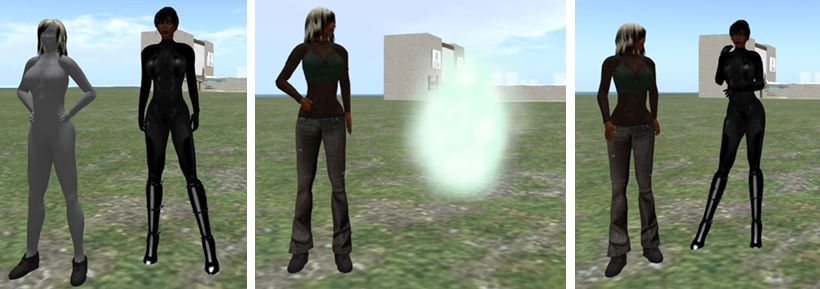
The three faces of SSB:
The three faces of SSB:On the left, what is seen when running a viewer which does not support SSB: the viewer user looks fine, but everyone else is a grey ghost. In the centre, what is seen when looking at someone who is using a viewer which does not support SSB: they are a cloud. Right: what is seen when both parties are using a viewer with SSB support: properly rendered and dressed avatars (remember: SSB does not affect prims / sculpts / mesh, hence why these render OK in the non-SSB viewer)

Following this, I switched to using Singularity first and then Cool VL.Results wer as expected – both accurately rendered outfits and outfit updates without any significant issues.

SSB on Singularity:
SSB on Singularity: Top: as I render in Singularity with SSB, as seen by myself (l) and with the official SSB viewer (r). Bottom: as I appear after an outfit change to both myself in Singularity (l) and the official SSB viewer (r).

Testing Radegast 2.8 also generated the expected results: outfits rendered correctly in both the Radegast 3D viewer, and in the SSB viewer, as did any outfit changes made via Radegast. Furthermore, and as expected, outfit changes made using one viewer were accurately reflected when logging into another viewer (so outfit changes made in Singularity were accurately rendered by Radegast, for example).The only issue I actually encountered was that footwear would not render correctly – which is not an SSB issue.

baking-rad
Baking on Radegast: (top) outfit changes on an SSB-enabled region render correctly in Radegast and (bottom) are also correctly rendered in other SSB-enabled viewers

SSB and RLVa

While carrying out these tests, I also took a look at RLVa on SSB, and confess to not finding any obvious issues when using Singularity or Cool VL (which uses RLV). All RLV/RLVa options functioned as expected:

  • Items “locked” as non-detachable remained undetachable until “unlocked”
  • Restrictions applied through RLV/a all functioned as expected (e.g. map restrictions prevented access to the World or Mini-Map; inventory denial prevented inventory access, etc.)
  • Remote access to #RLV Shared Folders worked as expected (i.e. remote changes of outfit worked and were accurately rendered)
  • Remote (HUD-based) access between avatars worked as expected
  • Control zone restrictions applied / released as anticipated.

This does not necessarily mean that RLVa is not “broken”. I actually have no idea if the Cool VL experimental or Singularity Alpha contain specific updates for RLV/RLVa outside of any work Kitty Barnett may be undertaking for RLVa and SSB.Aslo, just because the basic functionality of RLVa appears unaffected by SSB does not means that there are deeper, more subtle issues which need to be addressed in order to ensure all of RLVa continues to function correctly under SSB.

Summary

SSB is beginning to find its way into TPVs and appears to be working well – which is not to say that there are not bugs and issues still to be resolved with the service as a whole. Doubtless, we’ll find out more on this as LL continue to analyse the results of the initial pile-on test, and further tests are undertaken in the future. As a result of this quick-and-dirty play with the service over a number of viewers, I’m certainly curious to know if some of the issues encountered during the pile-on / load test (such as a noticeable slow-down in the time needed for outfits to render after a change) might be indicative that the system still needs tweaking in order to handle larger numbers of outfit changes, rather than all the problems being related to other issues on Aditi itself.

In terms of potential RLVa issues, I draw no conclusions; as mentioned above, the fact that the most obvious RLVa functions worked OK for me is not to say RLVa and SSB are without issues; there is much which goes on “under the hood” with RLVa which could very well be affected by the arrival of SSB which requires code refactoring but which does not result in outright / obvious breakages.

If you’d like to have a play with SSB for yourself, use the links below.

Related Links