2024 week #5: SL CCUG meeting summary

Hillvale Beach, December 2023 – blog post

The following notes were taken from my audio recording and chat log transcript of the Content Creators User Group (CCUG) meeting held on Thursday, February 1st, 2024.

  • The CCUG meeting is for discussion of work related to content creation in Second Life, including current and upcoming LL projects, and encompasses requests or comments from the community, together with viewer development work.
  • As a rule, these meetings are:
    • Held in-world at the Hippotropolis Campsite, where it is chaired by Vir Linden, in accordance with the dates and times given in the SL Public Calendar.
    • Conducted in a mix of voice and text.
    • Open to all with an interest in content creation.
  • The notes herein are a summary of topics discussed and are not intended to be a full transcript.

Official Viewers Status

  • The Maintenance W RC viewer – bug and crash fixes – updated to version 7.1.3.7701974306 on January 31st, January 31, 2024.

The remaining official viewers stood unchanged from the start of the week at the time of the meeting:

  • Release viewer: version 7.1.2.7215179142, formerly the glTF PBR Materials Maintenance RC, issued December 15, promoted January 8, 2024 – numerous bug fixes and improvements.
  • Release channel cohorts:
    • Emoji RC viewer, version 7.1.3.7453691714, January 22, 2024.
    • glTF PBR Materials Maintenance-2 RC viewer, version 7.1.3.7467259489, issued January 12, 2024.
    • Maintenance X RC, version 7.1.1.7088410646, December 7 – usability improvements.
    • Maintenance Y RC, version 6.6.17.6935642049, issued November 21 – My Outfits folder improvements; ability to remove entries from landmark history.
  • Project viewers:

General Viewer Notes

  • The Emoji viewer is still on the path towards an RC update, and it is still hoped it will get promoted to de facto release status Soon™.

Graphics / glTF

  • The “glTF featurettes” work is progressing, with the viewer following the current glTF Maintenance-2 RC viewer set to include:
    • Geenz Linden’s work on Hero reflection probes and reflections / mirrors and Cosmic Linden’s work on applying glTF materials to terrain.
    • Updates which will allow the glTF / PBR swatch boxes in the Build / Edit floater display previews of the materials being selected, rather than grey boxes.
    • Possibly, the first series of additional glTF extensions – Index of Refraction.
    • These capabilities (together with 2K textures support – see below) will be sitting behind debug settings, and so a) will need to be enabled by those wishing to test them; b) should be understood to be incomplete features subject to update and change / possible breakage.
  • 2K Textures:
    • The Lab is starting to assess the potential to allow 2K textures within SL. Such support will require “careful assessment” in terms of VRAM footprint, the risk of out of memory crashes on older systems and the like.
    • Runitai Linden believes that if there are issues with the viewer attempting to load a full 2K texture even when it is very small (or very distant), then it is a case of making the viewer “smarter” it terms of how it handles and samples / loads textures.
    • Support for 2K textures is available for general testing on Aditi (the Beta grid) within the RumpusRoom 2048 region.
    • One identified win is seen as terrain texturing, as 2K terrain textures at the region level should not overly tax systems and eliminate the current issues of blurriness / low texel density.

Mirrors

  • Work has been continuing of late, with what is described as a “significant” increase in reflection quality, and is starting to look “correct” as well as working with PBR.
  • Further performance tuning is required, and the clipping is “off in a lot of circumstances”.
  • The focus is on presenting planar reflections (utilising a cub map generated by a “Hero” reflection probe which is selection on the basis of the avatar’s proximity to it), with Geenz Linden noting it has the potential to allow more “fancy things” down the road.
  • It was noted that the approach taken has to offer a balance between intended use (to create actual mirror surfaces) against unintended uses (such as using the mirror capability within a highly polished floor), rather than trying to enforce some nebulous rule of “this functionality is ONLY for mirrors”), as well as taking into the consideration that it needs to be relatively easy to use.

Terrain

  • Cosmic Linden has indicated that once the PBR shader, etc., is working for terrain as per her current project, consideration is being given to allowing the same terrain shader to in-world objects.
  • So, for example, a mesh tunnel might be created and placed in-world, and then the outer face of the model set to display whatever the surrounding terrain might be.

“Combat Committee”

A reminder that:

  • The first meeting of the “Combat Committee” User Group will be held on Thursday, February 8th, at 13:00 SLT, and so will be alternating with the Content Creation User Group.
  • The venue for the meetings will be:  Longfellow/142/255/30.
  • The initial format for the meetings will be text-only, but this may become a mix of voice / text according to attendees’ preferences.
  • Further details are available on the SL wiki, and the meeting is now on the SL Public Calendar.

Rider Linden acknowledged the fact that I (aka “someone”) had pointed out having two user group meetings with the same abbreviation (CCUG) alternating between the same time slot on the same weekday might be confusing for some (even if the meetings are in different locations), so the name for this meeting might be changing.

In Brief

  • The transition from Jira to Github Issues  / Canny is still in progress at LL and is taking up resources and time, hence the slow-down in some areas of work (such as RC viewer updates. As per previous reporting, the work is due to be completed by the end of February, when Jira will cease to be used.
    • The use of Canny remains a source of unhappiness among those who tend to raise bug reports, largely as a result of its limited functionality in some areas (such as no support for any other attachment type other than static images).
    • The Lab is continuing to work with the Canny development team to try to improve things.
  • As was noted in the previous CCUG meeting, the placing of incomplete features (such as the glTF terrain and mirrors functions mentioned above) behind debug settings is a part of a more general move to add features and capabilities to the viewer more iteratively, allowing individual capabilities to be added (and potentially tested on a limited basis by those interested), but only fully exposed to all users once they have been validated / have any required supporting functionality / capabilities available to them.
  • There was a general discussion on the viewer UI and how it tries to meet the needs of very different groups of users  – content creators and “general” users, and how it might be made more responsive to specific modes of use – if you are using the viewer to explore, take photos, play a game in-world, and carry out basic building / editing, etc., then the viewer can be run in a “generic” mode to do all of these things, but if precision tools are required for design and creation, then the viewer can be switched to a mode which provides more specialised options through floaters and menus.
  • The question was asked that if SL is to support the “entire” glTF specification, including animations, does this mean future support for custom skeletons, and if so what does that mean for the current animation marketplace (e.g. preventing confusion as to what will / will not run against different skeleton types).
    • Runitai Linden’s viewer was that if custom skeletons are to be supported, then it would require suitable tools which allow for animation / joint retargeting (e.g. animations made for the current Bento skeleton could be retargeted of any other given skeleton, and vice versa). However, whilst there are tools to achieve this, they would require investigation and assessment.
    • There are limitations on how far retargeting will go, however (and it will not be entirely devoid of creator intervention), so if custom skeletons were to be allowed in SL, it was noted that expectations could be in part managed by specifying with which actual skeleton(s) the offered animation / avatar, etc. has been designed to work.
  • Concern was raised as to the constraints which might be applied if SL has an open gateway to importing glTF meshes from external sources such as SketchFab, where the content may well look pretty but is hardly appropriate for real time game rendering, the view being the Land Impact alone is not going to be sufficient.
    • The view from the Lab is that there will be some form of weighting system at import, at least analogous to Land Impact, but better suited for the acceptance / rejection of content, and this will vary for different content types (e.g. glTF scenes might be assessed of number of nodes, how many bytes in the asset, how many instances of the asset, etc.).

Next Meeting

† The header images included in these summaries are not intended to represent anything discussed at the meetings; they are simply here to avoid a repeated image of a gathering of people every week. They are taken from my list of region visits, with a link to the post for those interested.

2024 week #3: SL CCUG and TPVD meetings summary

Blue NANA Land, December 2023 – blog post

The following notes were taken from my audio recording and chat log transcript of the Content Creators User Group (CCUG) meeting held on Thursday, January 18th, 2024, and the chat log transcript and video of the Third-Party Viewer Developer (TPVD) meeting held on Friday, January 19th, 2024. My thanks as always to Pantera for recording the TPVD meeting and providing the video, which is embedded at the end of this article.

  • The CCUG meeting is for discussion of work related to content creation in Second Life, including current and upcoming LL projects, and encompasses requests or comments from the community, together with viewer development work.
  • The TPV Developer meeting provides an opportunity for discussion about the development of, and features for, the Second Life viewer, and for Linden Lab viewer developers and third-party viewer (TPV) / open-source code contributors to discuss general viewer development.
    • This meeting is held once a month  the third or fourth Friday, at 13:00 SLT at the Hippotropolis Theatre.
  • In regards to both meetings:
    • Dates and times are recorded in the SL Public Calendar.
    • Commence at 13:00 SLT on their respective dates.
    • Are conducted in a mix of Voice and text chat.
    • Are open to all with an interest in either content creation or viewer development.
  • The notes herein are a summary of topics discussed and are not intended to be a full transcript of either meeting.

Please note: my audio recording of the CCUG suffered a glitch in writing to disk. Whilst over an hour of audio was apparently recorded according to Audacity, only 22 minutes was actually saved to disk. As the meeting utilised voice, the loss of around half the audio means that response to questions and generally commentary from the Lab was lost. Therefore, these notes only reflect the section of the meeting which did save for playback.

Official Viewers Status

No updates through the week, leaving the current crop of official viewers as:

  • Release viewer: version 7.1.2.7215179142, formerly the glTF PBR Materials Maintenance RC, issued December 15, promoted January 8, 2024 – numerous bug fixes and improvements – NEW.
  • Release channel cohorts (please see my notes on manually installing RC viewer versions if you wish to install any release candidate(s) yourself).
    • glTF PBR Materials Maintenance-2 RC viewer, version 7.1.3.7467259489, issued January 12, 2024.
    • Maintenance-W RC viewer, version 7.1.3.7453541295, January 9, 2024 – bug and crash fixes.
    • Maintenance X RC, version 7.1.1.7088410646, December 7 – usability improvements.
    • Maintenance Y RC, version 6.6.17.6935642049, issued November 21 – My Outfits folder improvements; ability to remove entries from landmark history.
    • Emoji RC viewer, version 6.6.15.581551, August 31.
  • Project viewers:

General Viewer Notes

  • The glTF Maintenance 2 viewer includes, among other things, less blue tint to improve the general environment appearance.
  • The Emojis viewer is finally on the path towards an RC update, and it is hoped that this will be the finally update for the viewer before it gets promoted to de facto release status.
  • There is concern that the viewer crash rate has been higher than usual over the last several releases, so it appears viewer-side engineering effort is to be put towards determining underlying causes and rectifying them in order to bring the rate back down.
  • Longer-term there will be further Inventory work, with additional flags being added to the viewer which will enable future additional Inventory-related functionality – but it is too early in the process to go into specifics.

Mac OS Requirements

  • The Mac OS requirements for the viewer are changing as a result of Apple ending security updates for OSX 11 and earlier.
  • Whilst Mac OS 11 will now be the minimum requirement (up from 10.3), the recommendation to Mac users running Mac OS 11 or earlier is to “explore macOS upgrade options as soon as possible” due to the resultant security concerns (via Soft Linden).

Graphics / glTF and Future Viewer Development Overall

  • Following the glTF Maintenance 2 RC, it is likely there will be a further graphics RC viewer which will combine:
    • Geenz Linden’s work on Hero reflection probes and reflections / mirrors.
    • Cosmic Linden’s work on applying glTF materials to terrain.
    • Updates which will allow the glTF / PBR swatch boxes in the Build / Edit floater display previews of the materials being selected, rather than grey boxes.
    • Possibly, the first series of additional glTF extensions – Index of Refraction, and also potentially testing support for 2K textures.
  • The idea is to try to move development within the viewer away from huge projects (like PBR Materials), which tend to take a lot of time to develop (1 to 2 years) and suffer a lot of visible feature creep. Instead, the idea is to tackle smaller components and build them out within successive RCs which come together to enable the kind of functionality sought be large scale projects.
  • It is hoped that by focusing on “featurettes”, smaller tranches of work can be more easily validated, that workflow with development and bug fixing can become a lot more linear, and individual elements of the work can be enabled as they are ready, or hidden behind debug flags until such time as functionality they are dependent upon is also ready.
  • Should this approach work with the next iteration of glTF capabilities as listed above, the approach will likely be applied to other viewer projects.
  • BUG-234728 “[PBR] Masked alpha gradient textures change with viewing angle” has been accepted as a known PBR issue, but there is no time frame on a potential fix.

RLV / RLVa Adoption

[TPVD Video 10:16-15:40 and 25:28-28:23]

  • Per a previous TPVD meeting summary, LL is interested in the potential to adopt RLV/a functionality into the official viewer.
  • Adoption has been a popular request from many users, as RLV is seen to have a lot of beneficial uses well beyond its original scope (as is the case the RLV-driven “Wardrobe” systems which allow outfits to be visually previewed and worn in just a couple of clicks), many of which either cannot be easily achieved in viewers without RLV support, or would require Experience-based scripting, which is not seen as ideal.
  • One problem is that RLV/RLVa is for many scripters, an “all or nothing” API, as it can touch on so many areas of the viewer, so that to be of value, the entire protocol would need to be implemented – which would be a major overhaul of the viewer.
  • As such, it was noted that RLV/RLVa implementation within the official viewer could be an ideal candidate for the “featurette” approach to viewer development noted above: discrete elements of the code implemented to a point where they can be validated, but placed behind flags so that they are disabled until such time as the overall implementation has reached a point where they can be jointly enabled.
  • The option to turn it off completely – as is currently the case in the majority of viewers running the RLV/a protocol – would be retained for those not wishing to use it.

In Brief

CCUG Meeting

  • Canny Feedback glTF Materials w/Bake Layers-as-Base Colour Turn White When Editing BOM Layer caused some surprise within the Lab, as applying glTF materials in the manner hadn’t been seen as expected behaviour, as is the fact that the layers display as expected outside of the appearance editor.
    • It was noted that most PBR-related Bakes on Mesh requests have been to allow the Bake Service to composite multiple PBR materials applied to different layers (e.g. being able to apply one materials set to skin, another to (say) shirt layer and another to (say) pants layer).
    • This is something LL would like to tackle, but it is seen as a significant overhaul of the Bake Service, and so is not currently on the roadmap for implementation.
  • There is a known issue with screen space reflections (SSR) on Linden Water which can make the latter appear to “glitch”. Brad Linden is still investigating this, but the solution might be tweaking to / replacement of the SSR algorithm so it “plays nicely” with Linden Water.
  • Object unpacking: a discussion on the potential to be able to unpack the contents of objects directly from Inventory, rather than having to rez them in-world first or for creators to supply them in a scripted HUD for unpacking.
    • A feature request for the reverse – Right-Click to Box In Inventory – has been accepted (which does not indicate it will be implemented in the immediate future).
    • In terms of unpacking / previewing contents of on item directly from Inventory, this is seen as a harder issue as once items are contained within another, they are effectively in the “inventory” of the containing item, rather than the account inventory, and the container’s inventory is only loaded by the simulator when it (or a copy thereof) is rezzed (or attached as a HUD) in-world.
    • Given the above, a new Inventory behaviour would be required which would simulate the object being rezzed in-world / attached as a HUD in order to trigger the simulator to load its contents. This was noted as something worth consideration even if only as a mental exercise at the moment, in order to determine how it might be handled.
    • This is the point at which my audio recording of the meeting truncated during saving, and so ends the summary notes for the CCUG meeting.

TPVD Meeting

  • [Video: 16:02-17:40] Avatar de-clouding: There have been multiple anecdotal reports of avatars taking longer to de-cloud when logging-in. The anecdotal responses at the meeting varied between no real difference and comments that AWS may have had issues over the holiday period resulting in packet loss (and thus longer load times), but this appears to have since been resolved.
  • [Video 19:20-25:09] a discussion on TPV development, licensing, open-sourcing code, what is and is not permissible, new viewers, etc. Please refer to the video for more.
  • General notes:
    • Planar alignment being broken in the Build / Edit floater is a known issue and due to be addressed.
    • There are no plans for LL to offer various “fallbacks” for PBR to “classic” (Blinn-Phong) materials to account for users currently not running PBR enabled versions of viewers, as PBR will be a part of all viewers as they update and move forward.
    • There are no plans to make SL available through platforms such as Steam (as once was the case), due to issues around content restrictions, monetisation methods, etc.
    • A discussion on Twitch not allowing SL streaming and whether LL should try to engage with them to support it. Given that there are other avenues for streaming, and Twitch is free to stand whatever barrier to use of its platform it likes, this would seem unlikely.

Next Meetings

† The header images included in these summaries are not intended to represent anything discussed at the meetings; they are simply here to avoid a repeated image of a gathering of people every week. They are taken from my list of region visits, with a link to the post for those interested.

2024 week #1: SL CCUG meeting summary: PBR and MP

Blue Finch Frosty Hollow, November 2023 – blog post

The following notes were taken from my audio recording and chat log transcript of the Content Creators User Group (CCUG) meeting held on Thursday, January 4th, 2024.

  • The CCUG meeting is for discussion of work related to content creation in Second Life, including current and upcoming LL projects, and encompasses requests or comments from the community, together with viewer development work.
  • As a rule, these meetings are:
    • Held in-world and chaired by Vir Linden, in accordance with the dates and times given in the the SL Public Calendar, which also includes the location for the meetings.
    • Conducted in a mix of voice and text.
    • Open to all with an interest in content creation.
  • The notes herein are a summary of topics discussed and are not intended to be a full transcript.

Official Viewers Status

No updates through the week, leaving the current crop of official viewers as:

  • Release viewer: version 7.1.1.7039128750, formerly the Maintenance V(ersatility) RC viewer, issued December 1, promoted December 14 – displaying user-customized keybindings in chat – NO CHANGE.
  • Release channel cohorts (please see my notes on manually installing RC viewer versions if you wish to install any release candidate(s) yourself).
    • Maintenance-W RC viewer, version 7.1.2.7213596294, December 18 – bug and crash fixes.
    • glTF PBR Materials Maintenance RC, version 7.1.2.7215179142 issued December 15 – numerous bug fixes and improvements.
    • Maintenance X RC, version 7.1.1.7088410646, December 7 – usability improvements.
    • Maintenance Y RC, version 6.6.17.6935642049, issued November 21 – My Outfits folder improvements; ability to remove entries from landmark history.
    • Emoji RC viewer, version 6.6.15.581551, August 31.
  • Project viewers:

General Notes

  • It appears that the glTF PBR Materials maintenance RC viewer is being fast tracked for promotion to de facto release status. This could happen in the next few (working) days.
  • The Emojis viewer is currently held up due to some viewer library merging issues and some other unspecified issues. However, the hope at the Lab is that this will be the next viewer promotion after the glTF PBR maintenance release.

Client-Side Scripting

  • This has been the subject of some discussions at a number of recently User Group meetings and also internally at the Lab. Key areas of use for such a capability are seen by the Lab as:
    • Allowing viewer modifications to the UI.
    • Enabling client-side script testing.
    • Providing support for viewer-side functionality.
  • Those as the meeting saw the ability to use client-side scripting to generate HUDs (with the ability for the client scripts to trigger server-side supporting LSL events / functions); ability for custom menu generation for products, etc.
  • In terms of HUDs, it was suggested by Vir Linden that a more cohesive approach might be to provide support directly through the existing viewer UI and using commands native to the UI rather than part of an additional scripting capability to build / operate HUDs.
  • Note that this is not at present an active project, more the fact that discussions are going on about the potential for such a capability.

PBR Materials

  • Runitai Linden has been working to improve the look of the PBR EEP settings in light (no pun intended) of the significant negative user feedback concerning it.
  • Whilst it does have a large number of fixies and improvements, the glTF PBR maintenance viewer does not address all issues users have reported, and a further maintenance viewer for PBR is anticipated some time after the current update has been promoted.
  • A discussion was raised on the inability to have PBR materials on a object together with “classic” (Blinn-Phong) materials underlying them as a fall-back (as to get to the “classic” materials, the PBR must effectively be stripped from the object.
    • As the two approaches are essentially incompatible, an effective means of making this possible is not seen as easy / possible. The decision to separate them was also a conscious one on LL’s part, specifically because they did not want to burden creators with the idea that they must provide two sets of materials for their content in order for that content to “look good” under bot PBR viewers and non-PBR viewers (particularly as glTF / PBR is seen as the future of Second Life .
    • One suggestion was to perhaps used the PBR albedo texture as the defuse texture with “classic” materials. However, it was pointed out that again, PBR albedo textures are not the same as diffuse textures, so whilst it might work in some cases, it probably won’t work in all cases, and mileage on effectiveness subsequently vary.
    • Given that PBR is intended to be the way forward for the majority of SL, the preferred approach (from LL’s perspective) is that where a need to offer products with both Blinn-Phong (classic) materials and PBR materials, then produce two versions of the product.
  • A request was made to have more PDR assets added to the Library (notably PBR EEP settings). It was indicated that LL are looking to add more PBR content to the Library, which may well include additional sky settings.

Marketplace Discussion

  • As members of the Commerce Team were present at the meeting, there was a further discussion on how the MP is being gamed. This focused on how some sellers are exploiting the fact that items which are intended for gifting to others must have a Linden Dollar value against them in order for the “Add Item To Cart As Gift” button to be available.
    • The gaming involves placing the term “gift” and multiple product titled, then charging only L$1.00 for each item
    • This results in multiple items being sold in high volumes, helping to promote the seller(s) to the top of the Marketplace Best Selling Products listing.
    • Garfield Linden indicated he had some ideas to help address this, but needed to discuss them internally.
  • The above led to a wider discussion on Gifting through the Marketplace – such as clarifying the gifting process so people don’t end up using Buy Now in error, and sending an intended gift to themselves, and also on providing the means for creators to send copies of their own products as gifts through the MP (e.g. to bloggers for review purposes).

Next Meeting

† The header images included in these summaries are not intended to represent anything discussed at the meetings; they are simply here to avoid a repeated image of a gathering of people every week. They are taken from my list of region visits, with a link to the post for those interested.

2023 week #49: SL CCUG meeting summary: PBR status; Game Controllers

The Middle of Nowhere, November 2023 – blog post

The following notes were taken from my audio recording and chat log transcript of the Content Creators User Group (CCUG) meeting held on Thursday, December 7th, 2023.

  • The CCUG meeting is for discussion of work related to content creation in Second Life, including current and upcoming LL projects, and encompasses requests or comments from the community, together with viewer development work.
  • As a rule, these meetings are:
    • Held in-world and chaired by Vir Linden, in accordance with the dates and times given in the the SL Public Calendar, which also includes the location for the meetings.
    • Conducted in a mix of voice and text.
    • Open to all with an interest in content creation.
  • The notes herein are a summary of topics discussed and are not intended to be a full transcript.

Official Viewers Status

The Maintenance X RC viewer (usability improvements) updated to version 7.1.1.7088410646, on December 7.The rest of the official viewer stand as:

  • Release viewer: version 7.0.1.6894459864, the glTF / PBR Materials viewer, issued November 17, promoted November 28.
  • Release channel cohorts:
    • Maintenance-W RC viewer, version 7.1.1.7088402585, December 5 – bug and crash fixes.
    • Maintenance V(ersatility) RC viewer, version 7.1.1.7039128750, December 1 – displaying user-customized keybindings in chat.
    • Maintenance Y, version 6.6.17.6935642049, issued November 21 – My Outfits folder improvements; ability to remove entries from landmark history.
    • Emoji RC viewer, version 6.6.15.581551, August 31.
  • Project viewers:

General Notes

  • It is unclear which viewer is liable to be promoted (if any) to end-of-year de facto release status. Currently both the Maintenance V RC and the Emoji viewer are seen as possible candidates – although the latter has yet to be updated to Github Actions / merged with the PBR release viewer code base.

PBR Materials

  • Maintenance work on the initial release is well in progress.
  • This work includes updates to environmental haze, per my previous CCUG summary (e.g. making local lights and glow be subject to haze  / fog such that those further away appear dimmer / are blotted by the haze / fog, rather than poking through it; fixing BUG-234235 “[PBR] alpha blend on water is acting a bit like invisiprim” + correcting the fact that Linden Water is currently drawn twice in a rendered scene, when visible).
  • There have been some reported permissions issues with PBR / glTF, and these are being worked on.
  • A fix (courtesy of Ansariel Hiller) for BUG-234706 “[GLTF] [PBR] Performance unstable / massive performance loss compared to default release” has also been pulled into the maintenance update.
  • BUG-234728 “[PBR] Masked alpha gradient textures change with viewing angle” has been accepted by the Lab, but is proving difficult to consistently reproduce, slowing the investigation.

PBR Terrain Work

Materials applied to Second Life terrains. Credit: Linden Lab
  • Per past meeting notes, Cosmic Linden is prototyping the application of PBR materials on terrain (see this blog post for more).
  • Important notes with this work:
    • It is not terrain painting. It is the application of PBR materials – terrain painting is described as “something that’s on the radar” at LL.
    • The work does not include support for displacement maps.
    • The work is currently only viewer-side, with no corresponding server-side support, the idea here being to prototype what might be achieved and testing approaches / results.

Current Status

  • With PBR Materials now having shipped, cosmic Linden is turning her attention back to this work.
  • The first order of business she sees is to get a project viewer supporting PBR terrain made available for users to try.
  • Cosmic is also working on refining the PBR swatch / picker in the viewer’s UI.
  • There is an issue with how PBR normal appear when used within terrain which needed to be corrected.

Game Controller Support

Project Summary

  • The work is being led by Leviathan Linden, to provide game controller support at the scripting level (e.g. for handling things like vehicle movement, scripted objects etc.).
  • It is not currently related to matters of avatar locomotion / camera movement, which is covered by the Preferences → Move and View → Other Devices (/Joystick) options, and considered out-of-scope for the work at present.
  • Official documentation on the server-side support can be found on the Game Control page of the SL Wiki. Note this is based on the Simple Direct Media Layer (SDL) library for the button naming conventions, with some additional buttons added by the Lab to provide support for up to 32 buttons, rather than the 21 offered by SDL.
  • At the time of writing, the Gingerbread maintenance branch with the prototype Game_Control feature is available on Aditi (the Beta grid) on the following regions: Aegis Island, Blake Sea – Turnbuckle, Cloud Sandbox 1, Cloud Sandbox 2, Firestorm Aerodrome, Gothlauth, Hona Lee Puff, Jigglypuff, Laefeon, LR151, LR 152, Mauve, Moonberry, Morris, SG2, and Smithereens.
  • The current methodology for the Game_Control event is for whatever button is pressed on a games controller, an overall state is sent to the viewer, comprising:
    • The number of buttons available, presented in bitmask form to any controlling script.
    • A range of six axes in the range -1 to 1, given as floats), which the event then presents to an LSL script, which can then parse them.
    • The Game_Event function then passes this information to a controlling LSL script for parsing.
    • Notes:
      • The above points should not be considered tablets-of-stone, Leviathan is open to taking feedback from vehicle builders, etc., – such as including things like mouse input within the axes data.
      • Event_Control does not include a means for handling force feedback in its current form, but something like this might be added in a future iteration.
  • Note that discussions on the project are also held within the Simulator User Group meetings (summaries here).

Current Status

  • Consideration is being given to the fact that when the data on a games controller is sent to a script, it will have to be sent in sequence – so does this mean the inputs received by the Game_Control event should be given more meaningful names prior to being parsed by an LSL script?
  • Also, what does the LSL script need to know? Is it what button is being pressed or what action is being performed? Three lines of thought emerged in discussions:
    • One for keeping button options as “standardised” as possible, rather than allowing actions to be arbitrarily mapping to buttons (with the result that every creator using the capability will do so differently), possibly backed-up with a “best practices guide”. A concern with this approach was that it would require a degree of proscription (“button x can do  this, this or this” – which do you require?”), which might not meet all use-cases.
    • Allowing for a more arbitrary button / action assignment, sending the button names as bindable options to the viewer, and providing users with a UI element (accessed via an on-screen button) so they can freely map buttons to vehicle / object actions based on personal preference.
    • Something of a half-way house: providing a “standard” set of buttons that can be used by a controller, then providing a scripted means  / UI option to map vehicle / object actions to that set of buttons.
  • A further suggestion was made to have a core “glossary” of typical game controller inputs / actions (e.g. up, down, strafe left, strafe right, etc), but have the ability for script to identify the actions they require in controlling a vehicle / object, and allow the creator (/user, if a UI options for re-binding is provided), to map additional options to buttons /re-map preferences.
  • Discussions around these ideas set to continue.

In Brief

  • Not purely Content Creation related, but a Jira (BUG-234653 – “Feature Request: Invisible / Utility Login”) has been submitted requesting the ability for users to be able to completely hide their on-line status prior to logging-in. This is being considered for implementation.
  • The question of the status of the Puppetry Project was again raised. In short:
    • The overall project remains on “hold” for a variety of reasons (including both complexities and also limitations within SL which require separate addressing).
    • Some of the work originally sitting within the Puppetry banner – such as animation import – is either being considered as a separate project, or being folded into other work – such as glTF scene import (which encompasses items such a node hierarchies which are required for IK systems etc.).
    • This lead to a broader discussion of the potential with glTF (perhaps best left until the project relating to scene import becomes more public) and a history of the Puppetry Project, mush of which is summarised in my Puppetry Project meeting summaries).

Next Meeting

† The header images included in these summaries are not intended to represent anything discussed at the meetings; they are simply here to avoid a repeated image of a gathering of people every week. They are taken from my list of region visits, with a link to the post for those interested.

A simple introduction to PBR materials, reflection probes & glTF in Second Life

 My SL island home, as rendered on the PBR Materials viewer


Second Life is about to undergo something of a revolution in terms of the viewer’s rendering capabilities and – in the future – other capabilities as well as, after around than two year’s worth of development and testing, Linden Lab has deployed physically based rendering (PBR) into Second Life as part of an on-going project to overhaul rendering and other capabilities within the platform, with a focus on adopting as much of the Khronos® glTF™ ¹ 2.0(+) specification as can reasonably be achieved. Table of Contents

“PBR” and “glTF™” are terms which have referenced a lot in forum discussions, Lab Gab sessions, etc., but for many Second Life users it might not be entirely clear as to what it all means. I’ve therefore written this article to offer a layman’s overview of what is happening and what people can expect. I’ve intentionally tried to avoid making this a “one stop tour of everything PBR”, and to keep it as a relatively simple and (hopefully) informative introduction, with a resource list people can use to find out more.

The Terms

Khronos® Group¹

The Khronos® Group is a consortium of 170+ organisations focused on developing, publishing and maintaining open, royalty-free standards for a range of computing applications including 3D graphics, to enable software applications and middleware to effectively harness authoring and accelerated playback of dynamic media across a wide variety of platforms and devices. Some of these standards – such as COLLADA and OpenGL – are already used within Second Life (as the current file format for the import of mesh objects and the graphics API in the viewer respectively), and another Khronos® API – Vulkan – is also being considered as a replacement API for OpenGL in the viewer.

Find out more about the Khronos® Group via Wikipedia.

glTF™ ¹

Developed by the Khronos® Group, the graphics library Transmission Format, or glTF™ specification, is now regarded as the leading standard for sharing 3D and related assets (models, scenes, animations, etc,) authored in multiple tools across multiple platforms and devices in a optimised manner, minimising things like the processing overheads required to render those assets. It also enables content produced in accordance with it to be more easily shared across platforms and services by content creators.

To achieve this, the specification covers many aspects of 3D modelling and rendering, leveraging recognised rendering methodologies to manage the appearance of 3D models and assets, such as physically based rendering (PBR).

Find out more about the glTF™ specification via Wikipedia.

Physically Based Rendering (PBR) is a method of shading and rendering that provides a more accurate representation of how light interacts with material properties, with the aim of making both the environments and objects in a 3D environment appear more life-like in terms of the ambient lighting, haze, light diffusion, how surfaces respond and reflect the lighting within a scene – and in their general appearance.

Find out more about PBR via Wikipedia.

Putting the Terms into Context with Second Life

To put this all into some form of context in how it relates to the PBR Materials project within Second Life: Linden Lab has committed to gradually transitioning Second Life so it more and more adheres to the glTF™ specification.

Note: glTF™ is a core specification. Associated with it are additional features and schema referred to as extensions. Until such extensions are formally adopted into the core glTF™ specification, they are outside the scope of consideration for adoption by Second Life. 

Hang On! Second Life Already Has Materials!

A materials system was first introduced into Second Life in 2012/13 (coincidentally the time when the first implementation of PBR-like rendering was being attempted within video games). However, that system of materials handling was based on the Blinn-Phong reflection model, which has roots reaching back as far as the 1970s (Phong), although it was more directly defined to leverage OpenGL and Direct3D. The key point with Blinn-Phong is that it is based on a mix of ad-hoc assumptions and approximations of lighting and reflection, rather than anything modelled in the physical world.

As noted above, PBR is based far more on how physical world light interacts with surfaces and objects, etc., in order to provide a greater sense of depth and realism to rendered scenes. As such, PBR Materials might be said to be more integrated with the overall environment / scene, properly leveraging lighting, rather than being a capability added “on top” of the scene to provide an approximation of surface shine and reflectivity.

To help achieve this more realistic look, the Second Life PBR Materials system supports up to four texture maps: the base colour (which includes the alpha); normal map; metallic / roughness map and emissive map, each with independent scaling. Further, PBR Materials come as a bundle of textures and primitive parameters, such as face tint and specular colour which travel as a single unit and are applied all at once.

Note: I appreciate the above is a rather simple explanation, but as state at the top of this piece, I do not want this article to be overly technical. Others have already provided resources which explain the system in this regard far more capably than I ever could, so I’ll simply leave you to use the resources listed at the end of this article – such as the official PBR Materials Overview in the SL Wiki – to find out more.

Co-Existence

However, this should not be taken to mean the current materials system is now entirely obsolete and no longer useable. It remains possible to use “classic / legacy” materials (texture (diffuse), normal and specular) if required; steps have been taken to ensure that as far as possible, these will render reasonably well via the PBR shaders – but there will be some discernible differences that pop up.

How big / noticeable these differences might be is down to how the “classic / legacy” materials have  /are been / being used (e.g. have they ever been exposed to local lighting with SL?). Therefore, users should anticipate objects using the older materials system potentially looking “different” when viewed on a PBR-enabled viewer, but outside of some edge-cases, not excessively so.

Bringing PBR to Second Life means updating the basic calculations of how light is represented and interacts with the world of Second Life. The goal is to integrate these changes while minimally changing how everything that presently exists in Second Life that was designed prior to the introduction of PBR. While the preservation of creative intent and the aesthetic appeal of items users have enjoyed for over two decades of Second Life is always a priority, Second Life is an ever-evolving platform, and to continue to do so, some changes are inevitable.

– PBR Materials Overview in the SL Wiki

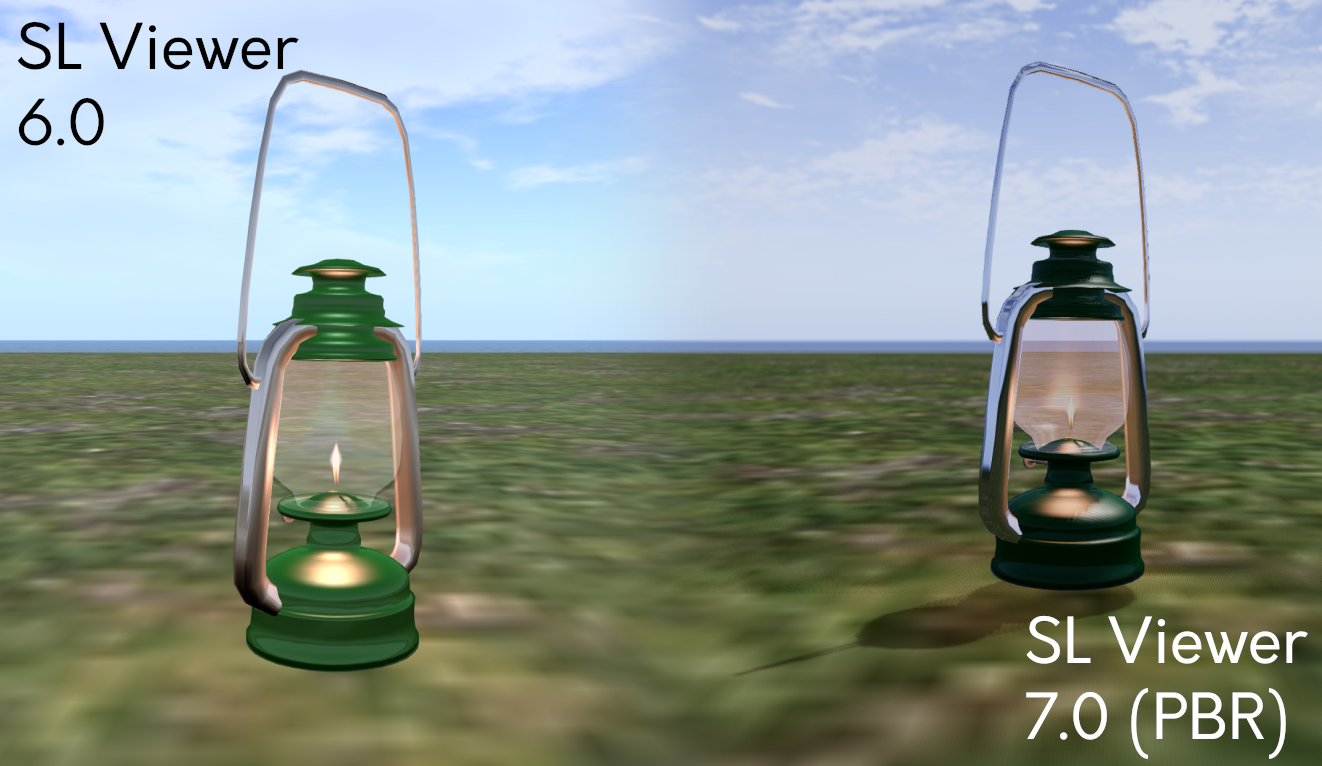
The lamp in this screenshot uses “classic / legacy” SL Materials and was created before PBR’s integration into SL. Here it demonstrates some of the visual differences to existing content. The environment used for the screenshot is the viewer’s default Midday preset (Note that the PBR viewer has a new Midday preset). Credit: Jenna Huntsman, via Linden Lab

Some of the Visible Changes Users Can Expect

Some of the updates to the Second Life Build / Edit floater to support PBR Materials

Note: PBR Materials require the use of a PBR-Materials enabled viewer. It may take time for the code to be implemented on all third-party viewers.

The introduction of PBR Materials has required a large-scale overhaul of the viewer’s rendering pipeline (and numerous back-end updates which fall outside the scope of this article). Some of the more visible changes users can expect to see include:

  • More realistic and immersive reflections (related: see Reflection Probes, below).
  • More natural ambient lighting within scenes, including a new Midday sky preset).
  • The use of high-dynamic range (HDR) rendering and tone-mapping, which should result in colours in Second Life generally appearing more saturated, with less detail being lost in shadows and highlights.
  • Updates to the viewer’s Graphics Preferences, comprising:
    • The removal of:
      • Hardware settings – Texture Memory slider, Fog distance Ratio slider and Gamma slider.
      • Shaders – Bump Mapping and Shiny, Local Lights, Terrain Detail slider, Avatar Cloth, Water Reflections drop-down, Atmospheric Shaders and Advanced Lighting Model.
    • The repositioning of:
      • The Sky detail slider.
      • The Shadows drop-down options.
      • Ambient Occlusion (renamed: Screen Space Ambient Occlusion).
    • The introduction of:
      • Enable / disable Screen Space Reflections.
      • Drop-downs to set Reflection Detail and Reflection Coverage.
      • Exposure slider.
    • Updates to the viewer’s Build Edit floater:
      • Ability to switch between “classic / legacy” materials (still referred to as “Textures”) and PBR Materials (referred to as “PBR Metallic Roughness”).
      • Options to copy attributes (colour tint, transparency, glow, materials) between editable objects / object faces.

Of the above, the removal of the Advanced Lighting Model checkbox might be viewed with alarm, given its (not always correctly) linked to viewer performance.  However, given the amount of work already completed in viewer rendering performance under the Graphics Improvements project, the loss of this option and the ability to disable atmospheric shaders should have a minimal impact for most users.

That said, for those who are on particularly low-end hardware and have relied on these options to help boost the viewer’s performance on their hardware, please refer to this section of the PBR Materials documentation for guidance on adjusting settings within PBR-enabled viewers.

Capabilities for Content Creators / Modifiers

Note that this is not an exhaustive list, but a simple-to-grasp summary.

  • Ability to use tools with PBR workflows without sacrificing visual quality on import.
  • A new Build → Upload option for uploading Materials to Second Life.
  • Generate new Materials assets which can be sold to other users in-world / via the Marketplace and otherwise exchangeable in accordance with their defined permissions, just like any other texture in Second Life.
  • Drag and drop Materials asset from inventory and onto an object face.
  • Perform limited editing on PBR Materials (again in accordance with their specified permissions).

As I am in no way qualified as a content creator, I will leave it to Boston Blaisdale to present an introductory course on creating, uploading, applying and editing PBR Materials, courtesy of the Second Life University.

Reflection Probes

As noted in the above video, a key component within the PBR Materials capability is the idea of a new Second Life volume type called a reflection probe.

  • “Automatic” reflection probes are located within regions and cannot be moved or edited; they are intended to provide a “default” or “ambient” reflection solution.
  • Reflection probes can also be created manually, when they are intended to be used in interior spaces such as rooms, homes, etc., or where a specific style / use of reflections is required. They are used to calculate and present reflections based on proximity to them, the local lighting, etc., and will override the default (/ambient) solution (e.g. so an object will not reflect things like the sky outside of a building).
  • Manually-created reflection probes are defined using a new set of parameters found within the Features tab of the Build / Edit floater.
  • However, Reflection Probes can be resource-intensive, and so should be used sparingly and efficiently, and should not:
    • Be used to try to create (planar) mirrors in Second Life – there is a follow-on “Mirrors” project which will enable real-time mirrors in SL within define parameters.
    • Be attached to small creations such as furniture or décor – these should use the reflection prob(s) within the space in which they reside.
    • Be worn on an avatar or attached to a physics-enabled object (e.g. a vehicle). By design, and given that reflection probes are intended to be part of a scene, doing so will render the probe inoperative.

Known and Possible Issues

There are some issues and bugs within the PBR code, with two of the most significant perhaps being:

  • A “slim minority” of users with very, very large inventories and Friends lists may find some objects in a scene do not render when logging-in. Currently, the steps for correcting this are to a) re-log, and if that fails to resolve the problem, b) clear cache.
  • Some users on Macbooks and / or Apple Silicon systems may experience poor performance on the PBR viewer.
  • When seen on a non-PBR enabled viewer, objects and avatars may have a blue tinge reflecting off of them. This is a result of the viewer not having the required shaders within the rendering pipe to manage the ambient lighting.

These, and remaining bugs within the system will be dealt with in upcoming maintenance updates to the viewer. Those finding issues with PBR Materials are asked to test on the official viewer, and if necessary raise a bug report.

Looking to the Future

The release of PBR Materials is not the end of the glTF™ project, but rather the first deployment of glTF™-based capabilities. In the coming months the Lab hopes to be able to deliver:

    • Real-time mirrors: providing the means to have mirrors within scenes reflect their immediate surroundings.
      • These will leverage a “hero” reflection probe concept (512×512 resolution), with one such probe per scene being active for any given avatar, based on the avatar / camera distance from the mirror.
      • Work on this is already in progress, and a project viewer for the capability is expected to be available in the very near future.
    • PBR terrain: providing the means to apply glTF™ materials to terrain as a viewer-side effect to improve the appearance of the SL terrain.
      • Again, s project to deliver this work is already in progress, and a project viewer supporting the capability will hopefully be available in the near future.
      • Please note: this is not support for PBR terrain painting.
Materials applied to Second Life terrains. Credit: Linden Lab

glTF™ Scene Import

It is hoped that alongside of the above mirrors / terrain work, and allowing for maintenance releases to the PBR Materials deployment, work will soon commence on developing the capability for Second Life to support glTF™ mesh and scene import.

  • There is no time frame as to when this will be available for testing or when it might be deployed.
  • The first steps will likely be the development of a prototype import mechanism.
  • Once the prototype is available, the Lab will then likely proceed as with the PBR Materials project, invite content creators to engage in the project, provide input / feedback, and then develop the capability on an iterative cycle utilising that input / feedback.

Resources and Further Links

Footnotes
  1. Khronos® and the Khronos® Group logo and glTF™ and the glTF™ logo are registered trademarks of the Khronos® Group Inc.

2023 week #46: SL CCUG meeting summary: PBR status & current release plan

Le’eaf Forest Retreat, September 2023 – blog post

The following notes were taken from my audio recording and chat log transcript of the Content Creators User Group (CCUG) meeting held on Thursday, November 16th, 2023.

  • The CCUG meeting is for discussion of work related to content creation in Second Life, including current and upcoming LL projects, and encompasses requests or comments from the community, together with viewer development work.
  • As a rule, these meetings are:
    • Held in-world and chaired by Vir Linden, in accordance with the dates and times given in the the SL Public Calendar, which also includes the location for the meetings.
    • Conducted in a mix of voice and text..
    • Open to all with an interest in content creation.
  • The notes herein are a summary of topics discussed and are not intended to be a full transcript.

Official Viewers Status

No updates for the latter part of the week, with the current crop of official viewers being:

  • Github Actions (GHA) RC viewer, version 6.6.16.6566955269, issued October 20 (with major CEF update and number version numbering) and promoted on October 25.
  • Release channel cohorts:
    • Maintenance X RC, version 6855926535, issued November 14 – usability improvements.
    • Maintenance Y, version 6.6.17.6855930358, issued November 14 – My Outfits folder improvements; ability to remove entries from landmark history.
    • glTF / PBR Materials viewer, version 7.0.1.6750600769, November 11.
    • Maintenance-W RC viewer, version 6.6.17.6709258523, November 9.
    • Maintenance V(ersatility) RC viewer, version 6.6.16.582201, October 16.
    • Emoji RC viewer, version 6.6.15.581551, August 31.
  • Project viewers:

General Notes

  • The PBR viewer now appears to be the no 1 on the runway for promotion to release status – see the notes below for more.
  • The next viewer LL is hoping to promote after PBR is the Emoji RC viewer.
  • As there are now four Maintenance RC viewer in the pipeline (V, W, X, and Y), it is likely some of them will be merged together to reduce the load on the release schedule.

glTF Materials and Reflection Probes

Project Summary

  • To provide support for PBR materials using the core glTF 2.0 specification Section 3.9 and using mikkTSpace tangents, including the ability to have PBR Materials assets which can be applied to surfaces and also traded / sold.
  • The overall goal for glTF as a whole is to provide as much support for the glTF 2.0 specification as possible.
  • Up to four texture maps are supported for PBR Materials: the base colour (which includes the alpha); normal; metallic / roughness; and emissive, each with independent scaling.
  • In the near-term, glTF materials assets are materials scenes that don’t have any nodes / geometry, they only have the materials array, and there is only one material in that array.
  • As a part of this work, PBR Materials will see the introduction of reflection probes which can be used to generate reflections (via cubemaps) on in-world surfaces. These will be a mix of automatically-place and manually place probes (with the ability to move either).
  • The viewer is available via the Alternate Viewers page.

Further Resources

Grid-Wide Deployment and Viewer Release

  • Following a meeting this week, the current plan from the Lab is to deploy PBR Materials grid-wide on the simhosts during the first week after US Thanksgiving (so week commencing Monday, November 27th, 2023).
  • Currently, all RC simhost have been updated to the PBR simulator code which leaves only the SLS Main channel to go.
  • The plan is also to promote the PBR RC viewer to de facto release status that same week.
  • Note that these plans are subject to late-breaking issues or other requirements not getting in the way of things.

Recent Work

  • Fixes are progress for what are seen as to remaining notable issues:
    • One to correct the issue with normal maps uploaded via the glTF uploader always coming out square post-upload  and with lossy compression.
    • One to correct the issue of not being able to revert an Alpha mode from blend or mask to opaque without having to save the material back to inventory after making the change in order for it to apply properly.
  • There are some additional bugs within the system, some of which do have fixes in the works, but these aren’t seen as having significant impact, and will be subject to release with the first maintenance update to PBR Materials.
  • That said, there some issues which have been identified, but will not be addressed until the first PBR maintenance viewer is issued. These include:
    • A “slim minority” of users with very, very large inventories and Friends lists may find some objects in a scene do not render when logging-in. Currently, the steps for correcting this are to a) re-log, and if that fails to resolve the problem, b) clear cache.
    • Some users on Macbooks and / or Apple Silicon systems may experience poor performance on the PBR viewer.
  • For those interested – this is the list of currently open issues for PBR.

General PBR Discussion

  • BUG-234235 “[PBR] alpha blend on water is acting a bit like invisiprim” – this is being worked on, and is seen as somewhat related to another change under consideration: environmental haze.
    • Currently, local lights are not affected by environmental haze. Runitai Linden is working on a change that will make local lights responsive to haze (e.g. if you are in a foggy environment, lights at an increasing distance from your camera position will appear fainter and fainter due to the influence of the fog).
    • This work will likely be surfaced in the first PBR viewer maintenance release.
    • The reason this is related to BUG-234235 is that it will also require an adjustment to water haze as well, and this should resolve the issue reported in the bug (haze will essentially get its own render pass, with a single shader being used for both atmospheric and water haze, rather than them requiring separate render passes).
  • Future work on glTF will allow for more greater control of lighting sources, such as lamps, etc., and provide for luminosity to be defined in terms such as lumens. However, this work will depend on glTF scene import, which will be worked on in the next tranche of work, together with HDRI import / export (which is not as yet on the glTF implementation roadmap).
  • A Materials folder is to be added to the system library and available through the Library section of inventory.

In Brief

  • A Feature Request has been filed to allow system-generated sounds to be overridden by Experiences to provide more immersive sounds (e.g. on entering a door and being teleported, the sound heard might be the creaking of the door opening, rather than the ding-sing-whoosh of the default teleport sound – which can only currently be disabled on a per viewer basis by the user). See (and Watch) BUG-234682 “Override UI sounds within the scope of experience keys” for more.

Next Meeting

† The header images included in these summaries are not intended to represent anything discussed at the meetings; they are simply here to avoid a repeated image of a gathering of people every week. They are taken from my list of region visits, with a link to the post for those interested.