The development of the Kokua and Imprudence Viewers has been somewhat stalled for several months for a wide range of reasons, all of which are understandable given the voluntary nature of Viewer development in general.
At the end of January 2012, the Kokua / Imprudence team held an open meeting at which the future of both viewers was discussed, and following this, a blog update was put out summarising the conclusions reached, and which reads in part:
We’re going to continue to develop Third Party viewers with a focus on cross supporting Second Life and OpenSim/Aurora. However we’re going to focus on Kokua in the future, the ultimate fate of Imprudence is still undecided though as we may push for a final 1.4 release but nothing that takes up too much of our time. Kokua will use Second Life v3.2 as a base, we feel the LL code for v3.2 has matured greatly beyond v2 and v3 and we’ll of course make our own modifications to it to make it more “purple” in flavor. It is also our intent to finalize the name change from Imprudence to Kokua, Imprudence and Kokua are separate viewers and the project has historically been called the Imprudence project. The intent was to switch from Imprudence to Kokua as the next generation client was released but it has been dragged out for quite a while now and caused confusion, so we’re going to finish the change over to Kokua.
This is excellent news for the SL TPV / OpenSim worlds, as Imprudence has long had an outstanding reputation for usability and has been popular across the wider metaverse (may of us who bounce between SL and other grids find it to be our Viewer of choice when outside of SL). That the expertise that has made Imprudence so popular and so capable a Viewer is now being brought to bear on the V3.2 FUI and capabilities is good news and means that both OS and SL stand to gain given wider choice in Viewer options.
Of course, many will lament what amounts to the eventual passing of Imprudence – but again, all Viewer development is only voluntary, and teams / devs must move in the direction that they feel is most appropriate for them in terms of building and maintaining a viable Viewer and it would be unfair to chastise the Kokua / Imprudence team for their decision.
Work will, for the forseeable future, focus on Windows (32-bit) and Linux 32-bit & 64-bit), although it is hoped both Windows and Mac 64-bit options will be available “down the road” – with the further caveat that Mac development is dependent upon the team gaining a Mac developer. Sounds reasons are given for not focusing on a Windows 64-bit version from the off, although the 32-bit version will have SSE optimisation.
Alongside the core work on the Viewer, the Kokua / Imprudence blog & forums are liable to see an overhaul in the near future as well.
As well as the blog post on the subject, you can also read the full transcript of the meeting, if you were unable to attend.
Jacek Antonelli, one of the major driving forces behind Imprudence / Kokua has today announced she is retiring form the Imprudence team. Her announcement in part reads:
After 3 years of serving this project, I will be retiring effective September 1. As often happens in life, the priorities in my life have shifted over time, and it is now time for me to focus on other things.
Obviously, this will be a major transition for the project. But, I will be working for the next month to make it as smooth as possible, so that everything can continue with minimal disruption. At this time, we have not yet decided who, if anyone, will replace me as “benevolent dictator“, or whether there will be some other form of project leadership. Of course, we will keep you guys informed as the details are fleshed out.
My retirement is not an occasion for somberness, but rather for fond reflection on the past, and hope-filled anticipation for the future. I am proud of the work we have done and what we have accomplished so far, and I look forward to the great things that will be accomplished after I am gone. What’s more, I am immensely proud that we have accomplished all this without compromising our principles or our integrity, even when the road was most difficult, and the temptation most pressing.
Imprudence has been a major force in the world of third-party Viewers, and the team, lead by Jacek, have rightly gained themselves a loyal and enthusiastic following. Over the years, Imprudence has often been a pathfinder for new functionality, and/ or has striven to meet the most-needed requirements of users.
It is not entirely clear what will be happening in the future – the team have a month to get things sorted out, and hopefully both Imprudence and the still in-initial-development Kokua will remain with us, and the vision of seeing Imprudence 1.4 stablised and Kokua gorwing into its worthy replacement will be realised over time.
As a former Imprudence user myself, I’ve always appreciated all the work the team has put into the Viewer, and I personally wish Jacek every good wish and every success, both in her virtual and real lives.
Kokua is the name of the new Viewer from the Imprudence team. It’s been in development for several months, and a “test release” or “Work-in-Progress release” has now been made available. Based on Snowstorm 2.4, Kokua represents the forth major TPV to be based on the Viewer 2, following Kirstenlee’s S20/S21 series, Dolphin 2 and Firestorm itself.
Given the version (0.1.0) on offer isn’t even an Alpha, it would be unfair to subject it to a full review; rather, here are some impressions after having taken it for a spin over a couple of hours.
Installation and Start-up
Installation was pretty much the norm for an SL Viewer, although running it might cause some surprises, at least on the Windows version, where it opens up a couple of unexpected terminal windows; one apparently monitoring the Viewer’s system calls, etc., and the other blank. Closing the latter will remove the blog display panel from the splash screen, but otherwise not impact the Viewer. Closing the other window – identifiable from the commands displayed – will also close the Viewer – it must remain open until you actively quit the Viewer (at which point it will close). Doubtless future releases will see these additional windows removed.
Hybrid Interface
Once logged-in it becomes evident that Kokua is something of a hybrid Viewer; while the layout of the UI is broadly Viewer 2, there are subtle differences. The most obvious of these at first glance is the menu bar, which is more Viewer 1.x in appearance than Viewer 2.x. Rather than the increasingly-familiar Me, Communicate, World, Build and Help options, Kokua presents us with File, Edit, View, World, Build and Help, together (as with Viewer 2) the optional Advanced and Develop menus.
Similarly, the toolbar at the bottom of the Viewer window presents additional buttons over Viewer 2’s default set (see below). Of particular note is the Sidebar button, which brings up a floating palette from which the various Sidebar tabs can be accessed. Anyone having used Kirstenlee’s S20 Viewer, will find this instantly familiar. However, there is a slight annoyance – close the Sidebar palette before you’ve closed any open Sidebar tab…and you cannot close the tab. You must re-open the Sidebar palette and click on the relevant button to close the tab.
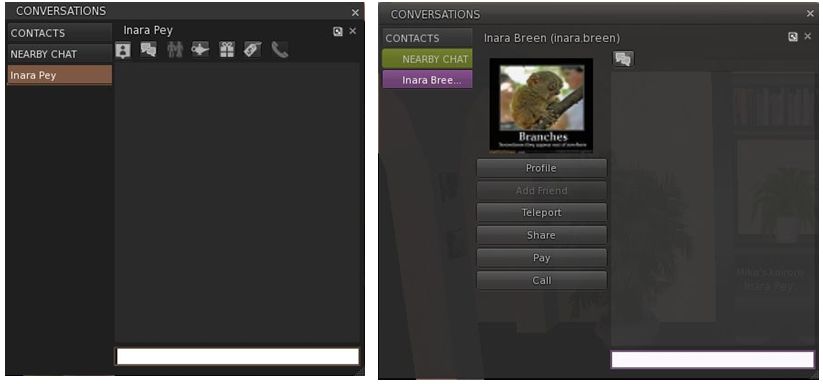
One of the major frustrations with Viewer 2.x has always been in the area of typewritten communications which has exhibited various flaws, including much in the way of wasted space through the use of avatar icons in the actual chat / IM windows. While things have improved over successive releases of Viewer 2, Kokua sadly takes a step backwards.
The problem is that both the chat and IM window tabs take up an excessive amount of space when compared to Viewer 2 because both include a central “column”. In the case of IM tabs, this is used to display the Profile picture of the person with whom you are conversing and a series of Action buttons (Pay, Teleport, etc), as shown below; in the case of the Chat window, it displays a list of icons representing everyone in your immediate vicinity.
IM tabs (Left: Viewer 2.x; right: Kokua)
Truth be told, while not always ideal, Viewer 2’s use of icons at the top of IM tabs is a far better solution to providing access the options to pay, teleport, etc. Where the chat window is concerned, the list of avatar icons is…wasteful.
View (Camera) Controls
On a more positive note, a nice touch within Kokua is a revised View / Camera control palette which includes buttons for camera zoom and for entering Mouselook, as well as the more familiar control options. These are a very nice touch.
Performance and General Feedback
In terms of performance and use, Kokua sits right up there for me. My frame rate was hitting 50-55 fps when on my own, and dropping to around the mid-30s when interacting with a few others. This actually puts it top of the tree for me in comparison to the likes of Firestorm and even Phoenix 908/977. However, activating dynamic shadows did give me a massive performance hit; one far greater than with Firestorm, with my frame rate collapsing to around 7-8 fps.
Rezzing was also extremely fast on Kokua when compared specifically to Phoenix and Firestorm – both of which it beat hands-down when logging on to the same location with each Viewer and with a cleared cache. While it might be my eyes, Kokua also seems to render objects with a far greater sharpness than seems to be the case with Viewer 2, Firestorm or Phoenix.
When installed, Kokua leaves one of the bigger footprints on a hard disk – 137Mb. This compares to the 102Mb used by V2, the 129 by Klee’s S21 and the whooping 154Mb required by Firestorm. Memory usage for the Viewer equated to that for both Firestorm and Klee, with similar overall core usage on a multi-core (quad core) CPU, where three cores shared the load.
Conclusion
There is of course much that is missing from this release – hence the “test” and “WIP” warnings in the Imprudence blog; so those anticipating a Viewer comparable to the pre-Alpha of Firestorm should perhaps wait until the next release of Kokua comes along. Certianly, anyone requiring the Media Filter, RLVa, radar or a choice of skins would do well to wait.
People also shouldn’t expect things like web Profiles or Avatar Physics – these became available after the version of Snowstorm Kokua is currently based on, so it is frankly unfair to expect either, or critique the Imprudence team because they are “not there”. Indeed, those expecting more would do well to read the Imprudence blog post caveats relating to the release, namely:
This is a test build. It will likely have many bugs. It might break your avatar or eat your pets. Use it for testing purposes only.
This is not a finished product. The UI is not final. The feature set is not final. Nothing about it is final.
We need your feedback to improve the viewer.
However, that said, there are two elements of the current release that I would change were I involved in Kokua. These are:
The current chat / IM window / tab layout: this is really irritating in the amount of screen real estate required to adequately display conversations – and it is simply not necessary. The central “column” for images and the like really serves no purpose that cannot be better met through other means. If nothing else, those routinely using SL from a laptop may well find the amount of screen display lost to chat very annoying
The Sidebar tabs really need individual options to close them in addition to being able to do so from the Sidebar button palette; relying on the palette alone is not really convenient.
Other than that, this looks like a promising start for Kokua, and I look forward to taking future, more advanced, releases for a more thorough test drive.
 The development of the Kokua and Imprudence Viewers has been somewhat stalled for several months for a wide range of reasons, all of which are understandable given the voluntary nature of Viewer development in general.


 Inara Pey: Living in a Modemworld