Kokua 3.7.1.30956: Fitted Mesh and refresh scene option

kokua-logoKokua, the SL and OpenSim v3-style viewer, updated on Tuesday February 18th to version 3.7.1.30956. With it came support for the Lab’s Fitted Mesh solution and the Facebook log-in hotfix.

As well as bringing the viewer up to parity with the Lab’s code base through to 3.7.1, this release also sees a set of updates from the Kokua team, the core of which can be summarised as:

  • The Mac version of the viewer (issued as a test version in January) is now available as a release version with this update, thanks to the help and support of Mac users
  • The Draw Distance slider on the status bar is now turned off by default as new users were apparently confusing it with a volume slider. It can be re-enabled via the debug setting ShowDDSlider (Advanced > Show Debug Settings)
  • The Windows version of Kokua now uses the FmodEx library for music streaming, and incorporates the avatar name in the title bar (port from Firestorm)
  • Opensim variable-sized regions and Aurora Sim regions are now supported
  • A number of issues with the UI have been resolved with assistance from CtrlAltStudio’s Strachan OFarrell.

Refresh Scene

Perhaps the most interesting update to Kokua with this release is a new Refresh Scene feature. This is primarily aimed at mitigating the missing prim issue, and can be accessed through both the Commands and Advanced menus or by pressing CTRL-ALT-SHIFT-R.
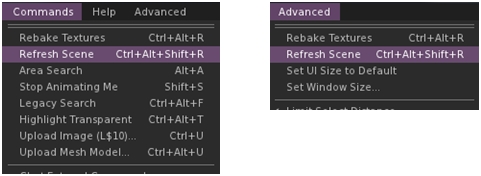
The Scene Refrsh option in the Command and Advanced menus
The Scene Refresh option in the Commands and Advanced menus

When selected, the option carries out a number of tasks:

  • Basic Shaders are deselected, increasing the viewer’s frame rate and allowing the viewer to more quickly pull-in the basics of a scene
  • A message is sent to the viewer log, allowing the viewer to run a little longer without the shaders
  • Basic Shaders are re-enabled to complete re-dressing the scene, which should now be correctly rendered.

Other Notes

There have been some reports in the comments following the release notes of issues running the 64-bit Linux version of the viewer on Ubuntu, which are apparently under investigation.

I did encounter initial issues running the viewer on 64-bit Windows using my Crash Test Alt, which saw the viewer repeatedly going non-responsive within a minute or so of logging-in. However, I confess to not having performed a clean install,  so this particular issue could have been as much my end as anything else. When I did perform a completely clean install, the issue went away. So if you do encounter issues, try a clean install, if you haven’t already.

All told, another nicely packaged update to Kokua, one which probably hides a lot more in the way of under-the-hood changes than might at first appear to be the case. The Refresh Scene option is an interesting approach to resolving the missing prim issue, and may well prove to have other benefits in the future as well.

Related Links

Kokua Mac test viewer: request for assistance

kokua-logoOn Saturday January 11th, Nicky Perian announced a test version of a Mac build of Kokua is now available, and has also issued a call for assistance from Kokua / Mac users.

The blog post reads in part:

Several hours ago the first Mac build completed and I logged on to Second Life beta grid, Aditi. Rebranding from Second Life to Kokua is needed. If there are Mac users that would like to help in this area please respond and I’ll help set up a build environment on your system. I would like Mac users to test and provide look and feel opinions as comments to this post. If there are bugs please report them to our issue tracker.

Having a Mac build of the viewer has been one of the more popular requests made to the Kokua team, so if you have a Mac system and are willing to help out test-driving the new Mac build and reporting back both opinions (via the Kokua blog post) and on any issues you discover (the latter via the Kokua issue tracker, as indicated above), please download the viewer from the Kokua nightly builds directory.

Similarly, if you are willing to help with rebranding the viewer from Second Life to Kokua (which, as noted above, will require a viewer build environment created on your system which Nicky can provide help with setting-up), do please contact Nicky either directly (via in-world IM or through the comments on the Kokua blog post.

(Please do not leave feedback or offers of assistance on this blog, they may not be picked-up.).

Release Notes

Kokua 3.6.12 released; CtrlAltStudio and UKanDo added to TPV Directory

Kokua Update

Thursday December 12th saw the Kokua team release version 3.6.12.30743 of the viewer. This appears to be a fairly contained update, focused on updating the viewer with the recent SL viewer 3.6.11 GPU Table updates and the 3.6.12 NameUpdater changes. Neither of these involved functional changes to the viewer from LL’s side, but do bring Kokua to parity with the current SL 3.6.12 code base.

In addition, the short-form release notes highlight the following updates from the Kokua team:

  • UI enhancements by Jessica Wabbit.
  • UK-english dictionary added to the spelling checker
  • Removal of packaged PCRE libraries from Linux 64-bit builds as they caused web kit to fail to load on newer Debian based distributions.

The release notes also point out that when the viewer is started for the first time following installation, there will be a notice and link to check graphics drive availability. The Kokua team urge caution if the option is taken to update drivers, as system breakages have resulted in the past. They also point out that the notice is a recommendation to check for updated drivers, not a requirement to update.

Related Links

CtrlAltStudio and UKanDo

The CtrlAltStudio and UKanDo TPVs have both undergone self-certification and have been added to the Third-party Viewer Directory (TPVD).

The associated wiki page for CtrlAltStudio describes the viewer as :

The CtrlAltStudio Viewer has been set up in order to try out and share a number of ideas, the first being stereoscopic 3D display and some initial Oculus Rift support . It is based on the Firestorm Viewer which it tracks closely while adding particular features.

The associated wiki page for UKanDo describes the viewer as:

UKanDo gives a whole new perspective in Second life by using a camera placement adopted by the vast majority of third person video games.

Also includes RLV along with plenty of other useful tools. It won’t have all the gadgets/gizmos a lot of the bigger viewers have, the aim is to keep it as lite as possible with only the fixes, gadgets and gizmos we need to keep the Viewer stable and up-to-date! The Avatar happy! And to aid with building!

(Please note that descriptions are supplied by the viewer developers, not Linden Lab.)

Congratulations to both viewers, both of which I’ve been following in these pages. You can catch-up with them as follows:

Kokua issues AIS test viewers

kokua-logoAs regular readers here will know from my weekly SL project reports, Linden Lab is (among other things) working on the final clean-up of the Server-side Appearance (SSA) code. A large part of this work is directly linked to inventory handling, and is being referred to as the Advanced Inventory Service version 3 updates (AIS v3).

The primary aims aim of these updates is to address a series of inventory issues outstanding from the implementation of SSA, and to aggregate some operations that are currently multiple things into a smaller set of more powerful APIs. As noted in my last update covering AIS, the viewer-side code has reached a point where the Lab is both keen to progress with further testing. This being the case, the Lab has asked TPVs if they could incorporate the updates into experimental versions of their viewers so that they might assist with the testing.

Integrating the AIS v3 code isn’t as straightforward for those viewers which support both OpenSim and SL as it is for those that are focused solely on SL, as the AIS updates have been combined with a removal of the old client-side baking code from the viewer, as this is no longer required by the Lab. So in order to ensure avatar baking continues to work when users log-in to an OpenSim environment, those TPVs supporting both environments with a single viewer are having to ensure the client-side code is not lost when incorporating the new SSA / AIS updates.

On November 6th, Nicky Perian reported that Kokua has now done this, and has a test viewer for Windows available in the former version 3.6.9.30799, which is available in both 32-bit and 64.bit flavours.This viewer both includes the AIS updates and retains the client-side avatar baking code.

As the AIS code is still under development, it is not recommended that either version of this test viewer is used as the primary viewer for logging into Second Life. The primary reasons for making the viewer available are to:

  • Allow SL users to test inventory transactions, including changing avatar body parts and body part parameters (for example, eye colors) using the dedicated test regions which have been established on the SL Beta test grid Aditi (sunshinesls, sunshinesls1, sunshinetest, sunshinetest1)
  • Allow OpenSim users to also test inventory transactions and avatar baking on an OpenSim, and check for any unexpected changes to expected behaviour when compared to the latest release viewer.

Related Links

Kokua and Singularity updates

Both Kokua and Singularity issued what amount to maintenance releases in the latter half of week 35, with Kokua releasing version 3.6.4.29422 on August 28th,  and Singularity releasing version 1.8.2.4929 on August 29th.

Kokua 3.6.4.29442

The release keeps Kokua on a par with LL’s code base, being built on the 3.6.4 code. The release notes identify a potential issue for Linux users with the last release, with Nicky reporting that:

A user on an older version of Linux reported an auto update issue that resulted in no working viewer. Kokua recently updated build systems from Debian Squeeze to Wheezy. While great for users that move ahead of the pack in updating their Linux distributions it left one user (and maybe more) without a working Kokua on their system. So, the request to upgrade was acknowledged and new Kokua was installed. But, it would not run then, when the old Kokua was tried it was stuck wanting to update.

Further testing revealed the issue appears to exist within LL’s Linux build as well, and a JIRA – OPEN-186 has been raised as a result.  In the interim, the team have reverted to building using Debian Squeeze.

This release also sees Kokua gain two potentially useful features – one for mentors / helpers, the other for builders.

Kokua can now optionally display the age of an avatar in the name tag. The option is off by default, and can be enabled via Preferences > Kokua > General > Show each avatar’s age in their name tag. When enabled, the option defaults to showing the age for avatars up to 28 days of age. However, this can be increased / decreased as required, with 0 meaning avatar ages will always be displayed.

The idea behind this is to make it easier for mentors and helpers identify new starters in a welcome area, so that greetings and offers of support can more readily be made.

The new avatar age display in name tags (Preferences > Kokua > General) and the new button for duplicating values for size, offsets, etc., on maps

This release also sees Kokua implement a Duplicate Values button in the Texture tab of the Build floater. This allows the settings for the size, offsets, repeats, etc., set for a texture / normal / specular map to be immediately duplicated to the other maps on an object / object face, saving the need to manually set them in turn when applying maps. If there are no additional maps applied to an object / objects face (e.g. a diffuse map, but no normal or specular), the button is disabled.

The remaining updates for the release include:

  • Sit Here or Stand Up options are now only shown in the right-click context menu for objects
  • A Teleport Here option has been added to the context menus to go with the Sit Here option
  • OXP backup crash fix to prevent selecting individual object(s) from a linkset, rather than the selecting the entire linkset, from causing an immediate viewer crash
  • Links no longer include the trailing “?” in the link when asking to load the indicated web page in notifications
  • Fixed a variable scope bug in LLVOVolume::getApproximateFaceNormal().

Please refer to the release notes for further information.

Singularity 1.8.2.4929

The Singularity release comprises a substantial list of tweaks and updates, including a change to the .DAE and .OBJ export permissions when using the viewer on OpenSim, such that if the grid on which the viewer is being used does not support explicit “export” permission, the exporter now follows the rules set by the original Imprudence exporter.

Additionally, the update includes:

  • Additions:
    • Ability to save textures from the inventory menu
    • An option to open inventory folders in a new separate window
    • An option to show landmarks on map
    • An option to hear speakers at the same volume unaffected by position
    • Show Profile button on teleport and inventory offer notifications
    • Ability to show only legacy names for speakers (in Adv. Chat > Chat UI preferences)
  • Fixes for:
    • The German translation where login notifications appeared as ‘[FIRST] [LAST] is online’ instead of showing the actual avatar name
    • The crash when opening Bumps, Pushes, and Hits floater
    • Windows, audio volume control for plugins is now working allowing gradual falloff in volume for prim media objects that are farther away
  • Improvements:
    • Updated Spanish translation
    • Legacy (pre-multiwear) wearables on some grids showed as (body part) shapes. Clothing (not body parts yet) now show with a (new) red question mark icon in the inventory, and can be used again
    • Animation uploads save the values for ease-in/out parameters for future uploads
    • Disable/Enable UI shortcut changed to Ctrl-Shift-F1 on Linux since the default Ctrl-Alt-F1 is used for switching virtual consoles. The same has been done for the other ctrl-alt-F# shortcuts on Linux
    • Imported changes from Linden viewer to introduce consistent ground texture generation and fix crashes in mesh upload.

For details on the contributors for the above, please refer to the release notes.

Related Links

Kokua offers .DAE exports

kokua-logoKokua have released a further update in the form of version 3.6.3.29169 (August 23rd). With it comes some important notes, and the addition of the .DAE (Collada) object export capability.

Installation Notes

This is the first release from Kokua to use the auto update mechanism from Linden Lab, which was incorporated into the viewer with release 3.6.2. However, for Windows users, there are two important points to note:

  • If you are a Windows user and have a pre-3.6.2 version of Kokua installed on your PC, you should first try to run the viewer and allow the auto-update process to fetch and install the latest release. This should work OK with versions of Kokua at least back as far as version 3.6.1.28998 (June 28th 2013).
  • Because all Windows versions from 3.6.2 onwards are installed into a folder called Kokua (rather than Kokua Viewer). So if you have a version older than 3.6.2 already installed on your PC, note that the new version will be installed alongside it, rather than over it. If you then subsequently remove the older version using the uninstaller, your settings (located in C:\Users\[username]\AppData\Roaming\Kokua) will be lost – so make sure you back-up / move this folder before removing any old versions of the viewer & then restore it afterwards.

Those on older versions of Kokua (pre-3.5.1? I’m not entirely clear on this from the blog post) may find that the updater will direct them to install the official SL viewer from the Lab. As Nicky points-out, this is not some conspiracy to force people into using the SL viewer. Should it happen, quit out of the installer and use the Kokua download links (and take note of the 2nd bullet point above).

Collada Export

The major update for Kokua 3.6.3 is the inclusion of the Collada .DAE export capability which was recently added to Singularity, together with the ability to export objects in Wavefront .OBJ format. As the Singularity team made the export options available under a LGPL licence,  Jessica Wabbit has extracted the.DAE export capability and contributed to Kokua.

The export option works in exactly the same manner as with Singularity: it respects object permissions, and you can only export those objects for which you are the creator and owner.

To export an item which fit the criteria, simply right-click on it and:

  • If you are using context menus, select EXPORT > COLLADA DAE
  • If you are using the pie menu, select MORE > MORE > EXPORT COLLADA DAE

Either option will open a window allowing you to save the object to your hard drive. Once exported, the object can be used into applications which support the editing of .DAE files and / or imported as mesh to other virtual environments.

The DAE expoert options in Kokua's context and pie menus. If you're not the creator & owner of the item you're trying to export, they won't be available to you
The DAE export options in Kokua’s context and pie menus. If you’re not the creator & owner of the item you’re trying to export, they won’t be available to you

Note that if you do not have the requisite permissions to export the item, the export option will be unavailable on both menus.

Currently, the system only exports naked prims / sculpts (no textures), but this may be changing in the future – keep and eye on the Singularity team for news.

Commenting on the export capability, Kokua’s Nicky Perrian has said that if there is sufficient interest, the option to export to .OBJ may also be added to the viewer.

Additional Updates

This release sees Kokua use the Lab’s viewer 3.6.3 code base, and the following updates / additions:

  • The upcoming OpenSim Community Conference grid on OS Grid has been added to the grid drop-down list
  • Some tuning of the auto-update feature
  • Addition of a plain text chat history option in the chat preferences tab
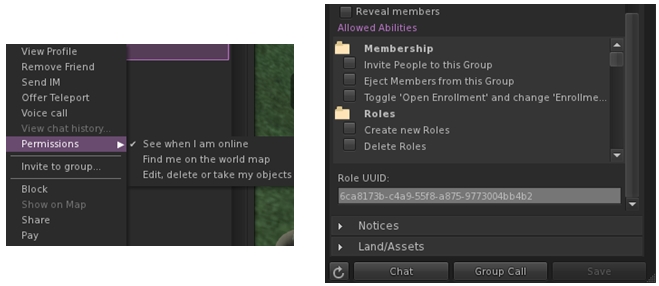
  • Addition of new “Permissions” sub-menu for friends on the People floater for setting the usual options of whether friends can see when you’re on-line, etc. Enabled options display the requisite icon alongside the avatar’s name
  • Addition of group and role UUIDs at the end of the group’s General and Roles panels.
(l) Setting permissions for friends can now be done via a sub-menu int he people folder; (r) the UUID for a group can now be obtained from the group's general tab (role UUID can also be obtained from the Roles tab)
(l) Setting permissions for friends can now be done via a sub-menu int he people folder; (r) the UUID for a group can now be obtained from the group’s General tab (role UUID can also be obtained from the Roles tab)

Feedback

Another, small, tidy update with Kokua which adds what is likely to be a popular feature, given the excitement which followed Singularity’s release with the export options. Using Kokua 3.6.3 myself (although again very briefly due to RL commitments), I found it to be fast, stable and smooth – pretty much as with 3.6.2.

As I already had 3.6.2 installed, I allowed the auto-updater to upgrade me. This actually took a few seconds to acknowledge that an update was available (the delay seemed to be longer than the official viewer, which often has the update pop-up appear as soon as the splash screen has loaded). This tiny point aside, update was smooth and returned me to the log-in splash screen when finished, with 3.6.3 ready to go.

It’s great to see Kokua rolling along like this.

Related Links