With Server-side Baking / Appearance starting to be enabled on the grid, the only two maintained viewers not to be SSB/A enabled are Dolphin and Imprudence.
I recently covered the state-of-play with Imprudence, and the fact that the team plan to ramp-up the viewer to support all of the new SL capabilities and viewer changes, including CHUI, materials and SSB/A, but it is liable to be some time before they actually get there.
Now Lance Corrimal, the man behind Dolphin, has provided an update on the status of that viewer. The main part of his blog post reads:
I’m sure there are one or two people wondering what is going on with the Dolphin Viewer lately.
To put it simply, my life has been quite hectic the last few months, and it still is. I have a new job that demands a lot of my time and attention. I’ve moved to a different province because of the job, and when I am actually home (the new job involves a lot of travelling), I’m just too damned tired to spend time on working on the viewer.
That being said, there will be a new version, that will have all the new shinies from the Lab. The CHUI interface, SSA, Materials, you name it.
Just … please do not ask me when. “When it is finished” is all I can say right now.
So – SSB/A and more will all be coming to Dolphin – soon. Just give Lance a little room to breathe as the dust of a busy real life settles around him.
He also notes that Dolphin users seeing the advisory warning users of a mandatory viewer update which is displayed on the splash should be aware that clicking on the link will download the official SL viewer, not an updated version of Dolphin.
The splash screen advisory comes from LL (along with the rest of the splash screen), and will download the official viewer, not an updated version of Dolphin
Tiling test for Dolphin (3.4.6.26773+): image taken at 3500×2134 resolution using Dolphin 3.4.6.26773. Location: The Island of Armenelos (M) (click to enlarge) – fix also in the latest SL official viewer (3.4.3.28262), Niran’s Viewer (2.0.5+) and RLV (2.8.3.5+)
Graphics Preferences Updates for GPU Classes
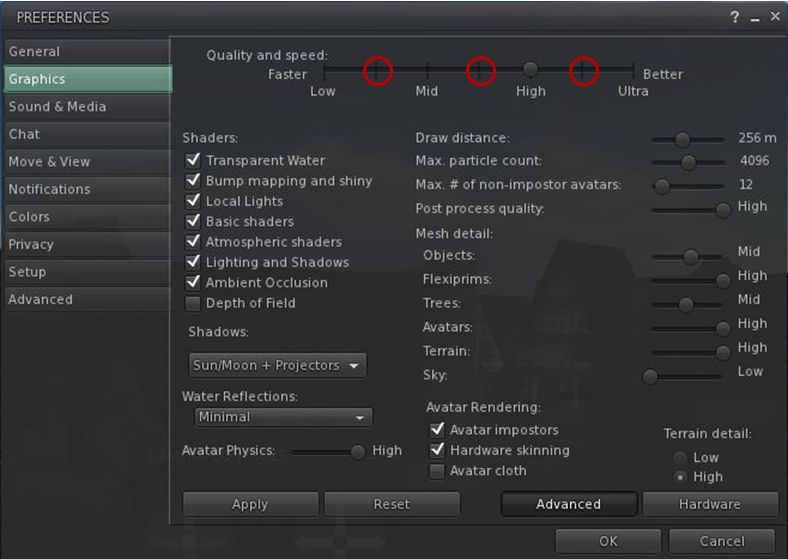
The SL viewer, Dolphin and RLV all include the new Graphics Preferences settings related to the ongoing GPU table updates. These new options place additional “stops” on the Quality and Speed slider between the four original settings of Low, Mid, High and Ultra, which are intended to better represent the default SL capabilities of different GPU classes,
The new “intermediary” graphics settings intended to better represent the default SL capabilities of different GPU classes
SSAO Fix for Horizon Haze
Also included in the recent Dolphin and Niran’s Viewer releases, is Tofu Buzzard’s SSAO improvements for generating horizon haze over Linden Sea (“ambient distance fog”). This helps overcome a long-standing bug within the viewer which has effectively broken / nerfed horizon haze over Linden Water for a considerable time.
SSAO haze effect – fix from Tofu Blizzard, available in deferred mode on Dolphin and Niran’s viewers. (image courtesy of Niran V Dean) – click to enlarge
Space Reflections
Niran’s viewer also introduces an interesting / experimental viewer-side feature from Tofu Blizzard called “space reflections”, designed to create reflections on shiny surfaces when running in deferred mode and with the appropriate Graphics Preferences option enabled. It’s not perfect, but it can be used to produce some interesting effects, as shown below, if only for those running a viewer which can render the desired results.
Tofu Blizzard’s “space reflections”: (l) a viewer running in deferred mode; (r) Niran’s viewer running in deferred with “space reflections” active to produce reflections both on the floor and inside the large sphere (click to enlarge)
Lance Corrimal released Dolphin Viewer 3.2.24.24816 on November 1st.
The release comprises a small number of updates, of which perhaps the most significant is the inclusion of the revised Mini-map first seen in Catznip R7.
For the most part, I have to say that I’ve never really seen the point of the Mini-map. Certainly, it has its various uses at times – role-play, combat, etc., but for me, the big let-down with it has been the map itself, impaired by an exceptionally weak background texture and god-awful zooming.
Catznip R7 revised all this, as I recently reviewed, completely overhauling the Mini-map and making it an exceptionally useful tool – and one I have been hoping would be adopted elsewhere (such as the code being contributed to LL).
Dolphin now includes the revised Mini-map in this release, and to mark its arrival, Lance has called the release his “Sailor’s Mini-map Mark 2”. It’s well-named, as the new Mini-map is a complete godsend for those into sailing and flying – and will probably be really handy for those who engage in cross-region road races.
The code includes all of Kitty’s refinements and updates, and really does make flying and sailing a joy without needing to necessarily clutter-up the screen with a lot of HUDs and having to waste space with the World Map to confirm your overall location.
Red Alert: using the updated mini-map to avoid parcels with object entry turned off
Not only does it how you your overall direction, it displays upcoming region boundaries, allowing you to make adjustments to course and speed which may help smooth the crossing (very handy in avoiding the risk of trying to make the diagonal corner-crossing between regions, which so often finishes rather badly (at least for me).
The revised Mini-map also helps avoid those pesky parcels where object entry has been turned off, showing them in red in the display, allowing sailors and aviators to navigate around them without suddenly finding themselves bouncing up against something or having their craft vanish from under them.
Other Updates in the Release:
Reset graphics preferences to default button in status panel, next to draw distance slider, labeled “GReset”.
Z offset reset button relabeled to “Z” to get room for GReset button.
“Refresh texture” also refreshes sculpt maps (from Firestorm).
“Restore inworld” now also sets the proper land group if you have “Rez with land group” switched on and are a member of that group.
The new reset graphics button (GReset) and revised Z-offset buttons in Dolphin’s menu bar
The Last Dolphin Release Supporting OpenSim
Release 3.2.24.24816 marks the end of line for OpenSim support within the Dolphin Viewer; it will be removed from future releases. That Lance would no longer be supporting OpenSim was made in a Dolphin blog announcement back in August 2012. The reason for this is the new Havok sub-licence arrangement Linden Lab have entered into, and Lance feeling he is unable to support two flavours of Dolphin for SL and OpenSim access on his own – which is a fair and reasonable decision on his part.
Should anyone wish to continue development of Dolphin to specifically support OpenSim access, Lance has created a clone of the original Dolphin repository for anyone wishing to fork the viewer, and he is also leaving the 3.3.19 release installers available for download from the Dolphin website.
Performance
This release of Dolphin sees a slight upturn in FPS rates over recent viewer reviews for me, if again using my rough-and-ride technique. With my usual test defaults (see the Review Systems panel on the right of this blog’s home page), I subjected Dolphin on my Linden Home region with three other residents (including my Alt in the same parcel) with the following results:
Deferred off:
Ground: 38-39 fps
370 metres: 43-44 fps
2875 metres: 55-56 fps
Deferred on + lighting set to Sun/Moon + Projectors; ambient occlusion on, full reflections:
Ground: 11 fps
370 metres:15 fps
2875 metres: 17 fps
I did find that running in Deferred with both lighting & shadows and ambient occlusion active within my Linden Home parcel did result is a significant drop in fps (to 5-6). A quick test with Catznip produced the same result.
At the start of the month, Hypergrid Business reported on Linden Lab’s removal of support for the –loginURI parameter from versions of the SL Viewer.
This command is most commonly used to modify the command path used to launch the viewer, allowing it to connect to grids other than Second Life. It has already been removed from the latest development ad beta versions of the viewer, and as such will find its way to the release version in the near future.
For the majority of people who use the official viewer and only access Second Life, the announcement passed largely unnoticed. Even among those who do routinely bounce between Second Life and other grids using TPVs, the impact of the change was minimal – most viewers openly supporting access to both Second Life and OpenSim grids tend to do so through the use of a grid selector / grid manager option – which remained unaffected by the change.
The Shape of Things to Come
However, the removal of support for –loginURI was the tip of the iceberg.
In April of this year, Linden Lab announced a sub-licencing arrangement involving the Havok physics engine. While there is already some Havok functionality evident in the viewer as it is (used in conjunction with mesh uploads and pathfinding), the licence arrangement enables Linden Lab to develop a library of Havok functions for the viewer. In time, this may prove to have significant benefits for Second Life; however, there is a catch.
Once the new Havok libraries are in place and available for use, the terms of the sub-licence require that any viewer accessing them only connects to Second Life. Period. Ergo, no grid selector, no grid manager and no support of –loginURI or any other means of provisioning OpenSim log-in support for such viewers.
In other words, once the arrangement is up and running, those TPVs that currently support both Second Life and OpenSim access, and which are eligible to make use of the new LL Havok libraries, have to make a choice as to their future direction:
Do they sign-up to the new sub-licence agreement to gain access to the new libraries and completely forgo any OpenSim support they may have provided?
Do they fork their development to provide two flavours of their viewer – one configured to access SL only and make use of the new Havok libraries, the other specifically aimed at OpenSim and unable to access the Havok functions?
Do they abandon SL altogether and instead focus solely on OpenSim?
Do they perhaps opt to forgo the use of the new library functions and continue “as is”, ignoring any new capabilities provisioned via the Havok libraries?
The option to fork development between SL and OpenSim probably comes down to matters of bandwidth, maintenance and audience. Does a TPV have the bandwidth to develop two flavours of viewer? Does it enjoy a sufficiently largely audience in both SL and OpenSim to warrant the time and effort needed to do so?
Firestorm
The Firestorm team announced in June that they would continue to support both Second Life and OpenSim by forking the development of the Firestom viewer between the two in the near future (if this has not in fact already happened in the intervening time).
While one version of Firestorm will remain focused on Second Life, the second branch will be geared towards general support of the OpenSim platform and not incorporate code from Linden Lab that is ring-fenced by the new sub-licence arrangement.
Niran’s
In July, NiranV Dean confirmed Niran’s Viewer would not be supporting OpenSim – although the decision was possibly as much based on a personal preference as having anything to do with the upcoming Havok sub-licence situation.
Dolphin
Now, with the new sub-licence arrangement looming, Dolphin Viewer developer Lance Corrimal formally announced on August 18th that future versions of Dolphin will be solely focused on Second Life as he doesn’t have the bandwidth to maintain three flavours of his viewer across two environments (Second Life and OpenSim). He will, however, be providing a clone of the original repository should anyone wish to fork it and make an OpenSim specific version.
It remains to be seen if other TPVs will make formal announcements and which route they will opt to take.
Looking to the Future
Some commentators, on hearing the news regarding –loginURI, reacted negatively, with some citing the move as a further indication of the demise of SL. These reactions would appear unwarranted. It is unlikely that any split in how either Second Life and OpenSim are accessed is going to have a major impact on either the use of SL or its longevity.
Similarly, while some may be personally inconvenienced (having to move between two viewers depending on whether they are logging-in to SL or an OpenSim grid), it is hard not to see this situation as anything but beneficial for OpenSim. If nothing else, it frees those viewer developers who wish to focus on OpenSim to develop functionality and capabilities within the viewer that are specifically geared to the platform (e.g. much improved OSSL support) and unfettered from any constraints or worries about maintaining compatibility with SL (such as the 4,096-region teleport limit).
Lance Corrimal is keeping up a rapid series of releases to his Dolphin Viewer, averaging around one release a week of late. Most have contained nips and tucks or have been driven by SL requirements such as Direct Delivery. However, at the beginning of March he rolled out the “Fujiyama edition” (version 3.2.9.23177), aimed specifically at SL photographers.
With his latest release, 3.3.5.23763, issued on Saturday April 28th and code-named “Fellini”, Lance adds functionality to his Viewer that is specifically aimed at machinimatographers – the code-name clearly being a reference to the late Italian film director Federico Fellini
The functionality in question comes in the form of an adaptation of Marx Catteneo’s machinima floater. In this the release is somewhat serendipitous for me, as I also linked to one of Marx Catteno’s marvellous videos on the 28th to highlight the architecture of this year’s Fantasy Faire.
In integrating the floater into Dolphin, Lance has modified it slightly so that information is tabbed for easier reference, especially when used on smaller screens, and while it may be aimed at the machinimatographer, it contains a lot of options that SL photographers are liable to find very useful.
The floater can be accessed in one of two ways:
via WORLD->MACHINIMA TOOLS in the menus
via a dedicated toolbar button called MACHINIMA TOOLS, which has a nice little movie camera icon (note that the button is not active by default, but must be dragged out of the Button Toolbox).
Using either option opens a compact panel, sized to display on laptop screen as well as larger monitors.
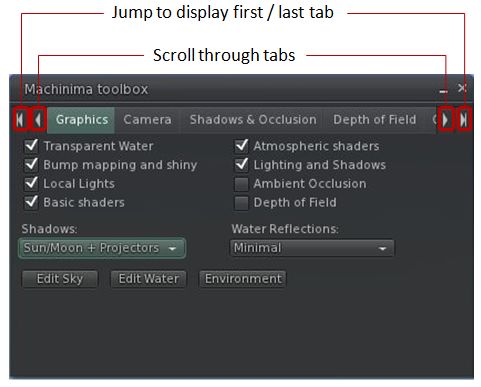
Machinima Toolbox with Graphic tab open
The toolbox essentially provides fast, single-point-of-access to a range of Preferences options as well as to a number of other panels and functions, allowing the machinimatographer / photographer to quickly and easily carry out a range of tasks such as enabling Windlight presets for the sky and / or water, adjusting their camera / flycam, enabling / disabling lighting and shadows, adding / adjusting depth-of-field, adjusting shadow and occlusion settings and much more besides.
Each of the tabs in the label is clearly laid out, and some benefit from having certain functions disabled (grayed out) until such time as their controlling option is enabled. In the Graphics tab, for example, the drop-down for selecting the required lighting types (None, Sun/Moon, Sun/Moon+Projectors), is disabled until the LIGHTING AND SHADOWS option is checked.
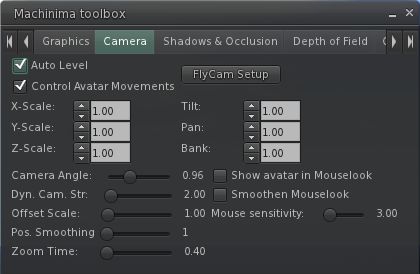
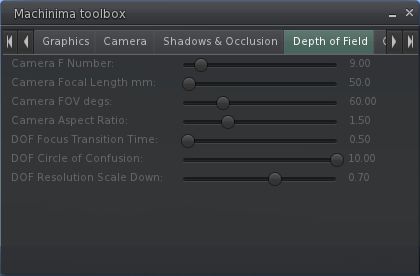
Rather than waste words describing each of the tab, here is a set of screen captures for the remaining tabs in the floater:
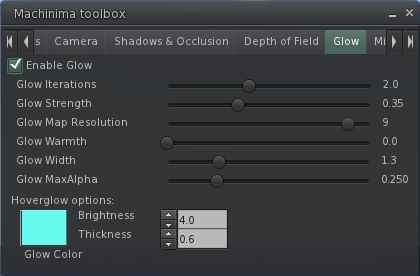
Camera settingsShadows & OcclusionDepth of FieldGlow“Miscellaneous” – currently derendering options
The derendering options are liable to prove useful for eliminating bystander avatars who are having a detrimental impact on camera movements, etc., when trying to shoot a video, while the “Miscellaneous” tab as a whole leaves room for further options to be added, should they be required / possibly requested.
Other Updates
As well as the machinima options, the blog post for the release notes the following updates are also included:
Getting a worn attachment into edit by right-clicking it in your inventory and selecting “Edit”-
Opening a Landmark on the map from your inventory, similar to what you can do from within the Places window.
Performance
I’ve not been able to thoroughly test the release in my usual manner due to time constraints elsewhere. However, in the tests I did perform, using my home sim as usual (3 others present in the sim) and both PC and Viewer set to my usual defaults (see the panel on the right of this blog’s home page), I found this release of Dolphin performed as well as other recent Viewer releases from the majority of 3.2-based TPVs. Running with deferred rendering off (no shadows / lighting enabled), the Viewer comfortably ran with an FPS in the mid-30s at 390m, with this increasing to the low 50s at altitude on my build platform (2850m). At ground level, the rate dropped very slightly to average at around 30-21 FPS.
Enabling deferred rendering and setting the lighting option to Sun/Moon+Projectors saw my frame rates fall to around 19-21 FPS at 390m, and to the mid-teens when at ground level. This was again pretty much in keeping with recent releases from the likes of SL and Firestorm.
Overall, an interesting new addition to Dolphin which should prove to be of interest to those interested in both video and photography.
Update April 1st: Dolphin Viewer has been updated to 3.3.1.23706. Percipal updates comprise the Kokua mesh uploader (Nicky Perian), Firestorm’s ability to attach a short message to avatar-to-avatar payments, and some fixes to the gstreamer audio playback and client-side AO.
This week sees the Restrained Life Viewer and Dolphin Viewer gain Merchant Outbox functionality for Direct Delivery.
Restrained Love 2.8.3.1
The V3.2-based standalone version of Marine Kelley’s Restrained Love Viewer is built on the standard V3.2 code, with a number of UI improvements. Marine develops the Windows version, with Kitten Ninetails maintaining the Mac and Linux versions.
As well as the arrival of the Merchant Outbox, this version sees a number of updates and fixes to the Restrained Love capabilities within the Viewer, all of which can be found listed on Marine’s blog. In testing the Merchant Outbox on the Windows version, I found it worked without any problems, while the revision to the position of the draw distance slider helps make this more usable.
Dolphin 3.3.0.27000
This release brings with it support for the Merchant Outbox for Windows, Mac and Linux. In addition, as an added and welcome tweak, Lance has doubled the length timeout on the Outbox so disconnects should be less frequent than may be experienced in other Viewers.
The remaining updates comprise:
The “RLV Height offset” slider is now wide enough to be properly functional, and has a reset button.
A checkbox to disable rendering of attached light sources has been added in Preferences->Dolphin Viewer 3->Graphics.
A fix for scripted sounds from FireStorm has been imported that makes scripted sounds play correctly the first time.
Codebase has been updated to official 3.3.1 source from SnowStorm.
RLV has been updated to 2.08.03.01.
Performance
Both of these Viewers are using the latest 3.3.1 code release from LL, which has yielded some stunning results on my “regular” system. Together with the latest SL Viewer (3.3.0 (251182)), I experienced the following frame rates on my home sim with 4 others present on the same region:
Average fps, no-deferred / no shadows, @ 390m: 45fps
Average fps, no-deferred / no shadows, @ ground level: 36fps
Average fps, deferred / shadows active, @ 390m: 20fps
Average fps, deferred / shadows active, @ ground level: 18fps
While visiting a popular store (Graves main store), with seven other avatars present, my frames rates were: 32 fps with deferred rendering / shadows off, and 14fps with deferred rendering and shadows on. Taken together and in terms of running with lighting / shadows enabled, these figure represent the best results I’ve had for any Viewer running on my PC, and leave me hoping that similar improvements will be seen in other Viewers as they cut over to the 3.3.1 code.
 With Server-side Baking / Appearance starting to be enabled on the grid, the only two maintained viewers not to be SSB/A enabled are Dolphin and Imprudence.







 Inara Pey: Living in a Modemworld