SL project updates 42/2: Content Creation User Group

The Content Creation User Group Meeting, Thursday, 13:00 SLT

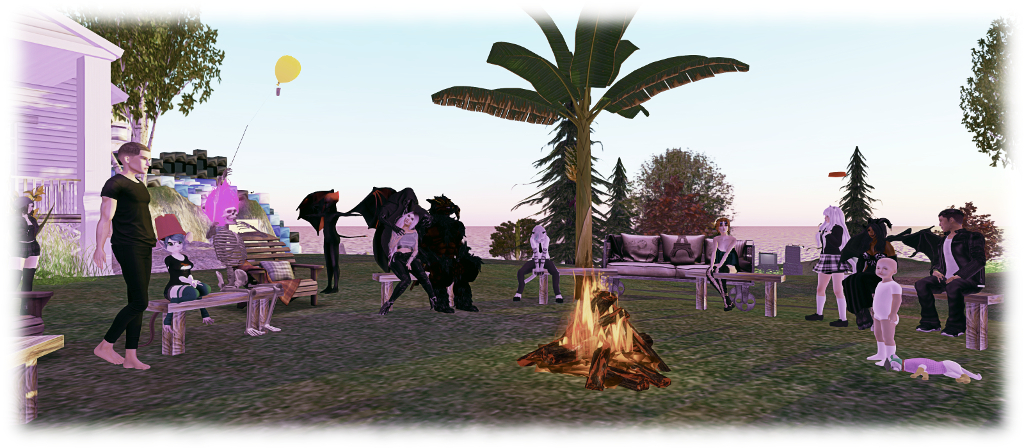
The following notes are taken from the Content Creation User Group meeting, held on  Thursday, October 19th, 2017 at 13:00 SLT at the the Hippotropolis Camp Fire Circle. The meeting is chaired by Vir Linden, and agenda notes, etc, are usually available on the Content Creation User Group wiki page.

Medhue Simoni live steamed the meeting to You Tube, and his video – in two parts – part 1 and part 2. These have been embedded as a playlist at the end of this article, as should play one to the next. Time stamps to the recordings are included below, and clicking on any of them will launch each video in a separate browser tab at the assigned point. However as these notes present the meeting in terms of topics discussed, rather than a chronological breakdown of the meeting, so some time stamps may appear to be out of sequence.

Animesh (Animated Mesh)

“I like the name ‘animated objects’ because I think it’s unambiguous, but it takes a long time to type!” – Vir Linden joking about the name “Animesh”.

Project Summary

The goal of this project is to provide a means of animating rigged mesh objects using the avatar skeleton, in whole or in part, to provide things like independently moveable pets / creatures, and animated scenery features via scripted animation. It involves both viewer and server-side changes.

In short, an Animesh object:

  • Can be any rigged / skinned mesh which and contains the necessary animations and controlling scripts in its own inventory  (Contents tab of the Build floater) required for it to animate itself.
  • Can be a single mesh object or a linkset of objects (link them first, then set them to Animated Mesh via the Build floater > Features).
  • Has been flagged as and Animesh object in the project viewer, and so has an avatar skeleton associated with it.
  • Uses three new LSL methods to run or stop animations, or check which animations are currently running:
  • Can use many existing animations.

At this point in time, this is not about adding fully functional, avatar-like non-player characters (NPCs) to Second Life. So Animesh objects will not (initially) have an avatar shape associated with them, make use of the viewer’s inventory floater or the server-side avatar locomotion graph for walking, etc., and so will not use an AO, and will not use the avatar baking service. Such capabilities may be added as a future phase of the project.

Viewer Progress

The project viewer, with supporting documentation, was released on Wednesday, October 19th. See the official blog post and my overview for more.

Testing – General Feedback

[video 1: 8:29-9:15] Vir re-iterated that the purpose of the testing is to uncover bugs, check the workflow logic, gather performance data, etc., and encouraged creators to try to push the capability by doing as many different things as possible to ensure this pass of Animesh results in a “good” release.

People have been using the test items provided on Aditi, and early reactions to to the capabilities have been positive. JIRA issues and requests have been filed, and Whirly Fizzle has created a JIRA filter for Animesh to make listing all current reports and requests filed for Animesh.

Some Noted Issues

[Video 1: 10:32-13:15] Animated mesh height placement: One issue with Animesh noted in the meeting is determining where on / above the ground an Animesh objects should be placed, with people noting that when enabling the Animated Mesh option in the viewer, an Animesh creature / avatar can sink into the ground somewhat – as can some Animesh objects which should appear to be attached to an avatar, such as at the hand attachment point.

This appears to be an issue within the baking service which will likely require an update. In addition, Vir is hoping that testing will reveal more about height offset positioning so that the workflow for calculating where Animesh objects appear to be can be further refined to avoid discrepancies.

[Video 1: 16:29-18:18] Animation Playback Speeding Up at Greater Distances: This is a known issue wherein animations appear to “speed up” the further away you cam from the object / avatar being animated (the same thing also happens when avatars are impostered). This isn’t an Animesh issue, but a product of how animation updates are handled and his been known about for some time (and was subject to some investigations and tweaking with things like the Interest list several years ago), and is particularly noticeable with large numbers of avatars dancing.

A non-public JIRA has been specifically filed against the problem for Animesh, as it is felt the problem could be far more visible in regions where Animesh creatures, etc., are used. Vir’s hope is that the Lab can re-examine the issue with a view to reducing the issue’s visibility.

[Video 1: 19:22-19:40] Viewer crashing on unchecking the Animated Mesh option: this is a known issue, but one not seen as occurring frequently enough to be considered a blocker to issuing the test viewer. It is being looked at.

Other Points of Animesh Discussions

  • [Video 1: 13:17-15:11Animesh: Purpose Built, or Just Conversion? Should Animesh just be a case of being able to convert any rezzable rigged mesh to Animesh (as is the case) or should mesh intended to be Animesh be specifically designed with that end use in mind. In the case of the former, conversion lowers the barrier to entry with Animesh, but might lead to inefficient models being converted, possibly leading to performance issues. The latter is likely to be used by some content creators wishing to optimise their content for Second Life, but potentially limits the scope of Animesh.
  • [Video 1: 15:12-16:23] “Unrigging Meshes” on conversion to Animesh: It is noted that converting a rigged mesh to Animesh and not animating it causes the rigging applied to the mesh to be ignored, effectively “converting” it to an unrigged mesh. So modifiable items brought from a creator which are not supplied with an unrigged version might, be “converted” in this way.
  • [Video 1: 20:19-21:43] Mesh attach / detach limitations: By default, we generally attach / detach objects directly from inventory; also by default, mesh attachments cannot be dropped in-world. However, this means that the only way to currently “pick up” and “put down” an Animesh pet which can roam in-world / be held, is via inventory, which doesn’t make a lot of visual sense. Vir agrees this should probably be looked at and amended, if possible.
  • [Video 1: 22:30-23:12 and 23:40-25:20] 90-degree rotation of visual mesh versus bounding box / physics: The question was asked if this is a side effect of the +x alignment (see my previous CCUG update for a discussion on avatar alignment). In short, yes, but there is a lot going on in defining, rigging, attachment mesh, it’s not clear precisely what is going on, and further investigations are required.
  • [Video 2: 0:00-0:30] Attaching a prim object to an Animesh object causes the prim to become invisible: (partially messing from the videos): the reason this happens is unclear, but it is regarded as a bug.
  • [Video 2: 0:48-2:15] Is there a script function for attaching a mesh to an existing Animesh object: yes, but is permissions based.
  • [Video 2: 3:05-7:45] Facial animation / pathfinding issue? Medhue Simoni reports that adding pathfinding to an Animesh object which does not have facial animations running can make the object’s face “explode”.  This requires further investigation to pin down – but might indicate Animesh may need a “reset” option similar to the Reset Skeleton option for avatars (also covering alignment / bound box issues).
  • [Video 2: 7:58-9:45] Animesh and avatar shapes: as noted in the project summary above, Animesh currently does not recognise avatar shapes (but this may be added in a future iteration of the project, once baking service support, etc., is available. This means all joint in a skeleton are in their default position unless affected by a script / animation & there is no ability for shape editing.
  • [Video 2: 10:29-13:44 and 15:08-16:00] Sitting on Animesh objects & pathfinding: sitting an avatar on an Animesh object should be possible, but if the mPelvis bone of the Animesh is moving, this may result in odd avatar movements, as noted in past Animesh updates. For an Animesh creature using Pathfinding, a sit target will likely need to be explicitly scripted.
  • [Video 2: 14:04-14:29] Interacting with Animesh by clicking on it: there is a known issue still being looked at, where right-clicking on an animated Animesh works, left-clicking doesn’t.
  • [Video 2: 16:16-20:00] Using a prim as the root of an Animesh object: Animesh currently requires the root object in the linkset is rigged mesh (and – as noted above, re: attaching prims to an Animesh item) is not very happy if any other parts of the linkset are not rigged mesh. A request has been made to allow the root of Animesh items to be a prim, in order to ease problems of orientation / bounding box scaling.Vir’s view on this is that work still needs to be done to ensure a better placement and orientation of the skeleton in order to better overcome issues of orientation, etc.
  • [Video 2: 16:46-17:40 and 22:50-23:20] Handling joint conflicts: conflicts with multiples meshes in an Animesh attempting to manipulate a joint at the same time are essentially handled the same way as for avatars where multiple attachments may try to manipulate the same joint: an arbitrary decision on which position is used is made by the system based on asset UUID.
  • [Video 2 20:24- 21:40] Why is there an alignment issue? The core issue with orientation is that, until now, attachments have been based on the avatar skeleton already being in-world, which causes an attachment to be correctly positioned and oriented to it. With Animesh, the opposite is true, it is the object that is already in-world, and the skeleton is then being associated with it. Wherever the skeleton goes and faces will become the visual location / orientation for the object, and its finding a way to most accurately position the skeleton with respect to the object that is the problem.
  • [Video 2: 24:40-25:13] Do linked Animesh objects each have a skeleton? No. Animesh linksets only use a single skeleton. So link three Animesh items together, and they’ll have a single skeleton.

Animesh In-World Groups

Two unofficial in-world groups for Animesh have been created:

Environment Enhancement Project (EEP)

Project Summary

A set of environmental enhancements, including the ability to define the environment (sky, sun, moon, clouds) at the parcel level; a new environment asset type that can be stored in inventory and traded through the Marketplace / exchanged with others; scripted, experience-based environment functions, an extended day cycle and extended environmental parameters. This work involves both a viewer updates (with a project viewer coming soon) and server-side updates.

Current Status

[Video 2: 25:47-26:38] Rider has converted the day settings in the new format and is about to start working on making environment setting into inventory objects. Once he’s completed this work, his focus will be on producing a project viewer for people to use in testing the available EEP capabilities. This will be “soon”, but may not include the scripted elements of the project.

Bakes on Mesh

Extending the current avatar baking service to allow wearable textures (skins, tattoos, clothing) to be applied directly to mesh bodies as well as system avatars. This involves server-side changes, including updating the baking service to support 1024×1024 textures, and may in time lead to a reduction in the complexity of mesh avatar bodies and heads. The project is in two phases:

  • The current work to update the baking service to support 1024×1024 textures.
  • An intended follow-on project to actually support baking textures onto avatar mesh surfaces (and potentially other mesh objects as well). This has yet to fully defined in terms of implementation and when it might be slotted into SL development time frames.

This work does not include normal or specular map support, as these are not part of the existing baking service.

Current Progress

[Video 2: 27:57-28:32] An updated baking service server is going to be set-up on one of the Lab’s internal development grids for load testing.

[Video 2:  28:44-29:33] People are looking towards the bakes on mesh project; Vir re-stated that it is a major project in total, and currently the only aspect being tackled is getting the baking service to comfortably support 1024×0124 textures. Where the rest of the work required to support baking on to mesh bodies and items, etc., lies on the Second Life development roadmap and time frames is still TBD.

Content Creation User Group Meetings Moving to Aditi

[Video 1: 6:44-7:33] To assist with Animesh discussions and testing (the latter of which is currently only be possible on the Aditi, also known as the beta grid or preview grid), CCUG meeting will, for the foreseeable future, be moving to that grid and the Animesh 4 region on Aiditi. Details of the meeting location will be made through the CCUG wiki page.

However, if you have not previously logged-in to Aditi, you will need to file a support ticket to request access, and do so at least 24 hours in advance of the meeting. For further information on Aditi, including how to log-in, please refer to the Aditi wiki page.


SL project updates 41/2: Content Creation User Group

People gather for the Content Creation User Group meeting, October 12th, 2017

The following notes are taken from the Content Creation User Group meeting, held on  Thursday, October 12th, 2017 at 13:00 SLT at the the Hippotropolis Camp Fire Circle. The meeting is chaired by Vir Linden, and agenda notes, etc, are usually available on the Content Creation User Group wiki page.

Medhue Simoni live steamed the meeting to You Tube, and his video is embedded at the end of this article, with key points of discussion noted below. Time stamps to the recording are included below, and clicking on any of them will launch the video in a separate browser tab at the assigned point. However as these notes present the meeting in terms of topics discussed, rather than a chronological breakdown of the meeting, so some time stamps may appear to be out of sequence.

Animesh (Animated Mesh)

“I like the name ‘animated objects’ because I think it’s unambiguous, but it takes a long time to type!” – Vir Linden joking about the name “Animesh”.

Project Summary

The goal of this project is to provide a means of animating rigged mesh objects using the avatar skeleton, in whole or in part, to provide things like independently moveable pets / creatures, and animated scenery features via scripted animation. It involves both viewer and server-side changes.

In short, an Animesh object:

  • Can be any object (generally rigged / skinned mesh) which and contains the necessary animations and controlling scripts in its own inventory  (Contents tab of the Build floater) required for it to animate itself.
  • Can be a single mesh object or a linkset of objects (link them first, then set them to Animated Mesh via the Build floater > Features).
  • Has been flagged as and Animesh object in the project viewer, and so has an avatar skeleton associated with it.
  • Can use many existing animations.

However Animated objects will not (initially):

  • Have an avatar shape associated with them
  • Make use of an avatar-like inventory (although individual parts can contain their own inventory such as animations and scripts)
  • Make use of the server-side locomotion graph for walking, etc., and so will not use an AO
  • Use the avatar baking service
  • Will not support its own attachments in the initial release.

These are considered options for follow-on work, possibly starting with the notion of a body shape (to help with more fully-formed NPCs).

Viewer Progress

[1:11-3:40] We are now “very close” to seeing a project viewer, test content and test regions appearing. The viewer has been passed by LL’s QA team, the initial test content is being developed (and will be added to, although people can obviously also test their own content) and a total of five regions will be set-up on Aditi (the beta grid) for the purposes of test very soon. Four of these will be arranged in square and be rated Moderate (allowing for comprehensive content testing, including how Animesh is managed on region crossings), the fifth will be separate and rated Adult.

The main hold-up for now is documentation: release notes, wiki documentation, FAQ, etc. When all is ready, there will be a blog post on the project, and the viewer itself will be appearing on the Alternate Viewer wiki page – so those interested in testing Animesh should keep their eyes on both the official blogs and the viewer wiki page.

Root Positioning

[4:20-7:20] The most recent work with Animesh has remained focused on aligning the root joint of a skeleton associated with an Animesh to the position of the Animesh object in-world. The problem here is that the skeleton / avatars in SL are oriented along the X-axis; however, some tools (Avastar?) align along the Y-axis.

This means that when applying skeleton (X-axis orientation) with an in-world mesh objects with a Y-axis orientation to make it Animesh, the latter can jump and rotate. Vir had been looking to make changes in the skeleton’s orientation to handle mesh with a Y-axis orientation this. However, it turns out doing so could cause unwanted behavioural changes for scripts handling attachment rotation and positioning. To avoid this, the skeleton orientation will remaining X-axis oriented. Vir hopes that the upcoming testing will allow the settings for linking skeleton to mesh can be further refined to make the conversion from static mesh to Animesh as smooth as possible.

Animesh and Vehicles / Testing vs Release

[9:20-13:20] A view is expressed that Animesh is being “rushed” without sufficient thought being given to its application in vehicle design. This in part perhaps stems from confusion about public testing of Animesh and a release in Animesh. For example, while Bento had an initial “closed” period of develop to lay the ground work, it was followed by a broad and lengthy public period of testing, consultation and enhancement.

As such, the arrival of the project viewer doesn’t mark a move towards “releasing” Animesh – but rather allows more widespread testing of the capability, including its potential use in vehicles and elsewhere. Testing is the point at which the Lab can more fully look to creators for feedback, requests for improvement – and even fleshed-out feature requests  etc., which might be considered for folding-in to the current work or for follow-on work once the initial Animesh release has been made.

Quick Questions

  • Land Impact:
    • [15:54-16:29] Overall land impact constraints of Animesh are still TBD (testing will help determine what might be required). However, Vir points out that in terms of individual LI applied to Animesh objects it will initially be focused on a per skeleton basis, not on a per mesh basis (so a linkset of several rigged meshes converted to Animesh will be seen as single object with an LI, not a group of mesh objects, each with an LI).
    • [37:35-38:34] Couldn’t the Animesh constraint be purely land impact based? possibly, but then attachments would be excluded – as they are with avatars, and the most costly element in terms of performance are avatars; by only using LI as a constraint, then Animesh could become as impactful as avatars with multiple high render cost attachments.
  • [16:46-17:18] Is Animesh prim objects with an AO? No. Animesh is rigged mesh objects containing scripted animations within them, associated with an avatar skeleton.
  • [17:22-17:57] If an Animesh has linked skeletons, do animations play across all of them? No – Animesh does not involve linking skeletons. It can comprise multiple rigged mesh objects which are linked to an individual skeleton, which can have animations applied to it.
  • [18:09-18:30] will the attached mesh also count against the tri count? Yes. There will be a limit, most likely set to 20K when testing starts, but subject to review as testing proceeds.
  • [26:02-27:35] Short description of how Animesh will work, as covered in some of the bullet points in the project description, above. Includes some discussion of using Animesh with pathfinding.
  • [30:00-30:35] Is animation movement capped (in terms of moving an individual bone): yes, it is capped at 5 metres, as it always has been for avatars.
  • [30:41-32:55] Physical properties discussion: Animesh objects will operate like avatars: they well not have physical collisions as a result of animation (e.g. a moving arm on an Animesh will not collide with a passing avatar, for example). However, Animesh objects will have physical properties (based on mesh physics shape), and so can fall, etc.
  • [47:35-48:08] Will Animesh alter the land impact for existing objects in-world? No. Animesh is a new object property, only applicable to objects intentionally set as Animesh. As such, it will not affect pre-existing content in-world unless said content is converted to Animesh (if it can be).
  • [48:48-49:58] Will Animesh behave at altitude? There  is an issue which sees mesh rigged with software skinning deforms at altitude (starting around 1,000m and getting worse from there). Animesh might suffer the same, but it hasn’t been tested.
  • [52:47-56:10] The eyes have it – a discussion on automating eye movements on Animesh in a similar manner to avatars. Vir see this more as building-out the NPC-style capabilities with Animesh, which is very much a follow-up to the current project.
  • [58:18-59:20] Can Animesh work with other mesh? It should; the complex part is liable to be keeping the object’s actual position in sync with its rendered position based on the animations playing, particularly as there won’t be a “sit” equivalent. Vir hopes this is something that will be poked at in testing.

Side notes on Animesh Constraints:

[44:08-45:21] As Vir has previously indicated, all of the constraints in the viewer – when it appears – are for testing purposes, and to provide a means by which things can be tested.  For a catch-up on constraints and testing, please refer to my previous CCUG update.

[20:21-20:45] Also, to help with constraints and information, Vir has been updating the viewer’s avatar complexity panel to provide information on triangles, which will also work for Animesh objects.

[22:45-29:08] A feature request has also been submitted for an alternative method of handling land impact and incorporating Animesh – see BUG-139203. This has been left open for comment. However, it is something the Lab is interested in taking a look at.

Continue reading “SL project updates 41/2: Content Creation User Group”

SL project updates 39/2: Content Creation User Group

Content Creation User Group Meeting, Hippotropolis Camp Fire Circle

The following notes are taken from the Content Creation User Group meeting, held on  Thursday, September 28th, 2017 at 13:00 SLT at the the Hippotropolis Camp Fire Circle. The meeting is chaired by Vir Linden, and agenda notes, etc, are usually available on the Content Creation User Group wiki page.

Medhue Simoni live steamed the meeting to You Tube, and his video is embedded at the end of this article, with key points of discussion noted below. Time stamps to the recording are included below, and clicking on any of them will launch the video in a separate browser tab at the assigned point. However as these notes present the meeting in terms of topics discussed, rather than a chronological breakdown of the meeting, so some time stamps may appear to be out of sequence.

Animesh (Animated Mesh)

“I like the name ‘animated objects’ because I think it’s unambiguous, but it takes a long time to type!” – Vir Linden joking about the name “Animesh”.

Project Summary

The goal of this project is to provide a means of animating rigged mesh objects using the avatar skeleton, in whole or in part, to provide things like independently moveable pets / creatures, and animated scenery features via scripted animation. It involves both viewer and server-side changes.

In short, an Animesh object:

  • Can be any object (generally rigged / skinned mesh) which and contains the necessary animations and controlling scripts in its own inventory  (Contents tab of the Build floater) required for it to animate itself.
  • Can be a single mesh object or a linkset of objects (link them first, then set them to Animated Mesh via the Build floater > Features).
  • Has been flagged as and Animesh object in the project viewer, and so has an avatar skeleton associated with it.
  • Can use many existing animations.

Note that the focus of this project is not currently about providing fully-functional NPCs at this point in time, which is seen as a follow-on project.

Current Progress

[3:32-4:00] We are getting close to seeing a project viewer for Animesh.  Vir is about to submit a build to the Lab’s QA team for testing, which should be done by the time of the next meeting (Thursday, October 12th, 2017). The outcome of the testing will help determine when we might see the project viewer made publicly available.

[4:00-4:37] Most recently, Vir has been working on issues with the transform matrices when handling Animesh attachments. He’s now got these to a point where things can be edited and positioned where they are needed. There may be some further iterations on this work, but it appears to be working well enough for testing now, once the project viewer is available.

Constraints

This discussion on constraints, and triangle limits in particular ran throughout most of the meeting in chat, with a large portion of the meeting from around the 50 minutes to the end of the hour being almost exclusively personal viewpoints chat. I’ve attempted to highlight the key points of the discussion below.

[6:05-7:25] As noted in previous CCUG meeting notes, some constraints on Animesh are required to prevent undue impact at either the simulator or (particularly) viewer end of the system. These constraints will be in addition to any already in place in SL, and include:

  • Limiting the overall complexity of an Animesh object
  • A land impact surcharge for in-world Animesh objects (currently set to 200LI per region for testing purposes).
  • Limiting how many Animesh items an avatar can have attached at any one time (currently set to one for testing purposes).
  • Limiting the number of triangles an Animesh object (attached or in-world) can contain, the figure for this the topic of debate.

[8:21-9:08] The initial limits will be documented when the project viewer is released. Vir will be working on this and other related Animesh documentation when the viewer goes to QA for testing.

[12:30-13:30]  The limit will come into play when converting an object (or linkset) to Animesh in-world (note there is no check at upload, as a) the uploader has no way of knowing if a rigged mesh item is specifically Animesh or not without changes; and b) an in-world check allows existing in-world mesh to be used as / with Animesh without the need to re-upload). It will be triggered through the viewer, enforced by the server.

[15:04-15:58, [16:02-18:35] There is doubt is the 20K tri limit is high enough – even Vir is not sure, and may raise it before the project viewer is made available.

[18:39-19:22] Concern was raised about the impact of the servers decompressing mesh objects in order to calculate the number of tris the number of objects in an item in order to check if the Animesh limit is exceeded. Vir explains this isn’t how it’s done. Rather the server has a estimation for the likely tri count based on the size of the data objects which store the triangles – which is essentially the same figure used in the rendering / streaming cost calculations, and gives a close enough estimate to be reliable.

[20:40-28:58] Some would like to see it raised “just for testing”. however, Vir’s concern is that once the project viewer is available, the Aditi test regions are liable to be inundated with Animesh objects, resulting in them being overloaded with no meaningful data collected. The flips side to this is that an initial limit of 35K or 50K would mean that more existing content could be “flipped” to Animesh status, without the need necessarily for creators to have to create models specifically for Animesh testing.

[31:47-32:47] As the tri limit is managed server-side, it may be possible to have different regions set with different limits to offer a variety of testing environments.

[20:01-20:30] Animesh will increase the server load in other ways. Whereas the tri count was only affected by in-world objects, it will now have to account for worn Animesh as well.

[34:54-35:42] The important thing to note with these constraints is that they are preliminary and for the purposes of testing. Depending on the results obtained, some of them might well be relaxed both as testing progresses and prior to Animesh being formally released. As Vir notes, it is potentially much easier – and less upsetting – to start with very tight constraints and then loosen them as data is gathered, rather than start with very broad constraints and then try to restrict them over time. so, the intent is with the testing is to lay the grounds for a more informed discussion on limits – tri counts, LI, and everything else. Nothing, at this point in time or with the arrival of the project viewer in due course, is set in stone.

[47:21-50:23] Could the number of tris in an Animesh be tied to land impact, rather than a basic surcharge regardless? Possibly; again, the 200 LI surcharge is purely for initially region-based testing. This is already how land impact works elsewhere. However, there is always a basic cost associated with an avatar skeleton, so this needed to be factored-in as well, however minimal it might be for a single skeleton.

Test Content

[4:50-5:42] The idea for the Lab to provide more in the way of test content to help those wanting to get started with Animesh has been passed to the Linden Department of Public Works (LPDW) team. They’ve in turn assigned someone to produce some test content which will be made available through the Library (and so will appear in people’s inventory under Library when available).

How Will Animesh Attachments Work?

[9:10-12:10] Essentially the same as any other attachment, using an avatar attachment point. The Animesh item is attached via its root joint, and then can be edited to fit (translation / rotation).  Animesh can also currently be attached to HUD point, but this is liable to be disabled, particularly as it is will require more work to get it to function reliably, and there aren’t any obvious use cases.

Bakes on Mesh

Project Summary

Extending the current avatar baking service to allow wearable textures (skins, tattoos, clothing) to be applied directly to mesh bodies as well as system avatars. This involves server-side changes, including updating the baking service to support 1024×1024 textures, and may in time lead to a reduction in the complexity of mesh avatar bodies and heads. The project is in two phases:

  • The current work to update the baking service to support 1024×1024 textures.
  • An intended follow-on project to actually support baking textures onto avatar mesh surfaces (and potentially other mesh objects as well). This has yet to fully defined in terms of implementation and when it might be slotted into SL development time frames.

This work does not include normal or specular map support, as these are not part of the existing baking service.

Current Status

[7:40-8:04] The updates to the service to manage 1024×1024 textures and compositing has been in testing with LL’s QA team, and it has been reported that the higher resolution texture capability (the baking service only supports 512×512) has the potential to impact the performance of the bake service, so a load test is being planned.

[14:17-14:37] The first part of the bakes on mesh project will not include any kind of API for injecting layers into the bake stack (e.g. to ensure that layers from the likes of appliers are stacked correctly (e.g. underwear, shirt, top), by the baking service. The might be added in the future.

[29:00-29:40] Essentially, the project currently breaks down into two core activities:

  • First stage: just to increase the maximum resolution the baking service can support (1024×1024, as noted above)
  • First (and larger) stage: to get the bakes on mesh to help with baking to mesh bodies. This work is “further down the line”.

[38:00-41:10] Once Animesh is released, the plan would be to also extend bakes on mesh to support Animesh objects as a part of the Animesh follow-on project, which would see Animesh objects have a notion of a shape, plus wearables in their object inventory.

Other Items

[14:39-15:03] As a ploy count will be used for Animesh constraints, can llGetObjectDetails() have a parameter to return the count is a scripted enquiry? Possibly, but not as part of the Animesh project.

There is no Content Creation meeting in week #40 (commencing, Monday, October 2nd). As noted above, the next meeting will be Thursday, October 12th, 2017.

SL project updates 38/2: Content Creation User Group

Content Creation User Group Meeting, Hippotropolis Camp Fire Circle

The following notes are taken from the Content Creation User Group meeting, held on  Thursday, September 21st, 2017 at 13:00 SLT at the the Hippotropolis Camp Fire Circle. The meeting is chaired by Vir Linden, and agenda notes, etc, are usually available on the Content Creation User Group wiki page.

Medhue Simoni live steamed the meeting to You Tube, and his video is embedded at the end of this article. Time stamps to the recording are included below, and clicking on any of them will launch the video in a separate browser tab at the assigned point. However as these notes present the meeting in terms of topics discussed, rather than a chronological breakdown of the meeting, time stamps may appear to be out of sequence in relation to the recording.

Animesh (Animated Mesh)

“I like the name ‘animated objects’ because I think it’s unambiguous, but it takes a long time to type!” – Vir Linden joking about the name “Animesh”.

Project Summary

The goal of this project is to provide a means of animating rigged mesh objects using the avatar skeleton, in whole or in part, to provide things like independently moveable pets / creatures, and animated scenery features via scripted animation.

  • Animated objects can be any rigged / skinned mesh which is correctly flagged as an animated object (so it has a skeleton associated with it), and contains the necessary animations and controlling scripts in its own inventory  (Contents tab of the Build floater) required for it to animate itself.
  • The capability will most likely include a new flag added to an existing rigged object type in order for the object to be given its own skeleton.
  • At this point in time, this is not about adding fully functional, avatar-like non-player characters (NPCs) to Second Life.
  • Animated objects will not (initially):
    • Have an avatar shape associated with them
    • Make use of an avatar-like inventory (although individual parts can contain their own inventory such as animations and scripts)
    • Make use of the server-side locomotion graph for walking, etc., and so will not use an AO
    • Use the avatar baking service
  • The project may be extended in the future.
  • It will involve both back-end and viewer-side changes, likely to encompass new LSL commands to trigger and stop animations (held in the object’s contents).

Current Progress – Animesh Constraints

“It’s not [been] the most exciting week,” Vir commented about his most recent focus on the project. “What’ I’ve been working on lately is complexity limits and other constraints.”

[2:48-4:19]As noted in previous CCUG meeting notes, some constraints on Animesh are required to prevent undue impact at either the simulator or viewer end of the system. These constraints will be in addition to any already in place in SL (e,g, Land Impact, overall limit of the number of attachments an avatar can wear, etc), and include:

  • Limiting the overall complexity of an Animesh object
  • Limiting how many Animesh items an avatar can have attached at any one time (currently set to one in the upcoming project viewer for testing purposes)
  • Limiting the number of triangles an Animesh object (attached or in-world) can contain, possibly to around 20K initially. Interestingly, some limits in Sansar are defined in terms of tri / poly limits.

With complexity and number of tris, the limits have yet to be fully defined, and Vir welcomed any well-made mash models could serve as Animesh examples in order to try to help baseline the initial limits.

[4:45-5:10 and 8:55-9:49] Currently, there are no new limits for the scale (or size) or an Animesh object beyond the existing constraint re objects and avatar skeletons already in place. Some feel that additional constraints / viewer limits may be required in order to handle “titan” Animesh creatures (e.g. creatures of 64m in height, which may also require bounding box adjustments). Vir is prepared to look at this, but would like to see how things go with testing via the project viewer.

[5:22-5:41 and 6:18-6:47 and 10:41-11:06] The triangle limit will apply to all Animesh objects regardless of whether they are in-world or attached, and will be applied at the time the objects are flagged as Animesh. So if someone tries to link together a set of existing rigged mesh items and flag them as Animesh (or which contain an Animesh item) which exceed the limit, the flag Animesh flag will not be set. This should leave existing content unaffected and avoid content breakage.

[12:14-13:17] Some see the proposed 20K limit is two low and suggest 30K or even 50K, to allow for clothing, accessories, etc., to Animesh characters. The counterpoint to this is to set a limit which encourages optimisation, and to have people consider impact on the simulator / on others.

[14:24-15:32] A request for the viewer to provide meaningful feedback when Animesh limits are reached, preferably with a pointer back to some wiki information. Limits won’t actually be reached on mesh upload, but when objects are flagged for use as Animesh post-upload, so would require some form of viewer notification.

[15:34-16:20] Requests have been made to obtain poly counts of objects via LSL to help track things or even in the viewer UI. Vir currently uses his own diagnostic display to help indicate such things, but currently, no such updates, LSL or UI are planned, although the debug ShowRenderInfo could display the required information if more directly exposed and Vir will file a JIRA on this, although it might fall outside the current scope of work.

[22:11-22:35] It was also pointed out that tri / poly counts are variable based on LOD. Vir is currently focused on the tri count of the highest LOD for an object

[13:18-13:44] Vir’s approach to all of the constraints / limits being discussed at this time is to start as tight as possible, and then make adjustments and loosen things as testing with the project viewer begins / offers reliable feedback and data. It is easier to relax constraints and allow people greater creative freedom, than to start with a loose set of limits and then have to tighten them (potentially breaking test content, and adding to people’s overhead in having to rebuild it).

Time Frame for Animesh

[19:29-20:00] The constraints mentioned above and trying to fix the transform matrix when handling Animesh attachments. There are also a couple of bugs he feels need fixing before the project viewer appears. However, the hope is now that the viewer will be appearing sooner rather than later.

[48:52-49:28] There are a couple of irritants in the viewer Vir wants to fix before releasing a project viewer for Animesh testing. Ther are some corner cases where the viewer can be awkward, but these are not considered blockers to a project viewer appearing, and can be cleared-up in due course.

Performance Hits

[27:45-28:42] There are still concerns as to the performance hits on things like real-time shadow casting with Animesh skeletons following avatars (pets, etc.) or in being attached to avatars (and vice-versa). Vir isn’t too concerned by this at the moment, as the code is already handling much of what will be required with Animesh: every time an avatar sits on something, it is effectively updating every frame, so with Animesh this will be much the same. However, as with everything else, this will be subject to testing.

Bakes on Mesh

Project Summary

Extending the current avatar baking service to allow wearable textures (skins, tattoos, clothing) to be applied directly to mesh bodies as well as system avatars. This involves server-side changes, including updating the baking service to support 1024×1024 textures. This may lead to a reduction in the complexity of mesh avatar bodies and heads.

Current Status

[31:28-32:00] The updates to the service to manage 1024×1024 textures and compositing is with LL’s QA team, who ar testing to ensure the system can handle the compositing correctly, and the back servers won’t fall under when loaded with handling 1024×1024 textures in bulk. Progress with the rest of the project is dependent on this.

[36:25-36:59] The rest of the work will focus on applying the baked textures (which will include alphas, just as is the case with the system avatar now, but will not include materials) to mesh avatar models.

[39:09-40:55] A possible follow-on to the current work on bakes on mesh is to extend the capability to include Animesh objects as well, although this will require Animesh objects to have a notion of a body shape. It might even be possible to push the system into other uses.

Environment Enhancement Project (EEP)

Project Summary

A set of environmental enhancements, including the ability to define the environment (sky, sun, moon, clouds) at the parcel level; a new environment asset type that can be stored in inventory and traded through the Marketplace / exchanged with others; scripted, experience-based environment functions, an extended day cycle and extended environmental parameters.

Current Status

[30:32-31:12] Rider has been working on getting his settings objects – environment assets – correctly passing into Windlight. Once he has this working smoothly, he’ll feel a little more comfortable in talking potential time lines on when things like a project viewer are likely to appear. However, he did point out that everything is currently in “Goth compatibility” – black environment settings against a black sky!

Other Items

Mesh Uploader

[49:38] A discussion on whether creators will in future be forced to upload only manually created LOD for their models, rather than auto-generating them. Short answer: No, but people are encouraged to optimise LODs where manually or automatically generated. The uploader also has numerous constraints on upload, not all of which are well documented or which provide adequate / any feedback when they occur. It’s acknowledged that such situations could be handled better.  However, issues of tracking the number of bones a mesh is rigged to can be tracked through Avastar and MayaStar prior to upload.

SL project updates 37/2: Content Creation User Group

Content Creation User Group Meeting, Hippotropolis Camp Fire Circle

The following notes are taken from the Content Creation User Group meeting, held on  Thursday, September 14th, 2017 at 13:00 SLT at the the Hippotropolis Camp Fire Circle. The meeting is chaired by Vir Linden, and agenda notes, etc, are usually available on the Content Creation User Group wiki page.

Medhue Simoni live steamed the meeting to You Tube, and his video is embedded at the end of this article. However, due to power issues at his end, the first few minutes are missing from the recording. Time stamps to that recording are included below, and clicking on any of them will launch the video in a separate browser tab at the assigned point. However as these notes present the meeting in terms of topics discussed, rather than a chronological breakdown of the meeting, time stamps may appear to be out of sequence in relation to the recording.

Animesh (Animated Mesh)

“I like the name ‘animated objects’ because I think it’s unambiguous, but it takes a long time to type!” – Vir Linden joking about the name “Animesh”.

Project Summary

The goal of this project is to provide a means of animating rigged mesh objects using the avatar skeleton, in whole or in part, to provide things like independently moveable pets / creatures, and animated scenery features via scripted animation.

  • Animated objects can be any rigged / skinned mesh which is correctly flagged as an animated object (so it has a skeleton associated with it), and contains the necessary animations and controlling scripts in its own inventory  (Contents tab of the Build floater) required for it to animate itself.
  • The capability will most likely include a new flag added to an existing rigged object type in order for the object to be given its own skeleton.
  • At this point in time, this is not about adding fully functional, avatar-like non-player characters (NPCs) to Second Life.
  • Animated objects will not (initially):
    • Have an avatar shape associated with them
    • Make use of an avatar-like inventory (although individual parts can contain their own inventory such as animations and scripts)
    • Make use of the server-side locomotion graph for walking, etc., and so will not use an AO
    • Use the avatar baking service
  • The project may be extended in the future.
  • It will involve both back-end and viewer-side changes, likely to encompass new LSL commands to trigger and stop animations (held in the object’s contents).

Project Viewer

[pre-video start and 46:06-46:40] Work on the viewer is focused on cleaning up how the viewer handles animation when dealing with Animesh objects, as there are some elements which simply aren’t used. The transform matrix has been adjusted, so that Animesh attachments now look as if they are attached to the avatar, rather than potentially floating somewhere reasonably close to it (so an Animesh object attached to a hand will now appear attached to the hand and move with the hand, for example). Further work is required, but things are now behaving a lot better; there’s still no ETA on the appearance of the project viewer, however.

Animesh Constraints

Some basic constraints on attaching Animesh objects to an avatar or in-world, and on the overall allowable complexity of Animesh objects have yet to be defined and incorporated into the viewer. These are necessary to prevent Animesh objects  negatively impacting performance to an undue degree. The initial constraints set within the project viewer will be subject to refinement in testing.

[32:21-33:06] In terms of avatar attachments, there is already a server-side limit on how many attachments can currently be worn by an avatar (38), so the Lab could look at the type of attachments being used, and limit Animesh in terms of an allowed number within this global attachment limit (e.g. 2 out of the 38 global limit for attachments may be Animesh).

Load Testing

Alexa provided a couple of GIFs demonstrating Animesh. The first showed her army of dancing bears – around 100 – all happily dancing on a region without causing an appreciable load.

Alexa’s army of dancing bears. Note that these are not actual avatars connected to the simulator via individual viewers; they are purely in-world objects being animated by scripts they contain driving a set of animations also contained within them.

[13:39-16:54] However, whether populated regions (in terms of avatars and objects) could handle such a load is open to question. Also, these bears are all the same optimised mesh, and are probably not placing the kind of load on the simulator and viewer as would be in the case of multiple and different kinds of mesh with varying levels of complexity. To help determine reasonable limits, the Lab will be establishing some test regions once the projects viewer is available, to allow for more comprehensive testing with assorted Animesh models, and which will used to further refine the Animesh constraints noted above.

[18:11-18:40] As a part of her own testing, Alex also intends to use the mesh starter avatars produced by the Lab, mixing them together in a scene using different animations, etc., to see how things behave.

Animesh and Pathfinding

[10:35-11:14] A couple of previous meetings have raised the idea of Animesh working with Pathfinding (the means by which scripted objects – people, animals, monsters, etc,– be set to move in a region / parcel and react to avatars, etc). Dan Linden is  looking into how Animesh and Pathfinding might work together, and he and Alexa shared a GIF image of some of the work, with some of Alexa’s dancing bears skating around their own pathfinding routes, which provide a quick demonstration that the two can likely be used together.

Dancing Bears following pathfinding Navmesh routes

Alexa has also been experimenting with Animesh and ice-skating, taking the view that having creatures and animals ice-skating in winter scenes (which can actually be common in “wintered” regions, with skating penguins and the like).

Animesh Attachments: Fluidity and Clothing

How smoothly attached Animesh objects work is liable to be dependent upon the animations themselves, and whether or not they move the object’s pelvis bone or nor. As with all things, some experimentation and fine tuning is likely to be required be creators in order to optimise the motions of their Animesh attachments.

Some people have been looking at Animesh as a means to get clothing to move more naturally with an avatar. However, as Vir pointed out in the meeting, utilising additional skeletons in clothes may not be the most efficient way to achieve this, when it should be possible – with a little care – to use existing some of the bones in the avatar skeleton to achieve the same results (e.g. skinning the cloth of a gown or skirt or cape to the wing bones, etc).

This would allow the clothing to move far more seamlessly and in sync with body movements than could be achieved with Animesh attachments, which would not have any direct means of syncing with an avatar’s movement.

Root Positioning

[1:39-3:03] Vir is has been working on aligning the root joint of a skeleton associated with a Animesh to the position of the object in-world. Sometimes this gives good results, sometimes it doesn’t, resulting in objects jumping around when animations is played or moving into the air or sinking into the ground, etc, as the server thinks they are somewhere else than the visual position shown in the viewer. Because of the mixed results, he’s considering alternative approaches, such as using the object’s bounding box, and will be exploring options before pushing out any project viewer. One of the balances he’s trying to achieve is presenting a nice visual result without over-complicating what has to be done in order to achieve that result.

Changing the Orientation of the Skeleton via LSL / LSL Commands

[34:12-34:45] Will there be a scripted function to change the default orientation of a skeleton to match an Animesh object? Conceivably; however, Vir is hoping to develop a reasonable default behaviour when attaching a skeleton which will allow simple editing of the object to achieve the desired result, if required. Should this be shown not to work sufficiently well enough, additional LSL support will likely be looked at.

[4:54] A question was asked about the list animations command (LlGetObjectAnimationNames). This is one of three new LSL commands being introduced to support Animesh – please refer to my week #35 CCUG update for details on these.

Continue reading “SL project updates 37/2: Content Creation User Group”

SL project updates week 35/2: Content Creation UG

Content Creation User Group Meeting, Hippotropolis Camp Fire Circle

The following notes are taken from the Content Creation User Group meeting, held on  Thursday, August 31st, 2017 at 13:00 SLT at the the Hippotropolis Camp Fire Circle. The meeting is chaired by Vir Linden, and agenda notes, etc, are usually available on the Content Creation User Group wiki page.

Medhue Simoni live steamed the meeting to You Tube, and his video is embedded at the end of this article. These notes present the meeting in terms of topics discussed, rather than a chronological breakdown of the meeting, so the provided time stamps may appear to be out of sequence in places. All time stamps are provided as links which will open the video in a separate browser tab, allowing the discussion to be heard in full.

Animated Mesh (Animesh)

Project Summary

The goal of this project is to provide a means of animating rigged mesh objects using the avatar skeleton, in whole or in part, to provide things like independently moveable pets / creatures, and animated scenery features via scripted animation.

  • Animated objects can be any rigged / skinned mesh which is correctly flagged as an animated object (so it has a skeleton associated with it), and contains the necessary animations and controlling scripts in its own inventory  (Contents tab of the Build floater) required for it to animate itself.
  • The capability will most likely include a new flag added to an existing rigged object type in order for the object to be given its own skeleton.
  • At this point in time, this is not about adding fully functional, avatar-like non-player characters (NPCs) to Second Life.
  • Animated objects will not (initially):
    • Have an avatar shape associated with them
    • Make use of an avatar-like inventory (although individual parts can contain their own inventory such as animations and scripts)
    • Make use of the server-side locomotion graph for walking, etc., and so will not use an AO
    • Use the avatar baking service
  • The project may be extended in the future.
  • It will involve both back-end and viewer-side changes, likely to encompass new LSL commands to trigger and stop animations (held in the object’s contents).

LSL Animation Functions

[1:18-3:04] The LSL functions needed for animating mesh objects are being tested. These comprise:

The first two commands are fairly straightforward in terms of use. The GetObjectAnimationNames function is intended to stop all animations currently playing in an animated object, or to check whether a particular animation whether an animated object is currently playing (the animations and scripts being stored in the object’s Contents tab inventory).

The documentation for these commands is still in progress, so the information on the wiki pages is subject to update. Also, keep in mind these commands will not work until a public animesh project viewer is available.

[10:12-11:16] These commands could, in theory, be used with a scripted HUD to provide some degree of control over animated objects by their owner. An example HUD may or may not be provided in the test content the Lab may supply (see below).

Test Content

[3:23-4:43] Test content for animesh has been a request at past meetings, the idea being to have models available in the Library people can use to familiarise themselves with created animated mesh objects and using the associated scripting controls. The Moles are now looking at adding some content for the Library in preparation for animesh becoming more widely available.

[41:26-45:12] A more general discussion on promoting animesh (when available), test content, and making people aware of animesh.

General Performance

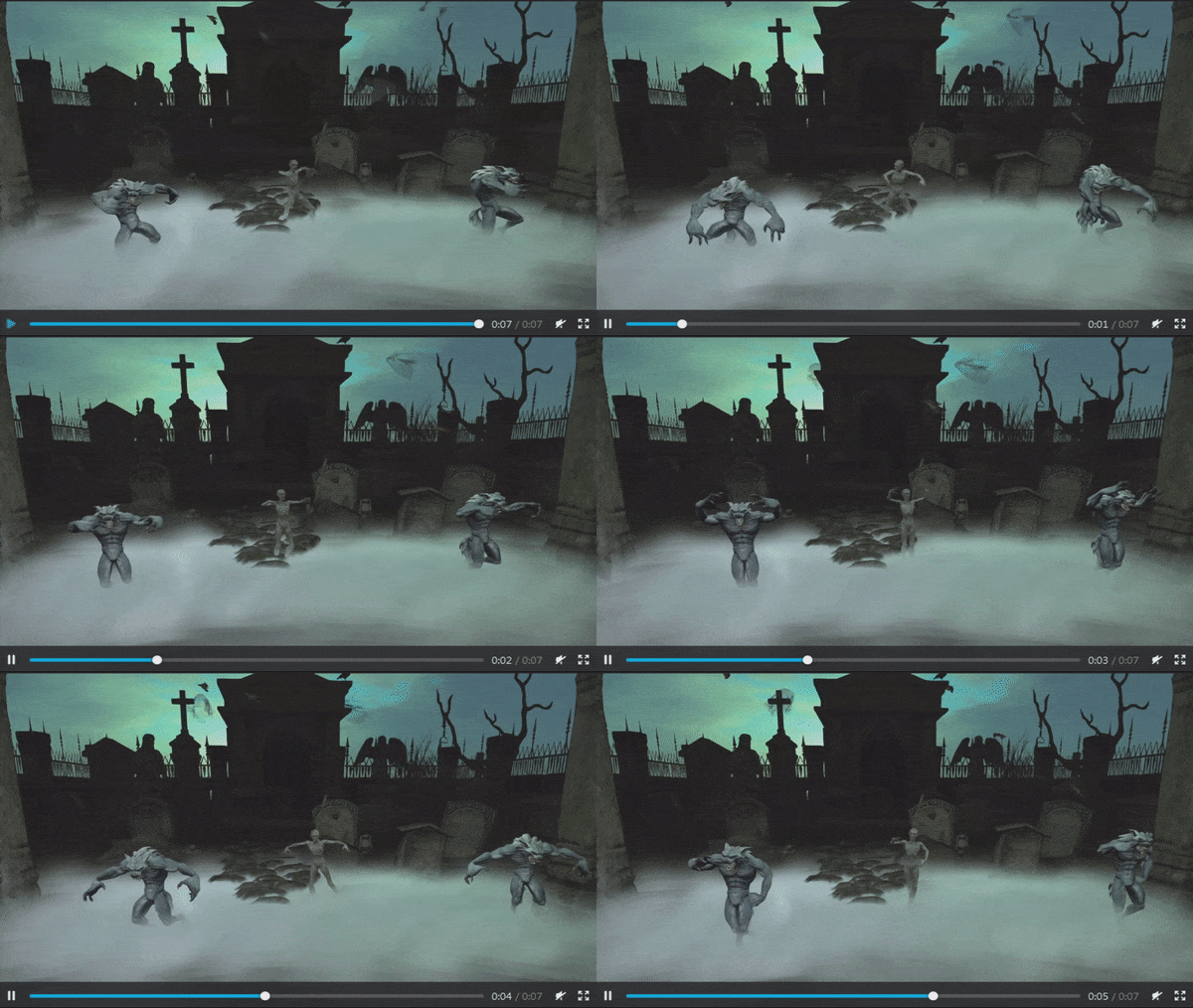
Alexa Linden has been converting existing mesh content  into animesh objects. She’s been using the mesh werewolf starter avatar originally released in 2014, and which is already available in the Library, for this work, and produced a short video of the result, presented as an animated GIF, below.

Alexa’s test use of the Lab’s mesh werewolf avatar as an animated mesh object

Again, note that these are not actual avatars connected to the simulator via individual viewers; they are purely in-world objects being animated by scripts they contain driving a set of animations also contained within them.

[8:00-9:04] More work is also required on the general controls / limits on animated mesh objects: how many are going to be allowed in a scene, the numbered of animated attachments an avatar can wear, calculating their rendering impact, etc. These will not be final when a public viewer appears, but will be used as a baseline which can then be tweaked one way or another once more intensive testing gets started.

[22:05-24:29] In her initial tests with dancing werewolves, Alexa managed to get over 300 dancing together, each using 6 dance animations and a control script. She didn’t notice much in the way of a frame rate impact whilst also moving her avatar around. However, she did notice some update issues with the Interest List (which controls how things are rendered in the viewer as you move your avatar / camera) when zooming in / out of the scene.

The test was by no means definitive. For example, it was using multiple copies of the same basic mesh model and animations, and this may have boosted performance somewhat than might have been the case with 300 different mesh models running in a scene, each with its own unique animations. She also carried out her tests on a region that doesn’t have a lot of other content on it.

[25:24-26:36] Comparing Alexa’s tests with avatar capacity / performance (e.g. 40 avatar in a region) isn’t easy as avatars can be a lot more individually complex. There are also various aspects of managing avatars which don’t necessarily apply to animated objects. For example, animesh items should really only have a limited number of updates associated with them, whereas avatars tend to have a lot more going on (interactions, messaging, etc.,), all of which increases the volume of traffic the simulator and viewers must handle.

Project Viewer

[6:47-7:58] Still no date for when a project viewer will appear, other than the Lab will release it “as soon as we can”.

Right now the biggest piece of work within the viewer is defining  how the skeleton get positioned relative to the object with which it is associated. This currently various depending on the model being used, and currently can result in things “jumping” as they start to animate.

This problem also has an impact when trying to use an animated object as an attachment (e.g. when holding and animated pet), with the result the object can be “floating” around the avatar, rather than obviously attached to it, and does not rotate / move appropriately as the attachment point moves relative to the avatar.

[11:55-12:30] Vir doesn’t believe this is a huge problem to solve, it just requires work on the transform matrix, and this shouldn’t add a significant delay in any project viewer appearing.

[21:05-21:45] However, should fixing it prove to be more complicated than anticipated, it may have to be taken into account in terms of lead times, particularly as having the ability to wear / carry animated pets is seen as one of the more popular user-cases for animesh.

Finally, internal testing of the viewer by the Lab has resulted in some suggestions being made which may also be incorporated into the viewer prior to a public project version appearing, in order to ensure that what does appear offers a solid foundation on which to build, and gives creators an opportunity to give feedback.

Tracking Complexities

[15:03-15:56] As animated objects will be manipulating avatar skeleton bones whether they are attached to an avatar or operating as in-world objects, it will require more tracking of such movements than is currently the case to ensure they are correctly represented by viewers able to see them.

Size Limitations

[16:00-18:12] Animated objects will likely be limited in terms of both their physical size and their poly / tri count. Limits for both have yet to be determined; however, high poly count objects will likely in part be limited by the impact they have on performance. The physical size of animated objects, unless  special limits are set, will likely be defined by the same rules as currently exist for avatar skeleton.

[24:31-25:22] The Interest List / animation issues Alexa encountered (e.g objects some distance from the camera position moving much faster than the should be, and then slowing down to a “normal” speed when zoomed at) are not unique to animated objects. These are issues which the Lab is liable to look at in more detail, but are not seen as something which will necessarily delay progress on animesh, simply because the issue has been around for some time (it can be seen when zoomed out from a group of dancing avatars, for example).

Continue reading “SL project updates week 35/2: Content Creation UG”