Blog navigation update

One of the things I’m striving to achieve within this blog is ease of access to information, be it through the way I use categories and tags for posts or through the use of the available menu options within the blog’s theme.

From time-to-time this inevitably means I tend to reshuffle and refine things in order to  – hopefully – make finding items easier. Those who regularly visit the blog may have noticed already that I’ve done so again, with a further re-vamp of the top menu.

To help you get used to the update menus, here’s quick run-down of what’s changed.

The updated menus at the top of this blog

News and Opinion: this menu still provides access to all my “news” and “opinion” articles, all still with their own sub-menus. However, the “SL Project Updates” item has now been re-located to the new SL Tech menu – see below.

SL Tech: this is a new menu heading, and brings together:

  • My weekly SL project updates, which look at on-going server-side and viewer work
  • My on-going coverage of viewers (official and TPV) – news, reviews, etc.
  • Articles on those significant issues that have been covered in these pages
  • The various SL tutorials I’ve written, or have pulled into this blog (with the original authors’ permissions) from other sources.
My "travelogue" articles on SL destinations, and features on other virtual world have been relocated
My “travelogue” articles on SL destinations, and features on other virtual world have been relocated

Events-Reviews-Travels: This option still provides access to all my SL event previews and reviews (RFL of SL, Fantasy Faire, SLB, BURN2, etc.), and my reviews of art installations, SL products, the Drax Files, my annual reviews, etc. However, all of my travelogue features and articles on those other virtual worlds and environments can now also be found here.

General: This option now provides access to information on me, my SL interests, this blog, etc., as well as covering those things not intrinsically SL or virtual world focused: spaceflight and astronomy, VR and AR, etc.

Information related to me and the blog now appear under the General menu

As with previous versions of the menu system, clicking on a “main” menu topic will display the entries for all of the sub-menus listed under it (if it has a sub-menu). So, for example, if you click on SL Tech > SL Project Updates all of the project updates I’ve written will be listed chronologically (or you can use the sub-menu to display the updates written in a specific year).

Hopefully, these changes won’t confuse those who have made use of the menus, and will further assist people in finding information in these pages.

A quick note on finding meeting transcripts in this blog

As regular readers may have noticed, I’ve produced a number of transcripts for meetings related to LL and which involve the Lab’s CEO or staff.

To make finding these transcripts easier, I’ve added a new tag to the blog, which will appear appended to the end of such posts. Clicking it should list all available transcripts so tagged.

More particularly, I’ve added a new menu category which should make finding them even easier. It’s called Meeting Transcripts, and can be found under News-Updates-Opinion > Linden Lab, thus:

The new transcripts option (News-Updates-Opinion > Linden Lab > Meeting Transcripts)

Note the transcripts related to things like specific viewer meetings – such as Firestorm meetings – will remain under the relevant section of the Viewers menu (so Viewers > V3 Style > Firestorm > Firestorm Meetings for … well, Firestorm meetings!).

Hope this makes finding information in the blog a little easier.

Another small navigation update

Just a quick note to say that I’m doing a little more tweaking to the menus at the top of this blog, and likely will be on-and-off for a bit as I try to make navigation and finding topic categories and groups a little easier within the limitations of WordPress (and without ending-up with a gazillion tags…).

The main tweak for the moment is to the Pey’s Travelogues menu, where I’ve now sub-divided my SL Explorations menu item by year as a sub-menu. While this doesn’t make finding an individual destination review that much easier, it at least breaks down the number of reviews returned compared to clicking on the main link!

SL destinations now broken down by year of visit

Hopefully this will prove to be of some help to people browsing through the places I’ve visited 🙂 .

Blog menu nips and tucks

Back in August 2013 I finally finished-up a complete run-through and rationalisation of the categories, tag, etc., used in this blog to try to ease the process of finding information. At the same time, I also implemented a new top menu structure to further help people find information on a specific topic category.

The new travelogue menu option

While I was reasonably happy with the menu system as far as it went, I was still left feeling it might be in need of tweaking.

Today, I’ve managed to put some effort into a little of that tweaking, which will hopefully again ease the process of finding stuff. In particular, regulars my notice that the Other Worlds menu heading has gone, and there is a new heading of Pey’s Travelogues in its place.

This new menu now presents all of my SL destination reviews (re-tagged “Exploring Second Life”), and my news and reviews on other virtual worlds into one menu.

Hopefully this will make finding my SL destination reviews a little easier than hunting down the Events & Reviews menu, although I confess, I’d actually like to make the Exploring Second Life topic a little more granular in nature to ease finding a specific group of destinations – but precisely how to further sort and tag them is a bit of a head-scratcher at the moment.

Don't forget you can use sub-menus (where provided) to display articles on a specific topic, or click the parent topic (in this case, "Linden Lab") to display all the items from the sub-menu topics
Don’t forget you can use sub-menus (where provided) to display articles on a specific topic, or click the parent topic (in this case, “Linden Lab”) to display all the items from the sub-menu topics

In the meantime, do take a peek at the new menu option, and don’t forget the other menu items should help in finding stuff, and remember that where an option has a sub-menu, you can either select a topic from the sub-menu or click the parent menu item and get everything listed under it.

A small update

Well, it took longer to finish-off than I’d hoped, so apologies to anyone who may have noticed things chopping and changing over the last few days with menu items and sidebar widgets appearing and vanishing. Things should be more-or-less done now.

So what’s happened?

In short, the sidebar on the right of my blog pages has been cleaned-up, with the link lists far more organised than before. The search options have been rationalised, with revised categories and tags which should make it a lot easier to find info, both via the sidebar and through the links at the foot of each post. I’ve kept the tag cloud towards the bottom of the sidebar rather than up with the rest of the search options, as I think it can be a bit of an eyeful, as useful as it might be for finding articles.

Up at the top of each page is a hugely updated menu system. With nigh-on 2,000 articles in this blog, I hope this will make it easier to access information quickly, and when used with article tags allow you to drill down to specific items more easily.

News menus - hopefully an easier means of finding article categories
News menus – hopefully an easier means of finding article categories

Hopefully the headings are straightforward enough, and I’ve tried to organise things as reasonably / logically as possible through the use of sub-menus. Where these occur, note that clicking on their “parent” item will display all the topics for all of the sub-menu items (so if you click on SL Viewer in the Viewers menu, you’ll get all the articles SL Viewer Updates and SL Viewer Reviews combined).

Anyway, have a play and see what you think. Hopefully I’ve captured everything, but do be aware there still might be the odd tweak here and there over the next few days.

Making Changes

I’ve been tweaking the blog a lot of late; some of it may have been noticeable (particularly for those on the RSS feed, which seems to pop out a “new post” notification every time I sneeze when tweaking bits of the blog – my apologies for that), other changes hopefully not so blatant!

Today I’m launching the new theme and updates, and would welcome constructive feedback on the revised look and feel of the place. Key changes are:

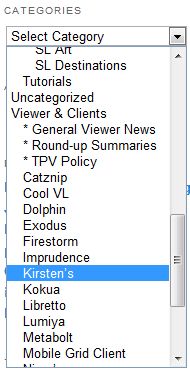
  • New Categories menu (sidebar)

    A new theme with greater white space within the text and an updated font, both of which I hope will improve readability

  • Inclusion of the sidebar on every page, rather than just the home page, which I hope will assist in better navigation
  • New hierarchical Categories menu, with additional sub-categories to improve topic selection (e.g. Viewer and Clients has been updated to allow you to pull-up all reviews on a specific viewer, rather than relying on tags, plus three new sub-categories added for viewer round-up summaries, general news on viewers of any flavour (rather than reviews) and news and updates relating to the TPV Policy)
  • New sidebar DESTINATIONS REVIEWS category for accessing reviews of SL destinations and other virtual worlds / immersive environments I’ve visited.

Hopefully, these changes will help make the blog more readable and more effective as a resource  / reference tool for those who use it that way.

I’ve retained the menus as well, but the new theme allows me to move them to the top of the page. Hopefully this will make those items which include drop-down lists and sub-menus (e.g. Reviews) to be more usable than the older layout, which sometimes required page scrolling in order to properly display a sub-menu.

I’ve included a little poll here, please feel free to use it as an indicator of how well you like the new layout.

The poll is now closed. Results are shown below.