Update, March11th: The capabilities described below are now available in Black Dragon 2.4.1.9, which I’ve overviewed here.
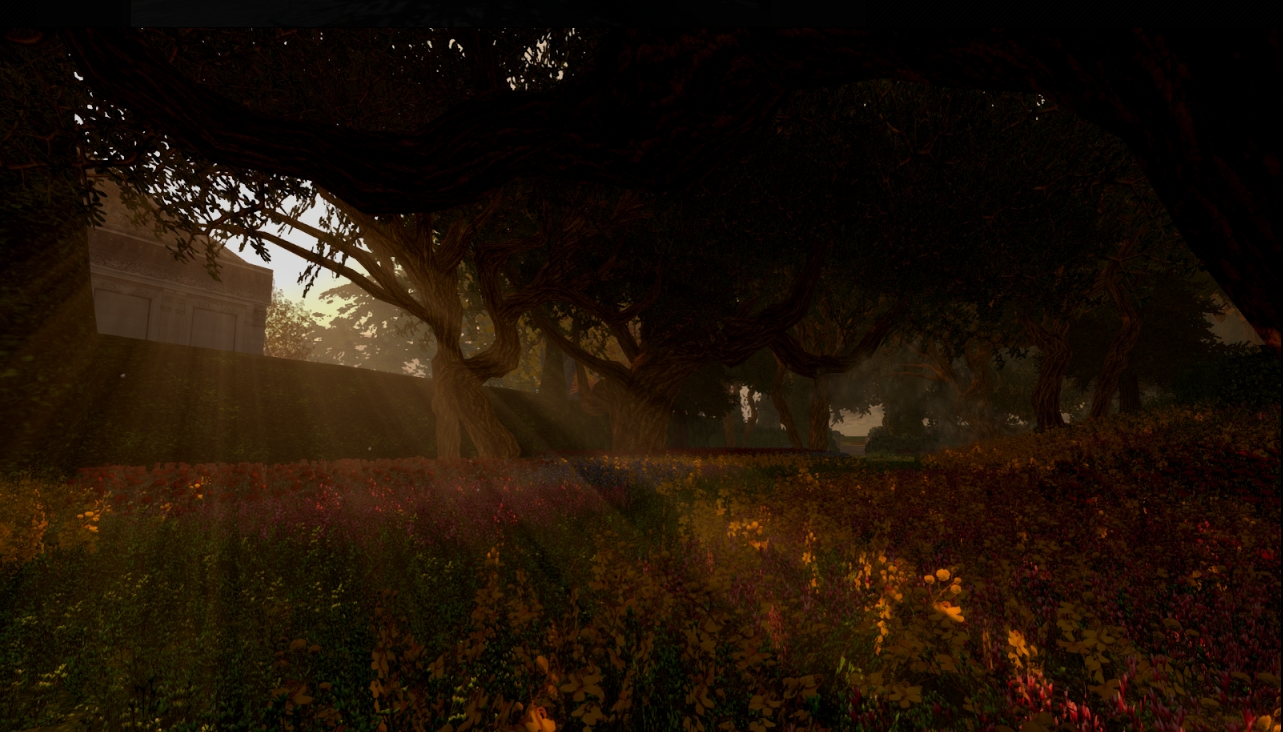
Update, March 4th: Niran is continuing to experiment with shaders, and has posted an interesting snapshot taken under water.
NiranV Dean has always enjoyed a reputation for pushing the limits of the the viewer, first within his Niran’s Viewer, and more recently with his Black Dragon viewer.
A lot of the work he does builds on code developed by Tofu Buzzard – such as with his implementation of screen space reflections and, more recently, Godrays. This work, coupled with his own, has enabled him to earn a reputation for producing a viewer with rich graphical capabilities.
Now Niran is pushing the limits again, using both his one code and elements such a Tofu’s Godrays to bring something to Sl people have long wanted to see: volumetric lighting effects.
On Sunday, March 1st, he released a stunning video showing the work to date. When watching it, be aware that while the camera is moving, everything else is static, other than the grating in the ceiling of the room. When you’ve got that, note how the grating not only casts shadows on the floor, it actually breaks up the light falling through it, just as would happen in real life where light rays hit a solid object and are broken up by it.
“The original Godrays are from tofu,” Niran says of the work. “The problem was, they only worked on objects and terrain; they got cut off on the sky. So I’ve worked on that, and added some code to my viewer, which was really the first iteration of things we saw on my viewer [the updates with Godrays from 2014].
“Since then, I’ve been working on improved resolution and smoother Godrays, moving things to another shader, which brought it’s own problems. Most recently I’ve been moving to another shader for depth of field and improved shadows.”
Interest in the work Niran has been doing has been expressed by the Lab, and he will be offering it as a code contribution for them to consider, although he still has some further work to do.
The first of this is to introduce a global fading effect on the Godrays such that they appear to fade away as an observer looks away from the sun. The basic code is already there, but is disabled in the video, as Niran is still working on things. He hopes to be able to offer the fading effect as a toggle on / off option once the work has been completed.
“The other work still to be done is with particles,” he told me. “Since these Godrays are in the final depth of field shader, they also share the same problems. So, if I can move it into a separate shader on top of everything else, it should resolve the remaining issues, and everything should be good to go.
Of course, contributing code to the Lab doesn’t always mean adoption by the Lab; there can be many intervening factors that prevent the latter. However, Niran is quietly confident his work will be adopted. But if not, “well, there’s always my viewer with it!” he tells me with a wink and a smile.
Both the UKanDo viewer and Black Dragon saw updates in week #6. Each of the release contain under-the-hood (so to speak) changes, with UKanDo in particular being something of a catch-up release more than anything else, as noted below.
UKanDo 3.7.24
The last UKanDo update was in October 2014, so it’s been something of an extended period between releases for the viewer. However, there is a good reason for this: Connor Monaron, the man behind the viewer has a good reason for this: he’s been off in the United States tying the knot with his SL (and now real life) partner. So the first thing to do here is offer congratulations to Blackrose and Connor.
Obviously, being away and being focused on such a major event in one’s life means that all things viewer naturally take a back seat. As such, the new release of UKanDo, version 3.7.24.28064, released on Wednesday, February 4th, is more about catching-up with all of the recent output from the Lab. This being the case, the release see the viewer gain parity through and up to the following LL releases:
3.7.19.295700 – Monty Linden’s last round of HTTP updates, also for October 2014, which improve texture and mesh data fetching and which offers significantly faster inventory loading
3.7.20.296094 – the GPU removal update and the subsequent 3.7.22.297128 update which fixed an inherent crash issue within the 3.7.20.296094 release
3.7.21.296724 – the winter open-source contributions release from November 2014, providing improved Japanese language input, improved projectors rendering, fixes for object editing when rotating and for an OS X Yosemite full screen crash issue
3.7.23.297296 – the winter maintenance release from December 2014, which included a range of fixes to voice, texture animation, object rendering, privacy, inventory management, etc., and which included fixes to previously released changes in the way joint offsets in rigged meshes are handled
3.7.24.297643 – the Experience Tool viewer (at the time this article was written, the de facto release viewer from LL).
As well as these LL-derived updates, this release also sees UKanDo reach parity through recent RLV updates from Marine Kelley from 2.9.3 through to the latest 2.9.6.6,
So while this release many not offer anything “new” in terms of TPV updates, it does bring the viewer right up to the cutting edge in terms of formal releases from both LL and RLV, which should be more than enough to keep UKanDo users happy.
The latest version of Black Dragon, version 2.4.1.8, was release on Friday, February 6th, and is the latest in a series of nips and tucks to the viewer as Niran continues to integrate code updates from the Lab and also work on refining the UI.
The core update from the Lab with this release is the inclusion of the winter maintenance release code from the Lab’s 3.7.23.297296 release, including the fixes for previously released changes in the way joint offsets in rigged meshes are handled. This means that deformations to an avatar’s shape are more intelligently tracked, and the viewer should be able to correct them without necessarily having to have the attachment causing them removed, or requiring a re-log in order to fix.
The other major update for this release see the Friends List undergo a revision. The accordion tabs separating on-line from off-line friends have been removed, and the Friends list rationalised so that on-line friends appear at the top – their names now in blue – and an duplication of names has been removed.
with the accordion tab removed, and the list sorted so that on-line friends always appear at the top, their names coloured blue, the Friends List in black Dragon 2.4.1.8 (left) is a lot more streamlined than previous versions (right), which also saw on-line friends duplicated between the “Online” and “All” accordion tabs
The release notes also list the following updates / changes:
A possible fix for RLVa detach and re-attach issues via RLVa commands
A possible fix for a crash caused by the connection issues panel when the region becomes invalid
A viewer compile fix
Max VRAM has been changed 1024 Mb in Preferences > Display Settings
Incremental steps for Shadow Blur changed to 0.1 in Preferences > Display Settings
The connection issues panel will no longer briefly appear when logging-in with the viewer
Appearance floater outfit status colour has been changed
Worn items are now listed in italics in the Appearance floater, rather than in bold
Beacon colour has been changed to stream “blue-ish”.
The Christmas / New Year period saw three more rapid-fire releases of the Black Dragon viewer as NiranV Dean continues to refine and tweak it both in response to feedback and as a result of stepping on a few bugs.
The first update, version 2.4.1.5, was available for people to add to their Christmas stockings on December 24th. This saw a merge with the Lab’s released 3.7.23 code base, and so captures everything up to an include the last set of maintenance updates from the Lab, which includes the fixes for joint offsets in rigged meshes.
Chief among Niran’s own updates came the ability to hide the Favourites Bar (which in the most recent versions of the Black Dragon UI has been sitting above the menu / address bar). The toggle is in the right-click context menu displayed when clicking on the menu / address bar; unchecking it will cause the latter to slide up and hide the Favourites bar from view. Checking the option will cause the Favourite Bars to be revealed once more. You can also achieve the same results via Preferences > Interface > Show Favourites Panel, if you prefer.
From Black Dragon 2.4.1.5 onwards, you can opt to hide / show the Favourites Bar using either using a context menu option or a Preferences option (click for full size, if required)
An “experimental connections issues” warning was also added to the viewer, which is designed to show when your ping time to the SL simhost exceeds 500ms. I’m not sure what form the warning takes, as I’ve not been able to fiddle with things sufficiently to push my ping rate that high.
The “New Years Update”, version 2.4.1.6, which appeared on December 31st, saw an overhaul of RLVa with the viewer, which Niran notes had become somewhat broken due to not having received TLC for several updates. There may still be further tweaks and fixes to come, but feedback would seem to be required for that to happen – so if you’re an RLV user and find problems still, please pass good feedback on the issues you’re encountering to Niran.
Also, version 2.4.1.6 added the ability to show / hide the Merchant Outbox and Received Items folders in Inventory, if preferred. You’ll need to re-log after enabling / disabling the option to show / hide the folders.
When the folders are active in Inventory, remember you’ll still be able to open the Merchant Outbox panel from the Edit menu, and Received Items via the panel near the bottom of the Inventory floater. This release also added the ability to change keyboard layouts without the need for a re-log, and added some new parcel property icons.
Black Dragon 2.4.1.6 added the option to display the Merchant Outbox and Received Items folders in inventory. A re-log is required between toggling the option on / off. Note that if you don’t have an active Merchant Outbox, the folder may not show in your Inventory (click for full size, if required)
On January 2nd, 2015, Niran issued version 2.4.1.7, which is essentially a bug fix for an error introduced with the 2.4.1.6 release, although it includes a few additional tweaks.
All three releases came with various tweaks, fixes and assorted minor changes (code clean-ups, etc.), which are listed in the release notes for each updated, linked-to above. Please refer to them for further details on an individual release.
Once again, a series of small changes serving to further refine Black Dragon and meet the needs of users, which should help to keep people happy, and which ensure the viewer keeps pace with the Lab’s code releases.
Update, Thursday, December 4th: Black Dragon 2.4.1.4 bug fix update released on Wednesday, December 3rd.
It’s been a busy week for Niran V Dean and his Black Dragon viewer, with no fewer than four updates between Thursday, November 27th and Tuesday, December 2nd.
The first of these updates – which lifted the viewer from version 2.4.0.4 to 2.4.1 came on Thursday, November 27th, and was quickly followed by two bug fix updates, 2.4.1.1 on the 27th and 2.4.1.2 on Friday November 28th. Then version 2.4.1.3, also a bug fix update, appeared on Tuesday, December 2nd.
The major part of these updates, appearing in version 2.4.1, is a complete overhaul of the UI. Gone is the ability to place toolbar button up in the top left of the menu bar area, the ink blots surrounding floaters and panels, etc. Instead, the UI presents a look heavily influenced by Valve’s Steam client. The result is a striking, charcoal grey finish to floater and panels, on which the white text shows up somewhat better than it did with the previous UI, together with bold white lines denoting fields, input boxes, etc., and individual headings to sections within a floater or tab highlighted in blue, all in a manner that works quite well.
Black dragon’s 2.4.1 UI design
There are a few immediately noticeable “Niran-isms” on display: the Favourites bar, for example, is now above the Navigation bar, rather than under it, as with most viewers. There’s also a nice incorporation of the notifications icon into the navigation bar area as well, over to the right of the screen. And, of course, the Dragon menu single point-of-access to the viewer’s menu tree is retained.
Given this release was an extensive overhaul of the UI, 2.4.1 and its subsequent releases didn’t bring too much in the way of new features to viewer, which is unsurprising – there’s work enough involved in getting the UI sorted for a release. There were a few issues following the initial 2.4.1 update – hence the release of 2.4.1.1 through 2.4.1.3, but looking at the release notes, most of these seem to have been nips and tucks rather than major “oopsie” fixes.
The updated preferences panel showing the crisper layout of the new UI
In terms of LL code updates, Black Dragon 2.4.1 through 2.4.1.3 see the viewer again reach parity with the Lab’s viewer, including implementing the benchmark viewer code and HTTP pipelining (I believe).
As always, for a full breakdown of updates, please refer to the Black Dragon change log, which lists changes from the most release release (in this case, 2.4.1.1) on down.
I did encounter a couple of minor problems with the viewer – although these may well be operator induced. Setting neither the “Show Network Stats” and “Show L$ Balance in Statusbar” options in Preferences > Interface seemed to do anything for me. I was particularly keen to try the latter, as I personally find having my account balance displayed in the Inventory floater nothing short of the PITA. But, other than these, the – admittedly brief – drive I did take with the viewer revealed nothing exasperatingly unpleasant or unexpected.
Overall, and interesting and clean UI update; one which I personally prefer to the last outing.
Things are liable to be getting busy in terms of TPV viewer updates over the next month or two. As noted in this blog, the Lab has now released their HTTP pipelining code for the viewer, which TPVs are being encouraged to adopt as soon as they can, and there have been a spate of other updates and fixes for the viewer that already are, and will be finding their way into TPVs.
Two of the most recent v3-style viewer to update have been Black Dragon and the Restrained Love Viewer, and the following is a quick overview of the most recent releases for both of these viewers.
Black Dragon 2.4.0.3 and 2.4.0.4
Black Dragon received two release updates in the space of around 24 hours. The first came when NiranV Dean released version 2.4.0.3 on October 29th, and the second saw the release of version 2.4.0.4 on October 31st.
A blog post on Niran’s website outlines the principle changes which appeared in the 2.4.0.3 version of his viewer, summarising them as:
A fix for the viewer failing to correctly apply maturity settings
An experimental update to the Godrays feature by Tofu Buzzard so that they now cast a faked volumetric sunlight everywhere where light can fall
Godray default lowered to 32
A new option in Preferences > Display to switch between a new shadow softening kernel by Tofu Buzzard and the LL default
Keyboard shortcut for Depth of Field locking changed to CTRL-X in the hopes of correcting a clash with another (unknown) shortcut
Addition of Geenz Spad’s spotlight reflection changes.
The latest release(s) of Black Dragon see an experimental volumetic lighting capability added to the Godrays feature (images via the Black Dragon website)
The 2.4.0.4 release is, in terms of user functions, the same as the 2.4.0.3 release; the major difference is that he has the Lab’s HTTP Pipelining updates included (which Niran has, for some reason referred to as the “CDN code”).
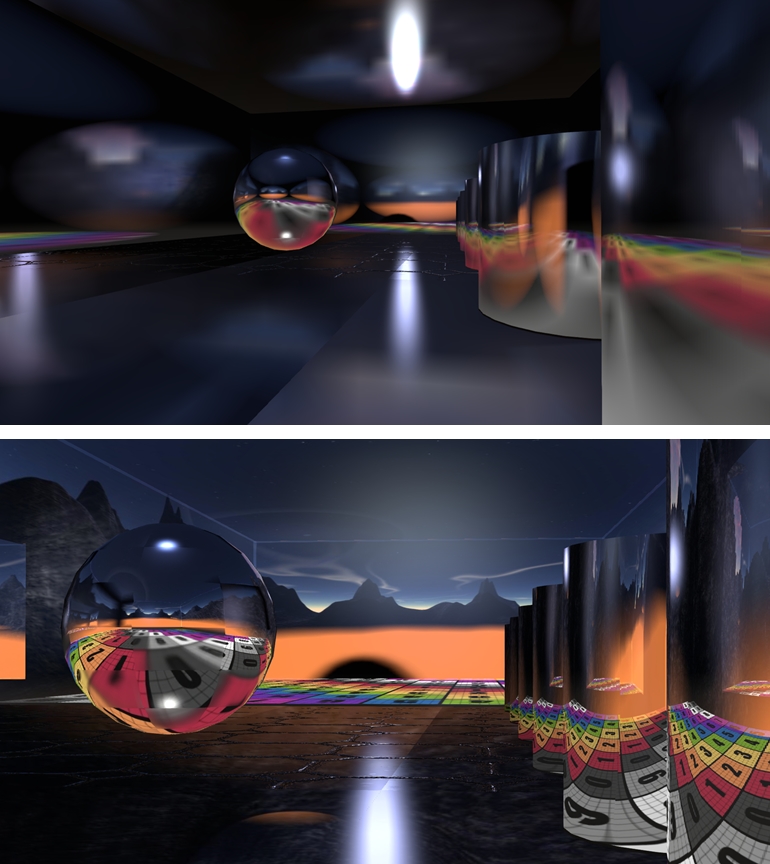
Geenz Spad’s work on glossy projectors can be found in JIRA STORM-2067. This corrects the tendency where, depending on a surface’s environment intensity, projected reflections they become more blurred as their intensity increases, they should become sharper for higher gloss values and more blurred for lower values.
Geenz’s work on projectors: as projected in the current viewer code (top) and in a viewer using Geenz Spad’s enhancements
As always, full details of all changes can be found in the change logs for the viewer.
This is another progressive step forward with Black Dragon, with Niran working to address issues as well as integrate updates from both LL and other developers which help further enhance the viewer and take it in a direction which matches the Lab’s important HTTP updates as well as enhancing the features Niran uses to help differentiate his viewer from other TPV offerings. Black Dragon users should be pleased.
Updated, Thursday October 2nd, 2014: Niran released Black Dragon 2.4.0.1, a “feedback update” containing a number of additions and revisions based on feedback received for the initial 2.4 release. These includes a revision to the world map, see the end of this review for details, and the Black Dragon 2.4.0.1 blog post for a complete list of revisions.
NiranV Dean released the latest version of his Black Dragon viewer on Sunday September 28th. Version 2.4 Beta, which is supplied in two flavours, a “normal” version, which comprises Niran’s additions and modifications to the viewer merged up to the Lab’s 3.7.15 code base (and is thus also referred to as version 3.7.15.33763) and a “current” version, which also has Niran’s updates and additions, but merged with the Lab’s 3.7.17 code (and is thus also referred to as 3.7.17.34052).
As well as emphasising this is a beta, with work still to come, Niran notes that the 3.7.17 version has not been thoroughly tested, and as such, may be subject to issues which might not be found in the 3.7.15 version. Keeping this in mind, for the purposes of this look at Black Dragon 2.4, I opted to go with the 3.7.17 version.
Note that this isn’t intended as an in-depth review of the viewer, but rather an overview of some of the more significant updates, together with some initial feedback.
Log-in / Splash Screen
This release of the viewer does away with the YouTube video which has been a feature of many of Niran’s viewer releases, and the log-in credentials area of the screen has been updated. Gone are the bold links to the right of the log-in area, replaced by a set of smart-looking buttons directly above the log-in credentials fields, with the Quit button ranged to the right and a link to the Black Dragon change logs to the left. A large, friendly CONNECT button has also been added below the credentials fields.
The old log-in credentials area for Black Dragon (top) and the cleaner, smarter new version (bottom) – click for full size
UI and Toolbar Buttons
The 2.3 release of Black Dragon, as noted in my last look at the viewer, saw some changes to the UI and to the toolbars, The “ink blots” effect within the UI are still there, but are more subtle in nature that the last release, although they have now found their way onto the various panel floaters as well, giving them a ragged look I personally found distracting; I found my eyes being drawn to the edges of any floater I opened, particularly if opened against a much lighter in-world background, rather than focusing on the options within it.
In my last overview of Black Dragon, I pointed to the new toolbar button placement area Niran had implemented, up in the top left corner of the viewer window, where one would normally expect to see the menu bar options. Buttons displayed in this area default to Niran’s “Tiny” size, and while it was a good use of available space, it could quickly become overrun if button labels are used rather than icons, or someone went daft placing buttons there, leading to the buttons wrapping themselves over two or more rows. More particularly, displaying the Navigation Bar / Favourites would result in the Navigation Bar clashing with any buttons placed there.
Niran has solved this latter problem in version 2.4 Beta by providing a new toolbar button. This is displayed by default when clean installing Black Dragon (or can be selected from the Toolbar Button floater). When clicked, it “opens” the Navigation Bar and Favourites, hiding the top button area (and also the Dragon menu, it must be said). The Navigation Bar has a corresponding button on the right-hand end which will hide them again.
The new toolbar buttons in Black Dragon 2.4 Beta
Two other new toolbar buttons with this release are the Teleport History buttons, which allow you to teleport back to the last location visited, or on to the next location (if any) in your teleport history. Again, these buttons are displayed by default during a clean install, or can be selected from the Toolbar Buttons floater.
Preferences and Panel Updates
The Preferences panel witnesses improvements in layout, with a number of outdated options (such as Niran’s own Navigation Bar buttons for editing the sky, etc.) removed, and a general improvement on font and colour contrasts against the darker background of the viewer’s UI which does much to assist readability. Those perhaps small, these updates do much to make scanning through the Preferences options a lot easier on the eye.
Specific improvements to Preferences see the following panels overhauled: General, Display, Sound and Media, Chat, Camera, Interface and Viewer. Some of these see layout overhauls, some include new options or updated capabilities – please refer to the change log for specifics.
Alongside the Preferences panel, a number of other panels have also been overhauled, including the: People floater (incl. the Group tab), appearance panel, Outfit selection panel, Picks, and Destinations floater. Please refer to the change log for a full list of updates and changes.
World Map
Please refer to the end of this article for notes on the black Dragon 2.4.0.1 update, which revised the world map to address some of the comments mentioned below.
The World Map gets a further update with the 2.4 Beta, which sees the layout once again resemble the World Map found in other viewers – albeit with the legend moved to the left side of the map this time, rather than along the top, where they are joined with the coordinates display and the option buttons. The search options remain to the right of the map, and slide into view when an additional Show Search button to the left of the map is clicked.
The revised Wolrd Map showing the legend and options moved to the left of the map, and the open search options to the right (displayed by clicking on the button)
Personally, the World Map legend in something I tend to set & forget. It’s the search options I use a lot more frequently, together with the coordinate fields and Copy SLurl options. I think I’m likely not alone in this, so if the World Map is to be revised, I’m surprised that no-one has made the legend the section hidden by default (if, indeed, anything really needs to be hidden) and left the more frequently used search options available for use, be they to the left, right, top or bottom of the map itself. It may not result in so much of a saving in screen (or map display) real estate, but I’d take convenience of use over having to click buttons to reveal slide-out options.
 Update, March 11th: The capabilities described below are now available in Black Dragon 2.4.1.9, which I’ve overviewed here.




 Inara Pey: Living in a Modemworld