Black Dragon: notifications and shadows

Blackdragon logoOn Thursday, July 9th, NiranV Dean released version 2.4.3.6 of his Black Dragon viewer.

The release brought with it a rapid-fire implementation of the Lab’s new notifications update from LL, which comes a little ahead of the curve, given the Lab prefer their code to be integrated into TPVs once it reaches RC status, and can be regarded as somewhat more stable than might be the case with a project viewer release. However, the code is such that it is apparently easy to manage should updates be forthcoming as that project progresses.

In implementing the notifications update, Niran has made some subtle changes to the notifications floater itself, improving the overall layout, although the overall functionality is pretty much as offered through the Lab’s current project viewer. Rather than describe the functionality here, readers are invited to read my overview of the project viewer.

The other major update with this release of Black Dragon release is related to shadows and lighting, and specifically, the uncoupling of shadow rendering from draw distance.

Because shadow rendering has been bound to draw distance, shadows tend to fade away the closer they are to your draw distance limit, with the result that the further objects are away from you, the less well-defined their shadows appear / the less shadows may influence how they appear, with objects close to the edge of your draw distance sometimes appearing shadowless.

With this change, Niran has added a new slider to the Display tab of Preferences, allowing the user to independently set a “shadow rendering distance”, thus allowing a better rendering and representation of shadows independent of draw distance.
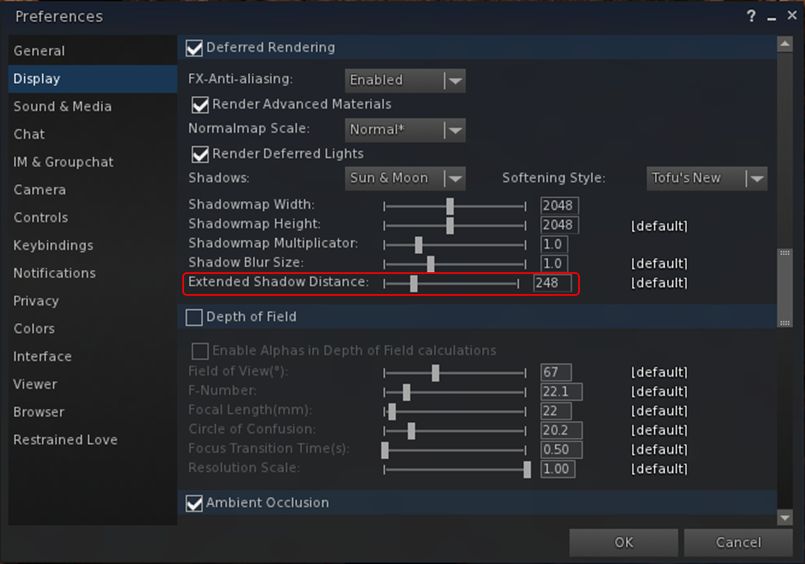
Black Dragon 2.4.3.6: the new shadow rendering distance slider
Black Dragon 2.4.3.6: the new shadow rendering distance slider in Preferences. A similar slider is also in the Machinima sidebar

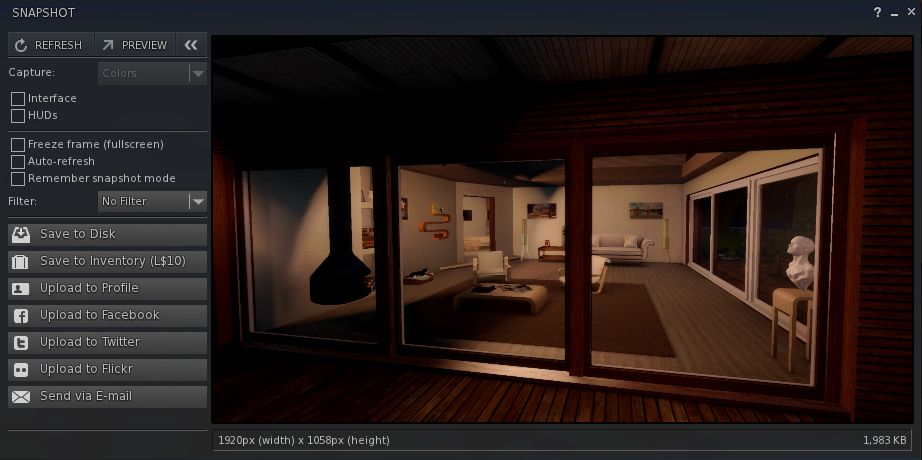
The result is a much improved depth of view in-world, and greatly enhanced snapshots (see Niran’s samples accompanying the viewer’s release notes).

By-and-large, extending the shadow rendering distance shouldn’t result in any appreciable performance hit. However, there is a caveat, as Niran explains:

Increasing the shadow draw distance will reduce the overall shadow precision, because shadows are split into shadow clip planes, 4 shadow textures if you will, these shadow textures have a given resolution (which you can set in preferences), increasing the shadow rendering distance scales up all 4 planes equally, increasing the area one texture has to cover, reducing the precision in that area obviously. You could counter this by increasing the shadow resolution or multiplier, but that would impact frame rate.

A side benefit of this, as Niran notes, is that because volumetric lighting is calculated via the shadow clip planes and shadow maps, increasing the shadow rendering distance enhances the volumetric lighting effects in the viewer. Again, check the sample images Niran provides with the release notes.

Other updates in this release include:

  • Re-enabling of the experimental auto-hiding of the Textures, Sounds, Calling Cards, Landmarks, Notecards, Scripts, Photo Album, Animations, Gestures, Favourites and My Outfits folders in Inventory (debug: DebugHideEmptySystemFolders)
  • Disabling of the auto-hiding of empty folders by default
  • Improvements to SSAO defaults
  • Freeze world and mode toggling issues, as reported in STORM-2118, fixed and implemented in this Black Dragon release
  • Further RLVa updates.

As always, for the full range of changes / updates, please refer to the release notes.
Additional Links

UKanDo and Black Dragon get Experience Tools

Both UKanDo and Black Dragon have recently incorporated the Lab’s Experience tools, following their were promotion to release status in the official viewer on June 30th, 2015.

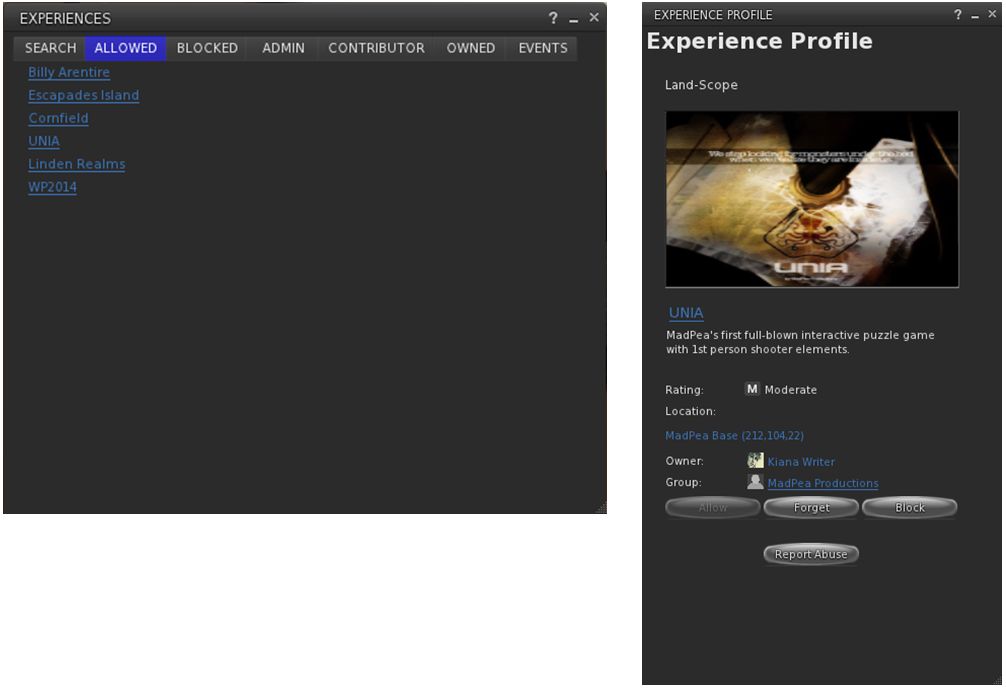
UKanDo arrived with Experience Tools on Thursday, July 2nd, with the release of version 3.8.0.28122. As with the official viewer, this adds the Experiences floater access to the ME menu, and also has the Region / Estate and About Land panel also updated with their respective Experiences tabs.

The Experiences floater and an Experience Profile as they appear in UKanDo with the default skin. The viewer also includes the Region / Estate and the About Land Experience Tools updates as well

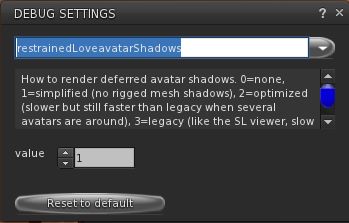
In addition, as a part of this release, UKanDo updates to RLV 2.9.12, with the NaCl / Marine Kelley avatar shadow rendering updates for rigged mesh – see my article of RLV 2.9.12, available here.

UKanDo 3.8.0 also includes Marine Kelley's RLV 2.9.12 update, with the avatar shadow rendering debug setting to help with rendering performance when running with shadows enabled and surrounded by avatars using mesh bodies & other rigged mesh attachments
UKanDo 3.8.0 also includes Marine Kelley’s RLV 2.9.12 update, with the avatar shadow rendering debug setting to help with rendering performance when running with shadows enabled and surrounded by avatars using mesh bodies & other rigged mesh attachments

Black Dragon release 2.4.3.5 sees the Experiences floater added to Dragon > Edit menu. As with UKanDo, it also adds the Experiences tabs to the Region / Estate and About Land Floaters.

This release, which arrived on July 4th after a couple of hiccups with versions 2.4.3.3 and 2.4.3.4, also includes Niran’s July 3rd update, which focused on a complete RLVa update, as per the release notes for that version.

I’ve not had an opportunity to extensively drive either of these viewers; my time is a little squeezed at the moment, and I’m struggling to clear a backlog of work and bits. So, consider this more a heads-up than any attempt at a review.

Related Links

Black Dragon: Build floater updates

Blackdragon logoBlack Dragon 2.4.2.6 was released on Saturday, May 30th 2015, followed by a rapid-fire bug fix update with the release of 2.4.2.7 on Monday, June 1st.

Both updates  focus on the Build tools floater and its associated tabs, which Niran has completely overhauled and realigned in an attempt to make it a lot less cluttered-looking and easier to read, as well as adding a degree of consistency of presentation between the tabs in the floater and the types of tool options (spinners and sliders) seen in the Build floater when compared to other tool floaters in the viewer.

My personal opinion on the changes is that is that he’s largely succeeded. There is a linear tidiness to the tabs in his revised Build floater that works naturally for those used to scanning left-to-right, and top down. everything is pretty much orderly placed, and the flow through the various tabs is logical and easy to follow.

Build-1
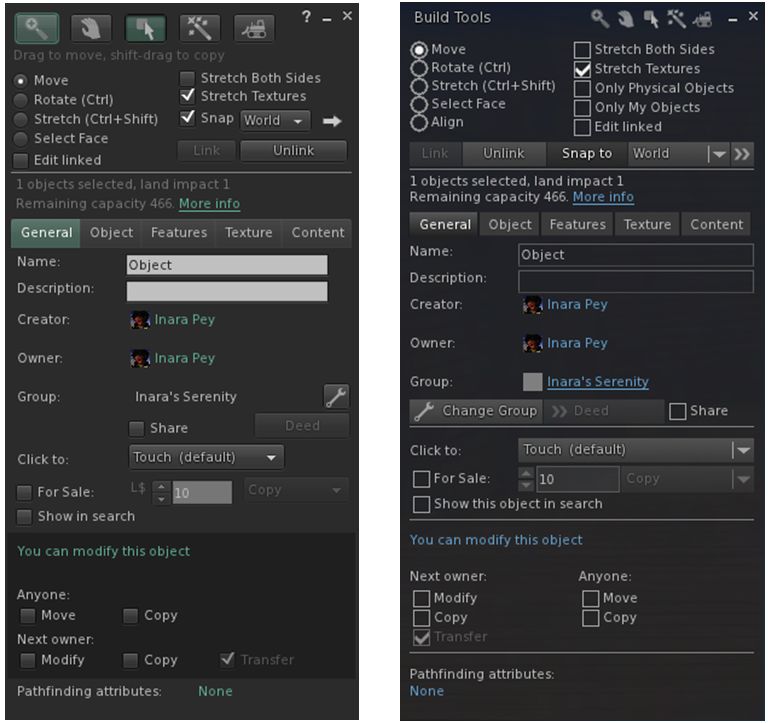
The official viewer’s Build floater Object tab (l) and Niran’s revised layout in black Dragon (r) – click any image for full size

Buttons with the Black Dragon floater are more obvious / clearer – radio buttons, for example are better defined when selected, what might be slightly confusing buttons (such as the spanner for changing the group attributes) are now clearly labelled, and buttons for pop-out options like the Grid Options are also more in keeping with the style used elsewhere in the viewer.

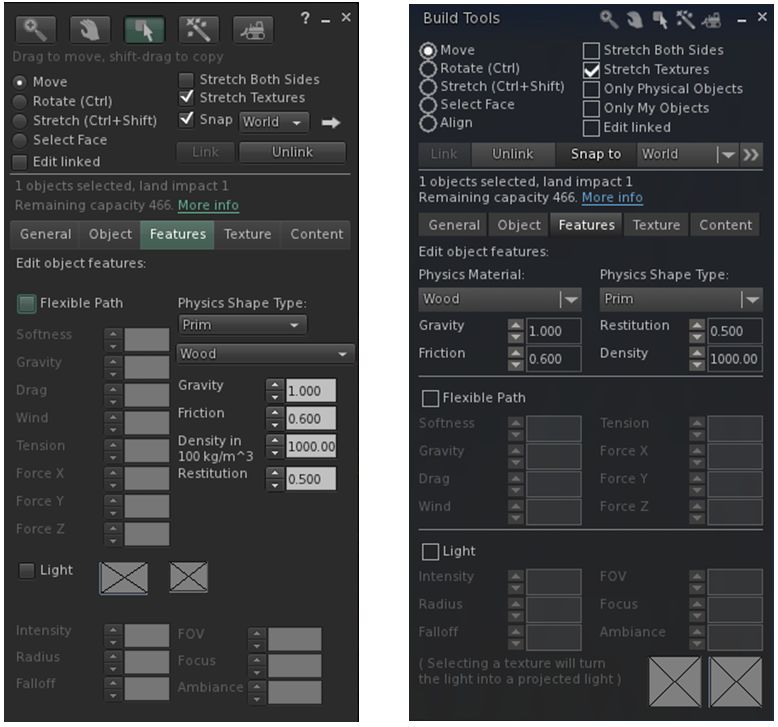
The official viewer's Build floater Features tab (l) and Niran's revised layout in black Dragon (r)
The official viewer’s Build floater Features tab (l) and Niran’s revised layout in black Dragon (r)

Some of the changes are a lot more noticeable in this regard than others – as with the General and Features tabs – both of which are compared to their official viewer equivalents in the images above – and the Texture tab. The changes to the Content and Object tabs are more subtle in nature – but given they were relatively straightforward to understand, then this is in keeping with making balanced changes.

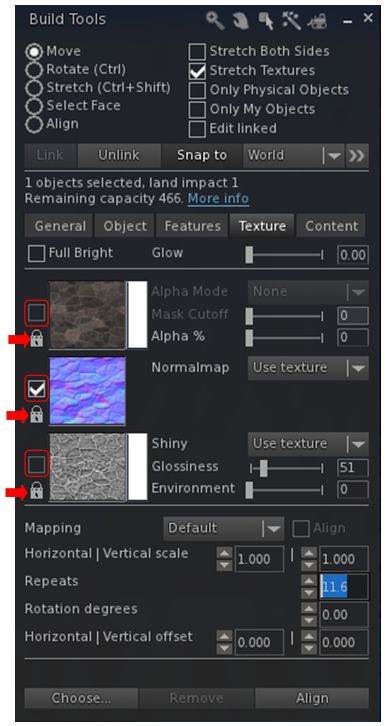
The Texture tab now has clearer map selection check boxes (outlined) and individual lock options for applying rotations, offsets, etc., via the spinners (arrowed)

In terms of the Texture tab, Niran has also revised the map selection indicator from a radio button to a check box – again adding consistency to the use of check boxes in the floater – and has also added an individual lock option to each of the three map types.

The check boxes actually do make it easier to see which of the three maps (diffuse, normal or specular) has been selected, while the three individual locks now allow greater flexibility in how changes to repeats, offsets and rotations are applied.

For example, if you want to have them applied across all three maps, regardless of which one you have selected, just click on the icons to lock them – any change make to the offsets, etc., on one map will automatically be applied to all three, regardless of which one you are working on.  If you want to change the offsets to each map independently of the others, simply unlock them (the default) – any changes made the offset, etc., spinners will only apply to the selected map. And you can also obviously have one set of rotations applied to two out of the three maps and level the third to be independently set.

The Textures tab also now makes use of sliders as well as spinners for applying  Glow, Transparency (Alpha %), Glossiness and Environment  to faces / objects, making it easy to apply quick changes before fine-tuning them with the spinners. It was actually two of these sliders that prompted the 2.4.2.7 release. While testing the 2.4.2.6 release for this review, I noted the Glow and Alpha % sliders were not working as expected. A quick IM to Niran, and he dived in and fixed the issue. The updates to these two sliders mark the only changes between 2.4.2.6 and 2.4.2.7.

Snapshot Floater Preview Update

The other significant update in the 2.4.2.6/7 release lies with the Unified Snapshot floater. In the 2.4.2.5 updates (which I reviewed here), Niran introduced a separate, resizeable preview panel as an alternative to the preview pane built-in to the floater. He’s now further revised the snapshot floater so that the built-in preview pane displays a high-resolution preview image, as with the alternative preview panel.

The resizeable preview panel for the snapshot floater now displays high-resolution preview images
The preview pane for the snapshot floater now displays high-resolution preview images

The new preview panel offers a much improved image, and further enhances an option a lot of people would like to see adopted by other viewers in some way.

Feedback

Overall, the core Build tools updates in these releases  – to me – do much to enhance the Build floater. As noted, some of the changes are a little more subtle than others, but overall they all work to present a far tidier set of tabs within the floater, and offer a more-or-less consistent set of control options in terms of the use of spinners, sliders, etc. One might have a small niggle with the colour swatch panels for the diffuse and specular maps perhaps not being obvious, but it’s really hard to see how else they could be presented without losing the order and layout Niran has achieved within the Texture tab.

Towards the top of this post, I pointed to these releases marking the beginning of the end of Niran’s active development of the Black Dragon viewer He’s aiming to slow things down from release 2.4.5). Since releasing the 2.4.2.7 update he has explained some of his reasons for this.

The important point to note here are the word “active” – hence my emphasis above. He’s not given up on everything within the viewer; he’s allowing himself space to refocus on other things than need attention (like that irritating thing we call “real life”) and to refresh himself. He’ll still be poking and tweaking things in the viewer in the future; it just won’t be his primary focus. And after the amount of time and effort he has poured into his viewers, frankly, he should be respected for his decision, and offered kudos for all he has offered the community.

In the meantime, I’ll continue to look forward to seeing what future updates to Black Dragon bring.

Additional Links

Black Dragon 2.4.2.5: snapshot floater and cinematic camera

Blackdragon logoOn Saturday, May 23rd, NiranV Dean released version 2.4.2.5 of his Black Dragon viewer, which brings with it three core updates:

  • Revisions to the Unified Snapshot floater
  • An experimental cinematic camera
  • A “lock” feature to synchronise map changes (diffuse, normal and specular) across all three channels simultaneously.

Unified Snapshot Floater Updates

The snapshot floater updates include:

  • An option to save the snapshot upload type
  • Automatic file format changes when switching to profile/inventory upload and back
  • Fixes for auto-refresh
  • Improved world freeze – the entire world is now frozen, and allows proper camming around.

However, what is likely to find favour with a lot of users (assuming it is adopted by other viewers, including LL’s)  is the ability to now preview snapshots in a separate, resizeable texture panel.

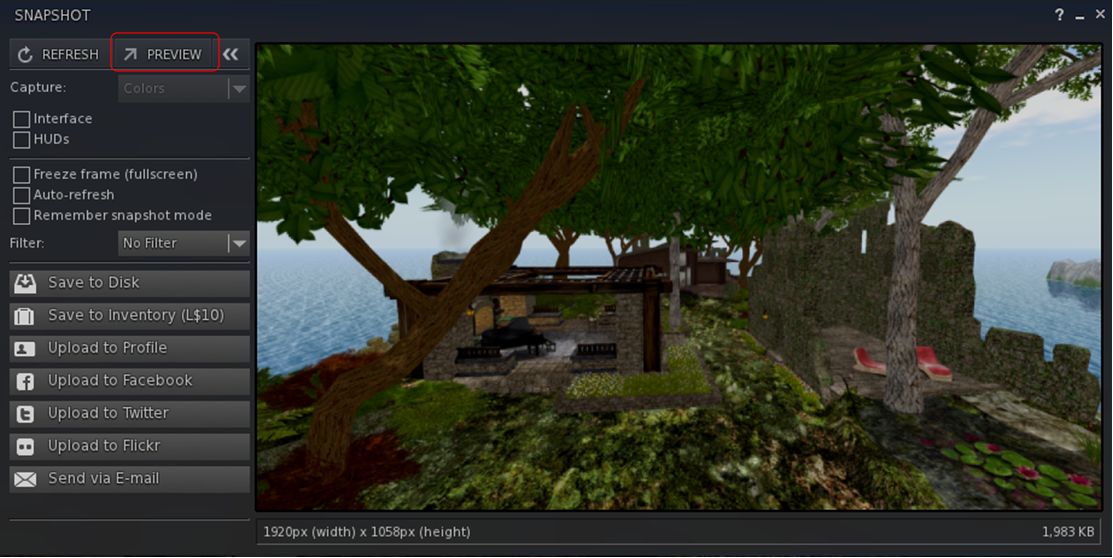
The alternative snapshot preview panel can be accessed via the Preview button in the Unified Snapshot Floater

This is enabled by a new Preview button in the snapshot floater, as shown above. However, do note that this does not “tear off” the existing preview pane, but actually opens a separate panel, linked to the floater – the original preview pane will remain open as well, until such time as it is closed using the << button at the top of the snapshot floater. Also, as it is a separate panel, the resizeable preview panel must also be closed separately to the snapshot floater.

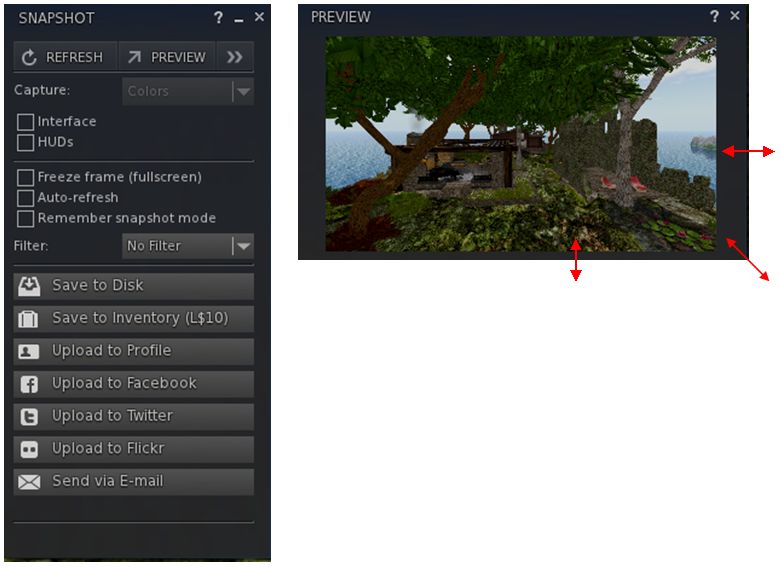
Once opened, the alternate preview panel can be resized by dragging from the sides, the top or bottom edge or from the corners to more readily suit your requirements. note also that in doing so, the image will retain the correct aspect ratio.

The additional preview panel can be resized via dragging from the top / bottom / sides / corners

I did encounter a slight problem with the updated snapshot floater – not with the new preview panel, but in the fact that the floater appears to be locked into saving images to disk in PNG format without my having changed any install defaults. On selecting either JPEG or BMP, the floater defaulted back to PNG.

Cinematic Camera

The Cinematic Camera is an experimental option, enabled through a debug setting, UseCinematicCamera. The camera will track head movements as you move – and is most effective if you’re using one of the Black Dragon over-the-shoulder third-person views. You’ll need to ensure your avatar’s head movement is free to follow the mouse as well.

If I’m honest, I didn’t have too much success playing with it – but that could easily be down to me doin’ it wrong. However, Niran has provided a video which may help to demonstrate things:

Texture Sync Lock

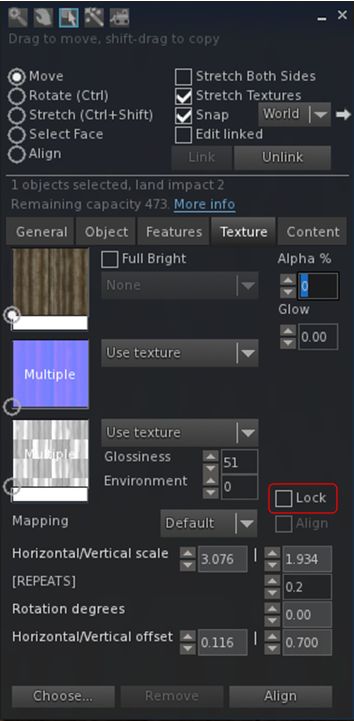
build-1The “Lock” option on the Texture tab of the Build floater operates in a similar manner to the Synchronise option found in the official viewer. When set, it ensures that changes made to the spinners for repeats, offsets and rotation on a texture are applied across all three materials maps.

This allows the viewer to use a single set of spinners for adjusting offsets, etc., against a set of maps applied to a surface / object and ensures they are applied across all three maps correctly.

Niran also provides some advice when using the Lock capability:

Note that this might cause the spinners and/or faces to revert sometimes, this is NORMAL behaviour, it’s due to lag which was already present long before this change (sadly). Usually happens if you use the spinners via mouse repeatedly, to prevent it most of the time you should type in your desired values directly and press enter ONCE then wait a bit.

Feedback

An interesting set of updates, and the ability to use a resizeable preview panel for snapshots could fine some popular support given some people have found the default preview panel size in the Unified Snapshot floater to be overwhelming. As such, it’ll be interesting to see how the Lab and other TPVs option to implement this particular change or not (I understand Niran will be contributing the updates to LL, if he has not already done so, as he did with the original Unified Snapshot floater code).

Note also that as well as the features outlined above, this release includes a number of fixes, updates and changes – please refer to the release notes for details of these.

Additional Links

Black Dragon 2.4.2 goes beta; UKanDo 3.7.26 and RLV 2.9.7 get AHH

There have been a number of rapid-fire TPV updates this week, so here’s a quick overview for Black Dragon, UKanDo and RLV.

Black Dragon 2.4.2 Beta

On Monday, March 23rd, Black Dragon updated to version 2.4.2 Beta, with Niran focusing on further updates to rendering, although there are some interesting WIP elements as well.

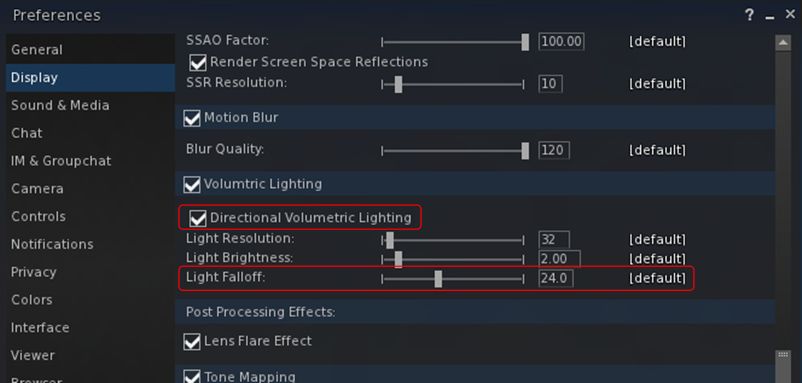
In particular, Niran notes that he’s done further work on the volumetric lighting capability, notably adding a Falloff slider to both Preferences -> Display and the Machinima Sidebar (F1), so that Godrays will fall off the closer they are to the camera which will be further smoothed in future releases), and working to get volumetric lighting working with FXAA and glow.

Black Dragon 2.4.2 Beta add options for both directional volumetric lighting and Godrays Falloff

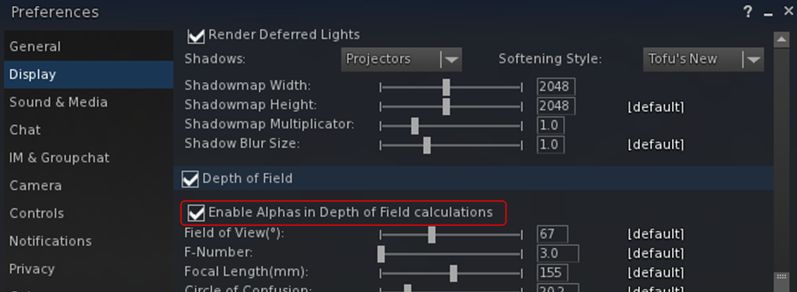
Also within Preferences -> Display, Niran has added a check box for enabling alphas in depth of field calculations. When unchecked, this excludes alpha from both depth of field and volumetric lighting calculations to prevent focus issues (depth of field) and odd lighting effects (volumetric lighting). when checked, both depth of field and volumetric lighting calculations will include alphas in the field of view.

The new option for enabling / disabling the inclusion of alphas is DoF and volumetric lighting calculations. The option is unchecked (alpha inclusion disabled) by default

Other additions with this release comprises:

  • A Custom System Memory option and a separate slider for the “linked” memory version
  • A chat colour for Friends
  • (as a work-in-progress) a new information system for Preferences to tell possible performance breakers and problems that could occour with certain options.

As always, for a full list of changes / updates, please refer to the viewer’s release notes.

Related Links

UKanDo 3.7.26

The UKanDo v3 style viewer updated to release 3.7.26.28080 on Tuesday, March 24th. This update brings the viewer up to parity with the Lab’s 3.7.25 and 3.7.26 code, and almost up to spec with Marine Kelley’s RLV updates (2.9.7 of RLV having appeared just after the UKanDo update).

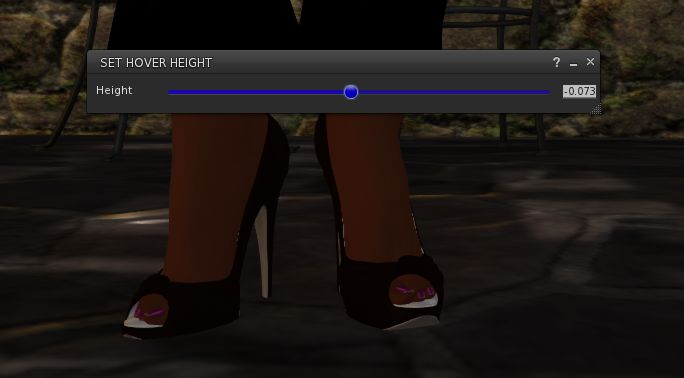
UKanDo 3.7.26 includes the Lab's new Avatar Hover Height capability
UKanDo 3.7.26 includes the Lab’s new Avatar Hover Height capability

In particular, this release sees UKanDo gain the maintenance fixes from the 3.7.25.299021 official view release and the new Avatar Hover Height functionality which has just become a part of the official release viewer.

In addition, this release of UKanDo includes:

  • Disabled the RLV start-up restriction feature by default. Re-enable via the “RLVStartUpRestriction” Debug setting or the RLV tab under General in Prefernces
  • FIRE-15489 by Ansariel Hiller – Add confirmation when unlinking objects, released under LGPL
  • RLV – Quick fix Courtesy of Nicky Perian, and tidy-up.
  • A fix for the “nolink>” parser bug, courtesy of Drake Arconis (Alchemy Viewer).

Related Links

RLV 2.9.7

This release of the Restrained Love Viewer sees assorted fixes for recent RLV release and the inclusion of the Lab’s Avatar Hover Height (AHH) capability, which came about as a result of a detailed formal proposal being put before Lab by members of the Firestorm team during a TPV developer meeting in June 2014.

Currently, and as noted by Marine, AHH is not yet linked to her existing “@adjustheight” capability and slider in the top bar of the viewer.

Related Links


Black Dragon 2.4.1.9: “volumetric lighting” and more

Blackdragon logoOn Tuesday, March 10th, NiranV Dean released version 2.4.1.9 of his Black Dragon viewer, which includes his recent work on volumetric lighting for Second Life, which I reported on at the start of March.

The update also includes a number of other fixes to some long standing rendering issues that Niran has been attempting to fix. Taken together, they are part of a larger update Niran has been planning, but as he comments in the release notes, he wanted to get these particular changes out to show people, and will save the rest for his upcoming version 2.4.2 release.

Graphics Memory Changes

The first of the changes Niran has made relates to the way in which graphics memory is used with textures. Generally, the viewer has one slider for setting a limit on the amount of texture memory, which encompasses everything you see in the viewer, including all of the UI elements.  The is generally set to 512 Mb by default.

Up until the 2.4.1.9 release, Black Dragon, like most viewers, offered a single slider for setting the amount of video memory which could be dedicated to texture processing by the viewer

With the 2.4.1.9 release of Black Dragon, Niran has split how graphics memory is used between “global” textures – which include all the UI elements, etc., and the graphics memory currently being used to render the current scene – what you are actually seeing in-world at any moment in time.

The idea here is to provide the scene textures with their own “pool” of graphics memory, so they are no longer competing for graphics memory with all the other textures obtained from the region and the viewer’s UI textures, and should thus result in fewer issues of visible textures being “thrashed” (e.g. constantly switching between blurry and clear as they are swapped into and out of memory due to lack of space).

With Black Dragon 2.4.1.9 , Niran has attempted to "split" how video memory is used  by the viewer into two adjustable "pools", one for global textures (which include UI elements), and one just for just the current scene textures
With Black Dragon 2.4.1.9 , Niran has attempted to “split” how video memory is used by the viewer into two adjustable “pools”, one for global textures (which include UI elements), and one just for just the current scene textures

As I’m not a graphics or viewer rendering expert, I can offer no opinion on this approach. However, do note Niran’s recommendation to set texture memory to 512 Mb (the default upper limit for SL viewers, set several years ago to avoid OpenGL issues which might occur when setting large memory allocations) and the scene memory to 256 Mb.

Horizon and Other Rendering Fixes

One of the visual irritants in Second Life when running the view with the Advanced Lighting Model option (which Niran still refers to by its more technical name of “deferred rendering”), those living at altitude in-world (or flying at a few hundred metres above sea level), is the way in which the line of the horizon between “sky” and “sea” forms a concave curve across the screen, rather than a flat line as one might expect.

The familiar concave horizon line between "sky" and "water" seen when running the viewer in "deferred" mode (ALM enabled) ...
The familiar concave horizon line between “sky” and “water” seen when running the viewer in “deferred” mode (ALM enabled) …

With Black Dragon 2.4.1.9, Niran has addressed this, and a few other horizon-related rendering issues so that – and again when running the viewer with Preferences > Display > Deferred Rendering (ALM) enabled, the horizon now appears as a horizontal line, as shown in the two images shown here, taken from Rebeca Bashly’s When Life Gives You Apples … Run.

Images of all the horizon rendering adjustments Niran has made can be found in his blog post on the release, linked to at the top and end of this article.

Niran's revised horizon line between "sky" and "sea", seen in Black Dragon 2.4.1.9 with deferred rendering (ALM) enabled
Niran’s revised horizon line between “sky” and “sea”, seen in Black Dragon 2.4.1.9 with deferred rendering (ALM) enabled

Continue reading “Black Dragon 2.4.1.9: “volumetric lighting” and more”