Alchemy: cooking up a TPV

Alchemy-logoSovereign Engineer poked me about the beta release of a v3- based third-party viewer going by the name of Alchemy, which was announced to the world on Saturday April 26th, 2014.

Now the name might be familiar to some, give that the pot has been simmering away on this one since around the middle of 2013, and there have been a number of blog posts on the associated website and some discussion over at SL Universe. However, it can take time to pull a viewer together – not to mention maintain it – so much so that Shakespeare himself couldn’t have put it better when he wrote Double, double toil and trouble; Fire burn, and caldron bubble, even if the meaning is a little reversed in this case, and the doubling of toil falls onto the alchemists who are bringing this latest TPV to life.

Nevertheless, the beta release – version  14.4.26.30997 – is now out for Windows, Mac and Linux (all, I believe, 32-bit). I’m not entirely sure which LL code base the viewer is built upon as there is no indication in either the About floater or on the website, but I’m guessing it’s probably the 3.7.4 or 3.7.6 code base, given the presence of things like the recent HTTP updates.

The overall aim of the viewer, according to the website, is to provide: “A Second Life Protocol compatible viewer targeted at stability, performance, and having a well thought out skin and feature set”.

Currently, three active members of the team are listed on the website: Sovereign Engineer (aka Drake, the project lead), Luminous Luminos (aka Cryo) and Inusaito Kanya (aka Lirusaito), all of whom have worked on / contributed to other TPV projects. The viewer also lists Miguael Liamano (aka Tarnix) and Captains Ghost, both of whom (or one or the other) appear to be taking care of the website.

So, what of the viewer itself?

Well, first off, this is a beta release, so don’t expect it to be all bells and whistles and how-do-you-dos. In terms of menus and Preferences, it has everything you’d expect of a v3-based TPV aimed at Second Life, including Havok sub-licensing support (which means this isn’t a viewer aim towards OpenSim as well).

The UI is a clean slate grey colour, slightly darker than the LL viewer, but with opacity set to 0.95 by default for the active floater, and inactive floaters at 0.55. In terms of size and general presentation, many of the floater panels appear more-or-less as they are rendered within the official viewer, although there are some shaper colour contrasts apparent, which can deceive the eye and brain into thinking some of the panels are more cluttered in Alchemy than is actually the case.

An example of this is World Map. There are no significant differences between it and the LL World Map. However, the flatter colours in the Alchemy world map, perhaps aided by the black / dark background to input and check boxes, tricks the eye into seeing the map as being somewhat more crowded than is actually the case when first opened.

Which is not to say all of the floaters are untouched. The build floater, for example, has been reworked to include popular open-source additions – notably Qarl Fizz’s prim alignment tool – and has been reorganised somewhat. The result, assisted by the subtle use of shading, is a more regimented feel to the floater which naturally helps the eye in locating options and option groups.

The Alchemy build floater (r) compared to the original LL viewer build floater: the former has a more regimented, easy-on-the-eye approach to its layout  without making significant changes
The Alchemy build floater (r) compared to the original LL viewer build floater: the former has a more regimented, easy-on-the-eye approach to its layout without making significant changes

When it comes to Preferences, Alchemy again doesn’t stray too far from the LL “norm”, although there are a number of TPV-specific additions, and there are hints of the Things to Come. The latter takes the form of an additional Preferences tab called Interface, which currently comprises three sub-tabs: General, Inventory and Status Bar, all of which have but one or two options for the time being, although more will doubtless follow as the viewer progresses.

Some of the tabs have been re-worked from the LL original; a good example of this is the Chat tab, which both splits-off the notification options into a sub-tab while adding a number of additional check-box options (turning off the typing animation, etc), which are again popular in TPVs. Chat also includes sub-tab for popular chat shortcut commands which Firestorm (and before it, Phoenix) made popular.

Alchemy's updated chat tab in Preferences
Alchemy’s updated chat tab in Preferences

Performance-wise, the view is slick and fast, easily on a par with all current v3-based viewers in terms of fps when running on my primary machine; I was getting 70+ fps at ground level in a region with five other avatars and a lot going on, which was more than adequate for my needs, and even when visiting The Golden Age of Russian Avant-Garde, I found my fps up in the 50s, which kept me perfectly happy during my explorations there.

In support of the viewer, the team have started on a wiki – although this still in the very early stages of development; there is also a JIRA, and the source is available through BitBucket – all of which can be accessed via the Alchemy website, or through links in the Help menu of the viewer itself.

As a beta version of an emerging viewer, anyone trying it out shouldn’t expect it to be packed to the gills with the more common-or-garden open-source / TPV additions (there’s not RLV / RLVa, and no media filter, for example), but as noted above, capabilities will doubtless be added over time as the dev team further refine the direction in which they want to take the viewer. In the meantime, this is a good start, and it’ll be interesting to see how Alchemy develops – and both the pace at which it develops and the direction it takes in terms of its own feature set.

Related Links

Black Dragon viewer 2.3.9.7: with added “Godrays”

Blackdragon logoNiranV Dean released Black Dragon 2.3.9.7 (or 3.7.5.31492, if you go via Help > About Black Dragon / the log-in splash screen) on Tuesday April 22nd.  The release marks Black Dragon’s completion of the third-party viewer self-certification process and inclusion in the Third-party Viewer Directory.

The release brings Black Dragon up to parity with the Lab’s 3.7.? code base (I assume 3.7.6, but this is not made clear in the release notes), and includes a number of updates listed as:

  • Added: ‘Godray’ effect, without switch yet
  • Added: Machinima Background texture
  • Changed: Disabled Show Title info in Sound tab
  • Changed: Updated to Tofu’s latest BlurLight shader. Doesn’t use newly added RenderShadowGaussian…
  • Changed: Allow minimum Sun Size down to 0.01.

Of these, the “Godray” addition is perhaps the most interesting, adding as it does rays of sunlight to the sky which, under certain lighting conditions appear to be very effective. The option is still a work-in-progress, and so there is currently no toggle / switch in the UI for enabling / disabling it (it is off by default) – expect one to be added in due course as the work is finished-off.

Tofu Blizzard's "Godray" effect in Black Draon 2.3.9.7 (via the Black Dragon 2.3.9.7 release notes)
Tofu Blizzard’s “Godray” effect in Black Dragon 2.3.9.7 (via the Black Dragon 2.3.9.7 release notes)

However, for those comfortable with editing shader files, Niran has provided notes on how to enable the function via a thread on SL Universe. I confess, the instructions didn’t work for me – which is probably more down to operator error than anything – but the images supplied by Niran look pretty impressive, as does a video he’s produced of the capability, which comes from the mind of Tofu Buzzard.

Niran is currently working on a UI refresh designed to offer a minimalist approach to displayed information while retaining ease-of-use and maximising the in-world viewing area. No time frame for this appearing in a release is available at present, but once it does appear, I’ll hopefully be able to provide a more detailed review, together with a better look at the “Godray” functionality. For now, and in the case of the latter, I’ll leave you with Niran’s video.

Related Links

April 12th Firestorm meeting: video, transcript and notes

firestorm-logoOn Saturday April 12th 2014, the Firestorm team hosted a meeting and Q and A session to discuss a number of issues, including the OpenSSL issue and how it affects SL / Firestorm, Firestorm blocking, the next Firestorm release and more, and answer audience questions.

While the meeting was recorded, the Firestorm team are aware that many of their users have hearing difficulties, and / or prefer to read text, so this transcript has been supplied on their behalf.

When reading, please remember:

  • This is not a word-for-word transcript of the entire meeting. While all quotes given are as they are spoken in the video, to assist in readability and maintain the flow of conversation, not all asides, jokes, interruptions, etc., have been included in the text presented here
  • In the interests of readability, topics in the transcript are not necessarily presented chronologically compared to the video. For example: specific topics of interest raised in the Q&A session, and which are self-contained, are presented under their own heading outside of the Q&A section.
  • If there are any sizeable gaps in comments from a speaker which resulted from asides, repetition, questions to others etc,, these are indicated by the use of “…”
  • Timestamps are provided as guidance should anyone wish to hear the comments in full from any speaker on the video
  • Questions / comments were made in chat while speakers were talking. This inevitably meant that replies to questions would lag well behind when they were originally asked. To provide context between questions and answers, questions in the transcript are given (in italics) at the point at which each is addressed by a member of the Firestorm team, either in voice or via chat.

Please note: This transcript is provided for informational purposes only. I am not an official member of the Firestorm team, and technical or support issues relating to Firestorm cannot easily be addressed through these pages. Such requests for assistance should be made through the in-world Firestorm Support groups or at the Firestorm support region.

With thanks, as always, to North for the video.

The TL;DR Summary

The following is a brief summary of topics discussed. Timestamps in braces refer to times in the video where the relevant commentary can be heard. All sections are expanded upon in the main transcript – click on the timestamp to go to them.

  • 0:00:15 Ebbe Linden – a review of Ebbe Linden’s (LL CEO Ebbe Altberg) presentation and Q&A at the VWBPE conference on Friday April 11th (video and transcript)
  • 0:05:15 Firestorm 64-bit download: an issue with the certificate for the 64-bit Firestorm expiring meant the download had to be temporarily pulled. It has now been restored.
  • 0:08:22 Firestorm DUI: the dynamic User Interface is very proof of concept and requires a lot of work and if it is developed, will possibly require as much as a year before it is remotely usable, and this with the collaboration of over TPVs and developers. Right now, it doesn’t require bug reports.
  • 0:23:04 The Heartbleed SSL bug: a error in versions of an OpenSSL extension called Heartbeat can be used to expose server-side information to attackers. The SL servers are safe, the Firestorm server is safe, however, people can be at risk when connecting to external sites using MOAP or the built-in web browser. Firestorm 4.5.1 and 4.6.1 use OpenSSL, but the chances of them being vulnerable are negligible, and because of the log-in hash, users names and passwords are secure. The very, very small risk will be removed in the next release.
  • 0:39:21 Firestorm blocking: older versions of Firestorm are blocked to try to encourage users to keep reasonable pace with the latest updates and capabilities in the viewer, and to meet with LL’s requirement that as many users as possible are on up-to-date viewers. It is not a Trojan, backdoor, spyware or malware. Log-in IDs, etc., are not compromised, nothing is passed to the FS server. Period.
    • 0:56:19: Why Firestorm doesn’t use an auto-update process and the pain of clean installs
    • 1:02:00: Due to a coding error, Firestorm 4.4.2, 4.5.1, 4.6.1 will be blocked from accessing OpenSim when the time comes to block them. This is not deliberate; it is the result of the code required to limit blocking to Second Life not making it into the viewer, which will be rectified with the next release. Firestorm remains committed to support OpenSim.
  • 1:09:30 Due to the use of automatically-generated SLurls with images uploaded to Facebook accounts using SL Share to Facebook, the snapshot upload capability was blocked by Facebook. This situation has now been resolved between the Lab and Facebook, and photo uploads work once more.
  • 1:14:05: The Next Firestorm release hopefully will be available in early May, and will include updates, fixes and new features, including some Mac updates, the new Vivox files, etc.
  • 1:31:36: bugs don’t get fixed in either Firestorm or the LL viewer without people filing bug reports via the JIRA. Please help in making Firestorm, the SL viewer and SL better
  • 1:36:25 Oculus Rift is coming, but it’s coming via Linden Lab. If you want to have a play, join the closed LL beta, or try CtrlAltStudio (just make sure you have a headset!)
  • 2:02:02 a look at the SL Share 2 capabilities, and why they won’t be in the next release of Firestorm
  • 1:51:06 Ed’s reminder about Firestorm Classes
  • 1:28:36 Start of the Q&A seesion

Continue reading “April 12th Firestorm meeting: video, transcript and notes”

Firestorm 4.4.0 blocking to commence

firestorm-logoThe Firestorm team have announced that version 4.4.0.33720 of the Firestorm viewer will be blocked from accessing Second Life and OpenSim starting on Thursday April 10th.

According to statistics from Linden Lab, there are some 5,500 people still using Firestorm 4.4.0.33720, which lacks support for many significant features, including Sever-side Appearance, Materials Processing and Fitted Mesh. Nor does it include support for many of the server / viewer improvements released over the course of the last year, including interest list updates and HTTP improvements.

Those people still running 4.4.0 are being strongly urged to update their Firestorm viewer to 4.4.2 or later prior to the block commencing on Thursday (no actual time is given in the blog post). Those already running 4.4.2 or later need not take any action – this does not affect you.

The block is being implemented as a part of Firestorm’s policy to, as far as is possible, only have three active versions of the viewer accessing Second Life at any given time. Unfortunately, OpenSim is also affected as the team do not currently have the means to selectively block older versions of the viewer from accessing individual grids at this time. However, this is expected to change when the time comes to block another release in the future.


Catznip R9 beta testing to commence; faster release cycles coming

catznip logoTrinity Dejavu of the Catznip viewer team provided me with a brief update on things relating to the viewer. The team have been working on the next release of Catznip (R9), and are already starting to look beyond it to future versions.

“We’re starting our beta test programme for R9 and beyond,” she told me on Thursday April 3rd, “And we’re going to move to a release often and early policy rather than a HUGE update once a blue moon.”

Catznip R9 has been in development for some time and is approaching a point where it will be released in the near future. With R8 having been released in July 2013, the news of a more rapid release cycle is going to be good news for Catznip users.

Catznip runs both alpha and beta testing programmes, and details of both can be found on the  Catznip wiki. However, in short:

  • The alpha group is to test very early versions of the viewer, and membership is by invitation only
  • The beta programme is not designed as an early means of gaining access to the viewer. Like alpha versions of the viewer, betas of Catznip are also liable to be incomplete, may have stability issues and will not be suitable for use as a primary viewer.

Those wishing to join the beta programme must be willing to comply with the following:

  • Use Catznip as their primary viewer
  • Be willing to undertake extensive (and repeated testing) of the viewer and viewer features
  • Have an account on the Catznip JIRA and be able submit reports
  • Be willing to allow the viewer to submit detailed crash reports to Catznip (see the team’s privacy policy)
  • Be willing to accept forced updates and have personal settings wiped
  • Preferably have a dual-boot Windows / Linux system and know what GDB is.

Instructions on how to sign-up as a Catznip beta tester can also be found on the Catznip wiki.

In reference to the next release (R9), the Catnip wiki states:

Catznip R9 is mostly feature complete, there are a couple of little bits we really want to get in if we can … The OSX version may be slightly delayed … cross your fingers.

Catznip R9 will have materials, new particles and fitted mesh from Linden Lab.

The major delay in getting the release prepped and out has been down to CHUI (LL’s Communications Hub User Interface), which had a number of unexpected impacts on viewer performance. As a result, Catznip have implemented a new chat interface, which they describe as:

Using a mixture of R8 and the best CHUI elements. The new chat interface is fast and tight with all the bells and whistles you expect (and maybe .. a few brand new ones).

There is currently no release date for the R9 version, but I’ll hopefully carry a review when it is launched.


Firestorm Dynamic User Interface (DUI): it’s a real prototype

firestorm-logoOn April 1st, the Firestorm team released and April Fools video in the spirit of their 2013 “Firestorm Mobile” hoax.

As fun it was, there was a secret within the joke which many – including me – missed at the first watching of the video, largely because we didn’t follow the suggestion and manually type the URL at the end of the video into a web browser.

For those who may have missed things, and to provide a frame of reference, I’m including the video in this post as well.

Jessica Lyon contacted me just after I’d published a post on the Firestorm and Catznip April Fools and gave me a proper “Gotcha!” So, having taken the time to stay quiet on the matter, as Jessica requested (and in order to go wipe the egg from my face!), I’m here to say, as many Firestorm users have been poking me about over the last 24-hours, that the Firestorm Dynamic User Interface isn’t a joke. It’s here. I’m using it. What’s more the Firestorm team have now blogged to confirm it.

The viewer,Firestorm 4.6.1.40484 is available for download for Windows only, and will run on both Second Life and OpenSim.

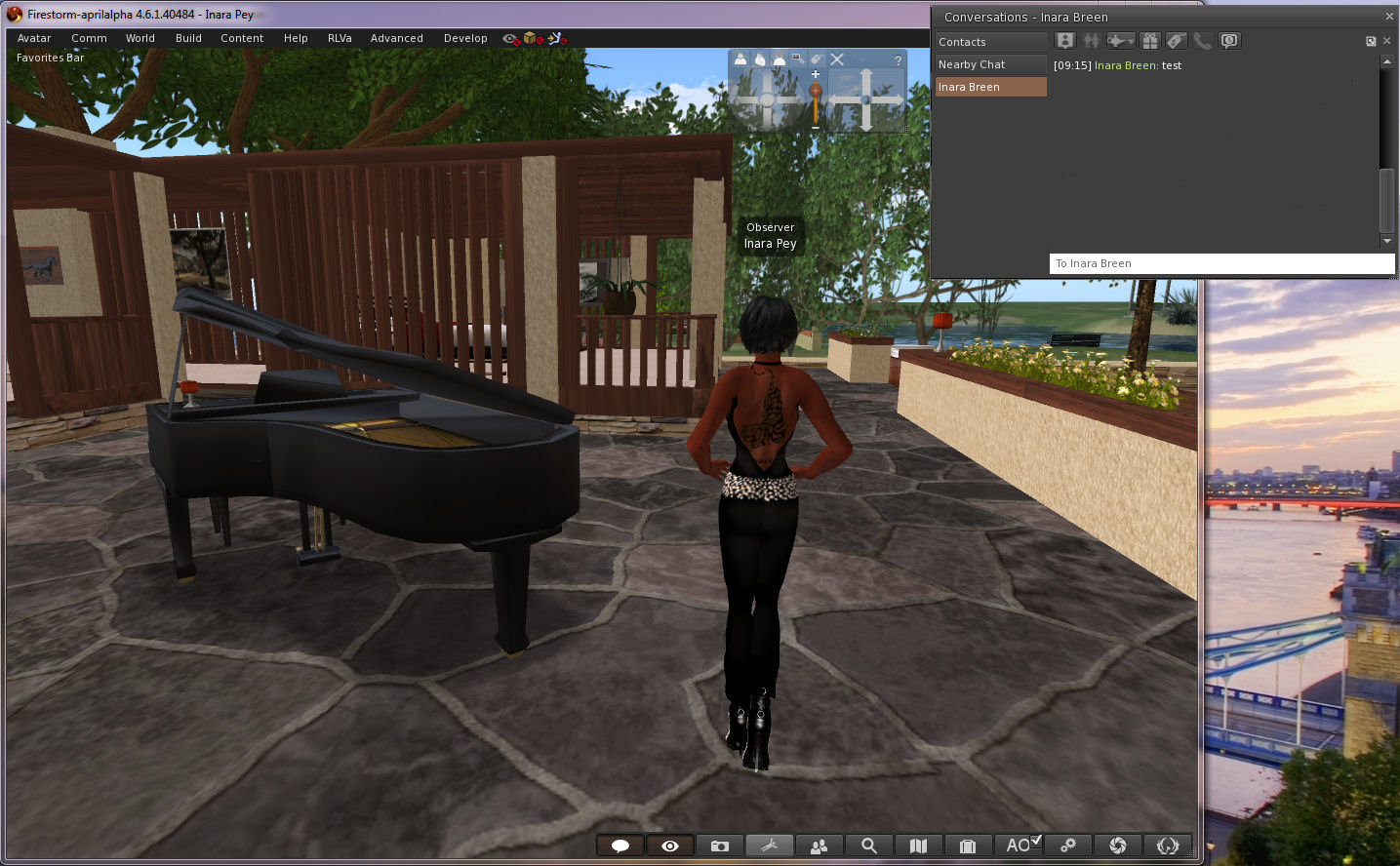
It really isn't an April Fools - Firestorm 4.6.1.40484 really does allow you to move some floaters outside of the viewer window!
It really isn’t an April Fools – Firestorm 4.6.1.40484 really does allow you to move some floaters outside of the viewer window!

Now, the viewer – as Jessica and the team wish to express loud and clear – isn’t the finished article. It’s currently experimental, and as such, subject to unpredictable behaviour. It is not recommended for use as a primary viewer.

There are also some other points to note:

  • Not all of the floaters in the viewer may be capable of being pulled out of the viewer window. Those that can appear to float “above” the viewer window, rather than “in” it
  • Not all of thefloaters work smoothly at this time, and may be subject to jumping and / or, flickering, and options on menus associated with them may not be accessible as a result. There may be other issues, such as:
    • You cannot drag / drop items from the Inventory floater in-world
    • Conversations in the communications floater tabs may not scroll soothly
  • Floaters outside of the viewer window cannot be resizedYou cannot resize those floaters which can be moved outside of the viewer window
  • Torn-off menus cannot as yet be floated
The conversations floater can be pulled out of the viewer - but if you detach a specific IM tab, it will bounce back into the viewer window and cannot currently be dragged back out
The conversations floater can be pulled out of the viewer – but if you detach a specific IM tab, it will bounce back into the viewer window and cannot currently be dragged back out

Discussing the viewer with me after pointing out I’d been had with the April Fools video, Jessica said:

The intention is that we want to release this code in the hopes that ALL open-source developers out there, TPVs included, will pick it up. fix it, improve it, expand its capability and most importantly SHARE it with one another. It is my hope that this may become a catalyst to renew interest in viewer development among inactive developers and that ultimately this will open a whole new realm of possibilities for SL viewer technology moving forward.

We will not be assigning the gentleman’s agreement on this… it’s too important to make this about credit. I don’t care who releases it first as long as the code is shared equally. We will also work on improving it, but I think this should be a community effort.

Having detachable floaters like this has been one of the Holy Grails for the SL viewer, and has long, and oft been requested. However, the Lab has generally taken the view that to get something like this working would take a considerable amount of effort. The Firestorm’s team work is therefore very much pre-proof-of-concept, as their blog post on the matter indicates:

Firestorm DUI is little more than a very early proof of concept that a dynamic user interface is in fact possible with Virtual World viewers … our very own Nicky Dasmijn managed to come up with this in a relatively short amount of time, and we hope that it will translate to this functionality being available in a reasonable amount of time …

So, if you haven’t already taken it for a test-drive, and remembering the Firestorm DUI isn’t a release, and there may be issues with using it, and that it is not supported by Firestorm at this point in time. So again, when using it, please do not use it as your primary viewer.

Please don’t report any issues with the viewer here; I’m not a part of the Firestorm team, and cannot help you. As mentioned above, the DUI viewer is currently unsupported!