Firestorm: counting down to the next release

firestorm-logoThe Firestorm team are working towards  their next major release. This has been in the works for a while now, and will represent a significant step forward for the viewer, as it will bring it up to parity with  the Lab 3.7.26, and also includes a number of cherry-picked fixes and updates from the more recent maintenance fixes, etc..

This means the viewer will include updates such as the revised snapshot floater, as originally re-designed by Niran V Dean as a contribution to Linden Lab, together with additional effects filters; the new Avatar Hover Height capability, the latest updates for HTTP pipelining and fastpipe changes, plus the recent AIS v3 changes, and much, much more, including numerous updates and improvements made by the Firestorm team and  from other TPVs.

Preview Testers Wanted

Beta versions of the release have been undergoing assorted tests for the last several weeks. However, prior to it reaching a formal release status, the team want to expose it to more extensive testing among users. To this end, a call has been put out through the Firestorm blog requesting more people to consider joining their Preview group.

Things you can expect in Firestorm 4.7.0: the revised snapshot floater (as developed by Niran V Dean), complete with an expanded set of default filter effects

If you are a Firestorm user and have a good working knowledge of the viewer, do please read the blog post and consider joining the Preview group. However, do keep in mind the following guidelines:

  • You will be required to give feedback on any Preview release you receive. This includes being prepared to report them through the Preview group and raise bug reports on the Firestorm JIRA – if you’ve never filed a bug report before, you can find guidelines on the Firestorm wiki. There is also a Reporting Bugs class which may also help
  • Please, do not join the group simply to get your hands on shiny new versions of the viewer – not only will this defeat the object of trying to test the viewer and uncover any issues possibly missed during QA and beta testing, you could find yourself running a viewer than has bugs, etc., and for which you cannot get assistance through the normal Firestorm support channels
  • Please do not share any links you are given to Preview versions of the viewer to people outside of the Preview group. Again, this defeats the object of controlled testing, and it runs the risk that if there is a significant issue with the viewer, then it means limiting the impact of the issue is that much harder (if not impossible).
Things you can expect in Firestorm 4.7.0: Avatar Hover Height

The Current Release Plan

As it stands, Firestorm hope to ramp-up to a formal release over the next few weeks as follows:

  • A further release to the Beta test group ready for the week commencing Monday, April 13th
  • If no significant issues with this release are found by the Beta testers, it will be released to the Preview group for wider testing
  • A further release is then likely to be made to the Beta and Preview groups for final testing and assessment.

Assuming nothing major is found to be a problem with the second preview release, a formal release of the viewer will then be made – potentially around three weeks (ish) from the date of this article.

Things you can expect in Firestorm 4.7.0: the Preferences floater has been completely overhauled and sub-tabs / options rationalised for easier use

It is possible that when it is made, the formal release will be classified as a “Public Beta”, rather than a “full” release. Part of the reason for this is that there are a number of further updates coming out of the Lab – such as the new Viewer-Managed Marketplace (VMM) functionality, once it has cleared its beta testing – and the Firestorm team will want to incorporate these updates as soon as they can into a follow-up release, allowing for the Lab’s own release schedule.

However, whether a “Public Beta” or a “full” release, I’ll of course be providing an overview / review of the viewer once it is available to everyone.

Firestorm TTT: building

firestorm-logoIn the Firestorm Tool Tip Tuesday video for Tuesday March 31st, 2015, Jessica takes a look at the assorted tools and options Firestorm provides in order to assist people with in-world building. As with some of the other TTT video, various options described within the video are not exclusive to Firestorm, which makes the video a worthwhile watch by anyone wishing to get more to grips with building, manipulating prims, and so on; although admittedly, if you’re not using Firestorm, you’ll have to poke at your preferred viewer’s Preferences, etc., to see where the options might reside.

Starting with changing the default colour of the basic rezzed prim shapes, the default size, prim status (physical, phantom, etc), and the next owner permissions (a function now common to all viewers, including LL’s own), Jessica takes a rapid-fire run through many of the the more frequently used build options and tool additions.

The build sub-tabs on Firestorm, located under Preferences > Firestorm, present access to the majority of additional options and capabilities associated with building using the viewer

This includes a look as assorted features within the build floater itself, many of which are, again, presented through other viewers as well, including the ever-popular prim alignment option (which, sadly, remains as something the Lab have refused to adopt, as they feel it does not fulfil enough potential use cases, despite the fact it actually achieves precisely what it sets out to do).

The video concludes with a look at the Z-drop and Z-take options, which respectively allow you to drop the contents of a folder into an in-world prim without needing to select and physically drag-and-drop them, and to take a number of in-world objects and place them within a root folder in your inventory – both of which are powerful and useful options, before finally providing an overview of one of the most useful building resources within Second Life: Builder’s Brewery. You can also find out more about BB through their website.

Getting to grips with building isn’t easy, and while this video isn’t intended as a beginning guide, for those who have paddled in the shallows of building, it offers some very useful pointers. Even those with a little more experience might also find it contains some interesting little tips!


Firestorm: of releases and springing into Spring

firestorm-logoAs noted in a recent TPV Developer meeting summary, things are in a state of flux with regards to Firestorm updates.

Originally, it had been hoped the team would have an update released during March; however, there have been numerous projects coming through the Lab which have encouraged the team to delay their release. These include things like fixes for the assorted issues of attachments either dropping off following region crossings (notably teleports) or failing to attach, and also with the upcoming Viewer-Managed Marketplace updates (VMM).

In addition, testing of the current pre-release beta has resulted in a very mixed bag of feedback from users involved in the beta process. Some have reported significant issues which may be linked to HTTP pipelining or the recent AIS v3 updates from that Lab, while others have indicated they’ve encountered very few issues, up to and including the attachment loss / failure issues mentioned above (although somewhat limited due to PC issues, my own use of the 4.7.0 pre-release versions of Firestorm has given me almost no issues whatsoever).

Because of this, it now seems likely that the Firestorm team will be handling the next release as follows:

  • Two initial preview releases, issued to the Firestorm preview group. One of these will have the latest AIS v3 updates and HTTP pipelining updates from the Lab enabled by default, and the other will have them disabled by default. The hope is these will help determine how many users may be impacted by any AIS v3  / HTTP pipelining issues, and how things should be defaulted for the follow-up releases
  • A public beta release will follow these two preview releases, which will see Firestorm brought up to par with the current LL viewer code
  • A “full” release will follow some weeks after the beta release, which may include any additional updates from the Lab (e.g. the attachment fixes and / or VMM, depending on the overall status of these updates from the Lab).

No precise time scales are available for any of these releases, but it seem likely (based on comments passed at the TPV meeting linked-to above), that there will likely be an initial call for users to join the Firestorm preview group to assist with the preview testing. The public beta then many still appear later in April.  So, keep an eye on the Firestorm blog for any call that may be made, and for news on upcoming releases.

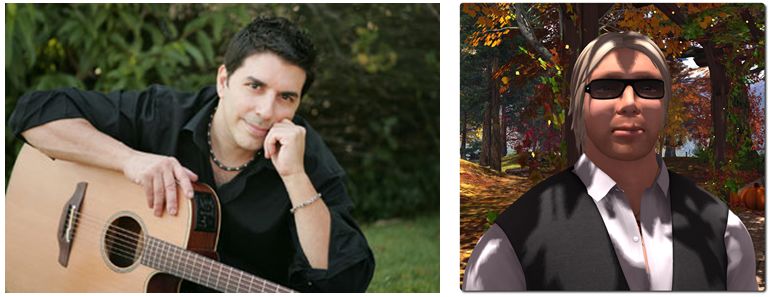
Seth Regan (Mankind Tracer in SL) will be headlining Firestorm's
Seth Regan (Mankind Tracer in SL) will be headlining Firestorm’s “Fed up with Winter” party, with Firestorm’s Ed Merryman spinning the discs afterwards

In the meantime, the Firestorm has announced a “Fed up with Winter!” party – or as I’ll prefer to call it, a “spring into Spring” party.

Headlining the event which will start at 12:00 noon SLT on Saturday, March 28th, will be Seth Regan, known in-world as Mankind Tracer. After his set, Firestorm’s own Ed Merryman will be providing the music in his usual style of spinning the discs until he (or everyone else) fall over from exhaustion!

The party is open to all – or at least, all who can get into the region, and will take place in a party area overhead on the Firestorm Support island.

Black Dragon 2.4.2 goes beta; UKanDo 3.7.26 and RLV 2.9.7 get AHH

There have been a number of rapid-fire TPV updates this week, so here’s a quick overview for Black Dragon, UKanDo and RLV.

Black Dragon 2.4.2 Beta

On Monday, March 23rd, Black Dragon updated to version 2.4.2 Beta, with Niran focusing on further updates to rendering, although there are some interesting WIP elements as well.

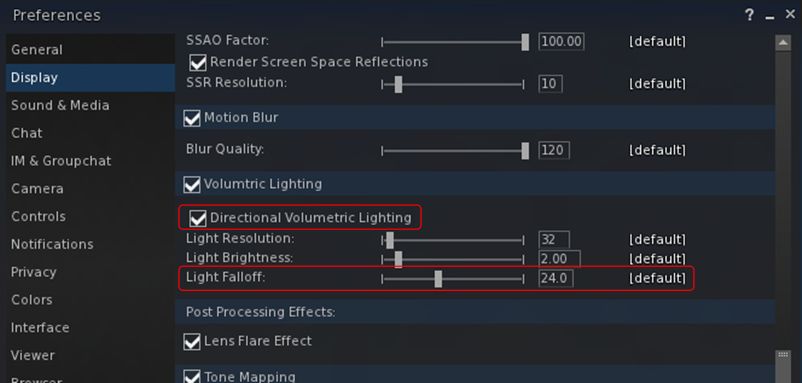
In particular, Niran notes that he’s done further work on the volumetric lighting capability, notably adding a Falloff slider to both Preferences -> Display and the Machinima Sidebar (F1), so that Godrays will fall off the closer they are to the camera which will be further smoothed in future releases), and working to get volumetric lighting working with FXAA and glow.

Black Dragon 2.4.2 Beta add options for both directional volumetric lighting and Godrays Falloff

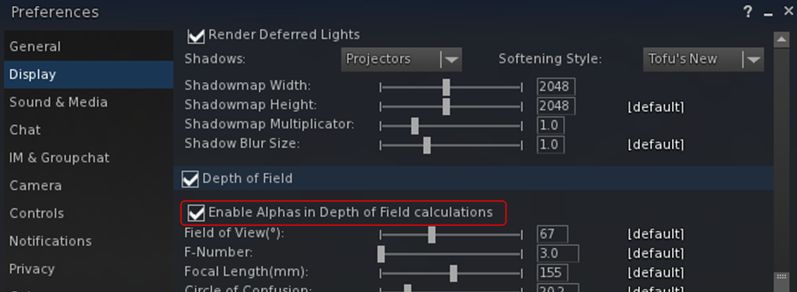
Also within Preferences -> Display, Niran has added a check box for enabling alphas in depth of field calculations. When unchecked, this excludes alpha from both depth of field and volumetric lighting calculations to prevent focus issues (depth of field) and odd lighting effects (volumetric lighting). when checked, both depth of field and volumetric lighting calculations will include alphas in the field of view.

The new option for enabling / disabling the inclusion of alphas is DoF and volumetric lighting calculations. The option is unchecked (alpha inclusion disabled) by default

Other additions with this release comprises:

  • A Custom System Memory option and a separate slider for the “linked” memory version
  • A chat colour for Friends
  • (as a work-in-progress) a new information system for Preferences to tell possible performance breakers and problems that could occour with certain options.

As always, for a full list of changes / updates, please refer to the viewer’s release notes.

Related Links

UKanDo 3.7.26

The UKanDo v3 style viewer updated to release 3.7.26.28080 on Tuesday, March 24th. This update brings the viewer up to parity with the Lab’s 3.7.25 and 3.7.26 code, and almost up to spec with Marine Kelley’s RLV updates (2.9.7 of RLV having appeared just after the UKanDo update).

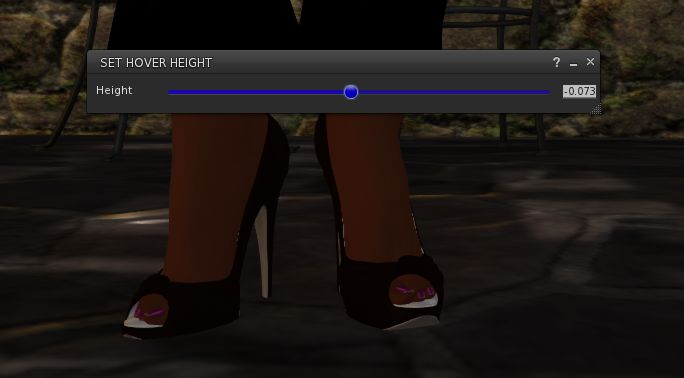
UKanDo 3.7.26 includes the Lab's new Avatar Hover Height capability
UKanDo 3.7.26 includes the Lab’s new Avatar Hover Height capability

In particular, this release sees UKanDo gain the maintenance fixes from the 3.7.25.299021 official view release and the new Avatar Hover Height functionality which has just become a part of the official release viewer.

In addition, this release of UKanDo includes:

  • Disabled the RLV start-up restriction feature by default. Re-enable via the “RLVStartUpRestriction” Debug setting or the RLV tab under General in Prefernces
  • FIRE-15489 by Ansariel Hiller – Add confirmation when unlinking objects, released under LGPL
  • RLV – Quick fix Courtesy of Nicky Perian, and tidy-up.
  • A fix for the “nolink>” parser bug, courtesy of Drake Arconis (Alchemy Viewer).

Related Links

RLV 2.9.7

This release of the Restrained Love Viewer sees assorted fixes for recent RLV release and the inclusion of the Lab’s Avatar Hover Height (AHH) capability, which came about as a result of a detailed formal proposal being put before Lab by members of the Firestorm team during a TPV developer meeting in June 2014.

Currently, and as noted by Marine, AHH is not yet linked to her existing “@adjustheight” capability and slider in the top bar of the viewer.

Related Links


Black Dragon 2.4.1.9: “volumetric lighting” and more

Blackdragon logoOn Tuesday, March 10th, NiranV Dean released version 2.4.1.9 of his Black Dragon viewer, which includes his recent work on volumetric lighting for Second Life, which I reported on at the start of March.

The update also includes a number of other fixes to some long standing rendering issues that Niran has been attempting to fix. Taken together, they are part of a larger update Niran has been planning, but as he comments in the release notes, he wanted to get these particular changes out to show people, and will save the rest for his upcoming version 2.4.2 release.

Graphics Memory Changes

The first of the changes Niran has made relates to the way in which graphics memory is used with textures. Generally, the viewer has one slider for setting a limit on the amount of texture memory, which encompasses everything you see in the viewer, including all of the UI elements.  The is generally set to 512 Mb by default.

Up until the 2.4.1.9 release, Black Dragon, like most viewers, offered a single slider for setting the amount of video memory which could be dedicated to texture processing by the viewer

With the 2.4.1.9 release of Black Dragon, Niran has split how graphics memory is used between “global” textures – which include all the UI elements, etc., and the graphics memory currently being used to render the current scene – what you are actually seeing in-world at any moment in time.

The idea here is to provide the scene textures with their own “pool” of graphics memory, so they are no longer competing for graphics memory with all the other textures obtained from the region and the viewer’s UI textures, and should thus result in fewer issues of visible textures being “thrashed” (e.g. constantly switching between blurry and clear as they are swapped into and out of memory due to lack of space).

With Black Dragon 2.4.1.9 , Niran has attempted to "split" how video memory is used  by the viewer into two adjustable "pools", one for global textures (which include UI elements), and one just for just the current scene textures
With Black Dragon 2.4.1.9 , Niran has attempted to “split” how video memory is used by the viewer into two adjustable “pools”, one for global textures (which include UI elements), and one just for just the current scene textures

As I’m not a graphics or viewer rendering expert, I can offer no opinion on this approach. However, do note Niran’s recommendation to set texture memory to 512 Mb (the default upper limit for SL viewers, set several years ago to avoid OpenGL issues which might occur when setting large memory allocations) and the scene memory to 256 Mb.

Horizon and Other Rendering Fixes

One of the visual irritants in Second Life when running the view with the Advanced Lighting Model option (which Niran still refers to by its more technical name of “deferred rendering”), those living at altitude in-world (or flying at a few hundred metres above sea level), is the way in which the line of the horizon between “sky” and “sea” forms a concave curve across the screen, rather than a flat line as one might expect.

The familiar concave horizon line between "sky" and "water" seen when running the viewer in "deferred" mode (ALM enabled) ...
The familiar concave horizon line between “sky” and “water” seen when running the viewer in “deferred” mode (ALM enabled) …

With Black Dragon 2.4.1.9, Niran has addressed this, and a few other horizon-related rendering issues so that – and again when running the viewer with Preferences > Display > Deferred Rendering (ALM) enabled, the horizon now appears as a horizontal line, as shown in the two images shown here, taken from Rebeca Bashly’s When Life Gives You Apples … Run.

Images of all the horizon rendering adjustments Niran has made can be found in his blog post on the release, linked to at the top and end of this article.

Niran's revised horizon line between "sky" and "sea", seen in Black Dragon 2.4.1.9 with deferred rendering (ALM) enabled
Niran’s revised horizon line between “sky” and “sea”, seen in Black Dragon 2.4.1.9 with deferred rendering (ALM) enabled

Continue reading “Black Dragon 2.4.1.9: “volumetric lighting” and more”

Firestorm TTT: clean install revisited

firestorm-logoIn the Firestorm Tool Tip Tuesday video for Tuesday March 3rd, 2015, Jessica gave a rapid-fire overview of performing a clean install. In trying to keep the video to around 5 minutes in length, the result, while informative, came across as rushed.

Given people did feel the first video did feel hurried, and that clean installs can be a necessary part of viewer life, the latest Tool Tip Tuesday video from Jessica might be referred to as “Clean installs: the Director’s Cut”.

With a running time a little under 13 minutes, the new video provides greater information and clearer instructions on:

  • Saving your chat and IM logs to a custom location on your PC
  • Using Firestorm’s backup capability to save and restore your viewer’s global and per-account settings
  • Performing a clean install.

The video both complements the original clean install video, and stands as an instructional guide in its own right, providing a lot more explanation and background. So, if you were confused by the speed of delivery in the original video, this revisit may well be for you!