Firestorm 7.2.2 release overview

On Tuesday, November 11th 2025 (SLT), Firestorm released version 7.2.2.79439 of their viewer.

The primary aim of this release is to achieve parity with the Lab’s most recent releases and to add further updates to features added to the June 2025 Firestorm 7.1.13 release.

Note that the following is not a complete review of the 7.2.2 release and all the changes made therein; it focuses on the more visible and user-facing updates. Those requiring a list of all changes and updates, including all bug fixes, etc, should refer to the Firestorm 7.2.2 release changelog, which also provides all proper credits for the work.

Table of Contents

General Notes

Installation

  • Only download Firestorm from the Firestorm website. Do not utilise and other third-party site purporting to offer the Firestorm viewer, and remember Firestorm will never ask for log-in credentials in order to download a release version of their viewer.
  • There is no need to perform a clean install with this release if you do not wish to.
  • Do, however, make sure you back-up all your settings safely so you can restore them after installing 7.1.11.

Linden Lab Updates

This release brings Firestorm to full parity with the following recent official viewer releases from Linden Lab:

Viewer 2025.04 – Chat Mentions

Version and release notes:  2025.04 – 7.1.14.15192634334 – May 2025.

  • Chat Mentions: support for chat mentions allowing  for better communication and awareness in local chat.
    • Type @ in any chat then pick a name from those listed, add your message and Say. Your text chat will be preceded by the selected avatar’s name displayed as a clickable link visible to everyone in local chat range, and which will open that person’s Profile.
    • Firestorm options:
      • Set chat mention colours for Font, Residents and Self: Preferences → Colors → Chat Color → Chat Mentions.
      • Set audible tone for chat mentions using your name: Preferences → Sound & Media → UI Sounds 1 → Chat Mentions.
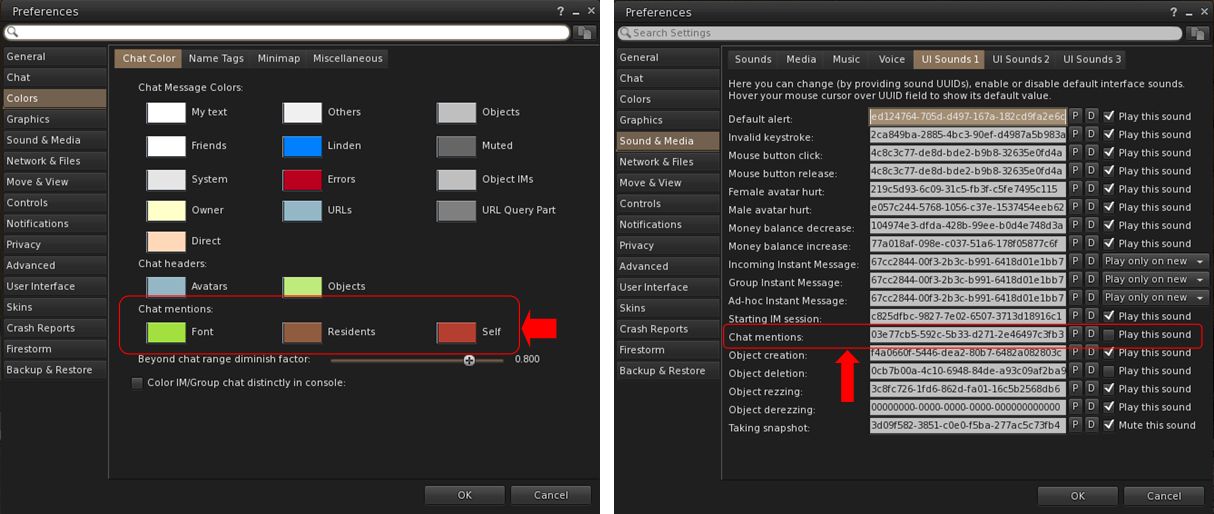
Chat Mention options available in Firestorm. Left: setting the colours in which chat mention links will appear; right: setting a sound to be associated with your chat mentions
  • Outfit Subfolders: the Outfit system folder now officially supports the use of subfolders.
  • Hover Height now supports new +/- 3 metre minimum/maximum values.
  • Build improvements:
    • Texture scale boundaries have been increased to match Firestorm Viewer – Canny BugGitHub Issue.
    • Physics Material Type now updates when selecting linked objects – Canny BugGitHub Issue.
    • Resolved texture “repeats per meter” value being incorrect for non-uniform sized objects – GitHub Issue.
  • Refer to the official release notes for all major updates and fixes.

Viewer 2025.04.01 – Avatar Welcome Pack

Version and release notes: 2025.04.01 – 7.1.15.15596336374 – June 2025.

  • Replacement of the old Avatar Chooser with the Avatar Welcome Pack, accessed via Menu Bar → Avatar → Avatar Welcome Pack.

Viewer 2025.05 – glTF Mesh Imports (.gltf and .glb)

Version and release notes: 2025.05 – 7.2.0.16729091892 – August 2025.

  • Support for glTF mesh imports, together with enhanced frame time metrics.
    • Allows content creators to import models in .gltf and .glb formats in a process to COLLADA uploads, with a few key differences.
    • A unified material upload for the .glb format is not yet supported (due in a future viewer update). To upload .glb models containing material, upload the model without any textures, then upload the materials separately via Upload Build → Upload → Material and then rez the model in-world and apply the materials.
  • Refer to the official release notes for all major updates and fixes .

Viewer 2025.06 – Inventory Favourites

Version and release notes: 2025.06 -7.2.1.17108480561 – August 2025.

  • Adds the Favourites tab to the Inventory floater.
    • Supports the addition of individual items or folders in Inventory to the Favourites tab in the floater.
    • To add an item / folder to the Favourites tab:
      • Right click on the item or folder.
      • Select Add to Favourites in the context / Pie menu.
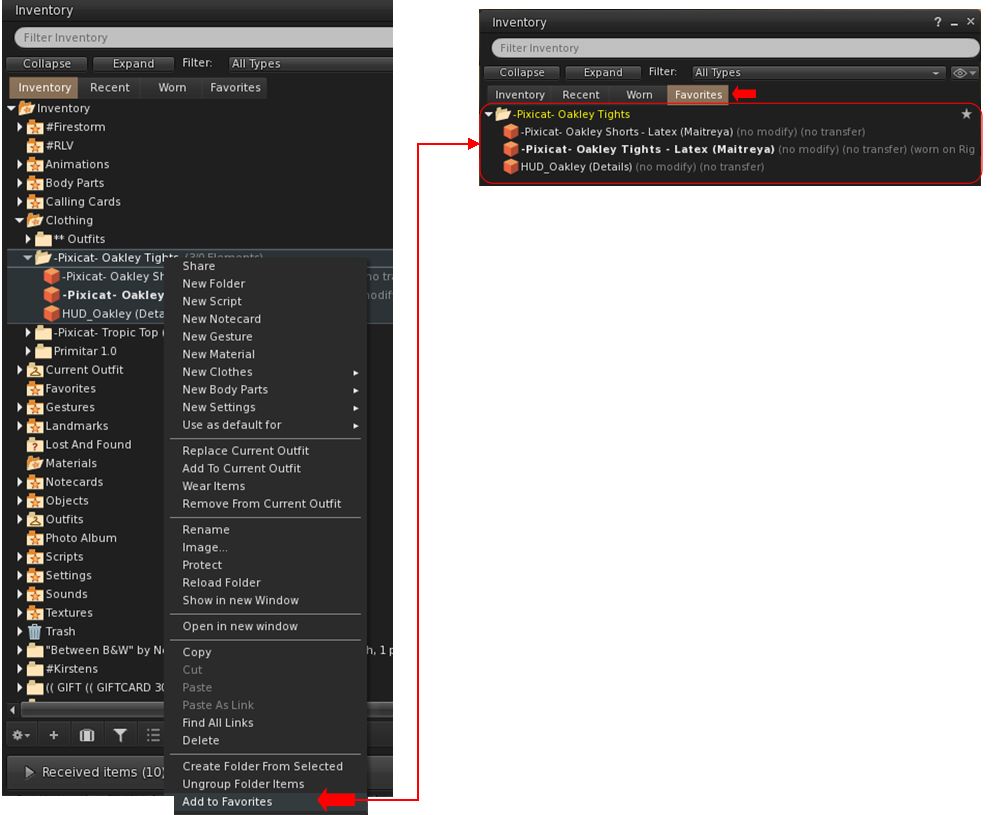
Inventory Favourites has been included from the official viewer, but doe not replace Firestorm’s own Favourite Wearables functionality
    • To remove an item / folder from the Favourites tab:
      • Locate the item / folder in Favourites or the original in the main Inventory tab.
      • Right-click on it and select Remove From Favourites in the context / Pie menu.
    • Note, this functionality is entirely separate to Firestorm’s Favourite Wearables feature, which remains in place in Firestorm, complete with its own toolbar button option.
  • Additional updates and improvements:
    • Assorted Avatar System fixes.
    • Camera and movement improvements.
    • Chat and Voice chat improvements.
    • UI Fixes.
    • Content Creation and Commerce improvements.
    • Environment improvements and fixes.
    • Mesh Uploader updates.
    • Refer to the official release notes for all the above updates and fixes .

Cherry-Picked Upstream Fixes from the Official Viewer

  • The Voice and WebRTC Reliability changes included in the official 2025,07 – 7.2.2.18475198968 viewer release have been added to Firestorm 7.2.2 at the request of Linden lab.
  • These changes comprise:
    • Improved device detection and recovery when unplugging/replugging microphones.
    • Fixes for several rare WebRTC crash scenarios, together with improved Voice clean-up and logging.
    • In world Voice indicator now properly reappears after tuning.
    • Fixed voice clean-up and device update crash on reinitialization.
  • All remaining updates and changes found within the 2025.07 official viewer release will be included in the next Firestorm release.

Firestorm Updates

New Features for 7.2.2

Disable Connecting to Neighbouring Regions (Navigation and Teleporting)
  • Preferences → Move & View → Movement → Disable connecting to neighbouring regions.
  • Request: FIRE-2325.
  • When enabled:
    • Prevents the viewer from connecting to neighbouring regions (which are ignored by the viewer), and only the current region (login/teleport destination) is connected, effectively isolating it.
    • This may improve performance for users with weaker computers or slower connections, assist multi-region event setups by lowering client overhead and reduce unintended neighbour interactions.
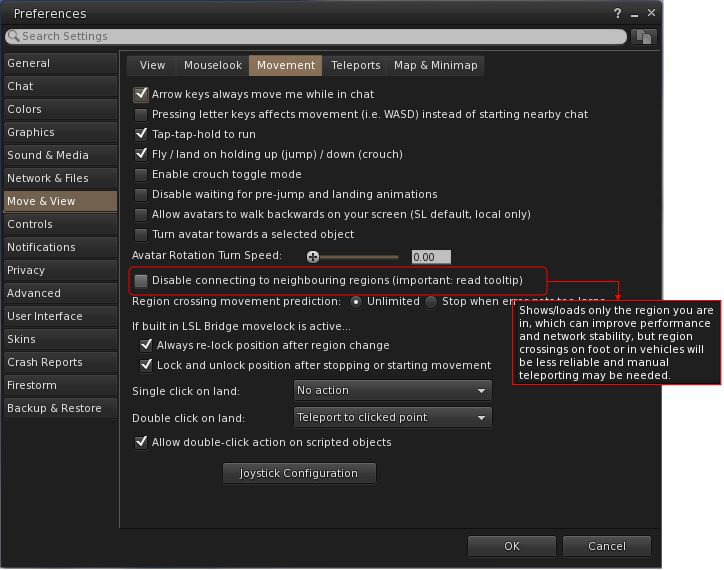
The new Preferences option to disabling the viewer from connecting to neighbouring regions, complete with the tooltip, which should be read to understand the implications
  • Limitations:
    • Region crossings will not function normally, as neighbouring regions are not visible or connected to the viewer.
    • Only direct teleports and logins to regions will work reliably.
    • The sense of world scale and continuity is reduced, and travellers or explorers may find it limiting.
New Imposter / Avatar Imposter Exclusions (Inventory / Avatar Appearance)
  • Preferences → Graphics → Rendering → Exclude Animesh Impostor Avatar.
  • Request: FIRE-35735.
  • When selected, allows a user to keep using the imposter system, but protect Animesh avatars from not animating or from having rendering issues (e.g. missing attachments).
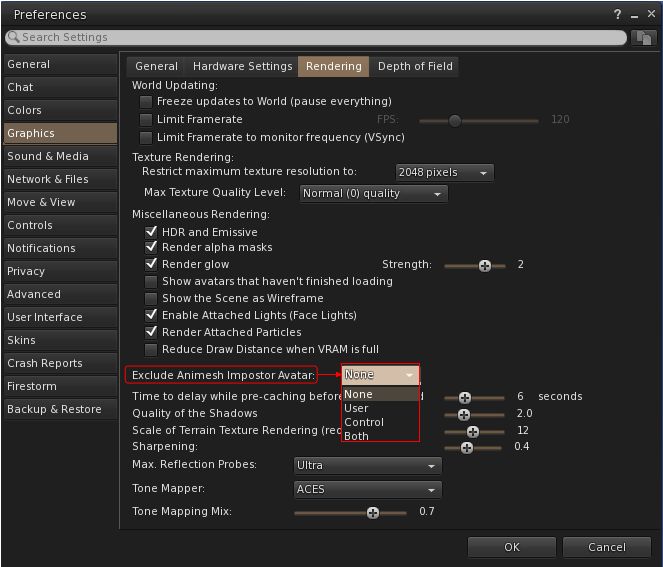
The new Impostors option for protecting Animesh avatars from not animating or from having rendering issues
  • Comprises four options:
    • None: Default, don’t exclude any avatars.
    • User: Exclude only user avatars which have Animesh attached to them.
    • Control: Exclude only control avatars.
    • Both: Exclude both User Animesh avatars and control avatars.
New Snapshot Framing Guides and Settings (Photography / Snapshot Floater)
  • The snapshot frame overlay and composition guides were added to the Snapshot floater with Firestorm 7.1.13.
  • They allow the user to:
    • Overlay their in-world view with a frame mirroring the selected image size selected from the relevant image size drop-down, with the parts of the in-world view outside of the image capture size rendering in monochrome (Show Capture Frame)
    • Optionally display a composition guide overlay as a set of yellow lines within the image frame on their world-view.
    • Use a series of Debug settings to customise the snapshot frame.
  • Firestorm 7.2.2 enhances these frame overlays and guides with additional options, access via a  new # button.
  • When clicked, this button allows the user to:
    • Adjust the thickness and opacity of the frame guides displayed in-world by the viewer without having to use the Debug Settings.
    •  Select from an expanded down-down of guide styles:
      • Rule of Thirds.
      • Golden Ratio: – one of Top Left, Top Right, Bottom Left or Bottom Right .
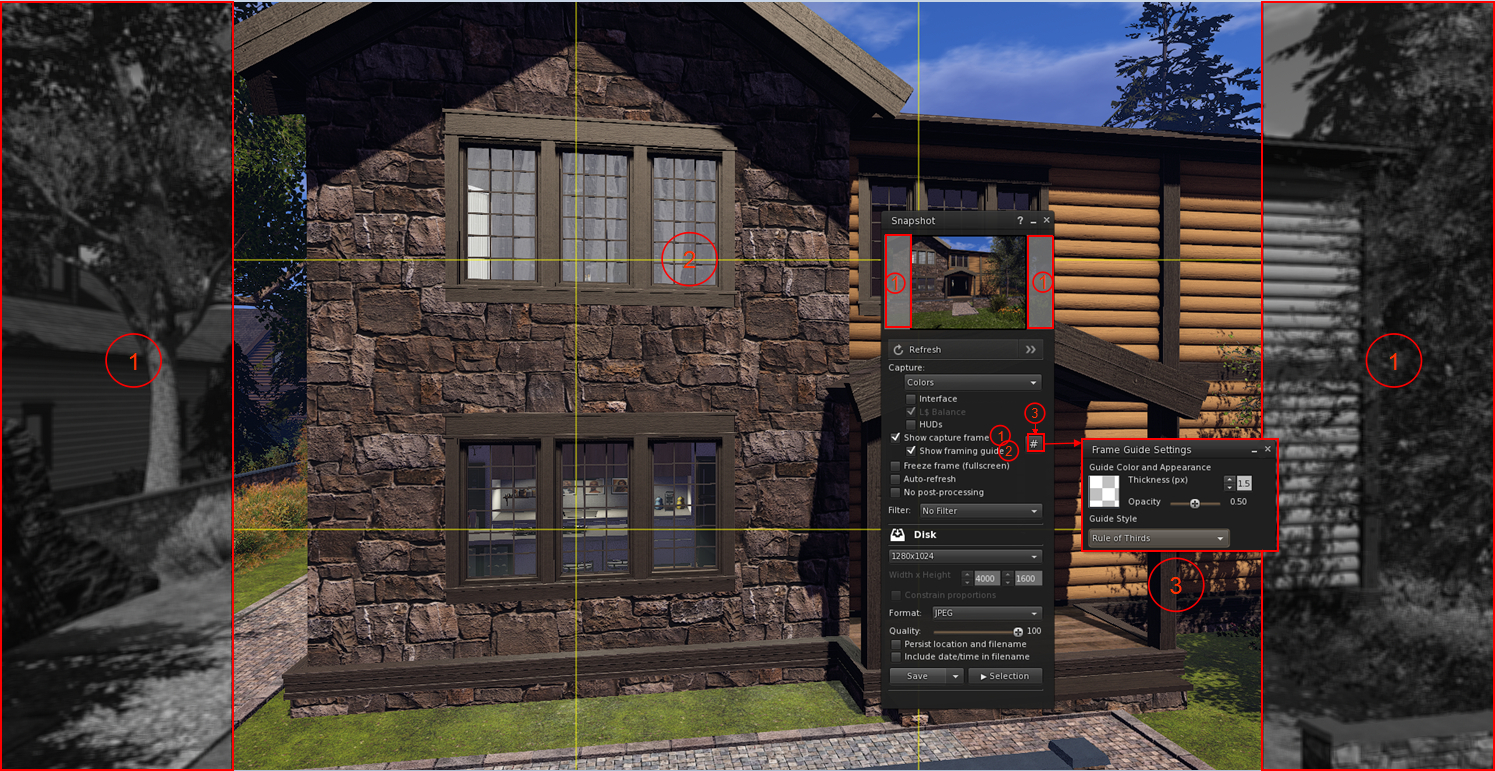
The Snapshot floater showing the frame overlay option (1) and the yellow composition guide (2) using the Rule of Thirds, added to the floater as a part of the Firestorm 7.1.13 release. Also shown is the new Firestorm 7.2.2 # button (3) which opens the Frame Guide Settings floater, allowing the user to customise the frame guides and select from the composition guide drop-down (defined in the text above)- click for full size, if required

Firestorm Avatar and Animesh Poser

The Firestorm avatar and Animesh poser system was introduced with the release of Firestorm 7.1.13 as a re-write of the Avatar poser system developed by NiranV Dean (and found on the Black Dragon viewer). For assorted reasons, that release of Firestorm did not have any associated overview in this blog, therefore for detailed information on it, please refer to the following links:

Firestorm 7.2.2 introduces a large number of improvements and updates to the Avatar and Animesh Poser, all of which are summarised in the viewer changelog, to which those interested are referred to for details.

Other Notable Improvements / Updates

Note: for bug fixes, etc., please refer to the viewer changelog

Inventory, Appearance & Avatar
  • New option to automatically reset skeleton upon standing up, which is also automatically broadcast to surrounding avatars as well: Preferences → Firestorm → Extras → Reset avatar skeleton after standing up.
  • New Stop button on the link replacement floater (Right click inventory item → Replace Links (FIRE-29394).
  • ‘Delete from outfit’ context menu entry when right clicking on an item in an outfit, in the Appearance window, Outfits tab.
    • This is useful for when you mistakenly added some HUD or anything else you didn’t want in your outfit, and is simpler than going inside the inventory and deleting the links from the outfit folder.
    • Note that only links are deleted, not actual inventory items.
    • Accessed via: Appearance → Outfits tab → Right click item → Delete from outfit.
  • Visual warning about too many saved outfits:
    • If a user has a large number of saved outfits, this can cause the viewer to freeze for a short time when opening the Appearance panel or when searching for saved outfits on slower hardware.
    • Therefore, when the user has over 200 saved outfits, they will now see this warning notification:
      A large number of outfits were detected: [AMOUNT]. This may cause viewer hangs or disconnects. Consider reducing the number of outfits for better performance
Radar, Navigation and Teleporting
  • New Radar option to set the maximum range for results to be obtained (FIRE-35815):
    • World Menu → Radar (or Radar Toolbar button)→ Radar Options drop-down → Limit Results to specific Radius → open range panel at the foot of the floater.
    • Use the slider to set the desired radius, or manually enter the radius.
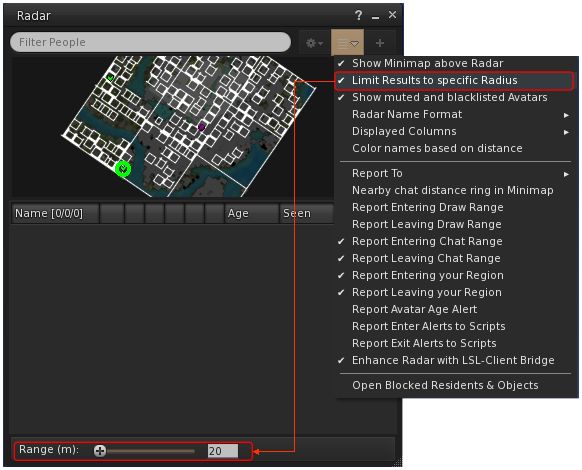
Firestorm 7.2.2 radar range option and slider / entry field
  • An option to View Chat Transcripts’ added to the Nearby People and Radar right-click context menu.
  • Option to show yellow beacons at region corners to help avoid region boundary disconnects, especially when driving or flying: Top menu → World → Show More → Beacons → Show → Region Corners (FIRE-33085).
  • The maximum zoom on the World Map has been increased to match the official viewer (FIRE-35934).
Communication + Sound and Media
  • Functionality to save and restore open resident-to-resident IMs from the previous session (Group chat sessions are not always ready in time during start-up, making their restoration unreliable): Preferences → Chat → Notices → Restore conversations with residents from previous session.
  • Option to enable / disable auto-completion when typing @ mentions in chat: Preferences → Chat → Typing → Enable automatic @ mentions window while typing in chat bars.
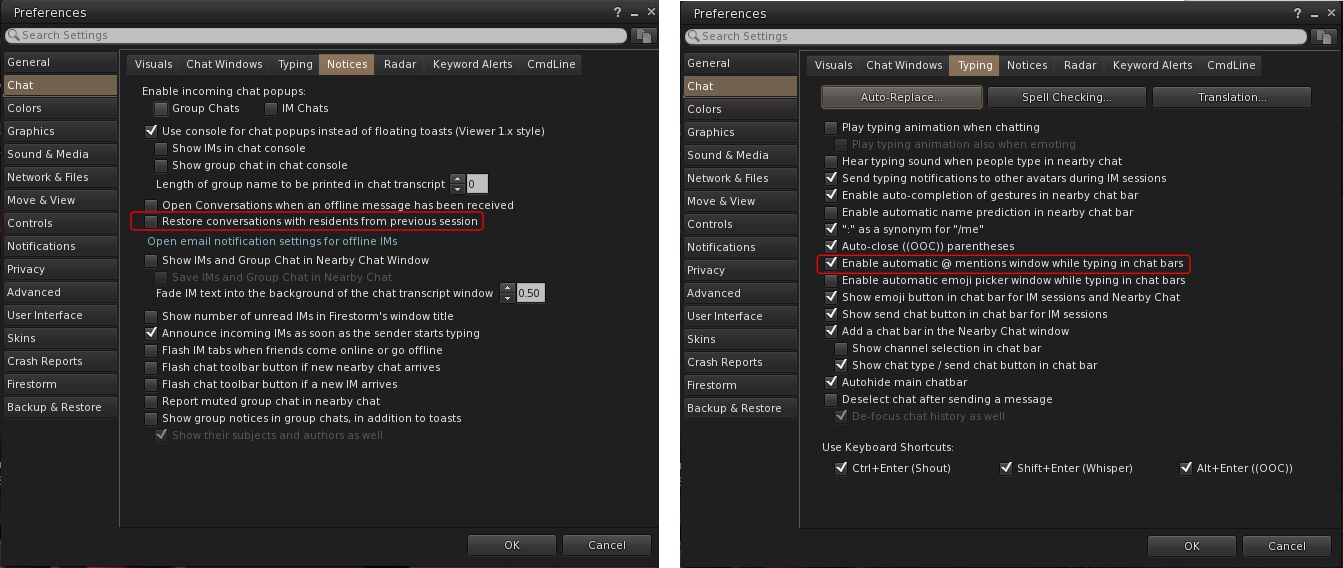
New Chat Preferences to restore resident-to-resident IMs (left) and to enable / disable auto-completion when typing @ mentions (right)
  • Separate conversations opacity options, together with new checkbox to allow the conversation floater to abide by the active opacity when it is focused, so that way it can have its own inactive transparency separate to everything else – FIRE-35804.
    • Preferences → Colours → Miscellaneous → Floating Window Opacity → Conversations.
    • Preferences → Colours → Miscellaneous → Floating Window Opacity → Use Active Opacity value when the conversations window is focused.
  • Sound Explorer:  new buttons in Sound Explorer to mute all attached, rezzed or gesture sounds for a specific avatar
    •  Muted sounds are re-enabled via the Asset Blacklist.
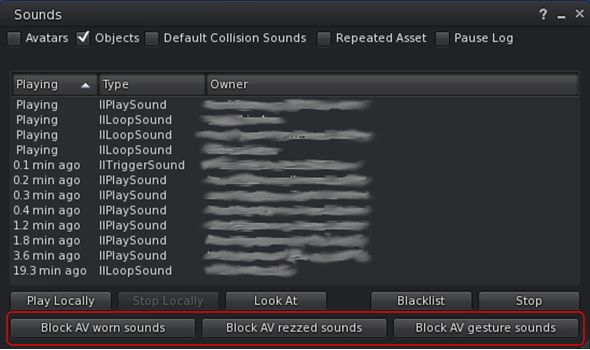
New Sound Explorer checkbox for muting specific sounds from an avatar
  • Asset Blacklist: new Flags column to the Asset Blacklist to denote if the muted sound is one of  Avatar Worn Object Sounds, Avatar Rezzed Objects Sounds or Avatar Gesture Sounds.
  • Media on a prim (MOAP) interaction option can now be set individually (when set, does not require a first click to focus before interaction can begin): Preferences → Sound & Media → Media → Media first-interact.
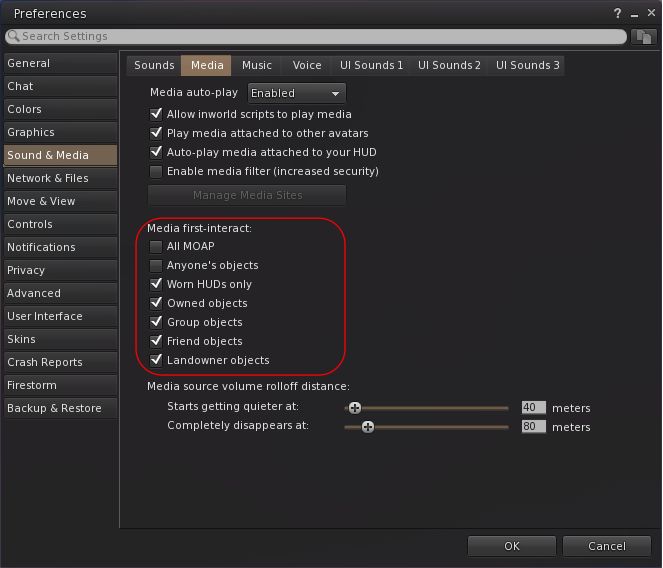
Firestorm 7.2.2 MOAP first interaction options
Miscellaneous Updates
  • Show On-Screen Console shortcut revised to ALT+SHIFT+`.
  • Area Search improvements:
    • Added functionality to save Area Search flags and options as defaults when the floater is opened: 
      Top Menu → World → Area Search → Filter Tab → Save as Default.
    • Improvements to more reliably send all objects and not just objects in front of the camera.
  • Camera:
    • Added an option to disable the reset buttons in the camera floaters (prevents the centre bullseye of the orbit and move camera controls from resetting the camera): Preferences → User Interface → Interface Windows → Disable camera controls reset buttons
    • Added a TPP preset button to the added to the right of the front, side & rear buttons on both the small and regular camera floaters – FIRE-32595.
  • Added Default buttons for Preference → Move & View → View sliders for ease of resetting to default values – FIRE-32710.
  • Height of Preferences floater increased for improved readability.
  • Graphics: Draw Distance VRAM Optimization changed to be optional:
    • Preferences → Graphics → Rendering → Reduce Draw Distance when VRAM is full or
    • Top Menu → Developer → Rendering → Reduce Draw Distance when VRAM is full.

Feedback

Sorry, no real feedback from me on 7.2.2, my personal situation has been such that I only managed to try the 79438 beta and the 78439 release less then 24 hours before the release of 79439.
Firestorm 7.1.11: DeltaFPS: performance updates and tweaks

On Tuesday, October 22nd (SLT), Firestorm released version 7.1.11.76496 of their viewer. The primary aim of this release is to achieve parity with the Lab’s DeltaFPS viewer release, and bring the performance enhancements and fixes from that viewer to Firestorm.

Note that the following is not a complete review of the 7.1.11 release and all the changes made therein; it focuses on the more visible and user-facing updates.

Those requiring a list of all changes and updates to Firestorm 7.1.11, including all bug fixes and changes since the last release, should refer to the Firestorm 7.1.11 release changelog, which also provides all proper credits for the work.

Table of Contents


General Notes

Installation

  • Only download Firestorm from the Firestorm website. Do not utilise and other third-party site purporting to offer the Firestorm viewer, and remember Firestorm will never ask for log-in credentials in order to download a release version of their viewer.
  • There is no need to perform a clean install with this release if you do not wish to.
  • Do, however, make sure you back-up all your settings safely so you can restore them after installing 7.1.11.

On Version Blocking

The Firestorm Team provide the following on viewer blocking and updating:

  • As per the 7.1.10 release documentation, Firestorm 6.6.17 will not be blocked, but will remain available for those who need it. However, it will not be maintained in terms of updates and bug fixes.
  • Firestorm 6.6.14 will also remain unblocked for the time being. However users running version 6.6.14 are strongly advised to update to version 6.6.17 on the ground of greater stability.
  • Users on the initial Firestorm PBR release, 7.1.9, are strongly encouraged to update to this release – 7.1.11 -in order to benefit from both greater stability and improved performance. Version 7.1.9 may well be blocked in the future, due to the high number of crash reports.

Linden Lab Updates: DeltaFPS

  • Viewer version number 7.1.10.10800445603 (release notes).
  • Date of promotion to release status: 17th September, 2024.

This is the first of two viewer releases from the Lab specifically targeting performance improvements (both PBR and non-PBR related), and which offers some additional quality of life improvements for users and a range of bug fixes. The following is a summary of some of the more notable updates within the DeltaFPS release:

Schedule Region Restarts

  • Region holders / Estate Managers with access to to the Region /Estate floater can now schedule their region restarts to run at a given time.
  • Top menu → World → Region Details → Region → Manage Restart Schedule button.

Disable 2K Textures for Bulk Uploads

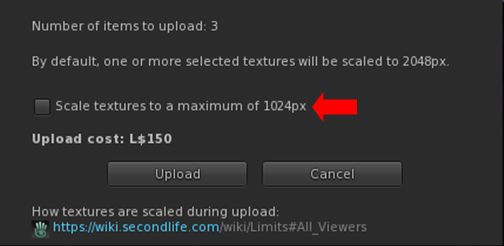
  • Even with the pop-up warning when including 2K textures during a Bulk texture upload, some people are still getting caught out. To further help prevent this, it is now possible to limit all Bulk textures to a maximum of 1024×1024 (thus limiting costs to L$10 per texture uploaded).
  • Top menu → Build → Upload → Bulk  → check Scale Textures to a Maximum of 1024px in the upload floater.
The option to limit the image size in Bulk texture uploads (and reduce costs to a level L$10 per texture)

Disable LookAt Animations

  • Tired of your avatar constantly tracking you mouse pointer movement, and looking like an idiot, constantly look up and down? You can move disable the animation.
  • Top menu → Developer → >Avatar → Character → Tests Disable Look At Animation.
  • Note this does not disable LookAt data being broadcast by the viewer (the cross-hairs / name tag), it only disables any avatar body / head movements associated with LookAt.

Notable Bug Fixes

    • Issue 1870: Improved performance on lower-end systems: lower-specification systems should see improved viewer performance; particularly those with the following:
      • Intel HD 4000, 4400, & Iris Xe video cards.
      • Nvidia GT 1030.
      • Laptops with an AMD video card.
      • Macs with the M1, M2, or M3 Silicon SoC chips.
    • Issue 2225: Fixed opening the Joystick Configuration floater causing a hug FPS drop.
    • PBR-related fixes:
      • Issue 853: Fixed – PBR Material resets to legacy material after teleport
      • Issue 1299: Fixed – PBR texture stretches when “stretch textures” is unchecked.
      • Issue 1847: Fixed – Negative UV scale causes wrong lighting on PBR materials.
      • Issue 1922: Fixed – Make PBR scale and offset crosshair work the same as Texture crosshair.
      • Issue 1857: Fixed – Reset texture transforms for a terrain PBR material when the material is applied.
      • Issue 2027: Fixed – Being unable to apply PBR materials on larger linksets.

General Quality of Life Improvements:

  • Issue 1209: Fixed – Newly-created sculpted prims not rendering until relog.
  • Issue 1253: Fixed – Viewer tries to detach attachments in inventory on shutdown.
  • Issue 1500: New – Better out of disk space handling: The viewer should no longer crash when disk space is low; instead the user will receive the warning: The system is out of disk space. You will need to free up some space on your computer or clear the cache.
  • Issue 1965: Fixed – Selection beam swirls swirl forever when the user interface is hidden
  • Issue: 1905: Fixed – The “Share” and “Pay” buttons are active when selecting multiple avatars in Nearby tab.
  • Issue 1988: Fixed – The ‘Set Empty’ option (Preferences → Controls does not remove previously applied keys for all control modes with the ‘Apply to all’ checkbox.
  • Issue 2144: New – Added tooltip to the region Object Return button to clarify who “someone else” means.
    • Top menu → World → Region Details → Debug → Object Return → Options → On someone else’s land.
    • Tooltip has been changed from “Return only objects which are on land belonging to someone else” to “Return only objects which are on land that isn’t owned by selected user”.
  • Issue: 2395: Fixed – Favourite and Featured locations sending user to (0,0).
  • Issue 2467: Fixed – Sim surrounds do not fully load.
  • Issue 2482: Fixed – Second Life reports incorrect amount of available video memory on some discrete GPUs on Windows.

Notable Viewer Build Updates

  • Updated llphysicsextensions to version 1.0.66e6919
  • Updated Tracy profiler to version 0.10
  • Updated Meshoptimizer package to version 0.21
  • Updated llca to version 202407221423.0
  • Updated Boost to version 1.85
  • Updated Ogg Vorbis to version 1.3.5-1.3.7
  • Updated VLC to version 3.0.21
  • Updated libhunspell to version 1.7.2-r1
  • Updated from jpeglib to libjpeg-turbo 3.0.3

WebRTC – Reminder

Note: as WebRTC is (subject to last-minute stoppers) now due to be deployed across the gird in the very near future, the following is repeated from my 7.1.10 release overview, for the benefit of those who use Voice and who may not have upgraded to Firestorm 7.1.10 / read that overview.

WebRTC communications protocol (RTC=”real-time communication”) is the new Voice communications protocol for Second Life, replacing Vivox Voice.

Why Make The Change?

Voice in Second Life has been supplied through an arrangement with Vivox. This has required Linden Lab to utilise a viewer plug-in tool – SLvoice.exe – to manage voice services within the viewer., which in turn has made LL both reliant on Vivox for bug fixes for the plug-in, and subject to changes in support for operating systems imposed by Vivox such as the latter ending native support for Linux some years ago).

WebRTC by contrast is the predominant telephony protocol used by web-based applications, such as Google Meet, and is integrated into most common browsers. It has almost all the features common to Vivox in supplying a voice service – spatial in-world voice; peer-to-peer sessions; Group voice (including moderation) and multi-user Voice conferencing – although the are some limitations (see below).

Benefits and Improvements

WebRTC Offers a range of benefits over Vivox, including, but not limited to:

  • 48khz audio bandwidth providing cleaner sound.
  • User control over:
    • Audio noise reduction – high reduction for noisy environments, no reduction for clean audio sources (performers, etc.)
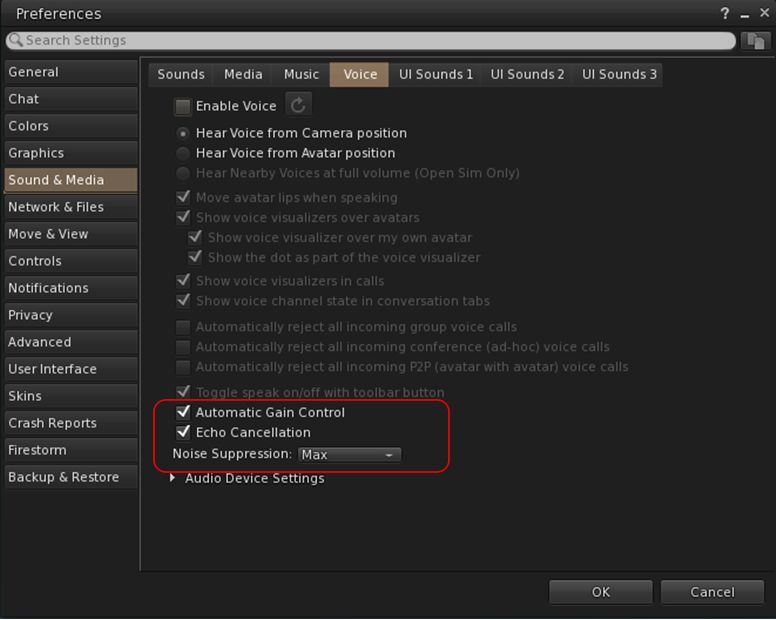
    • Automatic gain control – less need to individually tune other user’s audio levels.
  • Audio/video device selection.
  • Improved: spatialization,  audio echo cancellation and audio sampling rates for improved audio quality.
Options for managing WebRTC Voice quality can be found under Preferences → Sound & Media → Voice

Most significantly, WebRTC removes all reliance on a third-party plug-in for the viewer. Instead, it is supplied as a  a library and wrapper within the viewer. This means:

  • Linden Lab has greater ability to address Voice related issues directly, without having to await fixes from a supplier.
  •  Potentially opening the door to adding features and capabilities to SL Voice in the future, including some which have been long-requested.

Limitations

  • WebRTC does not support the existing Voice Morphing capability in Second Life.
    • This is because voice morphs are tied to the Vivox service, and cannot be utilised with WebRTC.
    • Those who do use the current Voice Morphing capability are directed to this SL Wiki article on Voice Morphing, which provides a list of solutions which can be used with WebRTC.
  • Conferences and group voice calls are limited to 50 participants.

Security

The Second Life implementation of WebRTC addresses security issues such as potential eavesdropping, exposing users’ IP addresses, etc., by routing communication through proxy servers managed directly by LL .

Additional Information

Firestorm Updates

Performance: AVX2 Update

AVX2 (also known as Haswell New Instructions) is the more recent of the Advanced Vector Extensions for  Intel and AMD, which should offer improved performance for more modern systems. To quote the official blog post on the AVX2 work:

Installer choices – supporting modern CPUs (AVX2): One of our aims is to help those on lower-end machines, and one change that our early-access users have loved has been enabling a feature of modern computer (called AVX2) which can unleash extra performance even on smaller machines. It works on CPUs built in the last decade, but don’t worry if you are not sure, the Firestorm installer will warn you if your computer is too old for this, and will redirect you to a more traditional version (Linux user can check here).  Some have found it makes a massive difference.

Pie Menu: Object Take Options

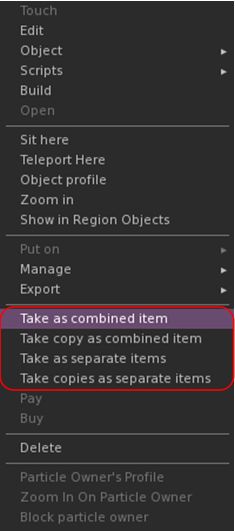
  • Linden Lab recently added further options for picking-up multiple objects collectively selected in-world and returning them to inventory as one of the following:
    • Take As Combined Item: return all the selected objects to inventory as a single, coalesced object (old behaviour).
    • Take Copy As Combined Item: return copies all the selected objects to inventory as a single, coalesced object, leaving the originals in-world as individual objects (old behaviour).
    • Take As Separate Items: return all the selected objects to inventory, but list them as individual items, not as coalesced (new behaviour).
    • Take Copies As Separate Items: return copies all the selected objects to inventory, but list them as individual items, not as coalesced, leaving the originals in-world (new behaviour.
  • These options were added to the right-click Context menu in Firestorm 7.1.10 (see: Object Take from my Firestorm 7.1.10 overview).
  • Firestorm 7.1.11 now extends this options into the pie menu as well – not that they will only be displayed within the pie menu when selecting multiple objects to return to Inventory at the same time.

Camera Roll and Key Bindings

Camera Roll Added to the Phototools Camera Floater
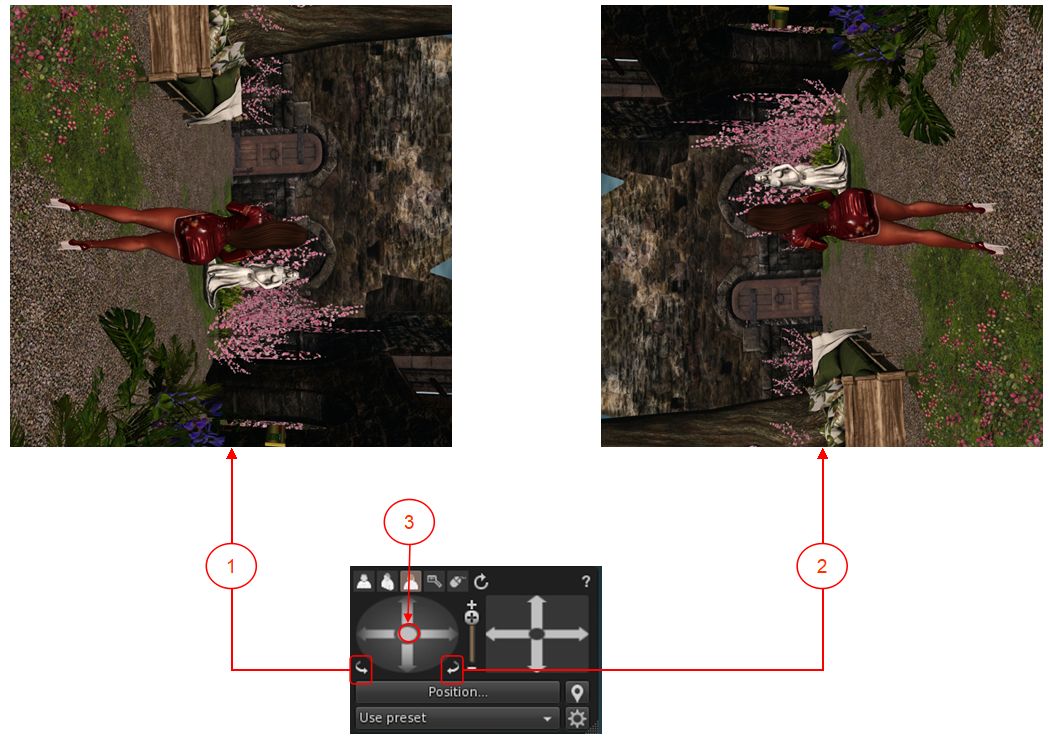
  • Camera Roll was added to Firestorm 7.1.0, in the form of two buttons on the Camera floater which allow the camera to be rolled clockwise or counter-clockwise for more dramatic photos see here for more).
  • These buttons have now been added to the Phototools Camera Floater.
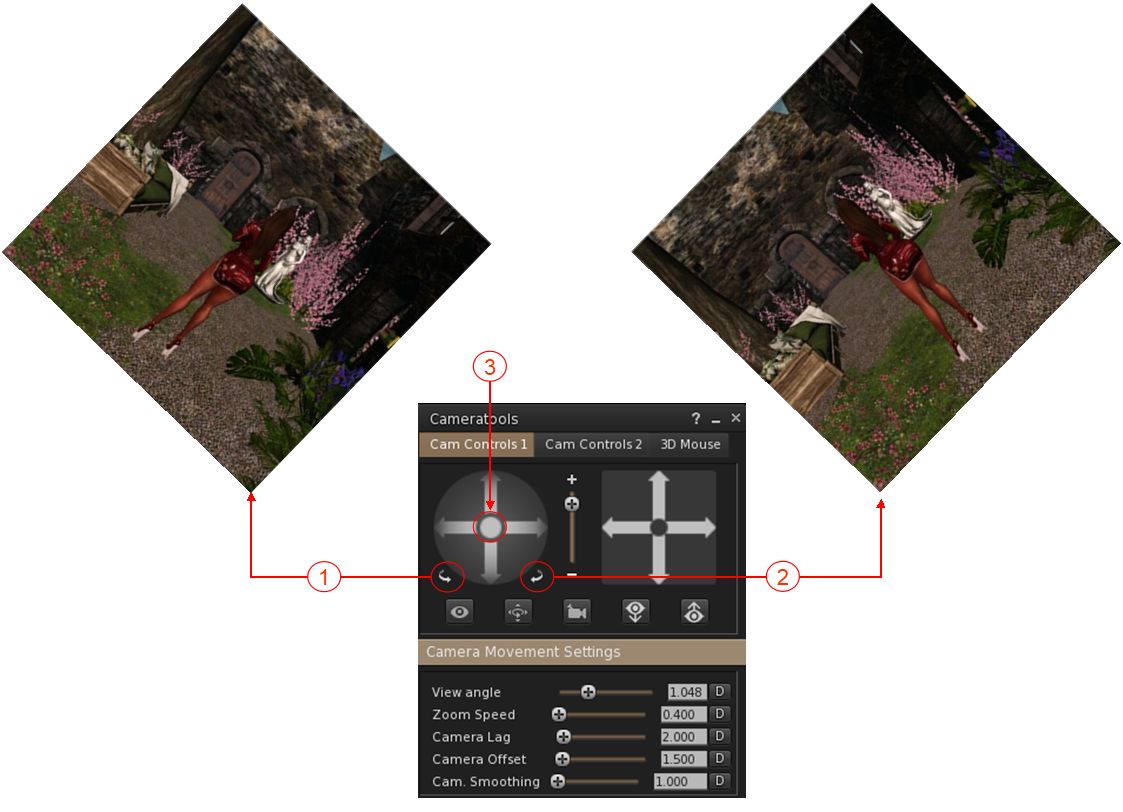
The Camera Roll buttons have now been added to the Phototools Camera floater: 1. The left button will roll the camera view clockwise on your screen through up to 360º; 2. The right button will roll the camera view counter-clockwise on your screen through up to 360º; 3. Clicking the button at the centre of the rotation controls will reset the view to “normal”.
Camera Roll Key Bindings
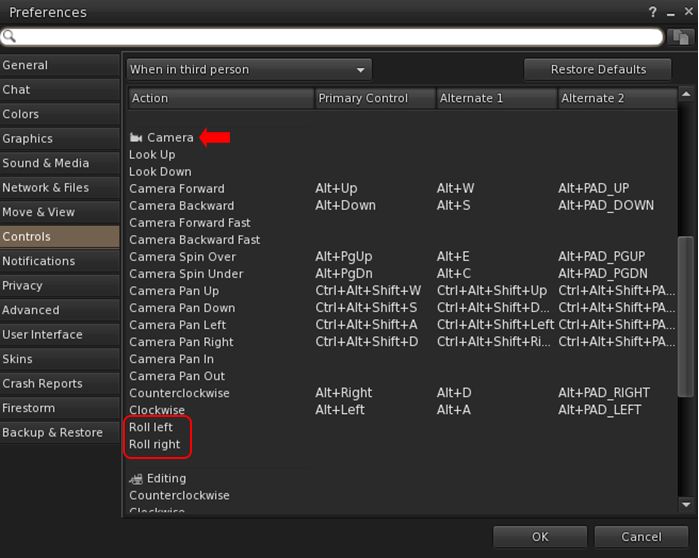
  • In addition, Firestorm 7.1.11 adds the ability to create key bindings for the camera roll buttons: Preferences → Controls → When in third person or when sitting → Camera section → Roll left / Roll right.
The new Camera Roll Key bindings options allow you to assign key combinations to enable the camera roll capabilities (left / right)

Assorted Quality of Life Updates

  • Addition of a “eye” button on the login splash screens.
    • When clicked, will display the alphanumeric values for a password as it is typed in, rather than black dots.
    • If the password has previously been saved (and so entered automatically on account name selection), clicking the button will display a placeholder, not the password.
    • See: FIRE-34629.
  • Pie menu autohide function has been extended to also work with sub menus and not only slices.
  • Whitelist adviser text corrected, as per FIRE-34524.
  • Snapshot floater updated so that the Current Window option no longer gives any pixel sizing (“512×512”), to reflect the fact that images up to 2K can be captured using this option, potentially incurring additional costs. See FIRE-34562.
  • Preferences → Graphics: in order to reduce potential confusion, the setting GPU Dedicated VRAM (GB): (Preferences → Graphics → Hardware Settings) has been renamed to Override GPU Dedicated VRAM (GB):.

OpenSim Updates

  • Removed the hardcoded classified fee for OpenSim (see FIRE-34618).
  • Fix for a crash when querying glTF materials (see FIRE-34589).
  • Fix for an OpenSim crash in surface patch gen Tangents for empty patch (see FIRE-34672).
  • General fix for OpenSim viewer build.

Feedback

In the limited time I’ve had to use 7.1.11.76496, I’ve found that it (and earlier versions of the Beta release) provide a decent improvement in performances and better stability. I did find with both 7.1.10 and earlier 7.1.11 Beta versions I experienced multiple crashes during / when attempting teleports. This has not been the case with 7.1.11.76496, although I have been running it less than 24 hours at this point. As with the PBR release, I have no feedback to offer with this release, as I’ve not had time time to bounce around with it to any great degree.

Kokua 7.1.10: going Delta(FPS)

On September 27th and 29th, Kokua updated their viewer with the release of version 7.1.10.

As is common with Kokua, the viewer is provided in three variants utilising the same code:

  • No RLV, version 7.1.10.56206
  • RLV and “Full time” RLV, version 7.1.10.59780.

The key aspects of this release are parity with Linden Lab’s DeltaFPS viewer code base, and changes made to the Linux system requirements. The following is an overview of some of the key changes between this release and the previous Kokua 7.1.8 release.

Table of Contents

Also note that Kokua did not provide a release to match the Lab’s 7.1.9 Altasaurus viewer. However, updates from that viewer are a part of DeltaFPS; as such, the release notes for the Altasaurus viewer are referenced below for those interested.

Installation

  • Only download Kokua via the Kokua website. Do not utilise and other third-party site purporting to offer the Kokua viewer.
  • There is no need to perform a clean install with this release if you do not wish to.
  • Do, however, make sure you back-up all your settings safely so you can restore them after installing 7.1.10.

Linden Lab Updates

DeltaFPS

  • Viewer version number 7.1.10.10800445603, dated September 17th  – release notes in full.
  • Core updates: performance improvements, building on the improvements in viewer 7.1.9; viewer-side WebRTC support.

Altasaurus

  • Viewer version number 7.1.9.10515727195 – release notes in full.
  • Date of promotion to release status: 26th August, 2024.

The release notes for both of the above should be referred to for complete information on updates and resolved issues, only some of which are summarised below.

WebRTC

WebRTC communications protocol (RTC=”real-time communication”) is the new Voice communications protocol for Second Life, replacing Vivox Voice.

Why Make The Change?

Voice in Second Life has been supplied through an arrangement with Vivox. This has required Linden Lab to utilise a viewer plug-in tool – SLvoice.exe – to manage voice services within the viewer., which in turn has made LL both reliant on Vivox for bug fixes for the plug-in, and subject to changes in support for operating systems imposed by Vivox such as the latter ending native support for Linux some years ago).

WebRTC by contrast is the predominant telephony protocol used by web-based applications, such as Google Meet, and is integrated into most common browsers. It has almost all the features common to Vivox in supplying a voice service – spatial in-world voice; peer-to-peer sessions; Group voice (including moderation) and multi-user Voice conferencing – although the are some limitations (see below).

Benefits and Improvements

WebRTC Offers a range of benefits over Vivox, including, but not limited to:

  • 48khz audio bandwidth providing cleaner sound.
  • User control over:
    • Audio noise reduction – high reduction for noisy environments, no reduction for clean audio sources (performers, etc.)
    • Automatic gain control – less need to individually tune other user’s audio levels.
  • Audio/video device selection.
  • Improved: spatialization,  audio echo cancellation and audio sampling rates for improved audio quality.
The WebRTC options added to Kokua’s Voice preferences

Most significantly, WebRTC removes all reliance on a third-party plug-in for the viewer. Instead, it is supplied as a library and wrapper within the viewer. This means:

  • Linden Lab has greater ability to address Voice related issues directly, without having to await fixes from a supplier.
  •  WebRTC potentially opens the door to adding features and capabilities to SL Voice in the future, including some which have been long-requested.
Limitations
  • WebRTC does not support the existing Voice Morphing capability in Second Life.
    • This is because voice morphs are tied to the Vivox service, and cannot be utilised with WebRTC.
    • Those who do use the current Voice Morphing capability are directed to this SL Wiki article on Voice Morphing, which provides a list of solutions which can be used with WebRTC.
    • Note that the Voice Morphing options remain available in Kokua 7.1.10 because at the time of release, Vivox Vorph Morphing remains available on Vivox-enabled regions.
  • Conferences and group voice calls are limited to 50 participants.
Security

The Second Life implementation of WebRTC addresses security issues such as potential eavesdropping, exposing users’ IP addresses, etc., by routing communication through proxy servers managed directly by LL .

Deployment Notes

At the time of writing, simulator support for WebRTC is limited; deployment is due to become more widespread from October 16th, 2024, and hopefully be grid-wide by the end of October 2024. During this transitional period, peer-to-peer, conference calls and group chat sessions might be subject to various disruptions (e.g. they will not work between those on simulators running Vivox and simulators running WebRTC).

Usability Updates

Object Take
The update multi-object take options

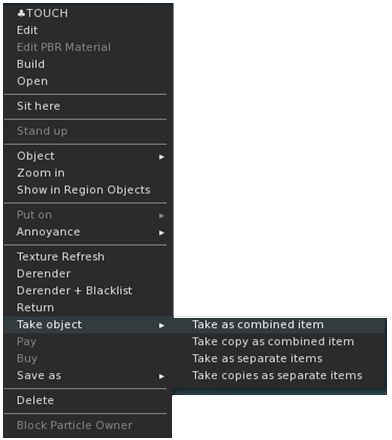
Kokua 7.1.10 includes the Lab’s updates to picking-up objects in-world using the right-click context menu:

  • When selecting an individual item, the right-click context menu will display the expected Take and Take Copy options.
  • When selecting multiple items, the right-click context menu will display the following new options:
    • Take As Combined Item: return all the selected objects to inventory as a single, coalesced object.
    • Take Copy As Combined Item: return copies all the selected objects to inventory as a single, coalesced object, leaving the originals in-world as individual objects.
    • Take As Separate Items: return all the selected objects to inventory, but list them as individual items, not as coalesced.
    • Take Copies As Separate Items: return copies all the selected objects to inventory, but list them as individual items, not as coalesced, leaving the originals in-world.

Note that all of the above Take options will be available in accordance the SL’s permissions system (as with Take / Take Copy).

Avatar Rendering Updates

Linden Lab added new options to enable the prioritisation of rendering avatars using the following criteria:
  • Limit by complexity – any avatar with a complexity greater then your Avatar Maximum Complexity” setting will be rendered as a Jellydoll.
  • Always show friends – your friends will never be rendered as Jellydolls, no matter what their complexity
  • Only show friends – all avatars except your friends will be rendered as Jellydolls.

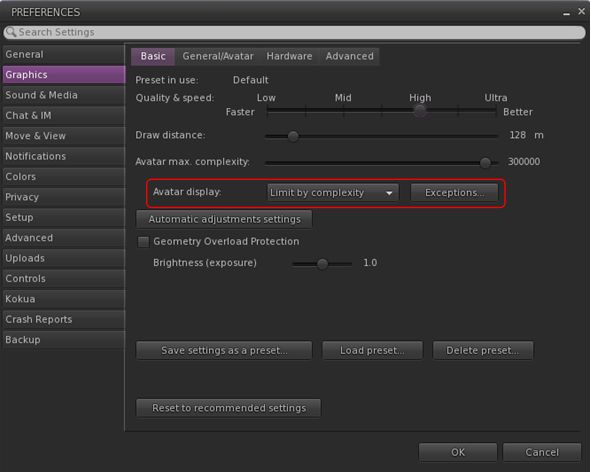
Within Kokua, this options are found under Preferences → Graphics, with the Exceptions drop-down also repositioned in the panel.

New Complexity options from LL within Kokua’s Preferences → Graphics → Basic, including a move of the Exceptions drop-down (also see below)

General Updates / Improvements

  • Add Images to Inventory Items in Bulk: select up to 50 inventory items → Right click selection → Image.
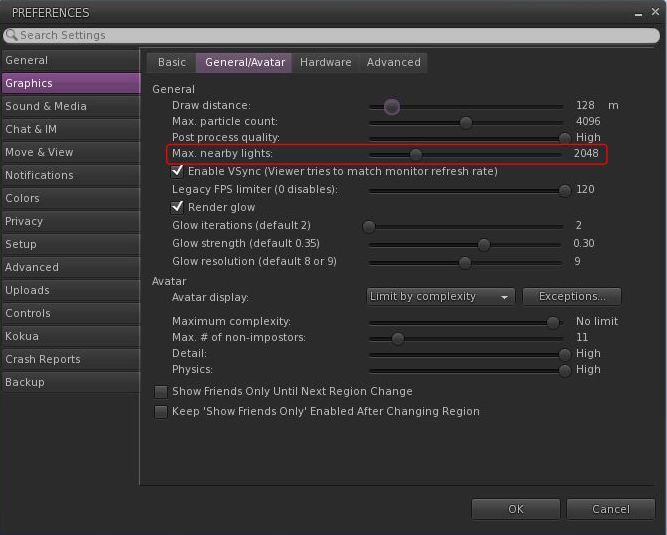
  • Option to control the amount of lights: Preferences → Graphics → General/Avatar → Max Nearby Lights slider.
Control nearby lighting through the nearby lighting slider
  • glTF model preview: use a prim to preview the appearance of a glTF scene / model:
    • Edit the prim. then Top menu bar → Develop → GLTF → Open.
    • To enable the Develop menu, either go to Advanced → Show Develop Menu or press Ctrl-Alt-Q or go to Preferences → Advanced → check  Show Developer Menu
  • Note that this feature is still in the early stages of development and that glTF models will only appear locally in your own viewer, they will not be rendered for others to see in their viewers.
  • Better MOAP URL handling in order for users to not only be able to CTRL-C or Cmd-C copy but also to see decoded URL payloads for easy inspection. In the nearby media list, you can also right click a media/data link and Copy URL/Copy Data.
  • Mirrors disabled by default for all graphics quality levels to improve performance.
    • You can choose to enable mirrors manually in Preferences → Graphics → Advanced→ Mirrors.

Selected Kokua Updates

Preferences

  • With the introduction of the new avatar complexity settings by the Lab:
    • Kokua’s options Show Friend Only Until Region Change and Keep ‘Show Friend Only Enabled Avatar Changing Region have been relocated:
      •  From: Preferences → Graphics → Basic
      • To: Preferences → Graphics → General/Avatar.
    • Kokua’s Always Render Friends checkbox is removed from Preferences → Graphics → Basic.

Improve Graphics Speed

  • The Improve Graphics Speed →  Auto-Adjust Settings panel is now correctly sized to fit the displayed information (no overflow).
  • The Enable VSync options have been inverted so the explanation and note are at the top (Improve Graphics Speed →  Auto-Adjust Settings → Enable VSync.

Linux Updates

  • Kokua 7.1.10 requires a newer Linux system than previous releases; GLIBC 2.35 is required, meaning Ubuntu 22 or better and Debian 12 or better.
  • This version of Kokua may run on older Linux variants (e.g. Ubuntu 20), however CEF will not run, so web pages within the viewer will not be available.
  • There are some known bugs in the Linux version which we considered minor enough to proceed with the release.
    • 360 snapshot doesn’t work
    • Need wine installed for Vivox voice
    • GLIBC 2.30 systems could still run the viewer, but with a broken internal browser.

This Linux version of Kokua runs much more smoothly due to LL fixing a number of the causes of frame stall which were most noticeable on Linux.

Kokua Team Request

Kokua is provided through time and efforts of a two-person project team. Understandably, the majority of work two people can perform on the viewer is largely focused on tracking and integrating with official viewer releases from Linden Lab. This means that there is limited time for bug fixing and for implementing additional features and requests. The team also has a limited capacity for maintaining the Linux flavour of the viewer.

Because of this, the Kokua team is seeking additional help. In particular they would like to hear from:

  • People interested in working on bug fixes and enhancements for Kokua, thus reducing the said backlog.
  • A Linux specialist to help with maintaining the Linux version of Kokua.

Those interested in volunteering their time should drop an e-mail to chorazinallen AT gmail.com. When doing so, please note that:

  • Experience with C++ is essential.
  • Familiarity with working with the viewer is a bonus.

Related Links

Firestorm 7.1.10: WebRTC and performance tweaks

On Tuesday, September 17th (SLT), Firestorm released version 7.1.10.75913 of their viewer.

This release is primarily focused on a merge with the Linden Lab Atlasaurus release code base, which combines initial performance bug fixes to help correct some of the issues seen with recent viewer releases with the WebRTC code in preparation for the switch away from using Vivox Voice with Second Life.

In addition to the above, there are some cherry-picked updates from the Lab’s upstream code (DeltaFPS), and also updates from the Firestorm Team.

Note that the following is not a complete review of the 7.1.10 release and all the changes made therein; it focuses on the more visible and user-facing updates. Those requiring a list of all changes and updates to Firestorm 7.1.10 should refer to the Firestorm 7.1.10 release changelog, which also provides all proper credits for the work.

Table of Contents

Note: as this review was going to post, Linden Lab promoted the DeltaFPS viewer to de facto release.

General Notes

Installation

  • Only download Firestorm from the Firestorm website. Do not utilise and other third-party site purporting to offer the Firestorm viewer, and remember Firestorm will never ask for log-in credentials in order to download a release version of their viewer.
  • There is no need to perform a clean install with this release if you do not wish to.
  • Do, however, make sure you back-up all your settings safely so you can restore them after installing 7.1.10.

Linden Lab Updates

Atlasaurus/WebRTC Viewer

  • Viewer version number 7.1.9.10515727195 – release notes in full.
  • Date of promotion to release status: 26th August, 2024.

WebRTC

WebRTC communications protocol (RTC=”real-time communication”) is the new Voice communications protocol for Second Life, replacing Vivox Voice.

Why Make The Change?

Voice in Second Life has been supplied through an arrangement with Vivox. This has required Linden Lab to utilise a viewer plug-in tool – SLvoice.exe – to manage voice services within the viewer., which in turn has made LL both reliant on Vivox for bug fixes for the plug-in, and subject to changes in support for operating systems imposed by Vivox such as the latter ending native support for Linux some years ago).

WebRTC by contrast is the predominant telephony protocol used by web-based applications, such as Google Meet, and is integrated into most common browsers. It has almost all the features common to Vivox in supplying a voice service – spatial in-world voice; peer-to-peer sessions; Group voice (including moderation) and multi-user Voice conferencing – although the are some limitations (see below).

Benefits and Improvements

WebRTC Offers a range of benefits over Vivox, including, but not limited to:

  • 48khz audio bandwidth providing cleaner sound.
  • User control over:
    • Audio noise reduction – high reduction for noisy environments, no reduction for clean audio sources (performers, etc.)
    • Automatic gain control – less need to individually tune other user’s audio levels.
  • Audio/video device selection.
  • Improved: spatialization,  audio echo cancellation and audio sampling rates for improved audio quality.
Options for managing WebRTC Voice quality can be found under Preferences → Sound & Media → Voice

Most significantly, WebRTC removes all reliance on a third-party plug-in for the viewer. Instead, it is supplied as a  a library and wrapper within the viewer. This means:

  • Linden Lab has greater ability to address Voice related issues directly, without having to await fixes from a supplier.
  •  Potentially opens the door to adding features and capabilities to SL Voice in the future, including some which have been long-requested.
Limitations
  • WebRTC does not support the existing Voice Morphing capability in Second Life.
    • This is because voice morphs are tied to the Vivox service, and cannot be utilised with WebRTC.
    • Those who do use the current Voice Morphing capability are directed to this SL Wiki article on Voice Morphing, which provides a list of solutions which can be used with WebRTC.
  • Conferences and group voice calls are limited to 50 participants.
Security

The Second Life implementation of WebRTC addresses security issues such as potential eavesdropping, exposing users’ IP addresses, etc., by routing communication through proxy servers managed directly by LL .

Project Status
  • At the time of writing this update, back end support is available on the WebRTC “Pop Rocks” simulator channel: WebRTC Voice 1WebRTC Voice 2WebRTC Voice 3 and WebRTC Voice 4.
  • Deployment to RC channel should  commence on Wednesday, October 2nd, when the code will be deployed to the BlueSteel RC channel.
  • During this deployment period both WebRTC Voice and Vivox Voice will be supported.
  •  LL will turn off the Vivox support on the simulators some time after WebRTC has been fully deployed and there is sufficient support for the service across all viewers.
Additional Information

Usability Enhancements

Object Take
LL’s new object Take options, as displayed through the Firestorm right-click context menu

When picking-up in-world objects you can now chose to:

  • Take As Combined Item: return all the selected objects to inventory as a single, coalesced object.
  • Take Copy As Combined Item: return copies all the selected objects to inventory as a single, coalesced object, leaving the originals in-world as individual objects.
  • Take As Separate Items: return all the selected objects to inventory, but list them as individual items, not as coalesced.
  • Take Copies As Separate Items: return copies all the selected objects to inventory, but list them as individual items, not as coalesced, leaving the originals in-world.

Note that for Firestorm 7.1.10, these options are ONLY available as a sub-menu set in the right-click context menu; they have not as yet been added to the Pie menu (see: FIRE-34438).

Avatar Rendering Updates

Linden Lab added new options to enable the prioritisation of rendering avatars using the following criteria:
  • Limit by complexity – any avatar with a complexity greater then your Avatar Maximum Complexity” setting will be rendered as a Jellydoll.
  • Always show friends – your friends will never be rendered as Jellydolls, no matter what their complexity
  • Only show friends – all avatars except your friends will be rendered as Jellydolls.

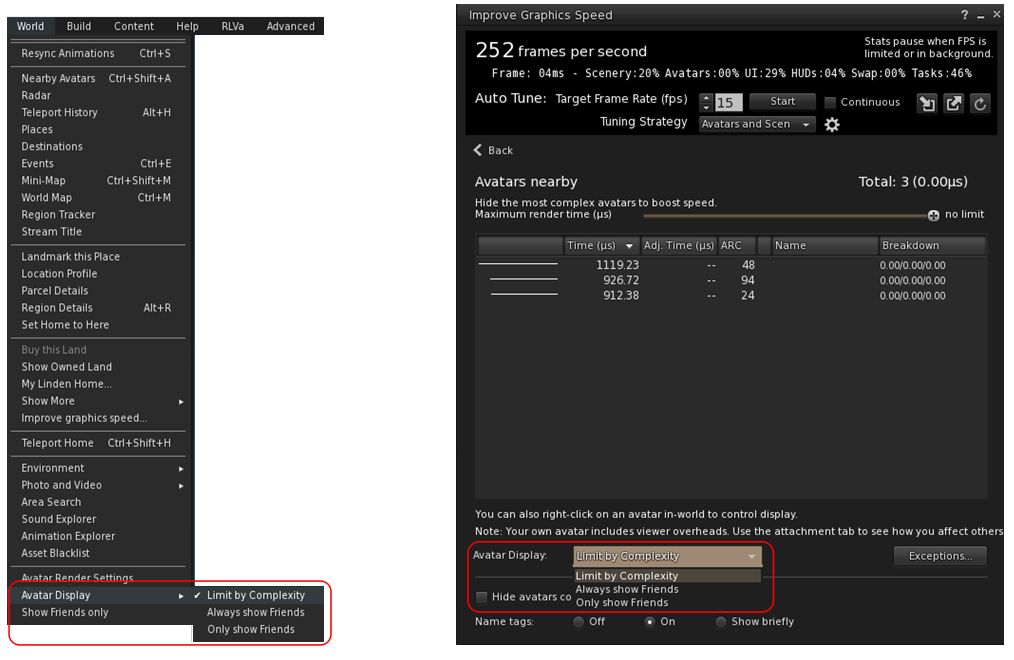
Within Firestorm, these options can be found as follows:

  • In  the  top menu → World → Avatar Display.
  • In the Performance Floater → Avatars Nearby.
Linden Lab’s avatar rendering options, as located within Firestorm 7.1.10
  • Notes:
    • In addition to these updates, Firestorm 7.1.10 retains the Firestorm option World → Show Friends Only. When enabled, the viewer will only renders your friends.
    • The now redundant Always Display Friends In Full Detail checkbox has been removed from the Performance Floater → Avatars Nearby.

Avatar-Related Improvements

  • Avatar height now correctly displays  in edit appearance window (see: FIRE-34192).
  • Worn clothing layers now all correctly report as such in inventory (see: FIRE-34343).
  • Fix for integer underflow causing issues with wearables.
  • Fix for avatar attachments & surroundings not rezzing after teleport when teleport screens are disabled (see: FIRE-33981).
  • Setting for AvatarRotateThresholdSlow and AvatarRotateThresholdFast added back into Firestorm following their removal as part of a viewer code clean-up by LL (see: FIRE-34196 and LL Bug #1963).

General Updates / Improvements

  • Add Images to Inventory Items in Bulk: select up to 50 inventory items → Right click selection → Image.
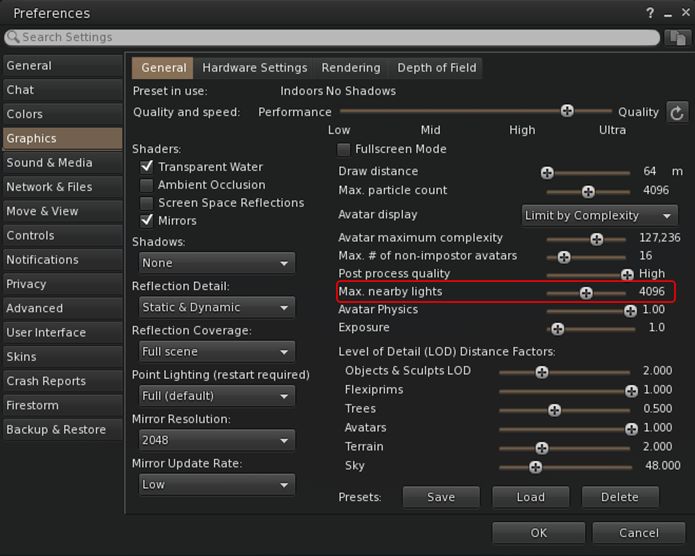
  • Option to control the amount of lights: Preferences → Graphics → General → Max Nearby Lights slider.
Control nearby lighting through the nearby lighting slider
  • GLTF model preview: use a prim to preview the appearance of a glTF scene / model:
    • Edit the prim. then Top menu bar → Developer → GLTF → Open.
      • To enable the Developer menu, either go to Advanced → Show Developer Menu or press Ctrl-Alt-Q or go to Preferences → Advanced → check  Show Developer Menu
    • Note that this feature is still in the early stages of development and that glTF models will only appear locally in your own viewer, they will not be rendered for others to see in their viewers.
  • Better MOAP URL handling in order for users to not only be able to CTRL-C or Cmd-C copy but also to see decoded URL payloads for easy inspection. In the nearby media list, you can also right click a media/data link and Copy URL/Copy Data.

Performance Improvements Summary

  • Mirrors disabled by default for all graphics quality levels to improve performance.
    • You can choose to enable mirrors manually in Preferences → Graphics → General → Mirrors.
  • Improved general performance with PBR – Issue 1769.
  • Fixed performance regression since Graphics Featurettes viewer – Issue 1831.
  • Fixed viewer failing to detect more than 4Gb of video memory on Windows – Issue 1583.
  • Improved texture memory calculation – Issue 799.
  • Various performance improvements for Mac:
    • Improved PBR viewer performance on Apple Silicon – Issue 1527.
    • Fixed setting a map beacon causing extreme lag on Mac – Issue 999.
    • Fixed severe stall and stutter in PBR viewers on Mac when editing objects – Issue 1203.
  • For the full list of fixes and improvements from Atlasaurus, please refer to the Atlasaurus release notes, linked to above.

Upstream Fixes from LL

  • Added error handling for intel crashes from the GLTF Scene shader – this fixes the login crashes on systems with older Intel HD graphics (see Issue 1856).
  • Fixed visual corruption caused by divide by zero in lighting functions – this fixes black & white areas in certain locations (see Issue 1852).
  • Fixed the voice call button being greyed out when you logged in to a voice disabled parcel (see this Canny bug).

Significant Firestorm Updates

Camera Roll

Ever wanted to physically roll the camera with ease when taking pictures? With Firestorm 7.1.10 you can, using an update based on an Alchemy viewer feature.  Both the large and the small camera control floaters have new camera roll buttons (see image below):

The new camera roll buttons and the button for re-centring the view
  1. The left button will roll the camera view clockwise on your screen through 360º.
  2. The right button will roll the camera view counter-clockwise on your screen through 360º.
  3. Clicking the button at the centre of the rotation controls will revert the viewer to “normal”.

General Improvements

  • Check folder limit safeguard:
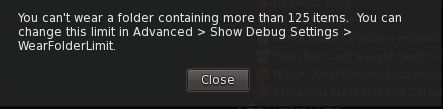
    • If you select the Wear Items option in the Inventory folder context menu, and the total number of items in the folder(s) exceeds the maximum limit for wearable items / attachments, a warning pop-up is displayed.
    • This prevents multiple items withing a folder (and sub-folders) being worn / removed / worn in excess of the limit when the Wear Items option is clicked.
A new safeguard warning is displayed when clicking on the Warn Items Inventory menu option for a folder containing items that exceed the maximum number of wearable items / attachments
  • Raised the 512×512 limitation for uploading snapshots to inventory to 2048×2048.
  • Multiple bug fixes for memory issues, RAM detection, texture management, UI bugs, stability and improvement fixes, crash fixes and more – please refer to the Firestorm 7.1.10 changelog for specifics.

OpenSim Updates

  • Fix for inventory fetching issues on OpenSim (see FIRE-34403).
  • Fix for occasional crashes on large inventories or slow grid asset servers (see  FIRE-34403).
    • Previously, an assertion failure would occur if mComplete.size() was zero. This has been downgraded to a warning message and early return, improving stability especially for large inventories or slow grid asset servers.
    • This entire code path is only accessed by OpenSim pending their implementation of AISV3, when it will be removed.

Feedback

As with the PBR release, I have no feedback to offer with this release, as I’ve not had time time to bounce around with it to any great degree.

Note that the performance improvements from the Lab’s Atlasaurus viewer constitute a first round of fixes; more will be coming with the upcoming DeltaFPS viewer (promoted to release status, Tuesday, September 17th) and the ExtraFPS viewer (still to be issued by LL at the time of writing).

Firestorm 7.1.9: PBR, emojis and mirrors, oh my!

On Thursday, June 20th (SLT), Firestorm released version 7.1.9.74746 of their viewer.

As indicated by the change in major version number (7), this is a significant release of Firestorm, one that brings it largely up to parity, in terms of core functionality, with the official Second Life Viewer SLV). Included in this release, as hinted at by the title of this article, are the following:

  • PBR support – including all updates and enhancements released by the Lab.
  • 2K Texture support.
  • PBR Terrain.
  • Mirrors.
  • Emojis support.
  • Assorted preferences, UI and menu updates.
Table of Contents

Update, July 6th 2024: as a result of some of the issues being experienced with the Firestorm PBR release, Runitai Linden is re-visiting memory use (e.g. VRAM use) and its impact on lower specification hardware, and the impact it can have on performance with a viewer to trying to remove some of the bottlenecks.

Note that the following is not a complete review of the 7.1.9 update, but focuses on the major updates, with additional notes as to why they have been made, and which may be helpful for those not familiar with the on-going updates being made the Second Life (glTF – see below). As far as I’m aware, there are no formal release notes accompanying 7.1.9.74746, just a brief timeline summary, so please excuse the lack of reference to same for additional information / credits.

General Notes

Installation

  • Only download Firestorm from the Firestorm website. Do not utilise and other third-party site purporting to offer the Firestorm viewer, and remember Firestorm will never ask for log-in credentials in order to download a release version of their viewer.
  • There is no need to perform a clean install with this release if you do not wish to.
  • Do, however, make sure you back-up all your settings safely so you can restore them after installing 7.1.9.

MacOS and Linux

  • Firestorm 7.1.9.74746 sees the viewer move to MacOS 12 with the deprecation of MacOS 11.
  • The Firestorm team has been working with the Lab and other TPVs to build up the Linden Linux repositories to enable a re-launch of official Linux support. Currently, the Firestorm team is in the process of migrating their Linux support to use the updated Linux build libraries maintained by LL.

Linden Lab Releases Reflected in Firestorm 7.1.9.74746

  • Graphics Featurette Viewer:
    • Viewer version 7.1.8.9375512768, June 2024.
    • Core features:
      •  2K texture uploads (with associated fees – see Possibly Useful Links, below right).
      • PBR materials terrain support.
      • Static and dynamic planar mirrors.
Remove locations from Teleport History
  • Maintenance Y/Z:
    • Viewer version 7.1.6.8745209917, April 2024.
    • Core features:
      • My Outfits folder improvements.
      • Ability to remove entries from landmark history.
  • Maintenance-W:
    • Viewer version 7.1.5.8443591509, March 2024.
    • Core features bug and crash fixes.
  • glTF PBR Materials Maintenance-2 Viewer:
    • Viewer version 7.1.4.8149792635, March 2024.
    • Core features: second round of improvements and bug fixes for the PBR viewer release.
  • Emoji Viewer:
  • glTF PBR Materials Maintenance-1 Viewer:
    • Viewer: version 7.1.2.7215179142, January 2024.
    • Core features: initial round of improvements and bug fixes for the PBR viewer release.
  • Maintenance V(ersatility) Viewer:
    • Viewer: version 7.1.1.7039128750, December 2023
    • Core feature: displaying user-customized keybindings in chat.
  • glTF / PBR Materials Viewer:
    • Viewer: version 7.0.1.6894459864, November 17 2023.
    • Core Feature: glTF PBR release (lighting, reflection probes, materials).

PBR: Physically Based Rendering

This is the most significant update with Firestorm 7.1.9, and represents some of the most clearly visible changes both in the viewer and how Second Life might appear. However, to provide some context on matters for those who may not be aware of all that is going on (and trying to keep things as concise as possible), some background notes.

The Story So Far (aka Skip This if You’ve Heard it Before)

  • Linden Lab has engaged on a project to extensively overhaul Second Life and bring in to parity with modern standards, specifically moving to compliance with the Khronos®  (graphics library Transmission Format) specification, regarded as the leading standard for sharing 3D and related assets (models, scenes, animations, etc.) across multiple tools and platforms.
  • The first phase of this project (November 2023) focused on a shift to support PBR (Physically Based Rendering). This introduced the likes of:
    • PBR materials, offered as an alternative to SL’s existing materials system (referred to as “Blinn-Phong” materials, rather than completely replacing them.
    • Reflection probes (for more realistic lighting / reflections in second life.
    • HDRI rendering for more realistic environmental rendering.
  • This was followed in January and March 2024 with two bug fix updates to PBR.
  • In June, LL released the Graphics Featurettes viewer, comprising:
    • Further bug fixes and improvements.
Possibly Useful Links
    • Support for the upload of 2048×20248 textures and materials without any down-sampling to 1024×1024 resolution.
    • Provision for using PBR textures on terrain.
    • The ability to create static and dynamic mirrors in Second Life.

But What Does it Mean?

Broadly speaking, the move to glTF compliance in Second Life should mean:

  • Deeper, richer environmental effects and lighting, with much improved reflections (including the ability to set reflection probes for better interior lighting and reflections – including planar “mirrors”).
    • However, some EEP settings can look darker due to the use of HDR.
    • Linden water can look very different – this is something Linden Lab will be addressing.
  • Some significant changes to viewer rendering. Perhaps most notably, you will not longer be able to disable Advanced Lighting Model (ALM).
    • This is because PBR sees the removal of the rendering pipe (called the “Forward Renderer” which was used as the “fallback” when ALM was turned off.
  • A potentially smoother, more straightforward workflow for mesh content creators, allowing them to use their tools (notably Substance Painter and, down the road, Blender), more efficiently and make the content they create more directly transferable between platforms.
  • The ability for content creators to:
    • Continue to use the existing materials system (Blinn-Phong) while they get up to speed with PBR.
    • Immediately swap to using PBR materials and leveraging the benefits thereof.
    • The option of, if they wish, providing content using both PBR materials and Blinn-Phong materials as a “fall back”. Note that this is not required, and creators are under no obligation to do so – it is simply possible at present, and a matter of individual choice.
  • However, there are some potential for viewer performance to be impacted, particularly if the settings for some of the new features are ramped-up and over-tax the computer running the viewer..
  • For Firestorm, some significant changes to familiar UI elements, as outlined in this review.

A Note on Reflection Probes

An important element to understand with PBR is that of reflection probes – what they are and what they are intended to do. The following notes are not exhaustive, but will hopefully assist those who might require some explanation.

  • Simply put, a reflection probe is a 360º degree image of the environment / setting within its physical volume which can be used to create approximate reflections of objects on suitably shiny surfaces, and can be used to add highlights or ambient light is defined spaces.
  • Reflection probes only generate images based on what is within their volumes. Similarly, they only affect objects within their volumes.
    • So, if you have a shiny box and a sofa inside a reflection probe, and another box outside of the probe, the reflection of the sofa should be visible on the box inside the probe, but not on the box outside of the probe.
  • Second Life uses two types of reflection probes: automatic and manual:
    • Every region has its own automatic probes – they are simply *there*, and cannot be directly manipulated.
    • Manual probes are users-created and can be used for specific effects (e.g. generating reflections of objects in a room on glossy /shiny surfaces within the same room. 
    • Manual probes always take precedence over automatic probes.   
  • Probes can be one of two forms: Sphere or Box.
    • Sphere probes tend to give the best results and blend better. SL’s automatic probes are of the sphere type. Sphere probes  are generally good enough for most outdoor scenes.
    • Box probes are handy for generating reflections within thins like rooms, due to their shape. They are also ideal for creating mirrors (see below). They can be rotated to adjust their influence.
  • When editing reflection probes:
    • You must enable Select Reflection Probes via the Build menu →  Options or within the Build / Edit floater so that you can right-click on them and select them for editing once created.
      • This is intentionally a non-persistent setting, as having it on all the time could prevent you from selecting objects inside a reflection probe’s volume. Therefore, you must do this once per log-in session when you intend to create / manipulate any reflection probe(s). 
    • The only parameters which can be used with an reflection probe are its position, rotation, scale, and specific settings assigned to it. All other parameters will be ignored. 
When creating / editing reflection probes, you must ensure you can select them for ease of manipulation, by check the Select Reflection Probes option via the Build → Options sub-menu (l), or directly in the upper section of the build / Edit floater (r)
  • Reflection probes use two ambient settings:
    • The EEP ambience set via Atmosphere & Lighting Reflection Probe Ambience (HDR) in the EEP Fixed Sky and Edit Day Cycle floaters. This is the “minimum” probe ambience.
    • The individual Ambience setting for a reflection probe, set via the build floater. This can be made to make the ambience of a probe more intense, if required (sometimes helpless when using probes in interior scenes.
Reflection probe ambience settings the “global minimum” set via the EEP settings (Fixed Sky or Day Cycle), and the per-probe setting within the Build / Edit floater

Again, for a more detailed exploration on reflection probes, see Reflection Probes and You by Kristy Aurelia.

2K Textures, PBR Terrain and Mirrors

2K Textures

  • Until now, texture resolution in Second Life has been limited to 1K (1024×1024) – however, it has been possible to upload 2048×2048 resolution textures but they would automatically be down-sampled to 1024×1024 for display.
  • With this release, it is now possible to upload 2048×2048 texture without any down-sampling.
  • This ability introduces new fees for uploading textures at 2K resolution:
    • Basic / Plus account: L$50 per texture.
    • Premium account: L$40 per texture.
    • Premium Plus: L$0.
  • Important: these fees are currently implied for bulk 2K texture uploads, rather than explicitly warned about. If you are a Basic, Plus or Premium user who routinely uploads 2048×2048 textures to Second Life in the expectation they will be down-sampled to 1024×1024 and only incur the L$10 per texture fee – you will be automatically charged at one of the above rates when doing so.

PBR Terrain

This refers to applying 2K PBR materials directly to Second Life terrain (subject to you having region / estate rights in order for you to do so. It is not PBR terrain painting as seen in engines such as Unity or Unreal, but it should result in considerable improvement in the visual quality of terrain. However, note that currently terrain repeats are fixed, but a future update as a part of the ongoing work will enable custom texture repeats to be set, helping with Texel and reducing stretching when PBR materials are applied over changes in elevation.

PBR terrain. Credit: Linden Lab

Note: there is no provision for any legacy fallback when using PBR materials on Second Life terrain, so if used, those on non-PBR viewers will only see grey ground.

Mirrors

The PBR updates allow the creation of planar (flat) mirrors in SL, using reflection probes

The release of the Graphics Featurette viewer finally allows the long-requested desire for real-time / dynamic mirrors in Second Life which do not require tricks with Linden Water or the user of lighting projectors (which could not reflection avatars anyway) or other sleight-of-hand.

How useful mirrors actually are in SL is a subjective issue, and one outside the scope of this review – as is how to create them. However, the following general points on mirrors should be noted:

  • While there can be multiple mirrors within a scene  / room, only one will be properly active at a time – the one nearest the viewer’s camera. All others will generally only appear as shiny surfaces.
  • Mirrors are limited to planar (that is, flat) mirrors, and the capability is not well suited for use with curved shapes / forms (such as the body of a car).
  • Allowing mirror reflections in the mirror (set via options in Preferences → Graphics (see below) will have a performance impact.
  • Mirrors are not designed to be worn as avatar attachments, and will not function correctly if used as such.

For instructions on creating a mirror, using either the new PBR options or Blinn-Phong materials, please refer to Creating a simple (prim) mirror with Firestorm.

Emoji Support

Emoji support was added to the official viewer courtesy of a code contribution by Kitty Barnett, the lead Catznip developer, and is now adopted by Firestorm with the release of 7.1.9.74746.

  • Emojis are accessed through the Firestorm conversations floater, and are available for local chat, Group chat and IMs.
  • To use them, two new icons have been added to the floater, to the right of the text input field (see image below).
Firestorm’s implementation of Emojis
  • Clicking on the down-pointing arrow button will open a display of frequently-used emojis directly under the text input line (note: this will obviously be empty on first-time use).
    • Click on any of the listed emojis to and have them added at the current cursor position in the text field.
    • If you ish to close the display of emojis, click on the arrow button again.
  • Click on the Smiley icon to open a floater of all the available emojis.
  • The emoji floater includes a series of buttons to help with sorting / displaying emojis, as shown and described below, left-to-right.
Emoji floater button bar
    1. All (“Search”): a scrollable list of all available emojis, split by categories.
    2. Recently / Frequently used: displays those emojis used most recently as well as those you’ve used most frequently.
    3. People and body: smileys, emoticons, “gestures”, human emojis (running, cycling, etc.).
    4. Animals and Nature: as per the label.
    5. Food & Drink: as per the label.
    6. Travel & Places: globes, regions, places, vehicles, time zones, etc.
    7. Activities: as per the label.
    8. Object: light bulbs, books, packages, calendars, locks, etc.
    9. Symbols: symbols, button, etc.
    10. Flags: as per the label.
  • Emojis can be con figured using options on Preferences → User Interface → Fonts.

Firestorm UI Updates

Note: these are in addition to those already mentioned above.

Preferences → Graphics

PBR sees a number of changes to the Graphics tabs in Preferences. The following is intended to provide a brief outline of the changes, not an in-depth breakdown of their functionality.

General Tab
Firestorm 7.1.9.74746 Preferences → Graphics: General updates
  1. Revised shader check boxes, which sees:
    • The addition of a Screen Space Reflections check box (can impact performance when enabled).
    • The Mirror check box, must be checked to see mirrors working as such in Second Life (will impact performance when enabled).
    • The removal of the option to disable Advanced Lighting Model (ALM), as noted earlier in this review.
  2. Reflection Detail: the type of reflections generated by reflection probes. Can be set one of: Static Only – generates reflections for everything except avatars; Static & Dynamic: generates reflections for everything including avatars; and Realtime. Generally speaking, the first two options should be adequate, depending on whether or not you wish to see avatars in things like mirrors  (and Static & Dynamic will have a higher performance hit).
  3. Reflection Coverage: can be set to one of None, Manual, Manual and Terrain or Full Coverage.
  4. Mirror Resolution: the quality of planar mirror reflections rendered by the viewer  – for Firestorm, this can be one of 256×256; 512×512; 1024×1024; 2048×2048. Higher resolutions will have a greater impact on viewer performance.
  5. Mirror Update Rate: how frequently mirror reflections are updated. Higher rates will impact viewer performance.
  6. Exposure slider.
Hardware Settings Tab

Extensive revisions in line with the updated viewer rendering including:

  • Updated anti-aliasing from stepped options to the use of fast approximate anti-aliasing (FXAA).
  • Removal of the dynamic texture memory options and the addition of an option to Override VRAM detection with a slider to set the amount of dedicated GPU VRAM.
    • Generally speaking, these options should not be enabled / altered.
    • They are only intended for situations where VRAM detection is reporting incorrect values.
    • Because altering them, seek the advice of Firestorm Support.
Rendering Tab
  • Maximum texture resolution can now be set to either 512×512 or 1024×1024 rather than just 512×512.

Other Preferences Updates

  • Move & View → View: removal of the option to Disable Minimum Camera Zoom Distance.
  • Preferences → User Interface → Fonts: options to change the style of the Emojis and Emoji button.
  • Firestorm → Build 2: option to toggle the Firestorm Texture tab on the Build / Edit floater  between the Firestorm layout and one close to the official viewer’s layout (and which uses a separate Edit Materials floater) – see Build / Edit floater, below.
  • Firestorm → Uploads: new option to define the inventory folder into which uploaded PBR materials so be filed (default: Materials and altered by right-click on the desired folder in Inventory and using the Use As Default For submenu to select the asset type).

Build / Edit Floater – Texture Tab

  • The Build / Edit floater Texture tab has the most visually extensive updates within Firestorm’s UI, including two layout options:
    1. The Firestorm Layout (default) which presents both PBR materials options and Blinn-Phong (“classic”) materials as two separate sub-tabs. When using this layout, the separate Edit Materials floater found within the official viewer does not have to be used.
    2. A layout closer to the official viewer, which uses a drop-down to select whether Blinn-Phong materials (labelled as “Textures”) or PBR materials (“PBR Metallic”) are to be used, and which updates the rest of the panel based on the selection made. This layout also utilises the separate Edit Materials floater as found in the official viewer.
The Firestorm Build / Edit floater Texture tab: left: in pre-PBR versions of the viewer (for comparison); 1: the default Firestorm Layout; 2: the alternate layout (click image for full size, if required)
  • The two layouts can be switched via unchecking / checking Preferences → Firestorm → Build 2 → Use The New Firestorm Texture Panel in the Tools floater (requires restart).
The option to use either the Firestorm Texture layout in the Build / Edit floater (when checked) or a layout close to that of the official viewer (when unchecked).

Note: the Second Life object content menu will display an option to Edit PBR Material when right-clicking on an object using PBR materials. When selected, this will open both the Build / Edit floater and the Materials Edit floater regardless of which Firestorm Texture tab layout you opt to use.

Menu Updates

The following is a brief list of changes to the viewer menus. For ease of reference, it includes menu updates also mentioned earlier in this review.

  • Avatar:  new option: Remove Selected Attachments. When one or more worn attachments are selected, will be enabled, and clicking will remove those attachments.
  • World → Environment: new Midday (Legacy) day setting, using the non-HDR settings for midday (can make the day look brighter).
    • You can “disable” HDR sky rendering by setting the ambience in the Atmosphere & lighting tab of the EEP Fixed Sky and Day Cycle edit floaters to 0.
  • Build → Options:
    • Select Reflection Probes. When checked, will allow any reflection probes in a scene to be right-clicked selected.
    • Show Reflection Probe Volumes. When check will show the volumes of reflection probes in a yellow tint.
    • Highlight Transparent: use as an alternative for CTRL-ALT-T for highlighting objects using transparency and Include Rigged Transparent – both relocated from Advanced Highlighting and Visibility.
  • Help → Whitelist Advisor: a list of Firestorm folders / locations that should be whitelisted with anti-virus tools should that latter give problems when trying to run the viewer, together with guidance notes.
  • The following should only be toggled / used if you know what you are doing:
    • Advanced → Rendering Types: addition of the following toggles: Materials (ON), PBR (ON), Glow, Fullbright, Fullbright Alpha Mask (all OFF).
    • Developer → Force an Error: new option Force LLError, Message And Crash.
    • Developer → Render Tests: options for previewing HDRI skies and for glTF scene preview (this option for in-development work by LL).
    • Developer → Render Metadata: addition of toggles for: Reflection Probes, Probe Updates and glTF Nodes (this option for in-development work by LL); removal of Build Queue.
    • Developer → Rendering: removal of: the following toggles: Advanced Lighting Model; Automatic Alpha Mask (non-Deferred); Disable Ambient, Sunlight and Local Lights; Hover Glow Objects.
    • Developer → Rendering: new Dump Font toggles; new Debug Unicode and Camera Control toggles.

OpenSim Updates

  • A new grid selector
  • Improved teleport/hop handling.
  • PBR terrain fallback (as OS support fallback textures).

Firestorm 6.6.17: Getting back on track

On Wednesday, December 13th, 2023 (SLT), the Firestorm team released version 6.6.17.70368 of their viewer.

It should be noted that this is not a new release of the viewer, but rather a hotfix for issues found with the client-side animation overrider which caused the withdrawal of the Firestorm 6.6.16 release (November 29th) – see here for more. In addition, the release includes a number of additional updates and fixes.

Table of Contents

Given this, the following is not a complete review of the 6.6.17 update, but focuses on the changes within it which were not a part of 6.6.16, together with the important lead-in notes – for a complete list of major and minor updates and credits for those responsible, please refer to the Firestorm 6.6.17 release notes.

Therefore, if you did not update to Firestorm 6.6.16, please release to my overview of that release as well as reading the notes below.

General Notes

Installation

  • Only download Firestorm from the Firestorm website. Do not utilise and other third-party site purporting to offer the Firestorm viewer, and remember Firestorm will never ask for log-in credentials in order to download a release version of their viewer.
  • There is no need to perform a clean install with this release if you do not wish to.
  • Do, however, make sure you back-up all your settings safely so you can restore them after installing 6.6.17.

Version Blocking

As per the Firestorm’s teams standard practice of only supporting 3 active versions of the viewer at any time, note that version 6.6.3 will be blocked from accessing Second Life three weeks from the date of version 6.6.17’s release, as will version 6.6.16.

Important Additional Notes

End of 32-Bit Windows Support
  • Linden Lab has recently moved their automated viewer build process to Github Actions (GHA) – see here for more. This will allow Firestorm to produce more timely updates, more in line with LL’s major updates.
  • However, as the Lab’s new build process does not include the third-party libraries required to build a 32-bit Windows version of the viewer, and Firestorm is not in a position to continue to directly maintain those libraries, Firestorm 6.6.17 will be the last version of Firestorm to provide a 32-bit Windows version.
PBR Materials Support
A Note on Inventory Updates
  • Both Firestorm 6.6.16 and Firestorm 6.6.17 include numerous Inventory updates. some of these see changes in inventory service communications with the viewer, designed to correct a long-standing bug wherein some deleted items became orphaned from the inventory folders and thus invisible.
  • However, with the fix these “orphaned” items may now be randomly restored to your Lost and Found folder – which may require checking and clearing as a result.
  • This issue is waiting a fix from Linden Lab – see BUG-234508.

Core Updates in Firestorm 6.6.17

Animation Overrider

Following the release of Firestorm 6.6.16, it was found that the viewer’s client-side Animation Overrider was suffering issues which were affecting a large numbers of users, prompting that version to be withdrawn. Specific fixes to address these problems in this release are:

  • FIRE-33414 – “Built-in AO destroyed after installing the Firestorm 6.6.16 (70339) Nov 23 2023 19:40:32 (64bit / SSE2)”.
  • FIRE-33300 – “FS AO doesn’t load animations on login”.

Inventory

  • FIRE-33322 – “Inventory window randomly jumps to the top”.
  • FIRE-33337 – “[BUG-234770] [SL-20682] Misbehaving Folders – can’t rename.
  • Inventory Preview Images:
    • Inventory Thumbnail Images should not be displayed uniformly.
    • An option has been added to disable inventory thumbnail preview images (see: FIRE-33356).
    • A further option has been added to control the delay before showing the inventory thumbnail preview images (see: FIRE-33285).
New Preferences option for Inventory Preview Images
  • The issue of Inventory folder names failing to correct update after a rename should now be fixed (see: FIRE-33337 “[BUG-234770] [SL-20682] Misbehaving Folders – can’t rename”.
  • The issue of tooltips always showing in inventory even though not needed, has been addressed. They should now only show for inventory items with a thumbnail or if it exceeds the width of the window.

Log-in Hang Fix

Firestorm could hang at log-in. The issue was triggered by having the statistics window open from a previous session, causing a cascade of problems, resulting in the viewer hanging.