Singularity 1.7.0

July 16th marked a new Singularity release with a number of updates and new features, namely:

  • Support for multiple clothing layers
  • Region Windlight support
  • New build preferences
  • A new audio display floater
  • Mouselook aiming
  • RLVa 1.4 update
  • Shift-C crouch toggle
  • LSL editor update, including external editor support
  • Radar now indicates gesture/sound/particle/animation spam
  • Sound bugs fixed.

The following is an overview of the key changes to the viewer, and is not intended as an in-depth review.

Download and Install

The Windows installer is some 23.8Mb in size; it is recommended that any prior versions of Singularity are removed prior to installing 1.7.0. The viewer installed smoothly, and did not throw any false-flag anti-virus warnings for me (I use AVG anti-virus)..

Once logged in, inventory download was fast in comparison to V3-based viewers.Granted, I keep my inventory fairly tight and tidy (anything not in regular use gets packed away – particularly COPY items), but by the time I’d rezzed (itself only a handful of seconds), my inventory had loaded; this seemed a lot faster than with other viewers of late.

Multi-wear

The ability to wear multiple items on the same layer of system clothing is now pretty much a staple part of most viewers. However, Singularity stands apart from the rest in it’s offering by not only being compatible with the LL multi-wear code, but in also providing a very useful enhancement.

In most viewers providing multi-wear capabilities, adding an item of clothing to the same layer as an item already being worn will currently see the additional item appear to be worn “over” the existing item (i.e. if you are wearing a shirt layer item, any shirt layer item added to your outfit will appear to be worn “over” the item already being worn).

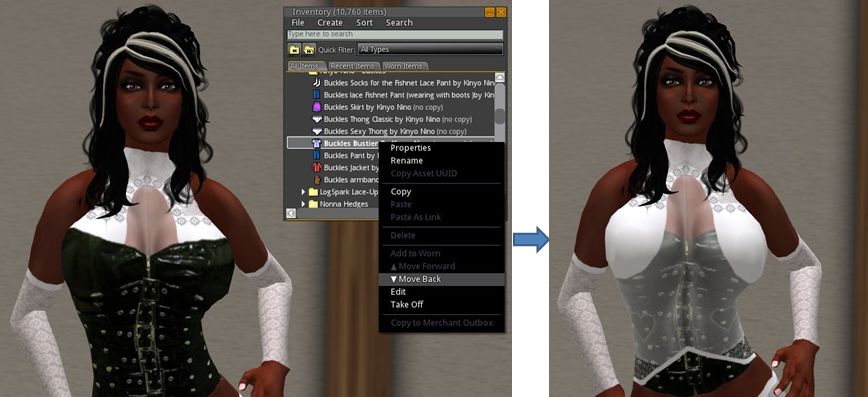
Singularity, however, provides two additional inventory menu options: Move Forward and Move Back, which allow you to change the order in which clothing items worn in the same layer are “stacked”, allowing them to appear to be worn under / over one another, as shown in the images below.
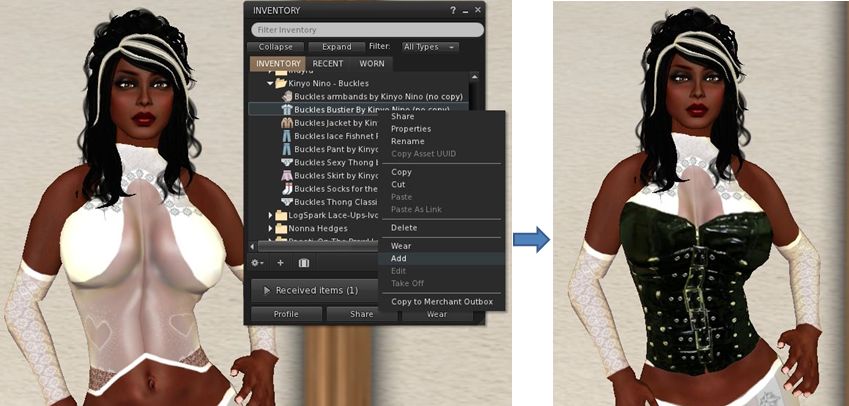
Multi-wear in most viewers: adding an item (in this case a shirt layer bustier) to a layer with clothing already worn will see the new item worn “over” any clothing on the same layer
Singularity’s Move Back and Move Forward inventory options allow the order of clothing items worn on the same layer to be changed relative to one another

Notes:

  • The menu options are context sensitive and will only be available for clothing items worn on the same layer
  • Which of the options is available for use depends on a clothing item’s position in the “stack” (e.g. if the item is the last item added to a layer, the Move Back option only will initially be enabled, but not the Move Forward option)
  • The options can be used with any number of items worn on a single layer (up to the standard maximum of 5 items per layer)
  • Any changes you make to the order of clothing items in the same layer will be correctly rendered in other viewers.

This should provide a very flexible way of additionally creating “mix’n’match” outfits. Kudos!

Along side of multi wear, Singularity 1.7.0 also provide full support of the Current Outfit folder as well.

Audio Display Floater

Accessed via the Singularity menu (Singularity->Streaming Audio Display), this displays a floater listing the artist and track name for any active media.

Audio display floater

Mouselook Aim / Zoom and Shift-C Crouch

Those into combat are likely to appreciate these additions – although they are not exclusively for such environments.

  • Mouselook aim / zoom: when in Mouselook, depressing the right mouse button and using the scroll wheel on a mouse, can zoom in / out of the direction you are looking
  • Pressing SHIFT-C will now toggle your avatar into a crouch until such time as you press SHIFT-C again, allowing you to move and do other things without having to hold down the C key yourself.

Build Preferences

The Build tab in PREFERENCES->SYSTEM has been extensively updated, as per the images below, offering users the ability to set global defaults on prims as they are rezzed and used (i.e. default texture type, permissions set against them, etc).
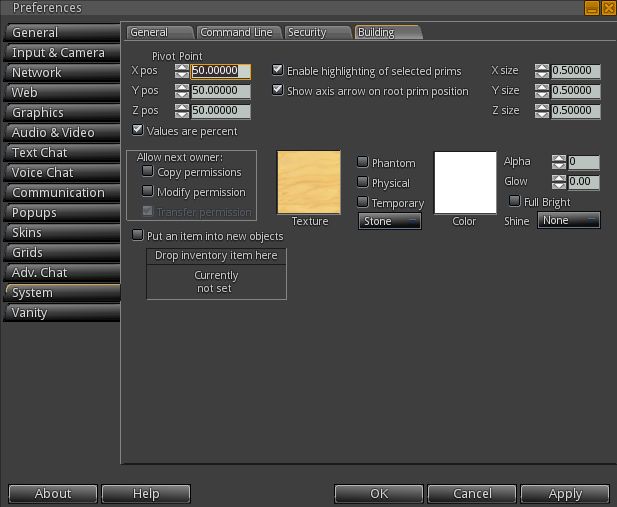
New Build Preferences

Performance

Running Singularity on my home platform (370m) with lighting and shadows off, Singularity rolled along at an average of 39-40 fps. With lighting & shadows active and sun/moon + projectors enabled, this dropped to 12-13 fps. On the ground on my home sim, these rates dropped to 7-8 fps with lighting and shadows, etc., on and around 17-18 fps with them off. Again, and while totally arbitrary, the tests were carried out on my usual system and with all other settings as defined in the panel on the right of this blog’s home page. Overall, the performance wasn’t far behind what I’ve seen on the new home sim with recent V3.2 viewers.

Opinion

As with the last release of Singularity (1.6.0), this is a long-awaited and tidy update. Feature changes may appear small – but they are by not means trivial. Much has been done to “future-proof” the viewer, although the Merchant Outbox functionality is still currently lacking.

What I particularly like in this release is the way in which multi-layer system clothing support has been implemented. The ability to alter the order of the clothing on a specific layer is very neat and a step ahead of other viewers – and is something that could prove very popular among users. It will be interesting to see if it appears in other TPVs moving forward.

For credits on the various elements and additions to this release of Singularity, please refer to the release notes (link below).
Related Links

Cool VL Viewer gets Merchant Outbox

The Cool VL viewer becomes the first V1-style SL Viewer to gain the Merchant Outbox for Direct Delivery. The new capability comes with release 1.26.4.7 (.7b for Linux due to a repackaging issue), released on April 5th.

The implementation is slightly different to Outbox support found on V3-based Viewers, as the notes accompanying the release specify. In particular:

  • There is no support for the Beta grid (Aditi) or the Beta Marketplace
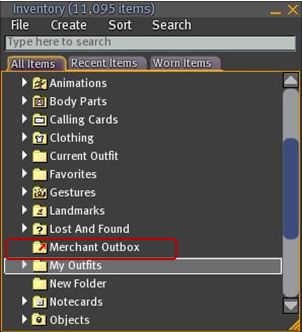
  • The Outbox is implemented as a folder within Inventory, rather than as a separate floater
  • There is (currently?) no right-click->Copy to Merchant Outbox capability for items / folders, as seen in V3-based Viewers with Outbox functionality.
Coll VL Viewer: Merchant Outbox folder

To use the Outbox, simply drag and drop folders / items to be transferred to your SL Marketplace store to the Merchant Outbox folder. Or if you prefer, COPY and PASTE them.

  • If you are dragging one or more folders, a copy of each folder will be made in the Outbox folder with the same name as the original
  • If you are copying one or more objects into the Outbox folder, each object will be placed in a folder bearing the object’s name (same functionality as V3-based Merchant Outboxes)
  • To send items to the Marketplace, right-click on the Outbox folder and select SEND TO MARKETPLACE. A pop-up will be displayed in the bottom right-hand corner of the Viewer window upon successfully transfer (and will also note any issues encountered).

As is to be expected, all other constraints (number of items, nested folder levels, etc.) are the same within Cool Viewer and for other Outbox-capable Viewers (as these are LL-imposed contraints).

In testing the capability, I found it functioned smoothly and without any incident: all items dropped into the Outbox folder arrived safely (and suitably “foldered” themselves, where required), and the upload handled multiple items and nested folders without incident.

If there are merchants who have been waiting for a V1-style Viewer to implement Merchant Outbox support prior to committing themselves to Direct Delivery (and allowing for current Marketplace issues), then Cool VL Viewer now provides the answer.

Singularity Viewer gets mesh rendering

An experimental release of the popular V1-based Singularity Viewer was made today – version 1.6.0 (0). According to the blog post accompanying the release, it has been four months in development, and most of the changes are under-the-hood, with the team acknowledging they still have a lot of work to do in some areas. However – the exciting news for Singularity user (and for those who prefer using V1-style Viewers as a whole) is that the release includes mesh rendering.

Currently the release is only available for Windows users – and requires systems running SSE2. Work is underway on a release for Linux, which is listed as “It’ll be here soon!”. However, Mac users may have a longer wait in store, as the download page states: “There are serious bugs affecting OS X in current codebase and also present in Linden V3 codebase. So far there is no known solution“.

So, how does this Windows release look and handle?

Installation and First Run

Given this is an experimental release, it is recommended that previous versions of Singularity are removed prior to installing 1.6.0. (0), or that you install it in an entirely separate folder hierarchy. I opted for the second option, and following the download and scan of the regularly sized .EXE file (22Mb), installed the new release into a folder I called “Singularity-Mesh”.

Starting the Viewer brought with it a surprise: up popped the “new” V3 login screen from LL with the Destination Guide, etc. This is the first time I’ve seen this login screen appear in a V1-based Viewer and as such, the Singularity team deserve double kudos; both for being the first, and for actively using the screen. It’s a massively useful feature for both old and new SL users  – particularly when you want to get to a noted event fast (as I’ve done myself several times even if it has meant using V3 in preference to Firestorm).

Singularity uses the “new” LL login screen

Once logged-in, you’re presented with the familiar (or in my case nowadays – not so familiar!) V1 UI in Singularity’s stylish charcoal grey / black. Don’t expect any obvious updates or changes here in terms of menu options and Preferences options; again, as the release notes state, most of the changes with this release are under-the-hood.

However, one change that is obvious (for those that use it) is with the Grid Manager (accessed via the login screen or via PREFERNCES -> GRIDS). In most V1 Viewers including older versions of Singularity, opening the Grid Manager would display the full information relating to the grid you are / will be logged-in to (below left).

Grid Manager changes: old (left) and new (right) – but no GET GRID INFO button

With Singularity 1.6.0. (0), a cleaner, summary page is displayed (above right). To access detailed information for a specific grid, one needs to lick on the ADVANCED tab, near the top of the floater.

This is regarded as an experimental Grid Manager, which includes megaregion support for OpenSim. However, it is missing a critical element: there is no GET GRID INFO button in either the ADD or the AdVANCED tabs. Thus, there is currently no way to fetch information relating to a grid (login page URI, etc.) on the basis of the grid name and URL. Instead, all additional information has to be manually typed-in (assuming you have it to hand).

This is something of a major oversight for those of us who do jump between grids – particularly given the button was present on earlier Singularity releases. Hopefully it will be back in an update.

Mesh Rendering

However, it is mesh that will be tweaking most people’s interest, and in this area, the Viewer is flawless in its ability to render mesh objects. A nice touch is that “Prim Equivalence” and “PE” have been abandoned in the Edit menu floater when viewing mesh objects, and replaced with a simple “Cost”. This should cause less confusion for users who still get caught between “Prims” and “Prim Equivalency” and also allow the Viewer code to easily be tweaked to read “Impact” once LL’s “Land Impact” approach becomes widely adopted.

There is no mesh upload tool at present, but apparently work on an uploader for V1 Viewers is underway on several fronts.

Other Noteworthy Bits

As those familiar with Singularity know, it includes much of the functionality found within Phoenix and other V1 TPVs. Radar, client-side AO, media filters, quick preferences, command line support (“/dd” for draw distance, etc), some shield options, and so on, so I’m not going to delve into these. However, a few things are worthy of note in terms of the “haves” and “have nots”:

  • RLVais updated to the latest release. When using the Viewer, remember:
    • RLVa is turned on by default in Singularity, so there’s not need to go hunting for a Preferences or menu option to enable it, and no need to then log out / log back in
    • To disable RLVa, enable the ADVANCED menu, then click on RESTRAINEDLOVE API. A message will be displayed informing you RLVa will be disabled following a restart. Use the same procedure to re-enable
  • There is no support for MOAP, multiple clothing layers and region Windlight settings, but these are being worked on
  •  Other updates include:
    • Renderer updated to move from mixed-pipeline to shader-only pipeline on capable hardware, analogous to V3
    • Editor support for more LSL/OSSL functions
    • Additional Windlight presets
    • A texture fetch and bake bug fix
    • Improvements to the notecard editor
    • V3-style media browser

Performance

Overall, performance good, although obviously slightly down on the non-mesh version. On my usual test machine (Q6600 quad-core Intel at 2.4Ghz, Windows 7 32-bit with all service packs, 3Gb RAM, nVidia GE9800 GT with 1Gb RAM), Singularity 1.6.0 (0) clocked an average of 23-25fps on a sim with 4 others, compared with 36-38 fps on 1.5.10 (2) – graphics set to ULTRA on both as usual, and Draw distance set to 256m.

Enabling shadows did, unsurprisingly, cause a huge fall-off in FPS – down to an average of 4-5fps. I also had issues with some mesh objects which had Shininess enabled rendering as plain white objects with shadows active; something I’ve not encountered with other Viewers.

Overall, the new release performed very well, and easily matched anything other mesh-enabled V1 Viewers could achieve.

Singularity 1.6.0 (0) and Other Grids

As mentioned above, the experimental Grid Manager floater has an issue in that it lacks a GET GRID INFO button. However, once you’ve set-up accessing another grid, Singularity 1.6.0 (0) seems to work as smoothly as Imprudence. I skipped around InWorldz quite happily with in and dipped a toe into a couple of OpenSim grids without mishap. Frame rates in InWorldz matched those for Second Life, although the Viewer suffered the same issue I’ve had with others in relation to InWorldz – crashing on attempting to log out (this happens for me with Imprudence on InWorldz as well).

Opinion

A long-awaited and tidy update. Feature changes may appear small – but getting mesh rendering active is no trivial matter, and there are apparently in excess of 68,000 new lines of code within this release to enable it and take care of the other under-the-hood fixes and updates!

The release should go down well with Singularity users, the “experimental” tags not withstanding. Given Singularity also includes much that makes Phoenix popular it could prove to be a viable alternative for Phoenix users who want to get to see mesh now, but who don’t yet wish to make the jump to Firestorm or a V3 TPV.

Related Links

Cool VL Viewer gains mesh support

Fresh on the heels of Astra 1.5.10.(2) gaining mesh rendering support, Henri Beauchamp has issued an experimental release of the Cool VL Viewer, also with mesh rendering support.

As with all versions of the Cool VL Viewer, the experimental release requires Snowglobe 1.4.2 to be installed first, with the CL VL package then installed over it. This is smooth enough, taking just a few seconds to complete. Once installed, the Viewer can be loaded using the Cool VL Viewer icon not the Snowglobe icon.

Given it is one of the longest-running TPVs in SL, Cool VL Viewer comes with  everything you’d expect of a TPV, and I’m not going to repeat the impressive list of features here – as this item is about the mesh rendering (although I should point out the release also includes full support for dynamic lighting and shadows).

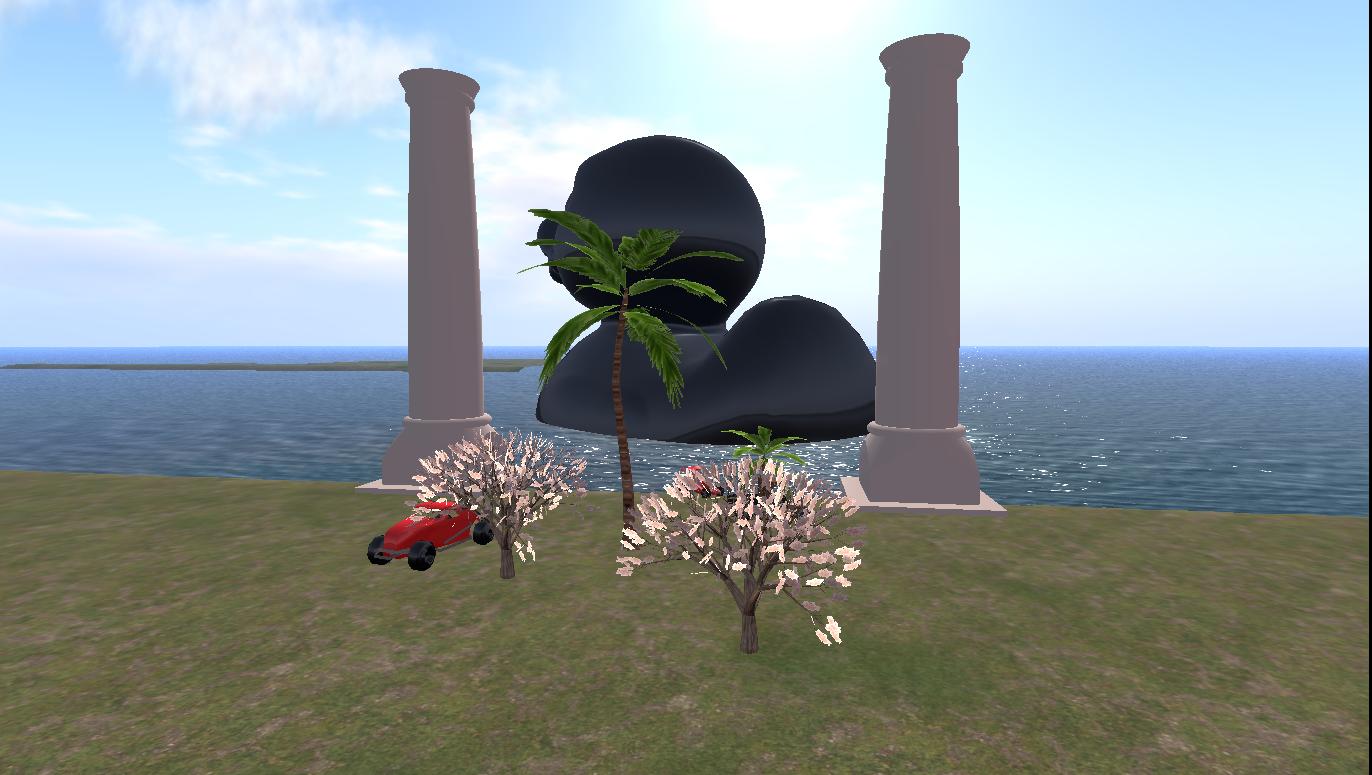
As with Astra 1.5.10.(2), I used the SL mesh sandboxes to test the Viewer and took a look around – starting with Don Linden’s familiar examples and Oskar Linden’s black duck in the background.

Mesh samples in Cool VL Viewer

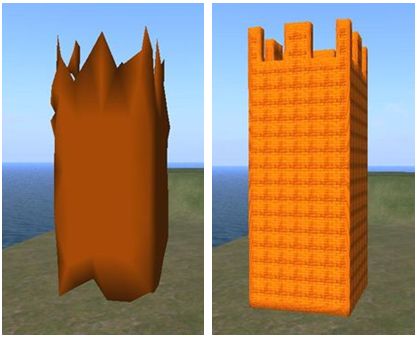
As can be seen, they all rendered well in Cool VL Viewer for me, although there is an issue that Henri is aware of at present. Sometimes mesh objects get stuck in the lowest level of detail (LOD) setting, causing them to appear semi-rendered. In the case of in-world objects, a quick right-click fixes this.

Mesh objects LOD issue – right-click on the object to resolve

Sadly, the same solution doesn’t work on mesh clothing worn by others, which may also get stuck in the lowest LOD rendering. However, as this is only an experimental issues of the Cool VL Viewer, things should hopefully improve as the code is refined.

There is currently no upload option for mesh at present, so those wishing to upload will have to use either the official Viewer 3 or Kirstenlee’s S21 (build 9 and above); this is currently a fact of life for the majority of third-party Viewers, although the situation may obviously change in the future.

If I’m honest, the LOD issue was not something I encountered in testing Astra 1.5.10.(2) and mesh at the sandboxes – but Cool VL Viewer does score over Astra 1.5.10.(2) in that it is a recognised Second Life Viewer with a pedigree people know and love; this is liable to make this version very popular, and any bugs in the current release are, as mentioned above, bound to be worked out.

Cool VL Viewer 1.26.1.0 also scores over Astra 1.5.10.(2) at present in that it is also available as a Linux download.

So if you are a confirmed V1.x user, either on SL or OpenSim, and want to see mesh, why not give it a go? Just please bear in mind that it is currently experimental, as as such, may be subject to stability issues, so don’t get mad with Henri if it does!

The Links