Logos representative only and should not be seen as an endorsement / preference / recommendation
Updates for the week ending Sunday, January 7th
This summary is published every Monday, and is a list of SL viewer / client releases (official and TPV) made during the previous week. When reading it, please note:
It is based on my Current Viewer Releases Page, a list of all Second Life viewers and clients that are in popular use (and of which I am aware), and which are recognised as adhering to the TPV Policy. This page includes comprehensive links to download pages, blog notes, release notes, etc., as well as links to any / all reviews of specific viewers / clients made within this blog
By its nature, this summary presented here will always be in arrears, please refer to the Current Viewer Release Page for more up-to-date information.
Official LL Viewers
Current Release version 5.0.9.329906, dated November 17, promoted November 29th – formerly the “Martini” Maintenance RC – No Change.
Monday, January 1st, 2018 saw the long-await release of Catnzip R12 – the release coming a little over a years since the last update – and slightly earlier than planned, thanks to the auto-update!
As one might expect, this update brings a large number of user-facing updates, which are quite comprehensively documented in the accompanying release notes, and rings Catznip up to parity with the current LL released viewer code base 5.0.9. It is currently only available for Windows, in 32-bit and 64-bit versions, the latter conforming to the Lab’s Alex Ivy 64-bit build.
Given the depth of the release notes, I’m providing an overviews of just some of the updates here:
Quick Preferences updates.
Inventory Management improvements.
Chat / group chat updates.
For the rest of the changes, please refer to the release notes.
Quick Preferences Updates
Main Quick Preferences Panel
The main Quick Preference panel sees a number of small updates and improvements:
The short cut CTRL-SHIFT-P no longer conflicts with Print Selected Object Info (the latter now ALT-SHIFT-P).
The panel can now be minimised via a button (item 1 in the image below)
The Other Section of avatar rendering now includes a button to open the Exceptions panel for listing exceptions to your avatar rendering settings (item 2 in the image below)
The worn items tab button (item 3 in the image below) now displays a tab with button to display sort options for the items listed in it (item 4 in the image).
The revised Catznip Quick Preferences
Quick Inventory
We all use HUDS – HUDS for AOs, HUDs for mesh bodies, HUDs for mesh heads, HUDs for appliers, etc.). However, wearing the all, all the time not only clutters the viewer’s window, it actually eats texture memory. We also have certain things we like to wear all the time. However, even if you dump all of your HUDs into a single folder in inventory, finding the one you want can be a pain.
Catznip R12 helps ease some of this pain through the provision of a Quick Inventory function. Used via Quick Preferences, this can afford faster, cleaner access to your HUDs, etc. To use it:
Create a folder anywhere in your inventory (if you don’t already have one ready to go).
Drag and drop your HUDs an bits (or links to them ) into it.
Open Quick Prefs and click on the inventory button (item 1 in the image below).
Click on the Folder <click to select> button (item 2 in the image below) to open a folder picker.
Click on the folder with your HUDs and bits to select it.
The contents of the folder will be displayed in the inventory tab of Quick Preferences each time it is opened, allowing you to easily Wear / Add items from it (right-hand picture in the image below).
The folder can be changed at any time by clicking on the folder button in the inventory tab.
Quick Preferences: Quick Inventory
Inventory Management
Inventory management updates make up the core of the R12 changes, and these come in a number of improvements, from how you chose to receive goods purchased in-world in your inventory or passed to you by others, through searching inventory to where boxed items are unpacked and stored in your inventory.
Accepting In-World Purchases and Inventory Offers
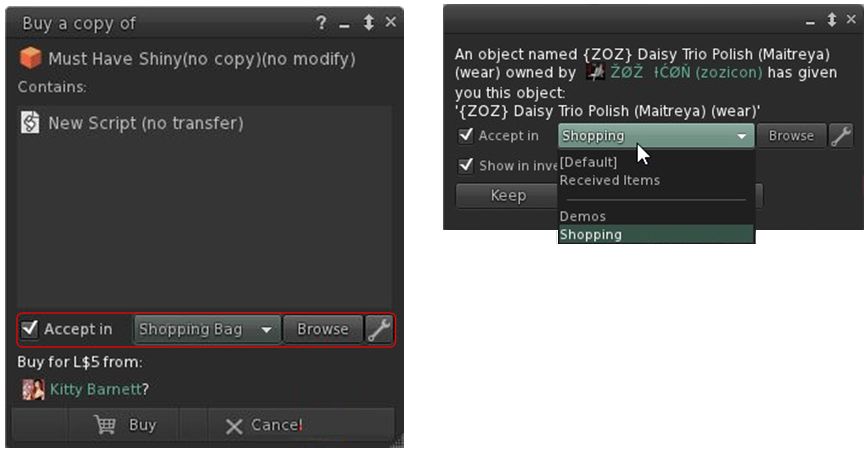
With Catznip R12 you can now designate where the items you purchase in-world or are given by others, are stored within your inventory. So, for example, you could opt to receive all your in-world purchases in a folder you call “Shopping Bag”, any demos you grab in a folder called “Demos”, anything your offered by friends in “From Friends”, and so on. How you organise things is entirely up to you. This means both the Pay and Buy floaters in Catznip R12, together with the Accept Inventory floater now offer you the ability to select where incoming items are going to be stored in your inventory.
Catznio R12’s options to select where items you buy / receive go in your inventory
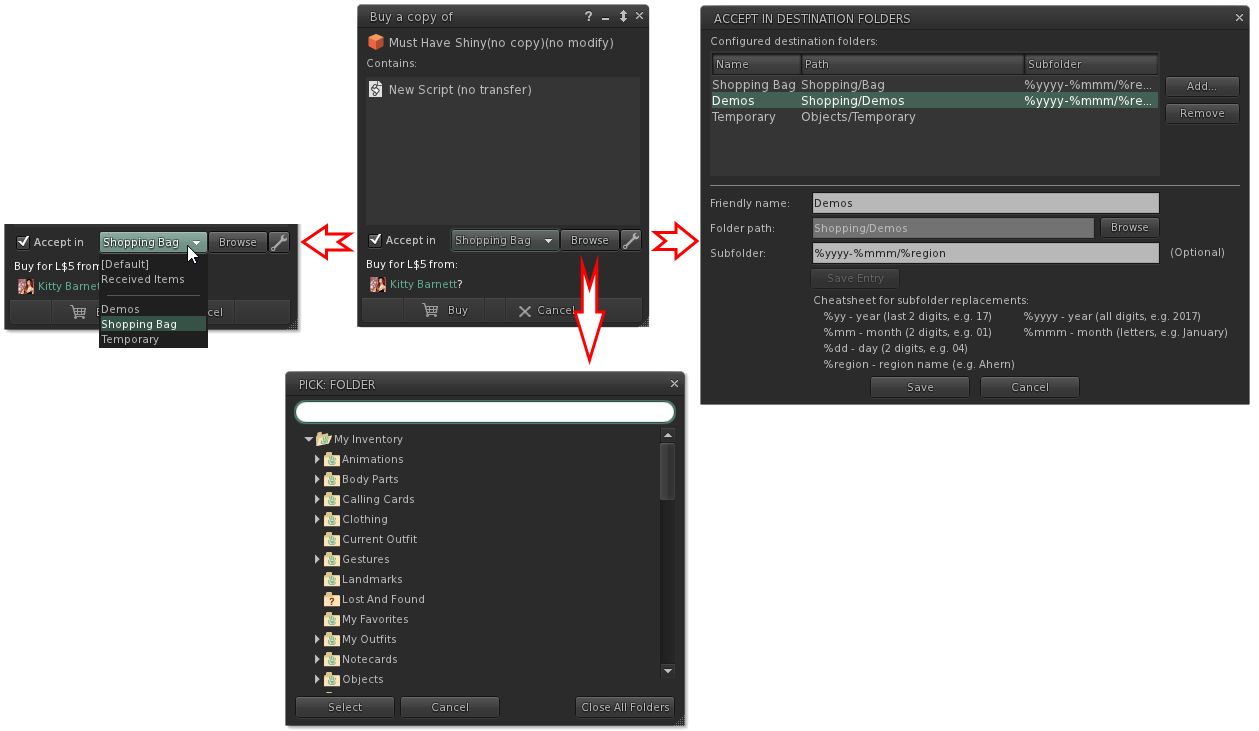
The options should be fairly self-explanatory. Check Accept in and the remaining options are activated. The drop-down will display a list of folders you have opted to allow incoming items to be delivered (show in the image on the right), the browse button allows an alternative to you list of folders in the drop-down to be selected, and the spanner button allows you to establish your list of destination folders. The roadmap of these various options is shown below.
What the options do. Note they are available in both the expanded floater view (centre) and the collapsed view (left)
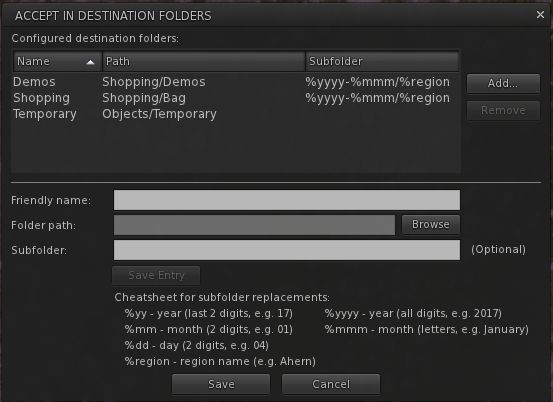
Not only can you select the folders into which you want incoming purchases to go, you can also set Catznip R12 to dynamically create new folders in which to place incoming items. This means, for example, that if you got to a big shopping event at one location, you can set the viewer to deliver all the demo you obtain / items you purchase into folders define by – say – the month in which you got them, and the location where they were obtained.
So, for example, if in April you go to shopping event X on region YYYY, and grab a load of demos, and then later in the month go to event A on region BBBB and grab more demos, you can have them delivered to sub-folders in your “Demos” folder, respectively labelled “April 2017 YYYY” and “April 2017 BBBB” – both of which are dynamically created by Catznip as they are needed. So even if you don’t get around to trying them for days after your visit, you can quickly and easily locate the demo items without have for fiddle around searching for folders and objects.
The panel for setting folders into which incoming purchases can be received, and the option for setting dynamically created sub-folders within that folder
Logos representative only and should not be seen as an endorsement / preference / recommendation
Updates for the week ending Sunday, December 24th
This summary is published every Monday, and is a list of SL viewer / client releases (official and TPV) made during the previous week. When reading it, please note:
It is based on my Current Viewer Releases Page, a list of all Second Life viewers and clients that are in popular use (and of which I am aware), and which are recognised as adhering to the TPV Policy. This page includes comprehensive links to download pages, blog notes, release notes, etc., as well as links to any / all reviews of specific viewers / clients made within this blog
By its nature, this summary presented here will always be in arrears, please refer to the Current Viewer Release Page for more up-to-date information.
Official LL Viewers
Current Release version 5.0.9.329906, dated November 17, promoted November 29th – formerly the “Martini” Maintenance RC – No Change.
Logos representative only and should not be seen as an endorsement / preference / recommendation
Updates for the week ending Sunday, December 17th
This summary is published every Monday, and is a list of SL viewer / client releases (official and TPV) made during the previous week. When reading it, please note:
It is based on my Current Viewer Releases Page, a list of all Second Life viewers and clients that are in popular use (and of which I am aware), and which are recognised as adhering to the TPV Policy. This page includes comprehensive links to download pages, blog notes, release notes, etc., as well as links to any / all reviews of specific viewers / clients made within this blog
By its nature, this summary presented here will always be in arrears, please refer to the Current Viewer Release Page for more up-to-date information.
Official LL Viewers
Current Release version 5.0.9.329906, dated November 17, promoted November 29th – formerly the “Martini” Maintenance RC – NEW
Cool VL viewer Stable branch updated to version 1.26.20.39 and the Experimental Branch (Animesh) updated to version 1.26.21.5, both on December 16th (change log).
Logos representative only and should not be seen as an endorsement / preference / recommendation
Updates for the week ending Sunday, December 3rd
This summary is published every Monday, and is a list of SL viewer / client releases (official and TPV) made during the previous week. When reading it, please note:
It is based on my Current Viewer Releases Page, a list of all Second Life viewers and clients that are in popular use (and of which I am aware), and which are recognised as adhering to the TPV Policy. This page includes comprehensive links to download pages, blog notes, release notes, etc., as well as links to any / all reviews of specific viewers / clients made within this blog
By its nature, this summary presented here will always be in arrears, please refer to the Current Viewer Release Page for more up-to-date information.
Official LL Viewers
Current Release version 5.0.9.329906, dated November 17, promoted November 29th – formerly the “Martini” Maintenance RC – NEW
Cool VL viewer Stable branch updated to version 1.26.20.38 and the Experimental Branch (Animesh) updated to version 1.26.21.4, both on December 2nd (change log)
Mobile / Other Clients
MetaChat updated to version 1.2 on November 24th (no release notes) – included here as no week 47 summary).
On Tuesday, November 14th, 2017, the Alchemy viewer updated to version 5.0.7.41341. The majority of the update appears to address issues and bug fixes, with the high-level summary in the release notes given as:
Re-Enabled HTTP Pipelining.
Fixes to IME for Japanese language input.
Numerous fixes to crashes and various other bugs.
Please refer to the release notes for a table of fixes.
The two significant updates to the viewer take the form of a revised Graphics tab in Preferences, and the adoption of the hypergrid currency extensions.
Graphics Preferences Update
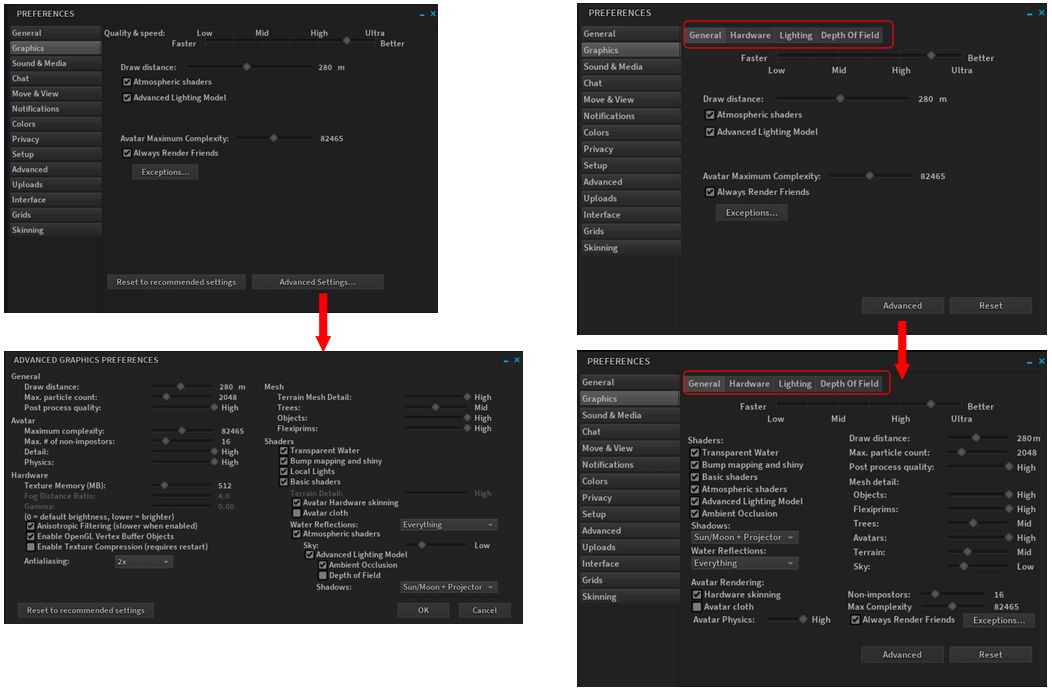
This updates reverts Alchemy to displaying the Advanced graphics options within the Graphics tab of Preferences, rather than breaking them out to a separate floater, as per the official viewer. It also re-introduces the sub-tabs for General, Hardware, Lighting and Depth of Field, all of which makes the graphics option less screen real estate consuming.
Alchemy 5.0.7 does away with splitting the Advanced graphics options into a separate floater, as per the 5.0.6 release (l) & the official viewer, and instead re-integrates them into the main Preferences > Graphics tab (r), with sub tabs to logically split options.
Hypergrid Currency Extensions
Currently, if an OpenSim user log-in to one grid and then hypergrids to another, the currency symbol (displayed in the top-right of the viewer window) do not update to the new grid. With this extension, the currency symbol will be automatically updated, and the currency helper-uri should also update. Thus, the buy currency / insufficient-funds / buy land processes should all continue to work correctly, and without the need for the user to manually update the grid info in their viewer and without any need to have specific currency.php, landtool.php files or an xml-rpc server.
The extension has been developed by Chris Colosi, founder and CEO of Gloebit, a multi-platform digital currency web service which has been adopted by a number of OpenSim grids (see here for a list of Gloebit partners). It was contributed as a patch for the Firestorm viewer in October (with the assistance of Ansariel Hiller from Firestorm), and is being adopted by both Alchemy and (hopefully) Singularity. Colosi was, from November 2010 through September 2011, the Monetisation Manager at Linden Lab, responsible for the Linden Dollar virtual currency product. In 2011 he left Linden Lab to set-up Gloebit, and you can read more about the extension via his article on Medium, posted on September 26th, 2017.
Feedback
I’ve not had the time to drive this release hard, but it appears stable and didn’t give me any significant issues when playing with it over the last several days. The graphics panel update is appreciated – I’ve always tended to find the Advanced Graphics break-out panel in the official viewer a waste of screen real estate which offers few, if any, advantages for users. I don’t really drop into OpenSim any more, so cannot comment on the currency extensions capability, other than it appears to be a good and useful feature to have.





 Inara Pey: Living in a Modemworld