Firestorm 6.3.9: housekeeping matters

On Wednesday, May 27th, 2020, Firestorm released version 6.3.9.58205 of their viewer.

This release brings Firestorm up-to-date with all official viewer releases prior to the EEP update, and includes assorted updates and fixes from upstream of that release from the Lab, plus fixes and improvements from the Firestorm team, including a lot of OpenSim updates.

However, it should be noted that this release does not include EEP (Environmental Enhancement Project). As such, this is perhaps best seen as a maintenance release to prepare the way for a later EEP release.

As always, the focus is on those updates that may be of particular general interest, rather than trying to cover absolutely everything. Readers are referred to the release notes for a full list of updates / fixes and all associated credits.

Table of Contents

The Usual Before We Begin

As per my usual preamble:

  • There is no need to perform a clean install with this release if you do not wish to.
  • Do, however, make sure you back-up all your settings safely so you can restore them after installing 6.3.9.
  • Again, please refer to the Firestorm 6.3.9 release notes for details of specific Lab-derived fixes for this release.

Viewer Blocks

Note that with this release:

  • Firestorm versions 6.0.2 for Second Life and 6.0.2 for OpenSim will both be blocked from logging into the Second Life grid in three weeks time.
  • 6.0.2 for OpenSim will not be blocked from accessing OpenSim Grids.

Lab Derived Updates

The version of Firestorm brings the viewer to parity with the Linden Lab 6.3.8 code base. This means  Firestorm now includes all viewer releases up to and including the Ordered Shutdown updates, which should reduce the frequency of the viewer crashing on shut-down,  and the Premium enhancements viewer (version 6.3.8.538264), which includes updates specifically for Premium Plus relating to fees, etc, and which may appear in places in the viewer. However, with regards to the latter, it is important to note that:

Firestorm Updates

Client AO Updates

Firestorm 6.3.9.580205 includes a number of updates / fixes for the client-side AO system, including:

  • AO floater should no longer appear empty if open on logging-in to the viewer (see FIRE-29192).
  • The AO should now be more robust when in or leaving Linden Water:
    • A swim animation should no longer play when leaving Linden Water; avatar should transition to flying animation (see: FIRE-6605 / FIRE-8099).
    • The flying hover animation (for included in an AO) should no longer play when pausing swimming when underwater (see FIRE-15350).
  • Transitions between animations should now be far smoother, as double start / stops should no longer occur.
  • Animations should not longer stick on cycling (particularly sits / ground sits) See: FIRE-14925.
  • Additional fixes for sitting, smart sit and region crossings:
    • After sitting, disabling the client AO should not longer place your avatar in a default standing pose whilst still seated (see FIRE-15059).
    • Turning on the AO sits should no longer fail to turn off the sit animation when standing once more (see FIRE-16230 / FIRE-22471).
  • Tabbing out of the AO name field should set the AO name if newly edited  – no need to press ENTER to apply the new name (see FIRE-29078).
  • The Default check box should no longer become active when the currently-open AO set is already the default for an avatar (see FIRE-29101).

Menu and Preferences Updates

Avatar menu → Avatar Health → Scripts:

  • Clicking on the help icon (“?”) in the top-right of the scripts floater now correctly opens the Firestorm wiki page about the floater, rather than the Script Information help page dealing with in-world object script information.

Build → Upload:

  • Misleading “lossless” check box removed from image upload floater (see: BUG-228331).

Preferences → Colours:

  • Pick Radius has been updated to read Pick Radius Colour, to make the option’s function clearer.
  • Both the Pick Radius Colour swatch and distance / opacity slider now have tool tips to explain their functions.
Mini-map updates: Renamed Pick Radius option (1) and new tool tips for colour picker and the distance / opacity slider (2 – with the colour swatch tool tip shown)

Preferences → User Interface → 2D Overlay:

  • The Group Notices and Chiclets in Top Right check box has been replaced by radio buttons offering a choice of top or bottom right to display group notices and chiclets (changing location still requires a viewer restart to take effect).
New radio buttons to define the location for displaying group notices and chiclets

Appearance Updates

  • Jellydolls: if an avatar is Jellydolled even though the avatar is below your Maximum Complexity setting, it is because the avatar’s texture area is above the maximum texture area limit (set via the RenderAutoMuteSurfaceAreaLimit Debug setting). Firestorm will therefore display their “Texture Area” number in red in their name tag (see FIRE-23495).
  • Inspect Own Attachments: a new option to inspect your own attachments has been added to the avatar right-click context menu / pie menu. Presents the same information as inspect attachments on other avatars. (see FIRE-23987).
You can now inspect attachments on your own avatar as well as on other avatars / inspect in-world objects
  • It should now be possible to detach temporary attachments from Appearance → Wearing tab.
  • It should now be no longer possible to wear more than one physics layer.

Inventory Updates

  • Protected Folders: a new option to prevent accidental drag / drop or deletion of inventory folders.
    • Right-click on an inventory folder and select Protect from the context menu.
    • Folder is now protected, and will display “(protected) alongside it.
    • Select the folder, right-click and select Unprotect to remove protection.
    • All protected folders in inventory can be summarised in the Protected Folders floater (Avatar Protected Folders).
    • Double clicking on a folder name in the Protected Folders floater will automatically highlight it in Inventory, allowing you to quickly locate any protected folder.
    • Note: sub-folders and objects in a Protected folder can still be deleted or drag / dropped.
The Protect (/Unprotect) folder option in the inventory context menu (l), and the Protect Folders floater (r)
  • Uploading an image or saving a snapshot should no longer cause Inventory to jump from the recent tab jumps to the main tab (see: FIRE-22943 and BUG-225229).
  • It should now be possible to copy / paste into outfits folders in inventory.
  • Possible fix for attachments randomly ending up in inventory Lost & Found folder. This hopefully fixes FIRE-23364 and BUG-228813.
  • The outmoded Merchant Outbox system folder should now be deletable with this release.

Continue reading “Firestorm 6.3.9: housekeeping matters”

Speedlight version 5.143.1224 – May 2020

via Speedlight

Speedlight, the browser based / Android Second Life client, received an update on May 22nd, focusing heavily on the world rendering capabilities, offering updates to the UI displays, and various performance fixes / improvements, together with a step forward in avatar rendering.

The performance improvements are mostly under-the-hood – notably the addition of a further back-end rendering server pool, that I understand specifically handles textures and which corrects issues of textures with alphas failing to render correctly (so, among other things, no more “boxy” trees). There have also been updates in handling network traffic, so 3D world view freezes should be less apparent.

For client-side assistance with rendering, the Scene Progress / 3D Settings information panels have been updated thus:

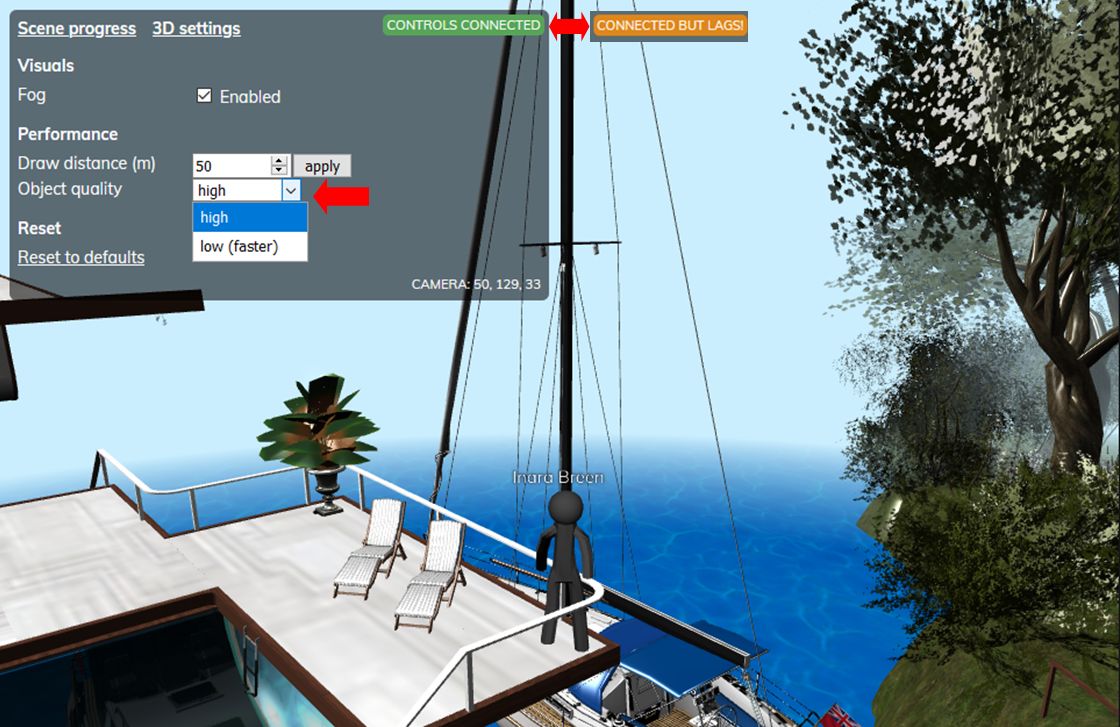
  • The old connection status has now been revised to show three colour relating to “lag”:
    • Green – you’re “fully” connected to the server.
    • Orange – your connection is suffering from network lag.
    • Red – severe lag (/ awaiting data?).
  • The 3D Settings display in the panel now includes the option to switch between downloading and rendering objects at “high” or “low” quality, with the latter intended to reduce the network traffic load between your browser / device and the Speedlight servers.
The 3D World View, May 2020, showing the “lag indicator” (top) which will switch from green to orange if the connecting is lagging (or red if really problematic), and the new option in the 3D settings to select your preferred object rendering quality. Also visible is the revised avatar mannequin

With regard to these object rendering quality settings, I understand that for users on the “low” quality object setting, objects stay cached in the Speedlight intermediary server, speeding load times when camming / moving around. Objects cached in “high” quality”, however, may be discarded if not in the immediate view, so as to allow the servers to handle other object data.

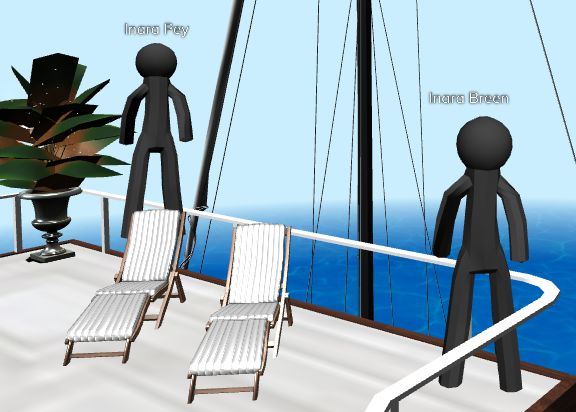
The improvements to avatar rendering mean that avatars now have a body shape. It’s still primitive, but again somewhat in keeping the Lumiya’s progress with avatar rendering.

The case remains that only Gold members can move their avatars in the world view while free account users can only orbit / zoom their camera / turn their avatar on he spot. However, both Gold and free account users can see others avatars moving in their field of view, and the walking is fairly fluid, and certainly a good start to things. The short video below highlights the avatar movement.

According to the release notes, seated avatars should be rendered in a basic sitting pose (and a seated avatar is shown in the video). However, whether this is limited to just Gold users or a glitch with my experience, I’m not entirely sure (my Gold membership has lapsed at present) – but I found that when my avatar (running on a viewer) was seated on a lounger, my alt (running on Speedlight) rendered her as standing on the back of the lounger, rather than offering a view of her Speedlight avatar in a basic sit pose.

Speedlight should render seated avatars in a basic sit pose in this release. Whether it was because I’m currently only using a free account or not I couldn’t say, but in testing I found this not to be the case. My other avatar appeared to be standing on her seat.

Observations

At the time of the release, there were apparently a number of issues with world view rendering, but these did appear to get fixed fairly rapidly. Certainly, by the time I got to play with the release for around 3 hours, I didn’t encounter any of the problems that had been reported; generally speaking, I found my experience was a lot smoother than previously: no sudden lock-ups  / freezes / log-outs within minutes of starting the world view rendering.

As noted, I did have an issue with rendering seated avatars, which might be down to the fact I’m currently not at Gold status. The lack of the latter also meant that I couldn’t check to see if a fix had been made to my issue of my avatar refusing to stop once walking had been initiated (unless she hit and insurmountable obstacle or I logged out / in).

The “high” quality object rendering appears to have fixed a little niggle I’ve had with earlier versions failing to render two of the more complex mesh boats we have have moored at home; one or other would invariably be left with holes in it / missing mesh faces when the download / rendering process apparently completed – but, no more! With this release, both boats render as I’d expect to see them. It was also good to see the trees around our house render correctly, thanks to the alpha issue being fixed.

Quite probably the best experience I’ve had with Speedlight to date, and I understand more improvements are coming down the pipe in the near future!

Related Links

2020 viewer release summaries week #21

Logos representative only and should not be seen as an endorsement / preference / recommendation

Updates for the week ending Sunday, May 24th

This summary is generally published every Monday, and is a list of SL viewer / client releases (official and TPV) made during the previous week. When reading it, please note:

  • It is based on my Current Viewer Releases Page, a list of all Second Life viewers and clients that are in popular use (and of which I am aware), and which are recognised as adhering to the TPV Policy. This page includes comprehensive links to download pages, blog notes, release notes, etc., as well as links to any / all reviews of specific viewers / clients made within this blog.
  • By its nature, this summary presented here will always be in arrears, please refer to the Current Viewer Release Page for more up-to-date information.
  • Note that for purposes of length, TPV test viewers, preview / beta viewers / nightly builds are generally not recorded in these summaries.

Official LL Viewers

  • Current Release viewer version 6.4.2.541639, dated May 11th, promoted May 19th, formerly the Camera Presets RC viewer – NEW.
  • Release channel cohorts:
    • FMOD Studio RC viewer update to version 6.4.3.542486 on issued May 21st.
    • Love Me Render RC viewer, updated to version 6.4.3.542484 on May 19th.
  • Project viewers:
    • No updates.

LL Viewer Resources

Third-party Viewers

V6-style

V1-style

  • No updates.

Mobile / Other Clients

Additional TPV Resources

Related Links

2020 viewer release summaries week #20

Logos representative only and should not be seen as an endorsement / preference / recommendation

Updates for the week ending Sunday, May 17th

This summary is generally published every Monday, and is a list of SL viewer / client releases (official and TPV) made during the previous week. When reading it, please note:

  • It is based on my Current Viewer Releases Page, a list of all Second Life viewers and clients that are in popular use (and of which I am aware), and which are recognised as adhering to the TPV Policy. This page includes comprehensive links to download pages, blog notes, release notes, etc., as well as links to any / all reviews of specific viewers / clients made within this blog.
  • By its nature, this summary presented here will always be in arrears, please refer to the Current Viewer Release Page for more up-to-date information.
  • Note that for purposes of length, TPV test viewers, preview / beta viewers / nightly builds are generally not recorded in these summaries.

Official LL Viewers

  • Current Release version  version 6.4.1.540593, dated April 27th, promoted May 4th. Formerly the Zirbenz Maintenance RC viewer – No Change.
  • Release channel cohorts:
    • FMOD Studio RC viewer, version 6.4.2.541570, issued May 11th.
    • Camera Presets RC viewer updated to version 6.4.2.541639 on May 11th.
    • Love Me Render RC viewer updated to version 6.4.2.541651 on May 11th.
  • Project viewers:
    • Mesh uploader project viewer, version 6.4.2.541645, issued May 15th..

LL Viewer Resources

Third-party Viewers

V6-style

V1-style

Mobile / Other Clients

  • No updates.

Additional TPV Resources

Related Links

2020 viewer release summaries week #19

Logos representative only and should not be seen as an endorsement / preference / recommendation

Updates for the week ending Sunday, May 10th

This summary is generally published every Monday, and is a list of SL viewer / client releases (official and TPV) made during the previous week. When reading it, please note:

  • It is based on my Current Viewer Releases Page, a list of all Second Life viewers and clients that are in popular use (and of which I am aware), and which are recognised as adhering to the TPV Policy. This page includes comprehensive links to download pages, blog notes, release notes, etc., as well as links to any / all reviews of specific viewers / clients made within this blog.
  • By its nature, this summary presented here will always be in arrears, please refer to the Current Viewer Release Page for more up-to-date information.
  • Note that for purposes of length, TPV test viewers, preview / beta viewers / nightly builds are generally not recorded in these summaries.

Official LL Viewers

  • Current Release version  version 6.4.1.540593, dated April 27th, promoted May 4th. Formerly the Zirbenz Maintenance RC viewer – NEW.
  • Release channel cohorts:
    • No updates.
  • Project viewers:
    • No updates.

LL Viewer Resources

Third-party Viewers

V6-style

V1-style

Mobile / Other Clients

Additional TPV Resources

Related Links

Kirsten’s Viewer gains the client-side AO

On May 2nd, I wrote about the return of Kirsten’s Viewer and its return to active duty. In that review I noted that while what goes into a viewer is down to those who maintain it, it would be nice to see Kirsten’s adopt the client-side AO mechanism, as first seen in the Firestorm viewer.

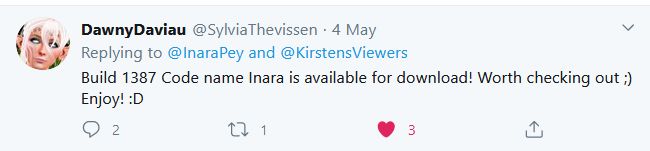
Following that review, KirstenLee’s partner, Dawny Daviau let me know the AO system was being considered and then, just a couple of days later, she Tweeted that the viewer had been updated with the AO code.

Even as an inside joke, I was flattered that KirstenLee had responded so rapidly to both Dawny’s prompting and my comment.

Dawny’s Tweet

I understand from KirstenLee’s own comments that getting the AO code into the viewer wasn’t easy, what with the UI changes created by EEP – so kudos and thanks got to KirstenLee and Dawny for going ahead and integrating it. Given it did take a little crowbarring, it’s not surprising that the AO floater has a couple of minor of rough edges to it – but these do not prevent it from being used or cannot be easily fixed.

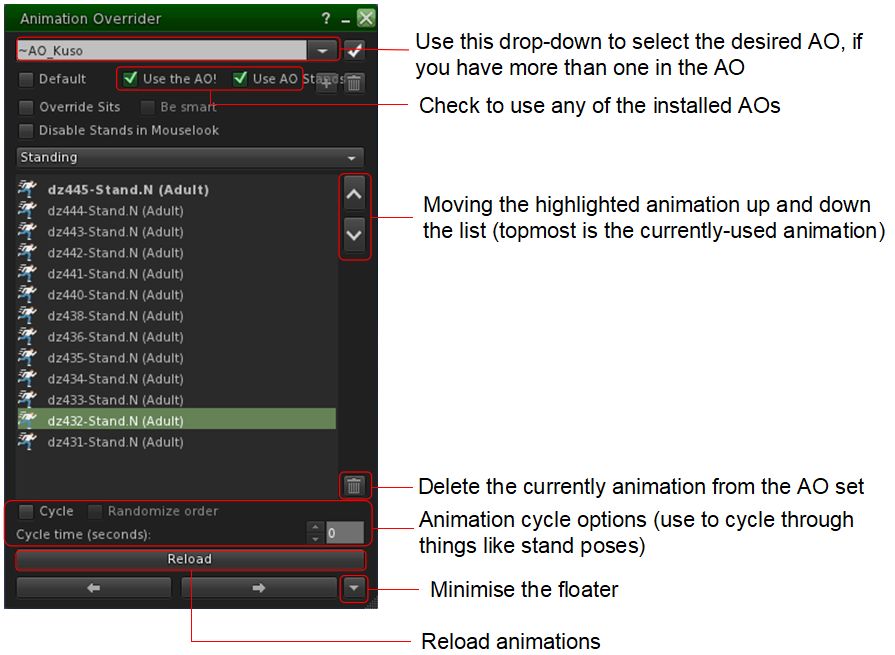
For those unfamiliar with the idea of a client-side AO, it allows the animations from an animation overrider system to run directly from the viewer without the need to wear a resource-gabbing scripted HUD. It takes a little setting-up, but once done, it’s easy to use – and has the further benefit of allowing you to use multiple AOs together without having to worry about swapping HUDS or including different outfit links to different HUDs.

Quick guide to the essentials of the client-side AO as included in Kirstens Viewer

The best place to get information on setting-up and using the client-side AO is via the Firestorm wiki. A couple of points should be noted here:

  • When first loaded, the AO floater may not display all of the AOs in its floater (e.g. all your stands might be listed, but none of your walks). If this happens, click the Reload button at the bottom of the AO floater to get them to list and run.
  • The UI scaling in the floater is a little off in this S23-1387 KV iteration, so it my need to be broadened to correctly display.

Neither of the above points impact the AO’s usability, and in my own tests, I had no issues with setting it up and using it.

Also note that the AO will create a folder called #Kirstens in your invention, which will contain a copy of the AO(s) you have selected for client-side use – do not delete this folder when using the capability!

As a long-time user of client-side AO capabilities (including loading it with more than one AO set), I’m clearly a fan of the capability. I like the freedom it gives, and the fact there’s no need to have screen real estate (however small) taken up by a HUD and, more particularly, the fact that texture RAM and script resources needn’t be taken up by the use of a HUD. So while this might be a “small” update, I think it to be worthwhile and – if you’re trying out Kirsten’s Viewer and haven’t used a viewer-side AO system, this is a good opportunity to try it out.

For those who do use the client-side AO, and might be looking to an alternative to (say) Firestorm for photography, the addition of the AO button and floater offers another reason for giving Kirsten’s Viewer a try out.

My thanks again to KirstenLee for responding to the request from Dawny and I!

Related Links